
springmvc复习笔记----springmvc姓名年龄例子:RequestParam 试水
继续
继上节http://www.cnblogs.com/tk55/p/6652394.html
重要部分颜色突出
结构
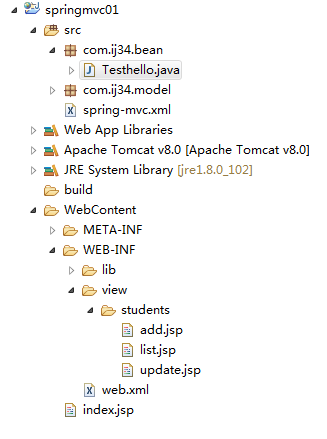
包
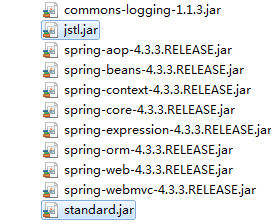
web.xml
乱码处理方面设置 <url-pattern>*</url-pattern>对所有对象起作用
<?xml version="1.0" encoding="UTF-8"?>

<web-app xmlns:xsi="http://www.w3.org/2001/XMLSchema-instance" xmlns="http://java.sun.com/xml/ns/javaee" xsi:schemaLocation="http://java.sun.com/xml/ns/javaee http://java.sun.com/xml/ns/javaee/web-app_2_5.xsd" id="WebApp_ID" version="2.5">

  <display-name>springmvc01</display-name>

  <welcome-file-list>

<welcome-file>index.jsp</welcome-file>

  </welcome-file-list>

  <servlet>

    <servlet-name>springDispatcherServlet</servlet-name>

    <servlet-class>org.springframework.web.servlet.DispatcherServlet</servlet-class>

    <init-param>

      <param-name>contextConfigLocation</param-name>

      <param-value>classpath:spring-mvc.xml</param-value>

    </init-param>

  </servlet>

  <servlet-mapping>

    <servlet-name>springDispatcherServlet</servlet-name>

    <url-pattern>/</url-pattern>

  </servlet-mapping>

  <filter>

    <filter-name>characterEncodingfilter</filter-name>

    <filter-class>org.springframework.web.filter.CharacterEncodingFilter</filter-class>

    <init-param>

      <param-name>encoding</param-name>

      <param-value>utf8</param-value>

    </init-param>

  </filter>

  <filter-mapping>

  <filter-name>characterEncodingfilter</filter-name>

  <url-pattern>*</url-pattern>

  </filter-mapping>

</web-app>
spring-mvc.xml
<?xml version="1.0" encoding="UTF-8"?>

<beans xmlns:xsi="http://www.w3.org/2001/XMLSchema-instance"

    xmlns="http://www.springframework.org/schema/beans"

        xmlns:p="http://www.springframework.org/schema/p"

    xmlns:context="http://www.springframework.org/schema/context"

    xsi:schemaLocation="http://www.springframework.org/schema/beans

    http://www.springframework.org/schema/beans/spring-beans-4.3.xsd

    http://www.springframework.org/schema/context

    http://www.springframework.org/schema/context/spring-context-4.3.xsd">

<!--   自动扫描加载注解的包 -->

<context:component-scan base-package="com.ij34.bean"/>

<bean id="viewResolver" class="org.springframework.web.servlet.view.InternalResourceViewResolver">

<property name="prefix" value="/WEB-INF/view/"></property>

<property name="suffix" value=".jsp" ></property>

</bean>

</beans>
index.jsp
<%@ page language="java" contentType="text/html; charset=UTF-8"

    pageEncoding="UTF-8"%>

<% response.sendRedirect("students/list"); %>
list.jsp
<%@ page language="java" contentType="text/html; charset=UTF-8" import="java.util.*"
pageEncoding="UTF-8"%>
<%@ taglib prefix="c" uri="http://java.sun.com/jsp/jstl/core" %>
<!DOCTYPE html PUBLIC "-//W3C//DTD HTML 4.01 Transitional//EN" "http://www.w3.org/TR/html4/loose.dtd">
<html>
<head>
<meta http-equiv="Content-Type" content="text/html; charset=UTF-8">
<title>Insert title here</title>
</head>
<body>
<a href="${pageContext.request.contextPath}/students/preSave">添加学生</a>
<table>
<tr>
<th>编号</th>
<th>姓名</th>
<th>年龄</th>
<th>操作</th>
</tr>
<c:forEach var="student" items="${studentlist}">
<tr>
<td>${student.id}</td>
<td>${student.name}</td>
<td>${student.age}</td>
<td><a href="${pageContext.request.contextPath }/students/preSave?id=${student.id}">修改</a>
<a href="${pageContext.request.contextPath }/students/delete?id=${student.id}">删除</a>
</td>
</tr>
</c:forEach>
</table>
</body>
</html>
add.jsp
<%@ page language="java" contentType="text/html; charset=UTF-8"

    pageEncoding="UTF-8"%>

<!DOCTYPE html PUBLIC "-//W3C//DTD HTML 4.01 Transitional//EN" "http://www.w3.org/TR/html4/loose.dtd">

<html>

<head>

<meta http-equiv="Content-Type" content="text/html; charset=UTF-8">

<title>Insert title here</title>

</head>

<body>

<form action="${pageContext.request.contextPath }/students/save"method="post">

<table>

<tr>

<th colspan="2">学生添加</th>

</tr>

<tr>

<td>姓名</td>

<td><input type="text" name="name"/></td>

</tr>

<tr>

<td>年龄</td>

<td><input type="text" name="age"/></td>

</tr>

<tr>

<td colspan="2"><input value="提交" type="submit"/></td>

</tr>

</table>

</form>

</body>

</html>
update.jsp
<%@ page language="java" contentType="text/html; charset=UTF-8"

    pageEncoding="UTF-8"%>

<!DOCTYPE html PUBLIC "-//W3C//DTD HTML 4.01 Transitional//EN" "http://www.w3.org/TR/html4/loose.dtd">

<html>

<head>

<meta http-equiv="Content-Type" content="text/html; charset=UTF-8">

<title>Insert title here</title>

</head>

<body>

<form action="${pageContext.request.contextPath }/students/save"method="post">

<table>

<tr>

<th colspan="2">学生修改</th>

</tr>

<tr>

<td>姓名</td>

<td><input type="text" name="name" value="${students.name }"/></td>

</tr>

<tr>

<td>年龄</td>

<td><input type="text" name="age" value="${students.age }"/></td>

</tr>

<tr>

<td><input type="hidden" name="id" value="${students.id }"/> </td>

<td colspan="2"><input value="提交" type="submit"/></td>

</tr>

</table>

</form>

</body>

</html>
Students.java
package com.ij34.model;

public class Students {

   private int id;

   private String name;

   private int age;

   public Students() {

    // TODO Auto-generated constructor stub

}

   public Students(int id,String name,int age) {

    this.id=id;

    this.name=name;

    this.age=age;

}

public int getId() {

    return id;

}

public void setId(int id) {

    this.id = id;

}

public String getName() {

    return name;

}

public void setName(String name) {

    this.name = name;

}

public int getAge() {

    return age;

}

public void setAge(int age) {

    this.age = age;

}

}
Testhello.java
package com.ij34.bean;

import java.util.ArrayList;

import java.util.List;

import org.springframework.stereotype.Controller;

import org.springframework.web.bind.annotation.RequestMapping;

import org.springframework.web.bind.annotation.RequestParam;

import org.springframework.web.servlet.ModelAndView;

import com.ij34.model.Students;

@Controller

@RequestMapping("/students")  //外部请求的 包括update.jsp里${students.name }

public class Testhello {

  private static List<Students> studentlist=new ArrayList<Students>();

  static{

      studentlist.add(new Students(1, "林肯", 39));

      studentlist.add(new Students(2, "奥巴马", 42));

      studentlist.add(new Students(3, "川普", 66));

      studentlist.add(new Students(4, "布什", 56));

  }

  @RequestMapping("/list")   //@RequestMapping  请求映射

  public ModelAndView list() {

    ModelAndView mav=new ModelAndView();  //ModelAndView  返回模型和视图

    mav.addObject("studentlist", studentlist);

    mav.setViewName("students/list");

   return mav;

 }

  @RequestMapping("/preSave")

  public ModelAndView preSave(@RequestParam(value="id",required=false)String id ){//@RequestParam  请求参数

    ModelAndView mav=new ModelAndView();

    if(id!=null){

        mav.addObject("students", studentlist.get(Integer.parseInt(id)-1));

        mav.setViewName("students/update");

    }else {

        mav.setViewName("students/add");

    }

    return mav;

  }

  @RequestMapping("/save")

  public String save(Students student){

      if(student.getId()!=0){

         Students s=studentlist.get(student.getId()-1);

         s.setName(student.getName());

         s.setAge(student.getAge());

      }else{

          studentlist.add(student);

      }

      return "redirect:/students/list";

  }

  @RequestMapping("/delete")

  public String delete(@RequestParam("id")int id){//@RequestParam  请求参数

       studentlist.remove(id-1);

      return "redirect:/students/list";  //重定向redirect或者forward转发

  }

}
springmvc复习笔记----springmvc姓名年龄例子:RequestParam 试水的更多相关文章
- springmvc复习笔记----springmvc最简单的第一个例子:RequestMapping试水
结构 用到的包 web.xml <url-pattern>/</url-pattern>中可以换成其他的后缀*.do ,*. sb …… <?xml version=& ...
- springmvc复习笔记----文件上传multipartResolver
结构 web.xml <?xml version="1.0" encoding=&q ...
- springmvc复习笔记----Restful 风格,PathVariable获取 Url实例
结构 包与之前相同 <?xml version="1.0" encoding="UTF-8"?> <web-app xmlns:xsi=&qu ...
- 【转载】SpringMVC学习笔记
转载于:SpringMVC笔记 SpringMVC 1.SpringMVC概述 MVC: Model(模型): 数据模型,提供要展示的数据,:Value Object(数据Dao) 和 服务层(行为S ...
- SpringMVC学习笔记之二(SpringMVC高级参数绑定)
一.高级参数绑定 1.1 绑定数组 需求:在商品列表页面选中多个商品,然后删除. 需求分析:功能要求商品列表页面中的每个商品前有一个checkbok,选中多个商品后点击删除按钮把商品id传递给Cont ...
- springmvc学习笔记(13)-springmvc注解开发之集合类型參数绑定
springmvc学习笔记(13)-springmvc注解开发之集合类型參数绑定 标签: springmvc springmvc学习笔记13-springmvc注解开发之集合类型參数绑定 数组绑定 需 ...
- 史上最全的SpringMVC学习笔记
SpringMVC学习笔记---- 一.SpringMVC基础入门,创建一个HelloWorld程序 1.首先,导入SpringMVC需要的jar包. 2.添加Web.xml配置文件中关于Spring ...
- springmvc学习笔记--REST API的异常处理
前言: 最近使用springmvc写了不少rest api, 觉得真是一个好框架. 之前描述的几篇关于rest api的文章, 其实还是不够完善. 比如当遇到参数缺失, 类型不匹配的情况时, 直接抛出 ...
- springmvc学习笔记---面向移动端支持REST API
前言: springmvc对注解的支持非常灵活和飘逸, 也得web编程少了以往很大一坨配置项. 另一方面移动互联网的到来, 使得REST API变得流行, 甚至成为主流. 因此我们来关注下spring ...
随机推荐
- ABP框架是怎么一回事呢?
ABP(ASP.NET Boilerplate['bɔɪlɚplet]:样板文件),就是一套基于.Net开源框架,官方地址为:https://aspnetboilerplate.com/ , 在这个地 ...
- 使用Eclipse创建SpringBoot项目
1 首先我们需要安装STS插件:Help--> Eclipse Marketplace 安装成功之后,会让你重启eclipse. 2 然后 File-->New--->Proje ...
- RabbitMQ系列(四)RabbitMQ事务和Confirm发送方消息确认——深入解读
RabbitMQ事务和Confirm发送方消息确认--深入解读 RabbitMQ系列文章 RabbitMQ在Ubuntu上的环境搭建 深入了解RabbitMQ工作原理及简单使用 RabbitMQ交换器 ...
- git在工作中的用法总结-使用篇
上一篇介绍了git的环境安装配置,本篇对git在工作中常用的用法进行总结,已满足大部分的日常工作需求,对于其他的一些git命令用法在今后使用到时我也会更新上来,文中如有错误,欢迎大家指出来,谢谢~ 一 ...
- linux常用命令学习笔记
1.top命令 作用:该命令可以按CPU使用.内存使用和执行时间对任务进行排序,常用来监控系统中占用CPU或内存较高的程序及CPU和内存的负载. 默认视图: 当想看系统负载时,可观察汇总的%CPU中的 ...
- SHELL脚本--简介
bash&shell系列文章:http://www.cnblogs.com/f-ck-need-u/p/7048359.html 脚本都以#!/bin/bash开头,“#”称为sharp,“! ...
- 分享一个用QT实现的Mjpeg-streamer客户端(简易版)
mainWindow代码如下(由于篇幅问题,子窗口代码不贴出了,有需要源码的可以留下邮箱): /* * Author : 博客园 Lance# */ #include "mainwindow ...
- 使用VSCode如何调试C#控制台程序_1
A-环境安装 https://www.microsoft.com/net/download 下载 .NET Core SDK Installer: https://www.microsoft.com/ ...
- [转]【docker】CMD ENTRYPOINT 区别
本文转自:https://blog.csdn.net/u010900754/article/details/78526443 昨天用Dockerfile来启动mongodb的集群,启动参数--repl ...
- camera测试之MTF
1.MTF介绍 MTF(Modulation Transfer Function)模量传递函数.MTF是camera成像对比度和分辨率的综合表现.从另一个角度来看,camera成像过程可以简单看成下图 ...