
Ubuntu14.04设置开机自启动脚本
方法一、编辑rc.loacl脚本
Ubuntu开机之后会执行/etc/rc.local文件中的脚本,所以我们可以直接在/etc/rc.local中添加启动脚本。在 exit 0 前面添加好脚本代码,如:
!/bin/sh -e

#

# rc.local

#

# This script is executed at the end of each multiuser runlevel.

# Make sure that the script will "exit 0" on success or any other

# value on error.

#

# In order to enable or disable this script just change the execution

# bits.

#

# By default this script does nothing.

echo "hello start up script!" > /home/sc/Desktop/mystart.txt

exit
重启后可以在桌面上看到生成的mystart.txt文件。
方法二、添加一个Ubuntu的开机启动服务
如果要添加为开机启动执行的脚本文件,可先将脚本复制或者软连接到/etc/init.d/目录下,然后用:update-rc.d xxx defaults NN 命令(NN为启动顺序),将脚本添加到初始化执行的队列中去。
#!/bin/bash

# command content
echo "hello start up script!" > /home/sc/Desktop/mystart.txt
exit
2) 将脚本放置到启动目录/etc/init.d下
sudo mv test.sh /etc/init.d/
cd /etc/init.d/
sudo chmod 755 test.sh
4) 将脚本添加到启动脚本中
sudo update-rc.d test.sh defaults
其中数字90是脚本启动的顺序号,数字越大表示执行的越晚,按照自己的需要相应修改即可。
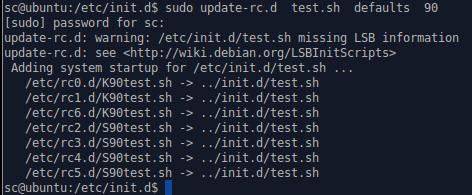
重启后可以在桌面上看到生成的mystart.txt文件。
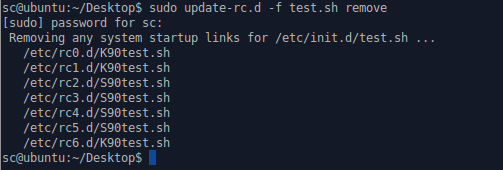
sudo update-rc.d -f test.sh remove
方法三、桌面环境下设置开机自启动
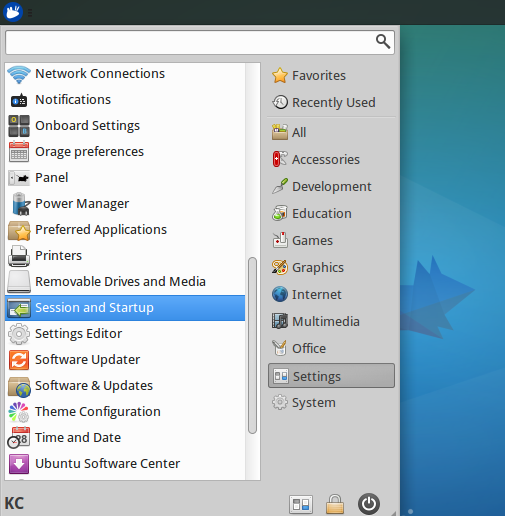
从Xfce桌面菜单中选择"Settings Manager"(设置管理器)。在"Settings"(设置)窗口中,点击"Session and Startup"(会话和启动)图标。
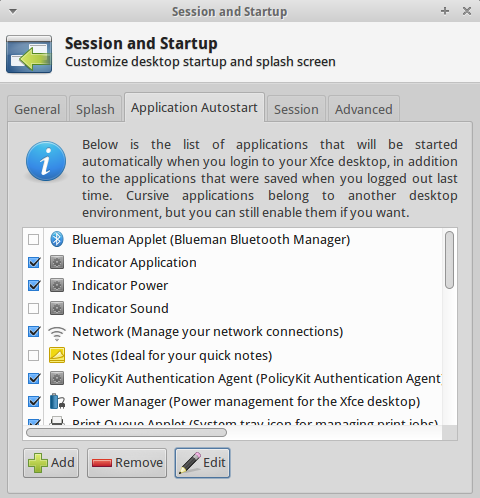
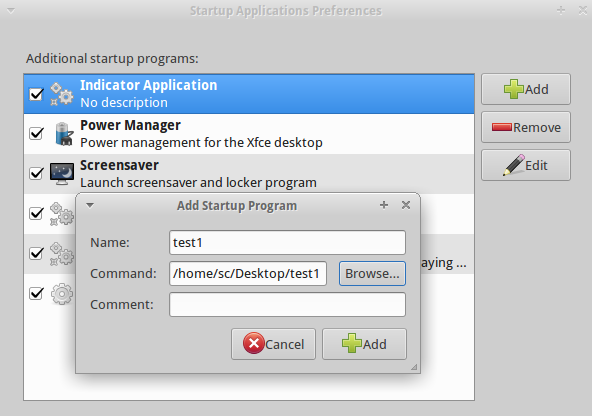
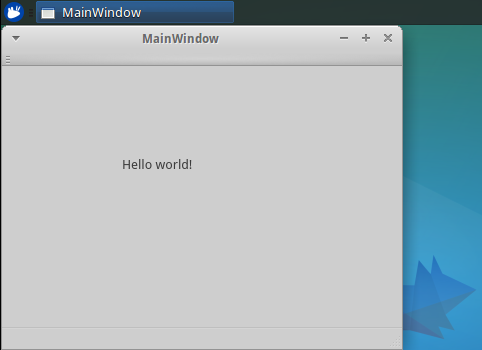
gnome-terminal -x /home/sc/Desktop/test
gnome-terminal打开一个新的终端,-x参数后面的内容是要执行的命令。重新启动后可以看到gnome终端模拟器中打印出Hello world!
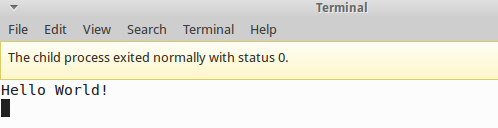 如果执行完后一闪而过,一种方法是修改terminal的配置,选择Edit→Profile Preferences→Title and Command,里面有一项When command exits,选为Hold the terminal open就可以了。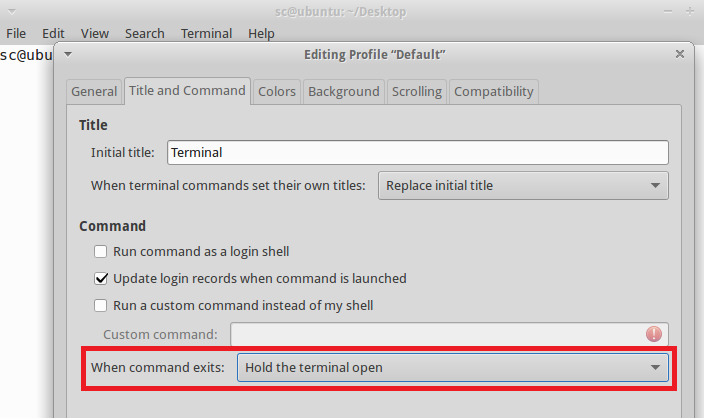
Ubuntu14.04设置开机自启动脚本的更多相关文章
- ubuntu14.04 设置开机自启动脚本
方法1.将脚本放入/etc/rc.local文件中. 方法2.添加一个ubuntu的开机启动服务 分为以下几个步骤: 1)新建一个脚本文件 new_services.sh #!/bin/bash # ...
- Ubuntu14.04设置开机自启动程序
启动应用程序可以帮助我们选择开机启动项.但是在Ubuntu14.04通过Dash输入startup 找不到启动应用程序了,可以通过在控制台输入以下内容: gnome-session-propertie ...
- Ubuntu14.04设置开机启动脚本(转)
原文:https://www.magentonotes.com/ubuntu-config-autostart-shell-script.html 方法一:将脚本添加到文件/etc/rc.local ...
- ubuntu-18.04 设置开机启动脚本
ubuntu-18.04 设置开机启动脚本 参阅下列链接 https://askubuntu.com/questions/886620/how-can-i-execute-command-on-sta ...
- ubuntu-18.04 设置开机启动脚本-亲测有效
ubuntu-18.04不能像ubuntu14一样通过编辑rc.local来设置开机启动脚本,通过下列简单设置后,可以使rc.local重新发挥作用. 2.将下列内容复制进rc-local.servi ...
- Ubuntu 18.04 设置开机启动脚本 rc.local systemd
ubuntu18.04不再使用initd管理系统,改用systemd. ubuntu-18.04不能像ubuntu14一样通过编辑rc.local来设置开机启动脚本,通过下列简单设置后,可以使rc.l ...
- Ubuntu-18.04设置开机启动脚本
参考:https://www.cnblogs.com/defifind/p/9285456.html http://www.cnblogs.com/airdot/p/9688530.html s ...
- centos设置开机自启动脚本
1.新建脚本文件 我这里是为了设置开机自动设置ipv6隧道,所以命名为ipv6tunnel.sh ifconfig sit0 up ifconfig sit0 inet6 tunnel ::66.22 ...
- Ubuntu 16.04设置开机启动脚本的方法
需求:公司卡片机容量太小,只有100G,由于使用的人比较的多,开机使用后有时候就会出现磁盘空间占满数据写不进去的情况,影响工作进度,而且每次使用完都得关掉卡片机,所以就有必要写个清理磁盘的脚本,当卡片 ...
随机推荐
- Kubernetes中Pod的健康检查
本文介绍 Pod 中容器健康检查相关的内容.配置方法以及实验测试,实验环境为 Kubernetes 1.11,搭建方法参考kubeadm安装kubernetes V1.11.1 集群 0. 什么是 C ...
- 学了编译原理能否用 Java 写一个编译器或解释器?
16 个回答 默认排序 RednaxelaFX JavaScript.编译原理.编程 等 7 个话题的优秀回答者 282 人赞同了该回答 能.我一开始学编译原理的时候就是用Java写了好多小编译器和 ...
- 【.Net】 C#访问修饰符
一 类的修饰符: C#中类的默认修饰符是internal.1 private 只有对包.NET中的应用程序或库才能访问.2 public 不限制对类的访问. 3 protected 只可以被本类和其 ...
- ubuntu修改软链接
https://blog.csdn.net/u012897374/article/details/79199336 添加软连接(symbol link)相当于添加一个快捷方式,解决cannot ope ...
- 【转】group_concat函数详解
转自: http://hchmsguo.iteye.com/blog/555543 问了好多人,都不知道group_concat这个函数. 这个函数好啊,能将相同的行组合起来,省老事了. MySQL中 ...
- java8 快速入门 lambda表达式 Java8 lambda表达式10个示例
本文由 ImportNew - lemeilleur 翻译自 javarevisited.欢迎加入翻译小组.转载请见文末要求. Java 8 刚于几周前发布,日期是2014年3月18日,这次开创性的发 ...
- DevExpress ChartControl 柱状图的使用【转】
//中心业务平台的“热门岗位信息监测”柱状图 public partial class HotJobInfo : UserControl { private object _o ...
- asp.net mvc源码分析-ModelValidatorProviders 客户端的验证
几年写过asp.net mvc源码分析-ModelValidatorProviders 当时主要是考虑mvc的流程对,客户端的验证也只是简单的提及了一下,现在我们来仔细看一下客户端的验证. 如图所示, ...
- 如何: 重命名在 IIS 6.0 中的虚拟目录
警告如果错误地为编辑元数据库,您会导致严重的问题,甚至可能需要重新安装使用元数据库的任何产品. Microsoft 不能保证可以解决问题,如果您错误地编辑元数据库产生.编辑元数据库需要您自担风险. 注 ...
- VS Code .vue文件代码缩进以及格式化代码
首先在应用商店中搜索“Vetur”插件安装,然后进行下面操作: 文件->首选项->设置,然后在右边编辑框输入以下设置: { "prettier.tabWidth": 4 ...