
nodejs基础-HTTP
案例通过nodejs编写http服务程序
步骤:
1,加载http模块
2.创建http服务
3、为http服务对象添加request事件处理程序
4·开启http服务监听,准备接收客户端请求
注意:
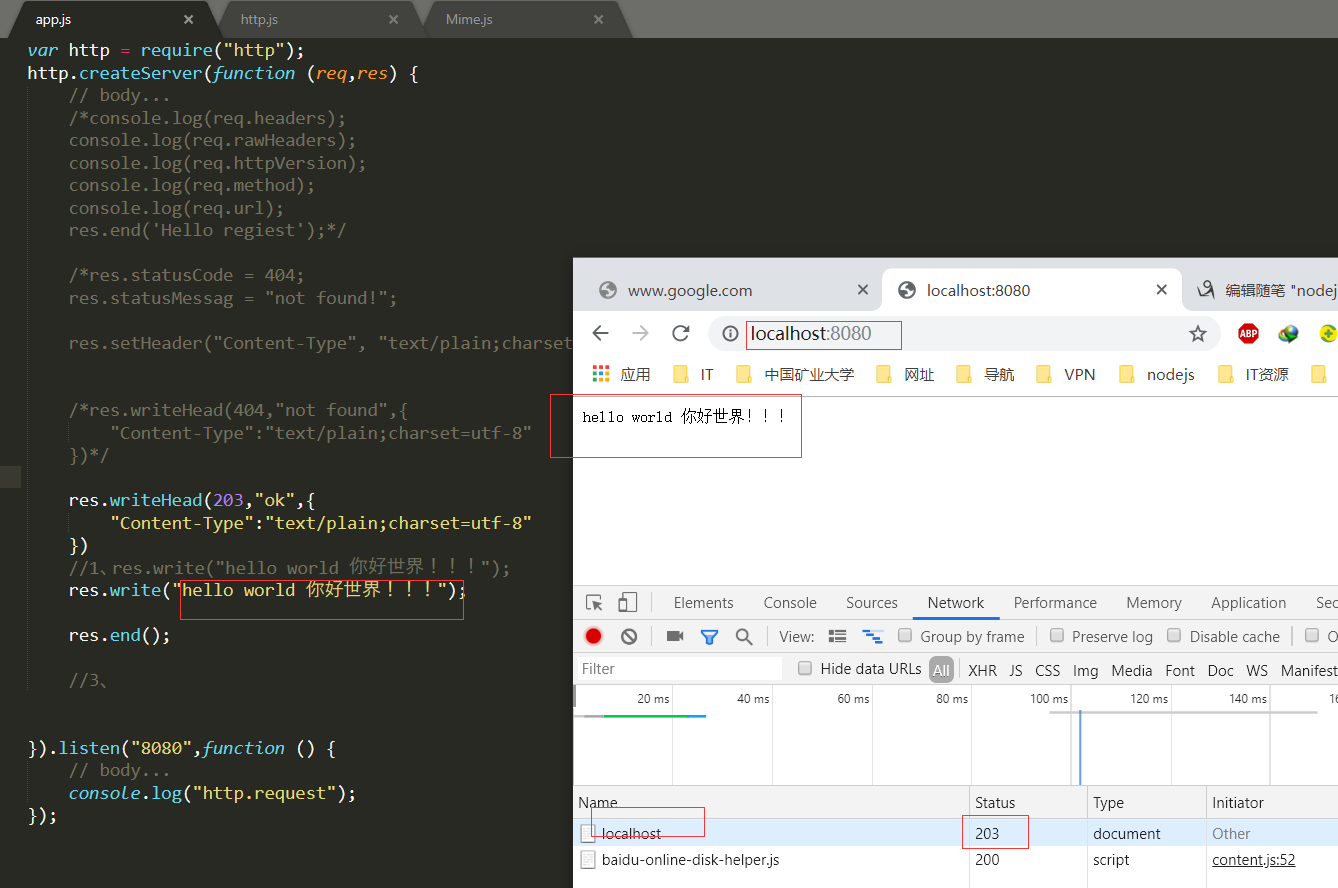
1,浏览器显示可能是乱码,所以可以通过.res.setHeader("Content-Type", 'text/plain; charset=utf-8');设置浏览器显示时所使用的编码.
2. Chrome浏览器默认无法手动设置编码,需要安装"Set Character Encoding"扩展.
3,演示一下设置Content-Type-text/html'和"Content-Type-text/plain的区别.

解决浏览器乱码,通过响应报文,指定浏览器解析编码格式
res.setHeader("Content-type","text/plain;charset=utf-8");
res.setHeader("Content-type","text/html;charset=utf-8");//解析html标签
根据不同的访问,请求不同的页面
通过node.js编写http服务程序,通过读取静态html文件来响应用户请求(带图片和外部css样式)
mime通过url的后缀返回输出头文件输出类型
模拟apache发布
var http = require("http");

var server = http.createServer();

var fs = require("fs");

var path = require("path");

var mime = require("mime");

server.on("request",function (req,res) {

    // bod

    res.write("hello wang 开发工程师");res.setHeader("Content-type","text/plain;charset=utf-8");

    res.end();

});

server.listen(8080,function () {

    // body...

    console.log("服务器启动,请访问:http://localhost:8080");

});

//根据请求url返回不同的数据

http.createServer(function (req,res) {

    // body...

    console.log(req.url);

    if (req.url === '/' || req.url === '/index') {

        res.end('Hello index');

    } else if(req.url === '/login'){

        res.end('Hello login');

    }else if(req.url === '/list'){

        res.end('Hello list');

    }else if(req.url === '/regiest'){

        res.end('Hello regiest');

    }else {

        res.end('404 not found!');

    }

}).listen(8888,function () {

    // body...

    console.log("http://localhost:8888");

})

//根据请求url返回不同的html

http.createServer(function (req,res) {

    // body...

    if (req.url === '/' || req.url === '/index') {

       fs.readFile(path.join(__dirname,"index.html"),function (err, data) {

           // body...

           if (err) {

                throw err;

           }

           res.end(data);

       });

    } else if(req.url === '/login'){

        res.end('Hello login');

    }else if(req.url === '/list'){

        res.end('Hello list');

    }else if(req.url === '/regiest'){

        res.end('Hello regiest');

    }else {

        res.end('404 not found!');

    }

}).listen("8090",function () {

    // body...

    console.log("监听请求!");

});

//try无法捕捉异步异常

var fs1 = require("fs");

try{

    fs1.writeFile("./yyy/abd.txt","大家早上好","utf-8",function (err,data) {

        // body...

        if (err) {

            console.log("出错了throw!");

        }

        console.log("ok");

    });

}catch(e){

    console.log("出错了catch");

}

//请求图片请求css文件

http.createServer(function (req,res) {

    // body...

    if (req.url === '/' || req.url === '/index') {

       fs.readFile(path.join(__dirname,"index.html"),function (err, data) {

           // body...

           if (err) {

                throw err;

           }

           res.end(data);

       });

    } else if(req.url === '/wang.png'){

        fs.readFile(path.join(__dirname,"wang.png"),function (err,data) {

            // body...

            console.log("图片信息");

            if (err) {

                throw err;

            }

            res.setHeader("Content-type","image/png");

            res.end(data);

        });

    }else if(req.url === '/body.css'){

        fs.readFile(path.join(__dirname,"body.css"),function (err,data) {

            // body...

            console.log("样式信息");

            if (err) {

                throw err;

            }

            res.setHeader("Content-type","text/css");

            res.end(data);

        });

    }else if(req.url === '/regiest'){

        res.end('Hello regiest');

    }else {

        console.log("error404");

        res.end('404 not found!');

    }

}).listen("9090",function () {

    // body...

     console.log("监听请求9090!");

});

//模拟apache

http.createServer(function (req,res) {

    // body...

    var filename = path.join(__dirname,"public",req.url);

    console.log("filename"+filename);

    fs.readFile(filename,function(err,data) {

        // body...

        if (err) {

            console.log(err);

            console.log("出错了!");

        }

        res.setHeader("Content-type", mime.getType(filename));

        res.end(data);

        console.log("好了!");

    });

}).listen("8899",function () {

    // body...

    console.log("监听请求8899!");

});
<!DOCTYPE html>

<html lang="en">

<head>

    <meta charset="UTF-8">

    <title>index页面</title>

    <link rel="stylesheet" type="text/css" href="./body.css">

    <link rel="stylesheet" type="text/css" href="./a.css">

</head>

<body>

    <h1 class="ttt">index页面</h1>

    <img src="./wang.png" alt="我的图片">

</body>

</html>
.
h1{

    color : red;

}
在线请求服务器的时候,请求的url就是一个标识
request和response对象介绍
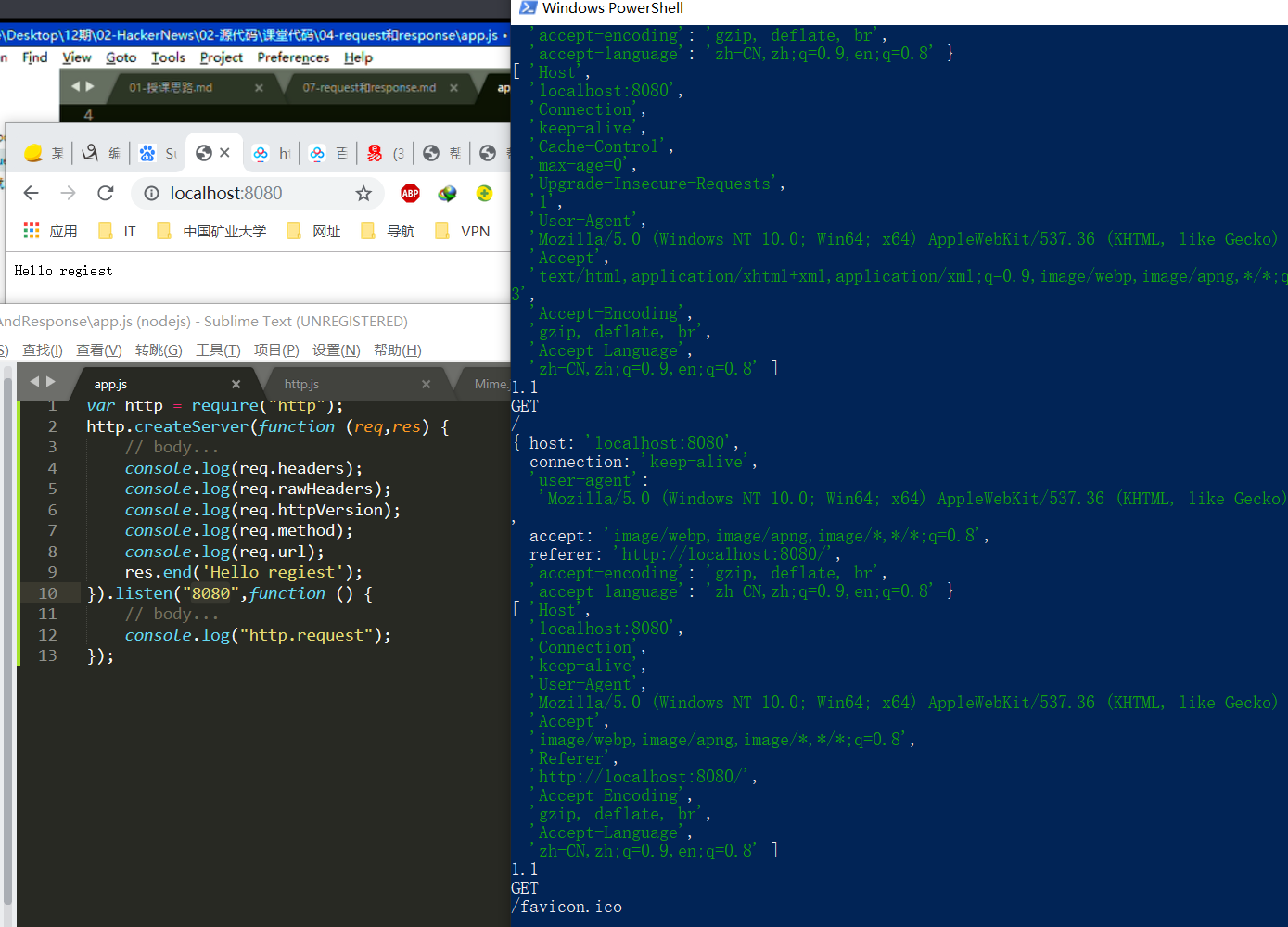
request:服务器解析用户提交的http请求报文,将结果解析到request对象中,凡是要获取和用户请求相关的数据都可以通过 request对象获取
response:在服务器端用来向用户做出响应的对象,凡是需要向用户(客户端)响应的操作,部需要通过[response对象来进行
request对象类型<http.IncomingMessage>,继承自stream. Readable
request对象常用成员
request.headers
request. rawHeadens
request.httpVersion
request.method
request.url
var http = require("http");

http.createServer(function (req,res) {

    // body...

    console.log(req.headers);

    console.log(req.rawHeaders);

    console.log(req.httpVersion);

    console.log(req.method);

    console.log(req.url);

    res.end('Hello regiest');

}).listen("8080",function () {

    // body...

    console.log("http.request");

});
nodejs基础-HTTP的更多相关文章
- [转]Nodejs基础中间件Connect
Nodejs基础中间件Connect 从零开始nodejs系列文章,将介绍如何利Javascript做为服务端脚本,通过Nodejs框架web开发.Nodejs框架是基于V8的引擎,是目前速度最快的J ...
- Nodejs基础中间件
Nodejs基础中间件Connect http://www.tuicool.com/articles/emeuie 关于作者 张丹(Conan), 程序员Java,R,PHP,Javascript ...
- Nodejs第一天-{Nodejs基础 深刻理解浏览器 环境变量 基础语法}
Nodejs第一天 1.什么是Nodejs Nodejs是一个可以运行(解析)ECMAScript的环境; ECMAScript是规定了一些列的语法 ,这些语法想要解析的执行就需要放在某个环境 ...
- nodejs 基础篇整合
nodeJs 基础篇整合 最近有朋友也想学习nodeJs相关方面的知识,如果你是后端想接近前端,node作为一门跑在服务端的JS语言从这里入门再好不过了.如果你正好喜欢前端,想走的更高,走的更远.no ...
- 前端知识体系-NodeJS相关】NodeJS基础知识全面总结
NodeJS基础知识 1. Node的全局对象和全局变量 1.1 全局对象:所有模块都可以调用的 global:表示Node所在的全局环境,类似于浏览器的window对象. process:该对象表示 ...
- Nodejs基础中间件Connect
http://www.tuicool.com/articles/emeuie 关于作者 张丹(Conan), 程序员Java,R,PHP,Javascript weibo:@Conan_Z blog: ...
- 02 nodejs命令参数(NodeJS基础入门)
声明:本文章可供有一定js基础的朋友参考nodejs入门,本文未讲解nodejs的安装,如有需要的同学可以加QQ3382260752找我,进行交流学习. 建议使用开发软件:webstorm或hbuil ...
- nodejs基础教程回顾01
最近在复习nodejs,因为框架太多隔一段时间不用就会忘了,所以没办法必须时常拿出来练练,就像家里有好几辆车,要时不常的轮流开一圈.我就从最基础的开始写,怎么下载安装就不说了,首先是nodejs的三类 ...
- NodeJS基础总结(一)
NodeJS官网网址:https://nodejs.org/en/ 使用require方法加载fs核心模块 var fs = require('fs'); 一.读取文件// 第一个参数就是尧读取的 ...
- NodeJS基础教程
关于 本书致力于教会你如何用Node.js来开发应用,过程中会传授你所有所需的“高级”JavaScript知识.本书绝不是一本“Hello World”的教程. 状态 你正在阅读的已经是本书的最终版. ...
随机推荐
- neo4j 基本语法笔记(全)
按照总监要求看了两天的neo4j 数据库的使用.在网上找了一个基础教程类似于w3c.school的网站(英文 ,中文,中文的翻译的不是很好,如果英文不好可以辅助理解),这个教程基础知识很全全面,从数据 ...
- Java缓存Ehcache-Ehcache的Cache在SSM框架中的配置
需要在Spring配置文件中配置: <!-- 配置缓存管理器工厂 --> <bean id="cacheManager" class="org.spri ...
- 数据分析之pandas(1)
一.Pandas的数据结构 1.Series (1)类似于一维数组 (2)通过list构建Series ser_obj=pd.Series(range(10)) (3)pandas数据结构案例
- 正则表达式RegExp对象
3.1 正则表达式对象的创建方式 字面量的方式 var patt = /匹配规则/修饰符; / --> 边界的意思 new关键字 var patt = new RegExp( ...
- Linux基于Hadoop2.8.0集群安装配置Hive2.1.1及基础操作
前言 安装Apache Hive前提是要先安装hadoop集群,并且hive只需要在hadoop的namenode节点集群里安装即可,安装前需保证Hadoop已启(动文中用到了hadoop的hdfs命 ...
- DbArithmeticExpression arguments must have a numeric common type.
引用 system.data.linq
- linux grep 设置高亮显示
[root@eric ~]# vi /etc/profile alias grep='grep --color=auto' [root@eric ~]# source /etc/profile
- vue动态生成表单
vue动态生成表单 一.下拉框 <!DOCTYPE html> <html> <head> <meta charset="utf-8" / ...
- python常用函数 Y
yield有点像return,但他会在下一次执行的时候从上次结束点继续执行,带有 yield 的函数在 Python 中被称之为 generator(生成器),生成器无法通过索引获取数据,同时也承诺使 ...
- Oracle 附加日志(supplemental log)
参考资料: 1.https://blog.csdn.net/li19236/article/details/41621179