
WWDC2017-advanced_animations_with_uikit
最后修改时间: 2017-12-1
这个Session主要讲一下的几个内容:
- Basic(基础的): 动画工作原理 以及 动画如何计时
- Interactive and Interruptible Animations: 可交互与可中断的动画
- New Property Animator Behaviors: UIPropertyAnimator新的属性
- Coordinating Animations: 协同动画
- Tips And Tricks: 提示和技巧
一、 Basic(基础的)
传统的动画是线性的。
UIView.animate(withDuration: 0.5) {

        circle.frame = circle.frame.offsetBy(dx: 100, dy: 0)

}
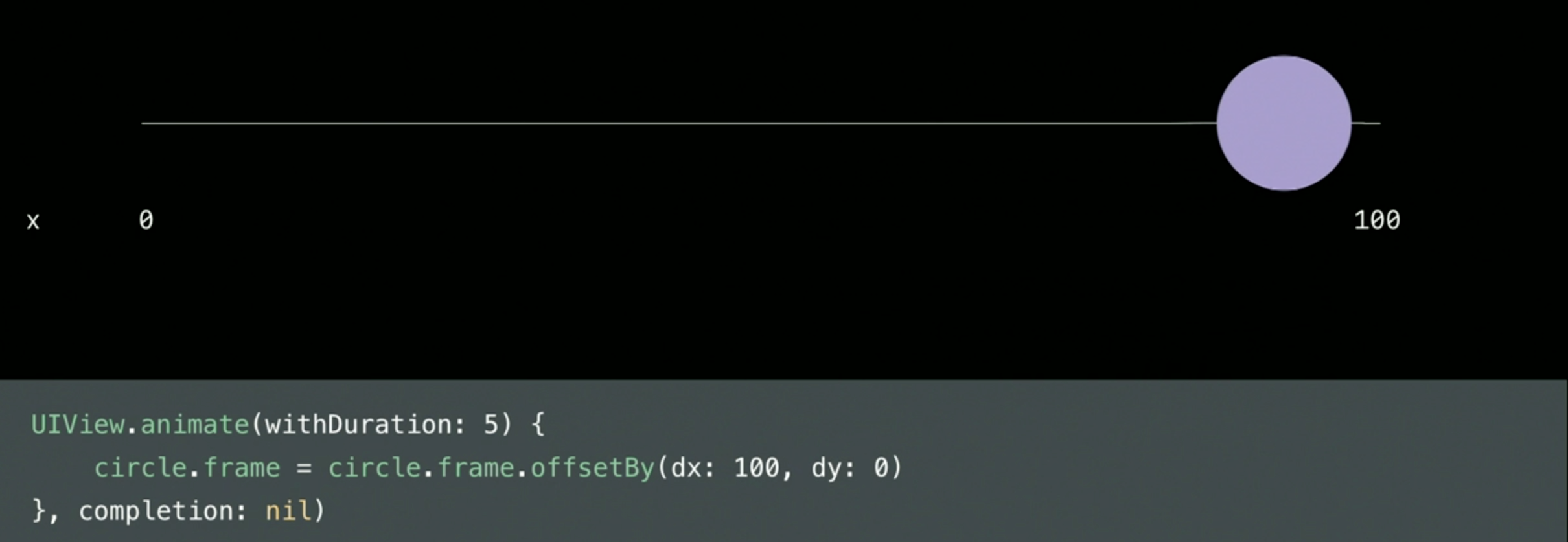
UIViewPropertyAnimator 可以更好控制动画。包括: 可自定义time function、更好交互(interactive)、 可中断(interruptible) 以及 更好响应Responsive。
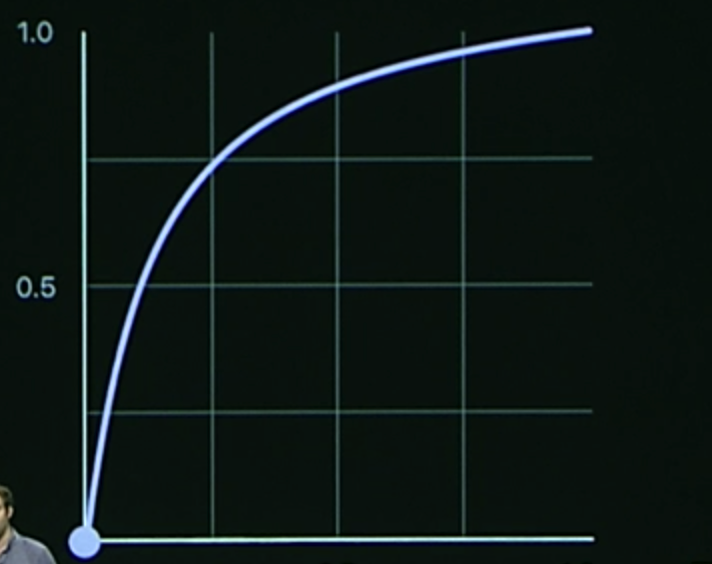
时间曲线(time curves): 本质就是一个函数,将时间转换为进度或者将动画所用的时间映射到动画的进度上。
- 线性曲线(Liner Curves): 时间的进度比(%Progress) = 动画进度比(%time)。
动画是按照一定的曲线的来完成的。 该曲线在时间与动画进度上有一定的关系。
例如: 线性动画10s,动画完成50% 所化时间 10 * 50% =
![Snip20170920_27.png-219.4kB][2]
- 非线性曲线也是按照时间进度函数来设置的。例如: easyOut
二、 Interactive and Interruptible Animations: 可交互与可中断的动画
2.1 Interactive(可交互动画)
```swift

    // 1. 实例化一个 animator

    var animator : UIViewPropertyAnimator!

    @objc func handlePan(recognizer: UIPanGestureRecognizer) {

        switch recognizer.state {

        case .began:

            // 2. 手势开始的时候,实例化,并设置相应的动作

            animator = UIViewPropertyAnimator(duration: 2.5, curve: .easeOut, animations: {

                self.circle.frame = self.circle.frame.offsetBy(dx: 100, dy: 0)

            })

            // 3. pauseAnimation, 动画未开始的时候, 会开启动画,并暂停

            animator?.pauseAnimation()

        case .changed:

            // 4. 手势 changed,改变 animator 的完成比

            let translation = recognizer.translation(in: circle)

            animator?.fractionComplete = translation.x / 100

        case .ended:

            // 5. 从 4 的完成比继续开始动画

            animator?.continueAnimation(withTimingParameters: nil, durationFactor: 0)

        default:

            break

        }

    }

```
值得一提的是,时间是如何计算呢?
以easyOut为例:用户交互是线性的,是动画进度来算的
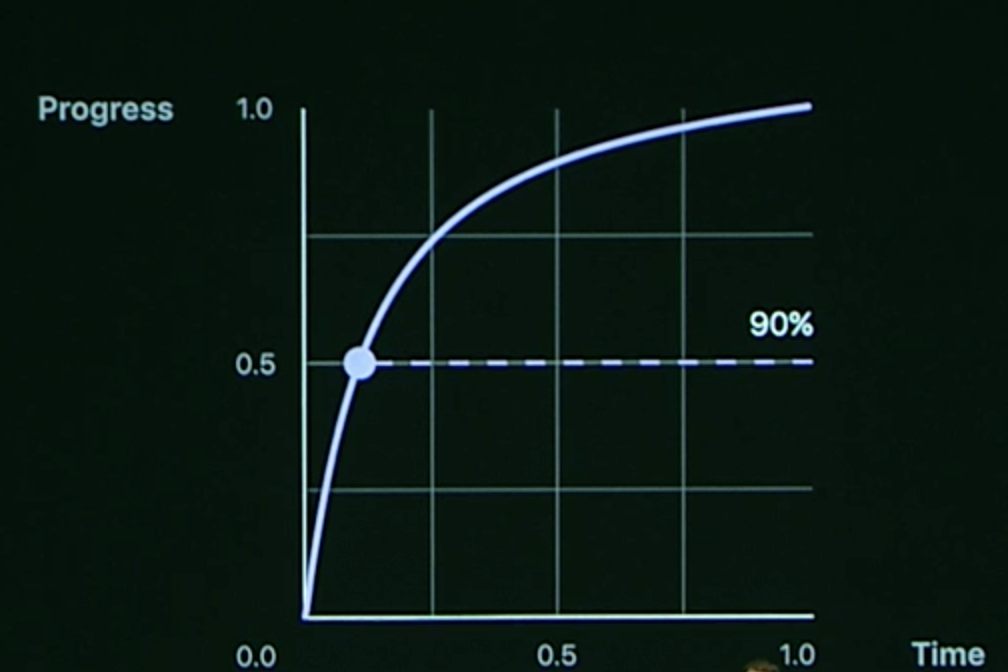
当Progress = 0.5的时候,反应到时间曲线上,fractionComplete = 10% = 0.1;
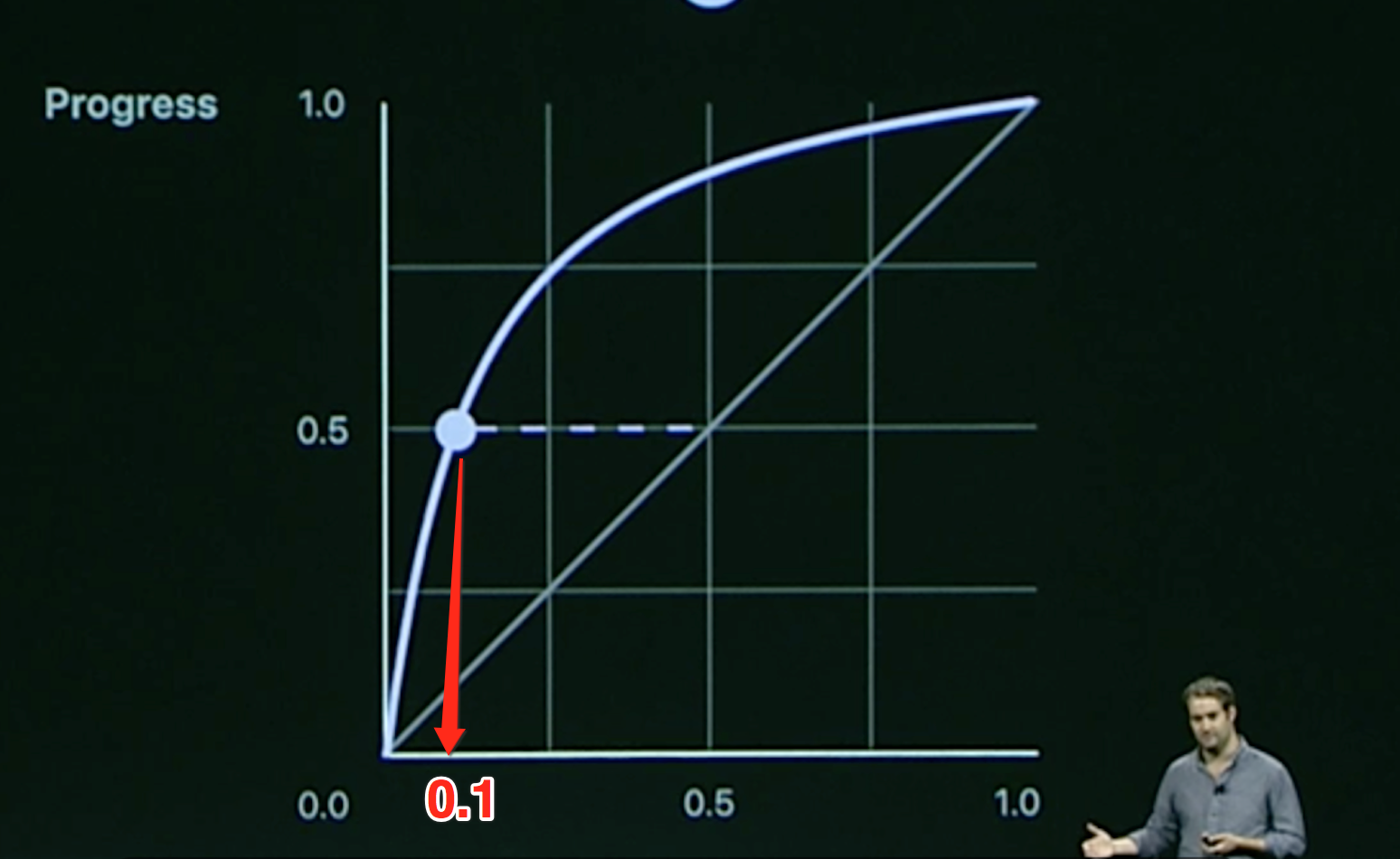
那么剩余90%的time,fractionComplete = 0.1 来完成剩下动画的 50% Progress
2.2 Interruptible Animations(可中断动画)
var animator : UIViewPropertyAnimator!

    func animateTransitionIfNeeded(duration: TimeInterval) {

        if animator != nil {

            return

        }

        animator = UIViewPropertyAnimator(duration: duration, curve: .easeIn, animations: {

            self.circle.frame = self.circle.frame.offsetBy(dx: 300, dy: 0)

        })

        animator.startAnimation()

    }

    var progressWhenInterrupted : CGFloat = 0.0

    @objc func handlePan(recognizer: UIPanGestureRecognizer) {

        switch recognizer.state {

        case .began:

            animateTransitionIfNeeded(duration: 1)

            animator?.pauseAnimation()

            progressWhenInterrupted = animator.fractionComplete

        case .changed:

            let translation = recognizer.translation(in: circle)

            animator?.fractionComplete = translation.x / 100 + progressWhenInterrupted

        case .ended:

            let timing = UICubicTimingParameters(animationCurve: .easeOut)

            animator.continueAnimation(withTimingParameters: timing, durationFactor: 0)

        default:

            break

        }

    }
思路:
开启动画 -> 监听到手指之后,停止动画,记录动画的fractionComplete -> 手势Changed,改变动画的 fractionComplete -> 继续动画
Pause
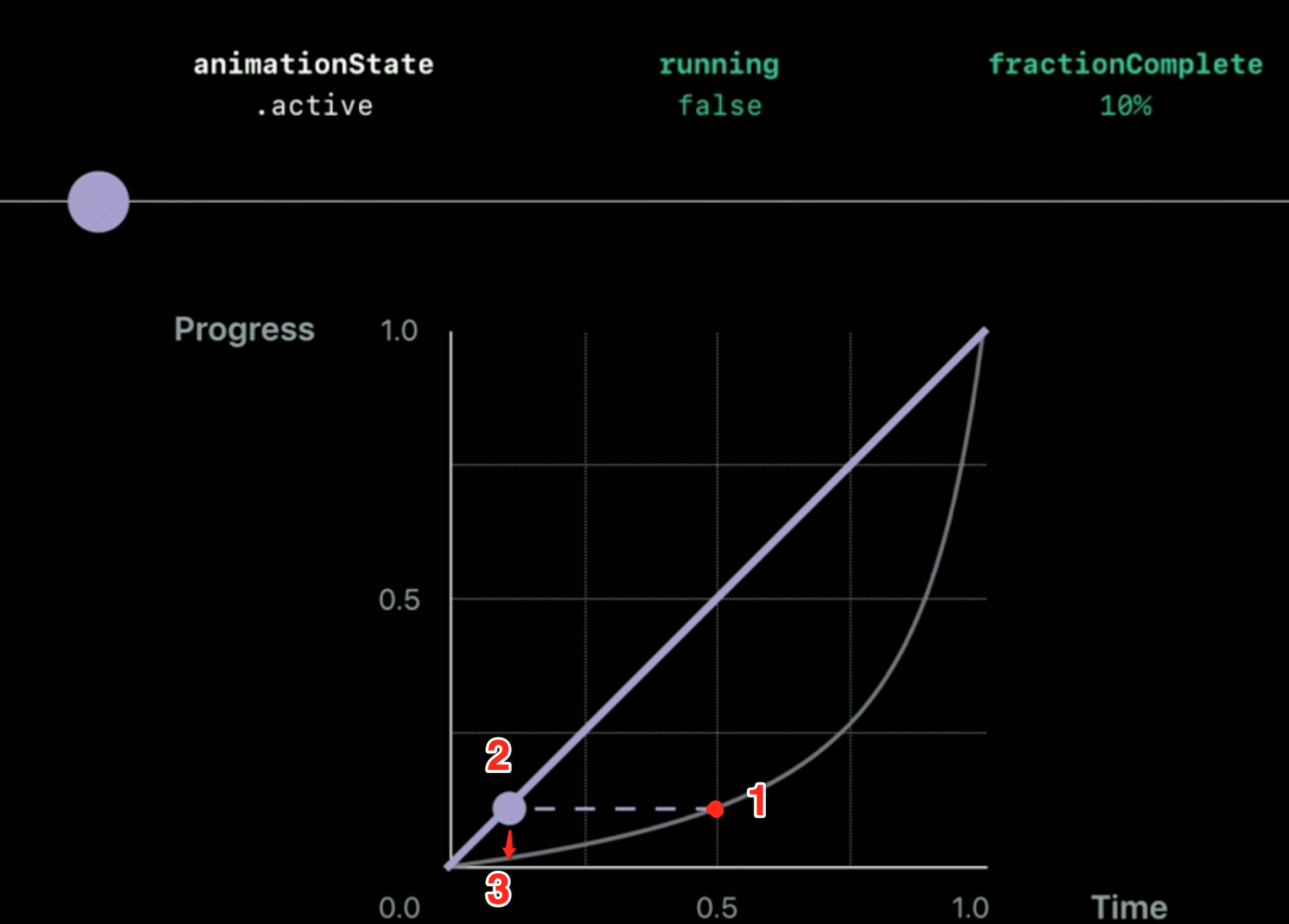
- 当Animator 执行动画开始,到 1 (time = 0.5, Progress = 10%) 的时候,用户手势进行了中断;
- 用户交互是线性的,反应到了 2 (time = 0.1, progress = 0.1 因为线性的)的地方;
Continue
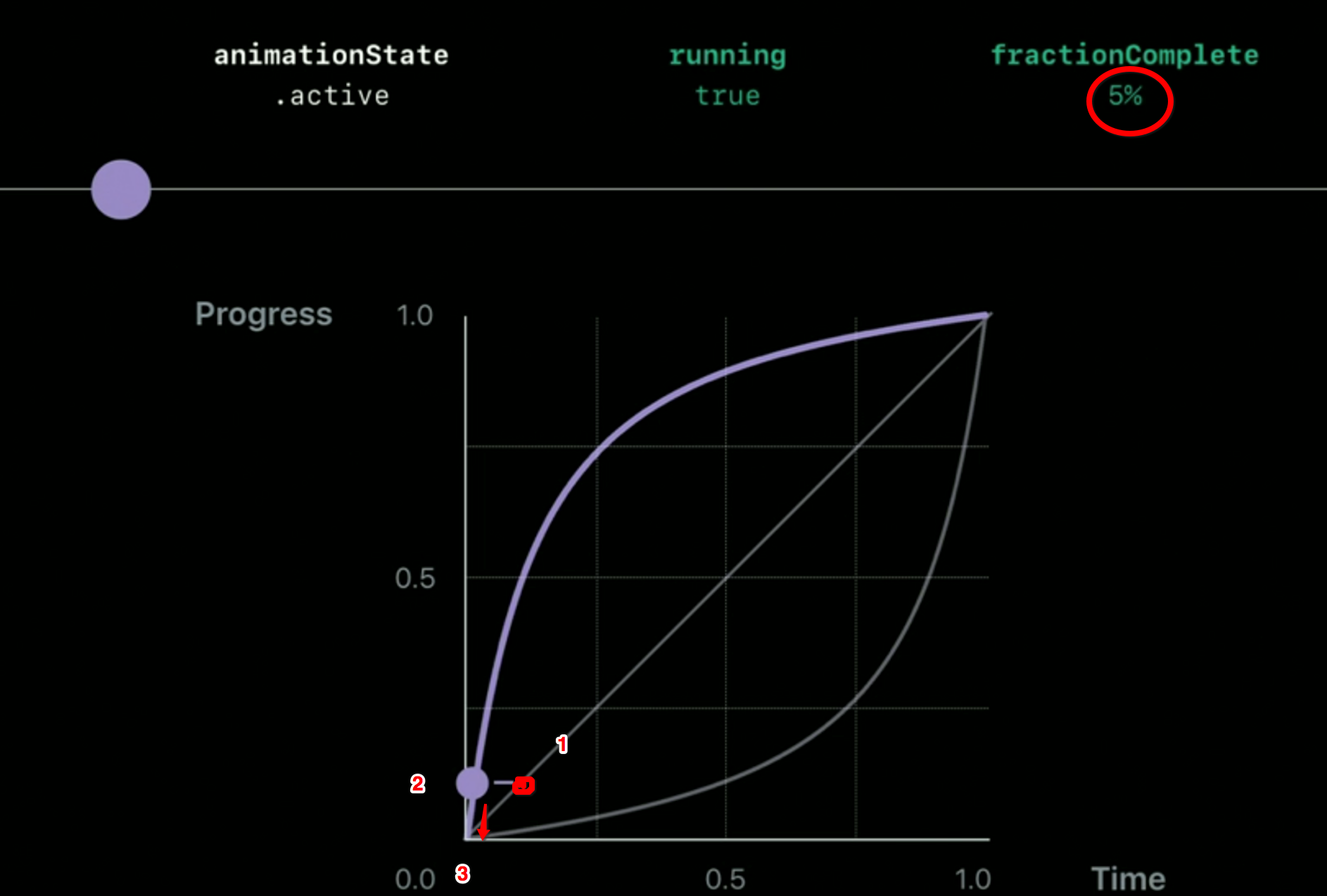
- 当用户松开之后,继续以 easyOut进行动画的时候,由 1 位置转变为 2 的位置, Progress = 10%
- 2 位置此时对应的 time = 0.05, fractionComplete = 0.05, 也就是说,剩下 95%的时间来完成 剩下Progress = 90%的动画
三、New Property Animator Behaviors: UIPropertyAnimator新的属性
- scrubsLinearly
- pausesOnCompletion.
3.1 scrubsLinearly
A Boolean value indicating whether a paused animation scrubs linearly or uses its specified timing information.
The default value of this property is true, which causes the animator to use a linear timing function during scrubbing. Setting the property to false causes the animator to use its specified timing curve.
简单的说: 这个参数就是,当你与动画进行交互时候,是按照线性的来做动画还是按照原来的时间曲线来做动画, true 表示利用线性的, false 表示利用指定的
例如: 动画开始是按照 easyIn的,用户进行交互时候,time curve 为线性的,
- scrubsLinearly = true, 那么用户进行交互的时候,是按照线性的来改变;
- scrubsLinearly = false, 那么就按照原来 easyIn的方式来。
3.2 pausesOnCompletion
A Boolean value that indicates whether a completed animation remains in the active state.
When the value of this property is true, the animator remains in the active state when the animation finishes, and it does not execute its completion handler. Keeping the animator in the active state allows you to reverse the animation even after it has finished. When the value of this property is false, the animator automatically transitions to the inactive state when the animation finishes, thereby concluding the animation. The default value of this property is false.
Because the completion handler is not called when this property is true, you cannot use the animator's completion handler to determine when the animations have finished running. Instead, you determine when the animation has ended by observing the isRunning property.
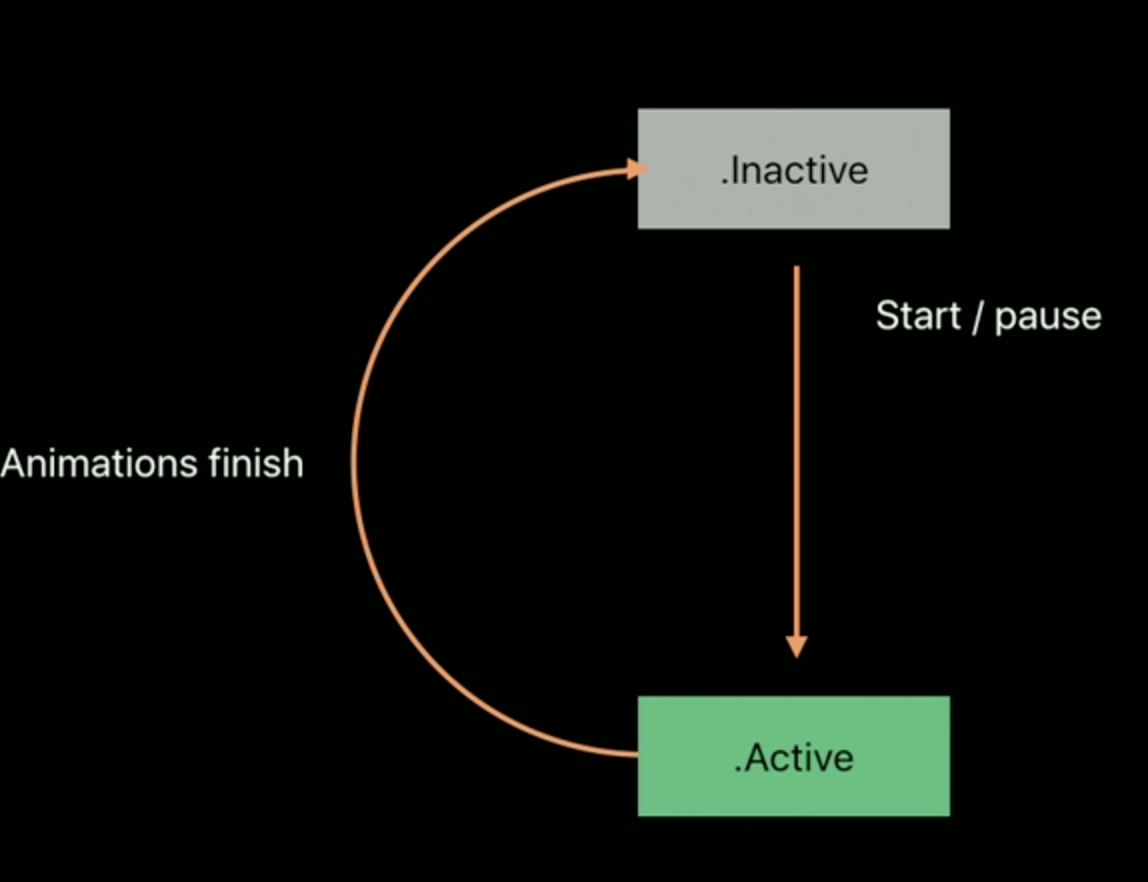
Animator的状态图(pausesOnCompletion = false )
- 开始实例化出来,Animator 是 .Inactive状态
- 当调用 startAnimation() 或 pauseAnimation(), Animator进入active状态;
- 动画结束,animator 再次进入 .Inactive 状态
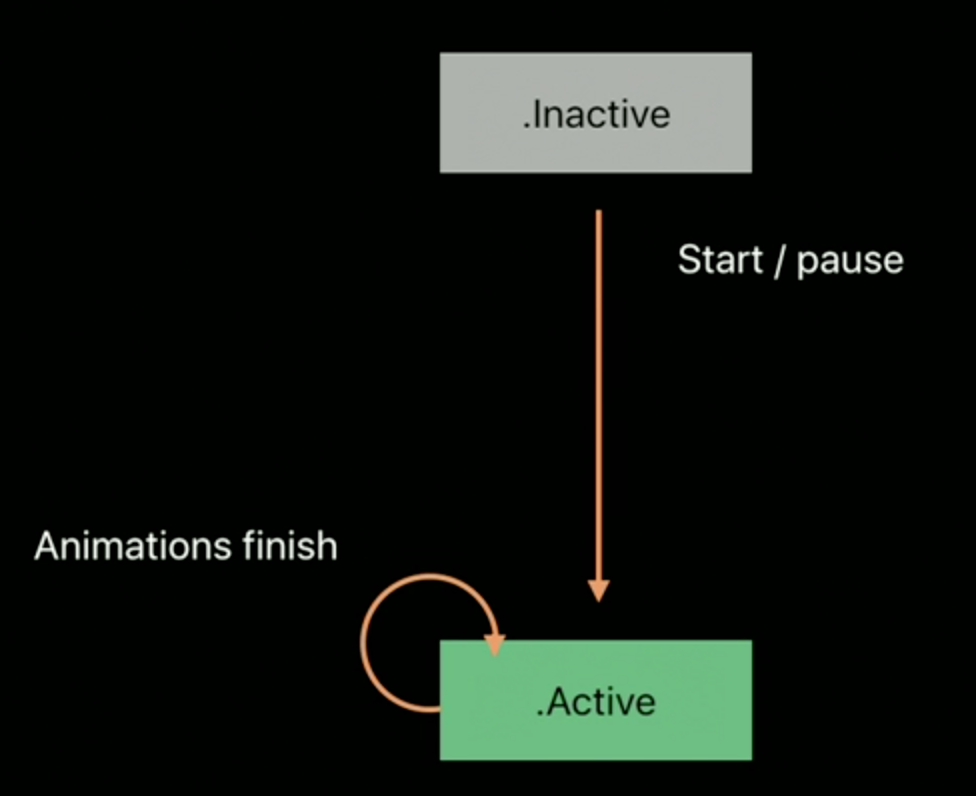
Animator的状态图(pausesOnCompletion = true )
- 开始实例化出来,Animator 是 .Inactive状态
- 当调用 startAnimation() 或 pauseAnimation(), Animator进入active状态;
- 动画结束,animator 保持 active 状态
注意: 此时不会调用完成的回调, 观察是否动画完成,可以通过 isRunning属性
WWDC2017-advanced_animations_with_uikit的更多相关文章
- 看过WWDC2017的闲谈
2017年6月6日凌晨的138分钟,是属于WWDC2017的. 鉴于时间问题,没有熬夜看,所以早上起来趁着公司不太忙就看了看.整体的内容没有太多变化,依然是苹果的主产品,不过这次的one more t ...
- 你可能需要为你的APP适配iOS11
WeTest 导读 iOS 11 为整个生态系统的 UI 元素带来了一种更加大胆.动态的新风格. 本文介绍了iOS11在UI方面做了哪些更新,有些更新可以为用户提供更加完美的体验,但也有的可能会给目 ...
- 浅酌iOS 11兼容性
WeTest导读 苹果在WWDC2017大会,公布了最新的iOS 11,系统新特性肯定是让不少果粉充满期待.在网上已能看到不少关于iOS 11的体验文章,那么iOS 11的新特性会对APP产生什么兼容 ...
- 你可能需要为你的 APP 适配 iOS 11
本文来自于腾讯Bugly公众号(weixinBugly),未经作者同意,请勿转载,原文地址:https://mp.weixin.qq.com/s/AZFrqL9dnlgA6Vt2sVhxIw 作者:s ...
- iOS Password AutoFill开发指南
转载请标明来源:https://www.cnblogs.com/zhanggui/p/9431950.html 引言 在<iPhone User Guide for iOS 11.4>这本 ...
- contentInsetAdjustmentBehavior各个值之间的区别
iOS11也出了不少时候了网上说适配的文章一大堆.关于contentInsetAdjustmentBehavior这个参数之间的区别,好像没什么人能说明.往下看的前提是你已经知道什么是安全区域,没看明 ...
- [SceneKit] 不会 Unity3D 的另一种选择
概述 SceneKit和SpriteKit的区别简单的来说就是二维和三维的区别 详细 代码下载:http://www.demodashi.com/demo/10664.html 上周一, 相信很多人和 ...
- 从iOS 11看怎样设计APP图标
苹果WWDC2017开发者大会已经尘埃落定,除了新产品的发布,iOS 11也正式亮相.新系统中,地图.App Store.时钟.相机.联系人等等原生应用都换了新的图标.此次图标的变化势必也会激发下一个 ...
- ARKit对安卓的提示 ARKit与Google Tango
我们知道安卓是Google开发的,那么关于AR谷歌有哪些作为呢?就是开发了Google Tango,尽管Tango还未开源,但是用户可以免费使用,可是一般的安卓手机是无法运行的,它对硬件有要求,这对它 ...
- Xcode9 新功能
翻译: https://developer.apple.com/library/content/documentation/DeveloperTools/Conceptual/WhatsNewXcod ...
随机推荐
- [19/10/13-星期日] Python中的函数
一.函数 # 第五章 函数 ## 函数简介(function) - 函数也是一个对象 - 对象是内存中专门用来存储数据的一块区域 - 函数可以用来保存一些可执行的代码,并且可以在需要时,对这些语句进行 ...
- 剑指Offer编程题(Java实现)——复杂链表的复制
题目描述 输入一个复杂链表(每个节点中有节点值,以及两个指针,一个指向下一个节点,另一个特殊指针指向任意一个节点),返回结果为复制后复杂链表的head.(注意,输出结果中请不要返回参数中的节点引用,否 ...
- Aliyun-Centos 7 LNMP安装(最新版LNMP)
linux装软件方式:1.源码安装:下载wget-->解压tar -zxvf -->配置 ./configure --->编译make -->安装 make install 2 ...
- jsoncpp解析
讲jsoncpp解析json的文章,很不错,可以参考: http://blog.csdn.net/hzyong_c/article/details/7163589 http://www.cnblogs ...
- 修改jar包中class文件
某日,想要更改jar包中的某个class文件,有无rar无法解压jar文件,故找到如下方式进行操作 1.解压某个jar包:在需要解压的jar包目录下,打开命令行(cmd),输入如下命令,输入:C:\j ...
- EL&JSTL笔记
# 今日内容 1. JSP: 1. 指令 2. 注释 3. 内置对象 2. MVC开发模式 3. EL表达式 4. JSTL标签 ...
- 5.css3盒模型--margin/border/padding/content
1.css3盒模型: ①margin外边距: Margin-top,Margin-right,Margin-bottom,Margin-left ②Border边框: Border-width Bor ...
- Java常用日期处理方法
import org.apache.commons.lang3.time.FastDateFormat; import org.joda.time.DateTime; import org.apach ...
- DRF框架之视图类
前后端分离的项目 >: pip3 install djangorestframework 一.视图类传递参数给序列化类 视图层:views.py 需求: (1)在视图类中实列化对象是,可以设 ...
- windows上的QT发布
1. 生成exe 1.1 release 条件下编译 1.2 将QT bin路径加入到path中去 1.3 将1.1生成的exe拷贝到单独的目录,然后cmd到这个目录,使用windeployqt编译 ...