
pylint在pycharm的使用及pylint的配置
pylint作为python代码风格检查工具,接近 PEP8风格,在使用此方法的过程中,发现不仅能让代码更加规范,优雅,更能 发现 隐藏的bug。
pylint在Pycharm中的2种安装方式;
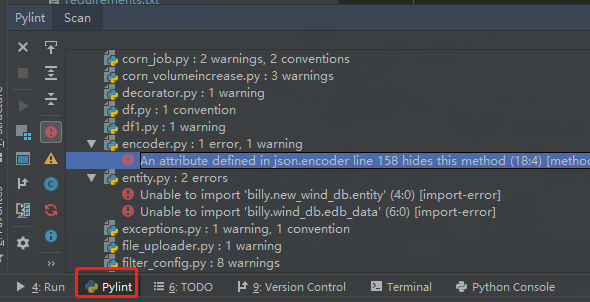
第一种效果展示(优点:通过点击错误点,自动定位到文件位置,省时):
安装步骤在:https://github.com/leinardi/pylint-pycharm 中;
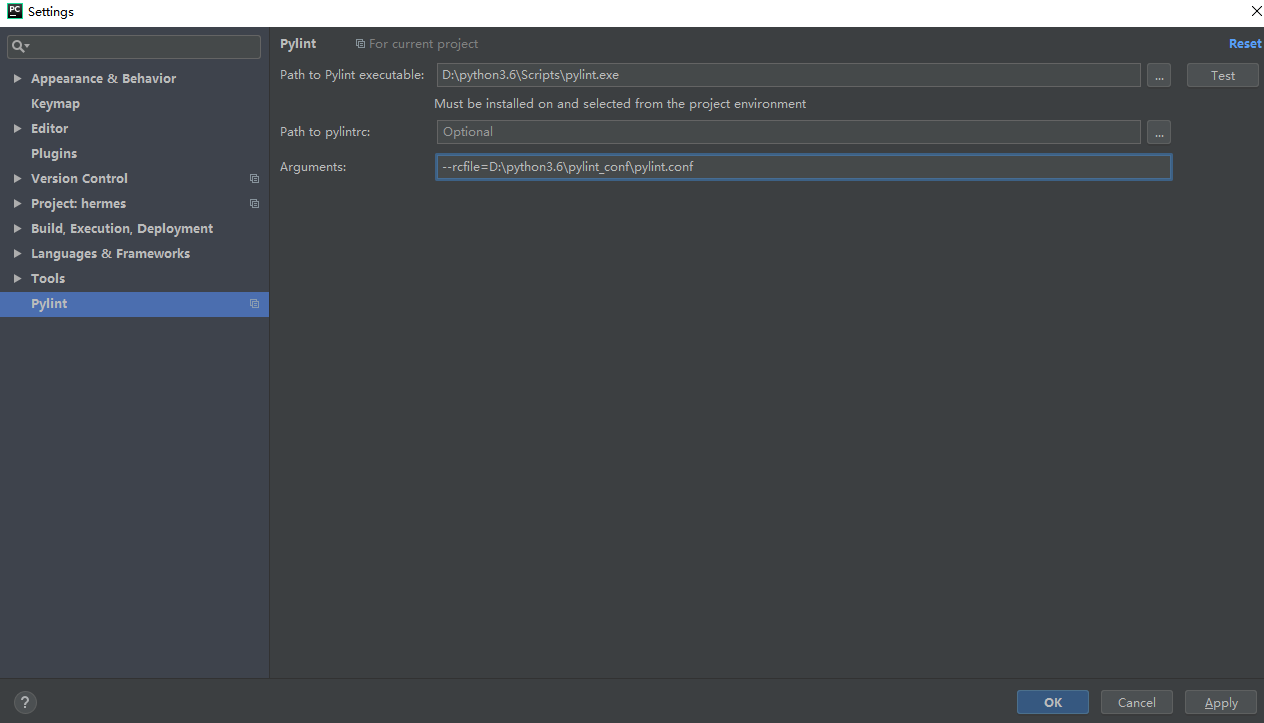
我的设置如下:
使用方法:单文件 检查:先点击 某个文件内容,再点击 绿色开始的箭头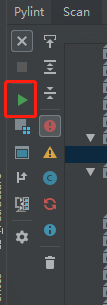 即可;
即可;
还可以 整个项目检查,只检查改变的文件 等等;
第二种安装使用效果展示(缺点:需要手动的找到错误文件位置,耗时):

安装步骤在:https://stackoverflow.com/questions/38134086/how-to-run-pylint-with-pycharm
注意点: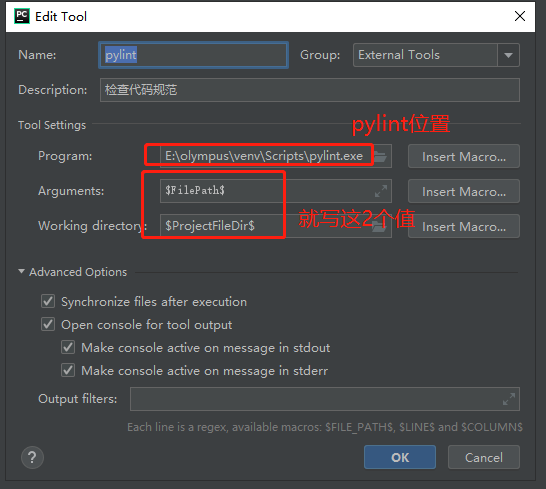
使用方法:文件 或文件夹 右击 选择 External Tools => Pylint 即可
2种安装方式总结:
a.通过pycharm的pylint检测 对 忽略检测文件的的 功能失效,此功能 必须 通过命令行才可使用
b.建议使用第一种方式 安装及使用,因为 省时省力
pylint 忽略 文件夹的正确配置及使用操作:
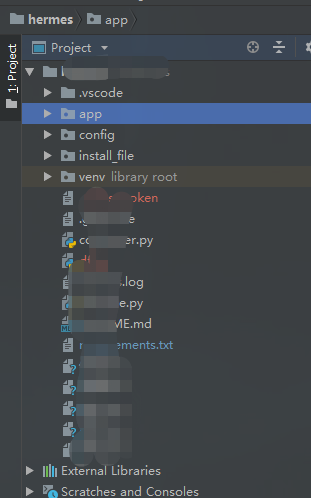
- 示范 项目结构如图 (忽略检查app和 venv 文件夹的所有文件):
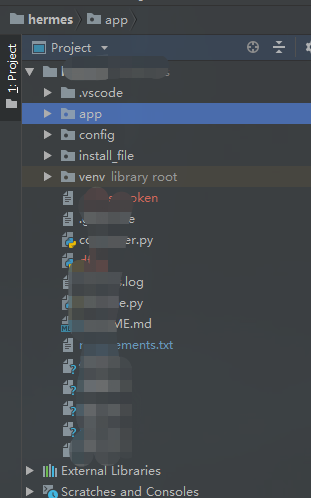
- 在配置文件中 的 [MASTER]的ignore 的 添加 app,venv 或者 在命令行 中 如下:pylint --ignore app,venv project_name 即可(注意多个忽略之间用 逗号 隔开);
- 通过命令行(不是pycharm的工具) 运行 脚本即可;命令为 pylint --rcfile=D:\python3.6\pylint_conf\pylint.conf project_name
pylint 禁用某些功能的方法:
在配置文件中的 [MESSAGES CONTROL] 的 disable 添加 想禁用的功能;
如:报错如下;
则 在 disable尾部添加 missing-docstring 即可;
pylint在行级别的代码中 禁用某些功能(也就是 不对所有代码禁用某个检测,只对某行代码禁用某个检测):
教程地址:https://pylint.readthedocs.io/en/latest/user_guide/message-control.html
实例:
在一行代码的 后面 添加注释,便只忽略检查某一行;
在一个文件的 单独一行 使用 则 此行以下 被忽略;
pylint的配置:
注意点:pylint默认的配置 无法 满足实际的开发需求,需要自行调整;如下代码 为 自行调整的结果;
[MASTER]

# A comma-separated list of package or module names from where C extensions may

# be loaded. Extensions are loading into the active Python interpreter and may

# run arbitrary code.

extension-pkg-whitelist=

# Add files or directories to the blacklist. They should be base names, not

# paths. 选择需要忽略检查的文件夹(在pycharm中使用pylint工具忽略文件夹无效,只能在命令行中生效:pylint --ignore weixin,lib project_name)

ignore=app,venv,install_file,libs

# Add files or directories matching the regex patterns to the blacklist. The

# regex matches against base names, not paths.

ignore-patterns=

# Python code to execute, usually for sys.path manipulation such as

# pygtk.require().

#init-hook=

# Use multiple processes to speed up Pylint. Specifying 0 will auto-detect the

# number of processors available to use.

jobs=1

# Control the amount of potential inferred values when inferring a single

# object. This can help the performance when dealing with large functions or

# complex, nested conditions.

limit-inference-results=100

# List of plugins (as comma separated values of python modules names) to load,

# usually to register additional checkers.

load-plugins=

# Pickle collected data for later comparisons.

persistent=no

# Specify a configuration file.

#rcfile=

# When enabled, pylint would attempt to guess common misconfiguration and emit

# user-friendly hints instead of false-positive error messages.

suggestion-mode=yes

# Allow loading of arbitrary C extensions. Extensions are imported into the

# active Python interpreter and may run arbitrary code.

unsafe-load-any-extension=no

[MESSAGES CONTROL]

# Only show warnings with the listed confidence levels. Leave empty to show

# all. Valid levels: HIGH, INFERENCE, INFERENCE_FAILURE, UNDEFINED.

confidence=

# Disable the message, report, category or checker with the given id(s). You

# can either give multiple identifiers separated by comma (,) or put this

# option multiple times (only on the command line, not in the configuration

# file where it should appear only once). You can also use "--disable=all" to

# disable everything first and then reenable specific checks. For example, if

# you want to run only the similarities checker, you can use "--disable=all

# --enable=similarities". If you want to run only the classes checker, but have

# no Warning level messages displayed, use "--disable=all --enable=classes

# --disable=W". 禁用pylint的某些模块 如 显示: Missing class docstring (missing-docstring)  则 添加 括号中的 missing-docstring 到变量中

disable=print-statement,

        parameter-unpacking,

        unpacking-in-except,

        old-raise-syntax,

        backtick,

        long-suffix,

        old-ne-operator,

        old-octal-literal,

        import-star-module-level,

        non-ascii-bytes-literal,

        raw-checker-failed,

        bad-inline-option,

        locally-disabled,

        file-ignored,

        suppressed-message,

        useless-suppression,

        deprecated-pragma,

        use-symbolic-message-instead,

        apply-builtin,

        basestring-builtin,

        buffer-builtin,

        cmp-builtin,

        coerce-builtin,

        execfile-builtin,

        file-builtin,

        long-builtin,

        raw_input-builtin,

        reduce-builtin,

        standarderror-builtin,

        unicode-builtin,

        xrange-builtin,

        coerce-method,

        delslice-method,

        getslice-method,

        setslice-method,

        no-absolute-import,

        old-division,

        dict-iter-method,

        dict-view-method,

        next-method-called,

        metaclass-assignment,

        indexing-exception,

        raising-string,

        reload-builtin,

        oct-method,

        hex-method,

        nonzero-method,

        cmp-method,

        input-builtin,

        round-builtin,

        intern-builtin,

        unichr-builtin,

        map-builtin-not-iterating,

        zip-builtin-not-iterating,

        range-builtin-not-iterating,

        filter-builtin-not-iterating,

        using-cmp-argument,

        eq-without-hash,

        div-method,

        idiv-method,

        rdiv-method,

        exception-message-attribute,

        invalid-str-codec,

        sys-max-int,

        bad-python3-import,

        deprecated-string-function,

        deprecated-str-translate-call,

        deprecated-itertools-function,

        deprecated-types-field,

        next-method-defined,

        dict-items-not-iterating,

        dict-keys-not-iterating,

        dict-values-not-iterating,

        deprecated-operator-function,

        deprecated-urllib-function,

        xreadlines-attribute,

        deprecated-sys-function,

        exception-escape,

        comprehension-escape,

        wrong-import-position, # 去掉 文件导入位置,不符合实际需求

        logging-not-lazy, # 去掉 日志打印相关

        missing-docstring,

        unnecessary-pass, # 去掉 判断 空函数 不能加pass的校验

        redefined-builtin, # 去掉 命名和 python内置函数名或类名冲突 的校验,如 python的next()函数,则变量不能命名为next

        no-self-use, # 去掉 类中没有自己调用的 检测

        too-few-public-methods, # 去掉 检测 类中方法太少 的功能

        no-else-return, # 去掉 if中有return,else中不能有return的 校验

        no-else-raise, # 去掉 if中有raise,else中不能有raise的 校验

# Enable the message, report, category or checker with the given id(s). You can

# either give multiple identifier separated by comma (,) or put this option

# multiple time (only on the command line, not in the configuration file where

# it should appear only once). See also the "--disable" option for examples.

enable=c-extension-no-member

[REPORTS]

# Python expression which should return a note less than 10 (10 is the highest

# note). You have access to the variables errors warning, statement which

# respectively contain the number of errors / warnings messages and the total

# number of statements analyzed. This is used by the global evaluation report

# (RP0004).

evaluation=10.0 - ((float(5 * error + warning + refactor + convention) / statement) * 10)

# Template used to display messages. This is a python new-style format string

# used to format the message information. See doc for all details.

#msg-template=

# Set the output format. Available formats are text, parseable, colorized, json

# and msvs (visual studio). You can also give a reporter class, e.g.

# mypackage.mymodule.MyReporterClass.

output-format=colorized

# Tells whether to display a full report or only the messages.

reports=yes

# Activate the evaluation score.

score=yes

[REFACTORING]

# Maximum number of nested blocks for function / method body;函数或方法的最大嵌套块数

max-nested-blocks=5

# Complete name of functions that never returns. When checking for

# inconsistent-return-statements if a never returning function is called then

# it will be considered as an explicit return statement and no message will be

# printed.

never-returning-functions=sys.exit

[BASIC]

# 基础设置

# Naming style matching correct argument names. 参数命名风格

argument-naming-style=snake_case

# Regular expression matching correct argument names. Overrides argument-

# naming-style. 不能有大写字母

argument-rgx=([^A-Z]+$)

# Naming style matching correct attribute names.属性命名风格

attr-naming-style=snake_case

# Regular expression matching correct attribute names. Overrides attr-naming-

# style.不能有大写字母

attr-rgx=([^A-Z]+$)

# Bad variable names which should always be refused, separated by a comma. 应该被拒绝的变量命名 穷举,用逗号隔开

bad-names=foo,

          bar,

          baz,

          toto,

          tutu,

          tata

# Naming style matching correct class attribute names.类属性命名风格

class-attribute-naming-style=any

# Regular expression matching correct class attribute names. Overrides class-

# attribute-naming-style.

#class-attribute-rgx=

# Naming style matching correct class names.类命名风格

class-naming-style=PascalCase

# Regular expression matching correct class names. Overrides class-naming-

# style.

#class-rgx=

# Naming style matching correct constant names.常量命名风格

const-naming-style=any

# Regular expression matching correct constant names. Overrides const-naming-

# style.

#const-rgx=

# Minimum line length for functions/classes that require docstrings, shorter

# ones are exempt. 函数或类 的文档注释的最短长度

docstring-min-length=-1

# Naming style matching correct function names. 函数命名风格

function-naming-style=snake_case

# Regular expression matching correct function names. Overrides function-

# naming-style.

#function-rgx=

# Good variable names which should always be accepted, separated by a comma.好的 变量命名 穷举,用逗号隔开

good-names=i,

           j,

           k,

           ex,

           Run,

           _

# Include a hint for the correct naming format with invalid-name.

include-naming-hint=no

# Naming style matching correct inline iteration names.

inlinevar-naming-style=any

# Regular expression matching correct inline iteration names. Overrides

# inlinevar-naming-style.

#inlinevar-rgx=

# Naming style matching correct method names.

method-naming-style=snake_case

# Regular expression matching correct method names. Overrides method-naming-

# style.

#method-rgx=

# Naming style matching correct module names.

module-naming-style=snake_case

# Regular expression matching correct module names. Overrides module-naming-

# style.

#module-rgx=

# Colon-delimited sets of names that determine each other's naming style when

# the name regexes allow several styles.

name-group=

# Regular expression which should only match function or class names that do

# not require a docstring. 不需要文档注释的函数或类 的 匹配的正则;如下为 匹配除了以_开头 的 其他函数或类

no-docstring-rgx=^_

# List of decorators that produce properties, such as abc.abstractproperty. Add

# to this list to register other decorators that produce valid properties.

# These decorators are taken in consideration only for invalid-name. 不理解

property-classes=abc.abstractproperty

# Naming style matching correct variable names. 变量命名风格

variable-naming-style=snake_case

# Regular expression matching correct variable names. Overrides variable-

# naming-style. 变量命名风格 正则匹配 覆盖上面的   本规则:不能有大写字母

variable-rgx=([^A-Z]+$)

[FORMAT]

# 格式的设置

# Expected format of line ending, e.g. empty (空字符), LF(换行) or CRLF(回车并换行). 行结束的预期格式;

expected-line-ending-format=

# Regexp for a line that is allowed to be longer than the limit. 运行超过行长度的 符合正则的 字符;如下为:注释的http或https请求

ignore-long-lines=^\s*(# )?<?https?://\S+>?$

# Number of spaces of indent required inside a hanging or continued line. 行缩进数

indent-after-paren=4

# String used as indentation unit. This is usually "    " (4 spaces) or "\t" (1

# tab). 字符串缩进

indent-string='    '

# Maximum number of characters on a single line. 最大行字符长度

max-line-length=125

# Maximum number of lines in a module. 一个文件最大行数

max-module-lines=1000

# List of optional constructs for which whitespace checking is disabled. `dict-

# separator` is used to allow tabulation in dicts, etc.: {1  : 1,\n222: 2}.

# `trailing-comma` allows a space between comma and closing bracket: (a, ).

# `empty-line` allows space-only lines. 没有空格的检查

no-space-check=trailing-comma,

               dict-separator

# Allow the body of a class to be on the same line as the declaration if body

# contains single statement. 允许类的主体与声明在同一行

single-line-class-stmt=no

# Allow the body of an if to be on the same line as the test if there is no

# else. 不理解

single-line-if-stmt=no

[LOGGING]

# Format style used to check logging format string. `old` means using %

# formatting, while `new` is for `{}` formatting. 日志代码风格 old:'%s' % ('日志内容'); new: '{}'.format('日志内容')

# 此方法 目前不支持 new的方式,禁用可在  disable 中 添加 logging-format-interpolation

logging-format-style=new

# Logging modules to check that the string format arguments are in logging

# function parameter format.

logging-modules=logging

[MISCELLANEOUS]

# List of note tags to take in consideration, separated by a comma.注释标签列表

notes=FIXME,

      XXX,

      TODO

[SIMILARITIES]

# 相似性

# Ignore comments when computing similarities.

ignore-comments=yes

# Ignore docstrings when computing similarities.

ignore-docstrings=yes

# Ignore imports when computing similarities.

ignore-imports=no

# Minimum lines number of a similarity.

min-similarity-lines=4

[SPELLING]

# Limits count of emitted suggestions for spelling mistakes.不理解

max-spelling-suggestions=4

# Spelling dictionary name. Available dictionaries: none. To make it working

# install python-enchant package.. 拼写词典名字

spelling-dict=

# List of comma separated words that should not be checked.拼写忽略的单词

spelling-ignore-words=

# A path to a file that contains private dictionary; one word per line.

spelling-private-dict-file=

# Tells whether to store unknown words to indicated private dictionary in

# --spelling-private-dict-file option instead of raising a message.

spelling-store-unknown-words=no

[STRING]

# This flag controls whether the implicit-str-concat-in-sequence should

# generate a warning on implicit string concatenation in sequences defined over

# several lines.不理解

check-str-concat-over-line-jumps=no

[TYPECHECK]

# List of decorators that produce context managers, such as

# contextlib.contextmanager. Add to this list to register other decorators that

# produce valid context managers.

contextmanager-decorators=contextlib.contextmanager

# List of members which are set dynamically and missed by pylint inference

# system, and so shouldn't trigger E1101 when accessed. Python regular

# expressions are accepted.

generated-members=

# Tells whether missing members accessed in mixin class should be ignored. A

# mixin class is detected if its name ends with "mixin" (case insensitive).

ignore-mixin-members=yes

# Tells whether to warn about missing members when the owner of the attribute

# is inferred to be None.

ignore-none=yes

# This flag controls whether pylint should warn about no-member and similar

# checks whenever an opaque object is returned when inferring. The inference

# can return multiple potential results while evaluating a Python object, but

# some branches might not be evaluated, which results in partial inference. In

# that case, it might be useful to still emit no-member and other checks for

# the rest of the inferred objects.

ignore-on-opaque-inference=yes

# List of class names for which member attributes should not be checked (useful

# for classes with dynamically set attributes). This supports the use of

# qualified names.

ignored-classes=optparse.Values,thread._local,_thread._local

# List of module names for which member attributes should not be checked

# (useful for modules/projects where namespaces are manipulated during runtime

# and thus existing member attributes cannot be deduced by static analysis. It

# supports qualified module names, as well as Unix pattern matching.

ignored-modules=

# Show a hint with possible names when a member name was not found. The aspect

# of finding the hint is based on edit distance.

missing-member-hint=yes

# The minimum edit distance a name should have in order to be considered a

# similar match for a missing member name.

missing-member-hint-distance=1

# The total number of similar names that should be taken in consideration when

# showing a hint for a missing member.

missing-member-max-choices=1

[VARIABLES]

# List of additional names supposed to be defined in builtins. Remember that

# you should avoid defining new builtins when possible.

additional-builtins=

# Tells whether unused global variables should be treated as a violation.

allow-global-unused-variables=yes

# List of strings which can identify a callback function by name. A callback

# name must start or end with one of those strings.

callbacks=cb_,

          _cb

# A regular expression matching the name of dummy variables (i.e. expected to

# not be used).

dummy-variables-rgx=_+$|(_[a-zA-Z0-9_]*[a-zA-Z0-9]+?$)|dummy|^ignored_|^unused_

# Argument names that match this expression will be ignored. Default to name

# with leading underscore.

ignored-argument-names=_.*|^ignored_|^unused_

# Tells whether we should check for unused import in __init__ files.对于__init__文件的 导入不用检查是否被使用

init-import=no

# List of qualified module names which can have objects that can redefine

# builtins.

redefining-builtins-modules=six.moves,past.builtins,future.builtins,builtins,io

[CLASSES]

# List of method names used to declare (i.e. assign) instance attributes.

defining-attr-methods=__init__,

                      __new__,

                      setUp

# List of member names, which should be excluded from the protected access

# warning.

exclude-protected=_asdict,

                  _fields,

                  _replace,

                  _source,

                  _make

# List of valid names for the first argument in a class method.

valid-classmethod-first-arg=cls

# List of valid names for the first argument in a metaclass class method.

valid-metaclass-classmethod-first-arg=cls

[DESIGN]

# Maximum number of arguments for function / method.一个函数或方法的最大参数个数

max-args=8

# Maximum number of attributes for a class (see R0902).一个类最多的属性个数

max-attributes=15

# Maximum number of boolean expressions in an if statement.if语句中的最大布尔表达式个数

max-bool-expr=5

# Maximum number of branch for function / method body.一个函数或方法最大的分支个数(if else 个数)

max-branches=15

# Maximum number of locals for function / method body. 最大局部变量个数

max-locals=30

# Maximum number of parents for a class (see R0901).类的最大父类个数

max-parents=7

# Maximum number of public methods for a class (see R0904).类中公共方法个数

max-public-methods=50

# Maximum number of return / yield for function / method body.一个函数最大return个数

max-returns=10

# Maximum number of statements in function / method body.

max-statements=100

# Minimum number of public methods for a class (see R0903).

min-public-methods=2

[IMPORTS]

# Allow wildcard imports from modules that define __all__.

allow-wildcard-with-all=no

# Analyse import fallback blocks. This can be used to support both Python 2 and

# 3 compatible code, which means that the block might have code that exists

# only in one or another interpreter, leading to false positives when analysed.

analyse-fallback-blocks=no

# Deprecated modules which should not be used, separated by a comma.不该被使用的废弃模块

deprecated-modules=optparse,tkinter.tix

# Create a graph of external dependencies in the given file (report RP0402 must

# not be disabled).

ext-import-graph=

# Create a graph of every (i.e. internal and external) dependencies in the

# given file (report RP0402 must not be disabled).

import-graph=

# Create a graph of internal dependencies in the given file (report RP0402 must

# not be disabled).

int-import-graph=

# Force import order to recognize a module as part of the standard

# compatibility libraries.

known-standard-library=

# Force import order to recognize a module as part of a third party library.

known-third-party=enchant

[EXCEPTIONS]

# Exceptions that will emit a warning when being caught. Defaults to

# "BaseException, Exception". 捕获的异常包含 Exception,BaseException会被 警告显示,这里 去掉了 Exception(因为代码里基本都是这种异常)

overgeneral-exceptions=BaseException,

# 其他注释

#报错 详解 http://pylint.pycqa.org/en/latest/technical_reference/features.html

# inconsistent-return-statements 当函数中 if 有return else 没有resturn
相关连接:
https://pylint.readthedocs.io/en/latest/intro.html
pylint在pycharm的使用及pylint的配置的更多相关文章
- pycharm 下使用tensorflow 之环境配置
我们常常看代码使用ide里面看,而且还可以看到调试信息(虽然tensorflow有专门的调试介绍哈) 但是,常常代码在终端里面执行可以直接执行,但是到pycharm里面就会出现各种问题,常见的就是找不 ...
- Pycharm中.py文件头信息配置
在社区版的Pycharm开发软件中设置每次新建.py文件都会自动生成如下信息 #! /usr/bin/env python # -*- coding:utf-8 -*- # Author: Tdcqm ...
- pycharm+PyQt5+python最新开发环境配置,踩坑过程详解
安装工具:Pycharm 专业版2017.3PyQT5python3 pyqt5-tools 设置扩展工具的参数找到setting->tools->external tools,点击加号新 ...
- pycharm+PyQt5+python最新开发环境配置
Python 3.6https://www.python.org/downloads/windows/========================================PyQt5 pip ...
- 利用pycharm运行scrapy以及scrapy的配置
1.安装两个whl文件 https://pypi.python.org/pypi/Twisted 下载Twisted的whl文件 https://pypi.python.org/pypi/Scrapy ...
- pycharm中在andconda环境中配置pyqt环境
一般在andconda环境中,自带pyqt5 在pip install pyqt5之后,需要安装pyqt5_tools. 对于pycharm需要配置pyqt Designer和pyqt UIC. De ...
- pycharm+QT5+python3安装与环境配置
开发环境: MAC OS 10.12.3 版本 Pycharm 2016.3.2 版本 Python 3.6.0 版本 PyQt5 5.8.1 版本 ( pyinstaller:将python代 ...
- PyCharm如何导入python项目,并配置虚拟环境
Pycharm导入python项目 进入PyCharm后,点击File→Open,然后在弹窗中选择需要导入项目的文件夹: 打开了python项目后,需要配置该项目对应的python才可以正常运行: 配 ...
- Windows | Ubuntu 16.04/18.04 安装Pycharm并永久破解以及安装配置Anaconda3
Ubuntu 18.04下 1.安装python 2._版本,输入 sudo apt install python 命令行输入 python或python3会打开对应的版本. 输入 exit()或C ...
随机推荐
- CF1009F Dominant Indices 长链剖分
题目传送门 https://codeforces.com/contest/1009/problem/F 题解 长链剖分的板子吧. 令 \(dp[x][i]\) 表示 \(x\) 的子树中的深度为 \( ...
- YOLOV3算法详解
YOLOV3 YOLO3主要的改进有:调整了网络结构:利用多尺度特征进行对象检测:对象分类用Logistic取代了softmax. 新的网络结构Darknet -53 darknet-53借用了re ...
- 禁止input输入框输入指定内容
链接: http://blog.csdn.net/xiaoya_syt/article/details/52746598
- flutter中的按钮组件
Flutter 里有很多的 Button 组件很多,常见的按钮组件有:RaisedButton.FlatButton.IconButton.OutlineButton.ButtonBar.Floati ...
- 【转】Office 2003 EXCEL多窗口打开
转自:http://blog.csdn.net/god_is_gril/article/details/8992587 1.注册表备份开始/运行,输入regedit回车,打开注册表.在注册表界面定位到 ...
- Remote desktop manager共享账号
因为多个远程机器,是会用了域账号进行登录的.而域账号的密码,三个月之后,密码强制过期 添加一个新的entry,类型是Credential Entry,然后选择用户名/密码 在remote deskto ...
- php基础函数,数组
1·字符串的处理: 2·爆炸函数(explode()): 里面填两个参数把.炸掉,在abc里 炸出来的数组 粘回去(implode()): 两个参数同上 3·截取字符串(substr()) 里面放三个 ...
- C++ 测量程序执行时间的办法
#include <time.h> clock_t start = clock(); //时间起始 /*待测试代码*/ clock_t end = clock(); //时间测试结束 co ...
- SqlServer 索引和视图
Ø 索引 1. 什么是索引 索引就是数据表中数据和相应的存储位置的列表,利用索引可以提高在表或视图中的查找数据的速度. 2. 索引分类 数据库中索引主要分为两类:聚集索引和非聚集索引.SQL Serv ...
- 手机端 ios 浏览器访问报错
原因: ios 隐私模式下 会限制 localstorage 和 sessionstorage 的使用 测试的时候最好看下当前浏览器所处的模式.代码里也要判断 当前是否隐私模式 .告知用户切换模式才能 ...