
linux篇之Nginx web服务器简单部署
一、安装部署nginx
1. 部署前先对nginx介绍下别嫌BB:
如果你听说或使用过Apache软件,那么很快就会熟悉Nginx软件,与Apache软件类似,
Nginx(“engine x”)是一个开源的,支持高性能、高并发的WWW服务器和代理服务软件。
它是由俄罗斯人lgor Sysoev开发的,最初被应用在俄罗斯的大型网站www.rambler.ru上。
后来作者将源代码以类BSD许可证的形式开源出来供全球使用。
Nginx可以运行在UNIX、Linux、BSD、Mac OS X、Solaris,以及Microsoft Windows等操作系统中
特征介绍:
· 支持高并发:能支持几万并发连接(特别是静态小文件业务环境)
· 资源消耗少:在3万并发连接下,开启10个Nginx线程消耗的内存不到200MB(WO CAO NB!!)
· 支持异步网络I/O事件模型epoll(Linux 2.6+) apache(select)
功能介绍:
1)作为Web服务软件(处理用户访问静态请求)
2)反向代理或负载均衡服务
3)前端业务数据缓存服务
nginx软件模型特点说明:
apache与nginx软件对比说明???
apache使用select模型
nginx使用epoll模型
举例说明:宿舍管理员
select模型版管理员 会一个一个房间查询人员
epoll模型版管理员 会进行检索后,直接找到需要找的人
举例说明:幼儿园阿姨
select模型版阿姨 会一个一个小朋友进行询问,确认哪个小朋友需要上厕所
epoll模型版阿姨 会告知想上厕所小朋友自觉站到响应位置
2.这里采用源码编译安装的方式安装
一个最lowB版的shell安装脚本
#!/bin/bash

. /etc/init.d/functions

tool_path=/server/tools

download_address=http://nginx.org/download/nginx-1.16.0.tar.gz

[ ! -d ${tool_path} ] && mkdir -p $tool_path

useradd www -s /sbin/nologin/ -M

yum install -y pcre-devel openssl-devel

if [ $? -eq 0 ];

then

	action "yum install success" /bin/true

else

	action "yum install failure" /bin/false

	exit 1

fi

cd $tool_path

wget $download_address

if [ $? -eq 0 ];

then

	action "download success" /bin/true

else

	action "download failure" /bin/false

	exit 1

fi

tar -xf nginx-1.16.0.tar.gz

if [ $? -eq 0 ];

then

	action "tar success" /bin/true

else

	action "tar failure" /bin/false

	exit 1

fi

cd nginx-1.16.0

./configure --prefix=/application/nginx-1.16.0/ --user=www --group=www --with-http_ssl_module --with-http_stub_status_module

if [ $? -eq 0 ];

then

	action "configure success" /bin/true

else

	action "configure failure" /bin/false

	exit 1

fi

make && make install

if [ $? -eq 0 ];

then

	action "makeinstall success" /bin/true

else

	action "makeinstall failure" /bin/false

	exit 1

fi

ls -s /application/nginx-1.16.0/ /application/nginx

ln -s /application/nginx-1.16.0/ /usr/bin/nginx

#启动Nginx服务

/usr/bin/nginx

ps -ef|grep nginx
2. 编写nginx配置文件
三个语法格式说明:
①. 大括号要成对出现
②. 每一行指令后面要用分号结尾
③. 每一个指令要放置在指定的区块中
01:简化配置文件(注释很多我们先简化下)
cd /application/nginx/conf/
grep -Ev "#|^$" nginx.conf.default >nginx.conf #简化nginx.conf
02. 实现编写一个网站页面(测试下)
vim /application/nginx/conf/nginx.conf

worker_processes  1;

events {

        worker_connections  1024;

    }

http {

       include       mime.types;

       default_type  application/octet-stream;

       sendfile        on;

        keepalive_timeout  65;

       server {

            listen       80;

            server_name  www.etiantian.org;

            location / {

                root   html/www; #站点根目录

                index  index.html index.htm;

            }

        }

    }
03. 如果要实现多个页面编写==多个虚拟主机,可以编写多个server模块
然后创建站点目录:
例如:mkdir -p /application/nginx/html/{www,bbs,blog}
server {

    listen       80;

    server_name  www.etiantian.org;

    location / {

        root   html/www;

        index  index.html index.htm;

    }

    }

    server {

        listen       80;

        server_name  bbs.etiantian.org;

        location / {

            root   html/bbs;

            index  index.html index.htm;

        }

    }

    server {

        listen       80;

        server_name  blog.etiantian.org;

        location / {

            root   html/blog;

            index  index.html index.htm;

        }

    }
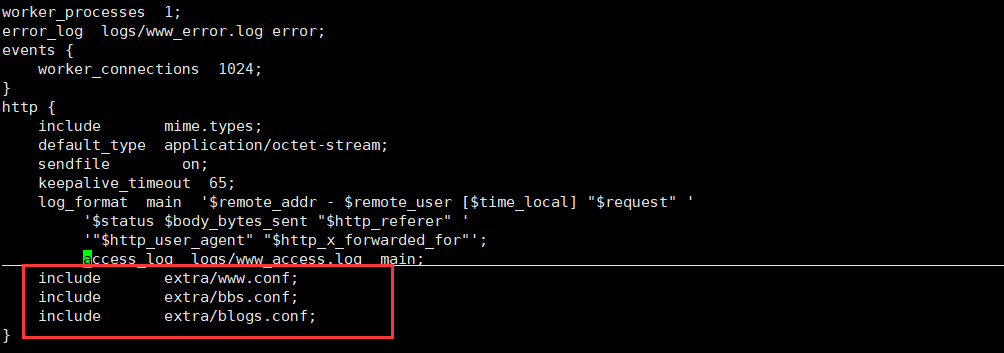
为了便于管理,每个站点的server模块可以分别编写在成子配置文件中,只需要在nginx.conf中 include进来就行了.................
04. 创建站点目录下首页文件:
例如:
for name in www bbs blog;do echo "10.0.0.7 $name.etiantian.org" >/application/nginx/html/$name/index.html;done

for name in www bbs blog;do cat /application/nginx/html/$name/index.html;done

10.0.0.7 www.etiantian.org

10.0.0.7 bbs.etiantian.org

10.0.0.7 blog.etiantian.org
05. 测试访问
浏览器访问测试:
注意:需要编写windows主机hosts文件,进行解析
命令行访问测试:
利用curl命令在linux系统中访问测试
注意:需要编写linux主机hosts文件,进行解析
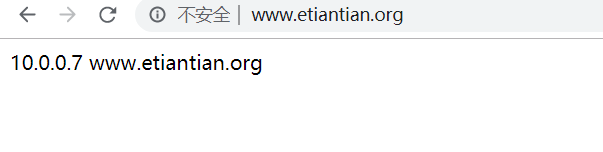
这样就部署成功啦!!!
二. nginx日志信息
1. 错误日志
   Syntax:    error_log file [level];

   Default:

   error_log logs/error.log error;

   Context:    main, http, mail, stream, server, location

   #error_log  logs/error.log;

   #error_log  logs/error.log  notice;

   #error_log  logs/error.log  info;

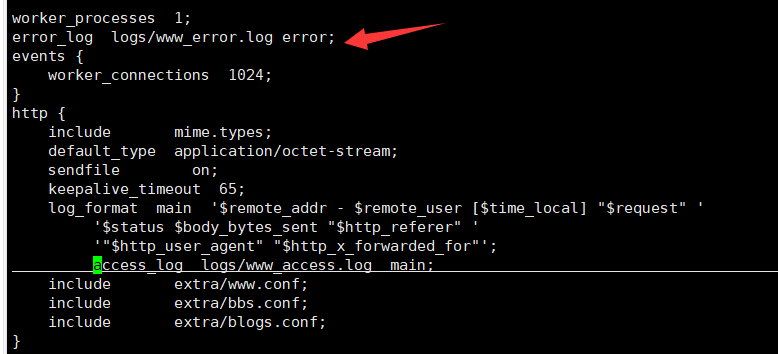
   vim nginx.conf

   error_log  /tmp/error.log error;
例如:
补充说明:
===========================================================================================
错误日志的,默认情况下不指定也没有关系,因为nginx很少有错误日志记录的。
但有时出现问题时,是有必要记录一下错误日志的,方便我们排查问题。
error_log 级别分为 debug, info, notice, warn, error, crit 默认为crit
该级别在日志名后边定义格式如下:
error_log /your/path/error.log crit;
crit 记录的日志最少,而debug记录的日志最多。
如果nginx遇到一些问题,比如502比较频繁出现,但是看默认的error_log并没有看到有意义的信息,
那么就可以调一下错误日志的级别,当你调成error级别时,错误日志记录的内容会更加丰富
===========================================================================================
2. 访问日志(重点关注)
   log_format  main  '$remote_addr - $remote_user [$time_local] "$request" '   ---

   定义日志信息要记录的内容格式

                      '$status $body_bytes_sent "$http_referer" '

                      '"$http_user_agent" "$http_x_forwarded_for"';

   access_log  logs/access.log  main;                    --- 调用定义格式信息,生成访问日

   志

   $remote_addr       10.0.0.1           --- 访问客户端的源地址信息

   $remote_user          -               --- 访问客户端认证用户信息   ???

   [$time_local]                         --- 显示访问时间

   $request        GET / HTTP/1.1        --- 请求行信息

   $status              304              --- 状态码信息(304状态码利用缓存显示页面信息)

   $body_bytes_sent                      --- 服务端响应客户端的数据大小信息

   $http_referer                         --- 记录链接到网站的域名信息  ???

   $http_user_agent                      --- 用户访问网站客户端软件标识信息

                                             用户利用客户端浏览器测试访问时,win10默认浏览器会有

   异常问

   $http_x_forwarded_for                 --- ???  反向代理

   官方链接:http://nginx.org/en/docs/http/ngx_http_log_module.html#access_log
3. 对日志我们要进行切割,防止一个日志文件过大
我们利用shell脚本就可简单实现
[root@web01 scripts]# vim cut_log.sh

#!/bin/bash

data_info=$(date +%F-%H:%M)

mv /application/nginx/logs/www_access.log /application/nginx/logs/access.log.$data_info

/application/nginx/sbin/nginx -s reload

# cut nginx log cron

* */6 * * * /bin/sh /server/scripts/cut_log.sh &>/dev/null    #自定义定时触发
linux篇之Nginx web服务器简单部署的更多相关文章
- 20步打造最安全的NGINX WEB服务器
Nginx 是一个轻量级的,高性能的Web服务器以及反向代理和邮箱(IMAP/POP3)代理服务器.它运行在UNIX,GNU /linux,BSD 各种版本,Mac OS X,Solaris和Wind ...
- 构建高效安全的Nginx Web服务器
一 为什么选择Nginx搭建Web服务器 Apache和Nginx是目前使用最火的两种Web服务器,Apache出现比Nginx早.Apache HTTP Server(简称Apache)是世界使用排 ...
- IIS 7 Web服务器上部署ASP.NET网站(转)
IIS 7 Web服务器上部署ASP.NET网站小记 摘自:http://swanmsg.blog.sohu.com/162111073.html 网上查找了很久关于iis7配置asp.net配置问题 ...
- nginx web服务器概念了解 配置
服务器 服务器 服务器是一种提供高效计算的机器,与普通的PC主机相比,具有可观的稳定性,高并发性,可扩展性. 互联网任何一个应用都是以服务器为基础设施的,没有服务器我们就无法访问网络上的任何内容,只能 ...
- .net core 使用IIS作为宿主Web服务器,部署常见问题
ASP.NET Core 使用IIS作为Web服务器,部署在IIS上 所做的步骤部署完毕后,启动网站 出现 An error occurred while starting the applicati ...
- Nginx web 服务器 安装篇
Nginx介绍: 静态web服务器有Nginx .Apache .lighttpd等 目前国内用的最常见的就是Nginx 和Apache 是一个开源的.支持高性能.高并发的www服务和代理服务软件,N ...
- nginx web服务器详解1(转)
原创作品,允许转载,转载时请务必以超链接形式标明文章 原始出处 .作者信息和本声明.否则将追究法律责任.http://freeloda.blog.51cto.com/2033581/1285332 大 ...
- Linux架构之Nginx Web基础1
第41章 Nginx Web基础入门 41.1 Nginx部署 41.1.1 Nginx的安装方式 源码编译 官方仓库 epel仓库 优点 规范 安装简单 安装简单 便于管理 配置易读 缺 ...
- 烂泥:Windows下安装与配置Nginx web服务器
本文由秀依林枫提供友情赞助,首发于烂泥行天下. 前几篇文章,我们使用nginx都是在linux环境下,今天由于工作的需要.需要在windows环境也使用nginx搭建web服务器. 下面记录下有关ng ...
随机推荐
- NODE升级到V12.X.X
Node.js 是一个基于Chrome JavaScript运行时的平台,可轻松构建快速,可扩展的网络应用程序.最新版本 node.js yum存储库 由其官方网站维护.使用本教程添加yum存储库,并 ...
- LeetCode--055--跳跃游戏(java)
给定一个非负整数数组,你最初位于数组的第一个位置. 数组中的每个元素代表你在该位置可以跳跃的最大长度. 判断你是否能够到达最后一个位置. 示例 1: 输入: [2,3,1,1,4] 输出: true ...
- threading包的例子和queue包的例子
参考:https://www.cnblogs.com/tkqasn/p/5700281.html 参考:https://www.cnblogs.com/tkqasn/p/5700281.html th ...
- Python3解leetcode Min Cost Climbing Stairs
问题描述: On a staircase, the i-th step has some non-negative cost cost[i]assigned (0 indexed). Once you ...
- Centos7防火墙和SELinux的开启和关闭
在虚拟机里面开启多个服务,对应多个端口,在防火墙开启的情况下,就要对外开放端口,这样客户端才能正常访问,但比较繁琐,关闭更直接点. 防火墙 临时关闭防火墙 systemctl stop firewal ...
- RSS(简易信息聚合)和jieba(第三方分词组件)
简易信息聚合(也叫聚合内容)是一种RSS基于XML标准,在互联网上被广泛采用的内容包装和投递协议.RSS(Really Simple Syndication)是一种描述和同步网站的内容格式,是使用最广 ...
- Curl命令、Elinks命令、lynx命令、Wget命令、lftp命令
一.Curl命令 语法 curl(选项)(参数) 选项 -a/--append 上传文件时,附加到目标文件 -A/--user-agent <string> 设置用户代理发送给服务器 -a ...
- eclipse 启动 tomcat 报错:Server mylocalhost was unable to start within 45 seconds
这个专门转载一篇博文也是为了讽刺一下自己二逼的程序员职业,哈哈. eclipse启动tomcat服务器报错:Server mylocalhost was unable to start within ...
- mysql错误:1093-You can’t specify target table for update in FROM clause的解决方法
update语句中包含的子查询的表和update的表为同一张表时,报错:1093-You can’t specify target table for update in FROM clause my ...
- nginx配置多个虚拟主机(mac)
1 . 安装 通过homebrew安装nginx,默认安装在:/usr/local/Cellar/nginx/版本号.配置文件在路径:/usr/local/etc/nginx ,默认配置文件ngin ...