
python3 requests库学习笔记(MOOC网)
奏:HTTP协议对资源的操作
方法说明:
GET 请求获取URL位置的资源
HEAD 请求获取URL位置资源的响应消息报告,即获得该资源的头部信息
POST 请求向URL位置的资源后附加新的数据
PUT 请求向URL位置存储一个资源,覆盖原URL位置的资源
PATCH 请求局部更新URL位置的资源,即改变该处资源的部分内容
DELETE 请求删除URL位置存储的资源
一、request库的主要方法:
requests.request() 构造一个请求,支撑以下各方法的基础方法
requests.get() 获取HTML网页的主要方法,对应于HTTP的GET
requests.head() 获取HTML网页头信息的方法,对应于HTTP的HEAD
requests.post() 向HTML网页提交POST请求的方法,对应于HTTP的POST
requests.put() 向HTML网页提交PUT请求的方法,对应于HTTP的PUT
requests.patch() 向HTML网页提交局部修改请求,对应于HTTP的PATCH
requests.delete() 向HTML页面提交删除请求,对应于HTTP的DELETE
1.最常用的方法:requests.get()
requests.get()的基本格式:
>>>requests.get(url,params=None,**kwargs)
参数解释:
url : 拟获取页面的url链接
比如:
url = "http://www.baidu.com"
params : url中的额外参数,字典或字节流格式,可选
params参数
实例:
>>> import requests

>>> url = "https://www.baidu.com"

>>> keyword = "Python"

>>> kv = {"wd":keyword}

>>> r = requests.get(url,params=kv)

>>> r.request.url

'https://www.baidu.com/?wd=Python'
**kwargs: 12个控制访问的参数
1)data : 字典、字节序列或文件对象,作为Request的内容
>>> kv = {'key1': 'value1', 'key2': 'value2'}

>>> r = requests.request('POST', 'http://python123.io/ws', data=kv)

>>> body = '主体内容'

>>> r = requests.request('POST', 'http://python123.io/ws', data=body)
data参数
2)json : JSON格式的数据,作为Request的内容
>>> kv = {'key1': 'value1'}

>>> r = requests.request('POST', 'http://python123.io/ws', json=kv)
json参数
3)headers : 字典,HTTP定制头
>>> hd = {'user‐agent': 'Chrome/10'}

>>> r = requests.request('POST', 'http://python123.io/ws', headers=hd)
head参数
应用:
User-agent信息的处理:
>>> r.request.headers

{'Connection': 'keep-alive', 'User-Agent': 'python-requests/2.18.4', 'Accept': '*/*', 'Accept-Encoding': 'gzip, deflate'}

>>> kv = {"user-agent":"Mozilla/5.0"}

>>> r = requests.get(url,headers = kv)

>>> r.request.headers

{'Connection': 'keep-alive', 'Accept': '*/*', 'Accept-Encoding': 'gzip, deflate', 'user-agent': 'Mozilla/5.0'}
4)cookies : 字典或CookieJar,Request中的cookie
5)auth : 元组,支持HTTP认证功能
6)files : 字典类型,传输文件
>>> fs = {'file': open('data.xls', 'rb')}

>>> r = requests.request('POST', 'http://python123.io/ws', files=fs)
file参数
>>> r = requests.request('GET', 'http://www.baidu.com', timeout=10)
timeout参数
8)proxies : 字典类型,设定访问代理服务器,可以增加登录认证
>>> pxs = { 'http': 'http://user:pass@10.10.10.1:1234'

'https': 'https://10.10.10.1:4321' }

>>> r = requests.request('GET', 'http://www.baidu.com', proxies=pxs)
proxies参数
9)allow_redirects : True/False,默认为True,重定向开关
10)stream : True/False,默认为True,获取内容立即下载开关
11)verify : True/False,默认为True,认证SSL证书开关
12)cert : 本地SSL证书路径
r = requests.get(url) #r用来接收一个包含服务器资源的Response对象
# requests库中的两个重要对象:response和request,Response对象包含服务器返回的所有信息,也包含请求的Request信息
requests对象的属性:
r.status_code HTTP请求的返回状态,200表示连接成功,404表示失败
r.text HTTP 响应内容的字符串形式,即,url对应的页面内容
r.encoding 从HTTP header中猜测的响应内容编码方式
r.apparent_encoding 从内容中分析出的响应内容编码方式(备选编码方式)
r.content HTTP 响应内容的二进制形式
r.encoding和r.apparent_encoding的区别:
r.encoding 从HTTP header中猜测的响应内容编码方式,如果header中不存在charset,则认为编码为ISO‐8859‐1
r.apparent_encoding 从内容中分析出的响应内容编码方式(备选编码方式)
>>> import requests
>>> url = "http://www.baidu.com"
>>> r = requests.get(url)
>>> r.status_code
200
>>> r.text
'<!DOCTYPE html>\r\n<!--STATUS OK--><html> <head><meta http-equiv=content-type content=text/html;charset=utf-8><meta http-equiv=X-UA-Compatible content=IE=Edge><meta content=always name=referrer><link rel=stylesheet type=text/css href=http://s1.bdstatic.com/r/www/cache/bdorz/baidu.min.css><title>ç\x99¾åº¦ä¸\x80ä¸\x8bï¼\x8cä½\xa0å°±ç\x9f¥é\x81\x93</title></head> <body link=#0000cc> <div id=wrapper> <div id=head> <div class=head_wrapper> <div class=s_form> <div class=s_form_wrapper> <div id=lg> <img hidefocus=true src=//www.baidu.com/img/bd_logo1.png width=270 height=129> </div> <form id=form name=f action=//www.baidu.com/s class=fm> <input type=hidden name=bdorz_come value=1> <input type=hidden name=ie value=utf-8> <input type=hidden name=f value=8> <input type=hidden name=rsv_bp value=1> <input type=hidden name=rsv_idx value=1> <input type=hidden name=tn value=baidu><span class="bg s_ipt_wr"><input id=kw name=wd class=s_ipt value maxlength=255 autocomplete=off autofocus></span><span class="bg s_btn_wr"><input type=submit id=su value=ç\x99¾åº¦ä¸\x80ä¸\x8b class="bg s_btn"></span> </form> </div> </div> <div id=u1> <a href=http://news.baidu.com name=tj_trnews class=mnav>æ\x96°é\x97»</a> <a href=http://www.hao123.com name=tj_trhao123 class=mnav>hao123</a> <a href=http://map.baidu.com name=tj_trmap class=mnav>å\x9c°å\x9b¾</a> <a href=http://v.baidu.com name=tj_trvideo class=mnav>è§\x86é¢\x91</a> <a href=http://tieba.baidu.com name=tj_trtieba class=mnav>è´´å\x90§</a> <noscript> <a href=http://www.baidu.com/bdorz/login.gif?login&tpl=mn&u=http%3A%2F%2Fwww.baidu.com%2f%3fbdorz_come%3d1 name=tj_login class=lb>ç\x99»å½\x95</a> </noscript> <script>document.write(\'<a href="http://www.baidu.com/bdorz/login.gif?login&tpl=mn&u=\'+ encodeURIComponent(window.location.href+ (window.location.search === "" ? "?" : "&")+ "bdorz_come=1")+ \'" name="tj_login" class="lb">ç\x99»å½\x95</a>\');</script> <a href=//www.baidu.com/more/ name=tj_briicon class=bri style="display: block;">æ\x9b´å¤\x9a产å\x93\x81</a> </div> </div> </div> <div id=ftCon> <div id=ftConw> <p id=lh> <a href=http://home.baidu.com>å\x85³äº\x8eç\x99¾åº¦</a> <a href=http://ir.baidu.com>About Baidu</a> </p> <p id=cp>©2017 Baidu <a href=http://www.baidu.com/duty/>使ç\x94¨ç\x99¾åº¦å\x89\x8då¿\x85读</a> <a href=http://jianyi.baidu.com/ class=cp-feedback>æ\x84\x8fè§\x81å\x8f\x8dé¦\x88</a> 京ICPè¯\x81030173å\x8f· <img src=//www.baidu.com/img/gs.gif> </p> </div> </div> </div> </body> </html>\r\n'
>>> r.encoding
'ISO-8859-1'
>>> r.apparent_encoding
'utf-8'
>>> r.encoding = r.apparent_encoding
>>> r.text
'<!DOCTYPE html>\r\n<!--STATUS OK--><html> <head><meta http-equiv=content-type content=text/html;charset=utf-8><meta http-equiv=X-UA-Compatible content=IE=Edge><meta content=always name=referrer><link rel=stylesheet type=text/css href=http://s1.bdstatic.com/r/www/cache/bdorz/baidu.min.css><title>百度一下,你就知道</title></head> <body link=#0000cc> <div id=wrapper> <div id=head> <div class=head_wrapper> <div class=s_form> <div class=s_form_wrapper> <div id=lg> <img hidefocus=true src=//www.baidu.com/img/bd_logo1.png width=270 height=129> </div> <form id=form name=f action=//www.baidu.com/s class=fm> <input type=hidden name=bdorz_come value=1> <input type=hidden name=ie value=utf-8> <input type=hidden name=f value=8> <input type=hidden name=rsv_bp value=1> <input type=hidden name=rsv_idx value=1> <input type=hidden name=tn value=baidu><span class="bg s_ipt_wr"><input id=kw name=wd class=s_ipt value maxlength=255 autocomplete=off autofocus></span><span class="bg s_btn_wr"><input type=submit id=su value=百度一下 class="bg s_btn"></span> </form> </div> </div> <div id=u1> <a href=http://news.baidu.com name=tj_trnews class=mnav>新闻</a> <a href=http://www.hao123.com name=tj_trhao123 class=mnav>hao123</a> <a href=http://map.baidu.com name=tj_trmap class=mnav>地图</a> <a href=http://v.baidu.com name=tj_trvideo class=mnav>视频</a> <a href=http://tieba.baidu.com name=tj_trtieba class=mnav>贴吧</a> <noscript> <a href=http://www.baidu.com/bdorz/login.gif?login&tpl=mn&u=http%3A%2F%2Fwww.baidu.com%2f%3fbdorz_come%3d1 name=tj_login class=lb>登录</a> </noscript> <script>document.write(\'<a href="http://www.baidu.com/bdorz/login.gif?login&tpl=mn&u=\'+ encodeURIComponent(window.location.href+ (window.location.search === "" ? "?" : "&")+ "bdorz_come=1")+ \'" name="tj_login" class="lb">登录</a>\');</script> <a href=//www.baidu.com/more/ name=tj_briicon class=bri style="display: block;">更多产品</a> </div> </div> </div> <div id=ftCon> <div id=ftConw> <p id=lh> <a href=http://home.baidu.com>关于百度</a> <a href=http://ir.baidu.com>About Baidu</a> </p> <p id=cp>©2017 Baidu <a href=http://www.baidu.com/duty/>使用百度前必读</a> <a href=http://jianyi.baidu.com/ class=cp-feedback>意见反馈</a> 京ICP证030173号 <img src=//www.baidu.com/img/gs.gif> </p> </div> </div> </div> </body> </html>\r\n'
>>> r.content
b'<!DOCTYPE html>\r\n<!--STATUS OK--><html> <head><meta http-equiv=content-type content=text/html;charset=utf-8><meta http-equiv=X-UA-Compatible content=IE=Edge><meta content=always name=referrer><link rel=stylesheet type=text/css href=http://s1.bdstatic.com/r/www/cache/bdorz/baidu.min.css><title>\xe7\x99\xbe\xe5\xba\xa6\xe4\xb8\x80\xe4\xb8\x8b\xef\xbc\x8c\xe4\xbd\xa0\xe5\xb0\xb1\xe7\x9f\xa5\xe9\x81\x93</title></head> <body link=#0000cc> <div id=wrapper> <div id=head> <div class=head_wrapper> <div class=s_form> <div class=s_form_wrapper> <div id=lg> <img hidefocus=true src=//www.baidu.com/img/bd_logo1.png width=270 height=129> </div> <form id=form name=f action=//www.baidu.com/s class=fm> <input type=hidden name=bdorz_come value=1> <input type=hidden name=ie value=utf-8> <input type=hidden name=f value=8> <input type=hidden name=rsv_bp value=1> <input type=hidden name=rsv_idx value=1> <input type=hidden name=tn value=baidu><span class="bg s_ipt_wr"><input id=kw name=wd class=s_ipt value maxlength=255 autocomplete=off autofocus></span><span class="bg s_btn_wr"><input type=submit id=su value=\xe7\x99\xbe\xe5\xba\xa6\xe4\xb8\x80\xe4\xb8\x8b class="bg s_btn"></span> </form> </div> </div> <div id=u1> <a href=http://news.baidu.com name=tj_trnews class=mnav>\xe6\x96\xb0\xe9\x97\xbb</a> <a href=http://www.hao123.com name=tj_trhao123 class=mnav>hao123</a> <a href=http://map.baidu.com name=tj_trmap class=mnav>\xe5\x9c\xb0\xe5\x9b\xbe</a> <a href=http://v.baidu.com name=tj_trvideo class=mnav>\xe8\xa7\x86\xe9\xa2\x91</a> <a href=http://tieba.baidu.com name=tj_trtieba class=mnav>\xe8\xb4\xb4\xe5\x90\xa7</a> <noscript> <a href=http://www.baidu.com/bdorz/login.gif?login&tpl=mn&u=http%3A%2F%2Fwww.baidu.com%2f%3fbdorz_come%3d1 name=tj_login class=lb>\xe7\x99\xbb\xe5\xbd\x95</a> </noscript> <script>document.write(\'<a href="http://www.baidu.com/bdorz/login.gif?login&tpl=mn&u=\'+ encodeURIComponent(window.location.href+ (window.location.search === "" ? "?" : "&")+ "bdorz_come=1")+ \'" name="tj_login" class="lb">\xe7\x99\xbb\xe5\xbd\x95</a>\');</script> <a href=//www.baidu.com/more/ name=tj_briicon class=bri style="display: block;">\xe6\x9b\xb4\xe5\xa4\x9a\xe4\xba\xa7\xe5\x93\x81</a> </div> </div> </div> <div id=ftCon> <div id=ftConw> <p id=lh> <a href=http://home.baidu.com>\xe5\x85\xb3\xe4\xba\x8e\xe7\x99\xbe\xe5\xba\xa6</a> <a href=http://ir.baidu.com>About Baidu</a> </p> <p id=cp>©2017 Baidu <a href=http://www.baidu.com/duty/>\xe4\xbd\xbf\xe7\x94\xa8\xe7\x99\xbe\xe5\xba\xa6\xe5\x89\x8d\xe5\xbf\x85\xe8\xaf\xbb</a> <a href=http://jianyi.baidu.com/ class=cp-feedback>\xe6\x84\x8f\xe8\xa7\x81\xe5\x8f\x8d\xe9\xa6\x88</a> \xe4\xba\xacICP\xe8\xaf\x81030173\xe5\x8f\xb7 <img src=//www.baidu.com/img/gs.gif> </p> </div> </div> </div> </body> </html>\r\n'
requests库的异常:
requests.ConnectionError 网络连接错误异常,如DNS查询失败、拒绝连接等
requests.HTTPError HTTP 错误异常
requests.URLRequired URL 缺失异常
requests.TooManyRedirects 超过最大重定向次数,产生重定向异常
requests.ConnectTimeout 连接远程服务器超时异常
requests.Timeout 请求URL超时,产生超时异常
处理:
r.raise_for_status() 如果不是200,产生异常requests.HTTPError
爬取网页的通用代码框架:
import requests

def getHTMLText(url):

    try:

        r = requests.get(url)

        r.rise_for_status()

        r.encoding = r.apparent_encoding

        return t.text

    except:

        return "异常"

if __name__ == '__main__':

    url = "http://www.baidu.com"

    print(getHTMLText)
2.head()方法
>>> import requests

>>> url = "http://www.baidu.com"

>>> r = requests.head(url)

>>> r.headers

{'Connection': 'Keep-Alive', 'Content-Type': 'text/html', 'Content-Encoding': 'gzip', 'Server': 'bfe/1.0.8.18', 'Pragma': 'no-cache', 'Last-Modified': 'Mon, 13 Jun 2016 02:50:08 GMT', 'Cache-Control': 'private, no-cache, no-store, proxy-revalidate, no-transform', 'Date': 'Sun, 15 Apr 2018 12:49:37 GMT'}
3.不常用的方法:post(),put()
二、文件保存的简单实例:
import requests

import os

url = "https://timgsa.baidu.com/timg?image&quality=80&size=b9999_10000&sec=1523808722531&di=9f6d8e5591397eaa2eaa2868b4e3bcec&imgtype=0&src=http%3A%2F%2Fup.enterdesk.com%2Fedpic_source%2Fca%2F6b%2F5f%2Fca6b5f366b3ea52aab975235096594e8.jpg"

root = "E:\\photos\\"

path = root + "photo1"+".jpg"

try:

    if not os.path.exists(root):

        os.mkdir(root)

        print("目录创建成功")

    if not os.path.exists(path):

        r = requests.get(url)

        with open(path,'wb') as f:

            f.write(r.content)

            f.close()

            print("文件保存成功")

    else:

        print("文件已存在")

except:

    print("爬取失败")
三、BeautifulSoup库
标签树:
<html>
<body>
<p class=“title”> … </p>
</body>
</html>
Beautiful Soup库是解析、遍历、维护“标签树”的功能库
bs4库将任何HTML输入都变成utf‐8编码
1.安装:pip install BeautifulSoup4
Beautiful Soup库解析器
soup = BeautifulSoup('<html>data</html>','html.parser')
解析器 使用方法 条件
bs4的HTML解析器 BeautifulSoup(mk,'html.parser') 安装bs4库
lxml的HTML解析器 BeautifulSoup(mk,'lxml') pip install lxml
lxml的XML解析器 BeautifulSoup(mk,'xml') pip install lxml
html5lib的解析器 BeautifulSoup(mk,'html5lib') pip install html5lib
BeautifulSoup类的基本元素
<p class=“title”> … </p>
基本元素说明
Tag 标签, 最基本的信息组织单元,分别用<>和</>标明开头和结尾
Name 标签的名字,<p>…</p>的名字是'p',格式:<tag>.name
Attributes 标签的属性,字典形式组织,格式:<tag>.attrs
NavigableString 标签内非属性字符串,<>…</>中字符串,格式:<tag>.string
Comment 标签内字符串的注释部分,一种特殊的Comment类型
import requests

from bs4 import BeautifulSoup

url = "https://python123.io/ws/demo.html"

r = requests.get(url)

demo = r.text

soup = BeautifulSoup(demo,"html.parser")

print(soup)

print("打印a标签:",soup.a)

print("a标签的名字是:",soup.a.name)

print("a标签的父标签的名字是:",soup.a.parent.name)

print("a标签的属性:",soup.a.attrs)

print("标签属性的类型:",type(soup.a.attrs))

print("a标签的属性的href的值:",soup.a.attrs["href"])

print("标签内非属性字符串:",soup.p.string)

soups = soup.prettify()  #.prettify()为HTML文本<>及其内容增加更加'\n'

print(soups)

执行结果:

<html><head><title>This is a python demo page</title></head>

<body>

<p class="title"><b>The demo python introduces several python courses.</b></p>

<p class="course">Python is a wonderful general-purpose programming language. You can learn Python from novice to professional by tracking the following courses:

<a class="py1" href="http://www.icourse163.org/course/BIT-268001" id="link1">Basic Python</a> and <a class="py2" href="http://www.icourse163.org/course/BIT-1001870001" id="link2">Advanced Python</a>.</p>

</body></html>

打印a标签: <a class="py1" href="http://www.icourse163.org/course/BIT-268001" id="link1">Basic Python</a>

a标签的名字是: a

a标签的父标签的名字是: p

a标签的属性: {'href': 'http://www.icourse163.org/course/BIT-268001', 'id': 'link1', 'class': ['py1']}

标签属性的类型: <class 'dict'>

a标签的属性的href的值: http://www.icourse163.org/course/BIT-268001

标签内非属性字符串: The demo python introduces several python courses.

<html>

 <head>

  <title>

   This is a python demo page

  </title>

 </head>

 <body>

  <p class="title">

   <b>

    The demo python introduces several python courses.

   </b>

  </p>

  <p class="course">

   Python is a wonderful general-purpose programming language. You can learn Python from novice to professional by tracking the following courses:

   <a class="py1" href="http://www.icourse163.org/course/BIT-268001" id="link1">

    Basic Python

   </a>

   and

   <a class="py2" href="http://www.icourse163.org/course/BIT-1001870001" id="link2">

    Advanced Python

   </a>

   .

  </p>

 </body>

</html>
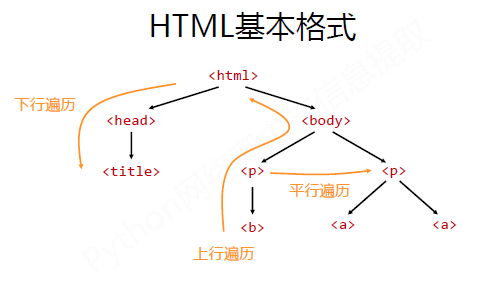
标签树的下行遍历
属性 说明
.contents 子节点的列表,将<tag>所有儿子节点存入列表
.children 子节点的迭代类型,与.contents类似,用于循环遍历儿子节点
.descendants 子孙节点的迭代类型,包含所有子孙节点,用于循环遍历
标签树的上行遍历
属性 说明
.parent 节点的父亲标签
.parents 节点先辈标签的迭代类型,用于循环遍历先辈节点
标签树的平行遍历
属性 说明
.next_sibling 返回按照HTML文本顺序的下一个平行节点标签
.previous_sibling 返回按照HTML文本顺序的上一个平行节点标签
.next_siblings 迭代类型,返回按照HTML文本顺序的后续所有平行节点标签
.previous_siblings 迭代类型,返回按照HTML文本顺序的前续所有平行节点标签
中国大学排名实例:
import requests

from bs4 import BeautifulSoup

import bs4

def getHTMLText(url):

    try:

        r = requests.get(url)

        r.raise_for_status()

        r.encoding = r.apparent_encoding

        return r.text

    except:

        return ""

def fillUnivList(ulist,html):

    soup = BeautifulSoup(html,"html.parser")

    for tr in soup.find('tbody').children:

        if isinstance(tr,bs4.element.Tag):  #检测tr标签的类型

            tds = tr('td')

            ulist.append([tds[0].string,tds[1].string,tds[3].string])

def printUnivList(ulist,num):

    print("{0:^15}\t{1:^15}\t{2:^15}".format("排名","学校","分数",chr(12288)))

    for i in range(num):

        u = ulist[i]

        print("{0:^15}\t{1:{3}^15}\t{2:^15}".format(u[0],u[1],u[2],chr(12288)))

def main():

    ulist = []

    url = "http://www.zuihaodaxue.com/zuihaodaxuepaiming2018.html"

    html = getHTMLText(url)

    fillUnivList(ulist,html)

    printUnivList(ulist,20)

main()
四、正则表达式
优势:简洁-“一行胜千言”
正则表达式的语法:
常用操作符:
操作符 说明 实例
. 表示任何单个字符
[ ] 字符集,对单个字符给出取值范围 [abc]表示a、b、c,[a‐z]表示a到z单个字符
[^ ] 非字符集,对单个字符给出排除范围 [^abc]表示非a或b或c的单个字符
* 前一个字符0次或无限次扩展 abc* 表示ab、abc、abcc、abccc等
+ 前一个字符1次或无限次扩展 abc+ 表示abc、abcc、abccc等
? 前一个字符0次或1次扩展 abc? 表示ab、abc
| 左右表达式任意一个 abc|def 表示abc、def
{m} 扩展前一个字符m至n次(含n) ab{2}c表示abbc
{m,n} 扩展前一个字符m至n次(含n) ab{1,2}c表示abc、abbc
^ 匹配字符串开头 ^abc表示abc且在一个字符串的开头
$ 匹配字符串结尾 abc$表示abc且在一个字符串的结尾
( ) 分组标记,内部只能使用| 操作符 (abc)表示abc,(abc|def)表示abc、def
\d 数字,等价于[0‐9]
\w 单词字符,等价于[A‐Za‐z0‐9_]
经典正则表达式:
^[A‐Za‐z]+$ 字符串
^[A‐Za‐z0‐9]+$ 字母加数字字符串
^‐?\d+$ 整数
^[0‐9]*[1‐9][0‐9]*$ 正整数
[1‐9]\d{5} 邮政编码
[\u4e00‐\u9fa5] 中文字符
\d{3}‐\d{8}|\d{4}‐\d{7} 电话号码
精确匹配IP地址:
(([1‐9]?\d|1\d{2}|2[0‐4]\d|25[0‐5]).){3}([1‐9]?\d|1\d{2}|2[0‐4]\d|25[0‐5])
python3 requests库学习笔记(MOOC网)的更多相关文章
- python requests库学习笔记(上)
尊重博客园原创精神,请勿转载! requests库官方使用手册地址:http://www.python-requests.org/en/master/:中文使用手册地址:http://cn.pytho ...
- python 之Requests库学习笔记
1. Requests库安装 Windows平台安装说明: 直接以管理员身份打开cmd运行界面,使用pip管理工具进行requests库的安装. 具体安装命令如下: >pip instal ...
- python requests库学习笔记(下)
1.请求异常处理 请求异常类型: 请求超时处理(timeout): 实现代码: import requestsfrom requests import exceptions #引入exc ...
- Python Requests 库学习笔记
概览 实例引入 import requests response = requests.get('https://www.baidu.com/') print(type(response)) prin ...
- 【python 】Requests 库学习笔记
概览 实例引入 import requests response = requests.get('https://www.baidu.com/') print(type(response)) prin ...
- numpy, matplotlib库学习笔记
Numpy库学习笔记: 1.array() 创建数组或者转化数组 例如,把列表转化为数组 >>>Np.array([1,2,3,4,5]) Array([1,2,3,4,5]) ...
- python3+requests库框架设计01-自动化测试框架需要什么?
什么是自动化测试框架 关于自动化测试框架的定义有很多,在我大致理解下就是把能实现不同功能的软件组合在一起,实现特定的目的,这就是一个简单的自动化测试框架. 接口自动化测试框架核心无非是选择 一个用来编 ...
- muduo网络库学习笔记(五) 链接器Connector与监听器Acceptor
目录 muduo网络库学习笔记(五) 链接器Connector与监听器Acceptor Connector 系统函数connect 处理非阻塞connect的步骤: Connetor时序图 Accep ...
- muduo网络库学习笔记(四) 通过eventfd实现的事件通知机制
目录 muduo网络库学习笔记(四) 通过eventfd实现的事件通知机制 eventfd的使用 eventfd系统函数 使用示例 EventLoop对eventfd的封装 工作时序 runInLoo ...
随机推荐
- es5和es6中的this指向问题
const test ={ id:2, a:function(){ var a_this=this; setTimeout(function(){ console.log('a:',this,a_th ...
- ahocorasick使用
一.作用 字符串匹配,比如现在有个大的列表,客户输入一句话,如何根据客户输入的一句话,从大列表中匹配出字符串交集 具体请详细查阅 二.示例 比如我们有一个wordlist列表,长度很长,包含43430 ...
- 初学Java 从控制台读取输入
代码 import java.util.Scanner; public class ComputeArea { public static void main(String[] args) { Sca ...
- 在linux终端中清空文件
cat /dev/null > file_name vim file_name 把文件的前10行拷贝到新的文件中 head -n10 file_name1 > file_name2
- Python格式输出汇总
print ('%10s'%('test')) print ('{:<10}'.format('test'))#left-aligned print ('{:>10}'.format('t ...
- C#基础提升系列——C#异步编程
C#异步编程 关于异步的概述,这里引用MSDN的一段文字: 异步编程是一项关键技术,使得能够简单处理多个核心上的阻塞 I/O 和并发操作. 如果需要 I/O 绑定(例如从网络请求数据或访问数据库),则 ...
- js this 指向
JavaScript 作为一种脚本语言身份的存在,因此被很多人认为是简单易学的.然而情况恰恰相反,JavaScript 支持函数式编程.闭包.基于原型的继承等高级功能.由于其运行期绑定的特性,Java ...
- Junit单元测试之MockMvc
在测试restful风格的接口时,springmvc为我们提供了MockMVC架构,使用起来也很方便. 下面写个笔记,便于以后使用时参考备用. 一 场景 1 . 提供一个restful风格的接口 im ...
- Asynchronous C# server[转]
It hasn't been thoroughly tested, but seems to work OK. This should scale pretty nicely as well. Ori ...
- Python 进阶_模块 & 包
目录 目录 模块的搜索路径和路径搜索 搜索路径 命名空间和变量作用域的比较 变量名的查找覆盖 导入模块 import 语句 from-import 语句 扩展的 import 语句 as 自动载入模块 ...