
Android开发 SeekBar开发记录
前言
开发记录博客不是讲解使用博客,更多的是功能与各个点子的记录
基本使用
 <SeekBar

        android:layout_width="match_parent"

        android:layout_height="wrap_content"

      android:max="200"

        android:maxHeight="3dp"

        android:minHeight="3dp"

        android:progressDrawable="@drawable/seekbar_bg"

        android:thumb="@drawable/seekbar_thumb_bg"/>
注意,如果你发现进度的高度或者宽度设置后依然很大,可以尝试使用maxHeight与minHeight 来调整
xml属性:
- android:max="200" 设置进度最大值
- android:progressDrawable="@drawable/seekbar_bg" 设置进度条的背景
- android:thumb="@drawable/seekbar_thumb_bg" 设置进度条上圆点的背景
- android:progress="10" 设置当前进度值
- android:min="0" 设置最小值
- android:splitTrack="false" 设置滑块圆点是否背景透明,在用图片设置thumb后,thumb的四周可能会出现正方形的白色背景。设置此属性可以取消这个背景
- android:padding=“0dp” 请注意,SeekBar 实际上是有内边距的,如果你需要填充满效果就需要设置成0dp。另外如果你需要圆点比今天背景大,也是调整这个内边距
Api:
- setProgress(int value) 设置滑块的位置
- setMax(int value) 设置进度条的最大长度
- setOnSeekBarChangeListener(OnSeekBarChangeListener l)这个主要是监听进度改变 里面包含3个回调方法: onProgressChanged进度条变化 onStartTrackingTouch(SeekBar seekBar) 监听开始拖动滚动条时的操作 onStopTrackingTouch(SeekBar seekBar) 监听停止拖动滚动条的操作
- setSecondaryProgress(int secondaryProgress) 设置缓冲的进度
- setProgressDrawable(Drawable d) 在代码上设置进度条背景,请注意,这里可以直接设置GradientDrawable或者Drawable。但是,设置后只会成为背景。如果需要有进度背景那就需要导入LayerDrawable。
进度条背景xml
seekbar_bg.xml
<?xml version="1.0" encoding="utf-8"?>

<layer-list xmlns:android="http://schemas.android.com/apk/res/android">

    <item android:id="@android:id/background">

        <shape>

            <solid android:color="#ff51495e"/>

        </shape>

    </item>

    <item android:id="@android:id/secondaryProgress">

        <clip>

            <shape>

                <solid android:color="#f9062a"/>

            </shape>

        </clip>

    </item>

    <item android:id="@android:id/progress">

        <clip>

            <shape>

                <solid android:color="#2db334"/>

            </shape>

        </clip>

    </item>

</layer-list>
根据属性解释一下3个背景的对应功能,原则上如果你不需要显示预加载的功能,可以将@android:id/secondaryProgress 设置为透明,或者不写
android:id="@android:id/background" 是没有如何拖动或者设置的背景,请注意!这个属性下面是没有用<clip>包裹的,如果不小心包裹了会出现没有背景的bug
android:id="@android:id/secondaryProgress" 是次级进度背景,类似你在看视频的时候,视频的进度条会有预加载的进度. 请注意!这个属性下面是用<clip>包裹的,如果没有包裹<clip>就会出现进度条没有颜色的bug
android:id="@android:id/progress"是主进度背景,就是你看视频的时候当前看到哪里的进度条背景. 请注意!这个属性下面是用<clip>包裹的,如果没有包裹<clip>就会出现进度条没有颜色的bug
另外,进度条背景还支持设置伸缩方向,横竖方向与自定义矢量图,可以参考如下设置:
    <item android:id="@android:id/progress">

        <clip android:drawable="@drawable/ic_curtain"

            android:gravity="right"

            android:clipOrientation="horizontal">

        </clip>

    </item>
进度条的圆点背景
seekbar_thumb_bg.xml
<selector xmlns:android="http://schemas.android.com/apk/res/android">

    <!--获取焦点和没有按下的时候-->

    <item android:drawable="@drawable/seekbar_thumb_normal" android:state_focused="true" android:state_pressed="false"/>

    <!--获取焦点但按下的时候-->

    <item android:drawable="@drawable/seekbar_thumb_pressed" android:state_focused="true" android:state_pressed="true"/>

    <!--没有获取焦点按下的时候-->

    <item android:drawable="@drawable/seekbar_thumb_pressed" android:state_focused="false" android:state_pressed="true"/>

    <!--默认的时候-->

    <item android:drawable="@drawable/seekbar_thumb_normal"/>

</selector>
在代码上设置的监听
mVideoSeekbar.setOnSeekBarChangeListener(new SeekBar.OnSeekBarChangeListener() {

            @Override

            public void onProgressChanged(SeekBar seekBar, int progress, boolean fromUser) {

         //进度变化回调

         //fromUser 表示改变这个进度的这个操作来自用户,这个布尔值可以区分是代码上改变的进度还是,用户操作后改变的进度

            }

            @Override

            public void onStartTrackingTouch(SeekBar seekBar) {

          //开始触摸移动进度条

            }

            @Override

            public void onStopTrackingTouch(SeekBar seekBar) {

          //停止触摸移动进度条

            }

        });
点子:将进度条竖立起来实现音量调节控件
效果图:
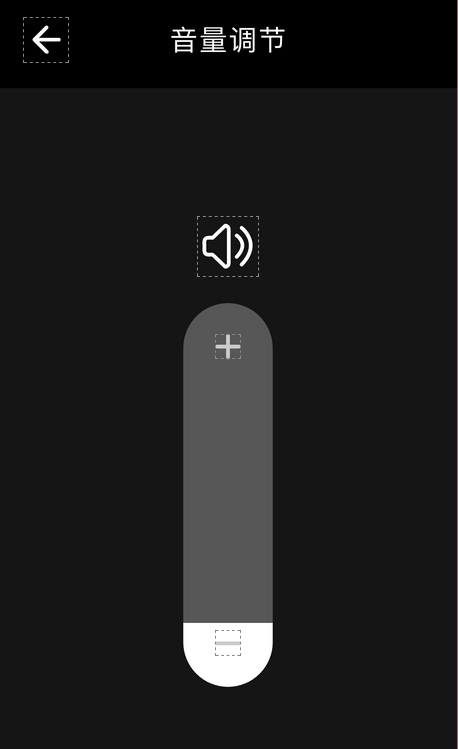
activity布局
<?xml version="1.0" encoding="utf-8"?>

<androidx.constraintlayout.widget.ConstraintLayout

    xmlns:android="http://schemas.android.com/apk/res/android"

    xmlns:app="http://schemas.android.com/apk/res-auto"

    xmlns:tools="http://schemas.android.com/tools"

    android:layout_width="match_parent"

    android:layout_height="match_parent"

    android:background="@color/color_black_1"

    tools:context=".function.setting.system.view.SetScreenTimeoutActivity">

    <TextView

        android:id="@+id/title"

        android:layout_width="match_parent"

        android:layout_height="76dp"

        android:text="@string/off_screen_time"

        android:textColor="@color/ColorWhite"

        android:textSize="22sp"

        android:gravity="center"

        android:background="@color/black"

        app:layout_constraintTop_toTopOf="parent"

        app:layout_constraintLeft_toLeftOf="parent"

        app:layout_constraintRight_toRightOf="parent"/>

    <ImageView

        android:id="@+id/back"

        android:layout_width="wrap_content"

        android:layout_height="0dp"

        android:src="@mipmap/img_back_arrow"

        android:paddingLeft="20dp"

        app:layout_constraintTop_toTopOf="@id/title"

        app:layout_constraintBottom_toBottomOf="@id/title"

        app:layout_constraintLeft_toLeftOf="parent"/>

    <ImageView

        android:id="@+id/icon"

        android:layout_width="wrap_content"

        android:layout_height="wrap_content"

        android:layout_marginTop="100dp"

        android:src="@drawable/ic_screen_timeout"

        app:layout_constraintTop_toBottomOf="@id/title"

        app:layout_constraintLeft_toLeftOf="parent"

        app:layout_constraintRight_toRightOf="parent"/>

    <SeekBar

        android:id="@+id/seek_bar"

        android:layout_width="300dp"

        android:layout_height="70dp"

        android:rotationX="0.5"

        android:rotationY="0.5"

        android:rotation="270"

        android:thumb="@null"

        android:layout_marginTop="135dp"

        android:progressDrawable="@drawable/bg_seekbar"

        android:max="6"

        app:layout_constraintTop_toBottomOf="@id/icon"

        app:layout_constraintLeft_toLeftOf="parent"

        app:layout_constraintRight_toRightOf="parent"/>

    <ImageView

        android:id="@+id/add_icon"

        android:layout_width="wrap_content"

        android:layout_height="wrap_content"

        android:src="@drawable/ic_add"

        android:layout_marginTop="55dp"

        app:layout_constraintLeft_toLeftOf="@id/seek_bar"

        app:layout_constraintRight_toRightOf="@id/seek_bar"

        app:layout_constraintTop_toBottomOf="@id/icon"/>

    <ImageView

        android:id="@+id/reduce_icon"

        android:layout_width="wrap_content"

        android:layout_height="wrap_content"

        android:src="@drawable/ic_reduce"

        android:layout_marginTop="195dp"

        app:layout_constraintTop_toBottomOf="@id/add_icon"

        app:layout_constraintLeft_toLeftOf="parent"

        app:layout_constraintRight_toRightOf="parent"/>

    <TextView

        android:id="@+id/current_select_time"

        android:layout_width="wrap_content"

        android:layout_height="wrap_content"

        android:layout_marginTop="340dp"

        android:textSize="22sp"

        android:textColor="@color/ColorWhite"

        app:layout_constraintTop_toBottomOf="@id/icon"

        app:layout_constraintLeft_toLeftOf="parent"

        app:layout_constraintRight_toRightOf="parent"/>

</androidx.constraintlayout.widget.ConstraintLayout>
这样里有一个需要注意的点,就是高度和宽度其实是互换的关系了.
进度背景
bg_seekbar.xml
<?xml version="1.0" encoding="utf-8"?>

<layer-list xmlns:android="http://schemas.android.com/apk/res/android">

    <item android:id="@android:id/background">

        <shape android:shape="rectangle">

            <size android:width="300dp" android:height="70dp"/>

            <solid android:color="#575757"/>

            <corners android:radius="88dp"/>

        </shape>

    </item>

    <item android:id="@android:id/secondaryProgress">

        <clip>

            <shape>

                <solid android:color="#575757"/>

            </shape>

        </clip>

    </item>

    <item android:id="@android:id/progress">

        <clip>

            <shape android:shape="rectangle">

                <size android:width="300dp" android:height="70dp"/>

                <solid android:color="#FFFFFF"/>

                <corners android:radius="88dp"/>

            </shape>

        </clip>

    </item>

</layer-list>
点子:实现一个多色阶渐变进度条(颜色取值进度条)
颜色取值的部分不说明,这个可以根据progress的位置来自定义取颜色值,这里重点说明的是怎么实现多色阶的渐变的背景。
效果图:

代码:
说明下为什么用代码实现,因为xml的shape属性根本不支持这么多颜色的渐变,在xml上的shape的gradient属性只支持三色阶渐变。当然,如果你直接放矢量图作为渐变色背景,那就不需要参考下面代码了。但是渐变色背景不能是位图,只能是矢量图。
如果你不太了解GradientDrawable,可以参考我这篇博客:https://www.cnblogs.com/guanxinjing/p/11142599.html
        int[] colors = {Color.parseColor("#FF0000")

                , Color.parseColor("#FF00FF")

                , Color.parseColor("#0000FF")

                , Color.parseColor("#00FFFF")

                , Color.parseColor("#00FF00")

                , Color.parseColor("#FFFF00")

                , Color.parseColor("#FF0000")};

        GradientDrawable gradientDrawable = new GradientDrawable();

        gradientDrawable.setShape(GradientDrawable.RECTANGLE);

        gradientDrawable.setColors(colors); //添加颜色组

        gradientDrawable.setCornerRadius(UnitConversionUtil.dip2px(getContext(), 10));

        gradientDrawable.setOrientation(GradientDrawable.Orientation.LEFT_RIGHT);//设置渐变方向

        gradientDrawable.setGradientType(GradientDrawable.LINEAR_GRADIENT);//设置线性渐变

        gradientDrawable.setDither(true);

        Drawable[] drawables = {gradientDrawable};

        LayerDrawable layerDrawable = new LayerDrawable(drawables);

        layerDrawable.setId(0, android.R.id.background);

        mColorSeekBar.setProgressDrawable(layerDrawable);
End
Android开发 SeekBar开发记录的更多相关文章
- Android开发 SeekBar(拖动条)的使用
SeekBar是Progress的子类,Progress主要用来显示进度,但是不能和用户互动,而SeekBar则可以供用户进行拖动改变进度值 实现拖动进度条并显示在文本中: <?xml vers ...
- Basic4android:多功能的Android应用软件快速开发平台
Basic4android 是目前最简单.最强大的Android平台快速应用开发工具. ( "Basic4android is the simplest and most powerful ...
- Android 音视频开发学习思路
Android 音视频开发这块目前的确没有比较系统的教程或者书籍,网上的博客文章也都是比较零散的.只能通过一点点的学习和积累把这块的知识串联积累起来. 初级入门篇: Android 音视频开发(一) ...
- 使用百度地图API进行Android地图应用开发(Eclipse)
随着基于位置的服务的兴起,地图类App呈现爆发趋势.随着而来的是地图供应商开放大量的API.供开发人员开发基于PC或者移动端的应用程序. 如今我们研究使用百度地图SDK进行Android项目的开发. ...
- Kotlin 编程语言成为其 Android 应用程序开发人员的首选语言
今年 5 月,谷歌在 I/O 大会上宣布,Kotlin 编程语言成为其 Android 应用程序开发人员的首选语言. Kotlin 是一种面向现代多平台应用程序的编程语言,成为谷歌开发 Android ...
- 【Android】Android Studio NDK 开发
Android Studio NDK 开发 记录在Android Studio中NDK简单开发的步骤 用到的Android Studio版本为3.5. 配置NDK 下载NDK 一般在SDK下已经有自带 ...
- Android应用安全开发之源码安全
Android应用安全开发之源码安全 gh0stbo · 2016/01/21 10:24 0x00 简介 Android apk很容易通过逆向工程进行反编译,从而是其代码完全暴露给攻击者,使apk面 ...
- Android 音视频开发(一):PCM 格式音频的播放与采集
什么是 PCM 格式 声音从模拟信号转化为数字信号的技术,经过采样.量化.编码三个过程将模拟信号数字化. 采样 顾名思义,对模拟信号采集样本,该过程是从时间上对信号进行数字化,例如每秒采集 44100 ...
- Android音视频开发(1):H264 基本原理
前言 H264 视频压缩算法现在无疑是所有视频压缩技术中使用最广泛,最流行的.随着 x264/openh264 以及 ffmpeg 等开源库的推出,大多数使用者无需再对H264的细节做过多的研究,这大 ...
随机推荐
- Module not found: Error: Can't resolve "xxx" in "xxx"
报错信息 ERROR in multi ./src/index.js ./dist/bundle.js Module not found: Error: Can't resolve './dist/b ...
- 入门 Webpack,看这篇就够
写在前面的话 阅读本文之前,先看下面这个webpack的配置文件,如果每一项你都懂,那本文能带给你的收获也许就比较有限,你可以快速浏览或直接跳过:如果你和十天前的我一样,对很多选项存在着疑惑,那花一段 ...
- docker学习---搭建Docker LAMP环境
1.环境 系统版本:CentOS Linux release 7.4.1708 docker版本:docker-ce-18.09 主机IP:192.168.121.121 2.载入MySQL和PHP镜 ...
- H5在js中向指定的元素添加样式
今天在做一个按钮的功能控制,点击之后,要根据判断条件,修改按钮的样式,然后就发现了一个巨好用的方法, <button type="button" id="btn_A ...
- Mycat搭建负载均衡,读写分离的Mysql集群
Mycat搭建负载均衡,读写分离的Mysql集群 准备环境 1.mysql-5.7.24-linux-glibc2.12-x86_64.tar.gz 2.Mycat-server-1.6.7.4-te ...
- PKUSC订正
Day1 T2:最大前缀和 枚举答案集合(不直接枚举答案数,相当于状态的离散化),这个集合成为答案当且仅当存在方案使得答案集合的排列后缀和>=0(如果<0就可以去掉显然更优),答案补集的前 ...
- 28. string类中方法练习
1. 自己写trim方法 public class Demo3 { public static void main(String[] args) { System.out.println(myTrim ...
- Redis缓存数据库常见操作
Jedis的最为常见的操作.主要包括常用的列表(list).集合(set).有序集合(sorted set).哈希表(hash)等数据结构,以及其他特性支持. 参考资料:http://hello-ni ...
- NX二次开发-UFUN读取工程图注释UF_DRF_ask_text_data
1 NX11+VS2013 2 3 4 #include <uf.h> 5 #include <uf_ui.h> 6 #include <uf_drf.h> 7 8 ...
- jquery判断对象是undifined,判断对象是null
判断对象是undifined: var aaa = undefined; if (typeof(aaa) == "undefined") { ... } typeof 返回的是字符 ...