
Window sevice +OWIN+webapi
webapi正常都托管在iis上,这里引入owin,将其托管在window服务上。
第一步:创建一个服务,这里就不多描述。
第二步:引入OWIN
2.1引入bll
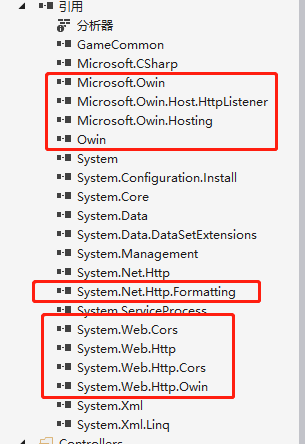
2.2加入api路由配置
    public class Startup

    {

        public void Configuration(IAppBuilder appBuilder)

        {

            HttpConfiguration config = new HttpConfiguration();

            config.MapHttpAttributeRoutes();

            config.Routes.MapHttpRoute(

                name: "DefaultApi",

                routeTemplate: "api/{controller}/{id}",

                defaults: new { id = RouteParameter.Optional }

            );

            //添加允许跨域

            var CorsConfig = new EnableCorsAttribute(origins: "*", headers: "*", methods: "*")

            {

                PreflightMaxAge = ,

                SupportsCredentials = true

            };

            config.EnableCors(CorsConfig);

            appBuilder.UseWebApi(config);

        }

    }
2.3监听ip和端口
        protected override void OnStart(string[] args)

        {

            _server = WebApp.Start<Startup>(url: "http://192.168.200.84:2000/");

            Console.WriteLine("Service start success...");

        }
第三步:加入webapi接口
namespace WebSocketService.Controllers

{

    public class HomeController : HomeControllerBase

    {

    }

}
基类:
namespace GameCommon.Controllers

{

    public class HomeControllerBase : ApiController

    {

        [HttpGet]

        public object Get()

        {

            return new { Age=,Name="Holle world"};

        }

        [HttpPost]

        public object Post()

        {

            return new { Age = , Name = "Holle world" };

        }

    }

}
我这里将接口单独提取了一个DLL文件来处理。
项目结构:
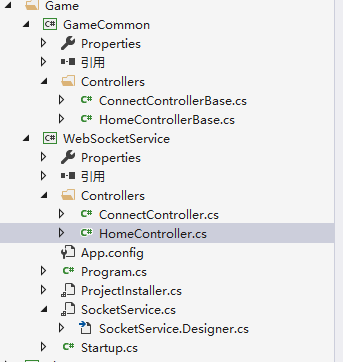
另外这里再贴上webSocket的代码:
using GameCommon.Controllers;

using System;

using System.Collections.Generic;

using System.Linq;

using System.Text;

using System.Threading.Tasks;

namespace WebSocketService.Controllers

{

    public class ConnectController:ConnectControllerBase

    {

    }

}
基类:
using Microsoft.Owin;

using System;

using System.Collections.Generic;

using System.Linq;

using System.Net;

using System.Net.Http;

using System.Net.WebSockets;

using System.Text;

using System.Threading;

using System.Threading.Tasks;

using System.Web.Http;

namespace GameCommon.Controllers

{

    using WebSocketAccept = System.Action<System.Collections.Generic.IDictionary<string, object>,System.Func<

        System.Collections.Generic.IDictionary<string, object>, System.Threading.Tasks.Task>>;

    public class ConnectControllerBase : ApiController

    {

        [HttpGet]

        public HttpResponseMessage Connect()

        {

            try

            {

                if (Request.Method != HttpMethod.Get)

                {

                    return new HttpResponseMessage(HttpStatusCode.NotFound);

                }

                IOwinContext owinContext = Request.GetOwinContext();

                WebSocketAccept acceptToken = owinContext.Get<WebSocketAccept>("websocket.Accept");

                if (acceptToken != null)

                {

                    acceptToken(null, ProcessSocketConnection);

                }

                else

                {

                    return new HttpResponseMessage(HttpStatusCode.BadRequest);

                }

                return new HttpResponseMessage(HttpStatusCode.SwitchingProtocols);

            }

            catch (Exception ex)

            {

                Console.WriteLine(ex.Message);

                return null;

            }

        }

        public async Task ProcessSocketConnection(IDictionary<string, object> wsEnv)

        {

            WebSocket wSocket = ((HttpListenerWebSocketContext)wsEnv["System.Net.WebSockets.WebSocketContext"]).WebSocket;

            while (true)

            {

                ArraySegment<byte> buffer = new ArraySegment<byte>(new byte[]);

                WebSocketReceiveResult receivedResult;

                receivedResult = await wSocket.ReceiveAsync(buffer, CancellationToken.None);

                if (receivedResult.MessageType == WebSocketMessageType.Close)

                {

                    await wSocket.CloseAsync(WebSocketCloseStatus.Empty, string.Empty, CancellationToken.None);

                    break;

                }

                if (wSocket.State == WebSocketState.Open)

                {

                    string receivedJson = Encoding.UTF8.GetString(buffer.Array, , receivedResult.Count);

                }

            }

        }

    }

}
Window sevice +OWIN+webapi的更多相关文章
- ASP.NET Linux部署(2) - MS Owin + WebApi + Mono + Jexus
ASP.NET Linux部署(2) - MS Owin + WebApi + Mono + Jexus 本文承接我的上一篇博文: ASP.NET 5 Linux部署,那篇文章主要是针对最新的ASP. ...
- (转)基于OWIN WebAPI 使用OAuth授权服务【客户端模式(Client Credentials Grant)】
适应范围 采用Client Credentials方式,即应用公钥.密钥方式获取Access Token,适用于任何类型应用,但通过它所获取的Access Token只能用于访问与用户无关的Open ...
- 基于OWIN WebAPI 使用OAuth授权服务【客户端验证授权(Resource Owner Password Credentials Grant)】
适用范围 前面介绍了Client Credentials Grant ,只适合客户端的模式来使用,不涉及用户相关.而Resource Owner Password Credentials Grant模 ...
- 基于OWIN WebAPI 使用OAuth授权服务【客户端模式(Client Credentials Grant)】
适应范围 采用Client Credentials方式,即应用公钥.密钥方式获取Access Token,适用于任何类型应用,但通过它所获取的Access Token只能用于访问与用户无关的Open ...
- 【干货】基于Owin WebApi 使用OAuth2进行客户端授权服务
前言:采用Client Credentials方式,即密钥key/password,场景一般是分为客户端限制必须有权限才能使用的模块,这和微信公众号开放平台很类似. 让用户通过客户端去获取自己的tok ...
- Owin WebAPI上传文件
Owin是微软出了几年的东东了,一直没时间学习.大概了解了下,是一个脱离IIS环境,快速搭建WebAPI服务的东西. 刚好想尝试下尽量脱离IIS创建简单快捷配置的项目,就是用了Nginx+Owin的模 ...
- 转:winform_webApiSelfHost及 OWIN WebAPI Service
winform_webApiSelfHost 窗本构造函数中添加以下代码: var baseAddress = ConfigurationManager.AppSettings["baseA ...
- Owin + WebApi + OAuth2 搭建授权模式(授权码模式 Part I)
绪 最近想要整理自己代码封装成库,也十分想把自己的设计思路贴出来让大家指正,奈何时间真的不随人意. 想要使用 OWIN 做中间件服务,该服务中包含 管线.授权 两部分.于是决定使用 webapi .O ...
- 基于OWIN WebAPI 使用OAUTH2授权服务【授权码模式(Authorization Code)】
之前已经简单实现了OAUTH2的授权码模式(Authorization Code),但是基于JAVA的,今天花了点时间调试了OWIN的实现,基本就把基于OWIN的OAUHT2的四种模式实现完了.官方推 ...
随机推荐
- UVA 1525 Falling Leaves
题目链接:https://vjudge.net/problem/UVA-1525 题目链接:https://vjudge.net/problem/POJ-1577 题目大意 略. 分析 建树,然后先序 ...
- FreeBSD_11-系统管理——{Part_a-bhyve}
;; 创建 vm: #!/usr/bin/env zsh bridgeIF=bridge0 laggIF=lagg0 tapIF=tap0 phyIF_0=re0 phyIF_1=em0 isoPat ...
- this和super差异
<三> this和super差异 1)super(参数):调用基类中的某一个构造函数(应该为构造函数中的第一条语句) 2)this(参数):调用本类中另一种形成的构造函数(应该为构造函数中 ...
- 前端(二)—— CSS的引入方式、长度与颜色单位、常用样式、选择器
CSS的引入方式.长度与颜色单位.常用样式.选择器 一.CSS的三种引入方式 1.行间式 <!doctype html> <html> <head> <met ...
- python调用tushare获取A股上市公司基础信息
接口:stock_company 描述:获取上市公司基础信息 积分:用户需要至少120积分才可以调取,具体请参阅最下方积分获取办法 注:tushare库下载和初始化教程,请查阅我之前的文章 输入参数 ...
- JavaScript深浅拷贝区别
分享一篇自己关注的微信订阅号(前端大全)文章:JavaScript浅拷贝与深拷贝 作者:浪里行舟 https://github.com/ljianshu/Blog/issues/5 这里很详细的讲解了 ...
- 获取url链接上的参数值的函数
function getUrlParam(name){ var reg = new RegExp('(^|&)' + name + '=([^&]*)(&|$)'); var ...
- MJExtension常用方法
一.MJExtension第三方框架 我们在iOS开发过程中,我们常常需要将字典数据(也就是JSON数据)与Model模型之间的转化,例如网络请求返回的微博数据.等等,如果我们自己全部手动去创建模型并 ...
- zmq利用protobuf通信
protobuf序列化之后为二进制数据,数据中可能包含 ‘\0’,直接转换为char *类型会导致发送数据不完整.解决方法: void buildProtobufMsg(const string&am ...
- Jenkins添加Windows自动化构建方案
一.为Jenkins添加Windows节点 这里需要填写远程工作目录,启动方法一项一定要选择"Launch agent via Java Web Start"一项,其它的保持默认. ...