
转:winform_webApiSelfHost及 OWIN WebAPI Service
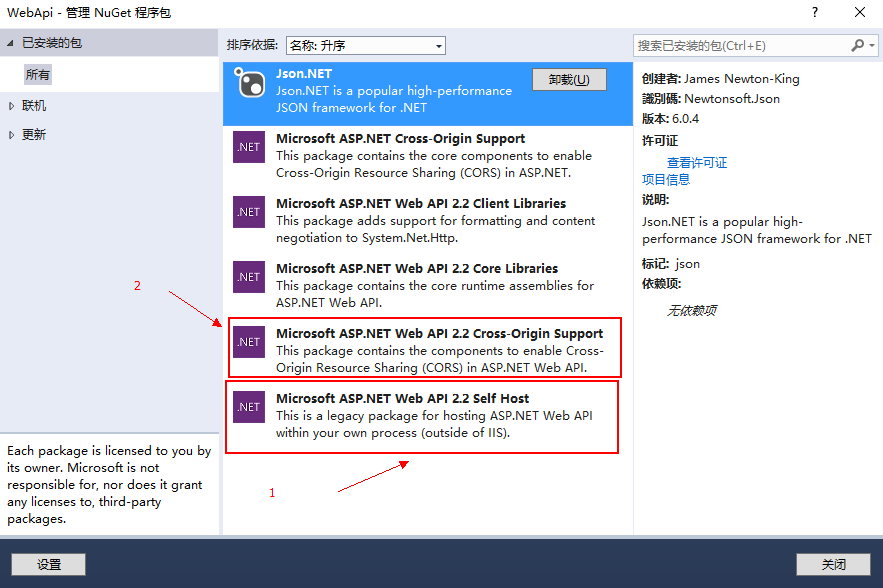
winform_webApiSelfHost
窗本构造函数中添加以下代码:
var baseAddress = ConfigurationManager.AppSettings["baseAddress"];

            var config = new HttpSelfHostConfiguration(baseAddress);

            config.Formatters.JsonFormatter.SupportedMediaTypes.Add(new MediaTypeHeaderValue("text/html"));

            config.Routes.MapHttpRoute(

                name: "DefaultApi",

                routeTemplate: "api/{controller}/{action}/{id}",

                defaults: new { id = RouteParameter.Optional }

            );

            var cors = new EnableCorsAttribute("*", "*", "*");

            config.EnableCors(cors);

            var server = new HttpSelfHostServer(config);

            server.OpenAsync().Wait();
App.config文件中添加以下内容:
<appSettings>

    <add key="baseAddress" value="http://localhost:9002" />

  </appSettings>
Create an OWIN configuration handler
class Startup

{

    //  Hack from http://stackoverflow.com/a/17227764/19020 to load controllers in

    //  another assembly.  Another way to do this is to create a custom assembly resolver

    Type valuesControllerType = typeof(OWINTest.API.ValuesController);

    // This code configures Web API. The Startup class is specified as a type

    // parameter in the WebApp.Start method.

    public void Configuration(IAppBuilder appBuilder)

    {

        // Configure Web API for self-host.

        HttpConfiguration config = new HttpConfiguration();

        //  Enable attribute based routing

        //  http://www.asp.net/web-api/overview/web-api-routing-and-actions/attribute-routing-in-web-api-2

        config.MapHttpAttributeRoutes();

        config.Routes.MapHttpRoute(

            name: "DefaultApi",

            routeTemplate: "api/{controller}/{id}",

            defaults: new { id = RouteParameter.Optional }

        );

        appBuilder.UseWebApi(config);

    }

}
Add API controllers
using System;

using System.Collections.Generic;

using System.Linq;

using System.Text;

using System.Threading.Tasks;

using System.Web.Http;

namespace OWINTest.Service.API

{

    [RoutePrefix("api/testing")]

    public class RoutedController : ApiController

    {

        [Route("getall")]

        public IEnumerable<string> GetAllItems()

        {

            return new string[] { "value1", "value2" };

        }

    }

}
Add code to start/stop the WebAPI listener
public partial class APIServiceTest : ServiceBase

{

    public string baseAddress = "http://localhost:9000/";

    private IDisposable _server = null;

    public APIServiceTest()

    {

        InitializeComponent();

    }

    protected override void OnStart(string[] args)

    {

        _server = WebApp.Start<Startup>(url: baseAddress);

    }

    protected override void OnStop()

    {

        if(_server != null)

        {

            _server.Dispose();

        }

        base.OnStop();

    }

}
原文:http://www.cnblogs.com/xinzheng/p/5586965.html
https://github.com/danesparza/OWIN-WebAPI-Service
转:winform_webApiSelfHost及 OWIN WebAPI Service的更多相关文章
- 基于OWIN WebAPI 使用OAuth授权服务【客户端验证授权(Resource Owner Password Credentials Grant)】
适用范围 前面介绍了Client Credentials Grant ,只适合客户端的模式来使用,不涉及用户相关.而Resource Owner Password Credentials Grant模 ...
- ASP.NET Linux部署(2) - MS Owin + WebApi + Mono + Jexus
ASP.NET Linux部署(2) - MS Owin + WebApi + Mono + Jexus 本文承接我的上一篇博文: ASP.NET 5 Linux部署,那篇文章主要是针对最新的ASP. ...
- (转)基于OWIN WebAPI 使用OAuth授权服务【客户端模式(Client Credentials Grant)】
适应范围 采用Client Credentials方式,即应用公钥.密钥方式获取Access Token,适用于任何类型应用,但通过它所获取的Access Token只能用于访问与用户无关的Open ...
- 基于OWIN WebAPI 使用OAuth授权服务【客户端模式(Client Credentials Grant)】
适应范围 采用Client Credentials方式,即应用公钥.密钥方式获取Access Token,适用于任何类型应用,但通过它所获取的Access Token只能用于访问与用户无关的Open ...
- Window sevice +OWIN+webapi
webapi正常都托管在iis上,这里引入owin,将其托管在window服务上. 第一步:创建一个服务,这里就不多描述. 第二步:引入OWIN 2.1引入bll 2.2加入api路由配置 publi ...
- 【干货】基于Owin WebApi 使用OAuth2进行客户端授权服务
前言:采用Client Credentials方式,即密钥key/password,场景一般是分为客户端限制必须有权限才能使用的模块,这和微信公众号开放平台很类似. 让用户通过客户端去获取自己的tok ...
- Owin WebAPI上传文件
Owin是微软出了几年的东东了,一直没时间学习.大概了解了下,是一个脱离IIS环境,快速搭建WebAPI服务的东西. 刚好想尝试下尽量脱离IIS创建简单快捷配置的项目,就是用了Nginx+Owin的模 ...
- Owin + WebApi + OAuth2 搭建授权模式(授权码模式 Part I)
绪 最近想要整理自己代码封装成库,也十分想把自己的设计思路贴出来让大家指正,奈何时间真的不随人意. 想要使用 OWIN 做中间件服务,该服务中包含 管线.授权 两部分.于是决定使用 webapi .O ...
- 基于OWIN WebAPI 使用OAUTH2授权服务【授权码模式(Authorization Code)】
之前已经简单实现了OAUTH2的授权码模式(Authorization Code),但是基于JAVA的,今天花了点时间调试了OWIN的实现,基本就把基于OWIN的OAUHT2的四种模式实现完了.官方推 ...
随机推荐
- 高效mysql的习惯(程序员版本)
高效的mysql 一定要有主键 如果没有主键: 数据多次读写后可能更离散,有更多随机I/O MySQL复制环境中,如果选择RBR模式,没有主键的update需要读全表,导致复制延迟 好的主键特点: 没 ...
- 在Strust2 使用datatimepicker 标签引发的一系列问题
问题:出现无法识别的问题 原因:Strust2.1开始,对于ajax类的标签不再使用<%@ taglib prefix="s" uri="/struts-tags& ...
- JDBC 操作数据库
jdbc: package org.java.dao; import java.sql.Connection; import java.sql.DriverManager; import java.s ...
- Swift中TableViewCell便利构造器写法
目前为止比较方便的一种方法,如果有更好的写法请通知我,谢谢!
- Eclipse快速补全快捷键Ctrl+1修改为Android Studio的Alt+Enter
步骤: Window ->Preferences->key-> type filter text 下输入quick fix(这个是快速补全的快捷键)改为Alt+Enter 下面的wh ...
- 【转载】Mini6410启动过程
这段时间在尝试使用uBoot来替代友善的Superboot,让板子支持从SD卡启动,所以就仔细研究了一下友善提供的内核和它的启动参数,发现 友善真的蛮聪明,把电脑的启动方式借鉴到它们自己的开发板上了. ...
- 【PHP手册】 PHP debug_backtrace() 函数
定义和用法 PHP debug_backtrace() 函数生成一个 backtrace(回溯信息). 该函数返回一个关联数组.下面是可能返回的元素: 名称 类型 描述 function 字符串 当前 ...
- MathType输入矩阵或者向量的注意事项
如图A区域是换行搞得,BC是插入矩阵,AC明显看着不一样,就是说行间不要使用换行,列间隔不要用空格(ctrl+shift+space),直接插入矩阵,向量就是矩阵的行或者列数目是1. 还有就是需要注意 ...
- 网络采集软件核心技术剖析系列(5)---将任意博主的全部博文下载到内存中并通过Webbrower显示(将之前的内容综合到一起)
一 本系列随笔概览及产生的背景 自己开发的豆约翰博客备份专家软件工具问世3年多以来,深受广大博客写作和阅读爱好者的喜爱.同时也不乏一些技术爱好者咨询我,这个软件里面各种实用的功能是如何实现的. 该软件 ...
- Bootstrap标签Tabs
<!--标签--> <ul class="nav nav-tabs" role="tablist"> <li class=&quo ...