
DEVOPS技术实践_09:Jenkins多分支管道
简介
多分支的管道是在jenkins2.x中新增的功能 。
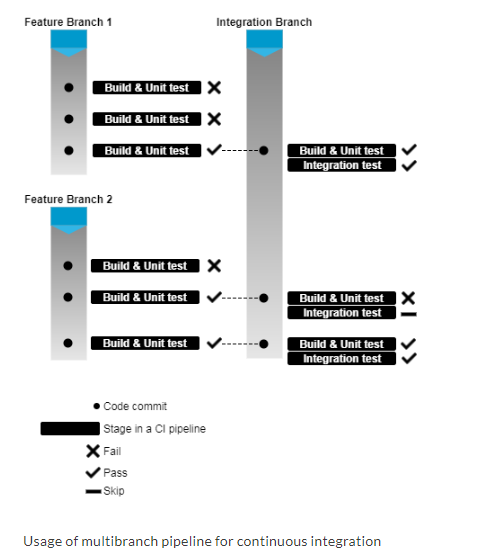
多分支管道允许你针对分布式的控制器的每个分支创建一个管道。 下图是对它的一个描述。使用jenkinsfile去创建多分支的管道,jenkinsfile可以存放在代码仓库中。 Jenkinsfile只是定义CI管道的一个脚本。

另外,多分支管道的设计初衷就是当Git仓库中的代码改变时,去自动触发构建。下图是对它的一个描述。
一. 准备工作
(1)在【全局工具配置】中Maven工具已经配置好。
(2)安装了【Pipeline Maven Integration Plugin】
(3)Java工具也需要安装好,由于我们构建是在jenkins master上执行,所以可以跳过此步(因为我们在安装Jenkins时,已经安装好Java)
(4)安装Gitlab插件,本实验使用gitlab做为代码管理
添加gitlab凭据到jenkins中
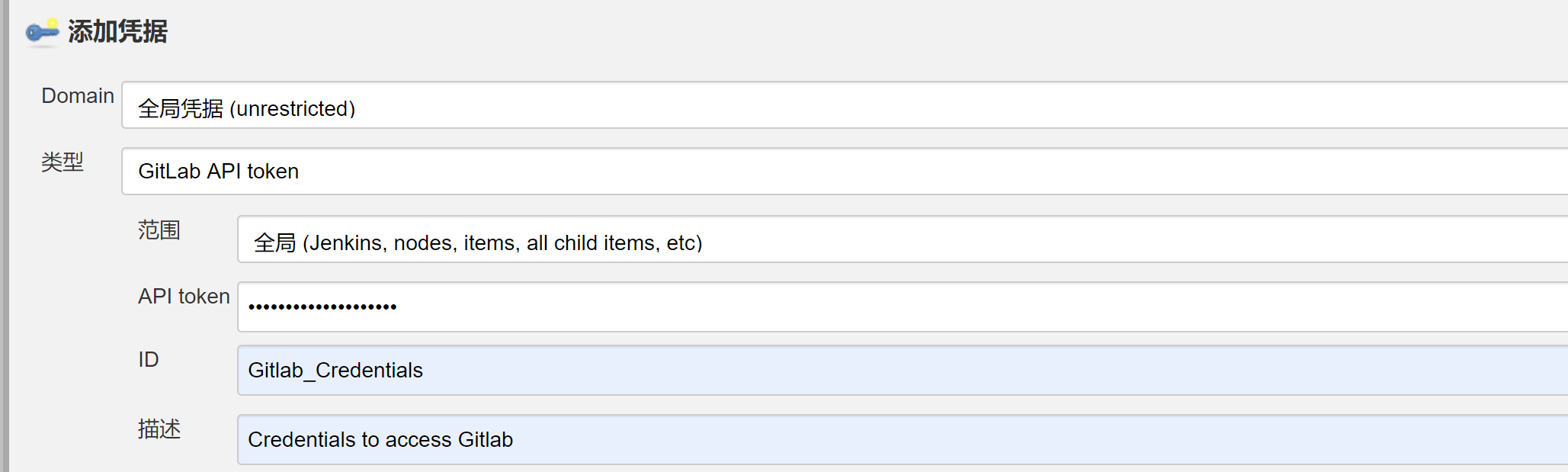
添加全局凭据
二. 从jenkins中配置在Gitlab服务器的webhooks
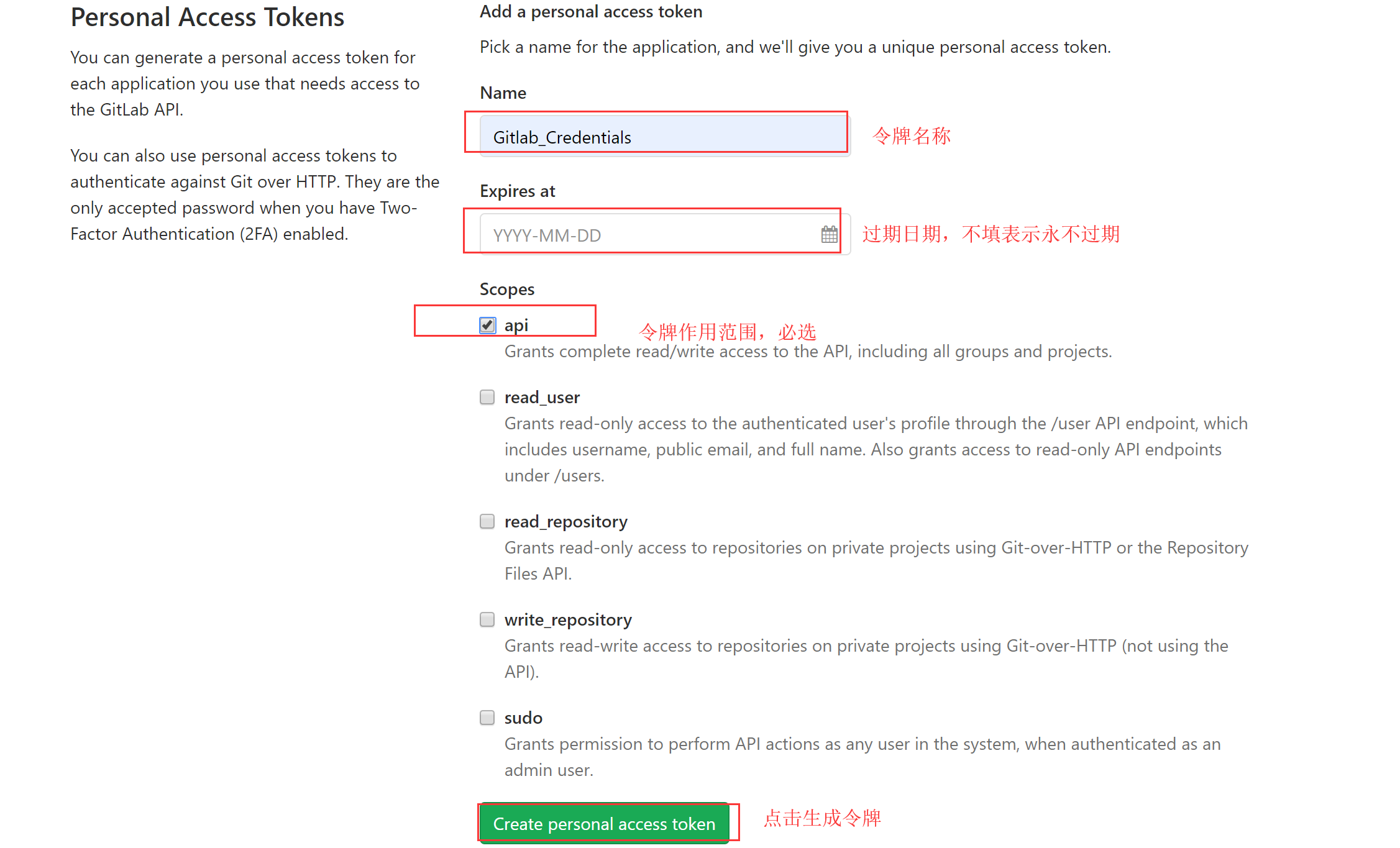
gitlab创建个人访问令牌(personal access token)
2.1 登录到gitlab,点击Settings

2.2 在右侧菜单栏中,点击Access Tokens

2.3 输入令牌名称、到期时间、令牌作用域等选项,点击Create personal access token按钮
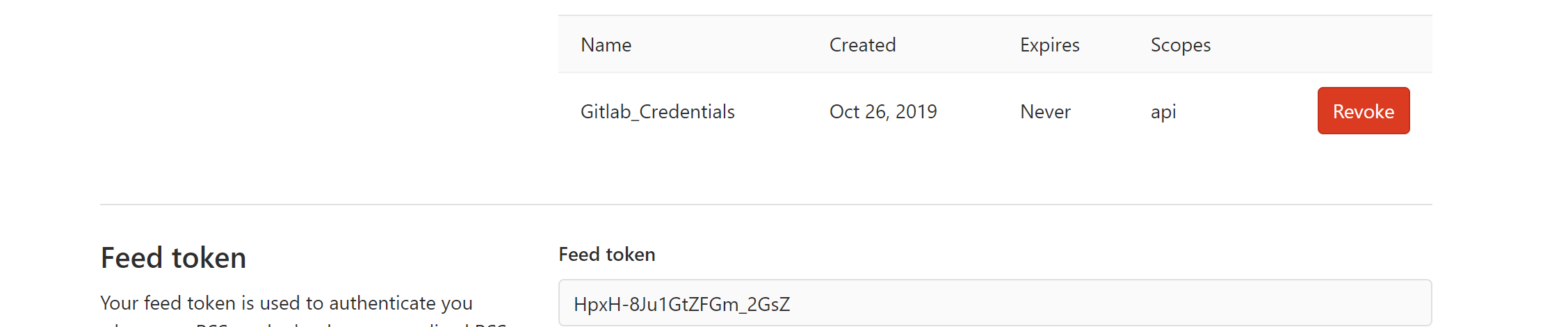
2.4 查看生成的个人访问令牌,并保存到安全位置,页面刷新后将无法查看
jenkins添加gitlab

2.5 添加凭据
添加后,test测试报错
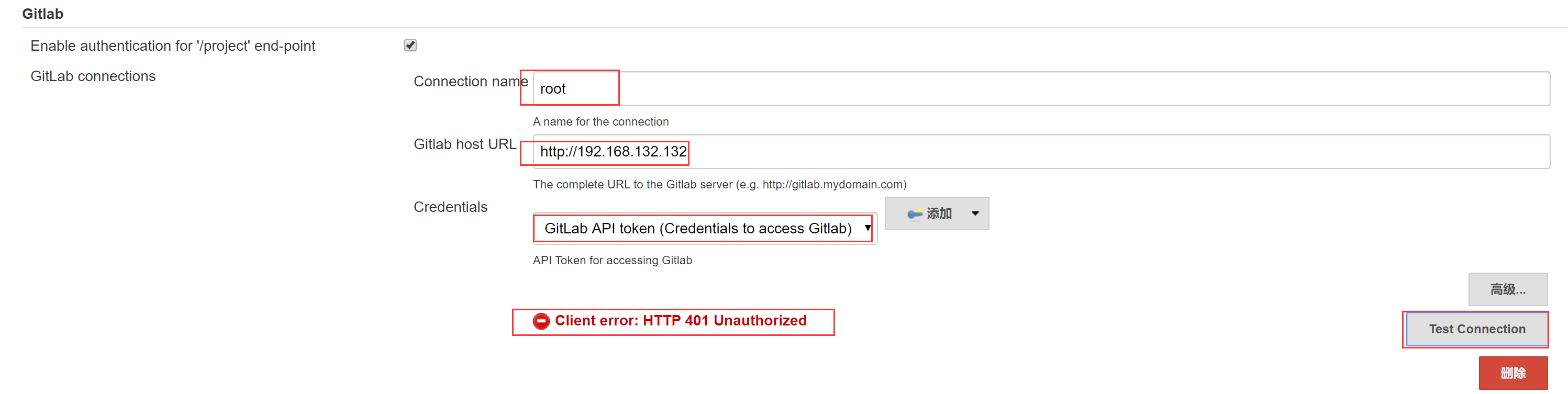
点击高级模式,选择API-levle为v3

升级git版本
[root@node1 ~]# wget https://github.com/git/git/archive/v2.2.1.tar.gz
[root@node1 ~]# tar -xf v2.2.1.tar.gz
[root@node1 ~]# cd git-2.2.1/
[root@node1 git-2.2.1]# yum install perl-ExtUtils-MakeMaker
[root@node1 git-2.2.1]# yum install zlib-devel
[root@node1 git-2.2.1]# make configure
GIT_VERSION = 2.2.1
GEN configure
[root@node1 git-2.2.1]# ./configure --prefix=/usr/local/git --with-iconv=/usr/local/libiconv
[root@node1 git-2.2.1]# make
[root@node1 git-2.2.1]# make install
[root@node1 git-2.2.1]# ln -s /usr/local/git/bin/git /usr/bin/
[root@node1 git-2.2.1]# git --version
git version 2.2.1
问题依然出现,最后排查的过程中发现,复制的不是真正的token,这是坑爹的地方


2.6 jenkins查看成功
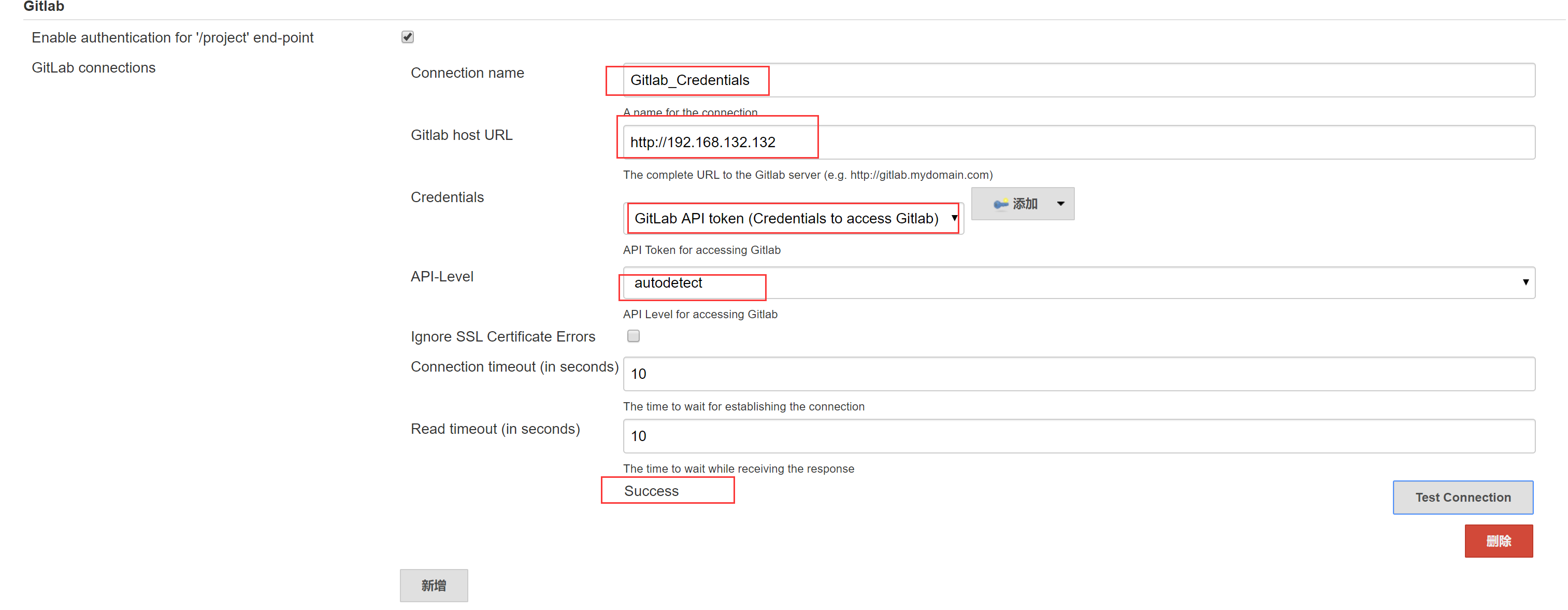
安装成功
三 创建一个多分支
3.1 编辑jenkinsfile
 node ('master') {

    checkout scm

    stage('Build') {

      withMaven(maven: 'M3') {

        if (isUnix()) {

          sh 'mvn -Dmaven.test.failure.ignore clean install package'

        }

        else {

          bat 'mvn -Dmaven.test.failure.ignore clean install package'

        }

      }

    }

    stage('Results') {

      junit '**/target/surefire-reports/TEST-*.xml'

      archive 'target/*.jar'

    }

  } installinstall
提交,开始创建多分枝流水线
3.2 创建多分枝项目

3.3 Trouble Shootting
出现错误:是因为 /usr/libexec/git-core/ 路径没在 PATH 环境变量中。
Started by user darren ning

[Sat Oct  :: EDT ] Starting branch indexing...

 > git --version # timeout=

using GIT_ASKPASS to set credentials

 > git ls-remote http://192.168.132.132/root/simple-maven-project-with-tests.git # timeout=10

ERROR: [Sat Oct  :: EDT ] Could not update folder level actions from source 9d2e73ea-7ee8--a8b2-0d7f20e75599

hudson.plugins.git.GitException: Command "git ls-remote http://192.168.132.132/root/simple-maven-project-with-tests.git" returned status code :

stdout:

stderr: fatal: Unable to find remote helper for 'http'

    at org.jenkinsci.plugins.gitclient.CliGitAPIImpl.launchCommandIn(CliGitAPIImpl.java:)

    at org.jenkinsci.plugins.gitclient.CliGitAPIImpl.launchCommandWithCredentials(CliGitAPIImpl.java:)

    at org.jenkinsci.plugins.gitclient.CliGitAPIImpl.launchCommandWithCredentials(CliGitAPIImpl.java:)

    at org.jenkinsci.plugins.gitclient.CliGitAPIImpl.launchCommandWithCredentials(CliGitAPIImpl.java:)

    at org.jenkinsci.plugins.gitclient.CliGitAPIImpl.getRemoteReferences(CliGitAPIImpl.java:)

    at jenkins.plugins.git.AbstractGitSCMSource.retrieveActions(AbstractGitSCMSource.java:)

    at jenkins.scm.api.SCMSource.fetchActions(SCMSource.java:)

    at jenkins.branch.MultiBranchProject.computeChildren(MultiBranchProject.java:)

    at com.cloudbees.hudson.plugins.folder.computed.ComputedFolder.updateChildren(ComputedFolder.java:)

    at com.cloudbees.hudson.plugins.folder.computed.FolderComputation.run(FolderComputation.java:)

    at jenkins.branch.MultiBranchProject$BranchIndexing.run(MultiBranchProject.java:)

    at hudson.model.ResourceController.execute(ResourceController.java:)

    at hudson.model.Executor.run(Executor.java:)

[Sat Oct  :: EDT ] Finished branch indexing. Indexing took  ms

FATAL: Failed to recompute children of simple-maven-project-with-tests

hudson.plugins.git.GitException: Command "git ls-remote http://192.168.132.132/root/simple-maven-project-with-tests.git" returned status code :

stdout:

stderr: fatal: Unable to find remote helper for 'http'

    at org.jenkinsci.plugins.gitclient.CliGitAPIImpl.launchCommandIn(CliGitAPIImpl.java:)

    at org.jenkinsci.plugins.gitclient.CliGitAPIImpl.launchCommandWithCredentials(CliGitAPIImpl.java:)

    at org.jenkinsci.plugins.gitclient.CliGitAPIImpl.launchCommandWithCredentials(CliGitAPIImpl.java:)

    at org.jenkinsci.plugins.gitclient.CliGitAPIImpl.launchCommandWithCredentials(CliGitAPIImpl.java:)

    at org.jenkinsci.plugins.gitclient.CliGitAPIImpl.getRemoteReferences(CliGitAPIImpl.java:)

    at jenkins.plugins.git.AbstractGitSCMSource.retrieveActions(AbstractGitSCMSource.java:)

    at jenkins.scm.api.SCMSource.fetchActions(SCMSource.java:)

    at jenkins.branch.MultiBranchProject.computeChildren(MultiBranchProject.java:)

    at com.cloudbees.hudson.plugins.folder.computed.ComputedFolder.updateChildren(ComputedFolder.java:)

    at com.cloudbees.hudson.plugins.folder.computed.FolderComputation.run(FolderComputation.java:)

    at jenkins.branch.MultiBranchProject$BranchIndexing.run(MultiBranchProject.java:)

    at hudson.model.ResourceController.execute(ResourceController.java:)

    at hudson.model.Executor.run(Executor.java:)

Finished: FAILURE
添加xport PATH=/usr/libexec/git-core:$PATH到/etc/profile里
在此执行

3.4 控制台输出
Started by user darren ning

[Sat Oct  :: EDT ] Starting branch indexing...

 > git --version # timeout=

using GIT_ASKPASS to set credentials

 > git ls-remote http://192.168.132.132/root/simple-maven-project-with-tests.git # timeout=10

Creating git repository in /root/.jenkins/caches/git-308bd15be61318b6e1166e23433fdd72

 > git init /root/.jenkins/caches/git-308bd15be61318b6e1166e23433fdd72 # timeout=

Setting origin to http://192.168.132.132/root/simple-maven-project-with-tests.git

 > git config remote.origin.url http://192.168.132.132/root/simple-maven-project-with-tests.git # timeout=10

Fetching & pruning origin...

Listing remote references...

 > git config --get remote.origin.url # timeout=

 > git --version # timeout=

using GIT_ASKPASS to set credentials

 > git ls-remote -h http://192.168.132.132/root/simple-maven-project-with-tests.git # timeout=10

Fetching upstream changes from origin

 > git config --get remote.origin.url # timeout=

using GIT_ASKPASS to set credentials

 > git fetch --tags --progress origin +refs/heads/*:refs/remotes/origin/* --prune

Checking branches...

  Checking branch master

      ‘Jenkinsfile’ found

    Met criteria

Scheduled build for branch: master

  Checking branch feature

      ‘Jenkinsfile’ found

    Met criteria

Scheduled build for branch: feature

Processed 2 branches

[Sat Oct 26 14:30:08 EDT 2019] Finished branch indexing. Indexing took 1 sec

Finished: SUCCESS


已经完成
DEVOPS技术实践_09:Jenkins多分支管道的更多相关文章
- DEVOPS技术实践_07:Jenkins 管道工作
一 简介 由于在公司构建很多工作,都是使用的maven工作构建的,这种构建方式很大缺点就是所有的工作都需要一步一步的配置,当项目较多,需求变动时,需要很大的精力去修改配置,很费劲 Pipeline即为 ...
- DEVOPS技术实践_18:Jenkins的Pinpeline对于参数的使用
因为最近使用Pipeline声明式语法构建项目,但是最近项目的参数设置较多,特地的来学习一下关于参数的调用和测试,主要式从一个大神那里学习的,结尾回贴上大神的博客链接 1 构建一个pipeline项目 ...
- DEVOPS技术实践_17:Jenkins使用扩展邮件功能发送邮件
一 环境准备 1.1 安装插件Email Extension 系统管理-管理插件-安装Email Extension插件 1.2 配置 配置jenkins邮箱的全局配置:系统管理-系统设置-完成邮箱配 ...
- DEVOPS技术实践_11:Jenkins集成Sonar
前言 前面已经有介绍sonar的安装,简单应用,下面在简答的研究一下sonar和jenkins集成的简单使用,对于sonar的安装不做介绍 一 sonar的简单介绍 持续检查避免了低质量的代码,比如S ...
- DEVOPS技术实践_02:jenkins自动构建项目
一.用户名密码错误 打开jenkins发现用户名密码错误,解决 1.1 找到config.xml文件 [root@jenkins-master ~]# ll -a drwxr-xr-x. root r ...
- DEVOPS技术实践_01:jenkins集成平台
一.准备环境 准备三台机器 角色 IP地址 用户名 密码 jenkins-master 172.25.254.130 admin meiyoumima gitlab 172.25.254 ...
- DEVOPS技术实践_13:使用Jenkins持续传送设计-CD基础
1. 分支策略 持续集成中使用的分支策略包括以下三个: The master branch The integration branch The feature branch 而CD只在Integra ...
- DEVOPS技术实践_12:创建持续集成的管道
持续集成不仅包含了Jenkins或者相关其它的CI工具,也包含了包含代码如何控制,采用的什么分支策略等.不同的组织可能采用不同的类型的策略来完成CI,策略类型和项目的类型的有很大的关系. 一 分支策略 ...
- DEVOPS技术实践_08:声明式管道语法
简介 前面简单的做了管道的实验,看了一下的它的效果 声明式管道是Groovy语法中的一个更简单和结构化的语法.下面主要学习明式管道语法. 一 声明式管道的基本结构 以上节的代码为例 node { de ...
随机推荐
- ADT上跑java application
Invalid layout of java.lang.String at value## A fatal error has been detected by the Java Runtime En ...
- day10-02_多线程之进程与线程的pid
一.多个线程之间PID的区别 主进程跟线程的pid是一样的 from threading import Thread from multiprocessing import Process impor ...
- List<object> 转 List<T>
List<TAXIWAY_CENTER_LINE> kk = allObjs.Where(c => c.ToString() == "AMXM.TAXIWAY_CENTER ...
- jq 监听返回事件
<script> $(document).ready(function(e) { var counter = 0; if (window.hi ...
- 根据花瓶的侧面投影图,用Matlab绘制花瓶的三维立体图
现有一花瓶侧面投影如图 问题: 1) 做出该花瓶三维立体图: 2) 计算其表面积: 计算其体积. 第一次参加数学建模,从来没有接触过Matlab语言,一上来就碰到这种数字图像处理的问题就 ...
- How To Move Or Rebuild A Lob Partition
How To Move Or Rebuild A Lob Partition [ID 761388.1] 改动时间 29-JUN-2010 类型 HOWTO 状 ...
- @游记@ CQOI2019(十二省联考)
目录 @day - 0@ @day - 1@ @day - 2@ @后记@ 我只是来打酱油哒-- 顶多能进个 E 类继续打酱油. 原本还在互奶 A 队,结果现在--铁定进不了队啦. 对初中生的歧视啊 ...
- 使用jquery.form.js的ajaxsubmit方法提交数据的Bug
周五同事遇到一个很奇怪的问题,调到下班,虽然问题解决了,但是不知道问题的具体原因,回来翻了翻代码,才发现症结所在,下面就分享出来,供遇到同样问题的同行们参考: 先把问题描述一下,做的功能是使用ajax ...
- H3C 对等通信
- 【原生JS】层叠轮播图
又是轮播?没错,换个样式玩轮播. HTML: <!DOCTYPE html> <html lang="en"> <head> <meta ...