
DEVOPS技术实践_18:Jenkins的Pinpeline对于参数的使用
因为最近使用Pipeline声明式语法构建项目,但是最近项目的参数设置较多,特地的来学习一下关于参数的调用和测试,主要式从一个大神那里学习的,结尾回贴上大神的博客链接
1 构建一个pipeline项目
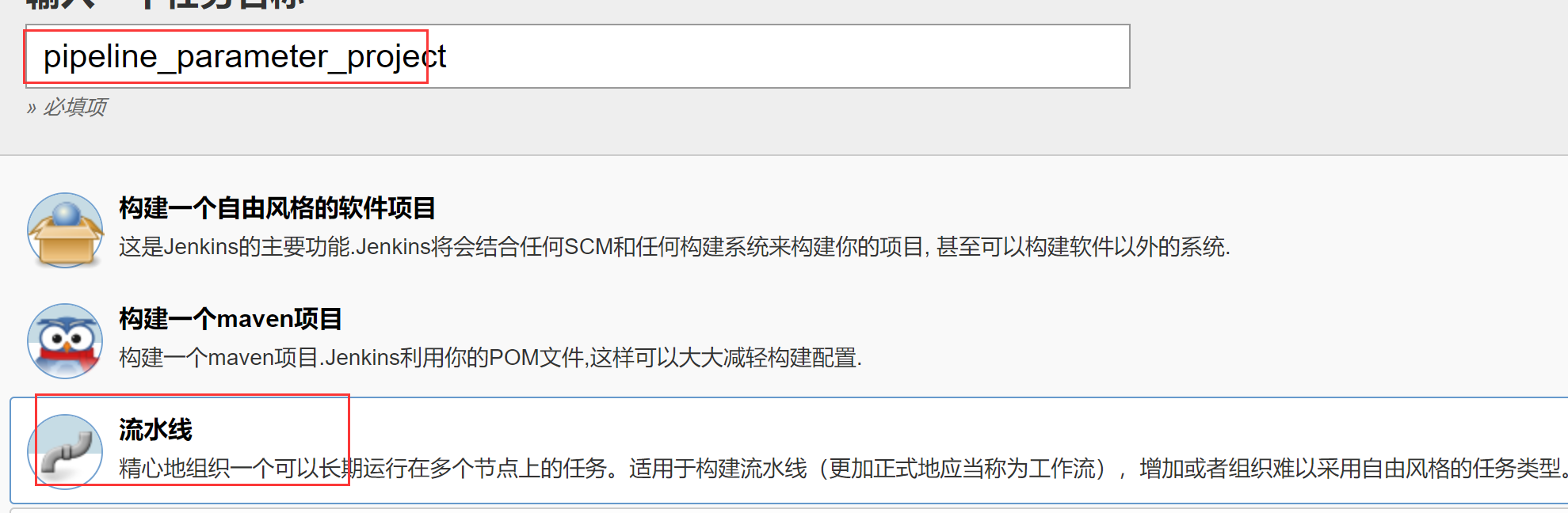
2 编写jenkinsfile文件
import hudson.model.*;

pipeline{

    agent any

    stages{

        stage("Hello Pipeline") {

            steps {

                script {

                    println "Hello Pipeline!"

                    println env.JOB_NAME

                    println env.BUILD_NUMBER

                }

            }

        }

    }

}
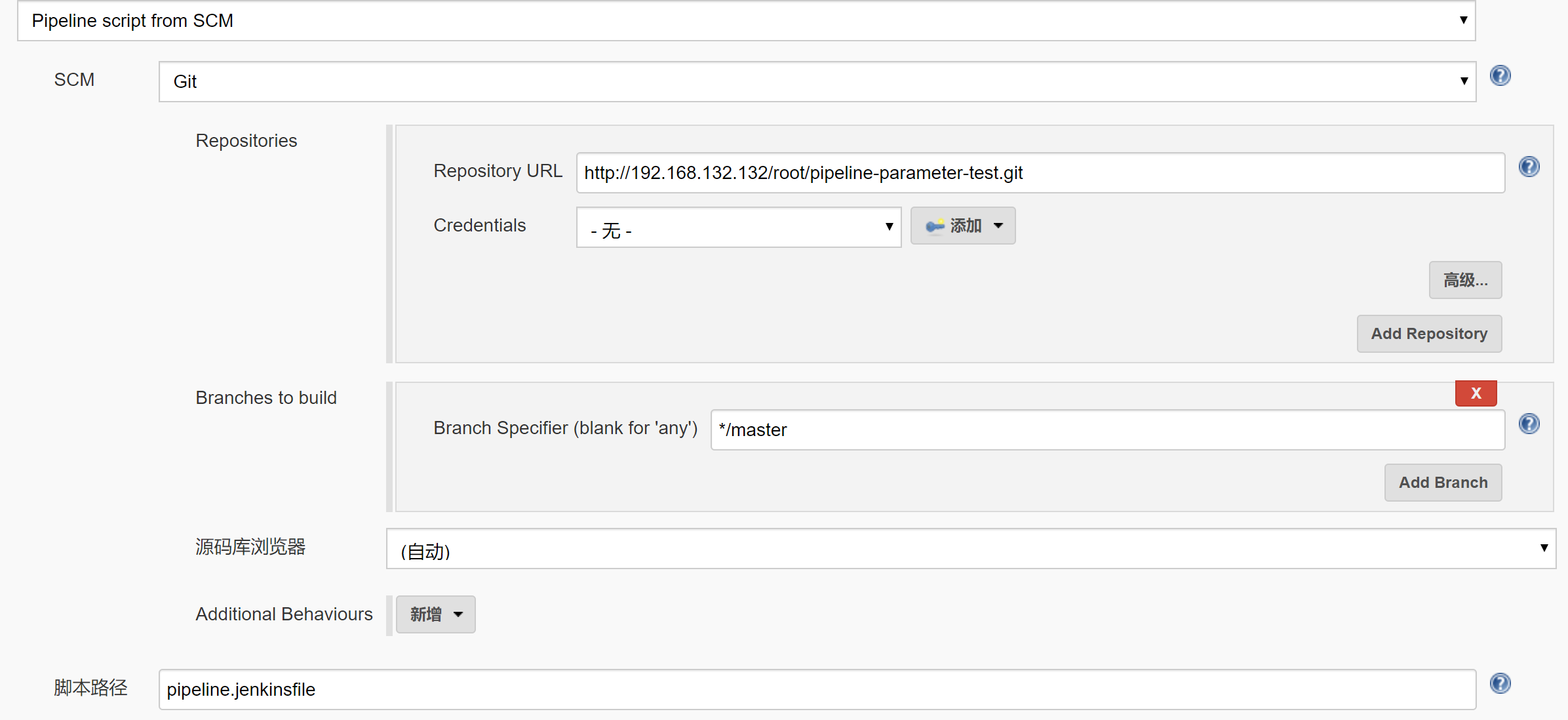
3 设置pipeline
4 结果
Started by user darren ning

Obtained pipeline.jenkinsfile from git http://192.168.132.132/root/pipeline-parameter-test.git

Running in Durability level: MAX_SURVIVABILITY

[Pipeline] Start of Pipeline

[Pipeline] node

Running on Jenkins in /root/.jenkins/workspace/pipeline_parameter_project

[Pipeline] {

[Pipeline] stage

[Pipeline] { (Declarative: Checkout SCM)

[Pipeline] checkout

No credentials specified

Cloning the remote Git repository

Cloning repository http://192.168.132.132/root/pipeline-parameter-test.git

 > git init /root/.jenkins/workspace/pipeline_parameter_project # timeout=

Fetching upstream changes from http://192.168.132.132/root/pipeline-parameter-test.git

 > git --version # timeout=

 > git fetch --tags --progress http://192.168.132.132/root/pipeline-parameter-test.git +refs/heads/*:refs/remotes/origin/*

 > git config remote.origin.url http://192.168.132.132/root/pipeline-parameter-test.git # timeout=10

 > git config --add remote.origin.fetch +refs/heads/*:refs/remotes/origin/* # timeout=10

 > git config remote.origin.url http://192.168.132.132/root/pipeline-parameter-test.git # timeout=10

Fetching upstream changes from http://192.168.132.132/root/pipeline-parameter-test.git

 > git fetch --tags --progress http://192.168.132.132/root/pipeline-parameter-test.git +refs/heads/*:refs/remotes/origin/*

 > git rev-parse refs/remotes/origin/master^{commit} # timeout=10

 > git rev-parse refs/remotes/origin/origin/master^{commit} # timeout=10

Checking out Revision 256f52910dbbc98008973b177ef533f21fd10a1f (refs/remotes/origin/master)

 > git config core.sparsecheckout # timeout=10

 > git checkout -f 256f52910dbbc98008973b177ef533f21fd10a1f

Commit message: "Add new file"

First time build. Skipping changelog.

[Pipeline] }

[Pipeline] // stage

[Pipeline] withEnv

[Pipeline] {

[Pipeline] stage

[Pipeline] { (Hello Pipeline)

[Pipeline] script

[Pipeline] {

[Pipeline] echo

Hello Pipeline!

[Pipeline] echo

pipeline_parameter_project

[Pipeline] echo

1

[Pipeline] }

[Pipeline] // script

[Pipeline] }

[Pipeline] // stage

[Pipeline] }

[Pipeline] // withEnv

[Pipeline] }

[Pipeline] // node

[Pipeline] End of Pipeline

Finished: SUCCESS
上面就是简单的参数调用,但是当项目的西安舒比较多的时候,需要一个很长篇幅的构建页面,
假如有十来个可变的参数,其中有几个是可以提取出来,没必要暴露出来,那么我们就可以把其他参数放入到一个json文件。这个json文件,可以存放在linux服务器上。
原则上,每一个有权限去构建这个job的人,需要去linux服务器上创建自己的名称的文件夹,这个文件夹下然后放一个json文件。
准备一个json文件,在这个文件定义一些需要的参数,为了方便,就直接从博主那里粘贴了
5 使用json调用参数
vi /tmp/test.json
{

    "NAME":"Lucy",

     "AGE":"",

    "PHONE_NUMBER":"",

    "ADDRESS":"Haidian Beijing",

    "EMAIL":"lucy@demo.com",

    "GENDER":"male",

    "IS_MARRY":"false"

}
jenkinsfile文件
import hudson.model.*;

    pipeline{

    agent any

    environment {

    INPUT_JSON = "/tmp/test.json"      #原本的文档使用参数化构建,我这里直接使用pipeline的环境变量,效果一样

    }

    stages{

        stage("Hello Pipeline") {

            steps {

                script {

                    println "Hello Pipeline!"

                    println env.JOB_NAME

                    println env.BUILD_NUMBER

                }

            }

        }

    stage("Init paramters in json") {

        steps {

            script {

                println "read josn input file"

                json_file = INPUT_JSON? INPUT_JSON.trim() : ""

                prop = readJSON file : json_file

                name = prop.NAME? prop.NAME.trim() : ""

                println "Name:" + name

                }

            }

        }

     }

}
6 安装插件
需要安装这个插件

安装完成后,构建
构建结果
Started by user darren ning

Obtained pipeline.jenkinsfile from git http://192.168.132.132/root/pipeline-parameter-test.git

Running in Durability level: MAX_SURVIVABILITY

[Pipeline] Start of Pipeline

[Pipeline] node

Running on Jenkins in /root/.jenkins/workspace/pipeline_parameter_project

[Pipeline] {

[Pipeline] stage

[Pipeline] { (Declarative: Checkout SCM)

[Pipeline] checkout

No credentials specified

 > git rev-parse --is-inside-work-tree # timeout=

Fetching changes from the remote Git repository

 > git config remote.origin.url http://192.168.132.132/root/pipeline-parameter-test.git # timeout=10

Fetching upstream changes from http://192.168.132.132/root/pipeline-parameter-test.git

 > git --version # timeout=

 > git fetch --tags --progress http://192.168.132.132/root/pipeline-parameter-test.git +refs/heads/*:refs/remotes/origin/*

 > git rev-parse refs/remotes/origin/master^{commit} # timeout=

 > git rev-parse refs/remotes/origin/origin/master^{commit} # timeout=

Checking out Revision 139f409fd00ad11c293ce9726c7a638f73212062 (refs/remotes/origin/master)

 > git config core.sparsecheckout # timeout=

 > git checkout -f 139f409fd00ad11c293ce9726c7a638f73212062

Commit message: "Update pipeline.jenkinsfile"

 > git rev-list --no-walk 9fc1715852a27f40d5fa3277d6f58ac150c972da # timeout=

[Pipeline] }

[Pipeline] // stage

[Pipeline] withEnv

[Pipeline] {

[Pipeline] withEnv

[Pipeline] {

[Pipeline] stage

[Pipeline] { (Hello Pipeline)

[Pipeline] script

[Pipeline] {

[Pipeline] echo

Hello Pipeline!

[Pipeline] echo

pipeline_parameter_project

[Pipeline] echo

[Pipeline] }

[Pipeline] // script

[Pipeline] }

[Pipeline] // stage

[Pipeline] stage

[Pipeline] { (Init paramters in json)

[Pipeline] script

[Pipeline] {

[Pipeline] echo

read josn input file

[Pipeline] readJSON

[Pipeline] echo

Name:Lucy

[Pipeline] }

[Pipeline] // script

[Pipeline] }

[Pipeline] // stage

[Pipeline] }

[Pipeline] // withEnv

[Pipeline] }

[Pipeline] // withEnv

[Pipeline] }

[Pipeline] // node

[Pipeline] End of Pipeline

Finished: SUCCESS
7 用完全的Jenkinsfile调用所有参数
import hudson.model.*;

    pipeline{

    agent any

    environment {

    INPUT_JSON = "/tmp/test.json"

    }

    stages{

        stage("Hello Pipeline") {

            steps {

                script {

                    println "Hello Pipeline!"

                    println env.JOB_NAME

                    println env.BUILD_NUMBER

                }

            }

        }

    stage("Init paramters in json") {

        steps {

            script {

                println "read josn input file"

                    json_file = INPUT_JSON? INPUT_JSON.trim() : ""

                    prop = readJSON file : json_file

                    name = prop.NAME? prop.NAME.trim() : ""

                    println "Name:" + name

                    age = prop.AGE? prop.AGE.trim() : ""

                    println "Age:" + age

                    phone = prop.PHONE_NUMBER? prop.PHONE_NUMBER.trim() : ""

                    println "Phone:" + phone

                    address = prop.ADDRESS? prop.ADDRESS.trim() : ""

                    println "Address:" + address

                    email = prop.EMAIL? prop.EMAIL.trim() : ""

                    println "Email:" + email

                    gender = prop.GENDER? prop.GENDER.trim() : ""

                    println "Gender:" + gender

                    is_marry = prop.IS_MARRY? prop.IS_MARRY.trim() : false

                    println "is_marry:" + is_marry

                }

            }

        }

     }

}
8 最终构建结果
Started by user darren ning

Obtained pipeline.jenkinsfile from git http://192.168.132.132/root/pipeline-parameter-test.git

Running in Durability level: MAX_SURVIVABILITY

[Pipeline] Start of Pipeline

[Pipeline] node

Running on Jenkins in /root/.jenkins/workspace/pipeline_parameter_project

[Pipeline] {

[Pipeline] stage

[Pipeline] { (Declarative: Checkout SCM)

[Pipeline] checkout

No credentials specified

 > git rev-parse --is-inside-work-tree # timeout=

Fetching changes from the remote Git repository

 > git config remote.origin.url http://192.168.132.132/root/pipeline-parameter-test.git # timeout=10

Fetching upstream changes from http://192.168.132.132/root/pipeline-parameter-test.git

 > git --version # timeout=

 > git fetch --tags --progress http://192.168.132.132/root/pipeline-parameter-test.git +refs/heads/*:refs/remotes/origin/*

 > git rev-parse refs/remotes/origin/master^{commit} # timeout=

 > git rev-parse refs/remotes/origin/origin/master^{commit} # timeout=

Checking out Revision 1f532ef638de79563acdabb39378602140ebd2e1 (refs/remotes/origin/master)

 > git config core.sparsecheckout # timeout=

 > git checkout -f 1f532ef638de79563acdabb39378602140ebd2e1

Commit message: "Update pipeline.jenkinsfile"

 > git rev-list --no-walk 139f409fd00ad11c293ce9726c7a638f73212062 # timeout=

[Pipeline] }

[Pipeline] // stage

[Pipeline] withEnv

[Pipeline] {

[Pipeline] withEnv

[Pipeline] {

[Pipeline] stage

[Pipeline] { (Hello Pipeline)

[Pipeline] script

[Pipeline] {

[Pipeline] echo

Hello Pipeline!

[Pipeline] echo

pipeline_parameter_project

[Pipeline] echo

[Pipeline] }

[Pipeline] // script

[Pipeline] }

[Pipeline] // stage

[Pipeline] stage

[Pipeline] { (Init paramters in json)

[Pipeline] script

[Pipeline] {

[Pipeline] echo

read josn input file

[Pipeline] readJSON

[Pipeline] echo

Name:Lucy

[Pipeline] echo

Age:

[Pipeline] echo

Phone:

[Pipeline] echo

Address:Haidian Beijing

[Pipeline] echo

Email:lucy@demo.com

[Pipeline] echo

Gender:male

[Pipeline] echo

is_marry:false

[Pipeline] }

[Pipeline] // script

[Pipeline] }

[Pipeline] // stage

[Pipeline] }

[Pipeline] // withEnv

[Pipeline] }

[Pipeline] // withEnv

[Pipeline] }

[Pipeline] // node

[Pipeline] End of Pipeline

Finished: SUCCESS
实验基本完成
参考文档:https://blog.csdn.net/u011541946/article/details/88937201
感谢博主的分享,让我在jenkins上又进了一步
DEVOPS技术实践_18:Jenkins的Pinpeline对于参数的使用的更多相关文章
- DEVOPS技术实践_17:Jenkins使用扩展邮件功能发送邮件
一 环境准备 1.1 安装插件Email Extension 系统管理-管理插件-安装Email Extension插件 1.2 配置 配置jenkins邮箱的全局配置:系统管理-系统设置-完成邮箱配 ...
- DEVOPS技术实践_11:Jenkins集成Sonar
前言 前面已经有介绍sonar的安装,简单应用,下面在简答的研究一下sonar和jenkins集成的简单使用,对于sonar的安装不做介绍 一 sonar的简单介绍 持续检查避免了低质量的代码,比如S ...
- DEVOPS技术实践_09:Jenkins多分支管道
简介 多分支的管道是在jenkins2.x中新增的功能 . 多分支管道允许你针对分布式的控制器的每个分支创建一个管道. 下图是对它的一个描述.使用jenkinsfile去创建多分支的管道,jenkin ...
- DEVOPS技术实践_07:Jenkins 管道工作
一 简介 由于在公司构建很多工作,都是使用的maven工作构建的,这种构建方式很大缺点就是所有的工作都需要一步一步的配置,当项目较多,需求变动时,需要很大的精力去修改配置,很费劲 Pipeline即为 ...
- DEVOPS技术实践_02:jenkins自动构建项目
一.用户名密码错误 打开jenkins发现用户名密码错误,解决 1.1 找到config.xml文件 [root@jenkins-master ~]# ll -a drwxr-xr-x. root r ...
- DEVOPS技术实践_01:jenkins集成平台
一.准备环境 准备三台机器 角色 IP地址 用户名 密码 jenkins-master 172.25.254.130 admin meiyoumima gitlab 172.25.254 ...
- DEVOPS技术实践_19:Pipeline的多参数json调用
在上一篇学习了把参数写进Json文件,然后通过去Json文件,调用参数的方法 1. 三元运算符介绍 调用的方法是通过一个三元运算符实现的 gender = prop.GENDER? prop.GEND ...
- DEVOPS技术实践_04:Jenkins参数化构建
一.参数化构建 1.1 各个参数的信息 凭据参数存储一个用户的账号密码信息,等等,运用最多的是选项参数 1.2 使用选项参数 构建已经变成参数化构建 1.3 获取这个值,修改Jenkinsfile文件 ...
- DEVOPS技术实践_03:Jenkins自动构建
一.提交代码自动构建 当开发人员在gitlab提交代码后,会自动触发jenkin构建 点击项目---->点击diy_maven-TEST----->点击配置--->构建触发器---- ...
随机推荐
- hdu 6201 【树形dp||SPFA最长路】
http://acm.hdu.edu.cn/showproblem.php?pid=6201 n个城市都在卖一种书,该书的价格在i城市为cost[i],商人打算从某个城市出发到另一个城市结束,途中可以 ...
- 『创造 Cloud Toolkit』贡献排行榜——如何参与定义一款 IDE 插件?
自从我们团队在去年12月发布 Cloud Toolkit(一款让开发部署效率提速 8 倍的 IDE 插件)以来,已帮助数以万计的开发者们提高了云上的部署效率,期间,开发者们不仅积极地向 Cloud T ...
- oracle函数 exp(y)
[功能]返回e的y次幂(e为数学常量) [参数]y,数字型表达式 [返回]数字 [示例] select exp(3),exp(0),exp(-3) from dual; 返回:20.0855369,1 ...
- hdu 1050 Moving Tables (Greedy)
Problem - 1050 过两天要给12的讲贪心,于是就做一下水贪心练习练习. 代码如下: #include <cstdio> #include <iostream> #i ...
- oracle不明确的索引等级
当ORACLE无法判断索引的等级高低差别,优化器将只使用一个索引,它就是在WHERE子句中被列在最前面的. 举例: DEPTNO上有一个非唯一性索引,EMP_CAT也有一个非唯一性索引. SELECT ...
- 第三期 第三期 搜索——1.运动规划(motion_planing)
运动规划的根本问题在于机器人可能存在于一个这样的世界中, 它可能想找到一条到达这个目标的路径,那么就需要指定一个到达那里的计划, 自动驾驶汽车也会遇到这个问题.他可能处于高速公路的附近的街道网络中,他 ...
- POJ 2488 深搜dfs、
题意:模拟国际象棋中马的走棋方式,其实和中国象棋的马走的方式其实是一样的,马可以从给定的方格棋盘中任意点开始,问是否能遍历全部格子,能的话输出字典序最小的走棋方式,否则输出impossible 思路: ...
- vue 打包后,页面空白及图片路径的问题
打包之后打开dist的页面显示空白: 1.记得改一下config下面的index.js中bulid模块导出的路径. 这里需要将 assetsPublicPath: '/'改为assetsPublicP ...
- H5 canvas 绘图
H5的canvas绘图技术 canvas元素是HTML5中新添加的一个元素,该元素是HTML5中的一个亮点.Canvas元素就像一块画布,通过该元素自带的API结合JavaScript代码可以绘制 ...
- Vmware虚拟机用户密码忘记了怎么办?
Vmware虚拟机用户密码忘记了怎么办? 虚拟机Linux上用户密码忘记了怎么办? 今天准备再学习一下linux操作系统,由于之前已经安装过vaware和linux(redhat),所以这次认为不 ...