
Read Large Files in Python
I have a large file ( ~4G) to process in Python. I wonder whether it is OK to "read" such a large file. So I tried in the following several ways:
The original large file to deal with is not "./CentOS-6.5-i386.iso", I just take this file as an example here.
1: Normal Method. (ignore try/except/finally)
def main():

    f = open(r"./CentOS-6.5-i386.iso", "rb")

    for line in f:

        print(line, end="")

    f.close()

if __name__ == "__main__":

    main()
2: "With" Method.
def main():

    with open(r"./CentOS-6.5-i386.iso", "rb") as f:

        for line in f:

            print(line, end="")

if __name__ == "__main__":

    main()
3: "readlines" Method. [Bad Idea]
#NO. readlines() is really bad for large files.

#Memory Error.

def main():

    for line in open(r"./CentOS-6.5-i386.iso", "rb").readlines():

        print(line, end="")

if __name__ == "__main__":

    main()
4: "fileinput" Method.
import fileinput

def main():

    for line in fileinput.input(files=r"./CentOS-6.5-i386.iso", mode="rb"):

        print(line, end="")

if __name__ == "__main__":

    main()
5: "Generator" Method.
def readFile():

    with open(r"./CentOS-6.5-i386.iso", "rb") as f:

        for line in f:

            yield line

def main():

    for line in readFile():

        print(line, end="")

if __name__ == "__main__":

    main()
The methods above, all work well for small files, but not always for large files(readlines Method). The readlines() function loads the entire file into memory as it runs.
When I run the readlines Method, I got the following error message:
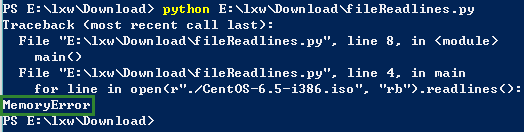
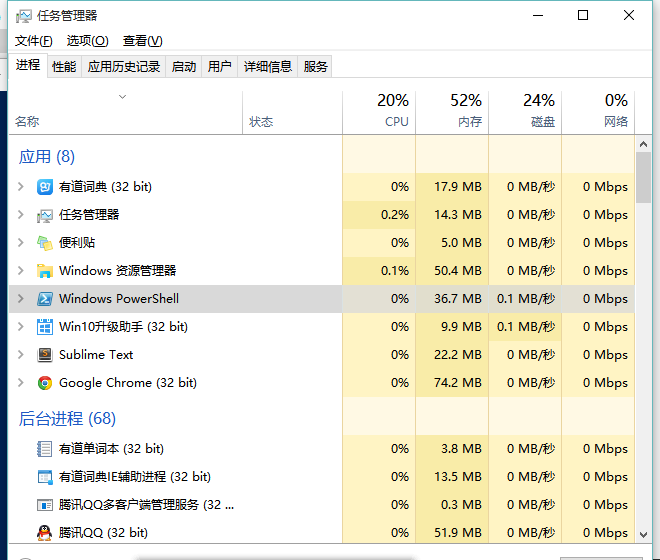
When using the readlines Method, the Percentage of Used CPU and Used Memory rises rapidly(in the following figure). And when the percentage of Used Memory reaches over 50%, I got the "MemoryError" in Python.
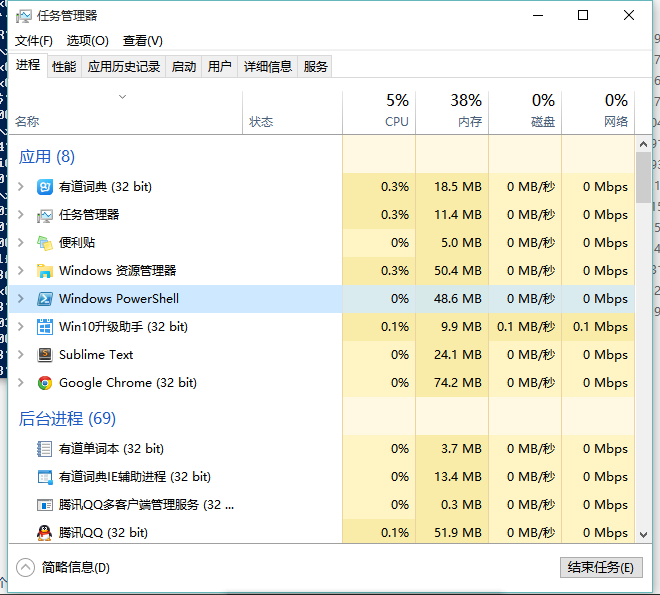
The other methods (Normal Method, With Method, fileinput Method, Generator Method) works well for large files. And when using these methods, the workload for CPU and memory which is shown in the following figure does not get a distinct rise.
By the way, I recommend the generator method, because it shows clearly that you have taken the file size into account.
Reference:
How to read large file, line by line in python
Read Large Files in Python的更多相关文章
- Huge CSV and XML Files in Python, Error: field larger than field limit (131072)
Huge CSV and XML Files in Python January 22, 2009. Filed under python twitter facebook pinterest lin ...
- Working with Excel Files in Python
Working with Excel Files in Python from: http://www.python-excel.org/ This site contains pointers to ...
- GitHub 上传文件过大报错:remote: error: GH001: Large files detected.
1.查看哪个文件过大了 报错信息: remote: Resolving deltas: 100% (24/24), completed with 3 local objects. remote: wa ...
- Creating Excel files with Python and XlsxWriter(通过 Python和XlsxWriter来创建Excel文件(xlsx格式))
以下所有内容翻译至: https://xlsxwriter.readthedocs.io/ #----------------------------------------------------- ...
- 【Selenium】【BugList4】执行pip报错:Fatal error in launcher: Unable to create process using '""D:\Program Files\Python36\python.exe"" "D:\Program Files\Python36\Scripts\pip.exe" '
环境信息: python版本:V3.6.4 安装路径:D:\Program Files\python36 环境变量PATH:D:\Program Files\Python36;D:\Program F ...
- Read a large file with python
python读取大文件 较pythonic的方法,使用with结构 文件可以自动关闭 异常可以在with块内处理 with open(filename, 'rb') as f: for line in ...
- reading/writing files in Python
file types: plaintext files, such as .txt .py Binary files, such as .docx, .pdf, iamges, spreadsheet ...
- How to read and write multiple files in Python?
Goal: I want to write a program for this: In a folder I have =n= number of files; first read one fil ...
- Creating Excel files with Python and XlsxWriter——Introduction
XlsxWriter 是用来写Excel2007版本以上的xlsx文件的Python模块. XlsxWriter 在供选择的可以写Excel的Python模块中有自己的优缺点. #---------- ...
随机推荐
- android跨进程通信(IPC)——AIDL
转载请标明出处: http://blog.csdn.net/sinat_15877283/article/details/51026711: 本文出自: [温利东的博客] 近期在看 @任玉刚 大神编写 ...
- java 读写文件常用方法
package study.bigdata; import org.apache.commons.io.FileUtils; import org.apache.commons.io.IOUtils; ...
- Java字符串中文检测转换
public class ChineseUtils { public static void main(String[] args) { String str = "中国 (1).jpg&q ...
- SAM I AM UVA - 11419 最小点集覆盖 要输出具体覆盖的行和列。
/** 题目:SAM I AM UVA - 11419 链接:https://vjudge.net/problem/UVA-11419 题意:给定n*n的矩阵,'X'表示障碍物,'.'表示空格;你有一 ...
- c++11线程池实现
咳咳.c++11 增加了线程库,从此告别了标准库不支持并发的历史. 然而 c++ 对于多线程的支持还是比較低级,略微高级一点的使用方法都须要自己去实现,譬如线程池.信号量等. 线程池(thread p ...
- pl/sql 实例精解 07
这章主要讨论 oracle11g 新特性, continue, continue when 语句 continue 的作用同其他编程语言一样. continue when condition 只是当条 ...
- 使用BarcodeLib.Barcode.ASP.NET生成条形码
生成条形码图片,然后在前台页面展示: <img id="img" src="Mobile/<%=url %>"/> public str ...
- redis 分布式,主从同步
redis和memcache比较像的,memcache可以实现服务器的集群,redis肯定也是可以的.下面在一台机,实现redis主从复制. 1,copy一下redis.conf,生成一个从机的配置 ...
- oralce函数
1.trunc函数处理数字和日期TRUNC(NUMBER[,DECIMAL]) 数字格式TRUNC(DATE[,FOMAT]) 日期格式2.round函数(四舍五入)ROUND(NUMBER[,DEC ...
- 51、自定义View基础和原理
一.编写自己的自定义View最简单的自定义View,继承View通过覆盖View的onDraw方法来实现自主显示利用Canvas和paint来绘制显示元素(文字,几何图形等) <com.myvi ...