
Setup JIRA Software 7.6.2 on Oracle Linux 6.8
|
OS |
Oracle Linux 6.8 |
V138414-01.iso |
|
Database |
mysql5.6.30 |
MySQL-5.6.30-1.el6.x86_64.rpm-bundle.tar |
|
JIRA Software |
JIRA Software 7.6.2 |
atlassian-jira-software-7.6.2-x64.bin |
Step 1. Create JIRA database.
[root@localhost ~]# mysql -uroot -pmysql
Warning: Using a password on the command line interface can be insecure.
Welcome to the MySQL monitor. Commands end with ; or \g.
Your MySQL connection id is 3
Server version: 5.6.30 MySQL Community Server (GPL)
Copyright (c) 2000, 2016, Oracle and/or its affiliates. All rights reserved.
Oracle is a registered trademark of Oracle Corporation and/or its
affiliates. Other names may be trademarks of their respective
owners.
Type 'help;' or '\h' for help. Type '\c' to clear the current input statement.
mysql> create user 'jirauser'@'localhost' identified by 'jirauser';
Query OK, 0 rows affected (0.00 sec)
mysql> create database jira character set utf8 collate utf8_bin;
Query OK, 1 row affected (0.00 sec)
mysql> grant select,insert,update,delete,create,drop,alter,index on jira.* to 'jirauser'@'localhost' identified by 'jirauser';
Query OK, 0 rows affected (0.00 sec)
mysql> flush privileges;
Query OK, 0 rows affected (0.00 sec)
mysql> exit
Bye
Step 2. Installing JIAR software.
[root@localhost atlassian]# pwd
/tmp/atlassian
[root@localhost atlassian]# chmod +x atlassian-jira-software-7.6.2-x64.bin
[root@localhost atlassian]# ./atlassian-jira-software-7.6.2-x64.bin
Unpacking JRE ...
Starting Installer ...
Dec 26, 2017 1:59:39 AM java.util.prefs.FileSystemPreferences$1 run
INFO: Created user preferences directory.
This will install JIRA Software 7.6.2 on your computer.
OK [o, Enter], Cancel [c]
Choose the appropriate installation or upgrade option.
Please choose one of the following:
Express Install (use default settings) [1], Custom Install (recommended for advanced users) [2, Enter], Upgrade an existing JIRA installation [3]
Where should JIRA Software be installed?
[/opt/atlassian/jira]
Default location for JIRA Software data
[/var/atlassian/application-data/jira]
Configure which ports JIRA Software will use.
JIRA requires two TCP ports that are not being used by any other
applications on this machine. The HTTP port is where you will access JIRA
through your browser. The Control port is used to startup and shutdown JIRA.
Use default ports (HTTP: 8080, Control: 8005) - Recommended [1, Enter], Set custom value for HTTP and Control ports [2]
JIRA can be run in the background.
You may choose to run JIRA as a service, which means it will start
automatically whenever the computer restarts.
Install JIRA as Service?
Yes [y, Enter], No [n]
Details on where JIRA Software will be installed and the settings that will be used.
Installation Directory: /opt/atlassian/jira
Home Directory: /var/atlassian/application-data/jira
HTTP Port: 8080
RMI Port: 8005
Install as service: Yes
Install [i, Enter], Exit [e]
Extracting files ...
Please wait a few moments while JIRA Software is configured.
Installation of JIRA Software 7.6.2 is complete
Start JIRA Software 7.6.2 now?
Yes [y, Enter], No [n]
Please wait a few moments while JIRA Software starts up.
Launching JIRA Software ...
Installation of JIRA Software 7.6.2 is complete
Your installation of JIRA Software 7.6.2 is now ready and can be accessed
via your browser.
JIRA Software 7.6.2 can be accessed at http://localhost:8080
Finishing installation ...
[root@localhost atlassian]# service jira stop
executing using dedicated user
.....
.... .NMMMD. ...
.8MMM. $MMN,..~MMMO.
.?MMM. .MMM?.
OMMMMZ. .,NMMMN~
.IMMMMMM. .NMMMN. .MMMMMN,
,MMMMMM$..3MD..ZMMMMMM.
=NMMMMMM,. .,MMMMMMD.
.MMMMMMMM8MMMMMMM,
.ONMMMMMMMMMMZ.
,NMMMMMMM8.
.:,.$MMMMMMM
.IMMMM..NMMMMMD.
.8MMMMM: :NMMMMN.
.MMMMMM. .MMMMM~.
.MMMMMN .MMMMM?.
Atlassian JIRA
Version : 7.6.2
If you encounter issues starting or stopping JIRA, please see the Troubleshooting guide at http://confluence.atlassian.com/display/JIRA/Installation+Troubleshooting+Guide
Server startup logs are located in /opt/atlassian/jira/logs/catalina.out
Using CATALINA_BASE: /opt/atlassian/jira
Using CATALINA_HOME: /opt/atlassian/jira
Using CATALINA_TMPDIR: /opt/atlassian/jira/temp
Using JRE_HOME: /opt/atlassian/jira/jre/
Using CLASSPATH: /opt/atlassian/jira/bin/bootstrap.jar:/opt/atlassian/jira/bin/tomcat-juli.jar
Using CATALINA_PID: /opt/atlassian/jira/work/catalina.pid
Tomcat stopped.
Step 3. Cracking JIAR software.
[root@localhost atlassian]# tar -zxvf mysql-connector-java-5.1.44.tar.gz
[root@localhost atlassian]# cp /tmp/atlassian/mysql-connector-java-5.1.44/mysql-connector-java-5.1.44-bin.jar /opt/atlassian/jira/lib
[root@localhost ~]# cp /tmp/atlassian/jira7.3/atlassian-extras-3.2.jar /opt/atlassian/jira/atlassian-jira/WEB-INF/lib/
[root@localhost ~]# cp /tmp/atlassian/jira7.3/mysql-connector-java-5.1.39-bin.jar /opt/atlassian/jira/atlassian-jira/WEB-INF/lib/
[root@localhost ~]# service jira start
To run JIRA in the foreground, start the server with start-jira.sh -fg
executing using dedicated user: jira
.....
.... .NMMMD. ...
.8MMM. $MMN,..~MMMO.
.?MMM. .MMM?.
OMMMMZ. .,NMMMN~
.IMMMMMM. .NMMMN. .MMMMMN,
,MMMMMM$..3MD..ZMMMMMM.
=NMMMMMM,. .,MMMMMMD.
.MMMMMMMM8MMMMMMM,
.ONMMMMMMMMMMZ.
,NMMMMMMM8.
.:,.$MMMMMMM
.IMMMM..NMMMMMD.
.8MMMMM: :NMMMMN.
.MMMMMM. .MMMMM~.
.MMMMMN .MMMMM?.
Atlassian JIRA
Version : 7.6.2
If you encounter issues starting or stopping JIRA, please see the Troubleshooting guide at http://confluence.atlassian.com/display/JIRA/Installation+Troubleshooting+Guide
Server startup logs are located in /opt/atlassian/jira/logs/catalina.out
Using CATALINA_BASE: /opt/atlassian/jira
Using CATALINA_HOME: /opt/atlassian/jira
Using CATALINA_TMPDIR: /opt/atlassian/jira/temp
Using JRE_HOME: /opt/atlassian/jira/jre/
Using CLASSPATH: /opt/atlassian/jira/bin/bootstrap.jar:/opt/atlassian/jira/bin/tomcat-juli.jar
Using CATALINA_PID: /opt/atlassian/jira/work/catalina.pid
Tomcat started.
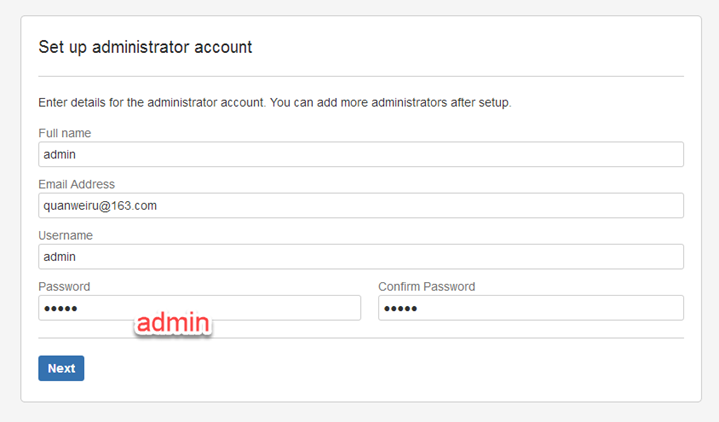
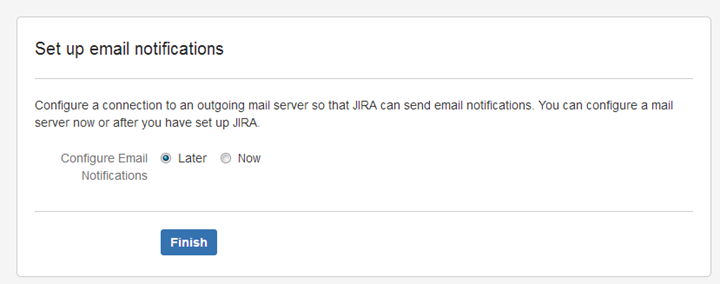
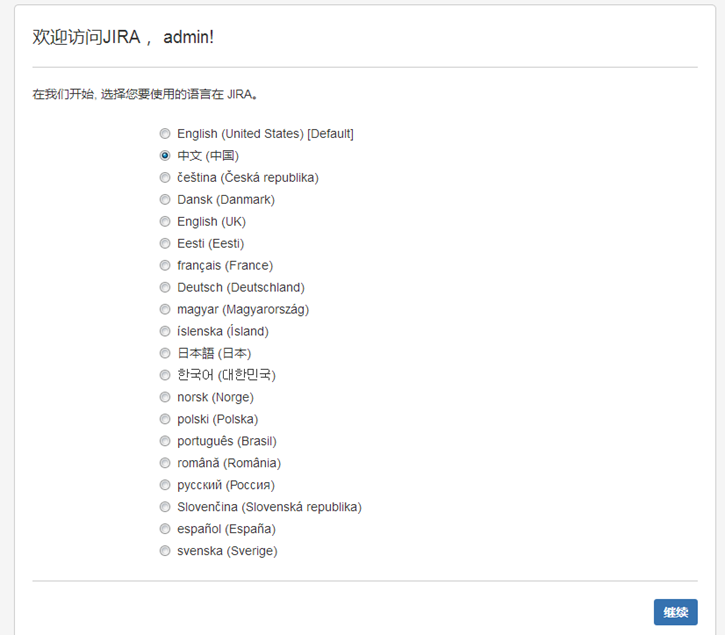
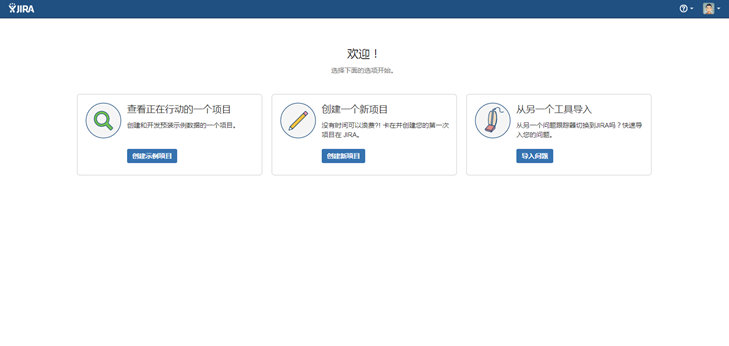
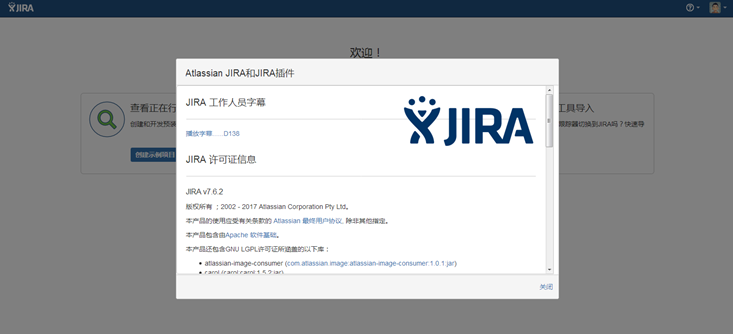
Step 4. Setting options for JIAR software.
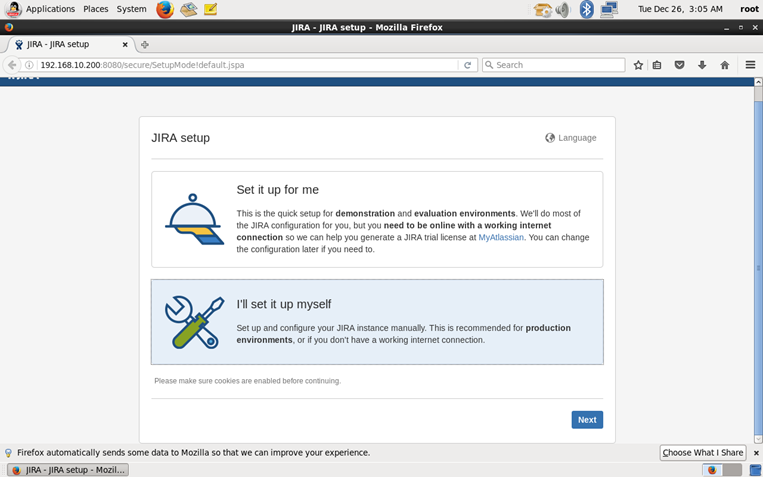
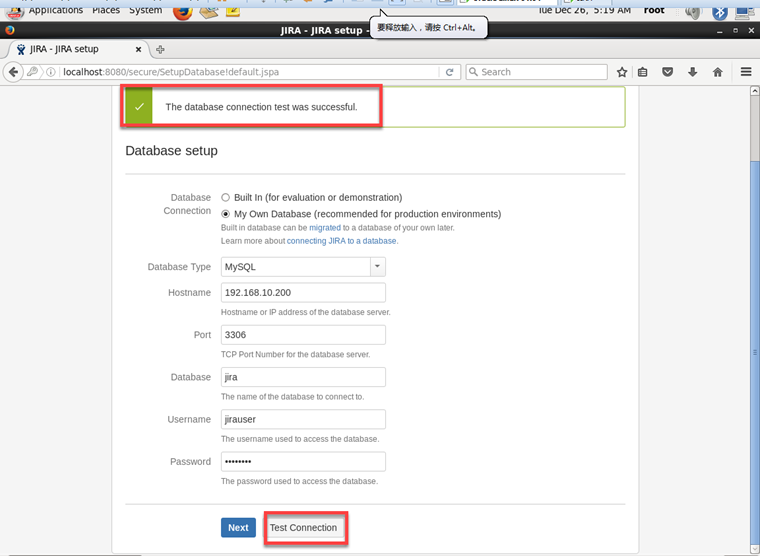
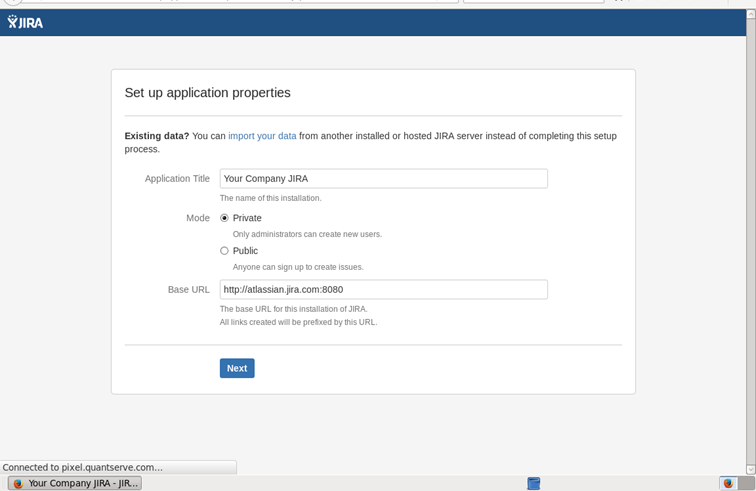
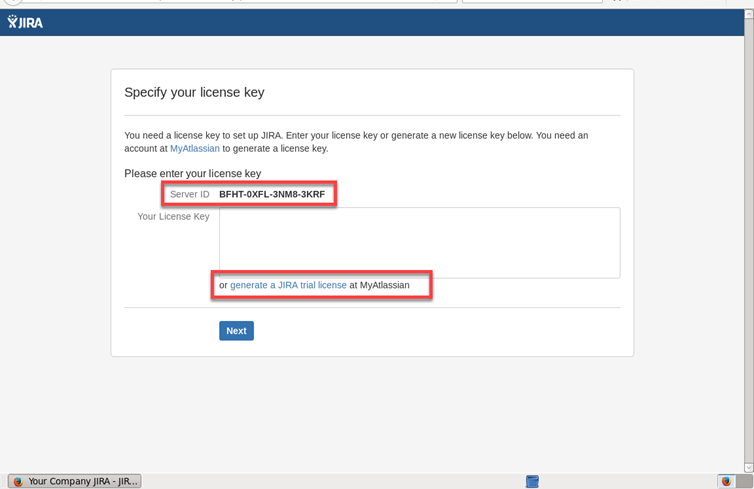
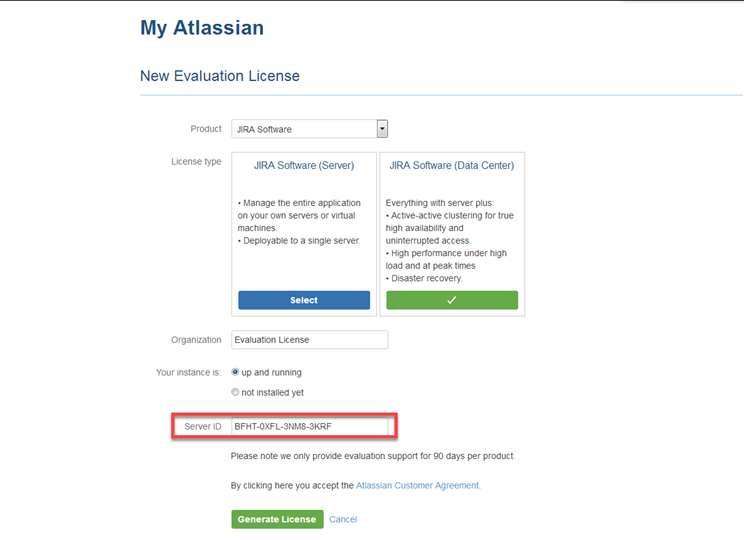
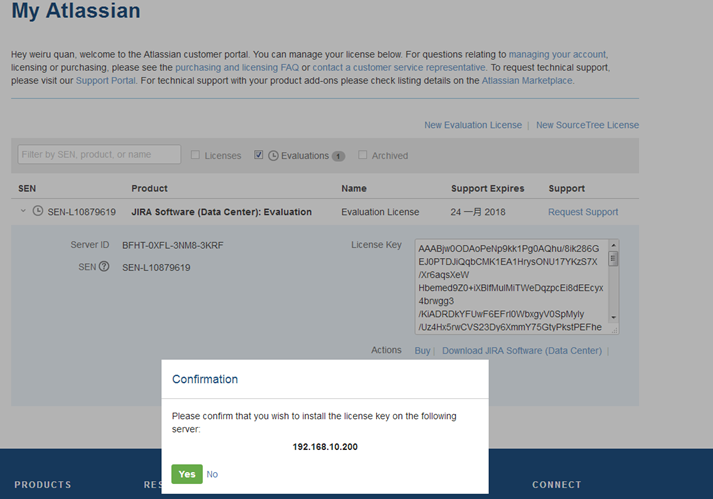
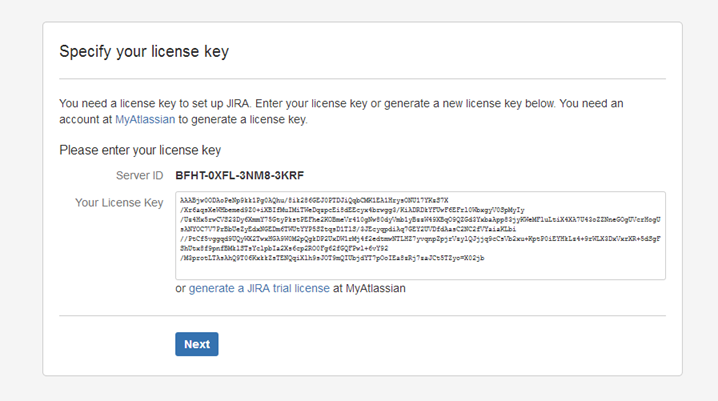
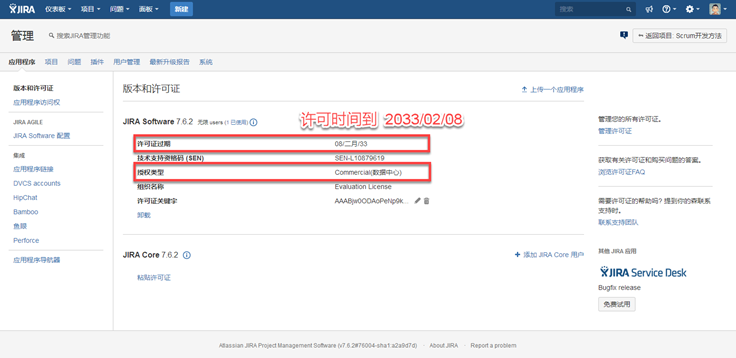
Server ID: BFHT-0XFL-3NM8-3KRF
Your License Key:
AAABjw0ODAoPeNp9kk1Pg0AQhu/8ik286GEJ0PTDJiQqbCMK1EA1HrysONU17YKzS7X/Xr6aqsXeWHbemed9Z0+iXBIfMuIMiTWeDqzpcEi8dEEcyx4brwgg3/KiADRDkYFUwF6EFrl0WbxgyV0SpMyIy/Uz4Hx5rwCVS23Dy6XmmY75GtyPkstPEFhe2KOBmeVr410gNw80dyVmb1yBzzW49XBqO9QZGd3YxbaApp83jyKWeMFluLtiX4XA7U43oZZNneGOgUVcrHogUsANYOC7V7PrBbUeZyEdxNGEDm6TWUtYYP5SZtqsD1TlS/3JEcyqpdiAq7GEY2UVDfdAasC2NC2fVYaiaKLbi//PtCf5vggqd9UQyWX2TwxHGA9W0M2pQgkDP2UxDW1rMj4f2edtmwNTLHZ7yvqnpZpjrVzylQJjjq9cCsVb2xu+KptP0iEYHkLz4+9rWLX3DxVxrXR+5dSgFShUtx8f9pnfBMklSTsYclpbIa2Xs6cp2RO0Fg62fGQFPwl+6vY92/M3protLTAsAhQ9T06KxkkZsTENQqiXlh9sJOT9mQIUbjdYT7pOoIEa8zRj7zaJCt5TZyo=X02jb
Setup JIRA Software 7.6.2 on Oracle Linux 6.8的更多相关文章
- Setup JIRA Service Desk 3.9.2 on Oracle Linux 6.8
OS Oracle Linux 6.8 V138414-01.iso Database mysql5.6.30 MySQL-5.6.30-1.el6.x86_64.rpm-bundle.tar JIR ...
- Docker 创建 Jira Core(Jira SoftWare) 7.12.3 中文版
目录 目录 1.介绍 1.1.什么是 JIRA Core? 1.2.什么是 JIRA SoftWare 2.JIRA 的官网在哪里? 3.如何下载安装? 4.对 JIRA 进行配置 4.1.JIRA ...
- Quick and Easy Installation of Oracle Database 12c on Oracle Linux in Oracle VM VirtualBox
发贴人 Sergio-Oracle 于2018-4-18 23:10:15在Oracle Linux Introduction How Does This Work? Requirements Bef ...
- 在 Oracle Linux 6.5 上安装 Oracle 11g 单实例数据库
Checking the Hardware Requirements 系统必须满足下面最小的硬件要求 Memory Requirements Minimum: 1 GB of RAMRecommend ...
- 数据库系统入门 | Oracle Linux上部署Oracle 11g服务,并实现SSH远程登录管理
文章目录 写在前面 一.实验内容 二.实验前期准备 1.软件目录 2.准备一些配置文件.脚本文件 三.实验方案(具体步骤) (一)在虚拟机上安装Oracle Linux (二)在Linux上安装Ora ...
- Oracle Linux 5.7安装VMware Tools的问题
案例环境介绍: 虚拟机的版本:VMware® Workstation 8.0.3 build-703057 操作系统版本:Oracle Linux Server release 5.7 ...
- Oracle Linux 6.3下安装Oracle 11g R2(11.2.0.3)
本文主要描写叙述了在Oracle Linux 6.3下安装Oracle 11gR2(11.2.0.3).从Oracle 11g開始,Oracle官方站点不再提供其Patch的下载链接,须要使用Meat ...
- Oracle Database 12c Release 1 Installation On Oracle Linux 6.4 x86_64
Create groups and users [root@vmdb12c ~]# groupadd oinstall [root@vmdb12c ~]# groupadd dba [root@vmd ...
- 【从翻译mos文章】oracle linux 和外部存储系统 关系
oracle linux 和外部存储系统 关系 参考原始: Oracle Linux and External Storage Systems (Doc ID 753050.1) 范围: Linux ...
随机推荐
- C#杂七杂八记录
1. 日期格式表示 DateTime.Now.ToString("yyyy-MM-dd") 2. div跟屏幕的高度一样高,自适应 <style> html, bo ...
- nodejs面试题
1.为什么用Nodejs,它有哪些缺点? 事件驱动,通过闭包很容易实现客户端的生命活期. 不用担心多线程,锁,并行计算的问题 V8引擎速度非常快 对于游戏来说,写一遍游戏逻辑代码,前端后端通用 当然N ...
- 给mongodb设置密码权限
昨天装了个mongodb数据库用于测试用,装好后没有密码,现在就讲讲怎么设置密码 1.首先进入C:\mongodb\bin下面运行mongod.exe启动数据库. 2.在相同目录下启动mongo.ex ...
- python库-urllib
urllib库提供了一系列操作url的功能,是python处理爬虫的入门级工具,网上的学习资料也很多.我做爬虫是一开始就用了Scrapy框架,并不是一步步从urllib开始的,反而是在后来解决一些小问 ...
- LCT 文档
file:///C:/Users/Frank/Downloads/QTREE%E8%A7%A3%E6%B3%95%E7%9A%84%E4%B8%80%E4%BA%9B%E7%A0%94%E7%A9%B ...
- _stdcall调用
以前看windows编程时一直有个 _stdcall 函数调用约定 一直不是很理解,只能硬记. 现在终于在<程序是怎样跑起来的>这本书书中找到了答案. 1. _stdcall 是stand ...
- Go语言表组测试示例
比基本测试多个循环... package main import ( "testing" "net/http" ) const checkMark = &quo ...
- 前端自动化gulp遇上es6从 无知到深爱
Gulp是什么? Gulp是前端自动化的工具,但Gulp能用来做什么 1.搭建web服务器 2.使用预处理器Sass,Less 3.压缩优化,可以压缩JS CSS Html 图片 4.自动将更新变化的 ...
- ejs模板在express里的默认文件夹路径修改
默认的是这句: app.set('view engine','ejs') ===>/views文件夹 我想要变成/websong app.set('views','webosg'); app.s ...
- CentOS7.5删除旧的内核
[root@localhost ~]# uname -r3.10.0-862.3.2.el7.x86_64 [root@localhost ~]# rpm -qa | grep kernelkerne ...