
Android之layout_weight解析
我们先来看以下这段Android布局代码:
 <LinearLayout

     xmlns:android="http://schemas.android.com/apk/res/android"

     android:layout_width="match_parent"

     android:layout_height="match_parent">

     <TextView

         android:layout_width="0.0dip"

         android:layout_height="100.0dip"

         android:layout_weight="1"

         android:background="@color/colorAccent"

         android:gravity="center"

         android:text="1111111111111111111"

         android:textColor="@color/black"

         android:textSize="18.0sp"

         android:textStyle="bold"/>

     <TextView

         android:layout_width="0.0dip"

         android:layout_height="100.0dip"

         android:layout_weight="2"

         android:background="@color/colorPrimary"

         android:gravity="center"

         android:text="2"

         android:textColor="@color/black"

         android:textSize="18.0sp"

         android:textStyle="bold"/>

     <TextView

         android:layout_width="0.0dip"

         android:layout_height="100.0dip"

         android:layout_weight="3"

         android:background="@color/white"

         android:gravity="center"

         android:text="3"

         android:textColor="@color/black"

         android:textSize="18.0sp"

         android:textStyle="bold"/>

 </LinearLayout>
layout_weight解析一代码
在线性布局LinearLayout中,三个TextView以layout_weight属性分别是1、2、3来布局,它们的高度都是100dip,宽度都是0dip。在这种情况下,三个TextView的布局是什么样子的呢?答案如下图所示。
如上图所示,三个TextView所占的宽度分别是1:2:3,这是在我们意料之中的,在我们意料之外的是,第一个TextView的位置偏下。这是为什么呢?我们只需要对结果图稍作处理,答案就会显而易见,见下图。

如上图所示,我们加上一道“辅助线”之后就会发现,虽然位置参差不齐,但它们的第一行文本的位置是在同一高度的。由此我们得出结论:在Android的LinearLayout布局中,TextView默认是根据第一行文本来对齐的。可是我们怎样消去这种文本对齐关系呢?我们只需要在父布局的LinearLayout中添加这样一句代码 android:baselineAligned="false" 就可以解决这个问题,解决后的布局图如下:

如果我们把某一个TextView的layout_width属性设置为wrap_content,结果又会如何呢?如果我们将上面的布局代码修改成如下的样子,那么我们会得到如下图所示的结果。
 <LinearLayout

     xmlns:android="http://schemas.android.com/apk/res/android"

     android:layout_width="match_parent"

     android:layout_height="match_parent"

     android:baselineAligned="false">

     <TextView

         android:layout_width="wrap_content"

         android:layout_height="100.0dip"

         android:layout_weight="1"

         android:background="@color/colorAccent"

         android:gravity="center"

         android:text="1111111111111111111"

         android:textColor="@color/black"

         android:textSize="18.0sp"

         android:textStyle="bold"/>

     <TextView

         android:layout_width="0.0dip"

         android:layout_height="100.0dip"

         android:layout_weight="2"

         android:background="@color/colorPrimary"

         android:gravity="center"

         android:text="2"

         android:textColor="@color/black"

         android:textSize="18.0sp"

         android:textStyle="bold"/>

     <TextView

         android:layout_width="0.0dip"

         android:layout_height="100.0dip"

         android:layout_weight="3"

         android:background="@color/white"

         android:gravity="center"

         android:text="3"

         android:textColor="@color/black"

         android:textSize="18.0sp"

         android:textStyle="bold"/>

 </LinearLayout>
layout_weight解析二代码
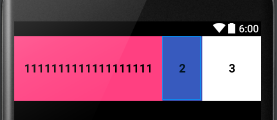
我们把第一个TextView的宽度属性设置成wrap_content,结果如上图所示。从结果中我们可以看到,我们得到的结果不符合1:2:3的布局比例。这时为什么呢?这时因为,Android会先分配已经声明尺寸的控件的空间,再分配未声明尺寸的控件的空间。在这个例子中,第一个TextView的宽度已经声明(wrap_content),而另外两个TextView的宽度都是0(等待父布局按layout_weight分配),那么Android就会先分配第一个TextView的空间,然后再把剩余的空间按1:2:3的比例分配给三个TextView。
如果三个TextView的宽度都是已经声明的,结果又会是怎样的呢?我们把三个TextView的宽度比例改成1:2:2,并把它们的宽度都设置成match_parent(代码如下),这样,我们就会得到如下图所示的结果。
 <LinearLayout

     xmlns:android="http://schemas.android.com/apk/res/android"

     android:layout_width="match_parent"

     android:layout_height="match_parent"

     android:baselineAligned="false">

     <TextView

         android:layout_width="match_parent"

         android:layout_height="100.0dip"

         android:layout_weight="1"

         android:background="@color/colorAccent"

         android:gravity="center"

         android:text="1111111111111111111"

         android:textColor="@color/black"

         android:textSize="18.0sp"

         android:textStyle="bold"/>

     <TextView

         android:layout_width="match_parent"

         android:layout_height="100.0dip"

         android:layout_weight="2"

         android:background="@color/colorPrimary"

         android:gravity="center"

         android:text="2"

         android:textColor="@color/black"

         android:textSize="18.0sp"

         android:textStyle="bold"/>

     <TextView

         android:layout_width="match_parent"

         android:layout_height="100.0dip"

         android:layout_weight="2"

         android:background="@color/white"

         android:gravity="center"

         android:text="3"

         android:textColor="@color/black"

         android:textSize="18.0sp"

         android:textStyle="bold"/>

 </LinearLayout>
layout_weight解析三代码

按照我们上一个demo得到的结论,Android先分配已经声明的控件的空间,那么这里,这三个TextView的宽度应该是按照1:2:2的比例分配的,即把屏幕宽度分成五份,然后让这三个TextView分别占一份、两份、两份。但现在为什么得到的结果与理论不相同呢?其实,我们得到的结果正是“一丝不苟”的按照我们得到的理论进行的,下面我们来分析一下。
我们假设手机屏幕的宽度是480dip,那么按照我们之前得出的结论(先给已经声明的控件分配空间),这三个TextView的宽度都应该是480dip(和屏幕的尺寸相同),那么剩余的空间就是480-(480*3)=-960,也就是说,我们要把-960dip评分成五份,然后按照1:2:2的比例分配给三个TextView。那么,第一个TextView就会分配到-192dip,第二个和第三个TextView都分配到-384dip。用它们之前分配的和屏幕同样宽度的480dip分别减去它们后来分配的尺寸,就可以求出它们实际所占的尺寸分别是288dip、96dip和96dip,即3:1:1。
layout_weight还有一个非常有用的作用,我们来看下面这个需求:我们想要得到一个占屏幕二分之一的TextView,我们该怎么办呢?这时,我们就可以利用layout_weight来解决这个问题。代码如下,结果如下图所示。
 <LinearLayout

     xmlns:android="http://schemas.android.com/apk/res/android"

     android:layout_width="match_parent"

     android:layout_height="match_parent"

     android:weightSum="2">

     <TextView

         android:layout_width="0.0dip"

         android:layout_height="100.0dip"

         android:layout_weight="1"

         android:background="@color/colorAccent"

         android:gravity="center"

         android:text="1111111111111111111"

         android:textColor="@color/black"

         android:textSize="18.0sp"

         android:textStyle="bold"/>

 </LinearLayout>
layout_weight的另一个作用

Android之layout_weight解析的更多相关文章
- Android Service完全解析,关于服务你所需知道的一切(下)
转载请注册出处:http://blog.csdn.net/guolin_blog/article/details/9797169 在上一篇文章中,我们学习了Android Service相关的许多重要 ...
- Android Service完全解析,关于服务你所需知道的一切(上)
转载请注明出处:http://blog.csdn.net/guolin_blog/article/details/11952435 相信大多数朋友对Service这个名词都不会陌生,没错,一个老练的A ...
- [转] Android Volley完全解析(一),初识Volley的基本用法
版权声明:本文出自郭霖的博客,转载必须注明出处. 目录(?)[-] Volley简介 下载Volley StringRequest的用法 JsonRequest的用法 转载请注明出处:http ...
- Android OkHttp完全解析 --zz
参考文章 https://github.com/square/okhttp http://square.github.io/okhttp/ 泡网OkHttp使用教程 Android OkHttp完全解 ...
- Android IntentService完全解析 当Service遇到Handler
一 概述 大家都清楚,在Android的开发中,凡是遇到耗时的操作尽可能的会交给Service去做,比如我们上传多张图,上传的过程用户可能将应用置于后台,然后干别的去了,我们的Activity就很可能 ...
- Android Volley完全解析
1. Volley简介 我们平时在开发Android应用的时候不可避免地都需要用到网络技术,而多数情况下应用程序都会使用HTTP协议来发送和接收网络数据.Android系统中主要提供了两种方式来进行H ...
- Android OkHttp完全解析 是时候来了解OkHttp了
Android OkHttp完全解析 是时候来了解OkHttp了 标签: AndroidOkHttp 2015-08-24 15:36 316254人阅读 评论(306) 收藏 举报 分类: [an ...
- Android Bitmap 全面解析(四)图片处理效果对比 ...
对比对象: UIL Volley 官方教程中的方法(此系列教程一里介绍的,ImageLoader的处理方法和官方的差不多) -------------------------------------- ...
- android源码解析(十七)-->Activity布局加载流程
版权声明:本文为博主原创文章,未经博主允许不得转载. 好吧,终于要开始讲讲Activity的布局加载流程了,大家都知道在Android体系中Activity扮演了一个界面展示的角色,这也是它与andr ...
随机推荐
- 编译安装zabbix 3.0及分开部署配置详解
实验系统:CentOS 6.6_x86_64 实验前提:提前准备好编译环境,防火墙和selinux都关闭 实验说明:本实验共有4台主机,IP及角色分配如拓扑 下载地址:试验中用到mariadb软件的下 ...
- 【Windows编程】系列第十一篇:多文档界面框架
前面我们所举的例子中都是单文档界面框架,也就是说这个窗口里面的客户区就是一个文档界面,可以编写程序在里面输入或者绘制文本和图形输出,但是不能有出现多个文档的情况.比如下面的UltraEdit就是一个典 ...
- WPFTookit Chart 入门
如何使用WPFToolKit Chart private void button1_Click(object sender, EventArgs e) { var s = new Series(); ...
- c++学习之容器细枝末节(2)
从昨天到现在,还依然停留在容器的学习上,现在写例程代码顺手多了,看来写代码还是要多多练习才能有感觉. 经过一天的学习,有一下几点知识点让我觉得很有意义: (1)删除容器中的元素的时候,pop_fron ...
- 2016.10.29 NOIP模拟赛 PM 考试整理
300分的题,只得了第三题的100分. 题目+数据:链接:http://pan.baidu.com/s/1o7P4YXs 密码:4how T1:这道题目存在着诸多的问题: 1.开始的序列是无法消除的( ...
- 微软准备开源PowerShell
微软有计划在近期内开源PowerShell 近日微软再次在向开源投出橄榄枝, PowerShell是面向Windows和Windows Server的自动化平台和脚本语言,帮助用户简化系统的管理.在纳 ...
- Hibernate选择题总结
Hibernate选择题总结 1.在Hibernate中,以下关于主键生成器说法错误的是( ). A.increment可以用于类型为long.short或byte的主键 B.identity用于如S ...
- UML九种图作用简介
UML(统一建模语言):是面向对象的可视化建模语言. UML中有3种构造块:事物.关系和图,事物是对模型中最具有代表性的成分的抽象,关系是把事物结合在一起,图聚集了相关的事物 UML中有九种图如下: ...
- svg拉伸,原来凹凸可以这么玩
原文:http://www.smartjava.org/content/render-geographic-information-3d-threejs-and-d3js The last coupl ...
- mysql的sql_mode模式
在oracle或sqlserver中,如果某个表的字段设置成not null,insert或update时不给这个字段赋值,比如下面这样: 表t_test(id,name)中id,name都不允许为空 ...