
路由器逆向分析------QEMU的下载和安装(Linux平台)
本文博客地址:http://blog.csdn.net/qq1084283172/article/details/68953160
一、QEMU源码的下载和编译
QEMU源码的github下载地址:https://github.com/qemu/qemu。
QEMU源码的官方网站下载地址:http://www.qemu-project.org/download/。
QEMU的官方参考的博客的地址:http://www.qemu-project.org/blog/。
QEMU的用户帮助文档的参考地址:https://qemu.weilnetz.de/doc/qemu-doc.html。
QEMU的旧版本的所有工程源码下载地址:http://wiki.qemu-project.org/OlderNews。
QEMU的新版本的所有工程源码下载地址:http://wiki.qemu-project.org/Main_Page#News。
<1>.QEMU官方文档给出的直接安装QEMU的方法:
Linux
QEMU is packaged by most Linux distributions:
# Arch平台的安装:

$ pacman -S qemu

# Debian/Ubuntu平台的安装:

$ apt-get  install  qemu

# Fedora平台的安装:

$ dnf  install  @virtualization

# Gentoo平台的安装:

$ emerge --ask app-emulation/qemu

# RHEL/CentOS平台的安装:

$ yum install qemu-kvm

# SUSE平台的安装:

$ zypper install qemu
macOS
QEMU can be installed from Homebrew:
$ brew install qemuQEMU requires Mac OS X 10.5 or later, but it is recommended to use Mac OS X 10.7 or later.
Windows
Stefan Weil provides binaries and installers for both 32-bit and 64-bit Windows.
# ubuntu下直接安装QEMU

$ sudo apt-get  install  qemu
<2>.QEMU官方文档给出的两种下载和编译QEMU的方法。
1.To download and build QEMU 2.9.0-rc2:
wget http://download.qemu-project.org/qemu-2.9.0-rc2.tar.xz

tar xvJf qemu-2.9.0-rc2.tar.xz

cd qemu-2.9.0-rc2

./configure

make
2.To download and build QEMU from git:
git clone git://git.qemu-project.org/qemu.git

cd qemu

git submodule init

git submodule update --recursive

./configure

make
The latest development happens on the master branch.
The stable trees are located in branches named stable-X.YY branch, where X.YY is the release version.
<3>.QEMU工程源码编译需要安装的依赖库文件。
经过参考QEMU官方的文档:http://wiki.qemu-project.org/Hosts/Linux 了解到 QEMU on Linux hosts 即在Linux系统上,下载和编译QEMU还需要安装一些必要的依赖库文件。
QEMU on Linux hosts
This documentation is work in progress - more information needs to be added for different Linux distributions.
Linux is QEMU's main host platform. Therefore it is the platform which gets most support. Both 32 and 64 bit Linux hosts are supported. Most of the following instructions are valid for
both variants.
Building QEMU for Linux
Most Linux distributions already provide binary packages for QEMU (or KVM).
Usually they also include all packages which are needed to compile QEMU for Linux. The default installation of most distributions will not include everything, so you have to install some
additional packages before you can build QEMU.
Fedora Linux / Debian GNU Linux / Ubuntu Linux / Linux Mint
Fedora, Debian and Debian based or similar distributions normally include compiler and compilation tools (gcc, make, ...) in their default installation.
Required additional packages(必须安装)
- git (30 MiB), version manager
- glib2.0-dev (9 MiB), this automatically includes zlib1g-dev
- libfdt-devel
For Ubuntu LTS Trusty (and maybe other Debian based distributions), all required additional packages can be installed like this:
sudo apt-get install git libglib2.0-dev libfdt-dev libpixman-1-dev zlib1g-dev
For Red Hat Enterprise Linux 7 or CentOS 7 all required additional packages can be installed like this:
yum install git glib2-devel libfdt-devel pixman-devel zlib-devel
Recommended additional packages(推荐安装)
- git-email, used for sending patches
- libsdl1.2-dev (23 MiB), needed for the SDL based graphical user interface
- gtk2-devel, for a simple UI instead of VNC
- vte-devel, for access to QEMU monitor and serial/console devices via the GTK interface
The above list is far from being complete. For maximum code coverage, as many QEMU features as possible should be enabled. When running configure, you should get many lines with "yes" and
only a few with "no".
For Ubuntu Trusty (and maybe other Debian based distributions), all recommended additional packages for maximum code coverage can be installed like this:
sudo apt-get install git-email

sudo apt-get install libaio-dev libbluetooth-dev libbrlapi-dev libbz2-dev

sudo apt-get install libcap-dev libcap-ng-dev libcurl4-gnutls-dev libgtk-3-dev

sudo apt-get install libibverbs-dev libjpeg8-dev libncurses5-dev libnuma-dev

sudo apt-get install librbd-dev librdmacm-dev

sudo apt-get install libsasl2-dev libsdl1.2-dev libseccomp-dev libsnappy-dev libssh2-1-dev

sudo apt-get install libvde-dev libvdeplug-dev libvte-2.90-dev libxen-dev liblzo2-dev

sudo apt-get install valgrind xfslibs-dev
Newer versions of Debian / Ubuntu might also try these additional packages:
sudo apt-get install libnfs-dev libiscsi-dev
Those packages also exist in Ubuntu Trusty, but they are too old for QEMU.
For Red Hat Enterprise Linux 7 or CentOS 7 some of the additional recommended packages can be installed like this:
sudo yum install libaio-devel libcap-devel libiscsi-devel
# 安装编译QEMU源码工程需要安装的依赖库文件

$ sudo apt-get update

# 必须安装的

$ sudo apt-get install git libglib2.0-dev libfdt-dev libpixman-1-dev zlib1g-dev

# 推荐可选安装的

$ sudo apt-get install git-email

$ sudo apt-get install libaio-dev libbluetooth-dev libbrlapi-dev libbz2-dev

$ sudo apt-get install libcap-dev libcap-ng-dev libcurl4-gnutls-dev libgtk-3-dev

$ sudo apt-get install libibverbs-dev libjpeg8-dev libncurses5-dev libnuma-dev

$ sudo apt-get install librbd-dev librdmacm-dev

$ sudo apt-get install libsasl2-dev libsdl1.2-dev libseccomp-dev libsnappy-dev libssh2-1-dev

$ sudo apt-get install libvde-dev libvdeplug-dev libvte-2.90-dev libxen-dev liblzo2-dev

$ sudo apt-get install valgrind xfslibs-dev

# 最新版的Debian/Ubuntu可能还需要安装的(可选)

sudo apt-get install libnfs-dev libiscsi-dev

# 安装QEMU到opt文件夹下

$ cd  /opt

# 下载QEMU的源码

$ sudo git clone git://git.qemu-project.org/qemu.git

$ cd qemu

$ sudo git submodule init

$ sudo git submodule update --recursive

# 执行脚本文件,生成Makefile文件

$ sudo ./configure --static

# 编译QEMU的源码

$ sudo make

# 安装QEMU程序

$ sudo make install# 安装依赖库文件
$ sudo apt-get update
$ sudo apt-get install libglib2.0 libglib2.0-dev
$ sudo apt-get install autoconf automake libtool
# 下载QEMU的源码
$ cd /opt
$ sudo git clone git://git.qemu-project.org/qemu.git
$ cd qemu
$ sudo git submodule update --init pixman
$ sudo git submodule update --init dtc
# 编译和安装QEMU
$ (sudo ./configure --static && sudo make && sudo make install)<5>.关于修改QEMU的源码。
Qemu usually does a great job emulating embedded Linux applications, but as with anything you will occasionally run into bugs. While attempting to debug an embedded application in Qemu the other day, I ran into the
following error:
eve@eve:~/firmware$ sudo chroot . ./qemu-mips bin/ls

bin/ls: Invalid ELF image for this architecture
This error is usually indicative of using the wrong endian emulator, but I knew that the target binary was big endian MIPS. The file utility began to shed some light on the issue:
eve@eve:~/firmware$ file bin/busybox

bin/busybox: ELF 32-bit MSB executable, MIPS, MIPS-I version 1 (SYSV), dynamically linked (uses shared libs), corrupted section header size
Hmmm, a corrupted section header? Let’s take a closer look at the binary.
Readelf will give us some more detailed information:
ELF Header:

  Magic:   7f 45 4c 46 01 02 01 00 00 00 00 00 00 00 00 00

  Class:                             ELF32

  Data:                              2's complement, big endian

  Version:                           1 (current)

  OS/ABI:                            UNIX - System V

  ABI Version:                       0

  Type:                              EXEC (Executable file)

  Machine:                           MIPS R3000

  Version:                           0x1

  Entry point address:               0x4052a0

  Start of program headers:          52 (bytes into file)

  Start of section headers:          0 (bytes into file)

  Flags:                             0x1007, noreorder, pic, cpic, o32, mips1

  Size of this header:               52 (bytes)

  Size of program headers:           32 (bytes)

  Number of program headers:         6

  Size of section headers:           0 (bytes)

  Number of section headers:         0

  Section header string table index: 0
Sure enough, the section headers had been stripped out of the ELF binary. This is commonly done by tools such as sstrip in
order to save precious storage space on embedded devices, and since section headers are not required in order to execute the program this shouldn’t prevent Qemu from loading the binary.
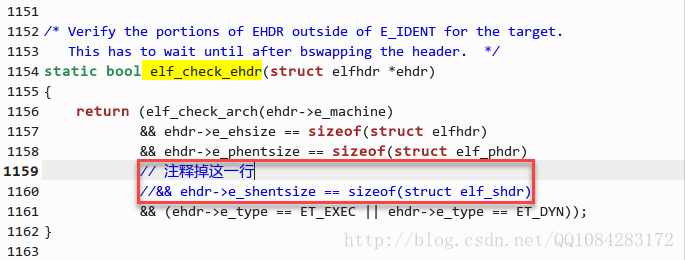
A quick grep of Qemu’s source quickly found the culprit in linux-user/elfload.c:
static bool elf_check_ehdr(struct elfhdr *ehdr)

{

    return (elf_check_arch(ehdr->e_machine)

            && ehdr->e_ehsize == sizeof(struct elfhdr)

            && ehdr->e_phentsize == sizeof(struct elf_phdr)

            && ehdr->e_shentsize == sizeof(struct elf_shdr)

            && (ehdr->e_type == ET_EXEC || ehdr->e_type == ET_DYN));

}
Even thoughsection headers aren’t required to load an ELF file,the elf_check_ehdr
function expects the section header size to equal the size of the elf_shdr structure;simply commenting out this line and re-compiling did the trick:
eve@eve:~/firmware$ sudo chroot . ./qemu-mips bin/ls

bin        lib        qemu-mips  tmp       var

dev        home       sbin       usr
A patch has been submitted,
but if you need this to work now it’s a quick and easy fix.
在低版本的QEMU源码中,在编译和安装之前需要如下修改 /qemu/linux-user/elfload.c文件中的 elf_check_ehdr 函数 的代码:

# 拷贝qemu-mipsel程序到固件文件系统的根目录

$ cp $(which qemu-mipsel) ./qemu

# 赋予qemu-mipsel程序可执行权限

$ chmod +x qemu

# 执行路由器固件的ls程序

$ sudo chroot . ./qemu ./bin/ls

# 或者

$ sudo chroot . ./qemu  bin/ls
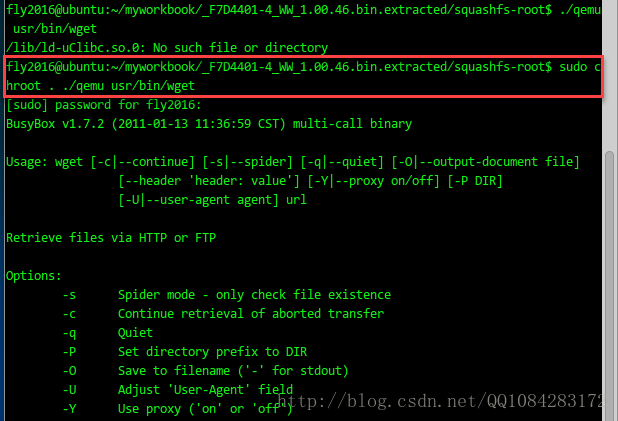
QEMU测试的结果截图:
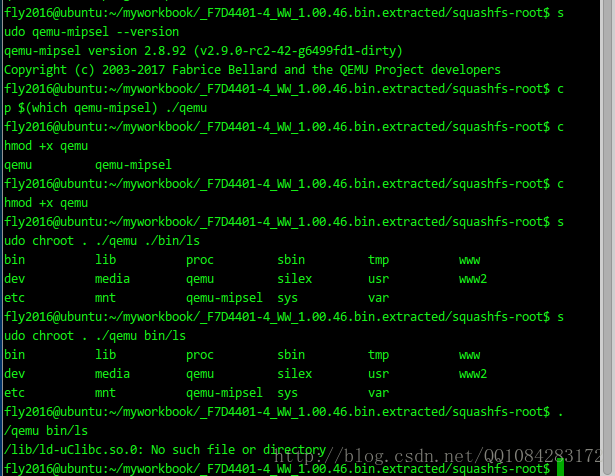
$ sudo chroot . ./qemu usr/bin/wget
<6>.QEMU程序的命令行帮助(以qemu-mipsel为例)。
fly2016@ubuntu:~$ qemu-mipsel -h

usage: qemu-mipsel [options] program [arguments...]

Linux CPU emulator (compiled for mipsel emulation)

Options and associated environment variables:

Argument      Env-variable      Description

-h                              print this help

-help

-g port       QEMU_GDB          wait gdb connection to 'port'

-L path       QEMU_LD_PREFIX    set the elf interpreter prefix to 'path'

-s size       QEMU_STACK_SIZE   set the stack size to 'size' bytes

-cpu model    QEMU_CPU          select CPU (-cpu help for list)

-E var=value  QEMU_SET_ENV      sets targets environment variable (see below)

-U var        QEMU_UNSET_ENV    unsets targets environment variable (see below)

-0 argv0      QEMU_ARGV0        forces target process argv[0] to be 'argv0'

-r uname      QEMU_UNAME        set qemu uname release string to 'uname'

-B address    QEMU_GUEST_BASE   set guest_base address to 'address'

-R size       QEMU_RESERVED_VA  reserve 'size' bytes for guest virtual address space

-d item[,...] QEMU_LOG          enable logging of specified items (use '-d help' for a list of items)

-D logfile    QEMU_LOG_FILENAME write logs to 'logfile' (default stderr)

-p pagesize   QEMU_PAGESIZE     set the host page size to 'pagesize'

-singlestep   QEMU_SINGLESTEP   run in singlestep mode

-strace       QEMU_STRACE       log system calls

-seed         QEMU_RAND_SEED    Seed for pseudo-random number generator

-trace        QEMU_TRACE        [[enable=]<pattern>][,events=<file>][,file=<file>]

-version      QEMU_VERSION      display version information and exit

Defaults:

QEMU_LD_PREFIX  = /usr/gnemul/qemu-mipsel

QEMU_STACK_SIZE = 8388608 byte

You can use -E and -U options or the QEMU_SET_ENV and

QEMU_UNSET_ENV environment variables to set and unset

environment variables for the target process.

It is possible to provide several variables by separating them

by commas in getsubopt(3) style. Additionally it is possible to

provide the -E and -U options multiple times.

The following lines are equivalent:

    -E var1=val2 -E var2=val2 -U LD_PRELOAD -U LD_DEBUG

    -E var1=val2,var2=val2 -U LD_PRELOAD,LD_DEBUG

    QEMU_SET_ENV=var1=val2,var2=val2 QEMU_UNSET_ENV=LD_PRELOAD,LD_DEBUG

Note that if you provide several changes to a single variable

the last change will stay in effect.
路由器逆向分析------QEMU的下载和安装(Linux平台)的更多相关文章
- 路由器逆向分析------QEMU的基本使用方法(MIPS)
本文博客地址:http://blog.csdn.net/qq1084283172/article/details/69258334 一.QEMU的运行模式 直接摘抄自己<揭秘家用路由器0day漏 ...
- 路由器逆向分析------Running Debian MIPS Linux in QEMU
本文博客地址:http://blog.csdn.net/qq1084283172/article/details/70176583 下面的文章内容主要参考英文博客<Running Debian ...
- 路由器逆向分析------MIPS系统网络的配置(QEMU)
本文博客地址:http://blog.csdn.net/qq1084283172/article/details/69378333 MIPS系统网络的配置 使用QEMU 模拟正在运行的MIPS系统并 ...
- 路由器逆向分析------在QEMU MIPS虚拟机上运行MIPS程序(ssh方式)
本文博客地址:http://blog.csdn.net/qq1084283172/article/details/69652258 在QEMU MIPS虚拟机上运行MIPS程序--SSH方式 有关在u ...
- 路由器逆向分析------firmware-mod-kit工具安装和使用说明
本文博客地址:http://blog.csdn.net/qq1084283172/article/details/68061957 一.firmware-mod-kit工具的安装 firmware-m ...
- 路由器逆向分析------在Linux上安装IDA Pro
本文博客地址:http://blog.csdn.net/qq1084283172/article/details/69665905 01.在Linux系统上安装Linux版本的IDA Pro Linu ...
- 路由器逆向分析------sasquatch和squashfs-tools工具的安装和使用
本文博客地址:http://blog.csdn.net/qq1084283172/article/details/68942660 一.sasquatch工具的安装和使用 sasquatch工具支持对 ...
- 路由器逆向分析------binwalk工具的安装
本文博客链接:http://blog.csdn.net/qq1084283172/article/details/65441110 一.binwalk工具运行支持的平台 binwalk工具安装支持的平 ...
- 路由器逆向分析------MIPS交叉编译环境的搭建(Buildroot)
本文博客地址:http://blog.csdn.net/qq1084283172/article/details/68950682 为了能在我们熟悉的windows或者ubuntu下开发mips架构的 ...
随机推荐
- 《C++ Primer》笔记 第7章 类
成员函数的声明必须在类的内部,它的定义则既可以在类的内部也可以在类的外部.作为接口组成部分的非成员函数,它们的定义和声明都在类的外部. 定义在类内部的函数是隐式的inline函数. 成员函数通过一个名 ...
- 剑指 Offer 64. 求1+2+…+n + 递归
剑指 Offer 64. 求1+2+-+n Offer_64 题目描述 题解分析 使用&&逻辑短路规则来终止循环 package com.walegarrett.offer; /** ...
- WPF 基础 - 启动与退出及异常捕获
1. 若需要控制 exe 实例数量 bool ret; mutex = new System.Threading.Mutex(true, exename, out ret); if (!ret) { ...
- uni-app(二)接口请求封装,全局输出api
在项目 main.js 同级创建 utils 文件夹, utils里创建 config.js文件,存储重要参数 // 获取平台信息 const { system, } = uni.getSystemI ...
- vue 仿zTree折叠树
需求: vue实现仿zTree折叠树,此文章仅作为记录文档. 实现: <template> <div class="line-tree"> <div ...
- 11、pass,is,位运算的补充
pass的补充 一般Python的代码是基于:和缩进来实现,Python中规定代码块中必须要有代码才算完整,在没有代码的情况下为了保证语法的完整性可以用pass代替 if 条件: pass else: ...
- HDU(1420)Prepared for New Acmer(JAVA语言)【快速幂模板】
思路:快速幂裸题. //注意用long,否则会超范围 Problem Description 集训进行了将近2个礼拜,这段时间以恢复性训练为主,我一直在密切关注大家的训练情况,目前为止,对大家的表现相 ...
- javascript是一种什么样的语言
javascript是一种动态类型.弱类型.基于原型的语言,内置支持类型.它的解释器被称为JavaScript引擎,为浏览器的一部分,广泛用于客户端的脚本语言,最早是在HTML网页上使用,用来给HTM ...
- 实现FTP+PAM+MySQL环境,批量配置虚拟用户
实现FTP+PAM+MySQL环境,批量配置虚拟用户 搭建环境: CentOS6.5或CentOS6.7 [root@vhost3 ~]# uname -a Linux vhost3 2.6.32-5 ...
- ES9的新特性:正则表达式RegExp
简介 正则表达式是我们做数据匹配的时候常用的一种工具,虽然正则表达式的语法并不复杂,但是如果多种语法组合起来会给人一种无从下手的感觉. 于是正则表达式成了程序员的噩梦.今天我们来看一下如何在ES9中玩 ...