
TCP/IP以及Socket聊天室带类库源码分享
TCP/IP以及Socket聊天室带类库源码分享
最近遇到个设备,需要去和客户的软件做一个网络通信交互,一般的我们的上位机都是作为客户端来和设备通信的,这次要作为服务端来监听客户端,在这个背景下,我查阅了一些大佬们的博客,和一些资料。将这些汇总做了一个简单的服务端监听和客户端的类库,希望对大家有一定的作用,当然更多还是给自己做一个日记。下面是类库和对类库测试的一些全部源代码,有需要的可以我QQ获取源代码(674479991)。
1.通信类库


using System;

using System.Collections.Generic;

using System.Text;

using System.Net;

using System.Net.Sockets;

namespace TCP_DLL

{

    public class PSS_Server

    {

        private Dictionary<string, Socket> cilentList = new Dictionary<string, Socket>();

        private Socket server = new Socket(AddressFamily.InterNetwork, SocketType.Stream, ProtocolType.IP);

        private Socket ConnCilent;

        /// <summary>

        /// 创建服务端

        /// </summary>

        /// <param name="ip">IP地址</param>

        /// <param name="Port">端口</param>

        public PSS_Server(string ip, int Port)

        {

            IPAddress _IP = IPAddress.Parse(ip);

            IPEndPoint endPoint = new IPEndPoint(_IP, Port);

            server.Bind(endPoint);

            server.Listen(20);

        }

        /// <summary>

        /// 接受客户端的连入请求

        /// </summary>

        /// <param name="retn"></param>

        /// <returns></returns>

        public bool Accept(ref string retn)

        {

            string info = "";

            try

            {

                ConnCilent = server.Accept();//接受一个连入的客户端

                if (ConnCilent != null)

                {

                    info = ConnCilent.RemoteEndPoint.ToString();

                    cilentList.Add(info, ConnCilent);

                    retn = info + "接入服务成功!";

                }

                return true;

            }

            catch (Exception)

            {

                retn = info + "接入服务失败!";

                return false;

            }

        }

        /// <summary>

        /// 发送消息

        /// </summary>

        /// <param name="str"></param>

        /// <returns></returns>

        public bool SendMsg(string str)

        {

            try

            {

                foreach (var item in cilentList)

                {

                    byte[] arrMsg = Encoding.UTF8.GetBytes(str);

                    item.Value.Send(arrMsg);

                }

                return true;

            }

            catch (Exception)

            {

                return false;

            }

        }

        /// <summary>

        /// 接收客户端消息

        /// </summary>

        /// <param name="obj"></param>

        /// <returns></returns>

        public bool Receive(object obj, ref string msg)

        {

            Socket ConnCilent1 = ConnCilent;

            IPEndPoint endPoint = null;

            try

            {

                byte[] arrMsg = new byte[1024 * 1024];

                int Len = ConnCilent1.Receive(arrMsg);

                if (Len != 0)

                {

                    msg = Encoding.UTF8.GetString(arrMsg, 0, Len);

                    endPoint = ConnCilent1.RemoteEndPoint as IPEndPoint;

                }

                return true;

            }

            catch (Exception)

            {

                if (endPoint!=null)

                {

                    cilentList.Remove(endPoint.ToString());

                }

                return false;

            }

        }

        /// <summary>

        /// 关闭连接

        /// </summary>

        public void Close()

        {

            try

            {

                server.Close();

                cilentList.Clear();

            }

            catch (Exception)

            {

            }

        }

    }

    public class PSS_Cilent

    {

        private Socket cilent = new Socket(AddressFamily.InterNetwork, SocketType.Stream, ProtocolType.IP);

        /// <summary>

        /// 创建客户端

        /// </summary>

        /// <param name="ip"></param>

        /// <param name="Port"></param>

        public bool Connect(string ip, int Port)

        {

            IPAddress _ip = IPAddress.Parse(ip);

            IPEndPoint endPoint = new IPEndPoint(_ip, Port);

            try

            {

                cilent.Connect(endPoint);

                return true;

            }

            catch (Exception)

            {

                return false;

            }

        }

        /// <summary>

        /// 关闭连接

        /// </summary>

        public void Close()

        {

            try

            {

                cilent.Close();

            }

            catch (Exception)

            {

            }

        }

        /// <summary>

        /// 接收消息

        /// </summary>

        /// <param name="o"></param>

        /// <returns></returns>

        public bool ReceiveMsg(ref string msg)

        {

            Socket _Cilent = cilent;

            try

            {

                //定义客户端收到的信息大小

                byte[] arrlist = new byte[1024 * 1024];

                //接收到的信息大小

                int Len = cilent.Receive(arrlist);

                msg = Encoding.UTF8.GetString(arrlist, 0, Len);

                return true;

            }

            catch (Exception)

            {

                _Cilent.Close();

                return false;

            }

        }

        /// <summary>

        /// 发送消息

        /// </summary>

        /// <param name="msg"></param>

        /// <returns></returns>

        public bool SenMsg(string msg)

        {

            try

            {

                byte[] arrmsg = Encoding.UTF8.GetBytes(msg);

                cilent.Send(arrmsg);

                return true;

            }

            catch (Exception)

            {

                return false;

            }

        }

    }

}
2.服务端源代码和界面
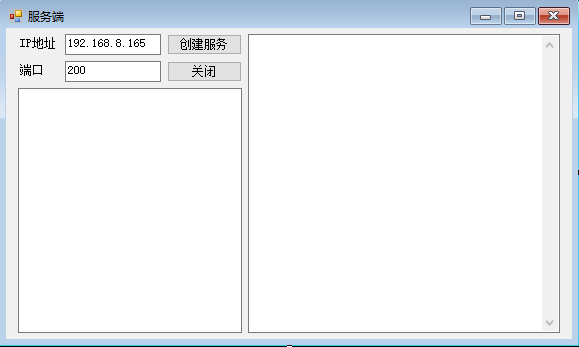
using System;

using System.Threading.Tasks;

using System.Windows.Forms;

namespace ServerTest

{

    public partial class Form1 : Form

    {

        public Form1()

        {

            InitializeComponent();

        }

        private TCP_DLL.PSS_Server Server;

        private void textBox3_KeyDown(object sender, KeyEventArgs e)

        {

            if (e.KeyCode == Keys.Enter)

            {

                if (Server.SendMsg(textBox3.Text).Equals(false))

                {

                    MessageBox.Show("发送消息失败!!");

                    return;

                }

                textBox3.Clear();

            }

        }

        private void button1_Click(object sender, EventArgs e)

        {

            string retn = "";

            Server = new TCP_DLL.PSS_Server(textBox1.Text, int.Parse(textBox2.Text));

            textBox4.Invoke(new Action(() => textBox4.AppendText(DateTime.Now + "\r\n" + "创建服务完成,等待接入..." + "\r\n")));

            if (Server.Accept(ref retn).Equals(false))

            {

                MessageBox.Show(retn);

                return;

            }

            textBox4.Invoke(new Action(() => textBox4.AppendText(DateTime.Now + "\r\n" + retn + "\r\n")));

            Task.Factory.StartNew(() =>

            {

                while (true)

                {

                    string retn1 = "";

                    if (Server.Receive(ref retn).Equals(false))

                    {

                        MessageBox.Show("接收消息异常!!");

                        return;

                    }

                    textBox4.Invoke(new Action(() => textBox4.AppendText(DateTime.Now + "\r\n" + retn + "\r\n")));

                }

            });

        }

        private void button2_Click(object sender, EventArgs e)

        {

            Server.Close();

        }

    }

}
2.客户端界面和源代码
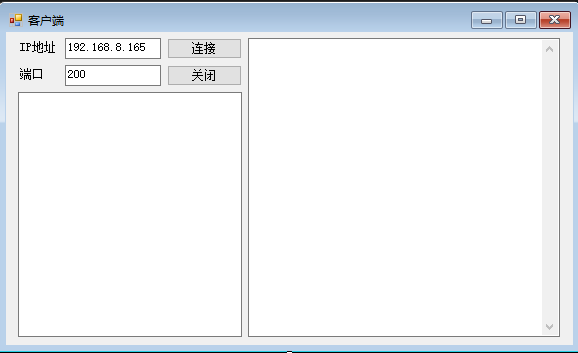
using System;

using System.Threading.Tasks;

using System.Windows.Forms;

namespace CilentTest

{

    public partial class Form1 : Form

    {

        public Form1()

        {

            InitializeComponent();

        }

        private TCP_DLL.PSS_Cilent Cilent = new TCP_DLL.PSS_Cilent();

        private void textBox3_KeyDown(object sender, KeyEventArgs e)

        {

            if (e.KeyCode==Keys.Enter)

            {

                if (Cilent.SenMsg(textBox3.Text).Equals(false))

                {

                    MessageBox.Show("发送消息失败!!!");

                    return;

                }

                textBox3.Clear();

            }

        }

        private void button1_Click(object sender, EventArgs e)

        {

            if (Cilent.Connect(textBox1.Text,int.Parse(textBox2.Text)).Equals(false))

            {

                MessageBox.Show("连接失败!!!");

                return;

            }

            textBox4.Invoke(new Action(() => textBox4.AppendText(DateTime.Now + "\r\n" + "创建连接完成....." + "\r\n")));

            Task.Factory.StartNew(() =>

            {

                while (true)

                {

                    string retn = "";

                    if (Cilent.ReceiveMsg(ref retn).Equals(false))

                    {

                        MessageBox.Show("接收消息异常!!");

                        return;

                    }

                    textBox4.Invoke(new Action(() => textBox4.AppendText(DateTime.Now + "\r\n" + retn + "\r\n")));

                }

            });

        }

        private void button2_Click(object sender, EventArgs e)

        {

            Cilent.Close();

        }

    }

}
TCP/IP以及Socket聊天室带类库源码分享的更多相关文章
- 基于TCP/IP的局域网聊天室---C语言
具备注册账号,群聊,查看在线人员信息,私发文件和接收文件功能,因为每个客户端只有一个属于自己的socket,所以无论客户端是发聊天消息还是文件都是通过这一个socket发送, 这也意味着服务器收发任何 ...
- Java Socket聊天室编程(二)之利用socket实现单聊聊天室
这篇文章主要介绍了Java Socket聊天室编程(二)之利用socket实现单聊聊天室的相关资料,非常不错,具有参考借鉴价值,需要的朋友可以参考下 在上篇文章Java Socket聊天室编程(一)之 ...
- Java Socket聊天室编程(一)之利用socket实现聊天之消息推送
这篇文章主要介绍了Java Socket聊天室编程(一)之利用socket实现聊天之消息推送的相关资料,非常不错,具有参考借鉴价值,需要的朋友可以参考下 网上已经有很多利用socket实现聊天的例子了 ...
- TCP/IP、SOCKET、HTTP之间的联系与区别
主要内容: 1.网络的七层协议 2.TCP/IP.SOCKET.HTTP简介 3.TCP连接.HTTP连接.Socket连接的区别 一.网络的七层协议 网络七层由下往上分别为物理层.数据链路层.网络层 ...
- ios开发网络知识 TCP,IP,HTTP,SOCKET区别和联系
TCP,IP,HTTP,SOCKET区别和联系 网络由下往上分为: 对应 物理层-- 数据链路层-- 网络层-- IP协议 传输层-- ...
- Linux内核 TCP/IP、Socket参数调优
Linux内核 TCP/IP.Socket参数调优 2014-06-06 Harrison.... 阅 9611 转 165 转藏到我的图书馆 微信分享: Doc1: /proc/sy ...
- 网络协议HTTP、TCP/IP、Socket
网络协议HTTP.TCP/IP.Socket 网络七层由下往上分别为物理层.数据链路层.网络层.传输层.会话层.表示层和应用层. 其中物理层.数据链路层和网络层通常被称作媒体层,是网络工程师所研究的 ...
- python socket 聊天室
socket 发送的时候,使用的是全双工的形式,不是半双工的形式.全双工就是类似于电话,可以一直通信.并且,在发送后,如果又接受数据,那么在这个接受到数据之前,整个过程是不会停止的.会进行堵塞,堵塞就 ...
- 学习懈怠的时候,可以运行Qt自带的Demo,或者Delphi控件自带的Demo,或者Cantu书带的源码,运行一下Boost的例子(搞C++不学习Boost/Poco/Folly绝对是一大损失,有需要使用库要第一时间想到)(在六大的痛苦经历说明,我的理论性确实不强,更适合做实践)
这样学还不用动脑子,而且熟悉控件也需要时间,而且慢慢就找到感觉了,就可以精神抖擞的恢复斗志干活了.或者Cantu书带的源码. 并且可以使用Mac SSD运行Qt的Demo,这样运行速度快一点. 此外, ...
随机推荐
- 第1天 Mark Down 学习及DOS命令
Markdown学习 标题 "#加空格"几个#就表示几级标题 字体 helloworld!一两个两个*号 helloworld!一边一个*号 helloworld! 一边三个号 h ...
- python项目案例
python项目案例1:----此学习案例用python3编写,摘自明日科技,感谢! 学生管理系统: 功能描述:具有增删改查,排序,保存并显示学生的全部信息. 1.主界面---函数menu(),显示功 ...
- Python自动化测试面试题-MySQL篇
目录 Python自动化测试面试题-经验篇 Python自动化测试面试题-用例设计篇 Python自动化测试面试题-Linux篇 Python自动化测试面试题-MySQL篇 Python自动化测试面试 ...
- RegOpenKeyEx
对注册表的操作是通过句柄来完成的,在对某个键下的键值进行操作的时候首先将该键进行打开,然后使用键句柄进行引用该键,操作完后要进行关闭: 注册键的根键不需要打开,他们的句柄是固定的,直接拿来用就是了. ...
- 前端性能之LightHouse
"灯塔"(LightHouse)前端性能优化测试工具 (谷歌亲儿子) 一 灯塔v6/v7版是通过几种性能指标及不同权重来进行计分的 前端性能指标主要是根据PerformanceTi ...
- 离线安装zadig
官网:https://koderover.com/ 官方给的离线安装问题有些问题,这里记录下自己离线安装的一些过程. 整体安装思路: 根据官方给出的helm安装方式以及离线安装方式结合而来. 通过官方 ...
- azure删除ns时一直处于terminating状态
写个脚本 #!/bin/bash NAMESPACE=corekubectl proxy &kubectl get namespace $NAMESPACE -o json |jq '.spe ...
- CentOS 永久修改系统时间
1.查看当前系统时间 date 2.修改当前系统时间 date -s "2018-2-22 19:10:30 3.查看硬件时间 hwclock --show ...
- 本以为精通Android事件分发机制,没想到被面试官问懵了
文章中出现的源码均基于8.0 前言 事件分发机制不仅仅是核心知识点更是难点,并且还是View的一大难题滑动冲突解决方法的理论基础,因此掌握好View的事件分发机制是十分重要的. 一.基本认识 1. 事 ...
- Python之replace()方法失效
1.背景 Titanic存活率预测案例: # 读取数据 df_train = pd.read_csv("./data/train.csv") df_train.head() OUT ...