
echarts的示例跟做出来的不一样
先给大家看下我做出来的和echarts官网做出来的 代码什么的都是一模一样但是颜色不一样 它字的颜色和柱状图颜色还一样不知道是不是脑子有猫病~
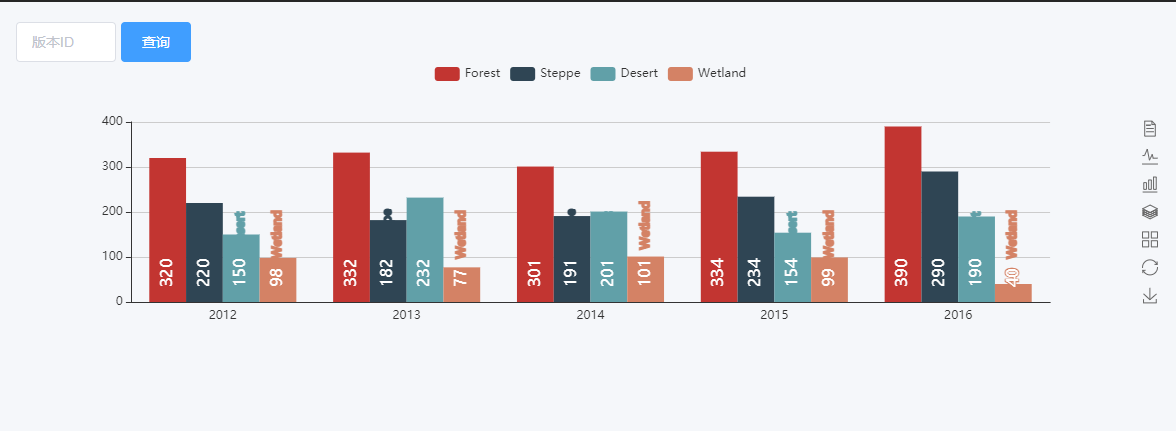
上面是我做的 下面是官网的
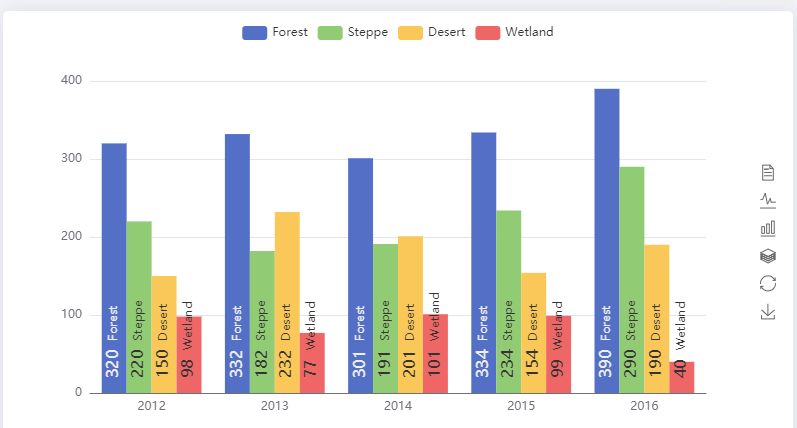
主要是代码都是一样 我又不是某宝买衣服 颜色差别这么大呢?
我给你们看代码下面是我写的
<template>

  <div>

    <div class="echarts" ref="echarts"></div>

  </div>

</template>

<script>

import echarts from 'echarts'

export default {

  name: 'dailyJournal',

  data() {

    return {

      chart: null,

      myChart: null,

      option: {},

    }

  },

  methods: {

    draw() {

      this.chart = this.$refs.echarts

      this.chart.style.height = 300 + 'px'

      this.myChart = echarts.init(this.chart)

      var app = {}

      var posList = [

        'left',

        'right',

        'top',

        'bottom',

        'inside',

        'insideTop',

        'insideLeft',

        'insideRight',

        'insideBottom',

        'insideTopLeft',

        'insideTopRight',

        'insideBottomLeft',

        'insideBottomRight'

      ]

      app.configParameters = {

        rotate: {

          min: -90,

          max: 90

        },

        align: {

          options: {

            left: 'left',

            center: 'center',

            right: 'right'

          }

        },

        verticalAlign: {

          options: {

            top: 'top',

            middle: 'middle',

            bottom: 'bottom'

          }

        },

        position: {

          options: posList.reduce(function(map, pos) {

            map[pos] = pos

            return map

          }, {})

        },

        distance: {

          min: 0,

          max: 100

        }

      }

      app.config = {

        rotate: 90,

        align: 'left',

        verticalAlign: 'middle',

        position: 'insideBottom',

        distance: 15,

        onChange: function() {

          var labelOption = {

            normal: {

              rotate: app.config.rotate,

              align: app.config.align,

              verticalAlign: app.config.verticalAlign,

              position: app.config.position,

              distance: app.config.distance

            }

          }

          this.myChart.setOption({

            series: [

              {

                label: labelOption

              },

              {

                label: labelOption

              },

              {

                label: labelOption

              },

              {

                label: labelOption

              }

            ]

          })

        }

      }

      var labelOption = {

        show: true,

        position: app.config.position,

        distance: app.config.distance,

        align: app.config.align,

        verticalAlign: app.config.verticalAlign,

        rotate: app.config.rotate,

        formatter: '{c}  {name|{a}}',

        fontSize: 16,

        rich: {

          name: {}

        }

      }

      this.option = {

        tooltip: {

          trigger: 'axis',

          axisPointer: {

            type: 'shadow'

          }

        },

        legend: {

          data: ['Forest', 'Steppe', 'Desert', 'Wetland']

        },

        toolbox: {

          show: true,

          orient: 'vertical',

          left: 'right',

          top: 'center',

          feature: {

            mark: { show: true },

            dataView: { show: true, readOnly: false },

            magicType: { show: true, type: ['line', 'bar', 'stack', 'tiled'] },

            restore: { show: true },

            saveAsImage: { show: true }

          }

        },

        xAxis: [

          {

            type: 'category',

            axisTick: { show: false },

            data: ['2012', '2013', '2014', '2015', '2016']

          }

        ],

        yAxis: [

          {

            type: 'value'

          }

        ],

        series: [

          {

            name: 'Forest',

            type: 'bar',

            barGap: 0,

            label: labelOption,

            emphasis: {

              focus: 'series'

            },

            data: [320, 332, 301, 334, 390]

          },

          {

            name: 'Steppe',

            type: 'bar',

            label: labelOption,

            emphasis: {

              focus: 'series'

            },

            data: [220, 182, 191, 234, 290]

          },

          {

            name: 'Desert',

            type: 'bar',

            label: labelOption,

            emphasis: {

              focus: 'series'

            },

            data: [150, 232, 201, 154, 190]

          },

          {

            name: 'Wetland',

            type: 'bar',

            label: labelOption,

            emphasis: {

              focus: 'series'

            },

            data: [98, 77, 101, 99, 40]

          }

        ]

      }

      this.myChart.setOption(this.option)

      // this.$nextTick(() => {

      window.addEventListener('resize', () => {

        this.myChart.resize()

      })

      // })

    }

  },

  mounted() {

     this.draw()

  }

}

</script>

<style></style>
下面看官网的 我都是下载示例copy官网一模一样
<!DOCTYPE html>

<html style="height: 100%">

    <head>

        <meta charset="utf-8">

    </head>

    <body style="height: 100%; margin: 0">

        <div id="container" style="height: 100%"></div>

        <script type="text/javascript" src="https://cdn.jsdelivr.net/npm/echarts@5/dist/echarts.min.js"></script>

        <script type="text/javascript">

var dom = document.getElementById("container");

var myChart = echarts.init(dom);

var app = {};

var option;

var posList = [

    'left', 'right', 'top', 'bottom',

    'inside',

    'insideTop', 'insideLeft', 'insideRight', 'insideBottom',

    'insideTopLeft', 'insideTopRight', 'insideBottomLeft', 'insideBottomRight'

];

app.configParameters = {

    rotate: {

        min: -90,

        max: 90

    },

    align: {

        options: {

            left: 'left',

            center: 'center',

            right: 'right'

        }

    },

    verticalAlign: {

        options: {

            top: 'top',

            middle: 'middle',

            bottom: 'bottom'

        }

    },

    position: {

        options: posList.reduce(function (map, pos) {

            map[pos] = pos;

            return map;

        }, {})

    },

    distance: {

        min: 0,

        max: 100

    }

};

app.config = {

    rotate: 90,

    align: 'left',

    verticalAlign: 'middle',

    position: 'insideBottom',

    distance: 15,

    onChange: function () {

        var labelOption = {

            normal: {

                rotate: app.config.rotate,

                align: app.config.align,

                verticalAlign: app.config.verticalAlign,

                position: app.config.position,

                distance: app.config.distance

            }

        };

        myChart.setOption({

            series: [{

                label: labelOption

            }, {

                label: labelOption

            }, {

                label: labelOption

            }, {

                label: labelOption

            }]

        });

    }

};

var labelOption = {

    show: true,

    position: app.config.position,

    distance: app.config.distance,

    align: app.config.align,

    verticalAlign: app.config.verticalAlign,

    rotate: app.config.rotate,

    formatter: '{c}  {name|{a}}',

    fontSize: 16,

    rich: {

        name: {

        }

    }

};

option = {

    tooltip: {

        trigger: 'axis',

        axisPointer: {

            type: 'shadow'

        }

    },

    legend: {

        data: ['Forest', 'Steppe', 'Desert', 'Wetland']

    },

    toolbox: {

        show: true,

        orient: 'vertical',

        left: 'right',

        top: 'center',

        feature: {

            mark: {show: true},

            dataView: {show: true, readOnly: false},

            magicType: {show: true, type: ['line', 'bar', 'stack', 'tiled']},

            restore: {show: true},

            saveAsImage: {show: true}

        }

    },

    xAxis: [

        {

            type: 'category',

            axisTick: {show: false},

            data: ['2012', '2013', '2014', '2015', '2016']

        }

    ],

    yAxis: [

        {

            type: 'value'

        }

    ],

    series: [

        {

            name: 'Forest',

            type: 'bar',

            barGap: 0,

            label: labelOption,

            emphasis: {

                focus: 'series'

            },

            data: [320, 332, 301, 334, 390]

        },

        {

            name: 'Steppe',

            type: 'bar',

            label: labelOption,

            emphasis: {

                focus: 'series'

            },

            data: [220, 182, 191, 234, 290]

        },

        {

            name: 'Desert',

            type: 'bar',

            label: labelOption,

            emphasis: {

                focus: 'series'

            },

            data: [150, 232, 201, 154, 190]

        },

        {

            name: 'Wetland',

            type: 'bar',

            label: labelOption,

            emphasis: {

                focus: 'series'

            },

            data: [98, 77, 101, 99, 40]

        }

    ]

};

if (option && typeof option === 'object') {

    myChart.setOption(option);

}

        </script>

    </body>

</html>
想问下大神们我都没有改啥为什么差别这么大 颜色也不知道在哪里改。。。。。
echarts的示例跟做出来的不一样的更多相关文章
- Echarts图表常用功能配置,Demo示例
先看下效果图: 就如上图所示,都是些常用的基本配置. Legend分页,X轴设置,Y轴设置,底部缩放条设置, 数值显示样式设置,工具箱设置,自定义工具按钮, 绑定点击事件等等.这些配置代码中都做了简单 ...
- 基于Servlet的Echarts例子(2018-12-26更新)
引子 ECharts是百度出品的,一个使用 JavaScript 实现的开源可视化库.程序员在Web页面上引入并稍作配置就能做出漂亮的数据图表. 本篇文章简单介绍一下如何在JSP中使用Echarts, ...
- 在react项目中使用ECharts
这里我们要在自己搭建的react项目中使用ECharts,我们可以在ECharts官网上看到有一种方式是在 webpack 中使用 ECharts,我们需要的就是这种方法. 我们在使用ECharts之 ...
- echarts图表的封装
其实echarts官网有个快速上手的教程,一般人看一遍也知道是怎么回事,先给个传送门吧--五分钟上手 引入方式多种多样就自己去官网看了--这里简单介绍echarts怎么用,下方的封装函数比较重要 1. ...
- Vue3+vite+Echarts案例大屏可视化--千峰(推荐)
https://www.bilibili.com/video/BV14u411D7qK?p=33&spm_id_from=pageDriver&vd_source=e2cfe74d93 ...
- Webstorm+Webpack+echarts构建个性化定制的数据可视化图表&&两个echarts详细教程(柱状图,南丁格尔图)
Webstorm+Webpack+echarts ECharts 特性介绍 ECharts,一个纯 Javascript 的图表库,可以流畅的运行在 PC 和移动设备上,兼容当前绝大部分浏览器(I ...
- ASP.NET MVC5+EF6+EasyUI 后台管理系统(67)-MVC与ECharts
系列目录 ECharts 特性介绍 ECharts,一个纯 Javascript 的图表库,可以流畅的运行在 PC 和移动设备上,兼容当前绝大部分浏览器(IE8/9/10/11,Chrome,Fire ...
- 数据图表插件Echarts(一)
一.引言 最近做一个智慧城市项目,项目中需要图表和报表进行数据分析,从网上找了很多,最后找到了百度开放的echarts,一个很强大的插件. 二.介绍 ECharts,缩写来自Enterprise Ch ...
- Ionic2系列——在Ionic2中使用ECharts
在群里看到有人问怎么在Ionic2中集成ECharts来显示图表.当时答应说写个blog,简单写下步骤. 在TypeScript中如果要使用第三方库,必须要有d.ts,也就是定义文件,没有这个文件的话 ...
- ECharts的简单使用过程
网页中经常要使用图表,以前使用的是highcharts插件,现在发现echarts使用起来和highcharts差不多,但是个人感觉echarts更酷炫,以下是echarts的使用过程,其实highc ...
随机推荐
- Flink 如何实时分析 Iceberg 数据湖的 CDC 数据
简介: 数据湖的架构中,CDC 数据实时读写的方案和原理 本文由李劲松.胡争分享,社区志愿者杨伟海.李培殿整理.主要介绍在数据湖的架构中,CDC 数据实时读写的方案和原理.文章主要分为 4 个部分内容 ...
- Fluid 0.5 版本发布:开启数据集缓存在线弹性扩缩容之路
简介: 为了解决大数据.AI 等数据密集型应用在云原生场景下,面临的异构数据源访问复杂.存算分离 I/O 速度慢.场景感知弱调度低效等痛点问题,南京大学PASALab.阿里巴巴.Alluxio 在 2 ...
- iLogtail 与Filebeat 性能对比
简介:前段时间, iLogtail 阿里千万实例可观测采集器开源,其中介绍了iLogtail采集性能可以达到单核100MB/s,相比开源采集Agent有5-10倍性能优势.很多小伙伴好奇iLogta ...
- [FAQ] Python的虚拟环境和包管理
1. 创建虚拟环境 $ python -m venv test-env 2. 激活虚拟环境 windows:tutorial-env\Scripts\activate (powershell: . ...
- dotnet UNO 如何在调试下输出界面层级结构
本文将告诉大家如何在 UNO 里面将界面的层级结构输出到调试窗口 实现方法非常简单,和 WPF 或 UWP 等的方法是一样的,那就是通过可视化树遍历的方式,如以下代码 static class UIS ...
- dotnet 修复 Uno 中文乱码
这是一个历史问题,在使用 Uno 展示中文的时候,如果设置 Uno 的底层使用 Skia 系进行渲染,那么将会因为中文字体问题,导致渲染出现乱码.此问题已被我修复,最佳解法是更新到最新版本 在上一篇博 ...
- element-ui表单重置函数 resetFields 无效解决
由element-ui文档中能看到重置表单使用的是如下函数 this.$refs[formName].resetFields(); 但是有时使用它却可能会失效 解决: form-item中要加上pro ...
- Python采集知网
Python爬虫初探 selenium+beautifulsoup4+chromedriver 安装模块:* import pymssql* pip install bs4* pip install ...
- SqlServer使用总结
-- 新增主键,系统随机取名 ALTER TABLE "T_CS1" ADD PRIMARY KEY CLUSTERED ("ID1", "ID2&q ...
- C#TMS系统学习(BaseCity页面)
C#TMS系统代码-基础页面BaseCity学习 本人纯新手,刚进公司跟领导报道,我说我是java全栈,他问我会不会C#,我说大学学过,他说这个TMS系统就给你来管了.外包已经把代码给我了,这几天先把 ...