
mint-ui之Swipe使用
<template>

<div>

  <div class="swipe-wrapper">

    <mt-swipe :auto="1000" ref="swipeWrapper">

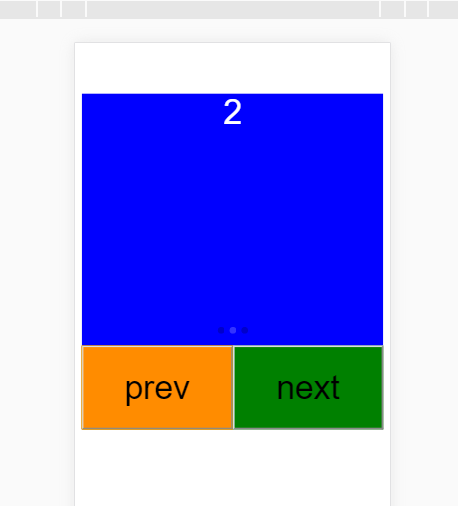
      <mt-swipe-item class="swip-item-1 item">1</mt-swipe-item>

      <mt-swipe-item class="swip-item-2 item">2</mt-swipe-item>

      <mt-swipe-item class="swip-item-3 item">3</mt-swipe-item>

    </mt-swipe>

  </div>

  <div class="button-wrapper">

    <button class="prev-button flex-item" @click="prev">prev</button>

    <button class="next-button flex-item" @click="next">next</button>

  </div>

</div>

</template>

<script>

  export default {

    data() {

      return {};

    },

    methods: {

      prev: function() {

        this.$refs.swipeWrapper.prev();

        console.log(this.$children);

      },

      next: function() {

        this.$refs.swipeWrapper.next();

      }

    }

  };

</script>

<style>

  .swipe-wrapper {

    width: 100%;

    height: 300px;

  }

  .swip-item-1 {

    background: red;

  }

  .swip-item-2 {

    background: blue;

  }

  .swip-item-3 {

    background: green;

  }

  .item {

    text-align: center;

    font-size: 40px;

    color: white;

  }

  .button-wrapper {

    display: flex;

    height: 100px;

  }

  .flex-item {

    flex: 1;

    display: inline-block;

    text-align: center;

    height: 100%;

    line-height: 100%;

    font-size: 40px;

  }

  .prev-button {

    background: darkorange;

  }

  .next-button {

    background: green;

  }

</style>
mint-ui之Swipe使用的更多相关文章
- Mint UI 之 Swipe 组件
#为什么不显示内容? 一定要指定 mt-swipe 元素的宽和高. <mt-swipe :auto="4000" class="swipe"> &l ...
- vue mint ui 手册文档对于墙的恐惧
http://www.cnblogs.com/smallteeth/p/6901610.html npm 安装 推荐使用 npm 的方式安装,它能更好地和 webpack 打包工具配合使用. npm ...
- vue mint ui 手册文档
npm 安装 推荐使用 npm 的方式安装,它能更好地和 webpack 打包工具配合使用. npm i mint-ui -S CDN 目前可以通过 unpkg.com/mint-ui 获取到最新版本 ...
- vue mint UI
vue 与mint UI 结合开发手机app html5页面 api 文档 http://mint-ui.github.io/#!/zh-cn
- 基于VUE.JS的移动端框架Mint UI
Mint UI GitHub:github.com/ElemeFE/mint 项目主页:mint-ui.github.io/# Demo:elemefe.github.io/mint- 文档:mint ...
- Mint UI文档
Mint UI文档:http://elemefe.github.io/mint-ui/#/ 一.Mint UI的安装和基本用法. 1.NPM :npm i mint-ui -S 建议使用npm进行安装 ...
- 新建一个基于vue.js+Mint UI的项目
上篇文章里面讲到如何新建一个基于vue,js的项目(详细文章请戳用Vue创建一个新的项目). 该项目如果需要组件等都需要自己去写,今天就学习一下如何新建一个基于vue.js+Mint UI的项目,直接 ...
- iView webapp / Mint UI / MUI [前端UI]
前端UI iView webapp一套高质量的 微信小程序 UI 组件库 https://weapp.iviewui.com/?from=iview Mint UI 基于 Vue.js 的移动端组件库 ...
- Mint UI 使用指南
上来直接在webpack里将Mint UI引入项目,发现各种问题.饿了么组件库文档太坑了,好多地方写错,有些该说明的地方没说,比如例子里单文件.vue组件里用的类post-css处理器,我一直使用SA ...
- Mint UI Example的运行
Mint -UI是新推出的移动端UI框架 官网 不过官网上的文档例子不是很全面. 建议下载他们提供的example来学习. 1.examplle源码下载地址 2.打开项目,我这里使用webstorm, ...
随机推荐
- 服务器--apache启用多个端口的方法
apache启用多个端口的方法 使用本地ip:端口号,或者修改hosts文件+域名的方法来进行本地多站点web调试. 注意这里是用apache 不是iis 1.安装好AppServ2.5.9软件 官网 ...
- python使用cx_Oracle在Linux和Windows下的一点差异
1. 主要是线程方面的差异. Windows下,把cx_Oracle.connect(connectedId)得到的handle传给定时器线程,主线程和和定时器可以用同一个handle. 但Linux ...
- 无法序列化会话状态。在“StateServer”或“SQLServer”模式下,ASP.NET 将序列化会话状态对象,因此不允许使用无法序列化的对象或 MarshalByRef 对象。如果自定义会话状态存储在“Custom”模式下执行了类似的序列化,则适用同样的限制。
将项目部署到服务器后发现有如下问题,查了网上好多说是需要被序列化的类没有写上[Serializable]标志,所以把全部需要序列化的列都写上了标志发现还是不是,最后查到了发现网上说的并不太准确,而是需 ...
- iOS UI进阶-1.1 Quartz2D 图片水印/裁剪/截图
图片水印 UIImage+MJ.h #import <UIKit/UIKit.h> @interface UIImage (MJ) /** * 打水印 * * @param bg 背景图片 ...
- unity3d-知识汇总
itween下载 http://www.youkexueyuan.com/exp_show/1147.html 代码修改精灵图片的透明度 UIBp.GetComponent<Image>( ...
- php 提取多维数组指定列
前言:有时候在开发中会遇到这样的问题,我们需要把有规律的多维数组按照纵向(列)取出,有下面的方法可用: 我们将拿下面的数组来处理: 1 $arr = array( 2 '0' => array( ...
- OBV15 案例5,上M10拉高出货
- XXE攻击学习
环境:lAMP simplexml_load_string.php代码内容 <?php $data = file_get_contents('php://input'); $xml = simp ...
- C# Control.Invoke匿名委托
if (txbValue.InvokeRequired) txbValue.Invoke(new MethodInvoker(delegate() { ...
- linux脚本文件执行的方法之间的区别
sh/bash sh a.sh bash a.sh 都是打开一个subshell去读取.执行a.sh,而a.sh不需要有"执行权限",在subshell里运行的脚本里设置变量,不会 ...