
Spring注解之 @EnableScheduling计划任务注解
要实现计划任务,首先通过在配置类注解@EnableScheduling来开启对计划任务的支持,
然后在要执行计划任务的方法上注解@Scheduled,声明这是一个计划任务
示例:计划任务执行类
在这个类中的方法上需要@Scheduled注解配合@EnableScheduling使用。
package cn.hncu.p3.p3_taskscheduler;

import org.springframework.scheduling.annotation.Scheduled;

import org.springframework.stereotype.Service;

import java.text.SimpleDateFormat;

import java.util.Date;

/**

 * Created with IntelliJ IDEA.

 * User:

 * Date: 2016/11/22.

 * Time: 下午 10:25.

 * Explain:计划任务执行类

 */

@Service

public class ScheduledTaskService {

    private static final SimpleDateFormat dateFormat = new SimpleDateFormat("HH:mm:ss");

    @Scheduled(fixedRate = 5000) //通过@Scheduled声明该方法是计划任务,使用fixedRate属性每隔固定时间执行

    public void reportCurrentTime(){

        System.out.println("每隔5秒执行一次 "+dateFormat.format(new Date()));

    }

    @Scheduled(cron = "0 07 20 ? * *" ) //使用cron属性可按照指定时间执行,本例指的是每天20点07分执行;

    //cron是UNIX和类UNIX(Linux)系统下的定时任务

    public void fixTimeExecution(){

        System.out.println("在指定时间 "+dateFormat.format(new Date())+" 执行");

    }

}
配置类
通过@EnableScheduling注解开启对计划任务的支持
package cn.hncu.p3.p3_taskscheduler;

import org.springframework.context.annotation.ComponentScan;

import org.springframework.context.annotation.Configuration;

import org.springframework.scheduling.annotation.EnableScheduling;

/**

 * Created with IntelliJ IDEA.

 * User:

 * Date: 2016/11/22.

 * Time: 下午 10:32.

 * Explain:配置类

 */

@Configuration

@ComponentScan("cn.hncu.p3.p3_taskscheduler")

@EnableScheduling //通过@EnableScheduling注解开启对计划任务的支持

public class TaskScheduleConfig {

}
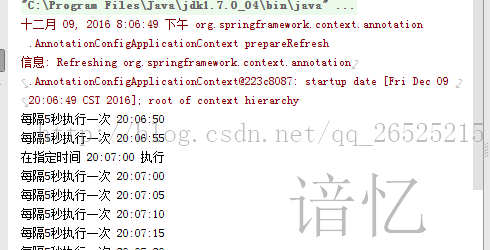
运行结果
package cn.hncu.p3.p3_taskscheduler;

import org.springframework.context.annotation.AnnotationConfigApplicationContext;

/**

 * Created with IntelliJ IDEA.

 * User:

 * Date: 2016/11/22.

 * Time: 下午 10:34.

 * Explain:运行类

 */

public class Main {

    public static void main(String[] args) {

        AnnotationConfigApplicationContext context = new AnnotationConfigApplicationContext(TaskScheduleConfig.class);

    }

}
运行结果
Spring注解之 @EnableScheduling计划任务注解的更多相关文章
- Spring boot @EnableScheduling 和 @Scheduled 注解使用例子
前言 Spring Boot提供了@EnableScheduling和@Scheduled注解,用于支持定时任务的执行,那么接下来就让我们学习下如何使用吧: 假设我们需要每隔10秒执行一个任务,那么我 ...
- spring boot集成swagger,自定义注解,拦截器,xss过滤,异步调用,guava限流,定时任务案例, 发邮件
本文介绍spring boot集成swagger,自定义注解,拦截器,xss过滤,异步调用,定时任务案例 集成swagger--对于做前后端分离的项目,后端只需要提供接口访问,swagger提供了接口 ...
- Spring 02多种注入方式和注解实现DI
一.Bean作用域 spring容器创建的时候,会将所有配置的bean对象创建出来,默认bean都是单例的.代码通过getBean()方法从容器获取指定的bean实例,容器首先会调用Bean类的无参构 ...
- [原创]java WEB学习笔记103:Spring学习---Spring Bean配置:基于注解的方式(基于注解配置bean,基于注解来装配bean的属性)
本博客的目的:①总结自己的学习过程,相当于学习笔记 ②将自己的经验分享给大家,相互学习,互相交流,不可商用 内容难免出现问题,欢迎指正,交流,探讨,可以留言,也可以通过以下方式联系. 本人互联网技术爱 ...
- spring框架学习(五)注解
注解Annotation,是一种类似注释的机制,在代码中添加注解可以在之后某时间使用这些信息.跟注释不同的是,注释是给我们看的,Java虚拟机不会编译,注解也是不编译的,但是我们可以通过反射机制去读取 ...
- spring注解说明之Spring2.5 注解介绍(3.0通用)
spring注解说明之Spring2.5 注解介绍(3.0通用) 注册注解处理器 方式一:bean <bean class="org.springframework.beans.fac ...
- spring + myBatis 常见错误:@Autowired注解失败
今天配置spring+myBatis的时候,使用注解@Autowired把持久层dao注入service层的时候总是报错. 查了好久才发现,居然是配置文件路径写错了.basepackge的路径一定要正 ...
- Spring入门(6)-使用注解装配
Spring入门(6)-使用注解装配 本文介绍如何使用注解装配. 0. 目录 使用Autowired 可选的自动装配 使用Qualifier选择 1. 使用Autowired package com. ...
- 从 Spring 2.5 开始就可以使用注解来配置依赖注入,而不是采用 XML 来描述一个 bean。
1.在 XML 注入之前进行注解注入,因此后者可以被前者重写. 2.在默认情况下注解在 Spring 容器中不打开,需要配置启动. <beans xmlns="http://www.s ...
随机推荐
- Leaflet中添加的不同图层样式图标
如上图,具体问题请查看对应html页引用的basemaps的css样式. 如下图是本项目引用的css样式: .basemap img { width: 48px; border: 2px solid ...
- 使用git上传项目到github的最基础命令
一.前言 把github作为自己项目托管的地方,实在是一个明智的选择.就算你不为自己项目考虑,你也要为你团队项目开发而学呀!可能有些初学者(比如我)会觉得git命令好多啊,又是各种术语,觉得好难上手. ...
- _itemmod_exchange_item
物品强化说明 表说明 `item`物品ID `exchangedItem` 升级后的物品ID `upFlag` 物品等级模式0或1,一般为0 `reqId` 需求ID `chance` 升级几率 `c ...
- Money 20/20 | 未来金融数字化转型:数字化半径与全栈式战略观
小蚂蚁说: 近年来,国际和国内的领先银行纷纷全力投入数字化转型.IDC去年报告说,全球1000大企业里面,67%已经把数字化转型定为企业级战略,而决定数字化转型成功与否的是人的思想改变.我们用数字化半 ...
- 下载安装 Android sdk
下载地址: https://www.androiddevtools.cn/ 选择sdk 选择版本 将解压出的整个文件夹复制或者移动到 your sdk 路径/platforms文件夹,然后打开SDK ...
- 史上最全Java面试题(带全部答案)
今天要谈的主题是关于求职,求职是在每个技术人员的生涯中都要经历多次.对于我们大部分人而言,在进入自己心仪的公司之前少不了准备工作,有一份全面细致面试题将帮助我们减少许多麻烦.在跳槽季来临之前,特地做这 ...
- linux基础01-bash特性
(1) ls -l:长格式文件类型: -:普通文件 (f) d: 目录文件 b: 块设备文件 (block) c: 字符设备文件 (character) l: 符号链接文件(symbolic link ...
- requests库使用:通过cookie跳过验证码登录,并用Session跨请求保持cookie
拿我平时测试的一个系统为例,从UI层面来说必须先登录才可以进行后续操作,但是我在测试接口文档提供的接口时,发现并不需要登录,每个接口只要传参就可以正常返回.原因是我们这边专门弄了一个接口包来统一管理常 ...
- Python 编程快速上手 第十一章 Web scrapping
前言 这一章讲了如何在 Web 上抓取相关的信息,工具是三个模块: webbrowser 模块:用于打开浏览器指定页面 requests 模块:用于下载文件 Beautiful Soup 模块:用于解 ...
- 雷林鹏分享:C# 基本语法
C# 基本语法 C# 是一种面向对象的编程语言.在面向对象的程序设计方法中,程序由各种相互交互的对象组成.相同种类的对象通常具有相同的类型,或者说,是在相同的 class 中. 例如,以 Rectan ...