
CFX构建webservice实例,与Spring整合.
项目结构图: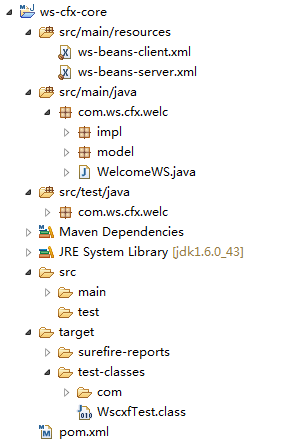
步骤一: 添加maven包依赖
<project xmlns="http://maven.apache.org/POM/4.0.0"

    xmlns:xsi="http://www.w3.org/2001/XMLSchema-instance"

    xsi:schemaLocation="http://maven.apache.org/POM/4.0.0 http://maven.apache.org/maven-v4_0_0.xsd">

    <modelVersion>4.0.0</modelVersion>

    <groupId>com.cfx.ws</groupId>

    <artifactId>ws-cfx-core</artifactId>

    <packaging>war</packaging>

    <version>0.0.1-SNAPSHOT</version>

    <name>ws-cfx-core</name>

    <url>http://maven.apache.org</url>

    <properties>

        <project.build.sourceEncoding>UTF-8</project.build.sourceEncoding>

        <org.springframework.version>3.1.1.RELEASE</org.springframework.version>

        <cxf.version>2.7.1</cxf.version>

        <junit.version>4.8.1</junit.version>

    </properties>

    <dependencies>

        <!-- SPRINGFRAMEWORK -->

        <dependency>

            <groupId>org.springframework</groupId>

            <artifactId>spring-core</artifactId>

            <version>${org.springframework.version}</version>

        </dependency>

        <dependency>

            <groupId>org.springframework</groupId>

            <artifactId>spring-expression</artifactId>

            <version>${org.springframework.version}</version>

        </dependency>

        <dependency>

            <groupId>org.springframework</groupId>

            <artifactId>spring-beans</artifactId>

            <version>${org.springframework.version}</version>

        </dependency>

        <dependency>

            <groupId>org.springframework</groupId>

            <artifactId>spring-aop</artifactId>

            <version>${org.springframework.version}</version>

        </dependency>

        <dependency>

            <groupId>org.springframework</groupId>

            <artifactId>spring-context</artifactId>

            <version>${org.springframework.version}</version>

        </dependency>

        <dependency>

            <groupId>org.springframework</groupId>

            <artifactId>spring-context-support</artifactId>

            <version>${org.springframework.version}</version>

        </dependency>

        <dependency>

            <groupId>org.springframework</groupId>

            <artifactId>spring-tx</artifactId>

            <version>${org.springframework.version}</version>

        </dependency>

        <dependency>

            <groupId>org.springframework</groupId>

            <artifactId>spring-jdbc</artifactId>

            <version>${org.springframework.version}</version>

        </dependency>

        <dependency>

            <groupId>org.springframework</groupId>

            <artifactId>spring-orm</artifactId>

            <version>${org.springframework.version}</version>

        </dependency>

        <dependency>

            <groupId>org.springframework</groupId>

            <artifactId>spring-oxm</artifactId>

            <version>${org.springframework.version}</version>

        </dependency>

        <dependency>

            <groupId>org.springframework</groupId>

            <artifactId>spring-web</artifactId>

            <version>${org.springframework.version}</version>

        </dependency>

        <dependency>

            <groupId>org.springframework</groupId>

            <artifactId>spring-webmvc</artifactId>

            <version>${org.springframework.version}</version>

        </dependency>

        <dependency>

            <groupId>org.springframework</groupId>

            <artifactId>spring-webmvc-portlet</artifactId>

            <version>${org.springframework.version}</version>

        </dependency>

        <dependency>

            <groupId>org.springframework</groupId>

            <artifactId>spring-test</artifactId>

            <version>${org.springframework.version}</version>

            <scope>test</scope>

        </dependency>

        <dependency>

            <groupId>org.apache.cxf</groupId>

            <artifactId>cxf-rt-frontend-jaxws</artifactId>

            <version>${cxf.version}</version>

        </dependency>

        <dependency>

            <groupId>org.apache.cxf</groupId>

            <artifactId>cxf-rt-transports-http</artifactId>

            <version>${cxf.version}</version>

        </dependency>

        <dependency>

            <groupId>org.apache.cxf</groupId>

            <artifactId>cxf-rt-transports-http-jetty</artifactId>

            <version>${cxf.version}</version>

        </dependency>

        <dependency>

            <groupId>org.apache.cxf</groupId>

            <artifactId>cxf-rt-ws-security</artifactId>

            <version>${cxf.version}</version>

        </dependency>

        <dependency>

            <groupId>org.apache.cxf</groupId>

            <artifactId>cxf-rt-ws-policy</artifactId>

            <version>${cxf.version}</version>

        </dependency>

        <dependency>

            <groupId>org.apache.cxf</groupId>

            <artifactId>cxf-bundle-jaxrs</artifactId>

            <version>${cxf.version}</version>

        </dependency>

        <dependency>

            <groupId>javax.ws.rs</groupId>

            <artifactId>jsr311-api</artifactId>

            <version>1.1.1</version>

        </dependency>

        <dependency>

            <groupId>commons-lang</groupId>

            <artifactId>commons-lang</artifactId>

            <version>2.6</version>

        </dependency>

        <dependency>

            <groupId>commons-httpclient</groupId>

            <artifactId>commons-httpclient</artifactId>

            <version>3.0</version>

        </dependency>

        <dependency>

            <groupId>commons-io</groupId>

            <artifactId>commons-io</artifactId>

            <version>2.3</version>

        </dependency>

        <dependency>

            <groupId>junit</groupId>

            <artifactId>junit</artifactId>

            <version>${junit.version}</version>

            <scope>test</scope>

        </dependency>

    </dependencies>

    <build>

        <finalName>ws-cxf-core</finalName>

        <resources>

            <resource>

                <directory>src/main/resources</directory>

            </resource>

            <resource>

                <directory>src/main/java</directory>

                <includes>

                    <include>**</include>

                </includes>

                <excludes>

                    <exclude>**/*.java</exclude>

                </excludes>

            </resource>

        </resources>

        <!-- cause we use tomcat , so follow plugin no use.

        <plugins>

            <plugin>

                <groupId>org.mortbay.jetty</groupId>

                <artifactId>maven-jetty-plugin</artifactId>

                <configuration>

                    <contextPath>/</contextPath>

                    <connectors>

                        <connector implementation="org.mortbay.jetty.nio.SelectChannelConnector">

                            <port>9000</port>

                        </connector>

                    </connectors>

                </configuration>

            </plugin>

            <plugin>

                <groupId>org.apache.maven.plugins</groupId>

                <artifactId>maven-compiler-plugin</artifactId>

                <configuration>

                    <source>1.5</source>

                    <target>1.5</target>

                </configuration>

            </plugin>

        </plugins>

        -->

    </build>

</project>
步骤二:添加CFX核心过滤到web.xml文件
<?xml version="1.0" encoding="UTF-8"?>

<web-app version="2.4"

         xmlns="http://java.sun.com/xml/ns/j2ee"

         xmlns:xsi="http://www.w3.org/2001/XMLSchema-instance"

         xsi:schemaLocation="http://java.sun.com/xml/ns/j2ee http://java.sun.com/xml/ns/j2ee/web-app_2_4.xsd">

    <listener>

        <listener-class>org.springframework.web.context.ContextLoaderListener</listener-class>

    </listener>

    <context-param>

        <param-name>contextConfigLocation</param-name>

        <param-value>classpath:ws-beans-*.xml</param-value>

    </context-param>

    <servlet>

        <servlet-name>cxf</servlet-name>

        <servlet-class>org.apache.cxf.transport.servlet.CXFServlet</servlet-class>

        <load-on-startup>1</load-on-startup>

    </servlet>

    <servlet-mapping>

        <servlet-name>cxf</servlet-name>

        <url-pattern>/ws/*</url-pattern>

    </servlet-mapping>

</web-app>
步骤三: 创建ws 接口, 并实现
WS接口
package com.ws.cfx.welc;

import javax.jws.WebMethod;

import javax.jws.WebParam;

import javax.jws.WebResult;

import javax.jws.WebService;

import com.ws.cfx.welc.model.WorkInfo;

/*

 * ws 接口

 */

@WebService

public interface WelcomeWS {

    @WebMethod

    @WebResult String welcomeMessage(@WebParam String message);

    @WebMethod

    @WebResult WorkInfo workInfoNode(Long id);

}
接口实现类
package com.ws.cfx.welc.impl;

import java.util.Date;

import com.ws.cfx.welc.WelcomeWS;

import com.ws.cfx.welc.model.WorkInfo;

/**

 *

 * @author dennisit@163.com

 *

 */

public class WelcomeWSImpl implements WelcomeWS{

    @Override

    public String welcomeMessage(String message) {

        return "server success , accpet message values is :" + message;

    }

    @Override

    public WorkInfo workInfoNode(Long id) {

        WorkInfo workInfo = new WorkInfo();

        workInfo.setId(2L);

        workInfo.setWorkname("Node 2");

        workInfo.setWorktime(new Date());

        return workInfo;

    }

}
步骤四: 实例化cfx 服务端与客户端到配置文件
cfx服务端配置文件ws-beans-server.xml
<?xml version="1.0" encoding="UTF-8"?>

<beans xmlns="http://www.springframework.org/schema/beans"

    xmlns:xsi="http://www.w3.org/2001/XMLSchema-instance"

    xmlns:jaxws="http://cxf.apache.org/jaxws"

    xsi:schemaLocation="http://www.springframework.org/schema/beans

                       http://www.springframework.org/schema/beans/spring-beans.xsd

                       http://cxf.apache.org/jaxws http://cxf.apache.org/schemas/jaxws.xsd">

    <!--

        手动添加的内容:

        xmlns:jaxws="http://cxf.apache.org/jaxws"

        http://cxf.apache.org/jaxws http://cxf.apache.org/schemas/jaxws.xsd"

     -->

    <import resource="classpath:META-INF/cxf/cxf.xml" />

    <import resource="classpath:META-INF/cxf/cxf-extension-soap.xml" />

    <import resource="classpath:META-INF/cxf/cxf-servlet.xml" />

    <jaxws:endpoint id="welcomews" implementor="com.ws.cfx.welc.impl.WelcomeWSImpl"

        address="/welcome" />

</beans>
cfx客户端配置文件ws-beans-client.xml
<?xml version="1.0" encoding="UTF-8"?>

<beans xmlns="http://www.springframework.org/schema/beans"

    xmlns:xsi="http://www.w3.org/2001/XMLSchema-instance"

    xmlns:jaxws="http://cxf.apache.org/jaxws"

    xsi:schemaLocation="http://www.springframework.org/schema/beans

                       http://www.springframework.org/schema/beans/spring-beans.xsd

                       http://cxf.apache.org/jaxws http://cxf.apache.org/schemas/jaxws.xsd">

    <!--

        手动添加的内容:

        xmlns:jaxws="http://cxf.apache.org/jaxws"

        http://cxf.apache.org/jaxws http://cxf.apache.org/schemas/jaxws.xsd"

     -->

    <import resource="classpath:META-INF/cxf/cxf.xml" />

    <import resource="classpath:META-INF/cxf/cxf-extension-soap.xml" />

    <import resource="classpath:META-INF/cxf/cxf-servlet.xml" />

    <bean id="welcomeWsclient" class="com.ws.cfx.welc.WelcomeWS" factory-bean="clientFactory" factory-method="create" />

    <bean id="clientFactory" class="org.apache.cxf.jaxws.JaxWsProxyFactoryBean">

        <property name="serviceClass" value="com.ws.cfx.welc.WelcomeWS" />

        <property name="address" value="http://localhost:8080/ws-cfx-core/ws/welcome" />

    </bean>

</beans>
步骤五: 编写测试类
package com.ws.cfx.welc;

import java.net.SocketTimeoutException;

import javax.xml.ws.WebServiceException;

import org.junit.Before;

import org.junit.Test;

import org.springframework.context.ApplicationContext;

import org.springframework.context.support.ClassPathXmlApplicationContext;

import com.ws.cfx.welc.WelcomeWS;

import com.ws.cfx.welc.model.WorkInfo;

public class WscxfTest {

    ApplicationContext context = null;

    @Before

    public void init(){

        context = new ClassPathXmlApplicationContext("classpath:ws-beans-server.xml","classpath:ws-beans-client.xml");

        System.out.println("context init result : " + (context!=null? true:false) );

    }

    @Test

    public void cfxServer(){

        WelcomeWS welcome =  (WelcomeWS) context.getBean("welcomeWsclient");

        System.out.println(welcome.welcomeMessage("This if first cfx ws ."));

        try {

            WorkInfo workInfo = welcome.workInfoNode(2L);

            System.out.println(workInfo);

        } catch(Exception e) {

            if (e instanceof WebServiceException

                    && e.getCause() instanceof SocketTimeoutException) {

                System.err.println("timeout exception.");

            } else {

                e.printStackTrace();

            }

        }

    }

}
步骤六: 启动tomcat服务器,访问路径http://localhost:8080/ws-cfx-core/ws/welcome?wsdl,测试server.
运行测试类,执行结果如下
context init result : true

server success , accpet message values is :This if first cfx ws .

com.ws.cfx.welc.model.WorkInfo@3ee62bde[id=2,workname=Node 2,worktime=Thu Apr 03 12:02:16 GMT+08:00 2014]
转载请注明出处:[http://www.cnblogs.com/dennisit/p/3649964.html]
CFX构建webservice实例,与Spring整合.的更多相关文章
- Spring整合CXF之发布WebService服务
今天我们来讲下如何用Spring来整合CXF,来发布WebService服务: 给下官方文档地址:http://cxf.apache.org/docs/writing-a-service-with-s ...
- Spring整合MyBatis(三)sqlSessionFactory创建
摘要: 本文结合<Spring源码深度解析>来分析Spring 5.0.6版本的源代码.若有描述错误之处,欢迎指正. 目录 一.SqlSessionFactoryBean的初始化 二.获取 ...
- Spring整合CXF webservice restful 实例
webservice restful接口跟soap协议的接口实现大同小异,只是在提供服务的类/接口的注解上存在差异,具体看下面的代码,然后自己对比下就可以了. 用到的基础类 User.java @Xm ...
- Spring整合CXF,发布RSETful 风格WebService(转)
Spring整合CXF,发布RSETful 风格WebService 这篇文章是承接之前CXF整合Spring的这个项目示例的延伸,所以有很大一部分都是一样的.关于发布CXF WebServer和Sp ...
- Spring整合CXF,发布RSETful 风格WebService
原文地址:http://www.cnblogs.com/hoojo/archive/2012/07/23/2605219.html 这篇文章是承接之前CXF整合Spring的这个项目示例的延伸,所以有 ...
- 【jersey】 spring 整合jersey 实现RESTful webservice
Jersey是一个RESTFUL请求服务JAVA框架,与常规的JAVA编程使用的struts框架类似,它主要用于处理业务逻辑层.与Struts类似,它同样可以和hibernate,sprin ...
- activiti自定义流程之Spring整合activiti-modeler5.16实例(九):历史任务查询
注:(1)环境搭建:activiti自定义流程之Spring整合activiti-modeler5.16实例(一):环境搭建 (2)创建流程模型:activiti自定义流程之Spring ...
- activiti自定义流程之Spring整合activiti-modeler5.16实例(八):完成个人任务
注:(1)环境搭建:activiti自定义流程之Spring整合activiti-modeler5.16实例(一):环境搭建 (2)创建流程模型:activiti自定义流程之Spring ...
- activiti自定义流程之Spring整合activiti-modeler5.16实例(七):任务列表展示
注:(1)环境搭建:activiti自定义流程之Spring整合activiti-modeler5.16实例(一):环境搭建 (2)创建流程模型:activiti自定义流程之Spring ...
随机推荐
- python学习之for循环
Python for循环可以遍历任何序列的项目,如一个列表或者一个字符串. 实例: #!/usr/bin/env python for letter in 'Python': # 第一个实例 prin ...
- BZOJ1567 [JSOI2008]Blue Mary的战役地图 二分答案 哈希
欢迎访问~原文出处——博客园-zhouzhendong 去博客园看该题解 题目传送门 - BZOJ1567 题意概括 给出两个n*n的数字矩阵,问最大公共正方形边长. 题解 先二分答案一个m,对于每一 ...
- 【Java】 剑指offer(19) 正则表达式匹配
本文参考自<剑指offer>一书,代码采用Java语言. 更多:<剑指Offer>Java实现合集 题目 请实现一个函数用来匹配包含'.'和'*'的正则表达式.模式中的字符 ...
- 【Java】 剑指offer(33) 二叉搜索树的后序遍历序列
本文参考自<剑指offer>一书,代码采用Java语言. 更多:<剑指Offer>Java实现合集 题目 输入一个整数数组,判断该数组是不是某二叉搜索树的后序遍历的结果.如 ...
- HDU 2222 Keywords Search (AC自动机)(模板题)
<题目链接> 题目大意: 给你一些单词,和一个字符串,问你这个字符串中含有多少个上面的单词. 解题分析: 这是多模匹配问题,如果用KMP的话,对每一个单词,都跑一遍KMP,那么当单词数量非 ...
- EF连接字符串小问题记录
1.EFDbContext”不包含必需的 providerName 特性: <connectionStrings> <add name="EFDbContext" ...
- Android应用开发-Activity
Android四大组件:Activity,Service,Broadcast Receiver,Content Provider Activity是Context的子类,同时实现了Window.Cal ...
- unity3d 给游戏添加音源 Unity3d adds a sound source to the game
unity3d 给游戏添加音源 Unity3d adds a sound source to the game 作者:韩梦飞沙 Author:han_meng_fei_sha 邮箱:3131345 ...
- bzoj1722: [Usaco2006 Mar] Milk Team Select 产奶比赛 树形dp
题目链接 bzoj1722: [Usaco2006 Mar] Milk Team Select 产奶比赛 题解 dp[i][j][0 / 1] 以i为根的子数中 相邻点对选了j个的最大价值 代码 #i ...
- javac编译出现需要标识符问题解决
因为没有写public static void mian(String[] args) 在类里面只有属性和方法,内部类.不能直接写System.out.println():