
CoreAnimation--CALayer的动画
CoreAnimation--CALayer的动画
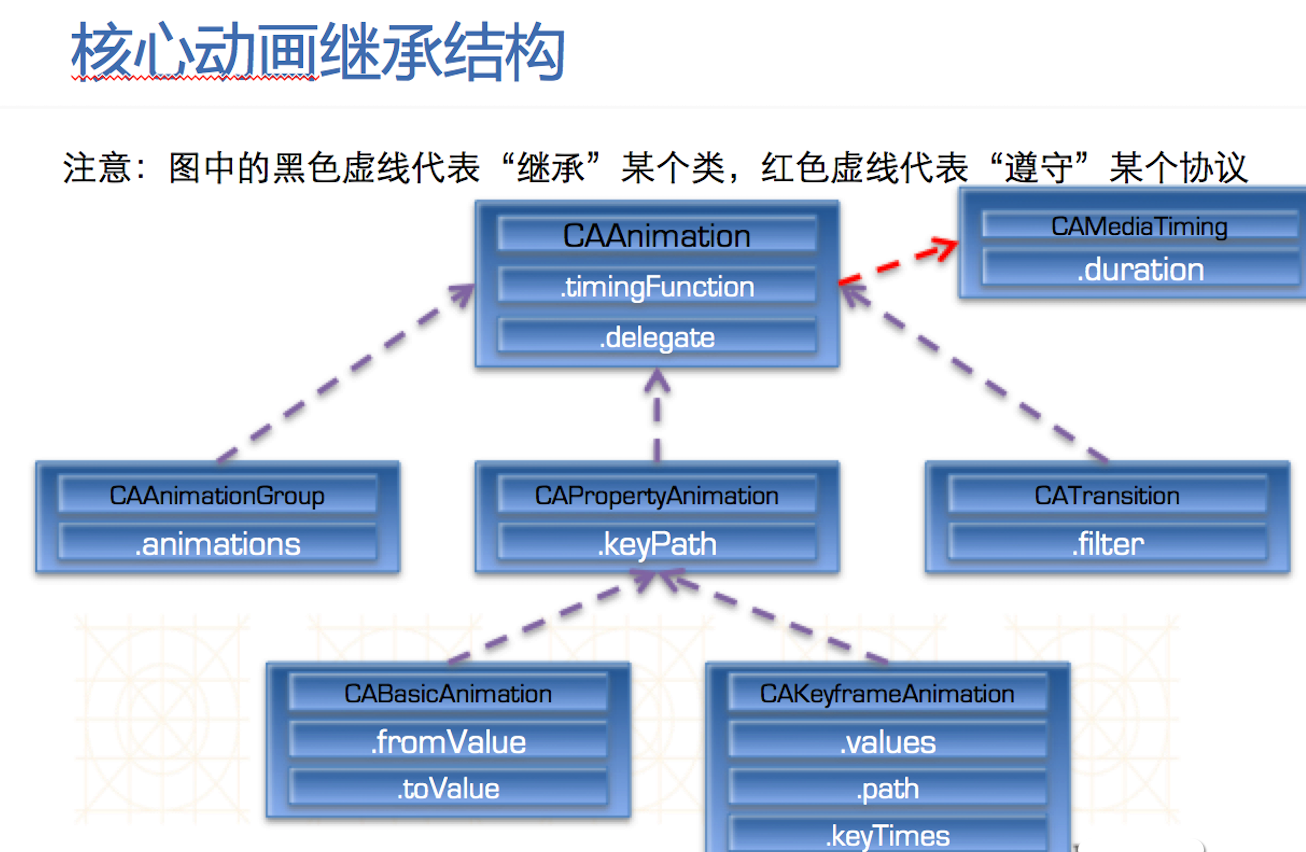
核心动画中所有类都遵守CAMediaTiming
CAAnaimation和CAPropertyAnimation都是抽象类,本身不具备动画效果,必须用它的子类才有动画效果。
CAAnimationGroup是个动画组,可以同时进行缩放,旋转。
CABasicAnimation基本动画,做一些简单效果。
CAKeyframeAnimation帧动画,做一些连续的流畅的动画。
CATransition是转场动画,界面之间跳转都可以用转场动画。
ios layer 动画-(transform.scale篇)
CABasicAnimation *theAnimation;
theAnimation=[CABasicAnimation animationWithKeyPath:@"transform.scale.x"];
theAnimation.duration=8;
theAnimation.removedOnCompletion = YES;
theAnimation.fromValue = [NSNumber numberWithFloat:1];
theAnimation.toValue = [NSNumber numberWithFloat:0.5];
[yourView.layer addAnimation:theAnimation forKey:@"animateTransform"];
y轴缩放:
CABasicAnimation *theAnimation;
theAnimation=[CABasicAnimation animationWithKeyPath:@"transform.scale.y"];
theAnimation.duration=8;
theAnimation.removedOnCompletion = YES;
theAnimation.fromValue = [NSNumber numberWithFloat:1];
theAnimation.toValue = [NSNumber numberWithFloat:0.5];
[yourView.layer addAnimation:theAnimation forKey:@"animateTransform"];
x轴,y轴同时按比例缩放:
CABasicAnimation *theAnimation;
theAnimation=[CABasicAnimation animationWithKeyPath:@"transform.scale"];
theAnimation.duration=8;
theAnimation.removedOnCompletion = YES;
theAnimation.fromValue = [NSNumber numberWithFloat:1];
theAnimation.toValue = [NSNumber numberWithFloat:0.5];
[yourView.layer addAnimation:theAnimation forKey:@"animateTransform"];
以上缩放是以view的中心点为中心缩放的,如果需要自定义缩放点,可以设置卯点:
//中心点
[yourView.layer setAnchorPoint:CGPointMake(0.5, 0.5)];
//左上角
[yourView.layer setAnchorPoint:CGPointMake(0, 0)];
//右下角
[yourView.layer setAnchorPoint:CGPointMake(1, 1)];
ios layer 动画-(transform.rotation篇)
CABasicAnimation *theAnimation;
theAnimation=[CABasicAnimation animationWithKeyPath:@"transform.rotation.x"];
theAnimation.duration=8;
theAnimation.removedOnCompletion = YES;
theAnimation.fromValue = [NSNumber numberWithFloat:0];
theAnimation.toValue = [NSNumber numberWithFloat:3.1415926];
[yourView.layer addAnimation:theAnimation forKey:@"animateTransform"];
y轴旋转:
CABasicAnimation *theAnimation;
theAnimation=[CABasicAnimation animationWithKeyPath:@"transform.rotation.y"];
theAnimation.duration=8;
theAnimation.removedOnCompletion = YES;
theAnimation.fromValue = [NSNumber numberWithFloat:0];
theAnimation.toValue = [NSNumber numberWithFloat:3.1415926];
[yourView.layer addAnimation:theAnimation forKey:@"animateTransform"];
z轴旋转:
CABasicAnimation *theAnimation;
theAnimation=[CABasicAnimation animationWithKeyPath:@"transform.rotation.z"];
theAnimation.duration=8;
theAnimation.removedOnCompletion = YES;
theAnimation.fromValue = [NSNumber numberWithFloat:0];
theAnimation.toValue = [NSNumber numberWithFloat:3.1415926];
[yourView.layer addAnimation:theAnimation forKey:@"animateTransform"];
以上缩放是以view的中心点为中心缩放的,如果需要自定义缩放点,可以设置卯点:
//中心点
[yourView.layer setAnchorPoint:CGPointMake(0.5, 0.5)];
//左上角
[yourView.layer setAnchorPoint:CGPointMake(0, 0)];
//右下角
[yourView.layer setAnchorPoint:CGPointMake(1, 1)];
可设参数:
theAnimation.repeatCount = 0;
theAnimation.autoreverses = NO;
旋转的另一种实现:(以下代码绕z轴旋转180度)
[self.topViewController.view.layer setAnchorPoint:CGPointMake(0.5, 0.5)];
[self.topViewController.view.layer setTransform:CATransform3DMakeRotation(0, 0, 0, 1)];
[UIView animateWithDuration:8 delay:0.0f options:UIViewAnimationOptionAllowUserInteraction | UIViewAnimationCurveEaseIn animations:^{
[self.topViewController.view.layer setTransform:CATransform3DMakeRotation(3.1415926, 0, 0, 1)];
} completion:^(BOOL finished) {
}];
CATransition 过渡动画
CATransition *animation = [CATransition animation];
animation.duration = 0.3;
animation.type = @"cube"; //转场动画type见后文
animation.subtype = kCATransitionFromLeft;
[[self.tableView layer] addAnimation:animation forKey:@"myAnimation"];
animation.fillMode = kCAFillModeBackwards;
animation.startProgress = 0.01;
animation.endProgress = 0.99;
使用过渡动画,实现在同一个view上,左推,右推等各种动画,节省一个view;
参数说明:
setType:可以返回四种类型:
kCATransitionFade淡出
kCATransitionMoveIn覆盖原图
kCATransitionPush推出
kCATransitionReveal底部显出来
setSubtype:也可以有四种类型:
kCATransitionFromRight;
kCATransitionFromLeft(默认值)
kCATransitionFromTop;
kCATransitionFromBottom
[animation setType:@"type类型"]; 可用的type类型主要有:
pageCurl 向上翻一页
pageUnCurl 向下翻一页
rippleEffect 滴水效果
suckEffect 收缩效果,如一块布被抽走
cube 立方体效果
oglFlip 上下翻转效果
/** 转场动画type一览表 **/
fade 交叉淡化过渡
push 新视图把旧视图推出去
moveIn 新视图移到旧视图上面
reveal 将旧视图移开,显示下面的新视图
cube 立方体翻滚效果
oglFlip 上下左右翻转效果
suckEffect 收缩效果,如一块布被抽走
rippleEffect 水滴效果
pageCurl 向上翻页效果
pageUnCurl 向下翻页效果
cameraIrisHollowOpen 相机镜头打开效果
cameraIrisHollowClose 相机镜头关闭效果
转自:http://blog.163.com/it__man/blog/static/137199904201301722556447/
CoreAnimation--CALayer的动画的更多相关文章
- CoreAnimation (CALayer 动画)
CoreAnimation基本介绍: CoreAnimation动画位于iOS框架的Media层 CoreAnimation动画实现需要添加QuartzCore.Framework CoreAnima ...
- iOS 用CALayer实现动画
与动画有关的几个类的继承关系 涉及到动画的类主要有6个,看一下它们的基本用途: 1. CAAnimation 动画基类 2. CAAnimationGroup 组合多个动画 3. CAPropert ...
- CALayer帧动画
CALayer帧动画 _sunLayer = [[CALayer alloc]init]; _sunLayer.contents = (id)[UIImage imageNamed:@"su ...
- Quartz2D复习(四) --- 图层CALayer和动画CAAnimation
1.CALayer 1).在ios中,能看得见摸得着的东西基本上都是UIView, 比如按钮.文本标签.文本输入框.图标等,这些都是UIView 2).UIView之所以能显示在屏幕上,完全是因为它内 ...
- CoreAnimation —— CALayer
概述 如上篇博文讲述,UIView中封装了很多系统方法,可以满足我们的大部分需求.但是,其也有很多限制.那些方法产生的动画基本单元为UIView,是非常重量级的对象,而且也不支持三维布局,大部分是对视 ...
- [iOS Animation]-CALayer 定时器动画
定时器的动画 我可以指导你,但是你必须按照我说的做. -- 骇客帝国 在第10章“缓冲”中,我们研究了CAMediaTimingFunction,它是一个通过控制动画缓冲来模拟物理效果例如加速或者减速 ...
- [iOS Animation]-CALayer 显示动画
显式动画 如果想让事情变得顺利,只有靠自己 -- 夏尔·纪尧姆 上一章介绍了隐式动画的概念.隐式动画是在iOS平台创建动态用户界面的一种直接方式,也是UIKit动画机制的基础,不过它并不能涵盖所有的动 ...
- CoreAnimation中layer动画闪烁的原因及解决
大熊猫猪·侯佩原创或翻译作品.欢迎转载,转载请注明出处. 如果觉得写的不好请多提意见,如果觉得不错请多多支持点赞.谢谢! hopy ;) 网上有一段Core Animation层动画的例子,是将vie ...
- iOS:CALayer核心动画层
CALayer:核心动画层 简介: Core Animation 是跨平台的,支持iOS环境和Mac OS X环境 学习核心动画之前,需要先理解CALayer,因为核心动画操作的对象不是UIView, ...
- iOS:CALayer核心动画层上绘图
在CALayer上绘图: •要在CALayer上绘图,有两种方法: 1.创建一个CALayer的子类,然后覆盖drawInContext:方法,可以使用Quartz2D API在其中进行绘图 2.设置 ...
随机推荐
- 常用JS正则表达式
常用JS正则表达式 收集一些常用的JavaScript正则表达式匹配规则,比如匹配电话号码.Email.中文字符.身份证号.邮编.QQ号.过滤空白行.匹配特定数字等.觉得这玩意是很有用的,只不过自己水 ...
- into outfile 生成sql脚本
select concat('insert into t_dm_stage(STAGE_ID,STAGE_NAME) values(',STAGE_ID,',','\'',STAGE_NAME,'\' ...
- codeforces Round #252 (Div. 2) C - Valera and Tubes
贪心算法,每条路径最短2格,故前k-1步每次走2格,最后一步全走完 由于数据比较小,可以先打表 #include <iostream> #include <vector> #i ...
- 洛谷 P1330 封锁阳光大学 Label:染色问题
题目描述 曹是一只爱刷街的老曹,暑假期间,他每天都欢快地在阳光大学的校园里刷街.河蟹看到欢快的曹,感到不爽.河蟹决定封锁阳光大学,不让曹刷街. 阳光大学的校园是一张由N个点构成的无向图,N个点之间由M ...
- require.js 入门学习 (share)
以下内容转自阮一峰老师的网络日志:http://www.ruanyifeng.com/blog/2012/11/require_js.html 更多学习资源: require.js官网:http:// ...
- BZOJ 1001 题解
1001: [BeiJing2006]狼抓兔子 Time Limit: 15 Sec Memory Limit: 162 MBSubmit: 18876 Solved: 4649[Submit][ ...
- 【BZOJ】1106: [POI2007]立方体大作战tet
题意 给定一个长度为\(2n(1 \le n \le 500000)\)的序列,\(1\)~\(n\)各出现两次,可以交换相邻两项,两个同样的数放在一起会对消,求把所有数对消的最小交换次数. 分析 如 ...
- 利用MetaWeblog API实现XMLRPC写博客功能
Windows Live Writer是一款小巧的写博客的工具,非常方便,甚至网上看到过有的评论称Live Writer是一款最不像微软产品的微软产品. Writer支持MSN Spaces以及Wor ...
- 1063. Set Similarity (25)
1063. Set Similarity (25) 时间限制 300 ms 内存限制 32000 kB 代码长度限制 16000 B 判题程序 Standard 作者 CHEN, Yue Given ...
- tab1
<html> <head> <meta charset="UTF-8"> <title>tab</title> < ...