
Android layout_weight的用法
- android:layout_weight是指LinearLayout先给里面的控件分配完大小之后剩余空间的权重。
下面通过举例说明:
<LinearLayout xmlns:android="http://schemas.android.com/apk/res/android"

    xmlns:tools="http://schemas.android.com/tools"

    android:layout_width="match_parent"

    android:layout_height="match_parent"

    android:orientation="horizontal" >

    <TextView

        android:layout_width="wrap_content"

        android:layout_height="wrap_content"

        android:background="#0045f5"

        android:gravity="center"

        android:text="1" />

    <TextView

        android:layout_width="wrap_content"

        android:layout_height="wrap_content"

        android:background="#00ff47"

        android:gravity="center"

        android:text="2"

        android:layout_weight="1"/>

    <TextView

        android:layout_width="wrap_content"

        android:layout_height="wrap_content"

        android:background="#ff5600"

        android:gravity="center"

        android:layout_weight="1"

        android:text="3" />

</LinearLayout>
这个布局文件包括3个TextView控件,界面如下:
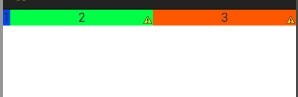
解释:由于3个文本框的宽度都是“wrap_content”,即根据视图内部内容自动扩展,LinearLayout就先给3个TextView分配适当的空间大小,
假设每个TextView分配10dp的宽度,屏幕宽度为480dp,那么LinearLayout的剩余空间就是480-3*10=450dp,由于第一个TextView没有
设置layout_weight,所以它的宽度就是10dp,而后面两个TextView设置layout_weight都是1,所以后面两个TextView就平均分配LinearLayout
的剩余空间,即为450/2=225dp,所以后面两个TextView的宽度为10+225=235dp。
- 如何让控件按比例进行空间大小的分配
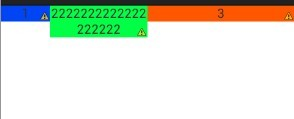
将控件的width设置为0dp,然后layout_weight的值就是该控件的权重。
<LinearLayout xmlns:android="http://schemas.android.com/apk/res/android"

    xmlns:tools="http://schemas.android.com/tools"

    android:layout_width="match_parent"

    android:layout_height="match_parent"

    android:orientation="horizontal" >

    <TextView

        android:layout_width="0dip"

        android:layout_height="wrap_content"

        android:background="#0045f5"

        android:gravity="center"

        android:layout_weight="1"

        android:text="1" />

    <TextView

        android:layout_width="0dip"

        android:layout_height="wrap_content"

        android:background="#00ff47"

        android:gravity="center"

        android:text="2222222222222222222"

        android:layout_weight="2"/>

    <TextView

        android:layout_width="0dip"

        android:layout_height="wrap_content"

        android:background="#ff5600"

        android:gravity="center"

        android:layout_weight="3"

        android:text="3" />

</LinearLayout>
效果图如下:三个控件按照1:2:3的比例进行空间分配
摘自:http://blog.csdn.net/xiaanming/article/details/13630837#
Android layout_weight的用法的更多相关文章
- 【Android学习】android:layout_weight的用法实例
对于android:layout_weight的用法,用下面的例子来说明: <LinearLayout xmlns:android="http://schemas.android.co ...
- android:layout_weight总有你不知道的用法.
都知道weight是权重的意思. 在布局中起到非常重要的作用. 但是这玩意不能嵌套使用, 而且只能使用在LinearLayout中. 下面说说它的几种用法(以下例子全为横排 注意android:lay ...
- android:layout_weight属性的使用方法总结
原创文章,转载请注明出处http://www.cnblogs.com/baipengzhan/p/6282826.html android:layout_weight属性可以和其他属性配合使用,产生多 ...
- Android状态选择器用法总结
原创文章,转载请注明出处http://www.cnblogs.com/baipengzhan/p/6284682.html 本文首先列出常见状态选择器的创建,然后按照常用控件来分别列出状态选择器的具体 ...
- xamarin android listview的用法
listview也许是用的非常频繁的一个控件之一,下面我写一个xamarin的listview栗子,大家尝一尝xamarin android开发的乐趣.原谅我的大小写吧. listview绑定自定义的 ...
- Android Fragment的用法(二)
如果你经常使用平板电脑,应该会发现很多的平板应用现在都采用的是双页模式(程序会在左侧的面板上显示一个包含子项的列表,在右侧的面板上显示内容),因为平板电脑的屏幕足够大,完全可以同时显示下两页的内容,但 ...
- android:layout_weight的真实含义(转)
首先声明只有在Linearlayout中,该属性才有效.之所以Android:layout_weight会引起争议,是因为在设置该属性的同时,设置android:layout_width为wrap_c ...
- android layout_weight讲解
Layout_weight是线性布局,也就是LinearLayout里面用到的,下面通过实验来看这个Layout_weight的特性. 1.当控件的属性android:layout_width=&qu ...
- Android之Adapter用法总结-(转)
Android之Adapter用法总结 1.概念 Adapter是连接后端数据和前端显示的适配器接口,是数据和UI(View)之间一个重要的纽带.在常见的View(List View,Grid Vie ...
随机推荐
- 51CTO专访淘宝清无:漫谈Nginx服务器与Lua语言
http://os.51cto.com/art/201112/307610.htm 说到Web服务器,也许你第一时间会想到Apache,也许你会想到Nginx.虽然说Apache依然是Web服务器的老 ...
- 20145320《Java程序设计》第3周学习总结
20145320<Java程序设计>第3周学习总结(第四章) 教材学习内容总结 对象(Object):存在的具体实体,具有明确的状态和行为 类(Class):具有相同属性和行为的一组对象的 ...
- 在xcode运行编译时,编译成功,但项目中显示缺少该文件,这是只要关闭重启xcode即可。
在xcode运行编译时,编译成功,但项目中显示缺少该文件,这是只要关闭重启xcode即可.
- Hibernate 一对多 保存和修改数据
Student和Sclass表,Student外键cid是Sclass的cid create table sclass( cid ) primary key, cname ) )go create t ...
- java Jsoup 抓取页面数据
List<ImageBean> imgList = new ArrayList<ImageBean>(); ImageBean image = null; String ima ...
- 06-BCD计数器设计与应用——小梅哥FPGA设计思想与验证方法视频教程配套文档
芯航线--普利斯队长精心奉献 实验目的:1.掌握BCD码的原理.分类以及优缺点 2.设计一个多位的8421码计数器并进行验证 3.学会基本的错误定位以及修改能力 ...
- jQuery 选择器 (基础恶补之三)+Ajax
jQuery load() 方法 jQuery load() 方法是简单但强大的 AJAX 方法. load() 方法从服务器加载数据,并把返回的数据放入被选元素中. 语法: $(selector). ...
- eclipse 设置jsp页面为HTML5
window-preferences-web-jspFiles-Editor-Templates-jsp with html... 然后修改为<!DOCTYPE html>就行了
- JavaScript编码风格指南(中文版)
前言: 程序语言的编码风格对于一个长期维护的软件非常重要,特别是在团队协作中.如果一个团队使用统一规范的编码分风格,可以提高团队的协作水平和工作效率.编程风格指南的核心是基本的格式化规则,这些规则决定 ...
- hadoop2.0初识1.2
1 hadoop启动方式(三种) 1.1 各个服务组件逐一启动 *dfs hadoop-daemon.sh start|stop namenode|datanode|secondarynamenode ...