
Linux之nginx入门
nginx入门
详见可参考:https://www.cnblogs.com/tiger666/p/10239307.html?tdsourcetag=s_pctim_aiomsg
1. 常用的WEB框架有哪些:
django 重量级别的框架,功能大而全, form表单,ORM, 内置的模块非常多 600-2000req/s
flask 轻量级的框架, 从第三方引入过来的 2500req/s
tornado(没学过) 异步非阻塞 支持多用户并发访问3000req/s
sanic 是python3.5之后的一个框架, 20000req/s
我们的WEB框架是用来处理用户请求,获取数据并返回给用户查看
在上面开发应用程序用的
2. web服务器
是用来对外提供服务的, www服务
IIS
apache 非常普通的WEB服务器 对高并发没有太大的支持
nginx 开源的,支持高并发,高性能的服务器
tengine 淘宝自己的nginx服务器,其实它的配置和nginx一样
面试回答nginx技巧
支持高并发,能支持几万并发连接
资源消耗少,在3万并发连接下开启10个nginx线程消耗的内存不到200M
可以做http反向代理和负载均衡
支持异步网络i/o事件模型epoll
linux下测试访问网站命令
curl -i 域名   # 访问网站并返回网站内容(源代码)

curl -I 域名   # 返回网站的服务器信息
3. nginx编译安装
1 安装所需要的依赖库

yum install -y gcc patch libffi-devel python-devel zlib-devel bzip2-devel openssl openssl-devel ncurses-devel sqlite-devel readline-devel tk-devel gdbm-devel db4-devel libpcap-devel xz-devel

2 下载nginx安装源码包 wget -c https://nginx.org/download/nginx-1.12.0.tar.gz

3.解压缩源码 tar -zxvf nginx-1.12.0.tar.gz

4.配置,编译安装

./configure --prefix=/opt/nginx112

make && make install

5.启动nginx,进入sbin目录,找到nginx启动命令

cd /opt/nginx112/sbin

./nginx #启动

./nginx -s stop #关闭

./nginx -s reload # 平滑重启 ,修改了nginx.conf之后,可以不重启服务,加载新的配置

或者  /opt/nginx112/sbin/nginx -s reload  # 绝对路径平滑重启
6 nginx的目录结构

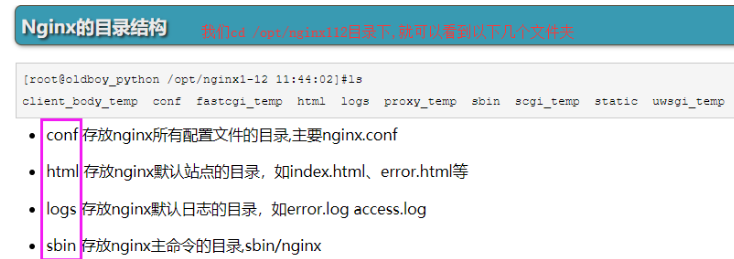
7 nginx配置文件详解

#定义nginx工作进程数
worker_processes 5;
#错误日志
#error_log logs/error.log;
#http定义代码主区域
http {
include mime.types;
default_type application/octet-stream;
#定义nginx的访问日志功能
#nginx会有一个accses.log功能,查看用户访问的记录
log_format main '$remote_addr - $remote_user [$time_local] "$request" '
'$status $body_bytes_sent "$http_referer" '
'"$http_user_agent" "$http_x_forwarded_for"';
#开启日志功能
access_log logs/access.log main;
sendfile on;
keepalive_timeout 65;
#开启gzip压缩传输
gzip on;
#虚拟主机1 定义一个 斗鱼网站
server {
#定义nginx的访问入口端口,访问地址是 192.168.11.37:80
listen 80;
#定义网站的域名www.woshidouyu.tv
#如果没有域名,就填写服务器的ip地址 192.168.11.37
server_name www.woshidouyu.tv;
#nginx的url域名匹配
#只要请求来自于www.woshidouyu.tv/111111111
#只要请求来自于www.woshidouyu.tv/qweqwewqe
#最低级的匹配,只要来自于www.woshidouyu.tv这个域名,都会走到这个location
location / {
#这个root参数,也是关键字,定义网页的根目录
#以nginx安装的目录为相对路径 /opt/nginx112/html
#可以自由修改这个root定义的网页根目录
root html;
#index参数定义网站的首页文件名,默认的文件名
index index.html index.htm;
}
#错误页面的优化(只要是遇到前面4系列的错误,就会直接跳转到相对目录下的40x.html页面)
error_page 400 401 402 403 404 /40x.html;
}
}
8 跑一个斗鱼网站出来
修改自己本地的host文件

路径如下:

        C:\Windows\System32\drivers\etc
server {
listen 80;
server_name www.qishi2douyu.com;
#access_log logs/host.access.log main;
location / {
root /opt/qishi2douyu/;
index index.html index.htm;
}
#error_page 404 /404.html;
error_page 500 502 503 504 /50x.html;
location = /50x.html {
root html;
}
}
4. nginx多虚拟主机的配置
1 在192.168.12.56服务器上,跑3个网站出来(需要在本地文件host中添加相应的IP地址)
配置文件如下:
server {
listen 80;
server_name www.qishi2douyu.com;
#access_log logs/host.access.log main;
location / {
root /opt/qishi2douyu/;
index index.html index.htm;
}
#error_page 404 /404.html;
error_page 500 502 503 504 /50x.html;
location = /50x.html {
root html;
}
}
server {
listen 80;
server_name www.qishi2huya.com;
location / {
root /opt/qishi2huya/;
index index.html index.htm;
}
}
server {
listen 80;
server_name www.qishi2jd.com;
location / {
root /opt/qishi2jd/;
index index.html index.htm;
}
}

2 分别在/opt目录下创建qishi2douyu、qishi2huya、qishi2jd这三个目录
分别在目录下创建index.html
3 平滑重启nginx
/opt/nginx112/sbin/nginx -s reload
nginx错误页面优化
1 修改配置文件
vim /opt/nginx112/conf/nginx.conf
在www.qishi2douyu.com虚拟主机下添加以下内容(server代码块下)
error_page 400 401 402 403 404 /40x.html;
location = /40x.html {
root /opt/qishi2douyu/;
}
2 在/opt/qishi2douyu/目录下创建40x.html, 把淘宝的错误页面源代码拷贝过来
vim 40x.html
3 平滑重启nginx
4 随便访问一个不存在的页面
http://www.qishi2douyu.com/sladfj243
5 就可以看到我们配置的错误页面
5. nginx访问日志功能
1 打开nginx配置文件nginx.conf
vim /opt/nginx112/conf/nginx.conf
2 修改配置文件, 启用日志功能
log_format main '$remote_addr - $remote_user [$time_local] "$request" '
'$status $body_bytes_sent "$http_referer" '
'"$http_user_agent" "$http_x_forwarded_for"';
access_log logs/access.log main;

3 平滑重启nginx
4 浏览器访问192.168.12.56
5.查看访问记录
tail -f /opt/nginx112/logs/access.log
6. nginx限制IP访问

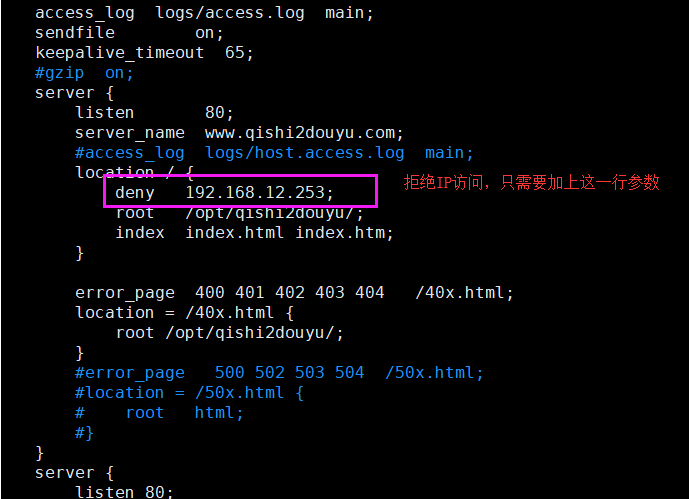
7. nginx代理功能
生活中的代理:
要想去租房:
租客 —> 中介 —>房东
代购, 海淘
正向代理

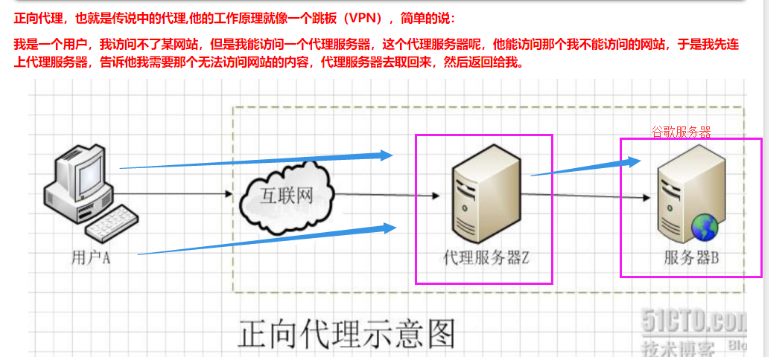
反向代理
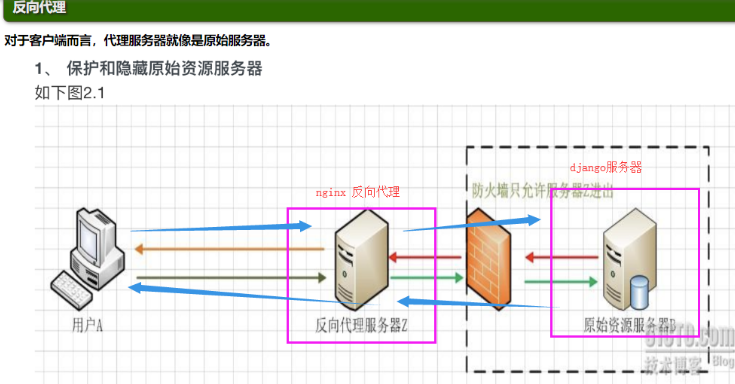


nginx反向代理
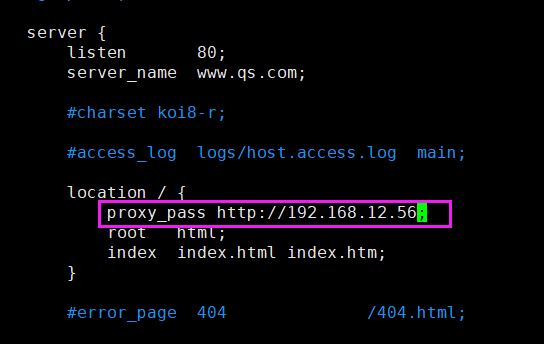
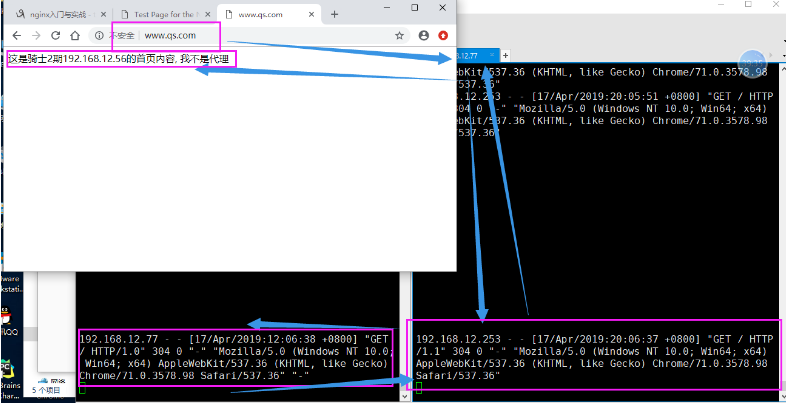
1 准备两台机器
192.168.12.56   # 内部的django服务器
192.168.12.77   # 代理服务器
请求数据: windows   ——>   192.168.12.77   ——>   192.168.12.56
返回数据: windows   <——   192.168.12.77   <——   192.168.12.56

2 修改代理服务器192.168.12.77的配置文件
vim /opt/nginx112/conf/nginx.conf


8. nginx负载均衡
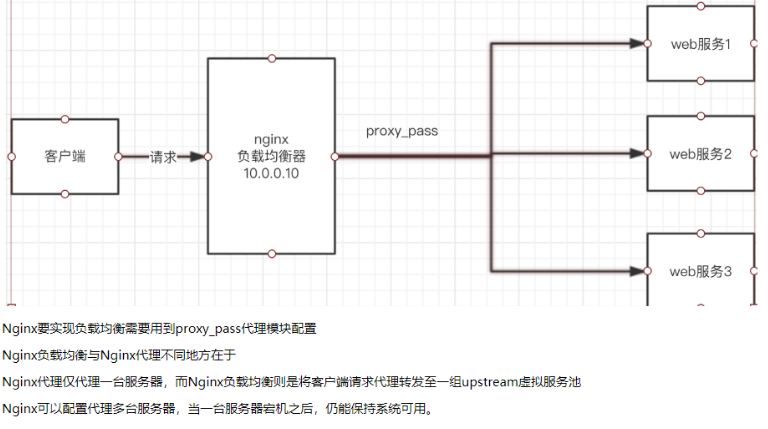
nginx负载均衡配置
1 准备三台机器
1. nginx负载均衡器(192.168.12.77)
2  另外两台应用服务器(192.168.12.56 +  192.168.12.65)
2 先确保两台应用服务器能够正常访问
http://192.168.12.56
http://192.168.12.65:8001
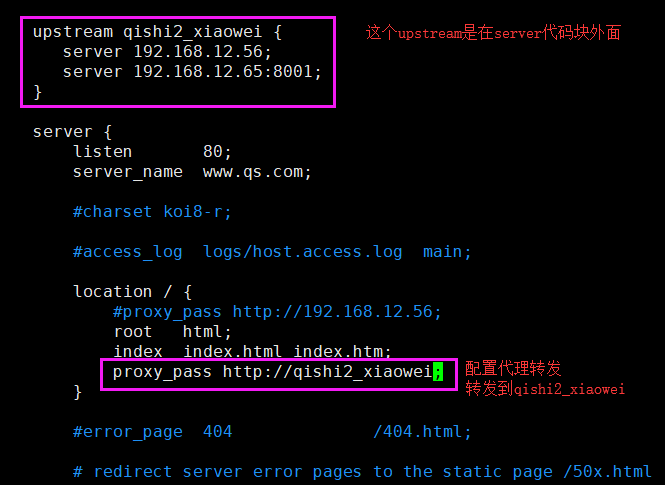
3 配置负载均衡器(192.168.12.77)
修改配置文件
vim /opt/nginx112/conf/nginx.conf
worker_processes 1;
#error_log logs/error.log;
events {
worker_connections 1024;
}
http {
include mime.types;
default_type application/octet-stream;
#log_format main '$remote_addr - $remote_user [$time_local] "$request" '
# '$status $body_bytes_sent "$http_referer" '
# '"$http_user_agent" "$http_x_forwarded_for"';
#access_log logs/access.log main;
sendfile on;
keepalive_timeout 65;
#gzip on;
upstream qishi2_xiaowei {
server 192.168.12.56;
server 192.168.12.65 weight=5;
}
server {
listen 80;
server_name www.qs.com;
location / {
root html;
index index.html index.htm;
proxy_pass http://qishi2_xiaowei;
}
#error_page 404 /404.html;
error_page 500 502 503 504 /50x.html;
location = /50x.html {
root html;
}
}
}

Linux之nginx入门的更多相关文章
- linux (08) nginx入门详解
一. nginx 入门 nginx 入门学习 web服务器软件 windows IIS服务器 linux nginx apache 收费lighthttp 公司的技术栈 收费版技术栈 apache ...
- Linux(6)- redis发布订阅/持久化/主从复制/redis-sentinel/redis-cluster、nginx入门
一.redis发布订阅 Redis 通过 PUBLISH .SUBSCRIBE 等命令实现了订阅与发布模式. 其实从Pub/Sub的机制来看,它更像是一个广播系统,多个Subscriber可以订阅多个 ...
- Linux运维入门到高级全套常用要点
Linux运维入门到高级全套常用要点 目 录 1. Linux 入门篇................................................................. ...
- Nginx 入门学习教程
昨天听一个前同事说他们公司老大让他去研究下关于Nginx 方面的知识,我想了下Nginx 在如今的开发技术栈中应该会很大可能会用到,所以写篇博文记录总结下官网学习教程吧. 1. 什么是Nginx? 我 ...
- nginx入门教程
nginx入门教程 一.概述 什么是nginx? Nginx (engine x) 是一款轻量级的Web 服务器 .反向代理服务器及电子邮件(IMAP/POP3)代理服务器. 什么是反向 ...
- nginx入门与实战 安装 启动 配置nginx Nginx状态信息(status)配置 正向代理 反向代理 nginx语法之location详解
nginx入门与实战 网站服务 想必我们大多数人都是通过访问网站而开始接触互联网的吧.我们平时访问的网站服务 就是 Web 网络服务,一般是指允许用户通过浏览器访问到互联网中各种资源的服务. Web ...
- Linux--6 redis订阅发布、持久化、集群cluster、nginx入门
一.redis发布订阅 Redis 通过 PUBLISH .SUBSCRIBE 等命令实现了订阅与发布模式. 其实从Pub/Sub的机制来看,它更像是一个广播系统,多个Subscriber可以订阅多个 ...
- Nginx入门教程(转)
原文:https://www.cnblogs.com/qdhxhz/p/8910174.html nginx入门教程 一.概述 什么是nginx? Nginx (engine x) 是一款轻 ...
- Linux 运维入门到跑路书单推荐
一.基础入门 <鸟哥的Linux私房菜基础学习篇>:最具知名度的Linux入门书<鸟哥的Linux私房菜基础学习篇>,全面而详细地介绍了Linux操作系统. https://b ...
随机推荐
- Easyui form提交后input清空的方法
先上解决办法: $(#formid #inputid).val("") 将这个代码放在提交按钮最后就可以了. 我在做一个修改信息的功能时,发现上一次提交的内容在下一次打开的记录里又 ...
- Angular4 投影ngContent
- 2018-2019-2 网络对抗技术 20165305 Exp1 PC平台逆向破解
2018-2019-2 网络对抗技术 20165305 Exp1 PC平台逆向破解 实验1-1直接修改程序机器指令,改变程序执行流程 先输入objdump -d 20165305pwn2查看反汇编代码 ...
- linux下的CPU、内存、IO、网络的压力测试
linux下的CPU.内存.IO.网络的压力测试 要远程测试其实很简单了,把结果放到一个微服务里直接在web里查看就可以了,或者同步到其他服务器上 一.对CPU进行简单测试: 1.通过bc命令计算特 ...
- vue配置手机通过IP访问,Win10让局域网内其他电脑通过IP访问网站的方法
vue配置手机通过IP访问config/index.js// Various Dev Server settings host: '0.0.0.0', // can be overwritten by ...
- 初学javascript《一》break和continue的标签问题
<script>var iNum = 0;outermost:for (var i=0; i<3; i++) { for (var j=0; j<3; j++) { ...
- random模块、time模块、sys模块、os模块
一.random模块 1.随机取小数 (数学计算) print(random.random()) #取0-1之间的小数 print(random.uniform(3,6)) #uniform( ...
- iOS进阶之如何进行 HTTP Mock(转载)
这篇文章会对 OHHTTPStubs 源代码的分析,其实现原理是建立在 NSURLProtocol 的基础上的,对这部分内容不了解的读者,可以阅读这篇文章 iOS 开发中使用 NSURLProtoco ...
- SAP如何修改表的数据
修改表: 事务代码:se16n 输入表名字 输入 /h 进入维护模式 修改 GD-EDIT 和 GD-SAPEDIT 内容为大写X. se ...
- APIO 2014 回文串(Manacher+后缀自动机+倍增)
题意 https://www.lydsy.com/JudgeOnline/problem.php?id=3676 思路 好像还是回文自动机裸体,但是 \(\text{Manacher}\) +后缀自动 ...