
python3读写csv文件
python读取CSV文件
python中有一个读写csv文件的包,直接import csv即可。利用这个python包可以很方便对csv文件进行操作,一些简单的用法如下。
1. 读文件
csv_reader = csv.reader(open('data.file', encoding='utf-8'))

for row in csv_reader:

    print(row)
例如有如下的文件
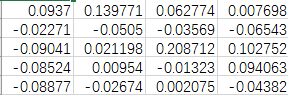
输出结果如下
['0.093700','0.139771','0.062774','0.007698']
['-0.022711','-0.050504','-0.035691','-0.065434']
['-0.090407','0.021198','0.208712','0.102752']
['-0.085235','0.009540','-0.013228','0.094063']
可见csv_reader把每一行数据转化成了一个list,list中每个元素是一个字符串。
2. 写文件
读文件时,我们把csv文件读入列表中,写文件时会把列表中的元素写入到csv文件中。
list = ['1', '2','3','4']
out = open(outfile, 'w')

csv_writer = csv.writer(out)

csv_writer.writerow(list)
可能遇到的问题:直接使用这种写法会导致文件每一行后面会多一个空行。
解决办法如下:
out = open(outfile, 'w', newline='')

csv_writer = csv.writer(out, dialect='excel')

csv_writer.writerow(list)
参考如下:
在stackoverflow上找到了比较经典的解释,原来 python3里面对 str和bytes类型做了严格的区分,不像python2里面某些函数里可以混用。所以用python3来写wirterow时,打开文件不要用wb模式,只需要使用w模式,然后带上newline=''。
|
In Python 2.X, it was required to open the csvfile with 'b' because the csv module does its own line termination handling. In Python 3.X, the csv module still does its own line termination handling, but still needs to know an encoding for Unicode strings. The correct way to open a csv file for writing is:
|
 class writer():

     def __init__(self):

         self.dict={

             "标题":"标题",

             "链接":"链接",

             "服务":"服务",

             "dsr":"dsr",

             "店铺名":"店铺名",

             "价格":"店铺名",

             "付款人数":"付款人数",

             "发货地":"发货地"

         }

         out = open("outfile.csv", 'w', newline='')

         self.csv_writer = csv.writer(out, dialect='excel')

         self.csv_writer.writerow(self.dict)

     def writer_to(self,key_value):

         self.csv_writer.writerow(key_value)

 if __name__ == '__main__':

     a=writer()

     new={"链接":"http://www.baidu.com",'标题':'我是标题',}

     a.dict.update(new)

     print(a.dict)

     a.writer_to(a.dict.values())
类
import csv

from selenium import webdriver

from selenium.webdriver.common.by import By

from selenium.webdriver.support.ui import WebDriverWait

from selenium.webdriver.support import expected_conditions as EC

from selenium.common.exceptions import TimeoutException, NoSuchElementException

from selenium.webdriver.common.action_chains import ActionChains

driver=['','']

colspan=['','']

try:

    out = open('类目.csv', 'w', newline='')

except PermissionError:

    print('文件被其他程序占用')

    input('')

csv_writer = csv.writer(out, dialect='excel')

csv_writer.writerow(['宝贝ID','类目'])

def open_chrome():

    driver[0]=webdriver.Chrome()

    driver[0].get('https://www.dianchacha.com')

    input('请登陆后按回车:')

def EC_located(one_group,value):

    '''

     目的:简化代码长度,参数1选择one或者group切换选中模式

    :param value:要找的值【CSS选择器】

    :return:选择到的对象

    '''

    wait = WebDriverWait(driver[0], 10)

    if one_group=="one":

        try:

            ecl=wait.until(EC.presence_of_element_located((By.CSS_SELECTOR,value)))

            return ecl

        except TimeoutException:

            print(value,'1元素未加载成功,等待超时')

    else:

        try:

            ecl=wait.until(EC.presence_of_all_elements_located((By.CSS_SELECTOR,value)))

            return ecl

        except TimeoutException:

            print(value,'1元素---组---未加载成功,等待超时')

def operating(ID):

    #先获取ID输入框

    driver[0].get('https://www.dianchacha.com/item/info/index/iid/'+ID)

    html=driver[0].page_source

    if '未能找到亲的宝贝' not in html:

        colspans=EC_located('group','.colspan-1')

        colspan[0]=str(colspans[1].text).replace('宝贝类目: ','')

    else:

        return operating(ID)

    print(colspan)

def writer_txt():

    csv_writer.writerow([url[0],colspan[0]])

    print('保存',url[0],colspan[0],'成功')

url=['','']

def main():

    open_chrome()

    file = '宝贝ID.txt'

    with open(file) as f:

        for line in f.readlines():

            url[0] = line

            print(line)

            operating(url[0])

            writer_txt()

        out.close()

        print('已完成')

if __name__ == '__main__':

    main()
读文本写csv
python3读写csv文件的更多相关文章
- python3使用csv包,读写csv文件
python操作csv,现在很多都用pandas包了,不过python还是有一个原始的包可以直接操作csv,或者excel的,下面举个例子说明csv读写csv文件的方法: import os impo ...
- (Python基础教程之十二)Python读写CSV文件
Python基础教程 在SublimeEditor中配置Python环境 Python代码中添加注释 Python中的变量的使用 Python中的数据类型 Python中的关键字 Python字符串操 ...
- 用opencsv文件读写CSV文件
首先明白csv文件长啥样儿: 用excel打开就变成表格了,看不到细节 推荐用其它简单粗暴一点儿的编辑器,比如Notepad++, csv文件内容如下: csv文件默认用逗号分隔各列. 有了基础的了解 ...
- 使用Python读写csv文件的三种方法
Python读写csv文件 觉得有用的话,欢迎一起讨论相互学习~Follow Me 前言 逗号分隔值(Comma-Separated Values,CSV,有时也称为字符分隔值,因为分隔字符也可以不是 ...
- python读写csv文件
文章链接:https://www.cnblogs.com/cloud-ken/p/8432999.html Python读写csv文件 觉得有用的话,欢迎一起讨论相互学习~Follow Me 前言 逗 ...
- 利用JavaCSV API来读写csv文件
http://blog.csdn.net/loongshawn/article/details/53423121 http://javacsv.sourceforge.net/ 转载请注明来源-作者@ ...
- 使用 Apache Commons CSV 读写 CSV 文件
有时候,我们需要读写 CSV 文件,在这里给大家分享Apache Commons CSV,读写 CSV 文件非常方便. 具体官方文档请访问Apache Commons CSV. 官方文档已经写得很详细 ...
- C/C++读写csv文件
博客转载自:http://blog.csdn.net/u012234115/article/details/64465398 C++ 读写CSV文件,注意一下格式即可 #include <ios ...
- JAVA读写CSV文件
最近工作需要,需要读写CSV文件的数据,简单封装了一下 依赖读写CSV文件只需引用`javacsv`这个依赖就可以了 <dependency> <groupId>net.sou ...
随机推荐
- day21 python之模块和包
一 模块 1 什么是模块? 常见的场景:一个模块就是一个包含了python定义和声明的文件,文件名就是模块名字加上.py的后缀. 但其实import加载的模块分为四个通用类别: 1 使用python编 ...
- 使用Configuration Extensions读取配置
使用Configuration Extensions读取配置 Configuration Extensions 是微软基于Configuration的扩展,能够很好的解析系统遇到各种配置文件,包括js ...
- redis 无序集合(set)函数
sAdd 命令/方法/函数 Adds a value to the set value stored at key. If this value is already in the set, FALS ...
- listener 监听 tomcat 容器的初始化和销毁
为了简单,就写个统计Action 请求数量的例子: 1.首先写个 listener public class TestServletContextListener implements Servlet ...
- idea用到的快捷键
之前一直用的eclipse,早就听说idea更智能,更便捷,于是,下载了idea,然后再破解,现在就慢慢抛弃eclipse,平时就用idea进行编码. idea的快捷键与eclipse还是有较大不同, ...
- office全系列激活脚本-改良版.cmd
@ECHO OFFTITLE office 全版本系统激活@echo offfor /l %%a in (8,1,16) do (for /f "tokens=*" %%i in ...
- CentOS 7Google浏览器
CentOS 7安装并启动Google浏览器(★firecat亲测有效★) 2018年09月23日 12:42:47 libaineu2004 阅读数:3088 版权声明:本文为博主原创文章,未 ...
- PyTorch in Action: A Step by Step Tutorial
PyTorch in Action: A Step by Step Tutorial PyTorch in Action: A Step by Step Tutorial Installation ...
- MySQL 压缩文件安装遇到的问题及解决方案
第一步:从官网下载压缩文件(链接). 第二步:解压该文件,放置到想放到的位置.我的目录是在 C:\mysql\mysql-8.0.12-winx64 下. 第三步:在C:\mysql\mysql-8. ...
- 利用 html js判断 客户端是否安装了某个app 安装了就打开 否则跳转到gp
三种方式 方式一:简单的进行打开app,延时操作若未打开直接跳gp function isInstalled(){ var urlFrag = 'somepars'; var the_href = ' ...