
scrapy splash 之一二
scrapy splash 用来爬取动态网页,其效果和scrapy selenium phantomjs一样,都是通过渲染js得到动态网页然后实现网页解析,
selenium + phantomjs 是用selenium的webdriver操作浏览器,然后用phantomjs执行渲染脚本得到结果,一般再用beautifulSoup进行处理。
splash是官方推荐的js渲染引擎,和scrapy结合比较好,使用的是webkit开发的轻量级无界面浏览器,渲染之后结果和静态爬取一样,可以直接用xpath处理。
但美中不足的是,splash以在docker中运行 。
scrapy-splash package网址 https://pypi.org/project/scrapy-splash/
splash 官网 http://splash.readthedocs.io/en/stable/scripting-ref.html
对于windows 家庭版用户而言,在dockers toolbox中 拉去splash镜像
(关于安装docker toolbox的步骤,请移步到其他随笔 docker toolbox 中)
首先,双击Docker Quickstart Terminal ,启动docker toolbox,
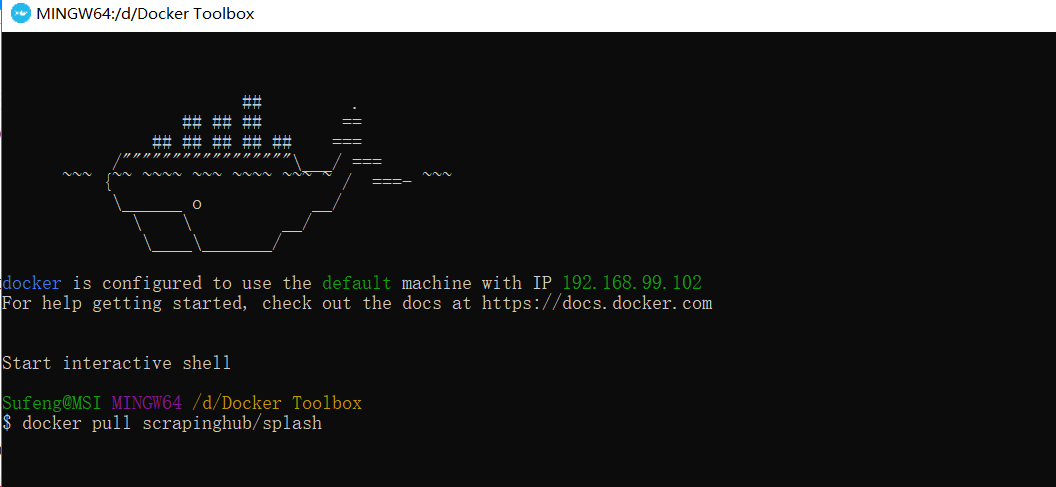
在终端输入docker pull registry.docker-cn.com/scrapinghub/splash
在浏览器中输入: IP +端口号8050
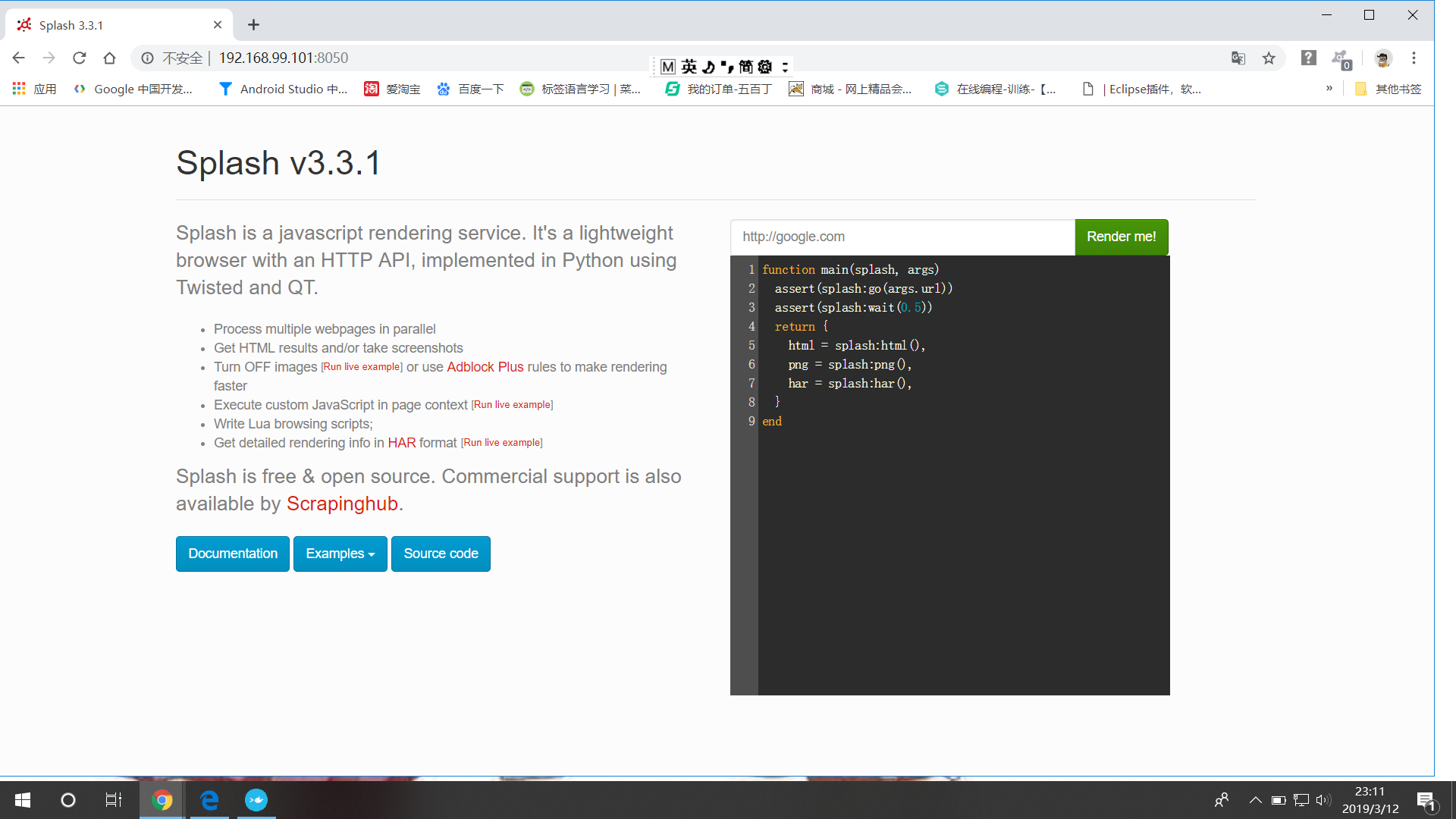
至此,splash服务安装完毕,验证成功;
打开cmd,按图中所示,输入命令

至此,scrapy-splash以及pip更新全部结束:
在我们开始使用scrapy-splash时,我们需要做一些准备工作:
首先,我们需要确定splash服务的ip和开放的端口,
博主这里是192.168.99.102:8050,
其次,创建项目,
命令行 输入
scrapy startproject mySpider
并在settings中做如下配置,
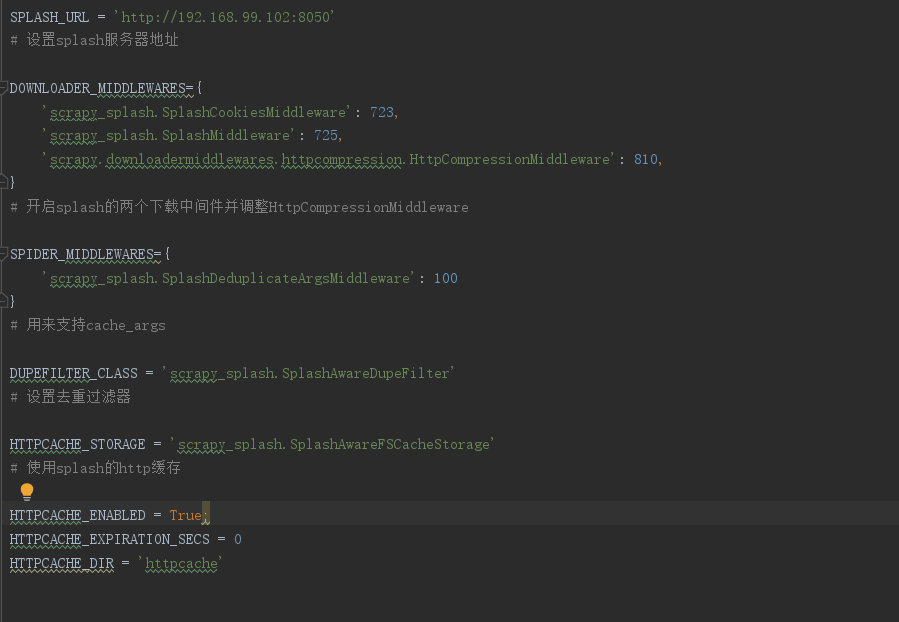
在爬虫主程序中 ,导入SplashRequest

在docker里把splash服务器运行起来

就可以运行项目.....
运行完,splash服务后,访问web页面,可以看到有一个输入框,默认是http://google/com,我们可以换成想要渲染的网页;
页面返回结果包括渲染截图,HAR加载统计数据,网页源代码,从HAR中我们可以看到页面的整个渲染过程,包括CSS,Javascript的加载等等,通过返回结果可以看到它分别对应搜索框下面的脚本中返回的脚本文件中return部分的三个返回值,html,png,har:
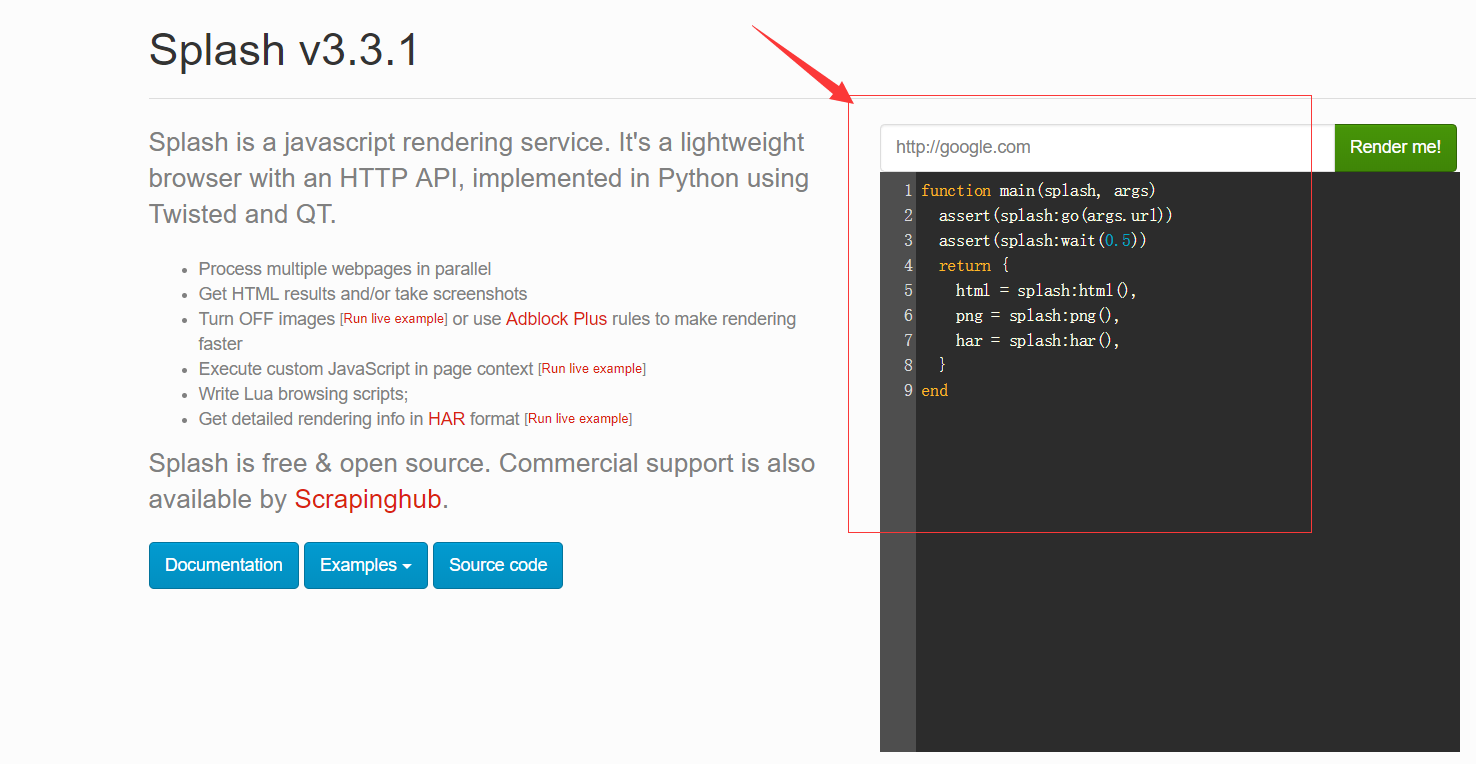
这个脚本是使用Lua语言写的,它首先使用go()方法加载页面,wait()方法等待加载时间,然后返回源代码,截图和HAR信息,
由此可以确定,Splash渲染服务页面时通过此入口脚本来实现的,那么我们可以修改此脚本来满足我么对抓取页面的分析和结果,(注意函数名必须是main),它返回的形式是一个字典形式,也可以是返回字符串形式。
function main(splash)
  return {
    hello="world"
  }
end

#返回结果
Splash Response: Object
hello: "world"

function main(splash)
  return "world"
end

#返回结果
Splash Response: "world"
在上边例子中,main()方法的第一参数是splash,这个对象类似于WebDriver对象,可以调用它的属性和方法控制加载规程,下面介绍一些常用的属性,
splash.args :该属性可以获取加载时陪在的参数,如URL,如果为get请求,它可以获得get请求参数,如果为post请求,他可以获取表单提交的数据,splash可以使用函数的第二个可选参数args进行访问。
function main(splash,args)
    local url = args.url
end
#上面的第二个参数args就相当于splash.args属性,如下代码与上面是等价的

function main(splash)
   local url=splash.args.url
end
splash.js_enableed: 启用或者禁用javaScript代码的执行,默认为true,启用javaS执行
splash.resource_timeout: 设置网络请求的默认超时,以秒为单位,0,nil(无限):splash.resource_timeout = nil
splash.images_enabled: 启用或禁用图片加载,默认情况下是加载的:splash.images-enable=true
splash.plugins_enabled 启用或禁用浏览器插件,默认为禁止:splash.plugins_enabled=false
splash.scroll_position 获取和设置主窗口的当前位置:splash.scroll_position={x=50,y=600}
splash.html5_media_enabled: 启用或禁用HTML5媒体,包括HTML5视频和音频(例如<video>元素播放)
splash对象的方法:
splash:go() :该方法用来请求某个链接,而且它可以模拟GET和POST请求,同时支持传入请求头,表单等数据,用法如下:
ok, reason = splash:go{url, baseurl=nil, headers=nil, http_method="GET", body=nil, formdata=nil}
参数说明,
url为请求的url, baseurl为可选参数表示资源加载相对路径,headers为可选参数,表示请求头,http_method表示http请求方法的字符串默认为get, body为使用post时发送表单数据,使用的Content-type为application/json,formdata默认为空,
post请求时的表单数据,使用的Content-type为application/x-www-form-urlencoded,该方法返回接受过是ok,reason的组合,如果ok为空则代表网页加载错误,reason变量中会包含错误信息
function main(splash, args)
  local ok, reason = splash:go{"http://httpbin.org/post", http_method="POST", body="name=Germey"}
  if ok then
        return splash:html()
  end
end
splash.wait() :控制页面的等待时间
ok, reason = splash:wait{time, cancel_on_redirect=false, cancel_on_error=true}
tiem为等待的秒数,cancel_on_redirect表示发生重定向就停止等待,并返回重定向结果,默认为false,cancel_on_error默认为false,表示如果发生错误就停止等待
返回结果同样是ok和reason的组合
function main(splash, args)
  splash:go("https://www.toutiao.com")
  )
  return {
    ok=ok,
    reason=reason
  }
end
splash:jsfunc()
lua_func = splash:jsfunc(func)
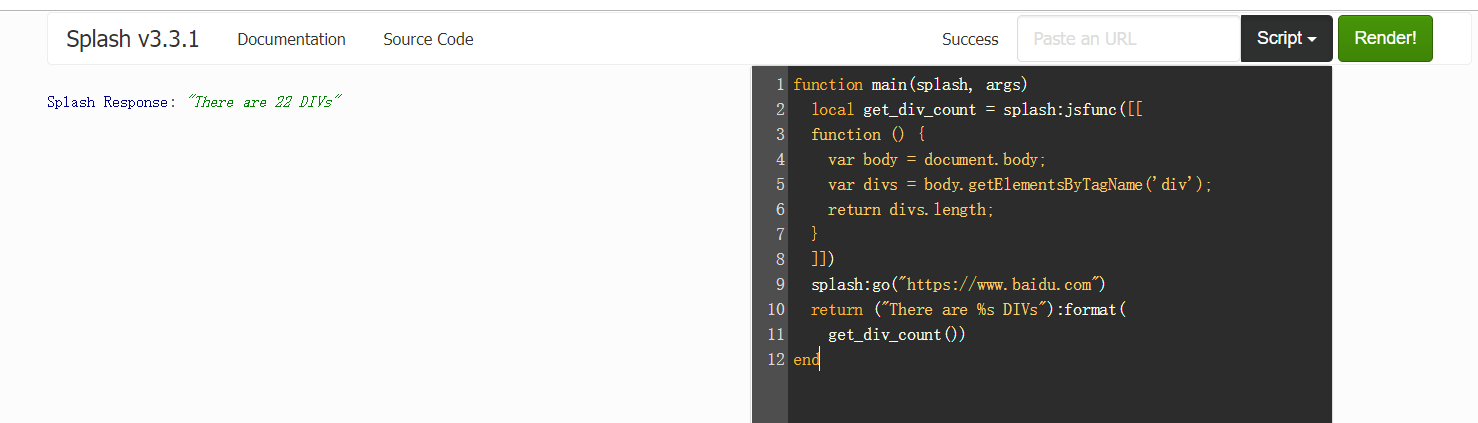
此方法可以直接调用JavaScript定义的函数,但所调用的函数需要用双中括号包围,它相当于实现了JavaScript方法到Lua脚本到转换,全局的JavaScript函数可以直接包装
function main(splash, args)
  local get_div_count = splash:jsfunc([[
  function () {
    var body = document.body;
    var divs = body.getElementsByTagName('div');
    return divs.length;
  }
  ]])
  splash:go("https://www.baidu.com")
  return ("There are %s DIVs"):format(
    get_div_count())
end
splash.evaljs() :在页面上下文中执行JavaScript代码段并返回最后一个语句的结果
splash.evaljs("document.title")# 返回页面标题
splash:runjs() :在页面上下文中运行JavaScript代码,同evaljs差不多,但它更偏向于执行某些动作或声明函数
function main(splash, args)
  splash:go("https://www.baidu.com")
  splash:runjs("foo = function() { return 'bar' }")
  local result = splash:evaljs("foo()")
  return result
end
splash:autoload() :将JavaScript设置为在每个页面加载时自动加载
ok, reason = splash:autoload{source_or_url, source=nil, url=nil}
function main(splash, args)
  splash:autoload([[
    function get_document_title(){
      return document.title;
    }
  ]])
  splash:go("https://www.baidu.com")
  return splash:evaljs("get_document_title()")
end
#加载JS库文件
function main(splash, args)
  assert(splash:autoload("https://code.jquery.com/jquery-2.1.3.min.js"))
  assert(splash:go("https://www.taobao.com"))
  local version = splash:evaljs("$.fn.jquery")
  return 'JQuery version: ' .. version
end
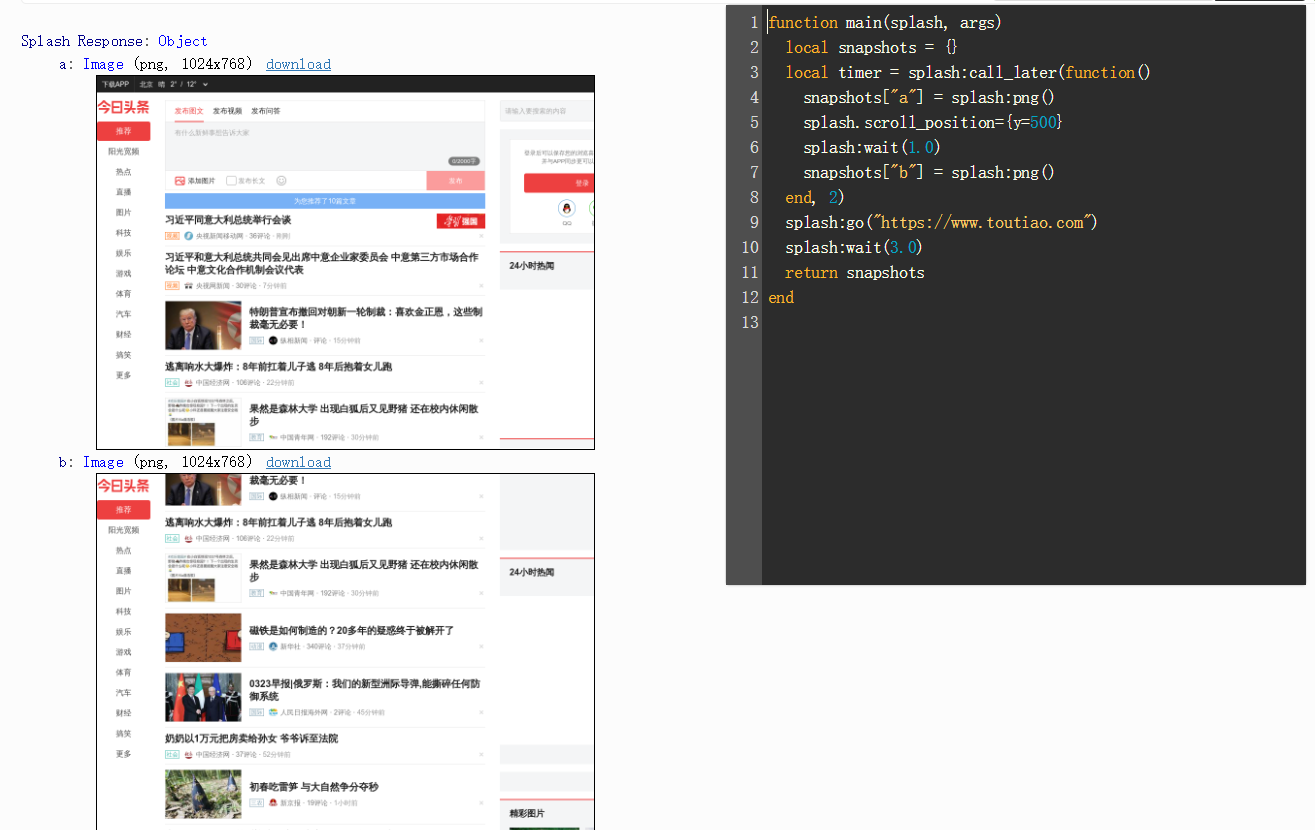
splash:call_later :通过设置定时任务和延迟时间来实现任务延时执行
timer = splash:call_later(callback, delay) :callback运行的函数,delay延迟时间
plash:http_get() :发送HTTP GET请求并返回响应
local reply = splash:http_get("http://example.com")
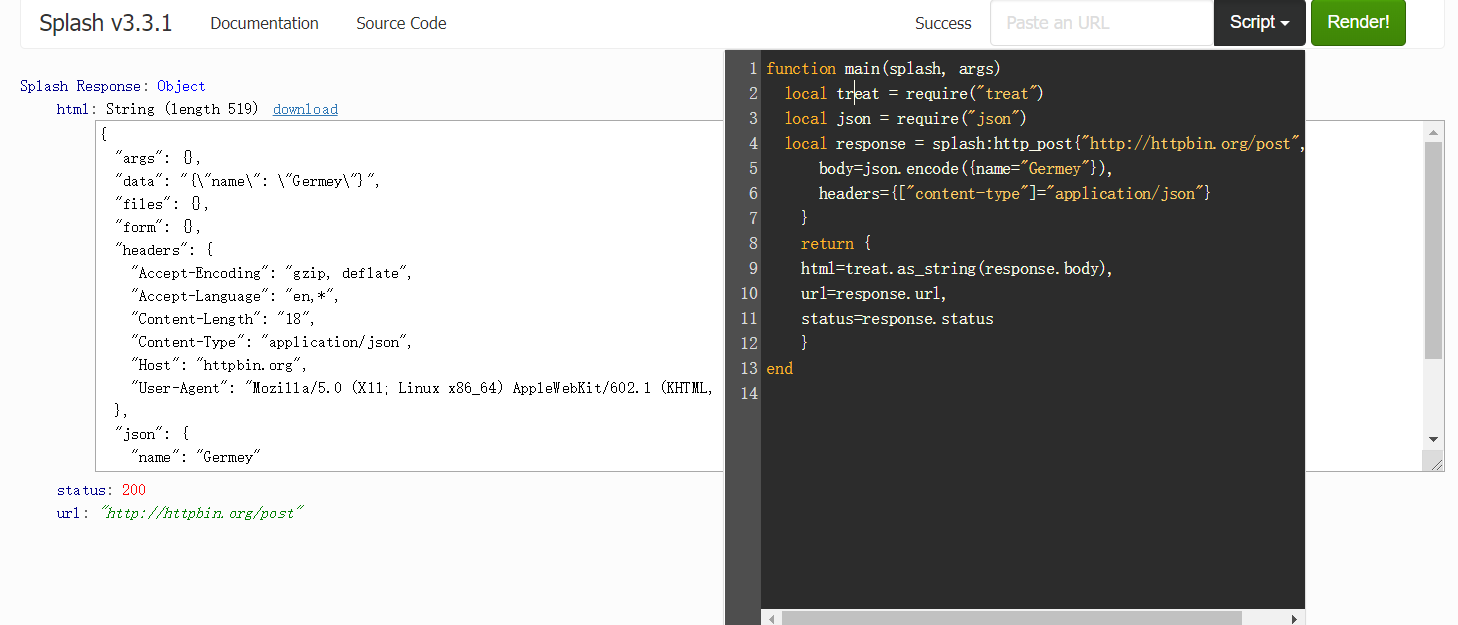
splash:http_post :发送POST请求
response = splash:http_post{url, headers=nil, follow_redirects=true, body=nil}
function main(splash, args)
  local treat = require("treat")
  local json = require("json")
  local response = splash:http_post{"http://httpbin.org/post",
      body=json.encode({name="Germey"}),
      headers={["content-type"]="application/json"}
    }
    return {
    html=treat.as_string(response.body),
    url=response.url,
    status=response.status
    }
end
splash:set_content() : 设置当前页面的内容
ok ,reason =splash:set_content{data,mime_type="text/html; charset=utf-8", baseurl=""}
function main(splash)
    assert(splash:set_content("<html><body><h1>hello</h1></body></html>"))
    return splash:png()
end
splash:html() :获取网页的源代码,结果为字符串
function main(splash, args)
  splash:go("https://httpbin.org/get")
  return splash:html()
end
splash:png() :获取PNG格式的网页截图
splash:jpeg() :获取JPEG格式的网页截图
splash:har() :获取页面加载过程描述
splash:url() :获取当前正在访问的URL
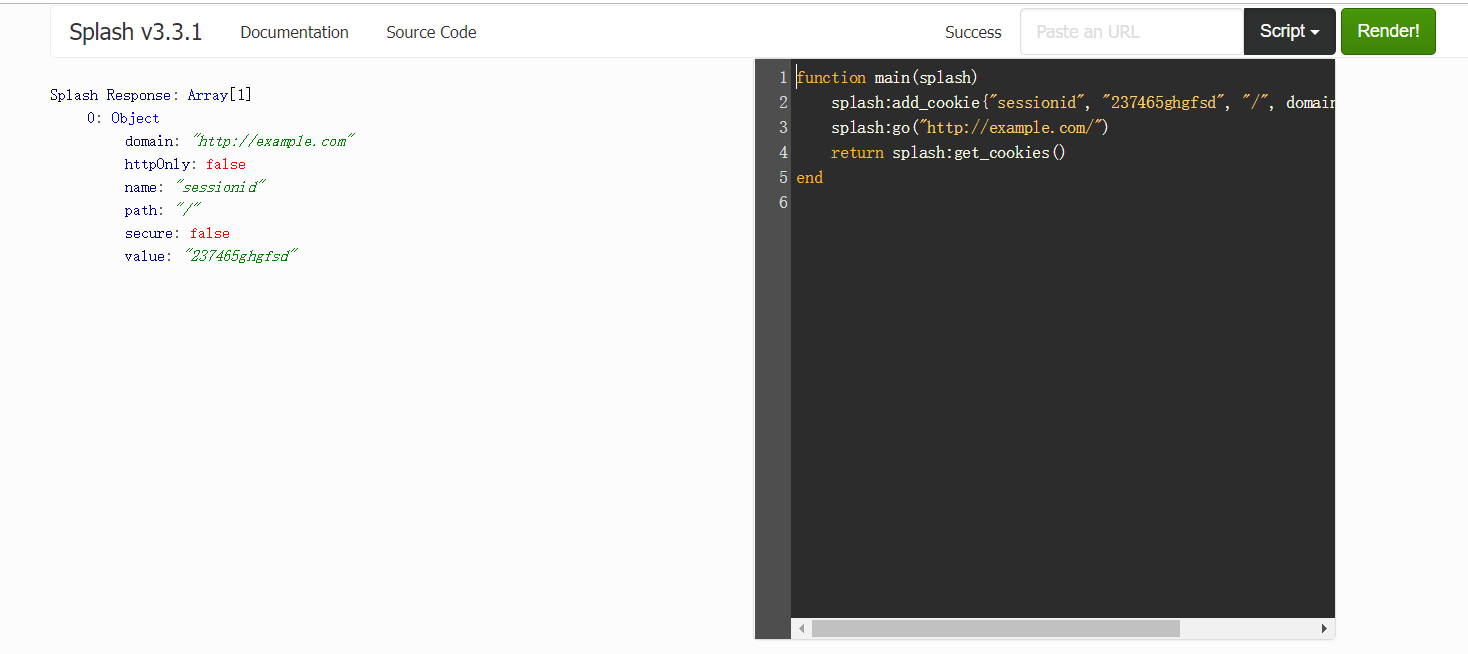
splash:get_cookies() :获取当前页面的cookies
splash:add_cookie() :为当前页面添加cookie
splash:clear_cookies() :清除所有的cookies
splash:delete_cookies{name=nil,url=nil} 删除指定的cookie
splash:get_viewport_size() :获取当前浏览器页面的大小,即宽高
splash:set_viewport_size(width,height) :设置当前浏览器页面的大小,即宽高
splash:set_viewport_full() :设置浏览器全屏显示
splash:set_user_agent() :覆盖设置请求头的User-Agent
splash:get_custom_headers(headers) :设置请求头
function main(splash)
  splash:set_custom_headers({
     ["User-Agent"] = "Mozilla/5.0 (Windows NT 10.0; Win64; x64) AppleWebKit/537.36 (KHTML, like Gecko) Chrome/67.0.3396.62 Safari/537.36",
     ["Site"] = "httpbin.org",
  })
  splash:go("http://httpbin.org/get")
  return splash:html()
end
splash:on_request(callback) :在HTTP请求之前注册要调用的函数
splash:get_version() :获取splash版本信息
splash:mouse_press() :触发鼠标按下事件
splash:mouse_release() :触发鼠标释放事件
splash:send_keys() :发送键盘事件到页面上下文,如发送回车键:splash:send_keys("key_Enter")
splash:send_text() :将文本内容发送到页面上下文
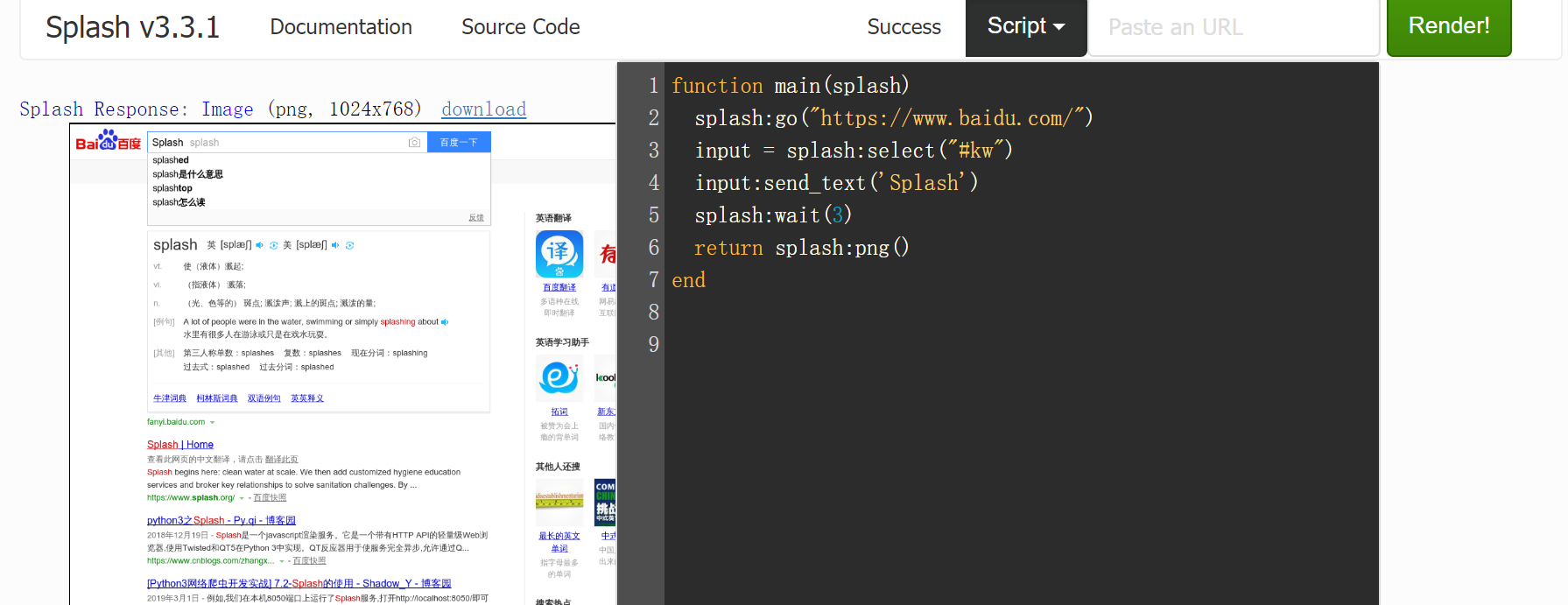
splash:select() :选中符合条件的第一个节点,如果有多个节点符合条件,则只会返回一个,其参数是CSS选择器
function main(splash)
  splash:go("https://www.baidu.com/")
  input = splash:select("#kw")
  input:send_text('Splash')
  splash:wait()
  return splash:png()
end
splash:select_all() :选中所有符合条件的节点,其参数是CSS选择器
function main(splash)
  local treat = require('treat')
  assert(splash:go("https://www.zhihu.com"))
  ))
  local texts = splash:select_all('.ContentLayout-mainColumn .ContentItem-title')
  local results = {}
  for index, text in ipairs(texts) do
    results[index] = text.node.textContent
  end
  return treat.as_array(results)
end
#返回所有节点下的文本内容
splash:mouse-click() : 出发鼠标单击事件
function main(splash)
  splash:go("https://www.baidu.com/")
  input = splash:select("#kw")
  input:send_text('Splash')
  submit = splash:select('#su')
  submit:mouse_click()
  splash:wait()
  return splash:png()
end
其他splash scripts的属性与方法请参考官方文档:http://splash.readthedocs.io/en/latest/scripting-ref.html#splash-args
响应对象是由splash方法返回的回调信息,如splash:http_get()或splash:http_post()会被传递给回调函数splash:on_response和splash:on_response_headers,它们包括的响应信息:
response.url:响应的URL
response.status:响应的HTTP状态码
response.ok:成功返回true否则返回false
response.headers:返回HTTP头信息
response.info:具有HAR响应格式的响应数据表
response.body:返回原始响应主体信息为二进制对象,需要使用treat.as_string转换为字符串
resonse.request:响应的请求对象
response.abort:终止响应
Splash通过HTTP API控制来发送GET请求或POST表单数据,它提供了这些接口,只需要在请求时传递相应的参数即可获得不同的内容,下面来介绍下这些接口
(1)render.html 它返回JavaScript渲染页面的HTML代码
参数:
url:要渲染的网址,str类型
baseurl:用于呈现页面的基本URL
timeout:渲染的超时时间默认为30秒
resource_timeout:单个网络请求的超时时间
wait:加载页面后等待更新的时间默认为0
proxy:代理配置文件名称或代理URL,格式为:[protocol://][user:password@]proxyhost[:port])
js:JavaScript配置
js_source:在页面中执行的JavaScript代码
filtrs:以逗号分隔的请求过滤器名称列表
allowed_domains:允许的域名列表
images:为1时下载图像,为0时不下载图像,默认为1
headers:设置的HTTP标头,JSON数组
body:发送POST请求的数据
http_method:HTTP方法,默认为GET
html5_media:是否启用HTML5媒体,值为1启用,0为禁用,默认为0
import requests
url='http://172.16.32.136:8050/'
response=requests.get(url+'render.html?url=https://www.baidu.com&wait=3&images=0')
print(response.text)  #返回网页源代码
(2)render.png 此接口获取网页的截图PNG格式
import requests
url='http://172.16.32.136:8050/'
#指定图像宽和高
response=requests.get(url+'render.png?url=https://www.taobao.com&wait=5&width=1000&height=700&render_all=1')
with open('taobao.png','wb') as f:
    f.write(response.content)
(3)render.jpeg 返回JPEG格式截图

import requests
url='http://172.16.32.136:8050/'

response=requests.get(url+'render.jpeg?url=https://www.taobao.com&wait=5&width=1000&height=700&render_all=1')
with open('taobao.jpeg','wb') as f:
    f.write(response.content)
(4)render.har 此接口用于获取页面加载的HAR数据
import requests
url='http://172.16.32.136:8050/'
response=requests.get(url+'render.har?url=https://www.jd.com&wait=5')

print(response.text)
(5)render.json 此接口包含了前面接口的所有功能,返回结果是JSON格式
参数:
html:是否在输出中包含HTML,html=1时包含html内容,为0时不包含,默认为0
png:是否包含PNG截图,为1包含为0不包含默认为0
jpeg:是否包含JPEG截图,为1包含为0不包含默认为0
iframes:是否在输出中包含子帧的信息,默认为0
script:是否输出包含执行的JavaScript语句的结果
console:是否输出中包含已执行的JavaScript控制台消息
history:是否包含网页主框架的请求与响应的历史记录
har:是否输出中包含HAR信息
import requests
url='http://172.16.32.136:8050/'
response=requests.get(url+'render.json?url=https://httpbin.org&html=1&png=1&history=1&har=1')

print(response.text)
(6)execute 用此接口可以实现与Lua脚本的对接,它可以实现与页面的交互操作
参数:
lua_source:Lua脚本文件
timeout:设置超时
allowed_domains:指定允许的域名列表
proxy:指定代理
filters:指定筛选条件
import requests
from urllib.parse import quote
lua='''
function main(splash)
    return 'hello'
end
'''
url='http://172.16.32.136:8050/execute?lua_source='+quote(lua)
response=requests.get(url)
print(response.text)
通过Lua脚本获取页面的body,url和状态码:
import requests
from urllib.parse import quote
lua='''
function main(splash,args)
    local treat=require("treat")
    local response=splash:http_get("http://httpbin.org/get")
    return {
        html=treat.as_string(response.body),
        url=response.url,
        status=response.status
    }
end
'''
url='http://172.16.32.136:8050/execute?lua_source='+quote(lua)
response=requests.get(url)
print(response.text)

#
{"status": 200, "html": "{\"args\":{},\"headers\":{\"Accept-Encoding\":\"gzip, deflate\",\"Accept-Language\":\"en,*\",\"Connection\":\"close\",\"Host\":\"httpbin.org\",\"User-Agent\":\"Mozilla/5.0 (X11; Linux x86_64) AppleWebKit/602.1 (KHTML, like Gecko) splash Version/9.0 Safari/602.1\"},\"origin\":\"221.218.181.223\",\"url\":\"http://httpbin.org/get\"}\n", "url": "http://httpbin.org/get"}
实例
#!/usr/bin/env python
# -*- coding: utf- -*-
# @Time    : // :
# @Author  : Py.qi
# @File    : JD.py
# @Software: PyCharm
import re

import requests
import pymongo
from pyquery import PyQuery as pq

client=pymongo.MongoClient()
db=client['JD']

def page_parse(html):
    doc=pq(html,parser='html')
    items=doc('#J_goodsList .gl-item').items()
    for item in items:
        if item('.p-img img').attr('src'):
            image=item('.p-img img').attr('src')
        else:
            image=item('.p-img img').attr('data-lazy-img')
        texts={
            'image':'https:'+image,
            ],
            'title':re.sub('\n','',item('.p-name').text()),
            ],

        }
        yield texts

def save_to_mongo(data):
    if db['jd_collection'].insert(data):
        print('保存到MongoDB成功',data)
    else:
        print('MongoDB存储错误',data)

def main(number):
    url='http://192.168.146.140:8050/render.html?url=https://search.jd.com/Search?keyword=python&page={}&wait=1&images=0'.format(number)
    response=requests.get(url)
    data=page_parse(response.text)
    for i in data:
        save_to_mongo(i)
        #print(i)

if __name__ == '__main__':
    ,,):
        print('开始抓取第{}页'.format(number))
        main(number)
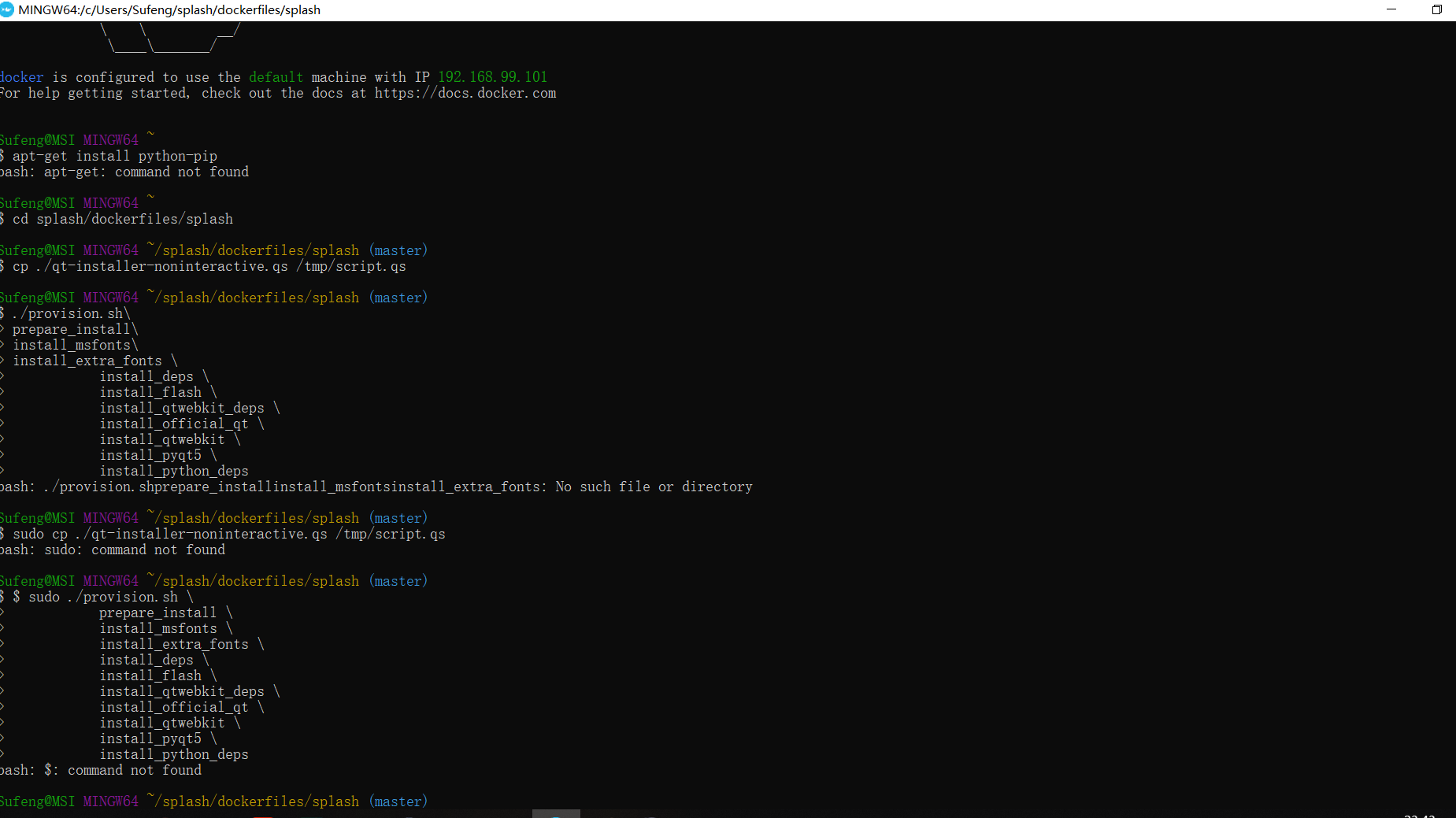
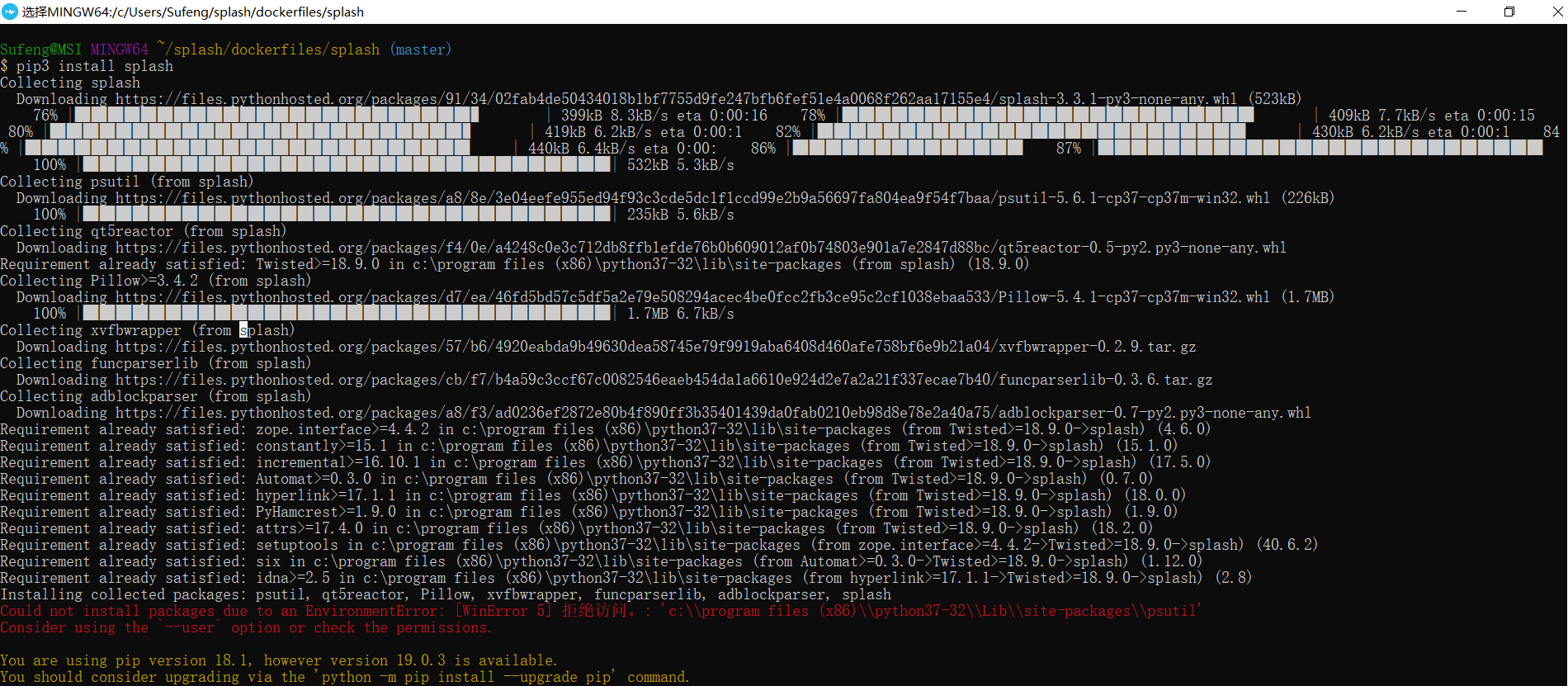
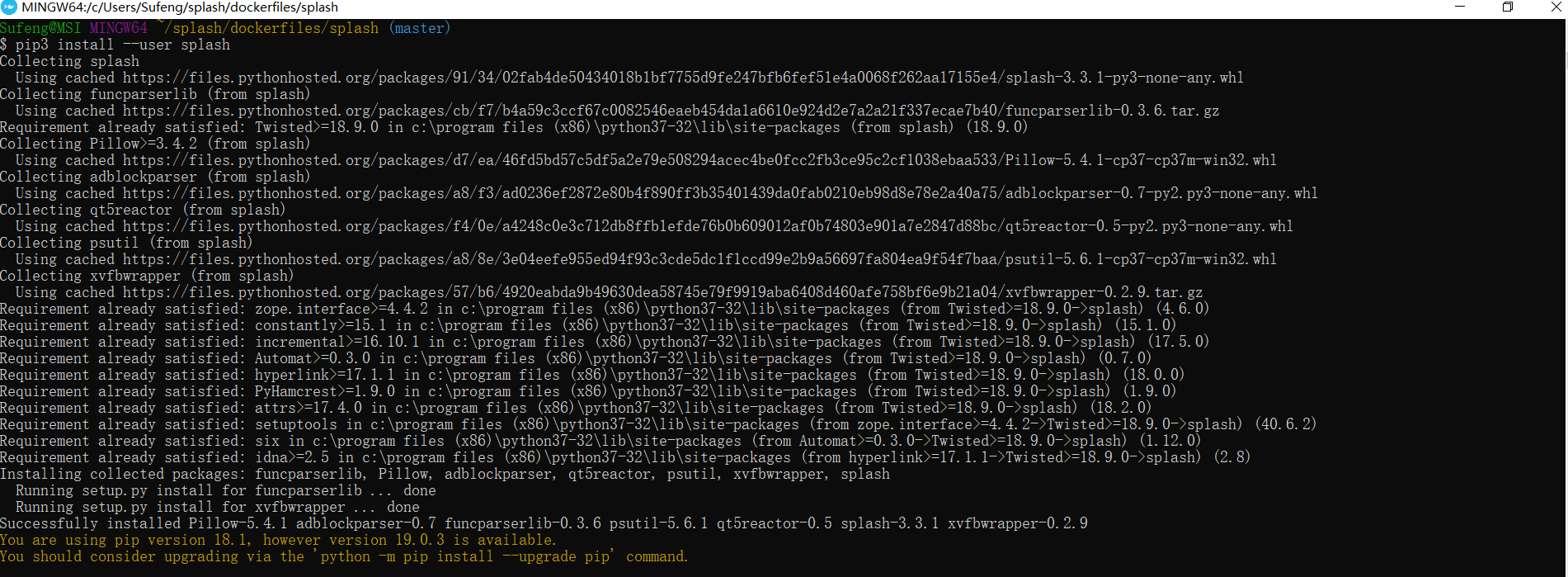
以下是关于splash-scrapy 库 无法解析js ,需要补充一些额外资料 ,部分读者有可能用得上
取自
https://splash.readthedocs.io/en/stable/install.html
scrapy splash 之一二的更多相关文章
- scrapy+splash 爬取京东动态商品
作业来源:https://edu.cnblogs.com/campus/gzcc/GZCC-16SE1/homework/3159 splash是容器安装的,从docker官网上下载windows下的 ...
- Scrapy+splash报错 Connection was refused by other side
报错信息如下: Traceback (most recent call last): File "/usr/local/lib/python3.7/site-packages/scrap ...
- Scrapy爬虫框架(实战篇)【Scrapy框架对接Splash抓取javaScript动态渲染页面】
(1).前言 动态页面:HTML文档中的部分是由客户端运行JS脚本生成的,即服务器生成部分HTML文档内容,其余的再由客户端生成 静态页面:整个HTML文档是在服务器端生成的,即服务器生成好了,再发送 ...
- python splash scrapy
python splash scrapy 1. 前言 slpash是一个渲染引擎,它有自己的api,可以直接访问splash服务的http接口,但也有对应的包python-splash方便调 ...
- scrapy 动态网页处理——爬取鼠绘海贼王最新漫画
简介 scrapy是基于python的爬虫框架,易于学习与使用.本篇文章主要介绍如何使用scrapy爬取鼠绘漫画网海贼王最新一集的漫画. 源码参见:https://github.com/liudaol ...
- 爬虫之scrapy-splash
什么是splash Splash是一个Javascript渲染服务.它是一个实现了HTTP API的轻量级浏览器,Splash是用Python实现的,同时使用Twisted和QT.Twisted(QT ...
- Facebook 爬虫
title: Facebook 爬虫 tags: [python3, facebook, scrapy, splash, 爬虫] date: 2018-06-02 09:42:06 categorie ...
- 爬虫、网页测试 及 java servlet 测试框架等介绍
scrapy 抓取网页并存入 mongodb的完整示例: https://github.com/rmax/scrapy-redis https://github.com/geekan/scrapy-e ...
- python的分布式爬虫框架
scrapy + celery: Scrapy原生不支持js渲染,需要单独下载[scrapy-splash](GitHub - scrapy-plugins/scrapy-splash: Scrapy ...
随机推荐
- MySQL查询缓存总结
可以通过下面的SQL查看当前查询缓存相关参数状态: show variables like '%query_cache%'; 1) query_cache_type 查询缓存类型: 0 表示始终不适 ...
- three.js初探,立体几何入手(一)
前言:首先先推荐一篇博客,关于webgl原理,讲的非常之通俗易懂了 图解WebGL&Three.js工作原理 webGL可以理解为openGL ES2.0 (webGL2.0 - openG ...
- CentOS7.X怎样更新yum源
1. 备份原来的yum源 $sudo cp /etc/yum.repos.d/CentOS-Base.repo /etc/yum.repos.d/CentOS-Base.repo-backup 2.设 ...
- npm配置国内镜像资源+淘宝镜像
将npm的注册表源设置为国内的镜像 1.国内用户,建议将npm的注册表源设置为国内的镜像,可以大幅提升安装速度 2.国内优秀npm镜像推荐及使用:http://riny.net/2014/cnpm/ ...
- asp.net 虹软 人脸识别 实现刷脸住宿、刷脸签到、刷脸进入等
先看看效果图,我把demo改成自动运行了,暂时借用别人的图片: 最左侧的大图为选择上传的, 中间的小图是大图的脸, 右侧的大图是人脸文件夹中已经存在的,并且相似度较高的一张脸,也就是比对的结果. 先记 ...
- centos7中bash: maven: 未找到命令... 解决办法
安装了maven,但在执行mvn -v或maven-versions时提示bash: maven: 未找到命令... 应该是环境变量出错,把MAVEN_HOME的路径换到PATH上就可以了,如下: e ...
- 安装和启动json-server
安装json-server JSON-Server 是一个 Node 模块,运行 Express 服务器,你可以指定一个 json 文件作为 api 的数据源 npm i -g json-server ...
- PDO设置字符集
<?php header("content-type:text/html;charset=GBK"); class CurlClass { protected $_pdo; ...
- pip使用国内源
对于Python开发用户来讲,PIP安装软件包是家常便饭.但国外的源下载速度实在太慢,浪费时间.而且经常出现下载后安装出错问题.所以把PIP安装源替换成国内镜像,可以大幅提升下载速度,还可以提高安装成 ...
- OO第二单元作业总结【自我反思与审视】
第二单元作业的完成史,就是一部心酸的血泪史…… 多线程的出现为我(们)打开一片广阔的天地,我也在这方天地摸爬滚打,不断成长!如果说第一单元之前还对Java语法有所了解的话,那么这单元学习多线程则完全是 ...