
3.9 run_main.py源码(兼容python2和3)
3.9 run_main.py源码(兼容python2和3)
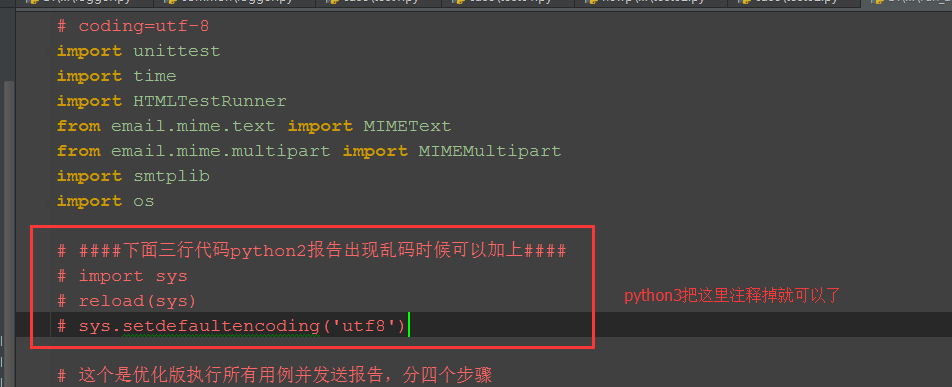
以下代码在python2和python3上都跑通过,python3只需注释掉上面红色框框区域代码就行(最后一步发送邮箱代码,我注释掉了)。

# coding=utf-8

import unittest

import time

import HTMLTestRunner

from email.mime.text import MIMEText

from email.mime.multipart import MIMEMultipart

import smtplib

import os

####下面三行代码python2报告出现乱码时候可以加上####

import sys

reload(sys)

sys.setdefaultencoding('utf8')

# 这个是优化版执行所有用例并发送报告,分四个步骤

# 第一步加载用例

# 第二步执行用例

# 第三步获取最新测试报告

# 第四步发送邮箱 (这一步不想执行的话,可以注释掉最后面那个函数就行)

def add_case(case_path, rule):

    '''加载所有的测试用例'''

    testunit = unittest.TestSuite()

    # 定义discover方法的参数

    discover = unittest.defaultTestLoader.discover(case_path,

                                                  pattern=rule,

                                                  top_level_dir=None)

    # discover方法筛选出来的用例,循环添加到测试套件中

    # for test_suite in discover:

    #     for test_case in test_suite:

    #         testunit.addTests(test_case)

    #         print testunit

    testunit.addTests(discover)  # 直接加载discover

    print(testunit)

    return testunit

def run_case(all_case, report_path):

    '''执行所有的用例, 并把结果写入测试报告'''

    now = time.strftime("%Y_%m_%d %H_%M_%S")

    report_abspath = os.path.join(report_path, now+"result.html")

    # report_abspath = "D:\\web_project\\report\\"+now+"result.html"

    fp = open(report_abspath, "wb")

    runner = HTMLTestRunner.HTMLTestRunner(stream=fp,

                                           title=u'自动化测试报告,测试结果如下:',

                                           description=u'用例执行情况:')

    # 调用add_case函数返回值

    runner.run(all_case)

    fp.close()

def get_report_file(report_path):

    '''获取最新的测试报告'''

    lists = os.listdir(report_path)

    lists.sort(key=lambda fn: os.path.getmtime(os.path.join(report_path, fn)))

    print (u'最新测试生成的报告: '+lists[-1])

    # 找到最新生成的报告文件

    report_file = os.path.join(report_path, lists[-1])

    return report_file

def send_mail(sender, psw, receiver, smtpserver, report_file):

    '''发送最新的测试报告内容'''

    # 读取测试报告的内容

    with open(report_file, "rb") as f:

        mail_body = f.read()

    # 定义邮件内容

    msg = MIMEMultipart()

    body = MIMEText(mail_body, _subtype='html', _charset='utf-8')

    msg['Subject'] = u"自动化测试报告"

    msg["from"] = sender

    msg["to"] = psw

    # 加上时间戳

    # msg["date"] = time.strftime('%a, %d %b %Y %H_%M_%S %z')

    msg.attach(body)

    # 添加附件

    att = MIMEText(open(report_file, "rb").read(), "base64", "utf-8")

    att["Content-Type"] = "application/octet-stream"

    att["Content-Disposition"] = 'attachment; filename= "report.html"'

    msg.attach(att)

    # 登录邮箱

    smtp = smtplib.SMTP()

    # 连接邮箱服务器

    smtp.connect(smtpserver)

    # 用户名密码

    smtp.login(sender, psw)

    smtp.sendmail(sender, receiver, msg.as_string())

    smtp.quit()

    print('test report email has send out !')

if __name__ == "__main__":

    # 测试用例的路径、匹配规则

    case_path = "D:\\test\\newp\\case"

    rule = "test*.py"

    all_case = add_case(case_path, rule)   # 1加载用例

    # 生成测试报告的路径

    report_path = "D:\\test\\newp\\report"

    run_case(all_case, report_path)        # 2执行用例

    # 获取最新的测试报告文件

    report_file = get_report_file(report_path)  # 3获取最新的测试报告

    #邮箱配置

    sender = "yoyo@xxx.com"

    psw = "xxx"

    # 收件人多个时,中间用逗号隔开,如'a@xx.com,b@xx.com'

    receiver = "yoyo@xxx.com"

    smtp_server = 'smtp.xxx.com'

    # send_mail(sender, psw, receiver, smtp_server, report_file)  # 4最后一步发送报告,需要发邮件就取消注释。
3.9 run_main.py源码(兼容python2和3)的更多相关文章
- daily news新闻阅读客户端应用源码(兼容iPhone和iPad)
daily news新闻阅读客户端应用源码(兼容iPhone和iPad),也是一款兼容性较好的应用,可以支iphone和ipad的阅读阅读器源码,设计风格和排列效果很不错,现在做新闻资讯客户端的朋友可 ...
- Django框架base.py源码
url.py文件 from django.conf.urls import url from django.contrib import admin from app_student import v ...
- Python逆向(四)—— Python内置模块dis.py源码详解
一.前言 上一节我们对Python编译及反汇编做了讲解,大家知道dis模块可以将编译好的pyc文件中提取出来的PyCodeObject反汇编为可以阅读字节码形式.本节我们对dis模块中的源码进行详细的 ...
- r-cnn学习(四):train_faster_rcnn_alt_opt.py源码学习
论文看的云里雾里,希望通过阅读其代码来进一步了解. 参考:http://blog.csdn.net/sloanqin/article/details/51525692 首先是./tools/train ...
- 深度学习入门-4.1 AND.py 源码分析
源代码 ------------------------------------------------------------------------------------------------ ...
- 获得PyInstaller打包exe的py源码
参考链接:https://laucyun.com/33359ed9f725529ac9b606d054c8459d.html way1:pyi-archive_viewer 提取pyc,uncomp ...
- python string.py 源码分析 三:maketrans
l = map(chr, xrange(256)) #将ascii转为字符串 _idmap = str('').join(l) del l # Construct a translation stri ...
- python string.py 源码分析 二:capwords
def capwords(s, sep=None): """capwords(s [,sep]) -> string Split the argument into ...
- python string.py 源码分析 一
# Some strings for ctype-style character classification c风格字符串 whitespace = ' \t\n\r\v\f' #空白字符 \t 制 ...
随机推荐
- django模型系统(一)
django模型系统(一) djangode ORM ORM:对像关系映射 用python概念去表达数据库 数据库配置(mysql) 安装pumysql 修改项目目录下的__init__.py imp ...
- 安装cmake 和 opencv 4.0.0
1.安装cmake3.5.1或更新的版本 安装gcc-c++:sudo apt-get install build-essential (或者直接执行这两条命令sudo apt-get install ...
- dockerfile语法规则
编写Dockerfile 在前面的章节,我们学习了通过docker命令来下载镜像,运行镜像,在容器中部署自己的程序,最后将容器提交到自己的镜像中.但是,这并不是Docker推荐的镜像构建方式.在这一章 ...
- Oracle查询语句导致CPU使用率过高问题处理
解决此问题的关键在于如何找到造成CPU使用率过高的SQL语句.步骤如下: 1.使用Process Explorer工具查看到Oracle进程,双击Oracle进程,在弹出的属性窗口的Threads选项 ...
- POJ - 3264——Balanced Lineup(入门线段树)
Balanced Lineup Time Limit: 5000MS Memory Limit: 65536K Total Submissions: 68466 Accepted: 31752 ...
- 关于angular 的路由title设置
在主模块下 constructor( private router: Router, private activatedRoute: ActivatedRoute, ) {} this.router. ...
- 洛谷P2886 [USACO07NOV]牛继电器Cow Relays
题意很简单,给一张图,把基本的求起点到终点最短路改成求经过k条边的最短路. 求最短路常用的算法是dijkstra,SPFA,还有floyd. 考虑floyd的过程: c[i][j]=min(c[i][ ...
- LeetCode 15. 3Sum 16. 3Sum Closest 18. 4Sum
n数求和,固定n-2个数,最后两个数在连续区间内一左一右根据当前求和与目标值比较移动,如果sum<target,移动较小数,否则,移动较大数 重复数处理: 使i为左至右第一个不重复数:while ...
- EFCore Owned Entity Types,彩蛋乎?鸡肋乎?之彩蛋篇
EFCore Owned Entity Types的定义 EFCore Owned Entity Types的文档在这里:https://docs.microsoft.com/zh-cn/ef/cor ...
- 使用Maps与Sets处理集合的交差运算
import com.google.common.collect.MapDifference; import com.google.common.collect.Maps; import java.u ...