
Spring Boot(十一)Redis集成从Docker安装到分布式Session共享
一、简介
Redis是一个开源的使用ANSI C语言编写、支持网络、可基于内存亦可持久化的日志型、Key-Value数据库,并提供多种语言的API,Redis也是技术领域使用最为广泛的存储中间件,它是「Remote Dictionary Service」首字母缩写,也就是「远程字典服务」。
Redis相比Memcached提供更多的数据类型支持和数据持久化操作。
二、在Docker中安装Redis
2.1 下载镜像
访问官网:https://hub.docker.com/r/library/redis/ 选择下载版本,本文选择最新Stable 4.0.11
使用命令拉取镜像:
docker pull redis:4.0.11
2.2 启动容器
启动Redis命令如下:
docker run --name myredis -p 6379:6379 -d redis:4.0.11 redis-server --appendonly yes
命令说明:
- --name 设置别名
- -p 映射宿主端口到容器端口
- -d 后台运行
- redis-server --appendonly yes 在容器启动执行redis-server启动命令,打开redis持久化
启动成功之后使用命令:
docker ps
查看redis运行请求,如下图为运行成功:

2.3 使用客户端连接
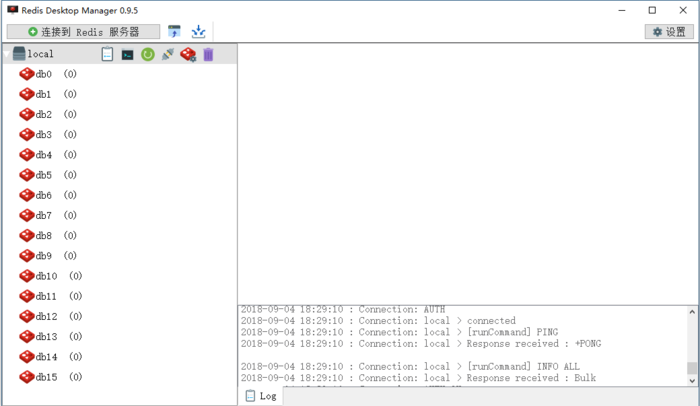
连接Redis不错的GUI工具应该是Redis Desktop Manager了,不过现在只有Linux版可以免费下载,我上传了一个Windows版本在百度云,版本号为:0.9.5(发布于2018.08.24)也是比较新的,链接: https://pan.baidu.com/s/16npZtnGa3-p2PAafiPEAkA 密码: 9uqg,还是免安装的,很好用。
Redis Desktop Manager客户端预览:
三、Redis集成
开发环境
- Spring Boot 2.0.4 RELEASE
- Manven
3.1 添加依赖
在pom.xml添加如下依赖:
<dependency>

    <groupId>org.springframework.boot</groupId>

    <artifactId>spring-boot-starter-data-redis</artifactId>

</dependency>
注意不要依赖“spring-boot-starter-redis”它是旧版本,新版已经迁移到“spring-boot-starter-data-redis”了。
3.2 配置Redis
在application.properties进行如下设置:
# Redis 配置

# Redis服务器地址

spring.redis.host=127.0.0.1

# Redis服务器连接密码(默认为空)

spring.redis.password=

# Redis服务器连接端口

spring.redis.port=6379

# Redis分片(默认为0)Redis默认有16个分片

spring.redis.database=0

# 连接池最大连接数(使用负值表示没有限制)

spring.redis.pool.max-active=8

# 连接池最大阻塞等待时间(使用负值表示没有限制)

spring.redis.pool.max-wait=-1

# 连接池中的最大空闲连接

spring.redis.pool.max-idle=8

# 连接池中的最小空闲连接

spring.redis.pool.min-idle=0

# 连接超时时间(毫秒)

spring.redis.timeout=10000

# 指定spring的缓存为redis

spring.cache.type=redis
注意:spring.redis.timeout不要设置为0,设置为0查询Redis时会报错,因为查询连接时间太短了。
3.3 Redis使用
完成以上配置之后就可以写代码操作Redis了,示例代码如下:
@Autowired

private StringRedisTemplate stringRedisTemplate;

@RequestMapping("/")

public String doTest() {

    String _key = "time"; //缓存key

    stringRedisTemplate.opsForValue().set(_key, String.valueOf(new Date().getTime())); //redis存值

    return stringRedisTemplate.opsForValue().get(_key); //redis取值

}
更多操作:
- stringRedisTemplate.opsForValue().set("test", "100",60*10,TimeUnit.SECONDS); 向redis里存入数据和设置缓存时间;
- stringRedisTemplate.hasKey("keyName"); 检查key是否存在,返回boolean;
四、声明式缓存
为了简化缓存可以直接使用声名式缓存,可以省去设置缓存和读取缓存的代码,使用起来会方便很多。
声明式缓存使用步骤如下:
4.1 设置Redis缓存
在pom.xml文件设置缓存为Redis,代码如下:
spring.cache.type=redis
4.2 开启全局缓存
在启动文件Application.java设置开启缓存,代码如下:
@SpringBootApplication

@EnableCaching

public class Application {

    public static void main(String[] args) {

        SpringApplication.run(Application.class, args);

    }

}
4.3 使用注解
注解如下:
- @Cacheable 设置并读取缓存(第一次设置以后直接读取);
- @CachePut 更新缓存(每次删除并更新缓存结果);
- @CacheEvict 删除缓存(只删除缓存);
通用属性:
- value 缓存名称;
- key 使用SpEL表达式自定义的缓存Key,比如:#name是以参数name为key的缓存,#resule.name是以返回结果的name作为key的缓存;
4.3.1 @Cacheable 使用
示例代码如下:
// 缓存key

private final String _CacheKey = "userCacheKeyTime";

@RequestMapping("/")

@Cacheable(value = _CacheKey)

public String index() {

    System.out.println("set cache");

    return "cache:" + new Date().getTime();

}
只有首次访问的时候会在控制台打印“set cache”信息,之后直接返回Redis结果了,不会在有添加的打印信息出现。
4.3.2 @CachePut 使用
示例代码如下:
// 缓存key

private final String _CacheKey = "userCacheKeyTime";

@RequestMapping("/put")

@CachePut(value = _CacheKey)

public String putCache() {

    System.out.println("update cache");

    return "update cache:" + new Date().getTime();

}
访问http://xxx/put 每次会把最新的数据存储缓存起来。
4.3.3 @CacheEvict 使用
示例代码如下:
// 缓存key

private final String _CacheKey = "userCacheKeyTime";

@RequestMapping("/del")

@CacheEvict(value = _CacheKey)

public String delCache() {

    System.out.println("缓存删除");

    return "delete cache:" + new Date().getTime();

}
访问http://xxx/del 只会删除缓存,除此之后不会进行任何操作。
五、分布式Session共享
在分布式系统中Session共享有很多种方案,而把Session托管在缓存中是最常用的方案之一,下面来看Session在Redis中的托管步骤。
5.1 添加依赖
在pom.xml中添加如下引用:
<dependency>

    <groupId>org.springframework.session</groupId>

    <artifactId>spring-session-data-redis</artifactId>

</dependency>
5.2 开启Session功能
在启动类Application.java的类注解添加开启Session,代码如下:
@SpringBootApplication

@EnableCaching

@EnableRedisHttpSession(maxInactiveIntervalInSeconds = 1800)

public class RedisApplication {

    public static void main(String[] args) {

        SpringApplication.run(RedisApplication.class, args);

    }

}
其中maxInactiveIntervalInSeconds为Session过期时间,默认30分钟,设置单位为秒。
5.3 Session使用
接下来编写一段代码来测试一下Session,示例代码如下:
@RequestMapping("/uid")

public String testSession(HttpSession session) {

    UUID uid = (UUID) session.getAttribute("uid");

    if (uid == null) {

        uid = UUID.randomUUID();

    }

    session.setAttribute("uid", uid);

    return session.getId();

}
连续访问两次请求之后,查看控制台信息如下图:
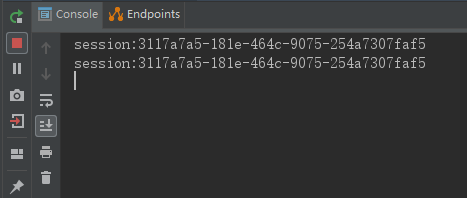
可以看出,两次访问的SessionId是一样的,这个时候在查看Redis 客户端,如下图:
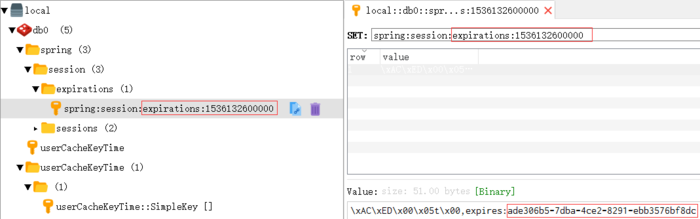
发现Redis里存储的Session过期时间也是对的,符合我们的设置。
5.4 分布式系统共享Session
因为把Session托管给同一台Redis服务器了,所以Session在Spring Boot中按照如上方式在配置多台服务器,得到的Session是一样的。
示例源码下载:https://github.com/vipstone/springboot-example/tree/master/springboot-redis
参考资料
Spring boot中Redis的使用:http://www.ityouknow.com/springboot/2016/03/06/spring-boot-redis.html
Spring Boot(十一)Redis集成从Docker安装到分布式Session共享的更多相关文章
- 7、Spring Boot 2.x 集成 Redis
1.7 Spring Boot 2.x 集成 Redis 简介 继续上篇的MyBatis操作,详细介绍在Spring Boot中使用RedisCacheManager作为缓存管理器,集成业务于一体. ...
- Spring Boot 如何快速集成 Redis 哨兵?
上一篇:Spring Boot 如何快速集成 Redis? 前面的分享栈长介绍了如何使用 Spring Boot 快速集成 Redis,上一篇是单机版,也有粉丝留言说有没有 Redis Sentine ...
- Spring Boot与Redis的集成
Redis是一个完全开源免费的.遵守BSD协议的.内存中的数据结构存储,它既可以作为数据库,也可以作为缓存和消息代理.因其性能优异等优势,目前已被很多企业所使用,但通常在企业中我们会将其作为缓存来使用 ...
- Spring Boot学习笔记——Spring Boot与Redis的集成
一.添加Redis缓存 1.添加Redis起步依赖 在pom.xml中添加Spring Boot支持Redis的依赖配置,具体如下: <dependency> <groupId> ...
- spring boot / cloud (十八) 使用docker快速搭建本地环境
spring boot / cloud (十八) 使用docker快速搭建本地环境 在平时的开发中工作中,环境的搭建其实一直都是一个很麻烦的事情 特别是现在,系统越来越复杂,所需要连接的一些中间件也越 ...
- (转)Spring Boot 2 (六):使用 Docker 部署 Spring Boot 开源软件云收藏
http://www.ityouknow.com/springboot/2018/04/02/docker-favorites.html 云收藏项目已经开源2年多了,作为当初刚开始学习 Spring ...
- Spring Boot 2 (六):使用 Docker 部署 Spring Boot 开源软件云收藏
Spring Boot 2 (六):使用 Docker 部署 Spring Boot 开源软件云收藏 云收藏项目已经开源3年多了,作为当初刚开始学习 Spring Boot 的练手项目,使用了很多当时 ...
- spring boot 整合 redis
自己开发环境需要安装 redis 服务,百度一下很多,下面主要说明Springboot 集成 redis 讲解 我的版本 java8 + redis3.0 + springboot 1.5.9. Sp ...
- 玩转spring boot——结合redis
一.准备工作 下载redis的windows版zip包:https://github.com/MSOpenTech/redis/releases 运行redis-server.exe程序 出现黑色窗口 ...
随机推荐
- C#中IPAddress转换成整型int
string addr = "11.22.33.44"; System.Net.IPAddress IPAddr=System.Net.IPAddress.Parse(addr); ...
- Linux进阶命令用法
1.tr命令 可以对来自标准输入的字符进行替换.压缩和删除.它可以将一组字符变成另一组字符 选项 -c或——complerment:取代所有不属于第一字符集的字符: -d或——delete:删除所有属 ...
- 小飞机ss端口被占用处理
如图所示: 解决方法: 1.运行cmd 2.输入命令:netstat -aon|findstr "1080" 3.获取使用该端口的PID---“8540”,如下图所示: 4.输入命 ...
- vue-router路由学习总结
vue路由 <!DOCTYPE html> <html lang="en"> <head> <meta charset="UTF ...
- Python基础之面向对象2(封装)
一.封装定义: 二.作用 三.私有成员: 1.基本概念及作用 2.__slots__手段私有成员: 3.@property属性手段私有成员: 四.基础示例代码 1.用方法封装变量 "&quo ...
- [.net 面向对象程序设计深入](36)Redis——基础
[.net 面向对象程序设计深入](36)Redis——基础 很长一段时间没更新博客了,坚持做一件事,真不是件容易的事,后面我会继续尽可能的花时间更新完这个系列文章. 因这个系列的文章涉及的范围太大了 ...
- emWin实现ATM机界面设计,含uCOS-III和FreeRTOS两个版本
第1期:ATM机配套例子:V6-900_STemWin提高篇实验_ATM机(uCOS-III)V6-901_STemWin提高篇实验_ATM机(FreeRTOS) 例程下载地址:http://foru ...
- Eclipse极致性能调优
直接复制以下到eclipse.ini里面 1 2 3 4 5 6 7 8 9 10 11 12 13 14 15 16 17 18 19 20 21 22 23 24 25 26 -Xverify:n ...
- jQuery ajax如何传多个值到后台页面,举例:
一.js代码 <script type="text/JavaScript">$("#save_change_<{$aff.Id}>"). ...
- 阿里云rds数据库迁移实战(多数据源)
由于某几个业务表数据量太大,数据由业务写,数据部门读. 写压力不大,读却很容易导致长时间等待问题(读由单独系统进行读),导致连接被占用,从而容易并发稍稍增长导致全库卡死! 于是,就拆库呗. 业务系统拆 ...