
Theano入门神经网络(三)
附录一个:Keras学习随笔 http://blog.csdn.net/niuwei22007/article/details/49045909
参考 《Python Machine Learning》这本书的第13章
Theano是Bengio大神课题组弄得。
一、Theano初步
Theano编程三个步骤: 初始化、编译和执行,就是定义符号(变量对象)、编译代码和执行代码
举个例子:计算 z=x1*w1+wo 代码如下:
 # -*- coding: utf-8 -*-

 __author__ = 'Administrator'

 import theano

 import  theano.tensor as T

 import  random

 import  numpy as np

 from itertools import izip

 import matplotlib.pyplot as plt

 #初始化

 x1 = T.scalar()

 w1 = T.scalar()

 w0 = T.scalar()

 z = w1*x1+w0

 #编译

 net_input = theano.function(

     inputs=[w1, x1, w0],

     outputs=z

 )

 #执行

 print 'net input %.2f'% (net_input(2.0, 1.0 ,0.5))
在写Theano代码时,要注意变量的类型 dtype ,要分清楚我们要使用 64或者32为的int or floats
二、 配置Theano
一般来说 采用CPU时,我们设置float64 ,采用GPU时,需要设置float32
print (theano.config.floatX)
print (theano.config.device)
在window中设置CPU or GPU模式,是在运行cmd后出现的路径下,新建一个.theanorc.txt的文件。文件内容如下图所示

三、使用array结构
一个简单的求和例子
 #初始化

 x = T.fmatrix(name ='x')

 x_sum = T.sum(x, axis=1) # 0  是按列 1 是按行

 #编译

 calc_sum = theano.function(

     inputs=[x],

     outputs=x_sum

 )

 #执行

 ary = np.array([[1,2,4],[1,2,3]],dtype=theano.config.floatX)

 print calc_sum(ary)
shared variable 和 权值更新
 #初始化

 x =  T.fmatrix('x')

 w = theano.shared(np.asarray([[0.0,0.0,0.0]],dtype=theano.config.floatX))

 z = T.dot(x,w.T) # 这个就是两个矩阵相乘 w是1*3  x是1*3

 update = [[w, w+1.0]]

 # 编译

 net_input = theano.function(

     inputs=[x],

     updates=update,

     outputs=z

 )

 # 执行

 data = np.array([[1,2,3]],dtype=theano.config.floatX)

 for i in range(5):

     print w.get_value()

     print '%d   %.2f' % (i,net_input(data))
可以提取指定数据,代码如下
 #初始化

 data = np.array([[1,2,3]],dtype=theano.config.floatX)

 x =  T.fmatrix('x')

 w = theano.shared(np.asarray([[0.0,0.0,0.0]],dtype=theano.config.floatX))

 z = T.dot(x,w.T) # 这个就是两个矩阵相乘 w是1*3  x是1*3

 update = [[w, w+1.0]]

 # 编译

 net_input = theano.function(

     inputs=[],

     updates=update,

     givens={x : data},

     outputs=z

 )

 # 执行

 for i in range(5):

     print w.get_value()

     print '%d   %.2f' % (i,net_input())
四、 一个线性回归的例子
 X_train = np.asarray(

     [ [0,0] , [1, 0],

       [2,0] , [3, 0],

       [4,0] , [5, 0],

       [6,0] , [7, 0],

       [8,0] , [9, 0]],

     dtype= theano.config.floatX

     )

 y_train = np.asarray(

     [ 1.0,1.3,3.1,2.0,

       5.0,6.3,6.6,7.4,

       8.0,9.0],

     dtype= theano.config.floatX

     )

 y_train_new = np.asarray(

     [ [1.0],[1.3],[3.1],[2.0],

       [5.0],[6.3],[6.6],[7.4],

       [8.0],[9.0]],

     dtype= theano.config.floatX

     )

 print X_train.shape[1] # shape 0 获取行 shape 1 获取列

 def train_linreg(X_train, y_train ,eta, epochs):

     costs = []

     #初始化array0

     eta0 = T.fscalar('eta0')

     y = T.fvector(name='y')

     X = T.fmatrix(name='X')

     w = theano.shared(np.zeros(

         shape=(X_train.shape[1] +1 ),dtype= theano.config.floatX), name = 'w')

     #计算损失函数

     net_input = T.dot(X, w[1:]) + w[0] # w[1:] 从第二个到最后一个数据

     errors = y - net_input

     cost = T.sum(T.pow(errors,2))

     #梯度更新

     gradient = T.grad(cost,wrt=w)

     update = [(w, w- eta0* gradient)]

     #定义模型

     train = theano .function(inputs=[eta0],

                              outputs=cost,

                              updates=update,

                              givens={X:X_train,

                                      y: y_train})

     for i in range(epochs):

         costs.append(train(eta))

         print w.get_value()

     return  costs, w

 def predict_linreg(X,w):

     Xt = T.matrix(name='X')

     net_input = T.dot(Xt, w[1:])+w[0]

     predict = theano.function(inputs=[Xt],

                               givens={w:w},

                               outputs= net_input)

     return  predict(X)

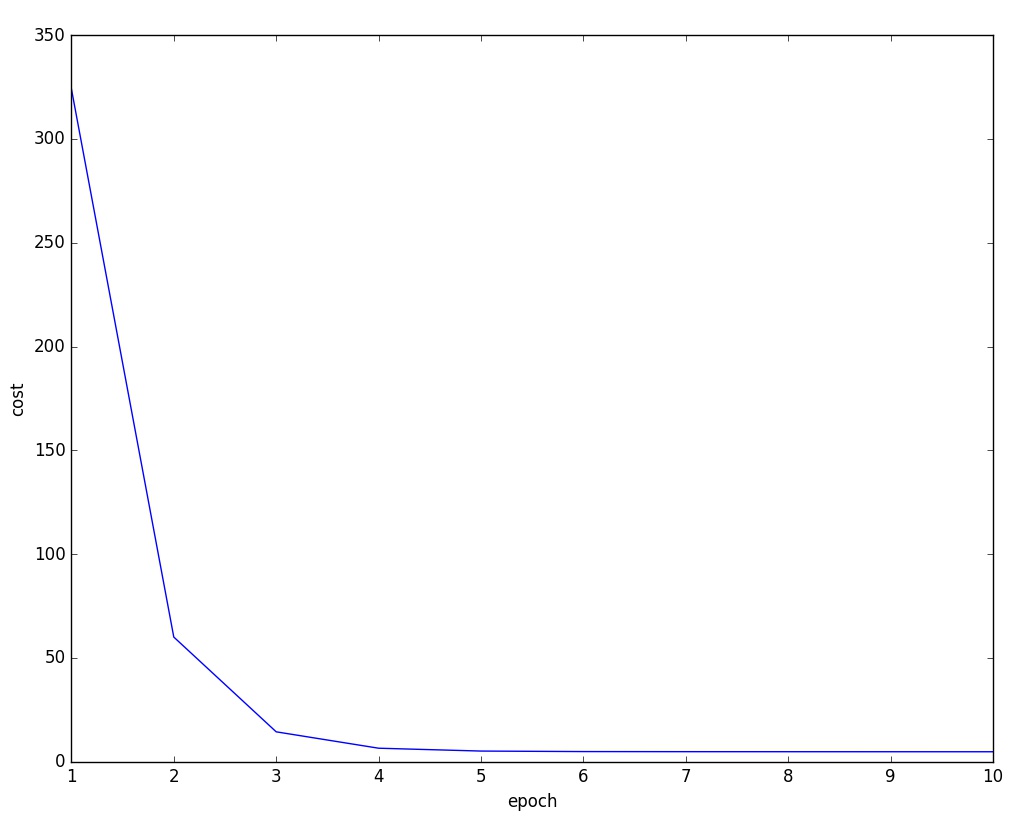
 costs,w= train_linreg(X_train,y_train,eta=0.001,epochs=10)

 plt.plot(range(1,len(costs)+1),costs)

 plt.tight_layout()

 plt.xlabel("epoch")

 plt.ylabel('cost')

 plt.show()

     #

 #plt.scatter(X_train, y_train ,marker='s',s=50)

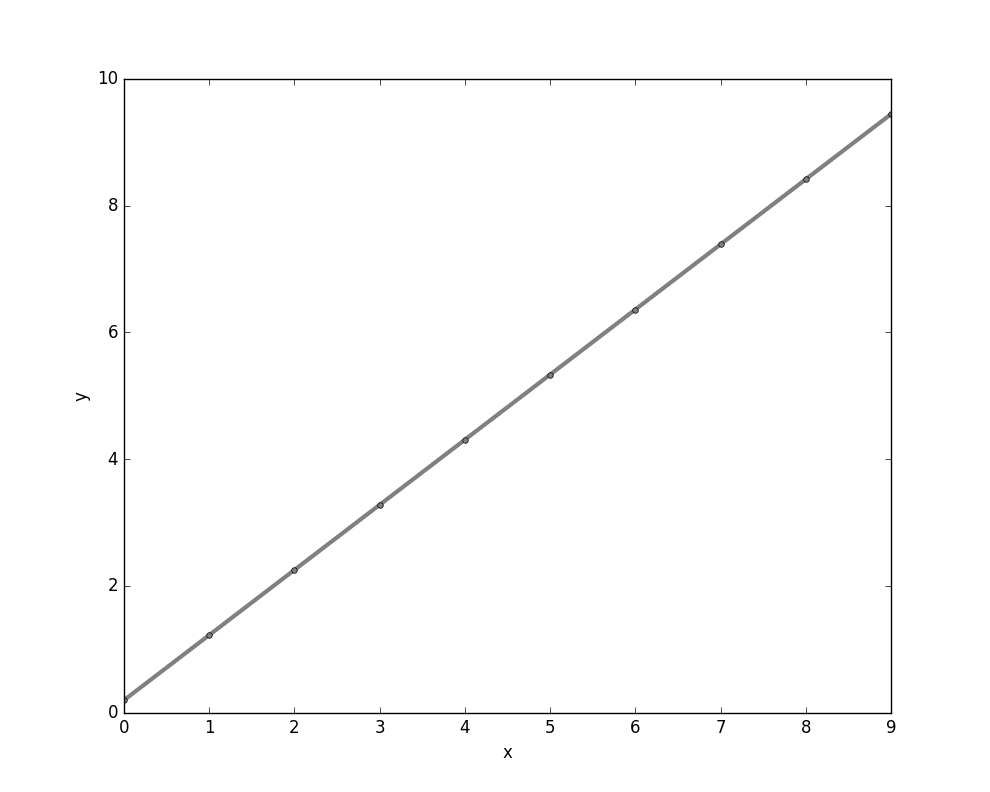
 plt.plot(range(X_train.shape[0]),predict_linreg(X_train,w),color='gray',marker='o',markersize=4,linewidth=3)

 plt.xlabel("x")

 plt.ylabel('y')

 plt.show()
结果图:
Theano入门神经网络(三)的更多相关文章
- Theano入门神经网络(一)
Theano是一个Python库,专门用于定义.优化.求值数学表达式,效率高,适用于多维数组.特别适合做机器学习.一般来说,使用时需要安装python和numpy. 首先回顾一下机器学习的东西,定义一 ...
- Theano入门神经网络(四)
这一部分主要介绍用Theano 实现softmax函数. 在多分类任务中经常用到softmax函数,首先上几个投影片解释一下 假设目标输出是y_hat ,激活函数后的Relu y 一个是1.2 一个是 ...
- Theano入门神经网络(二) 实现一个XOR门
与非门的图片如下 示意图 详细解释: 1 定义变量的代码,包括了输入.权值.输出等.其中激活函数采用的是sigmod函数 # -*- coding: utf-8 -*- __author__ = 'A ...
- Theano入门——CIFAR-10和CIFAR-100数据集
Theano入门——CIFAR-10和CIFAR-100数据集 1.CIFAR-10数据集介绍 CIFAR-10数据集包含60000个32*32的彩色图像,共有10类.有50000个训练图像和1000 ...
- 无废话ExtJs 入门教程三[窗体:Window组件]
无废话ExtJs 入门教程三[窗体:Window组件] extjs技术交流,欢迎加群(201926085) 1.代码如下: 1 <!DOCTYPE html PUBLIC "-//W3 ...
- RequireJS入门(三)转
这篇来写一个具有依赖的事件模块event.event提供三个方法bind.unbind.trigger来管理DOM元素事件. event依赖于cache模块,cache模块类似于jQuery的$.da ...
- RequireJS入门(三)
这篇来写一个具有依赖的事件模块event.event提供三个方法bind.unbind.trigger来管理DOM元素事件. event依赖于cache模块,cache模块类似于jQuery的$.da ...
- 【SSRS】入门篇(三) -- 为报表定义数据集
原文:[SSRS]入门篇(三) -- 为报表定义数据集 通过前两篇文件 [SSRS]入门篇(一) -- 创建SSRS项目 和 [SSRS]入门篇(二) -- 建立数据源 后, 我们建立了一个SSRS项 ...
- Bootstrap入门(三十)JS插件7:警告框
Bootstrap入门(三十)JS插件7:警告框 通过这个插件可以为警告信息添加点击以及消失的功能. 当使用一个.close按钮,它必须是第一个子元素.alert-dismissible,并没有文字内 ...
随机推荐
- 使用Code::blocks在windows下写网络程序
使用Code::blocks在windows下写网络程序 作者 He YiJun – storysnail<at>gmail.com 团队 ls 版权 转载请保留本声明! 本文档包含的原创 ...
- ASP.NET 5 入门(1) - 建立和开发ASP.NET 5 项目
ASP.NET入门(1) - 建立和开发ASP.NET 5 项目 ASP.NET 5 理解和入门 使用自定义配置文件 建立项目 首先,目前只有VS 2015支持开发最新的ASP.NET 5 程序,所以 ...
- centos 6.5 X64 安装 mongodb 2.6.1 (笔记 实测)
环境: 系统硬件:vmware vsphere (CPU:2*4核,内存2G) 系统版本:Centos-6.5-x86_64 *** Centos编译安装mongodb 2.6 系统最好是64位的,才 ...
- Hadoop日记Day17---计数器、map规约、分区学习
一.Hadoop计数器 1.1 什么是Hadoop计数器 Haoop是处理大数据的,不适合处理小数据,有些大数据问题是小数据程序是处理不了的,他是一个高延迟的任务,有时处理一个大数据需要花费好几个小时 ...
- question
1.软件工程技术和软件应用技术用什么区别吗? 2.软件工程专业和计算机技术(不是计算机科学与技术)有什么区别吗? 3.
- guava之Joiner 和 Splitter
最近在给客户准备一个Guava的分享,所以会陆续的更新关于Guava更多的细节分享.本文将记录Guava中得字符串处理Joiner(连接)和Splitter(分割)处理. Joiner 首先我们来看看 ...
- 在代码中设置IE9的默认文档模式
要在旧系统中加一个jquery插件,本地demo测试没问题,部署到服务器后却报错.使用的是IE9浏览器,打开F12调试台,发现默认的文档模式是IE7,调成IE9后,报错消失.可以确认是该插件不兼容IE ...
- 渐析java的浅拷贝和深拷贝
首先来看看浅拷贝和深拷贝的定义: 浅拷贝:使用一个已知实例对新创建实例的成员变量逐个赋值,这个方式被称为浅拷贝. 深拷贝:当一个类的拷贝构造方法,不仅要复制对象的所 ...
- [ACM_动态规划] Palindrome
http://acm.hust.edu.cn/vjudge/contest/view.action?cid=28415#problem/D 题目大意:给一个长为n的字符串,问最少插入几个字符成回文串 ...
- CocoaPod问题
CocoaPod问题 升级10.11后使用CocoaPod出现-bash: pod: command not found 解决办法 字数91 阅读10946 评论24 喜欢27 升级10.11后,运行 ...