
WPF依赖属性详解
WPF依赖属性详解
WPF 依赖属性 英文译为 Dependency Properties,是WPF引入的一种新类型的属性,在WPF中有着极为广泛的应用,在WPF中对于WPF Dependency Properties 的使用贯穿样式的使用,数据绑定,动画等等,在刚刚接触Dependency Properties的时候可能觉得有些奇怪,但是,当你了解他要解决的问题的时候,你可能就不觉得奇怪了。Dependency Properties第一个要解决的问题就是控件的属性共享问题,由于大部分的WPF控件都有多达上百个属性,如果每个属性都是使用实例属性,那对于一个有着成百上千控件的应用来说后果是不堪设想的,Dependency Properties 使用静态共享的方式解决了这个问题,下面的代码说明了这个solution.
public class Button : ButtonBase

{

// The dependency property

public static readonly DependencyProperty IsDefaultProperty;

static Button()

{

// Register the property

Button.IsDefaultProperty = DependencyProperty.Register( “IsDefault” ,

typeof( bool), typeof( Button),

new FrameworkPropertyMetadata( false,

new PropertyChangedCallback(OnIsDefaultChanged)));

…

}

// A .NET property wrapper (optional)

public bool IsDefault

{

get { return ( bool)GetValue( Button.IsDefaultProperty); }

set { SetValue( Button.IsDefaultProperty, value); }

}

// A property changed callback (optional)

private static void OnIsDefaultChanged(

DependencyObject o, DependencyPropertyChangedEventArgs e) { … }

…

}
另外相对于普通的WPF属性,Dependency Properties 还有如下的优势
Property value inheritance -- 属性继承
Change notification -- 改变通知
Support for multiple providers -- 支持多个提供者
下面让我们首选来看看属性继承的效果和代码,从这两张图上读者可以看出,窗体上所有的字体都变大了,从30变成了50,但是这个改变并不是通过设置每个控件的属性得到的,我只需要设置窗体的一个属性,这个窗体的子控件就会适应这一改变,并且使用相同的设置,这就是,属性继承,区别于传统的OO继承,这种方式的继承主要是控件树上元素的继承,相对应的代码如下所示。
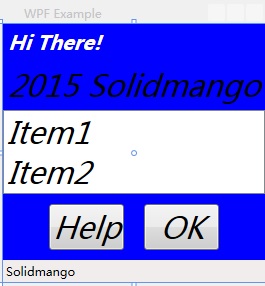
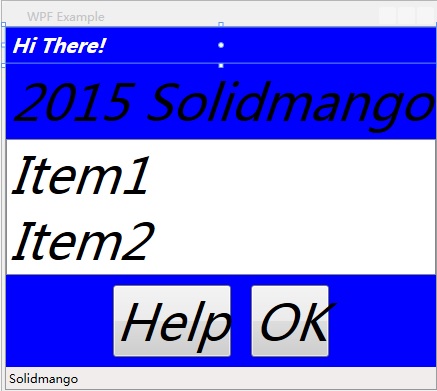
<Window xmlns="http://schemas.microsoft.com/winfx/2006/xaml/presentation"

  Title="WPF Example" SizeToContent="WidthAndHeight"

  FontSize="" FontStyle="Italic"

  Background="Blue">

    <StackPanel>

        <Label FontWeight="Bold" FontSize="" Foreground="White">

            Hi There!

        </Label>

        <Label> Solidmango</Label>

        <ListBox>

            <ListBoxItem>Item1</ListBoxItem>

            <ListBoxItem>Item2</ListBoxItem>

        </ListBox>

        <StackPanel Orientation="Horizontal" HorizontalAlignment="Center">

            <Button MinWidth="" Margin="">Help</Button>

            <Button MinWidth="" Margin="">OK</Button>

        </StackPanel>

        <StatusBar>Solidmango</StatusBar>

    </StackPanel>

</Window>
对于属性的改变通知主要说的是通常我们使用普通属性时只有通过事件响应函数,或者回调函数才能解决的问题,使用 Dependency Properties 只需要及其简单的配置就可以解决,相对于普通属性,方便性不言而喻。下面我们对比一下这两种方式的代码。
使用普通属性
<Button MouseEnter=” Button_MouseEnter” MouseLeave=” Button_MouseLeave”

MinWidth=” ” Margin=” ” >Help</Button>

<Button MouseEnter=” Button_MouseEnter” MouseLeave=” Button_MouseLeave”

MinWidth=” ” Margin=” ” >OK</Button>

// Change the foreground to blue when the mouse enters the button

void Button_MouseEnter( object sender, MouseEventArgs e)

{

Button b = sender as Button;

if (b != null) b.Foreground = Brushes.Blue;

}

// Restore the foreground to black when the mouse exits the button

void Button_MouseLeave( object sender, MouseEventArgs e)

{

Button b = sender as Button;

if (b != null) b.Foreground = Brushes.Black;

}
使用依赖属性
<Trigger Property=” IsMouseOver” Value=” True” >

<Setter Property=” Foreground” Value=” Blue” />

</Trigger>
对于多提供者的支持也是 Dependency Properties 的特色之一,具体的提供者优先级如下:
Determine Base Value
1.Local value
2. Parent template trigger
3. Parent template
4. Style triggers
5. Template triggers
6. Style setters
7. Theme style triggers
8. Theme style setters
9. Property value inheritance
10. Default value
Evaluate (if an Expression)
Apply Animations
Coerce
Validate
WPF依赖属性详解的更多相关文章
- OutputCache属性详解(三)— VaryByHeader,VaryByCustom
目录 OutputCache概念学习 OutputCache属性详解(一) OutputCache属性详解(二) OutputCache属性详解(三) OutputCache属性详解(四)— SqlD ...
- OutputCache属性详解(四)— SqlDependency
目录 OutputCache概念学习 OutputCache属性详解(一) OutputCache属性详解(二) OutputCache属性详解(三) OutputCache属性详解(四)— SqlD ...
- odoo项目结构参数属性详解
1.基础文件及目录结构 在认识odoo ORM框架前,先介绍一下odoo中模块目录结构. data:存放模块预制数据i18n:存放国际化文件models:存放模型等py代码security:存放权 ...
- hikari连接池属性详解
hikari连接池属性详解 一.主要配置 1.dataSourceClassName 这是DataSourceJDBC驱动程序提供的类的名称.请查阅您的特定JDBC驱动程序的文档以获取此类名称,或参阅 ...
- Java精通并发-自旋对于synchronized关键字的底层意义与价值分析以及互斥锁属性详解与Monitor对象特性解说【纯理论】
自旋对于synchronized关键字的底层意义与价值分析: 对于synchronized关键字的底层意义和价值分析,下面用纯理论的方式来对它进行阐述,自旋这个概念就会应运而生,还是很重要的,下面阐述 ...
- android:exported 属性详解
属性详解 标签: android 2015-06-11 17:47 27940人阅读 评论(7) 收藏 举报 分类: Android(95) 项目点滴(25) 昨天在用360扫描应用漏洞时,扫描结果, ...
- OutputCache属性详解(一)一Duration、VaryByParam
目录 OutputCache概念学习 OutputCache属性详解(一) OutputCache属性详解(二) OutputCache属性详解(三) OutputCache属性详解(四)— SqlD ...
- OutputCache属性详解(二)一 Location
目录 OutputCache概念学习 OutputCache属性详解(一) OutputCache属性详解(二) OutputCache属性详解(三) OutputCache属性详解(四)— SqlD ...
- HTML video 视频标签全属性详解
HTML 5 video 视频标签全属性详解 现在如果要在页面中使用video标签,需要考虑三种情况,支持Ogg Theora或者VP8(如果这玩意儿没出事的话)的(Opera.Mozilla.C ...
随机推荐
- 黑马程序员+Winform基础(下)
---------------<a href="http://edu.csdn.net"target="blank">ASP.Net+Android ...
- C#中的线程四(System.Threading.Thread)
C#中的线程四(System.Threading.Thread) 1.最简单的多线程调用 System.Threading.Thread类构造方法接受一个ThreadStart委托,改委托不带参数,无 ...
- 团队项目——站立会议DAY13
第十三次站立会议记录: 参会人员:张靖颜,钟灵毓秀,何玥,赵莹,王梓萱 项目进展: 1.张靖颜:在完成各项功能的基础上继续进行扩展完善 2.钟灵毓秀:进行模块分类的整合与纠错修改,整理错误向队友提出 ...
- 如何用Unity GUI制作HUD
若知其所以然,自然知其然. HUD是指平视显示器,就是套在脸上,和你的眼睛固定在一起,HUD的意思就是界面咯,一般我们说HUD特指把3D空间中的界面的某些信息(比如血条,伤害之类)的贴在界面上,对应3 ...
- .NET中Dictionary<TKey, TValue>浅析
.NET中Dictionary<TKey, Tvalue>是非常常用的key-value的数据结构,也就是其实就是传说中的哈希表..NET中还有一个叫做Hashtable的类型,两个类型都 ...
- [FPGA] 1、开发板使用和引脚连接
目录 1.注意事项 2.设备简介 3.引脚分配 注意事项: ① 插拔下载线时必须断电! ② Quartus II 软件和 NIOS 软件的版本必须一致,并安装在同一个目录下面,安装目录不要有中文和空格 ...
- html5 Web Workers
虽然在JavaScript中有setInterval和setTimeout函数使javaScript看起来好像使多线程执行,单实际上JavaScript使单线程的,一次只能做一件事情(关于JavaSc ...
- Atititi 版本管理 rc final rtm ga release 软件的生命周期中一般分4个版本
Atititi 版本管理 rc final rtm ga release 软件的生命周期中一般分4个版本 RC=Release Candidate,含义是"发布候选版",它不是最终 ...
- css 文本溢出显示省略号
<!DOCTYPE html><html lang="en"><head> <meta charset="UTF-8" ...
- react4 props 解析
<body><!-- React 真实 DOM 将会插入到这里 --><div id="example"></div> <!- ...