
老陈 ASP.NET封装
第一个页面
using System;

using System.Collections.Generic;

using System.ComponentModel;

using System.Data;

using System.Drawing;

using System.Linq;

using System.Text;

using System.IO;

public partial class _Default : System.Web.UI.Page

{

    protected void Page_Load(object sender, EventArgs e)

    {

    }

    protected void Button1_Click(object sender, EventArgs e)

    {

        StreamWriter n1 = File.AppendText("C:\\n1.txt");

        n1.WriteLine(TextBox1.Text);

        n1.Close();

        StreamWriter n2 = File.AppendText("C:\\n2.txt");

        n2.WriteLine(TextBox2.Text);

        n2.Close();

        StreamWriter n3 = File.AppendText("C:\\n3.txt");

        n3.WriteLine(TextBox3.Text);

        n3.Close();

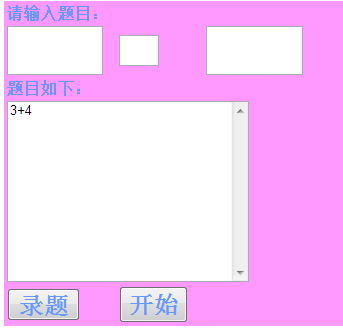
        ListBox1.Items.Add(TextBox1.Text + TextBox2.Text + TextBox3.Text + "\n");

        TextBox1.Text = "";

        TextBox2.Text = "";

        TextBox3.Text = "";

    }

    protected void Button2_Click(object sender, EventArgs e)

    {//跳转页面

        Response.Redirect("Default2.aspx");

    }

}
第二个页面
using System;

using System.Collections.Generic;

using System.Linq;

using System.Web;

using System.Web.UI;

using System.Web.UI.WebControls;

using System.IO;

public partial class Default2 : System.Web.UI.Page

{

    protected void Page_Load(object sender, EventArgs e)

    {

    }//开始

    public static int Count = 0;

    public static int right = 0;

    //总计的个数和正确的个数

     int m = 0;

    protected void Button1_Click(object sender, EventArgs e)

    {

        //出题

        string[] n1 = new string[100];

        n1 = File.ReadAllLines("C:\\n1.txt");

        TextBox1.Text = n1[m];

        string[] n2 = new string[100];

        n2 = File.ReadAllLines("C:\\n2.txt");

        TextBox2.Text = n2[m];

        string[] n3 = new string[100];

        n3 = File.ReadAllLines("C:\\n3.txt");

        TextBox3.Text = n3[m];

        m++;

    }

    protected void Button2_Click(object sender, EventArgs e)

    {

        TextBox4.Enabled = false;

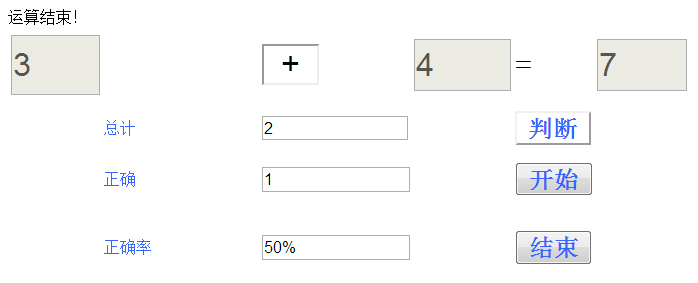
        Response.Write("运算结束!");

        TextBox5.Text = Default2.Count.ToString();//题目总数

        TextBox6.Text = Default2.right.ToString();

        TextBox7.Text = ((Default2.right / (double)(Default2.Count)) * 100).ToString() + "%";//正确率

    }

    protected void Button4_Click(object sender, EventArgs e)

    {

        int a = int.Parse(TextBox1.Text);

        int b = int.Parse(TextBox3.Text);

        Char c = Convert.ToChar(TextBox2.Text);

        Class1 con = new Class1();

        con.chu(a, b, c);

        if (con.answer == int.Parse(TextBox4.Text))

        {

            Response.Write("回答正确!下一题请按开始按钮!");

            right++;

            Count++;

        }

        else

        {

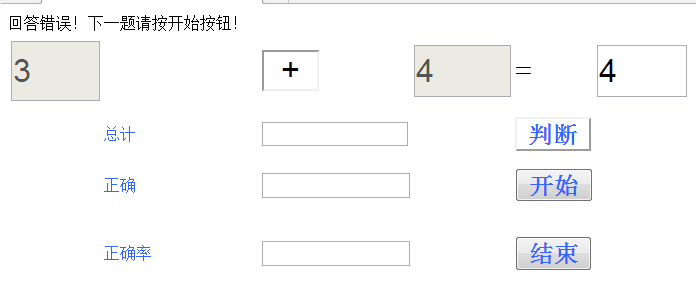
            Response.Write("回答错误!下一题请按开始按钮!");

            Count++;

        }

    }

}
.net的封装
using System;

using System.Collections.Generic;

using System.Linq;

using System.Web;

/// <summary>

///Class1 的摘要说明

/// </summary>

public class Class1

{

    public Class1()

    {

        //

        //TODO: 在此处添加构造函数逻辑

        //

    }

        public int sum;

        public int answer

        {

            get

            {

                return sum;

            }

        }

        public int chu(int n1, int n2, char fuhao)

        {

            if (fuhao == '+')

            {

                return sum = n1 + n2;

            }

            else if (fuhao == '-')

            {

                return sum = n1 - n2;

            }

            else if (fuhao == '*')

            {

                return sum= n1 * n2;

            }

            return sum;

        }

}
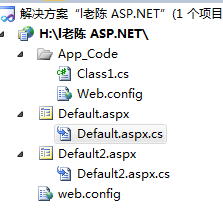
运行后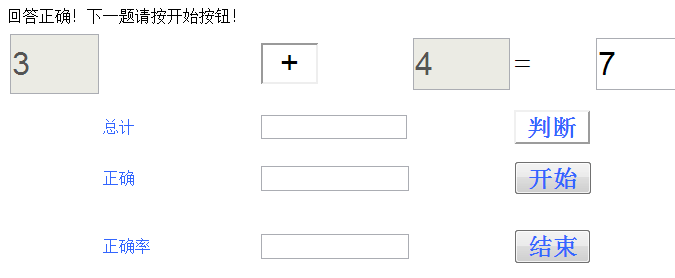
老陈 ASP.NET封装的更多相关文章
- 老陈 WPF
using System; using System.Collections.Generic; using System.Linq; using System.Text; using System.W ...
- (l老陈-小石头)典型用户、用户故事、用例图
一.典型用户 老陈 小石头 二.用户故事 老陈:作为一个家长,我希望能利用软件在电脑上储存一些数学题目,以便在繁忙的工作中也能帮助到孩子提高数学. 小石头:作为一个小学二年级的小学生,我希望能利用软件 ...
- win2003 老的ASP程序报错 Microsoft OLE DB Provider for Orac(0x80004005)
ASP连接ORACLE报错,记得环境刚配置完成的时候一切正常,今天莫名其妙的报错了 报错位置78行: 这是一个很老的系统,代码没人去东,只是从老的机器迁移到新的服务器中,想想应该是环境的问题 网上搜索 ...
- 使用NetBox实现ASP网页封装为EXE教程
简单的形容就是把ASP文件打包 成一个EXE文件,并且不需要在调试的机器上安装IIS即可正常调试.如果按照说明书来操作的话,观看比较繁琐,本人为方便大家使用,现制作一个简单的使用教程. 封装过程 1. ...
- 老陈---谈Delphi中SSL协议的应用[转]
摘要:本文主要介绍如何在Delphi中使用SSL协议.一共分为七个部分:(1)SSL协议是什么?(2)Delphi中如何使用SSL协议?(3)SSL客户端编程实例.(4)SSL服务端编程实例.(5)S ...
- ASP.net封装
设计如下: 代码: using System; using System.IO; public partial class 四则运算 : System.Web.UI.Page { protected ...
- Asp.net封装js的类
using System; using System.Collections.Generic; using System.Text; using System.Web; using System.We ...
- .net,C#,Vb,F#,Asp,Asp.net区别以及作用和方向
.net是平台,其他都是运行在其.NET FrameWork环境下的 C#,Vb都是语言运行在.net 平台下 Asp,Asp.net 都是用来写Web网页的,但是Asp和Asp.net有区别 Asp ...
- ASP.NET Linux部署(2) - MS Owin + WebApi + Mono + Jexus
ASP.NET Linux部署(2) - MS Owin + WebApi + Mono + Jexus 本文承接我的上一篇博文: ASP.NET 5 Linux部署,那篇文章主要是针对最新的ASP. ...
随机推荐
- jQuery中$(function() {});问题详解
$(function() {});是$(document).ready(function(){ })的简写,最早接触的时候也说$(document).ready(function(){ })这个函数是 ...
- 转载Mongondb
转自(http://blog.csdn.net/lchjustc/article/details/16988251) Mongodb调研 1. 调研目的 现在公司缺乏一个通用的key-value存 ...
- WordPress 主题开发 - (十二) Search模板与Page模板 待翻译
The Search Template and The Page Template are vital to any complete WordPress Theme. And they're bot ...
- 18)Java八股文名词
>VO: value-object >DTO: Data Transform Object >DTD: Document Type Definition 文档类型定 ...
- Delphi For Android 开发笔记 2 NEXTGEN下的字符串类型
delphi开发速度迅捷至少有30%(猜的,呵呵)的原因是因为其字符串(string.WideString.PChar.PAnsiChar等)处理能力. 而从delphi XE4开始,在system等 ...
- 新成员!Visual Studio Code --跨平台的开发工具(支持OSX, Linux 和 Windows)
原文出处:新成员!Visual Studio Code --跨平台的开发工具(支持OSX, Linux 和 Windows) 这是我的文章备份 http://www.dotblogs.com.tw/ ...
- Oracle 11g 执行计划管理2
1.创建测试数据 SQL> conn NC50/NC50 Connected. SQL)); SQL> insert into tab1 select rownum,object_name ...
- python SocketServer 源码分析
附上原文链接: http://beginman.cn/python/2015/04/06/python-SocketServer/
- rails devise使用
gem 'devise'rails g devise:install Userrails g devise Userrails g devise:views
- openSUSE13.2安装ruby和rails
用rvm安装了ruby2.2.0之后,发现rails又装不了了,因为什么nokgiri安不上需要安装两个包: libxml2 libxml2-dev libxslt libxslt-dev 然后gem ...