
清除浮动float (:after方法)
<div class="outer">

<div class="div1">1</div>

<div class="div2">2</div>

<div class="div3">3</div>

</div>
.outer{ border:1px solid #ccc; background:#fc9; color:#fff; margin:50px auto; padding:50px;}

.div1{ width:80px; height:80px; background:#f00; float:left; }

.div2{ width:80px; height:80px; background:blue; float:left; }

.div3{ width:80px; height:80px; background:sienna; float:left; }

.outer{ border:1px solid #ccc; background:#fc9; color:#fff; margin:50px auto; padding:50px;}

.div1{ width:80px; height:80px; background:#f00; /*float:left;*/ }

.div2{ width:80px; height:80px; background:blue;/* float:left; */}

.div3{ width:80px; height:80px; background:sienna;/* float:left;*/ }
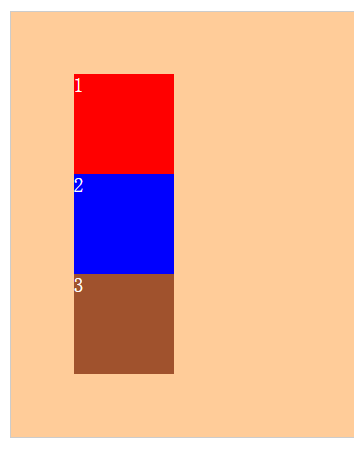
<div class="outer">

<div class="div1">1</div>

<div class="div2">2</div>

<div class="div3">3</div>

<div class="clear"></div>

</div>
.outer{ border:1px solid #ccc; background:#fc9; color:#fff; margin:50px auto; padding:50px;}

.div1{ width:80px; height:80px; background:#f00; float:left; }

.div2{ width:80px; height:80px; background:blue; float:left; }

.div3{ width:80px; height:80px; background:sienna; float:left; }

.clear{ clear:both; height:; line-height:; font-size:; }
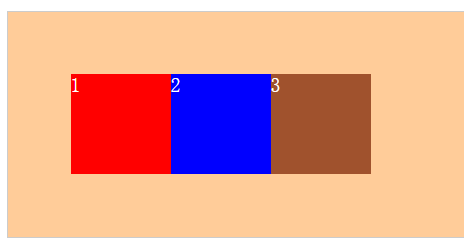
方法二:父级div定义 overflow:auto;(主意:是父级div,也就是这里的 div.outer)。
<div class="outer over-flow">

<div class="div1">1</div>

<div class="div2">2</div>

<div class="div3">3</div>

</div>
.outer{ border:1px solid #ccc; background:#fc9; color:#fff; margin:50px auto; padding:50px;}

.div1{ width:80px; height:80px; background:#f00; float:left; }

.div2{ width:80px; height:80px; background:blue; float:left; }

.div3{ width:80px; height:80px; background:sienna; float:left; }

.over-flow{ overflow:auto; zoom:;  } //zoom:1;是在处理兼容性问题
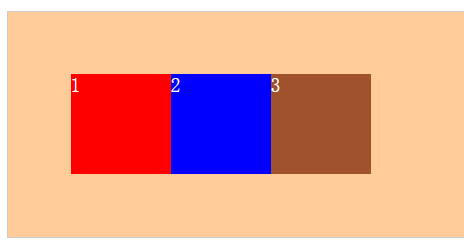
.outer { zoom:; } //为了兼容性,因为ie6/7不能使用伪类,所以加上此行代码。

.outer:after { clear:both;content:'';display:block;width:;height:;visibility:hidden; }
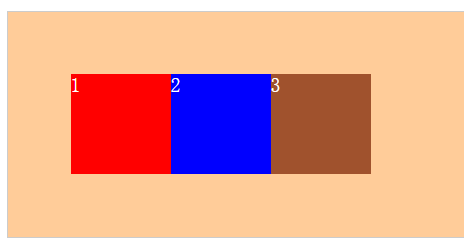
利用伪元素,就可以不再HTML中加入标签。
:after 的意思是再.outer内部的最后加入为元素:after,
首先要显示伪元素,所以display:block,
然后为伪元素加入空内容,以便伪元素中不会有内容显示在页面中,所以, content:"";
其次,为使伪元素不影响页面布局,将伪元素高度设置为0,所以, height:0,
最后,要清除浮动,所以,clear:both。
清除浮动float (:after方法)的更多相关文章
- 【转】css清除浮动float的三种方法总结,为什么清浮动?浮动会有那些影响?
摘要: css清除浮动float的三种方法总结,为什么清浮动?浮动会有那些影响? 一.抛一块问题砖(display: block)先看现象: 分析HTML代码结构: <div class ...
- css清除浮动float的几种方法
摘要: css清除浮动float的三种方法总结,为什么清浮动?浮动会有那些影响? 一.抛一块问题砖(display: block)先看现象: 这里我没有给最外层的DIV.outer 设置高度, ...
- 更优雅的清除浮动float方法
上篇文章是利用 :after 方法清除浮动float(作用于浮动元素的父元素上). ; } //为了兼容性,因为ie6/7不能使用伪类,所以加上此行代码. .outer:after {;;visibi ...
- css清除浮动float
css清除浮动float 1.分析HTML代码 <div class="outer"> <div class="div1">1</ ...
- 如何清除浮动(float)所带来的影响
清除浮动(float) 1.定义和用法 在w3c中给了浮动这样的定义. "float 属性定义元素在哪个方向浮动.以往这个属性总应用于图像,使文本围绕在图像周围,不过在 CSS 中,任何元素 ...
- CSS清除浮动8大方法
CSS清除浮动是每一位web前端工程师都要掌握的技术,也是让每一位刚入门的前端工程师感到头疼的问题, 下面就来讲一下CSS清除浮动的原理和各种解决方法,大家可以根据实际情况选择最佳的解决方案. 在用D ...
- CSS清除浮动float方法总结
使用浮动造成的BUG: 使用浮动前:(子节点是将父节点撑开了) 代码如下 <div class="box"> <div class="d1"& ...
- float包裹性与破坏性及清除浮动几种方法
1. “清除浮动” ??准确的描述应该是“清除浮动造成的影响” 学习视频录制推荐的教程<CSS深入理解之float浮动> 2.如何清除浮动造成的影响??? 栗子 块级div元素包含一个内 ...
- css清除浮动float的三种方法总结,为什么清浮动?浮动会有那些影响?一起来$('.float')
一.抛一块问题砖(display: block)先看现象: 分析HTML代码结构: <div class="outer"> <div class=&quo ...
随机推荐
- 第18章 SysTick—系统定时器—零死角玩转STM32-F429系列
第18章 SysTick—系统定时器 全套200集视频教程和1000页PDF教程请到秉火论坛下载:www.firebbs.cn 野火视频教程优酷观看网址:http://i.youku.com/ ...
- 通过eclipse启动tomcat设置JAVA_OPTS失败的解决方案
clipse中配置tomcat方法: Window-->Preference-->Server-->Runtime Environment-->add-->Apache ...
- 12、SpringBoot------activeMq的简单使用
开发工具:STS 前言: What is ActiveMq? ActiveMq:实现了Jms规范的一款Java 消息中间件. 消息中间件: 处理消息的一个消息机制,负责接收消息与转发. 用途: (1) ...
- javascript入门笔记5-事件
1.继续循环continue; continue的作用是仅仅跳过本次循环,而整个循环体继续执行. 语句结构: for(初始条件;判断条件;循环后条件值更新) { if(特殊情况) { continue ...
- 面试-Spring理解
转自http://hui.sohu.com/infonews/article/6331404387079946240 spring呢,是pivotal公司维护的一系列开源工具的总称,最为人所知的是sp ...
- base64位 解码图片
jar包是commons-codec.jar. pnuts //base64解码成图片 function gldBase64ToImage(imgStr,imgFilePath) { // 对字节数组 ...
- java Web 常见错误集锦 及解决方法
只能删除pid为整数的商品,32位的pid商品不能删除? 原因onclick="agree('${s.pid}')" 括号中需要加 ' ' 删除多余的工作空间? 使用prefer ...
- css样式 body的font-size 为什么用625%
浏览器的默认高度?一般为16px. 为什么用62.5%作为body的默认样式?16px62.5%=10px.* 那么为什么一般多是 16px *625% = 100px; <响应式Web设计实 ...
- MySQL查询优化 对not in 、in 的优化
因为 not in不走索引,所以不在不得已情况下,就不要使用not in 下面使用 join 来替代not in 做查询 select ID from A where ID not in (selec ...
- 用go run命令启动main package中的多个文件
linux: go run *.go windows: go build后运行main.exe