
Spark Structured Streaming框架(4)之窗口管理详解
1. 结构
1.1 概述
Structured Streaming组件滑动窗口功能由三个参数决定其功能:窗口时间、滑动步长和触发时间.
- 窗口时间:是指确定数据操作的长度;
- 滑动步长:是指窗口每次向前移动的时间长度;
- 触发时间:是指Structured Streaming将数据写入外部DataStreamWriter的时间间隔。
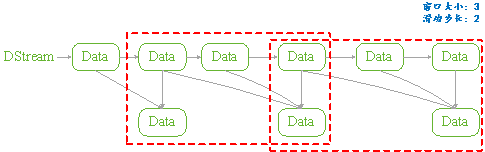
图 11
1.2 API
用户管理Structured Streaming的窗口功能,可以分为两步完成:
API是通过一个全局的window方法来设置,如下所示是其Spark实现细节:
|
def window(timeColumn:Column, windowDuratiion:String, slideDuration:String):Column ={ window(timeColumn, windowDuration, slideDuration, "0" second) } |
- timecolumn:具有时间戳的列;
- windowDuration:为窗口的时间长度;
- slideDuration:为滑动的步长;
- return:返回的数据类型是Column。
Structured Streaming在通过readStream对象的load方法加载数据后,悔返回一个DataFrame对象(Dataset[T]类型)。所以用户将上述定义的Column对象传递给DataFrame对象,从而就实现了窗口功能的设置。
由于window方法返回的数据类型是Column,所以只要DataFrame对象方法中具有columnl类型的参数就可以进行设置。如Dataset的select和groupBy方法。如下是Spark源码中select和groupBy方法的实现细节:
|
def select (cols:Column*):DataFrame = withPlan{ Project(cols.map(_.named),logicalPlan) } |
|
def groupBy(cols:Column*):RelationGroupedDataset={ RelationGroupedDataset(toDF(), cols.map(_.expr), RelationGroupedDataset.GroupByType) } |
1.3 类型
如上述介绍的Structured Streaming API,根据Dataset提供的方法,我们可以将其分为两类:
- 聚合操作:是指具有对数据进行组合操作的方法,如groupBy方法;
- 非聚合操作:是指普通的数据操作方法,如select方法
PS:
两类操作都有明确的输出形式(outputMode),不能混用。
2. 聚合操作
2.1 操作方法
聚合操作是指接收到的数据DataFrame先进行groupBy等操作,器操作的特征是返回RelationGroupedDataset类型的数据。若Structured Streaming存在的聚合操作,那么输出形式必须为"complete",否则程序会出现异常。
如下所示的聚合操作示例:
|
Import spark.implicits._ Val words = … // streaming DataFrame of schema{timestamp:timestamp, word:String} val windowedCounts = words.groupBy( window($"timestamp","10 minutes","5 minutes"), $"word" ).count() |
2.2 example
本例是Spark程序自带的example,其功能是接收socket数据,在接受socket数据,在接受完数据后将数据按空格" "进行分割;然后统计每个单词出现的次数;最后按时间戳排序输出。
如下具体程序内容:
|
package org.apache.spark.examples.sql.streaming import java.sql.Timestamp import org.apache.spark.sql.SparkSession import org.apache.spark.sql.functions._ /** * Counts words in UTF8 encoded, '\n' delimited text received from the network over a * sliding window of configurable duration. Each line from the network is tagged * with a timestamp that is used to determine the windows into which it falls. * * Usage: StructuredNetworkWordCountWindowed <hostname> <port> <window duration> * [<slide duration>] * <hostname> and <port> describe the TCP server that Structured Streaming * would connect to receive data. * <window duration> gives the size of window, specified as integer number of seconds * <slide duration> gives the amount of time successive windows are offset from one another, * given in the same units as above. <slide duration> should be less than or equal to * <window duration>. If the two are equal, successive windows have no overlap. If * <slide duration> is not provided, it defaults to <window duration>. * * To run this on your local machine, you need to first run a Netcat server * `$ nc -lk 9999` * and then run the example * `$ bin/run-example sql.streaming.StructuredNetworkWordCountWindowed * localhost 9999 <window duration in seconds> [<slide duration in seconds>]` * * One recommended <window duration>, <slide duration> pair is 10, 5 */ object StructuredNetworkWordCountWindowed { def main(args: Array[String]) { if (args.length < 3) { System.err.println("Usage: StructuredNetworkWordCountWindowed <hostname> <port>" + " <window duration in seconds> [<slide duration in seconds>]") System.exit(1) } val host = args(0) val port = args(1).toInt val windowSize = args(2).toInt val slideSize = if (args.length == 3) windowSize else args(3).toInt if (slideSize > windowSize) { System.err.println("<slide duration> must be less than or equal to <window duration>") } val windowDuration = s"$windowSize seconds" val slideDuration = s"$slideSize seconds" val spark = SparkSession .builder .appName("StructuredNetworkWordCountWindowed") .getOrCreate() import spark.implicits._ // Create DataFrame representing the stream of input lines from connection to host:port val lines = spark.readStream .format("socket") .option("host", host) .option("port", port) .option("includeTimestamp", true) //输出内容包括时间戳 .load() // Split the lines into words, retaining timestamps val words = lines.as[(String, Timestamp)].flatMap(line => line._1.split(" ").map(word => (word, line._2)) ).toDF("word", "timestamp") // Group the data by window and word and compute the count of each group //设置窗口大小和滑动窗口步长 val windowedCounts = words.groupBy( window($"timestamp", windowDuration, slideDuration), $"word" ).count().orderBy("window") // Start running the query that prints the windowed word counts to the console //由于采用聚合操作,所以需要指定"complete"输出形式。指定"truncate"只是为了在控制台输出时,不进行列宽度自动缩小。 val query = windowedCounts.writeStream .outputMode("complete") .format("console") .option("truncate", "false") .start() query.awaitTermination() } } |
3. 非聚合操作
3.1 操作方法
非聚合操作是指接收到的数据DataFrame进行select等操作,其操作的特征是返回Dataset类型的数据。若Structured Streaming进行非聚合操作,那么输出形式必须为"append",否则程序会出现异常。若spark 2.1.1 版本则输出形式开可以是"update"。
3.2 example
本例功能只是简单地将接收到的数据保持原样输出,不进行任何其它操作。只是为了观察Structured Streaming的窗口功能。如下所示:
|
object StructuredNetworkWordCountWindowed { def main(args: Array[String]) { if (args.length < 3) { System.err.println("Usage: StructuredNetworkWordCountWindowed <hostname> <port>" + " <window duration in seconds> [<slide duration in seconds>]") System.exit(1) } val host = args(0) val port = args(1).toInt val windowSize = args(2).toInt val slideSize = if (args.length == 3) windowSize else args(3).toInt val triggerTime = args(4).toInt if (slideSize > windowSize) { System.err.println("<slide duration> must be less than or equal to <window duration>") } val windowDuration = s"$windowSize seconds" val slideDuration = s"$slideSize seconds" val spark = SparkSession .builder .appName("StructuredNetworkWordCountWindowed") .getOrCreate() import spark.implicits._ // Create DataFrame representing the stream of input lines from connection to host:port val lines = spark.readStream .format("socket") .option("host", host) .option("port", port) .option("includeTimestamp", true) .load() val wordCounts:DataFrame = lines.select(window($"timestamp",windowDuration,slideDuration),$"value") // Start running the query that prints the windowed word counts to the console val query = wordCounts.writeStream .outputMode("append") .format("console") .trigger(ProcessingTime(s"$triggerTime seconds")) .option("truncate", "false") .start() query.awaitTermination() } } |
|
#nc –lk 9999 1 2 3 4 5 6 |
|
#spark-submit –class structuredNetWordCount ./sparkStreaming.jar localhost 9999 3 2 1 |
|
输出: Batch:0 +---------------------------------------+-----+ |window |value| |[2017-05-16 11:14:15.0,2017-05-16 11:14:19.0]|1 | |[2017-05-16 11:14:15.0,2017-05-16 11:14:19.0]|2 | +---------------------------------------+-----+ Batch:1 +---------------------------------------+-----+ |window |value| |[2017-05-16 11:14:15.0,2017-05-16 11:14:19.0]|3 | |[2017-05-16 11:14:18.0,2017-05-16 11:14:22.0]|3 | |[2017-05-16 11:14:18.0,2017-05-16 11:14:22.0]|4 | +---------------------------------------+-----+ Batch:2 +---------------------------------------+-----+ |window |value| |[2017-05-16 11:14:18.0,2017-05-16 11:14:22.0]|5 | |[2017-05-16 11:14:18.0,2017-05-16 11:14:22.0]|6 | |[2017-05-16 11:14:21.0,2017-05-16 11:14:25.0]|6 | +---------------------------------------+-----+ |
4. 参考文献
Spark Structured Streaming框架(4)之窗口管理详解的更多相关文章
- Spark Structured Streaming框架(5)之进程管理
Structured Streaming提供一些API来管理Streaming对象.用户可以通过这些API来手动管理已经启动的Streaming,保证在系统中的Streaming有序执行. 1. St ...
- Spark Structured streaming框架(1)之基本使用
Spark Struntured Streaming是Spark 2.1.0版本后新增加的流计算引擎,本博将通过几篇博文详细介绍这个框架.这篇是介绍Spark Structured Streamin ...
- Spark Structured Streaming框架(1)之基本用法
Spark Struntured Streaming是Spark 2.1.0版本后新增加的流计算引擎,本博将通过几篇博文详细介绍这个框架.这篇是介绍Spark Structured Streamin ...
- Spark Structured Streaming框架(3)之数据输出源详解
Spark Structured streaming API支持的输出源有:Console.Memory.File和Foreach.其中Console在前两篇博文中已有详述,而Memory使用非常简单 ...
- Spark Structured Streaming框架(2)之数据输入源详解
Spark Structured Streaming目前的2.1.0版本只支持输入源:File.kafka和socket. 1. Socket Socket方式是最简单的数据输入源,如Quick ex ...
- Spark Structured Streaming框架(2)之数据输入源详解
Spark Structured Streaming目前的2.1.0版本只支持输入源:File.kafka和socket. 1. Socket Socket方式是最简单的数据输入源,如Quick ex ...
- Spark2.3(三十四):Spark Structured Streaming之withWaterMark和windows窗口是否可以实现最近一小时统计
WaterMark除了可以限定来迟数据范围,是否可以实现最近一小时统计? WaterMark目的用来限定参数计算数据的范围:比如当前计算数据内max timestamp是12::00,waterMar ...
- DataFlow编程模型与Spark Structured streaming
流式(streaming)和批量( batch):流式数据,实际上更准确的说法应该是unbounded data(processing),也就是无边界的连续的数据的处理:对应的批量计算,更准确的说法是 ...
- Spark2.3(三十五)Spark Structured Streaming源代码剖析(从CSDN和Github中看到别人分析的源代码的文章值得收藏)
从CSDN中读取到关于spark structured streaming源代码分析不错的几篇文章 spark源码分析--事件总线LiveListenerBus spark事件总线的核心是LiveLi ...
随机推荐
- C# 写日志到文件
C# 写日志到文件 using System;using System.Collections.Generic;using System.Text;using System.Windows.Forms ...
- windows快捷启动命令
gpedit.msc-----组策略 sndrec32-----录音机 nslookup----- ip地址侦测器 explorer------ 打开资源管理器 logoff-------注销命令 t ...
- maven设置本地仓库地址和设置国内镜像
<?xml version="1.0" encoding="UTF-8"?> <!-- 英文注释已经被删除了,直接修改本地仓库地址用就行了. ...
- 简述JS中 appy 和 call 的详细用法
Apply 和 Call 两个老生常言的方法,使用过程的一些细节还是有很大的异同,具体使用情况可以参照下面例子详细回顾一下. 区别和详解:js中call()和apply()的用法 1.关于call() ...
- hdu - 5033 - Building(单调栈)
题意:N 幢楼排成一列(1<=N<=10^5),各楼有横坐标 xi(1<=xi<=10^7) 以及高度 hi(1<=hi<=10^7),在各楼之间的Q个位置(1&l ...
- php跨域共享session
. $gb_DBHOSTname = "127.0.0.1"; //主机的名称或是IP地址 02 $gb_DBname = "dbname"; //数据库名称 ...
- C# 中安全代码与不安全代码
C# 中安全代码与不安全代码 P/Invoke 非托管代码需要在unsafe块中书写. using System; using System.Collections.Generic; using Sy ...
- [转]maven2中snapshot快照库和release发布库的应用
[转载声明] 转载时必须标注:本文来源于铁木箱子的博客http://www.mzone.cc [原文地址] 原文永久地址是:http://www.mzone.cc/article/279.html 在 ...
- C# 代码 手工 配置 Log4Net 2种方法
这个初始化要在 获取 ILog 接口的代码之前完成, 之后按通常方式使用 log4net 就行了. 不用携带 config 配置文件. 方法1: /// <summary> /// 使用文 ...
- 文件大小转换(b,kb,M,GB/TB)
//转换单位 setupSize(1111111111111); function setupSize($fileSize) { $size = sprintf("%u", $fi ...