
eclipse进行Debug的时候,发出“java breakpoint unable to install breakpoint”错误
错误情况图:
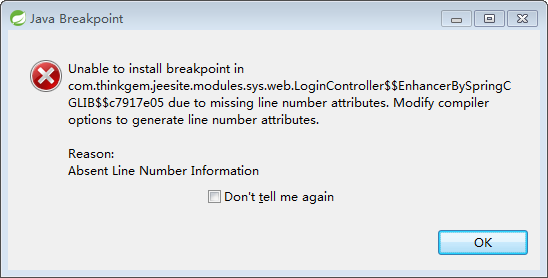
问题的解决方法:
直接点击忽略掉:Don't tell me again
来自网上的答案~~
I had the same error message in Eclipse 3.4.1, SUN JVM1.6.0_07 connected to Tomcat 6.0 (running in debug-mode on a different machine, Sun JVM1.6.0_16, the debug connection did work correctly).

Window --> Preferences --> Java --> Compiler --> Classfile Generation: "add line number attributes to generated class file" was checked. I did a clean, recompile. I did uncheck it, recompile, check it, recompile. I made sure the project did use the global settings. Still the same message.

I switched to ant build, using

<javac srcdir="./src/java" destdir="./bin" debug="true">

Still, same message.

I didn't find out what caused this message and why it wouldn't go away. Though it seemed to have something to do with the running Tomcat debug session: when disconnected, recompiling solves the issue. But on connecting the debugger to Tomcat or on setting new breakpoints during a connected debug session, it appeared again.

However, it turned out the message was wrong: I was indeed able to debug and set breakpoints, both before and during debugging (javap -l did show line numbers, too). So just ignore it :)
来源:http://stackoverflow.com/questions/957822/eclipse-unable-to-install-breakpoint-due-to-missing-line-number-attributes
eclipse进行Debug的时候,发出“java breakpoint unable to install breakpoint”错误的更多相关文章
- Eclipse Unable to install breakpoint in XXX 解决办法
Debug 时偶尔会出现:Eclipse Unable to install breakpoint in XXX 情况一: 清除所有断点就行了,原因是断点打到注释上了. breakpoint 窗口: ...
- Eclipse错误出现:Unable to install breakpoint in... (未能解决)
Unable to install breakpoint in... Eclipse Unable to install breakpoint in 的问题还是没解决 1.重装eclipse无效 2 ...
- Eclipse Unable to install breakpoint in XXX
Eclipse Unable to install breakpoint in 的问题, 到window-preferences-java-compiler下面 把Add line number ...
- Unable to install breakpoint in
Unable to install breakpoint inXXXX due to missing line number attributes.modify compiler options to ...
- Eclipse debug 断点不能调试 ,Eclipse Unable to install breakpoint in 解决办法
解决:[1]项目工程名 ,右键 --> properties --> java compiler -->class file Generation 位置 Add line numb ...
- Eclipse "Unable to install breakpoint due to missing line number attributes..."
Eclipse 无法找到 该 断点,原因是编译时,字节码改变了,导致eclipse无法读取对应的行了 1.ANT编译的class Eclipse不认,因为eclipse也会编译class.怎么让它们统 ...
- eclipse报错:unable to install breakpoint in .......due to missing line number attributes
报错信息如下: 解决方案方案1.把断点都干掉,再启动.应该是代码更新后,断点位置没有代码了或位置改变了. 方案2.在Eclipse - Preferences - Java - Complier 下 ...
- 使用eclipse遇到的unable to install breakpoint的问题
调试一个tomcat工程,设置好断点,启动工程,结果出现了下面的错误: 继续运行,再进入断点之前,还会再度提示,但是最终会命中断点. 使用CGLIB查找关键字,了解到CGLIB是一个AOP的拦截库,想 ...
- 【java异常】Unable to install breakpoint in
这个是断点失效,把那个断点双击清理掉就完了. 具体原因,以后再写.
随机推荐
- [转]mysql联合索引
mysql联合索引 命名规则:表名_字段名1.需要加索引的字段,要在where条件中2.数据量少的字段不需要加索引3.如果where条件中是OR关系,加索引不起作用4.符合最左原则 https:/ ...
- POJ 1061 青蛙的约会 | 同余方程和exGcd
题解: 要求s+px=t+qx (mod L) 移项 (p-q)x=t-s (mod L) 等价于 (p-q)x+Ly=t-s 即ax+by=c的方程最小非负根 exGcd后乘个C #include& ...
- 洛谷 P2606 [ZJOI2010]排列计数 解题报告
P2606 [ZJOI2010]排列计数 题目描述 称一个\(1,2,...,N\)的排列\(P_1,P_2...,P_n\)是\(Magic\)的,当且仅当对所以的\(2<=i<=N\) ...
- MFC 按钮
((CButton *)GetDlgItem(IDC_RADIO1))->SetCheck(TRUE);//选上 ((CButton *)GetDlgItem(IDC_RADIO1))-> ...
- 创建型设计模式之单例模式(Singleton)
结构 意图 保证一个类仅有一个实例,并提供一个访问它的全局访问点. 适用性 当类只能有一个实例而且客户可以从一个众所周知的访问点访问它时. 当这个唯一实例应该是通过子类化可扩展的,并且客户应该无需更 ...
- linux内核分析之进程地址空间【转】
转自:http://blog.csdn.net/bullbat/article/details/7106094 版权声明:本文为博主原创文章,未经博主允许不得转载. 本文主要介绍linux内核中进程地 ...
- linux内核分析之缺页中断【转】
转自:http://blog.csdn.net/bullbat/article/details/7108402 linux缺页异常程序必须能够区分由编程引起的异常以及由引用属于进程地址空间但还尚未分配 ...
- localhost、127.0.0.1和本机IP
localhost 是个域名,不是地址,它可以被配置为任意的 IP 地址,不过通常情况下都指向 127.0.0.1(ipv4)和 [::1](ipv6) 整个127.* 网段通常被用作 loopbac ...
- C++文件(夹)选择对话框
由于各种应用,我们需要调用系统的打开文件对话框或者打开文件夹对话框,或两者兼有.今遇到这个情况已经解决,特写下这篇博文. 1.打开文件对话框常用的方法是使用系统的CFileDialog.这里介绍另外一 ...
- javascript与mongodb的日期时区问题
默认情况下,js的日期生成是当地时区,但默认显示是按照GMT显示的: > var c = new Date('2017-10-31 06:00:00'); > c 2017-10-30T2 ...