
NLTK与NLP原理及基础
参考https://blog.csdn.net/zxm1306192988/article/details/78896319
以NLTK为基础配合讲解自然语言处理的原理 http://www.nltk.org/
Python上著名的自然语⾔处理库
自带语料库,词性分类库
自带分类,分词,等功能
强⼤的社区⽀持
还有N多的简单版wrapper,如 TextBlob
NLTK安装(可能需要预先安装numpy)
pip install nltk
安装语料库
import nltk

nltk.download()
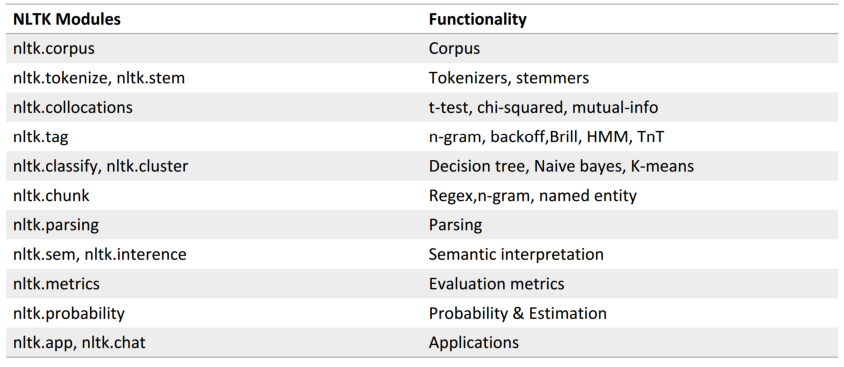
NLTK自带语料库
>>> from nltk.corpus import brown

>>> brown.categories()  # 分类

['adventure', 'belles_lettres', 'editorial',

'fiction', 'government', 'hobbies', 'humor',

'learned', 'lore', 'mystery', 'news', 'religion',

'reviews', 'romance', 'science_fiction']

>>> len(brown.sents()) # 一共句子数

57340

>>> len(brown.words()) # 一共单词数

1161192
文本处理流程:
文本 -> 预处理(分词、去停用词) -> 特征工程 -> 机器学习算法 -> 标签
分词(Tokenize)
把长句⼦拆成有“意义”的⼩部件
>>> import nltk

>>> sentence = “hello, world"

>>> tokens = nltk.word_tokenize(sentence)

>>> tokens

['hello', ‘,', 'world']
中英文NLP区别:
英文直接使用空格分词,中文需要专门的方法进行分词

中文分词
import jieba

seg_list = jieba.cut('我来到北京清华大学', cut_all=True)

print('Full Mode:', '/'.join(seg_list))  # 全模式

seg_list = jieba.cut('我来到北京清华大学', cut_all=False)

print('Default Mode:', '/'.join(seg_list))  # 精确模式

seg_list = jieba.cut('他来到了网易杭研大厦')  # 默认是精确模式

print('/'.join(seg_list))

seg_list = jieba.cut_for_search('小明硕士毕业于中国科学院计算所,后在日本京都大学深造')  # 搜索引擎模式

print('搜索引擎模式:', '/'.join(seg_list))

seg_list = jieba.cut('小明硕士毕业于中国科学院计算所,后在日本京都大学深造', cut_all=True)

print('Full Mode:', '/'.join(seg_list))
纷繁复杂的词型
- Inflection 变化:walk=>walking=>walked 不影响词性
- derivation 引申:nation(noun)=>national(adjective)=>nationalize(verb) 影响词性
词形归一化
- Stemming 词干提取(词根还原):把不影响词性的inflection 的小尾巴砍掉 (使用词典,匹配最长词)
- walking 砍掉ing=>walk
- walked 砍掉ed=>walk
- Lemmatization 词形归一(词形还原):把各种类型的词的变形,都归一为一个形式(使用wordnet)
- went 归一 => go
- are 归一 => be
NLTK实现Stemming
词干提取:3种
1、
from nltk.stem.lancaster import LancasterStemmer

lancaster_stemmer=LancasterStemmer()

print(lancaster_stemmer.stem('maximum'))

print(lancaster_stemmer.stem('multiply'))

print(lancaster_stemmer.stem('provision'))

print(lancaster_stemmer.stem('went'))

print(lancaster_stemmer.stem('wenting'))

print(lancaster_stemmer.stem('walked'))

print(lancaster_stemmer.stem('national'))
2、
from nltk.stem.porter import PorterStemmer

porter_stemmer=PorterStemmer()

print(porter_stemmer.stem('maximum'))

print(porter_stemmer.stem('multiply'))

print(porter_stemmer.stem('provision'))

print(porter_stemmer.stem('went'))

print(porter_stemmer.stem('wenting'))

print(porter_stemmer.stem('walked'))

print(porter_stemmer.stem('national'))
3、
from nltk.stem import SnowballStemmer

snowball_stemmer=SnowballStemmer("english")

print(snowball_stemmer.stem('maximum'))

print(snowball_stemmer.stem('multiply'))

print(snowball_stemmer.stem('provision'))

print(snowball_stemmer.stem('went'))

print(snowball_stemmer.stem('wenting'))

print(snowball_stemmer.stem('walked'))

print(snowball_stemmer.stem('national'))
NLTK实现 Lemmatization(词形归一)
from nltk.stem import WordNetLemmatizer

wordnet_lemmatizer=WordNetLemmatizer()

print(wordnet_lemmatizer.lemmatize('dogs'))

print(wordnet_lemmatizer.lemmatize('churches'))

print(wordnet_lemmatizer.lemmatize('aardwolves'))

print(wordnet_lemmatizer.lemmatize('abaci'))

print(wordnet_lemmatizer.lemmatize('hardrock'))
问题:Went v.是go的过去式 n.英文名:温特
所以增加词性信息,可使NLTK更好的 Lemmatization
from nltk.stem import WordNetLemmatizer

wordnet_lemmatizer = WordNetLemmatizer()

# 没有POS Tag,默认是NN 名词

print(wordnet_lemmatizer.lemmatize('are'))

print(wordnet_lemmatizer.lemmatize('is'))

# 加上POS Tag

print(wordnet_lemmatizer.lemmatize('is', pos='v'))

print(wordnet_lemmatizer.lemmatize('are', pos='v'))
NLTK标注POS Tag
import nltk

text=nltk.word_tokenize('what does the beautiful fox say')

print(text)

print(nltk.pos_tag(text))
去停用词
import nltk

from nltk.corpus import stopwords

word_list=nltk.word_tokenize('what does the beautiful fox say')

print(word_list )

filter_words=[word for word in word_list if word not in stopwords.words('english')]

print(filter_words)
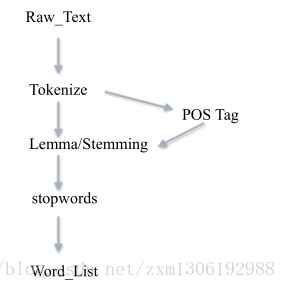
根据具体task决定,如果是文本查重、写作风格判断等,可能就不需要去除停止词
什么是自然语言处理?
自然语言——> 计算机数据
文本预处理让我们得到了什么?
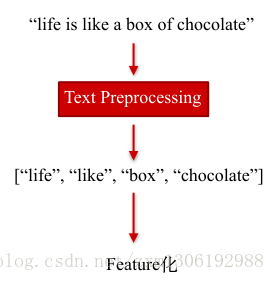
NLTK在NLP上的经典应⽤(重点)
- 情感分析
- 文本相似度
- 文本分类
1、情感分析
最简单的方法:基于情感词典(sentiment dictionary)
类似于关键词打分机制
like 1
good 2
bad -2
terrible -3
比如:AFINN-111
http://www2.imm.dtu.dk/pubdb/views/publication_details.php?id=6010
import nltk

from nltk.corpus import stopwords

from nltk.stem import SnowballStemmer

snowball_stemmer = SnowballStemmer("english")

sentiment_dictionary = {}

for line in open('AFINN-111.txt'):

    word, score = line.split('\t')

    sentiment_dictionary[word] = int(score)

text = 'I went to Chicago yesterday, what a fucking day!'

word_list = nltk.word_tokenize(text)  # 分词

words = [(snowball_stemmer.stem(word)) for word in word_list]  # 词干提取,词形还原最好有词性,此处先不进行

words = [word for word in word_list if word not in stopwords.words('english')]  # 去除停用词

print('预处理之后的词:', words)

total_score = sum(sentiment_dictionary.get(word, 0) for word in words)

print('该句子的情感得分:', total_score)

if total_score > 0:

    print('积极')

elif total_score == 0:

    print('中性')

else:

    print('消极')
缺点:新词无法处理、依赖人工主观性、无法挖掘句子深层含义
配上ML的情感分析
from nltk.classify import NaiveBayesClassifier

# 随手造点训练集

s1 = 'this is a good book'

s2 = 'this is a awesome book'

s3 = 'this is a bad book'

s4 = 'this is a terrible book'

def preprocess(s):

    dic = ['this', 'is', 'a', 'good', 'book', 'awesome', 'bad', 'terrible']

    return {word: True if word in s else False for word in dic} # 返回句子的词袋向量表示

# 把训练集给做成标准形式

training_data = [[preprocess(s1), 'pos'],

                 [preprocess(s2), 'pos'],

                 [preprocess(s3), 'neg'],

                 [preprocess(s4), 'neg']]

# 喂给model吃

model = NaiveBayesClassifier.train(training_data)

# 打出结果

print(model.classify(preprocess('this is a terrible book')))
文本相似度
使用 Bag of Words 元素的频率表示文本特征
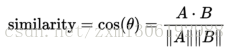
使用 余弦定理 判断向量相似度
import nltk

from nltk import FreqDist

corpus = 'this is my sentence ' \

         'this is my life ' \

         'this is the day'

# 根据需要做预处理:tokensize,stemming,lemma,stopwords 等

tokens = nltk.word_tokenize(corpus)

print(tokens)

# 用NLTK的FreqDist统计一下文字出现的频率

fdist = FreqDist(tokens)

# 类似于一个Dict,带上某个单词, 可以看到它在整个文章中出现的次数

print(fdist['is'])

# 把最常见的50个单词拿出来

standard_freq_vector = fdist.most_common(50)

size = len(standard_freq_vector)

print(standard_freq_vector)

# Func:按照出现频率大小,记录下每一个单词的位置

def position_lookup(v):

    res = {}

    counter = 0

    for word in v:

        res[word[0]] = counter

        counter += 1

    return res

# 把词典中每个单词的位置记录下来

standard_position_dict = position_lookup(standard_freq_vector)

print(standard_position_dict)

#新的句子

sentence='this is cool'

# 建立一个跟词典同样大小的向量

freq_vector=[0]*size

# 简单的预处理

tokens=nltk.word_tokenize(sentence)

# 对于新句子里的每个单词

for word in tokens:

    try:

        # 如果在词典里有,就在标准位置上加1

        freq_vector[standard_position_dict[word]]+=1

    except KeyError:

        continue

print(freq_vector)
这里求的是一个词频率向量。
求完之后再运用上述那个公式。
应用:文本分类
TF-IDF是一个整体
TF:Term Frequency 衡量一个term 在文档中出现得有多频繁。
TF(t)=t出现在文档中的次数/文档中的term总数
IDF:Inverse Document Frequency ,衡量一个term有多重要。
有些词出现的很多,但明显不是很有用,如 ‘is’’the’ ‘and’ 之类的词。
IDF(t)=loge(文档总数/含有t的文档总数)
(如果一个词越常见,那么分母就越大,逆文档频率就越小越接近0。所以分母通常加1,是为了避免分母为0(即所有文档都不包含该词)。log表示对得到的值取对数。)
如果某个词比较少见,但是它在这篇文章中多次出现,那么它很可能就反映了这篇文章的特性,正是我们所需要的关键词。
TF−IDF=TF∗IDF
NLTK实现TF-IDF
from nltk.text import TextCollection

# 首先,把所有的文档放到TextCollection类中

# 这个类会自动帮你断句,做统计,做计算

corpus = TextCollection(['this is sentence one',

                         'this is sentence two',

                         ' is sentence three'])

# 直接就能算出tfidf

# (term:一句话中的某个term,text:这句话)

print(corpus.tf_idf('this', 'this is sentence four'))

# 对于每个新句子

new_sentence='this is sentence five'

# 遍历一遍所有的vocabulary中的词:

standard_vocab=['this' 'is' 'sentence' 'one' 'two' 'five']

for word in standard_vocab:

    print(corpus.tf_idf(word, new_sentence))
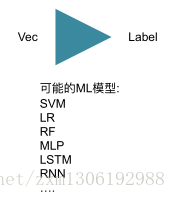
得到了 TF-IDF的向量表示后,用ML 模型就行分类即可:
NLTK与NLP原理及基础的更多相关文章
- linux基础-第十四单元 Linux网络原理及基础设置
第十四单元 Linux网络原理及基础设置 三种网卡模式图 使用ifconfig命令来维护网络 ifconfig命令的功能 ifconfig命令的用法举例 使用ifup和ifdown命令启动和停止网卡 ...
- Linux iptables:规则原理和基础
什么是iptables? iptables是Linux下功能强大的应用层防火墙工具,但了解其规则原理和基础后,配置起来也非常简单. 什么是Netfilter? 说到iptables必然提到Netfil ...
- 【自然语言处理篇】--以NLTK为基础讲解自然语⾔处理的原理和基础知识
一.前述 Python上著名的⾃然语⾔处理库⾃带语料库,词性分类库⾃带分类,分词,等等功能强⼤的社区⽀持,还有N多的简单版wrapper. 二.文本预处理 1.安装nltk pip install - ...
- MySQL运行原理与基础架构
1.MySQL基础 MySQL是一个开放源代码的关系数据库管理系统.原开发者为瑞典的MySQL AB公司,最早是在2001年MySQL3.23进入到管理员的视野并在之后获得广泛的应用. 2008年My ...
- 【面试问题】—— 2019.3月前端面试之JS原理&CSS基础&Vue框架
前言:三月中旬面试了两家公司,一家小型公司只有面试,另一家稍大型公司笔试之后一面定夺.笔试部分属于基础类型,网上的复习资料都有. 面试时两位面试官都有考到一些实际工作中会用到,但我还没接触过的知识点. ...
- LDAP学习小结【仅原理和基础篇】
此篇文章花费了好几个晚上,大部分是软件翻译的英文文档,加上自己的理解所写,希望学习者能尊重每个人的努力. 我有句话想送给每个看我文章的人: 慢就是快,快就是慢!!! 另外更希望更多人能从认真从原理学习 ...
- iSCSI 原理和基础使用
终于完成最后一篇了,一上午的时间就过去了. 下文主要是对基本操作和我对iSCSI的理解,网上有很多iSCSI原理,在这里我就不写了,请自行学习. 这篇文章仅对iSCSI的很多误解做一次梳理,你必须对所 ...
- 【git体验】git原理及基础
原理:分布式版本号控制系统像 Git,Mercurial,Bazaar 以及 Darcs 等,client并不仅仅提取最新版本号 的文件快照,而是把原始的代码仓库完整地镜像下来. 这么一来.不论什么一 ...
- Kerberos原理和基础小结
此篇文章仅做Kerberos的基本原理和基本使用做说明,本人对Kerberos了解有限,也是通过大量英文文档中翻译过来, 加上自己对Kerberos的理解所写,本人英文太菜,看文档看的头昏眼花若有写的 ...
随机推荐
- iis 设置 主机头,设置 host文件
iis主机头设置后,一般本机不能再用ip:127.0.0.1访问. 接着设置host文件,使用域名直接访问主机头就可以访问到127.0.0.1 host文件路径:c//system32/drives/ ...
- 第一个DirectX程序include、lib设置问题
1.fatal error LNK1104: cannot open file "d3d9.lib" 解决方案: (1)项目 -->属性 --> 配置属性 --> ...
- C#中的线程(二)线程同步
C#中的线程(二)线程同步 Keywords:C# 线程Source:http://www.albahari.com/threading/Author: Joe AlbahariTranslato ...
- java学习笔记 --- IO(3)
1.FileReader:读取字符流,默认GBK public class CharStreamDemo { public static void main(String[] args) throws ...
- jmeter请求中上传图片
1.请求中上传图片 把图片放在bin目录下:multipart/form-data 先把照片发送给阿里,阿里返回image_id:然后用后置条件正则表达式匹配并保存image_id 下次请求直接用im ...
- Knuth-Morris-Pratt 算法
KMP算法是一种改进的字符串匹配算法,由D.E.Knuth,J.H.Morris和V.R.Pratt同时发现,因此人们称它为克努特——莫里斯——普拉特操作(简称KMP算法).KMP算法的关键是利用匹配 ...
- Why getting this error “django.db.utils.OperationalError: (1050, ”Table 'someTable' already exists“)”
0down votefavorite I am getting error like django.db.utils.OperationalError: (1050, "Table 's ...
- Oracle job procedure 存储过程定时任务(转自hoojo)
Oracle job procedure 存储过程定时任务 oracle job有定时执行的功能,可以在指定的时间点或每天的某个时间点自行执行任务. 一.查询系统中的job,可以查询视图 --相关视图 ...
- Raid信息丢失数据恢复及oracle数据库恢复验证方案
早些时候,有个客户14块盘的磁盘阵列出现故障,需要恢复的数据是oracle数据库,客户在寻求数据恢复技术支持,要求我提供详细的数据恢复方案,以下是提供给客户的详细数据恢复解决方案,本方案包含Raid数 ...
- 8、Selenium+python安装HTMLTestRunner插件
1.打开网址:http://tungwaiyip.info/software/HTMLTestRunner.html,下载HTMLTestRunner.py 2.copy其HTMLTestRunner ...