
[原创]Centos7 安装配置ASP.NET Core+Nginx+Supervisor
序言
此教程安装的都是最新版本的。
一键安装
有了这个神器,下面的教程就不用做了!只需运行几行代码,直接打开浏览器就可以访问!
cd /home/

wget https://files.cnblogs.com/files/project/install.sh

chmod  install.sh

./install.sh
准备工作
1. 更新系统
没啥,就他喵想用个最新的。
apt update && apt upgrade
2. 创建目录
创建目录,分别用来放配置文件和网站。
mkdir /web/
一、ASP.NET Core
官方网站:https://docs.microsoft.com/zh-cn/dotnet/core/install/linux-package-manager-debian10
1. 注册Microsoft密钥和订阅源
wget -qO- https://packages.microsoft.com/keys/microsoft.asc | gpg --dearmor > microsoft.asc.gpg

sudo mv microsoft.asc.gpg /etc/apt/trusted.gpg.d/

wget -q https://packages.microsoft.com/config/debian/10/prod.list

sudo mv prod.list /etc/apt/sources.list.d/microsoft-prod.list

sudo chown root:root /etc/apt/trusted.gpg.d/microsoft.asc.gpg

sudo chown root:root /etc/apt/sources.list.d/microsoft-prod.list
2. 安装.NET Core SDK
sudo apt-get update

sudo apt-get install apt-transport-https

sudo apt-get update

sudo apt-get install dotnet-sdk-3.1
3. 利用.NET Core SDK创建一个web实例
创建 Web 应用项目
cd /web/

dotnet new webapp -o app
二、Supervisor
官方网站:http://www.supervisord.org/
1. 安装Supervisor
apt install -y supervisor
2. 编辑supervisord.conf
vim /etc/supervisor/supervisord.conf
3. 新建配置文件
将下面配置文件存到/etc/supervisor/conf.d/app.conf
[program:app]

command=dotnet run      ;要执行的命令

directory=/web/app/     ;命令执行的目录

autostart=true          ;是否自动启动

autorestart=true        ;是否自动重启

stderr_logfile=/var/log/webapp.err.log ;标准错误日志

stdout_logfile=/var/log/webapp.out.log ;标准输出日志
4. 重新启动
supervisorctl shutdown

supervisord -c /etc/supervisor/supervisord.conf
四、Nginx
官方网站:http://nginx.org/
1. 安装nginx
apt install -y nginx
2. 编辑nginx.conf
vim /etc/nginx/nginx.conf
3. 修改如下
worker_processes  ;

events {

    worker_connections  ;

}

http {

    include       mime.types;

    default_type  application/octet-stream;

    sendfile        on;

    keepalive_timeout  ;

    gzip  on;

    server {

        listen       ;

        server_name  localhost;

        location / {

            proxy_pass https://localhost:5001;

            proxy_http_version 1.1;

            proxy_set_header Upgrade $http_upgrade;

            proxy_set_header Connection keep-alive;

            proxy_set_header Host $host;

            proxy_set_header X-Real-IP $remote_addr;

            proxy_set_header X-Forwarded-For $proxy_add_x_forwarded_for;

            proxy_cache_bypass $http_upgrade;

        }

    }

}
4. 重新加载
nginx -s reload
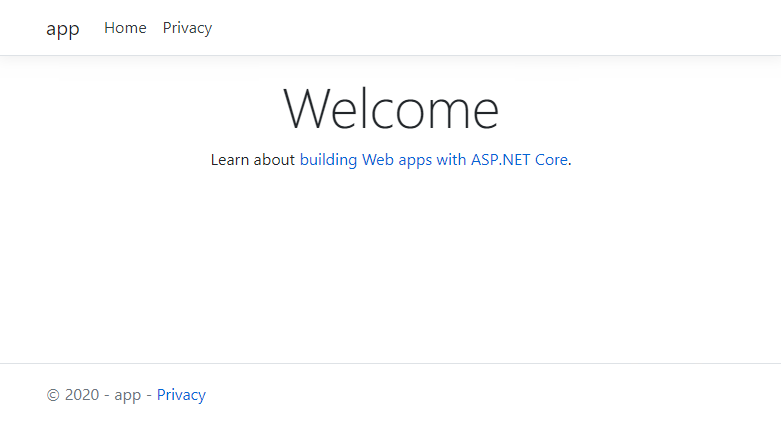
五、效果预览
附、常用命令
nginx
# nginx             //启动nginx

# nginx -s reload   //重启nginx

# nginx -s stop     //关闭nginx
supervisor
supervisord

supervisorctl status    //查看所有任务状态

supervisorctl shutdown  //关闭所有任务

supervisorctl start|stop|restart all          //控制所有进程

supervisorctl start|stop|restart program_name //控制目标进程
[原创]Centos7 安装配置ASP.NET Core+Nginx+Supervisor的更多相关文章
- CentOS7上部署ASP.Net Core 2.2应用
前言 在CentOS7上部署ASP.Net Core应用是我的技术路线验证的一部分,下一个产品计划采用ASP.Net Boilerplate Framework开发.因此需要求提前进行一下技术验证,在 ...
- 部署Asp.net core & Nginx,通过nginx转发
部署Asp.net core & Nginx,通过nginx转发 CentOS 7 x64 1.vs2017 建立Asp.net core项目,并发布到目录 2.通过FTP工具,将程序copy ...
- 本文演示如何配置ASP.NET Core项目以在Visual Studio(VS)2017中使用Telerik UI for ASP.NET Core。
学习时使用的是VS2017+Core2.1了,不再讨论VS2015和core1.1的东西. 配置ASP.NET Core Web应用程序以使用Telerik UI for ASP.NET Core: ...
- ASP.NET Core Identity 配置 - ASP.NET Core 基础教程 - 简单教程,简单编程
原文:ASP.NET Core Identity 配置 - ASP.NET Core 基础教程 - 简单教程,简单编程 ASP.NET Core Identity 配置 上一章节我们简单介绍了下 Id ...
- ASP.NET Core macOS 环境配置 - ASP.NET Core 基础教程 - 简单教程,简单编程
原文:ASP.NET Core macOS 环境配置 - ASP.NET Core 基础教程 - 简单教程,简单编程 ASP.NET Core 是对 ASP.NET 有重大意义的一次重新设计.本章节我 ...
- ASP.NET Core Windows 环境配置 - ASP.NET Core 基础教程 - 简单教程,简单编程
原文:ASP.NET Core Windows 环境配置 - ASP.NET Core 基础教程 - 简单教程,简单编程 ASP.NET Core Windows 环境配置 ASP.NET Core ...
- CentOS7 安装配置笔记
CentOS7 安装配置笔记 1.通过镜像安装 CentOS7 ==============================* 使用 UltraISO 9.7 或者 rufus-3.5p 制作ISO的 ...
- 用"hosting.json"配置ASP.NET Core站点的Hosting环境
通常我们在 Prgram.cs 中使用硬编码的方式配置 ASP.NET Core 站点的 Hosting 环境,最常用的就是 .UseUrls() . public class Program { p ...
- 阿里云服务器Linux CentOS安装配置(八)nginx安装、配置、域名绑定
阿里云服务器Linux CentOS安装配置(八)nginx安装.配置.域名绑定 1.安装nginx yum -y install nginx 2.启动nginx service nginx star ...
随机推荐
- socket套接字基本概念
int socket()函数创建的是套接字socket,返回的是socket描述符(套接字描述符),其实就是文件描述符,socket(套接字)其实就是文件 socket()创建了套接字(文件),只是开 ...
- J.U.C-其他组件
J.U.C-其他组件 FutureTask 介绍Callable时我们知道它可以有返回值,返回值通过Future进行封装.FutrueTask实现了RunnableFuture接口,该接口继承了R ...
- spring boot中 启用aspectj
<dependency> <groupId>org.springframework.boot</groupId> <artifactId>spring- ...
- lintcode - 被围绕的区域
class Solution { public: /* * @param board: board a 2D board containing 'X' and 'O' * @return: nothi ...
- C#工具类之字典扩展类
using System; using System.Collections; using System.Collections.Generic; using System.Linq; using S ...
- day17 isinstance type issubclass 反射
1. issubclass,type,isinstance 1.issubclass 判断xxx是否yyy的子类 例: class Foo: pass class Bar(Foo): pass cla ...
- django ORM 连表查询
db_index=True 如果设置该字段就可以设置索引 auto_now_add 代表设置创建时候的时间 auto_now 每次更新数据记录时会更新该字段 to_field 设置要关联表的字 ...
- IntelliJ Save Action
https://blog.csdn.net/hustzw07/article/details/82824713
- 基于APPIUM测试微信公众号的UI自动化测试框架(结合Allure2测试报告框架)
框架初衷 前两周组内的小伙伴跟我说她现在测试的微信公众号项目(保险)每次上新产品时测试起来很费时,存在大量的重复操作(点点点),手工测试每个产品可能需要半天到一天的时间,复杂的产品需要两天. 由于保险 ...
- 大数据 Big Data howto
The Fourth Paradigm: Data-Intensive Scientific Discovery http://research.microsoft.com/en-us/collabo ...