
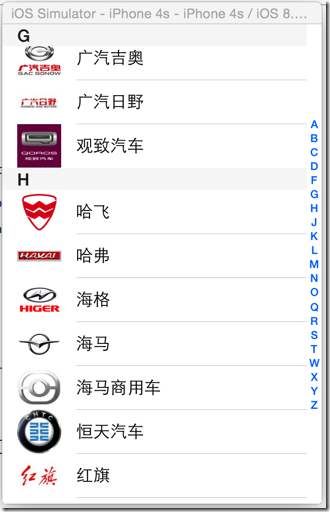
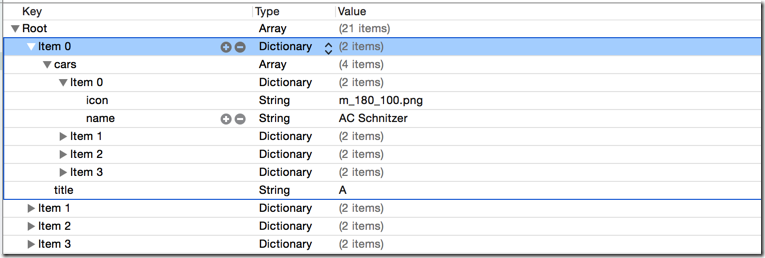
[iOS基础控件 - 6.4] 汽车品牌展示 Model嵌套/KVC/TableView索引
@property(nonatomic, strong) NSArray *cars;
         // 这里不能用KVC,封装car model再放到array中,不能直接存储array

         NSArray *carsArray = dictionary[@"cars"];

         NSMutableArray *mcarsArray = [NSMutableArray array];

         for (NSDictionary *dict in carsArray) {

             Car *car = [Car carWithDictionary:dict];

             [mcarsArray addObject:car];

         }

         self.cars = mcarsArray;
 Car.m

 - (instancetype) initWithDictionary:(NSDictionary *) dictionary {

     if (self = [super init]) {

         // 当dictionary中的键名跟Model中的成员名一致的时候,可以使用KVC

         [self setValuesForKeysWithDictionary:dictionary];

 //        self.icon = dictionary[@"icon"];

 //        self.name = dictionary[@"name"];

     }

     return self;

 }
 /** 设置section头部标题 */

 - (NSString *)tableView:(UITableView *)tableView titleForHeaderInSection:(NSInteger)section
 /** 索引 */

 - (NSArray *)sectionIndexTitlesForTableView:(UITableView *)tableView {

     // 使用KVC取出数组,不用使用遍历封装

     return [self.carGroups valueForKey:@"title"];

 }
 //

 //  Car.h

 //  CarGroup

 //

 //  Created by hellovoidworld on 14/12/2.

 //  Copyright (c) 2014年 hellovoidworld. All rights reserved.

 //

 #import <Foundation/Foundation.h>

 @interface Car : NSObject

 @property(nonatomic, copy) NSString *icon;

 @property(nonatomic, copy) NSString *name;

 - (instancetype) initWithDictionary:(NSDictionary *) dictionary;

 + (instancetype) carWithDictionary:(NSDictionary *) dictionary;

 + (instancetype) car;

 @end
 //

 //  Car.m

 //  CarGroup

 //

 //  Created by hellovoidworld on 14/12/2.

 //  Copyright (c) 2014年 hellovoidworld. All rights reserved.

 //

 #import "Car.h"

 @implementation Car

 - (instancetype) initWithDictionary:(NSDictionary *) dictionary {

     if (self = [super init]) {

         // 当dictionary中的键名跟Model中的成员名一致的时候,可以使用KVC

         [self setValuesForKeysWithDictionary:dictionary];

 //        self.icon = dictionary[@"icon"];

 //        self.name = dictionary[@"name"];

     }

     return self;

 }

 + (instancetype) carWithDictionary:(NSDictionary *) dictionary {

     return [[self alloc] initWithDictionary:dictionary];

 }

 + (instancetype) car {

     return [self carWithDictionary:nil];

 }

 @end
 //

 //  CarGroup.h

 //  CarGroup

 //

 //  Created by hellovoidworld on 14/12/2.

 //  Copyright (c) 2014年 hellovoidworld. All rights reserved.

 //

 #import <Foundation/Foundation.h>

 @interface CarGroup : NSObject

 @property(nonatomic, strong) NSArray *cars;

 @property(nonatomic, copy) NSString *title;

 - (instancetype) initWithDictionary:(NSDictionary *) dictionary;

 + (instancetype) carGroupWithDictionary:(NSDictionary *) dictionary;

 + (instancetype) carGroup;

 @end
 //

 //  CarGroup.m

 //  CarGroup

 //

 //  Created by hellovoidworld on 14/12/2.

 //  Copyright (c) 2014年 hellovoidworld. All rights reserved.

 //

 #import "CarGroup.h"

 #import "Car.h"

 @implementation CarGroup

 - (instancetype) initWithDictionary:(NSDictionary *) dictionary {

     if (self = [super init]) {

         self.title = dictionary[@"title"];

         // 这里不能用KVC,封装car model再放到array中,不能直接存储array

         NSArray *carsArray = dictionary[@"cars"];

         NSMutableArray *mcarsArray = [NSMutableArray array];

         for (NSDictionary *dict in carsArray) {

             Car *car = [Car carWithDictionary:dict];

             [mcarsArray addObject:car];

         }

         self.cars = mcarsArray;

     }

     return self;

 }

 + (instancetype) carGroupWithDictionary:(NSDictionary *) dictionary {

     return [[self alloc] initWithDictionary:dictionary];

 }

 + (instancetype) carGroup {

     return [self carGroupWithDictionary:nil];

 }

 @end
 //

 //  ViewController.m

 //  CarGroup

 //

 //  Created by hellovoidworld on 14/12/1.

 //  Copyright (c) 2014年 hellovoidworld. All rights reserved.

 //

 #import "ViewController.h"

 #import "CarGroup.h"

 #import "Car.h"

 @interface ViewController () <UITableViewDataSource>

 @property (weak, nonatomic) IBOutlet UITableView *tableView;

 // 所有的车品牌

 @property(nonatomic, strong) NSArray *carGroups;

 @end
[iOS基础控件 - 6.4] 汽车品牌展示 Model嵌套/KVC/TableView索引的更多相关文章
- [iOS基础控件 - 6.1] 汽车品牌列表 UITableView多项显示
A.实现思路 1.拖入UITableView 2.拖曳.连线UITableView控件 3.Controller遵守UITalbeViewDataSource协议 4.设置UITableView的da ...
- [iOS基础控件 - 6.7.1] 微博展示 代码
Controller: // // ViewController.m // Weibo // // Created by hellovoidworld on 14/12/4. // Copyrig ...
- [iOS基础控件 - 5.5] 代理设计模式 (基于”APP列表"练习)
A.概述 在"[iOS基础控件 - 4.4] APP列表 进一步封装,初见MVC模式”上进一步改进,给“下载”按钮加上效果.功能 1.按钮点击后,显示为“已下载”,并且不 ...
- iOS 基础控件(下)
上篇介绍了UIButton.UILabel.UIImageView和UITextField,这篇就简短一点介绍UIScrollView和UIAlertView. UIScrollView 顾名思义也知 ...
- [iOS基础控件 - 7.0] UIWebView
A.基本使用 1.概念 iOS内置的浏览器控件 Safari浏览器就是通过UIWebView实现的 2.用途:制作简易浏览器 (1)基本请求 创建请求 加载请求 (2)代理监听webView加载, ...
- [iOS基础控件 - 6.11.3] 私人通讯录Demo 控制器的数据传递、存储
A.需求 1.搭建一个"私人通讯录"Demo 2.模拟登陆界面 账号 密码 记住密码开关 自动登陆开关 登陆按钮 3.退出注销 4.增删改查 5.恢复数据(取消修改) 这个代码 ...
- [iOS基础控件 - 6.10.2] PickerView 自定义row内容 国家选择Demo
A.需求 1.自定义一个UIView和xib,包含国家名和国旗显示 2.学习row的重用 B.实现步骤 1.准备plist文件和国旗图片 2.创建模型 // // Flag.h // Co ...
- [iOS基础控件 - 6.9] 聊天界面Demo
A.需求 做出一个类似于QQ.微信的聊天界面 1.每个cell包含发送时间.发送人(头像).发送信息 2.使用对方头像放在左边,我方头像在右边 3.对方信息使用白色背景对话框,我方信息使用蓝色背景对话 ...
- iOS基础 - 控件属性
一.控件的属性 1.CGRect frame 1> 表示控件的位置和尺寸(以父控件的左上角为坐标原点(0, 0)) 2> 修改这个属性,可以调整控件的位置和尺寸 2.CGPoint cen ...
随机推荐
- POJ1850——Code(组合数学)
Code DescriptionTransmitting and memorizing information is a task that requires different coding sys ...
- CodeForces152C——Pocket Book(排列组合问题)
Pocket Book DescriptionOne day little Vasya found mom's pocket book. The book had n names of her fri ...
- python脚本工具 - 3 目录遍历
遍历系统中某一目录下的所有文件名 #! /usr/bin/python # coding:utf-8 import os def dirList(path): filelist = os.listdi ...
- Android性能优化之如何避免Overdraw
什么是Overdraw? Overdraw就是过度绘制,是指在一帧的时间内(16.67ms)像素被绘制了多次,理论上一个像素每次只绘制一次是最优的,但是由于重叠的布局导致一些像素会被多次绘制,而每次绘 ...
- linux命令之-pstree使用说明
pstree shows running processes as a tree. The tree is rooted at either pid or init if pid is omitte ...
- easyui datagrid 多表头设置
最近在做二维报表,要求报表的表头自定义.在网上找了好久二维报表的插件,一直找不到合适的.后来就用easyui 中的datagrid替代了一下. 根据实际需求,统计的信息可能不是一个模块中的字段信息,所 ...
- git指令
返回当前目录路径: $ pwd 1.1 git add git add . #将文件先暂存到staging area, stages new and modified, without deleted ...
- javacript序列化表单数据
在前端开发时,用到表单交互的比较多,在我们实现一些异步操作数据时,表单数据的序列化就显得尤为重要了.下面我们一起来看看如何进行序列化. 如,我们在进行提交表单时,地址栏里会显示这样的东东:name=z ...
- 扫描.net dll引用dll
最近升级系统里的NHibernate,从3.3到4,项目工程太多, 一个模块分bll,dal,model,web,test,10几个模块,就要60多dll,升级一次太头疼. 编译过后,有时候会有的dl ...
- Android使用Webview加载网页
安卓使用Webview来加载和显示网页内容,首先在layout文件中定义Webview <?xml version="1.0" encoding="utf-8&qu ...