
基于Ambari Server部署HDP集群实战案例
基于Ambari Server部署HDP集群实战案例
作者:尹正杰
版权声明:原创作品,谢绝转载!否则将追究法律责任。
一.部署Ambari Server端
  博主推荐阅读:

    https://www.cnblogs.com/yinzhengjie2020/p/12219108.html
二.时钟同步
  我们在生产环境中必须同步各个服务器时间是一致的,最好是有内网的时间服务器。

  配置时间同步的好处:

    可以定位集群故障发生的具体时间;

    解决HBase,Kudu等存储依赖于时间同步的问题(若时间不同步会报错);

  CentOS .x默认使用ntpd软件来同步时间的,但在CentOS .x版本之后就被更替为chrony来实现时间同步,因此咱们安装时间同步就是用CentOS .x推荐的Chrony来进行时间同步。
1>.安装chrony
[root@hdp101.yinzhengjie.org.cn ~]# yum -y install chrony

Loaded plugins: fastestmirror

Determining fastest mirrors

 * base: mirror.bit.edu.cn

 * extras: mirror.bit.edu.cn

 * updates: mirrors.huaweicloud.com

ambari-repo                                                                                                                                                                                                                                            | 2.9 kB  ::

base                                                                                                                                                                                                                                                   | 3.6 kB  ::

extras                                                                                                                                                                                                                                                 | 2.9 kB  ::

mysql-connectors-community                                                                                                                                                                                                                             | 2.5 kB  ::

mysql-tools-community                                                                                                                                                                                                                                  | 2.5 kB  ::

mysql80-community                                                                                                                                                                                                                                      | 2.5 kB  ::

updates                                                                                                                                                                                                                                                | 2.9 kB  ::

(/): extras//x86_64/primary_db                                                                                                                                                                                                                      |  kB  ::

(/): updates//x86_64/primary_db                                                                                                                                                                                                                     | 5.9 MB  ::

Resolving Dependencies

--> Running transaction check

---> Package chrony.x86_64 :3.4-.el7 will be installed

--> Processing Dependency: libseccomp.so.()(64bit) for package: chrony-3.4-.el7.x86_64

--> Running transaction check

---> Package libseccomp.x86_64 :2.3.-.el7 will be installed

--> Finished Dependency Resolution

Dependencies Resolved

==============================================================================================================================================================================================================================================================================

 Package                                                             Arch                                                            Version                                                              Repository                                                     Size

==============================================================================================================================================================================================================================================================================

Installing:

 chrony                                                              x86_64                                                          3.4-.el7                                                            base                                                           k

Installing for dependencies:

 libseccomp                                                          x86_64                                                          2.3.-.el7                                                          base                                                            k

Transaction Summary

==============================================================================================================================================================================================================================================================================

Install   Package (+ Dependent package)

Total download size:  k

Installed size:  k

Downloading packages:

(/): libseccomp-2.3.-.el7.x86_64.rpm                                                                                                                                                                                                               |   kB  ::

(/): chrony-3.4-.el7.x86_64.rpm                                                                                                                                                                                                                     |  kB  ::

------------------------------------------------------------------------------------------------------------------------------------------------------------------------------------------------------------------------------------------------------------------------------

Total                                                                                                                                                                                                                                          kB/s |  kB  ::

Running transaction check

Running transaction test

Transaction test succeeded

Running transaction

  Installing : libseccomp-2.3.-.el7.x86_64                                                                                                                                                                                                                              /

  Installing : chrony-3.4-.el7.x86_64                                                                                                                                                                                                                                    /

  Verifying  : libseccomp-2.3.-.el7.x86_64                                                                                                                                                                                                                              /

  Verifying  : chrony-3.4-.el7.x86_64                                                                                                                                                                                                                                    /

Installed:

  chrony.x86_64 :3.4-.el7

Dependency Installed:

  libseccomp.x86_64 :2.3.-.el7

Complete!

[root@hdp101.yinzhengjie.org.cn ~]#
[root@hdp101.yinzhengjie.org.cn ~]# yum -y install chrony
2>.禁用本地时间服务器从公网同步时间
[root@hdp101.yinzhengjie.org.cn ~]# egrep -v "^#|^$" /etc/chrony.conf

server .centos.pool.ntp.org iburst

server .centos.pool.ntp.org iburst

server .centos.pool.ntp.org iburst

server .centos.pool.ntp.org iburst

driftfile /var/lib/chrony/drift

makestep 1.0

rtcsync

logdir /var/log/chrony

[root@hdp101.yinzhengjie.org.cn ~]#

[root@hdp101.yinzhengjie.org.cn ~]# sed -r -i 's@(^server)@#\1@g' /etc/chrony.conf

[root@hdp101.yinzhengjie.org.cn ~]#

[root@hdp101.yinzhengjie.org.cn ~]# egrep -v "^#|^$" /etc/chrony.conf

driftfile /var/lib/chrony/drift

makestep 1.0

rtcsync

logdir /var/log/chrony

[root@hdp101.yinzhengjie.org.cn ~]#
3>.新增时间同步服务器为本机地址
[root@hdp101.yinzhengjie.org.cn ~]# egrep -v "^#|^$" /etc/chrony.conf

driftfile /var/lib/chrony/drift

makestep 1.0

rtcsync

logdir /var/log/chrony

[root@hdp101.yinzhengjie.org.cn ~]#

[root@hdp101.yinzhengjie.org.cn ~]# vim /etc/chrony.conf

[root@hdp101.yinzhengjie.org.cn ~]#

[root@hdp101.yinzhengjie.org.cn ~]# egrep -v "^#|^$" /etc/chrony.conf

server hdp101.yinzhengjie.org.cn iburst

driftfile /var/lib/chrony/drift

makestep 1.0

rtcsync

logdir /var/log/chrony

[root@hdp101.yinzhengjie.org.cn ~]#

[root@hdp101.yinzhengjie.org.cn ~]#
4>.设置允许来chronyd服务器端同步时间的客户端地址
[root@hdp101.yinzhengjie.org.cn ~]# egrep -v "^#|^$" /etc/chrony.conf

server hdp101.yinzhengjie.org.cn iburst

driftfile /var/lib/chrony/drift

makestep 1.0

rtcsync

logdir /var/log/chrony

[root@hdp101.yinzhengjie.org.cn ~]#

[root@hdp101.yinzhengjie.org.cn ~]# grep ^#allow /etc/chrony.conf

#allow 192.168.0.0/

[root@hdp101.yinzhengjie.org.cn ~]#

[root@hdp101.yinzhengjie.org.cn ~]# sed -r -i 's@#(allow) 192.168.0.0/16@\1 172.200.0.0/21@' /etc/chrony.conf

[root@hdp101.yinzhengjie.org.cn ~]#

[root@hdp101.yinzhengjie.org.cn ~]# vim /etc/chrony.conf

[root@hdp101.yinzhengjie.org.cn ~]#

[root@hdp101.yinzhengjie.org.cn ~]# egrep -v "^#|^$" /etc/chrony.conf

server hdp101.yinzhengjie.org.cn iburst

driftfile /var/lib/chrony/drift

makestep 1.0

rtcsync

allow 172.200.0.0/21          #允许客户端IP地址同步

allow 127/8                #允许本地同步时间

logdir /var/log/chrony

[root@hdp101.yinzhengjie.org.cn ~]#

[root@hdp101.yinzhengjie.org.cn ~]#
5>.设置chronyd服务器端允许返回本地时间
[root@hdp101.yinzhengjie.org.cn ~]# egrep -v "^#|^$" /etc/chrony.conf

server hdp101.yinzhengjie.org.cn iburst

driftfile /var/lib/chrony/drift

makestep 1.0

rtcsync

allow 172.200.0.0/

allow /

logdir /var/log/chrony

[root@hdp101.yinzhengjie.org.cn ~]#

[root@hdp101.yinzhengjie.org.cn ~]# grep ^#local /etc/chrony.conf

#local stratum

[root@hdp101.yinzhengjie.org.cn ~]#

[root@hdp101.yinzhengjie.org.cn ~]# sed -r -i 's@#(local)@\1@' /etc/chrony.conf

[root@hdp101.yinzhengjie.org.cn ~]#

[root@hdp101.yinzhengjie.org.cn ~]# egrep -v "^#|^$" /etc/chrony.conf

server hdp101.yinzhengjie.org.cn iburst

driftfile /var/lib/chrony/drift

makestep 1.0

rtcsync

allow 172.200.0.0/

allow /

local stratum 10           #即使自己未能通过网络时间服务器同步到时间,也允许将本地时间作为标准时间授时给其它客户端,而我们上面设置了禁用默认公网的时间服务器进行同步(换句话说,这里表示不去同步任何服务器的时间)。

logdir /var/log/chrony

[root@hdp101.yinzhengjie.org.cn ~]#

[root@hdp101.yinzhengjie.org.cn ~]#
6>.启动chronyd并设置为开机自启动
[root@hdp101.yinzhengjie.org.cn ~]# systemctl start chronyd

[root@hdp101.yinzhengjie.org.cn ~]#

[root@hdp101.yinzhengjie.org.cn ~]# systemctl enable chronyd

[root@hdp101.yinzhengjie.org.cn ~]#

[root@hdp101.yinzhengjie.org.cn ~]# systemctl list-unit-files | grep chronyd

chronyd.service                               enabled

[root@hdp101.yinzhengjie.org.cn ~]#

[root@hdp101.yinzhengjie.org.cn ~]#
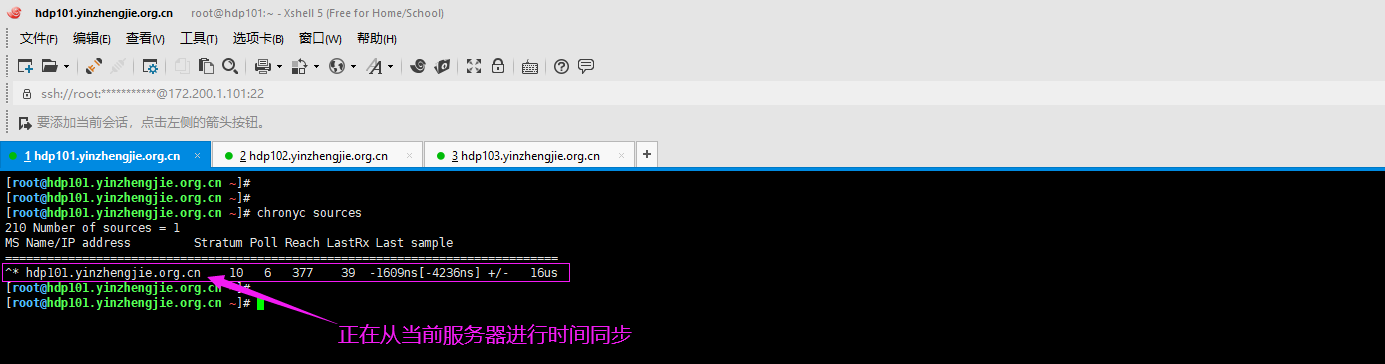
7>.查看chronyd正在使用哪个时间服务器进行时间同步
[root@hdp101.yinzhengjie.org.cn ~]# chronyc sources

 Number of sources =

MS Name/IP address         Stratum Poll Reach LastRx Last sample

===============================================================================

^* hdp101.yinzhengjie.org.cn                -1609ns[-4236ns] +/-   16us

[root@hdp101.yinzhengjie.org.cn ~]#

[root@hdp101.yinzhengjie.org.cn ~]#
8>.hdp102.yinzhengjie.org.cn客户端同步时间
[root@hdp102.yinzhengjie.org.cn ~]# yum -y install chrony

Loaded plugins: fastestmirror

Determining fastest mirrors

 * base: mirrors.tuna.tsinghua.edu.cn

 * extras: mirrors.tuna.tsinghua.edu.cn

 * updates: mirror.bit.edu.cn

base                                                                                                                                                                                                                                                   | 3.6 kB  ::

extras                                                                                                                                                                                                                                                 | 2.9 kB  ::

updates                                                                                                                                                                                                                                                | 2.9 kB  ::

(/): extras//x86_64/primary_db                                                                                                                                                                                                                      |  kB  ::

(/): updates//x86_64/primary_db                                                                                                                                                                                                                     | 5.9 MB  ::

Resolving Dependencies

--> Running transaction check

---> Package chrony.x86_64 :3.4-.el7 will be installed

--> Processing Dependency: libseccomp.so.()(64bit) for package: chrony-3.4-.el7.x86_64

--> Running transaction check

---> Package libseccomp.x86_64 :2.3.-.el7 will be installed

--> Finished Dependency Resolution

Dependencies Resolved

==============================================================================================================================================================================================================================================================================

 Package                                                             Arch                                                            Version                                                              Repository                                                     Size

==============================================================================================================================================================================================================================================================================

Installing:

 chrony                                                              x86_64                                                          3.4-.el7                                                            base                                                           k

Installing for dependencies:

 libseccomp                                                          x86_64                                                          2.3.-.el7                                                          base                                                            k

Transaction Summary

==============================================================================================================================================================================================================================================================================

Install   Package (+ Dependent package)

Total download size:  k

Installed size:  k

Downloading packages:

(/): chrony-3.4-.el7.x86_64.rpm                                                                                                                                                                                                                     |  kB  ::

(/): libseccomp-2.3.-.el7.x86_64.rpm                                                                                                                                                                                                               |   kB  ::

------------------------------------------------------------------------------------------------------------------------------------------------------------------------------------------------------------------------------------------------------------------------------

Total                                                                                                                                                                                                                                         1.5 MB/s |  kB  ::

Running transaction check

Running transaction test

Transaction test succeeded

Running transaction

  Installing : libseccomp-2.3.-.el7.x86_64                                                                                                                                                                                                                              /

  Installing : chrony-3.4-.el7.x86_64                                                                                                                                                                                                                                    /

  Verifying  : libseccomp-2.3.-.el7.x86_64                                                                                                                                                                                                                              /

  Verifying  : chrony-3.4-.el7.x86_64                                                                                                                                                                                                                                    /

Installed:

  chrony.x86_64 :3.4-.el7

Dependency Installed:

  libseccomp.x86_64 :2.3.-.el7

Complete!

[root@hdp102.yinzhengjie.org.cn ~]#
[root@hdp102.yinzhengjie.org.cn ~]# yum -y install chrony
[root@hdp102.yinzhengjie.org.cn ~]# egrep -v "^#|^$" /etc/chrony.conf

server .centos.pool.ntp.org iburst

server .centos.pool.ntp.org iburst

server .centos.pool.ntp.org iburst

server .centos.pool.ntp.org iburst

driftfile /var/lib/chrony/drift

makestep 1.0

rtcsync

logdir /var/log/chrony

[root@hdp102.yinzhengjie.org.cn ~]#

[root@hdp102.yinzhengjie.org.cn ~]# sed -r -i 's@(^server)@#\1@g' /etc/chrony.conf

[root@hdp102.yinzhengjie.org.cn ~]#

[root@hdp102.yinzhengjie.org.cn ~]# vim /etc/chrony.conf

[root@hdp102.yinzhengjie.org.cn ~]#

[root@hdp102.yinzhengjie.org.cn ~]# egrep -v "^#|^$" /etc/chrony.conf

server hdp101.yinzhengjie.org.cn iburst

driftfile /var/lib/chrony/drift

makestep 1.0

rtcsync

logdir /var/log/chrony

[root@hdp102.yinzhengjie.org.cn ~]#

[root@hdp102.yinzhengjie.org.cn ~]# systemctl status chronyd

● chronyd.service - NTP client/server

   Loaded: loaded (/usr/lib/systemd/system/chronyd.service; enabled; vendor preset: enabled)

   Active: inactive (dead)

     Docs: man:chronyd()

           man:chrony.conf()

[root@hdp102.yinzhengjie.org.cn ~]#

[root@hdp102.yinzhengjie.org.cn ~]# systemctl start chronyd

[root@hdp102.yinzhengjie.org.cn ~]#

[root@hdp102.yinzhengjie.org.cn ~]# systemctl enable chronyd

[root@hdp102.yinzhengjie.org.cn ~]#

[root@hdp102.yinzhengjie.org.cn ~]# systemctl list-units -t service | grep chronyd

  chronyd.service                    loaded active running NTP client/server

[root@hdp102.yinzhengjie.org.cn ~]#

[root@hdp102.yinzhengjie.org.cn ~]# systemctl status chronyd

● chronyd.service - NTP client/server

   Loaded: loaded (/usr/lib/systemd/system/chronyd.service; enabled; vendor preset: enabled)

   Active: active (running) since Fri -- :: CST; 20s ago

     Docs: man:chronyd()

           man:chrony.conf()

 Main PID:  (chronyd)

   CGroup: /system.slice/chronyd.service

           └─ /usr/sbin/chronyd

Jan  :: hdp102.yinzhengjie.org.cn systemd[]: Starting NTP client/server...

Jan  :: hdp102.yinzhengjie.org.cn chronyd[]: chronyd version 3.4 starting (+CMDMON +NTP +REFCLOCK +RTC +PRIVDROP +SCFILTER +SIGND +ASYNCDNS +SECHASH +IPV6 +DEBUG)

Jan  :: hdp102.yinzhengjie.org.cn systemd[]: Started NTP client/server.

Jan  :: hdp102.yinzhengjie.org.cn chronyd[]: Selected source 172.200.1.101

[root@hdp102.yinzhengjie.org.cn ~]#

[root@hdp102.yinzhengjie.org.cn ~]#
9>.hdp103.yinzhengjie.org.cn客户端同步时间
[root@hdp103.yinzhengjie.org.cn ~]# yum -y install chrony

Loaded plugins: fastestmirror

Determining fastest mirrors

 * base: mirrors.tuna.tsinghua.edu.cn

 * extras: mirrors.tuna.tsinghua.edu.cn

 * updates: mirror.bit.edu.cn

base                                                                                                                                                                                                                                                   | 3.6 kB  ::

extras                                                                                                                                                                                                                                                 | 2.9 kB  ::

updates                                                                                                                                                                                                                                                | 2.9 kB  ::

(/): extras//x86_64/primary_db                                                                                                                                                                                                                      |  kB  ::

(/): updates//x86_64/primary_db                                                                                                                                                                                                                     | 5.9 MB  ::

Resolving Dependencies

--> Running transaction check

---> Package chrony.x86_64 :3.4-.el7 will be installed

--> Processing Dependency: libseccomp.so.()(64bit) for package: chrony-3.4-.el7.x86_64

--> Running transaction check

---> Package libseccomp.x86_64 :2.3.-.el7 will be installed

--> Finished Dependency Resolution

Dependencies Resolved

==============================================================================================================================================================================================================================================================================

 Package                                                             Arch                                                            Version                                                              Repository                                                     Size

==============================================================================================================================================================================================================================================================================

Installing:

 chrony                                                              x86_64                                                          3.4-.el7                                                            base                                                           k

Installing for dependencies:

 libseccomp                                                          x86_64                                                          2.3.-.el7                                                          base                                                            k

Transaction Summary

==============================================================================================================================================================================================================================================================================

Install   Package (+ Dependent package)

Total download size:  k

Installed size:  k

Downloading packages:

(/): chrony-3.4-.el7.x86_64.rpm                                                                                                                                                                                                                     |  kB  ::

(/): libseccomp-2.3.-.el7.x86_64.rpm                                                                                                                                                                                                               |   kB  ::

------------------------------------------------------------------------------------------------------------------------------------------------------------------------------------------------------------------------------------------------------------------------------

Total                                                                                                                                                                                                                                         1.5 MB/s |  kB  ::

Running transaction check

Running transaction test

Transaction test succeeded

Running transaction

  Installing : libseccomp-2.3.-.el7.x86_64                                                                                                                                                                                                                              /

  Installing : chrony-3.4-.el7.x86_64                                                                                                                                                                                                                                    /

  Verifying  : libseccomp-2.3.-.el7.x86_64                                                                                                                                                                                                                              /

  Verifying  : chrony-3.4-.el7.x86_64                                                                                                                                                                                                                                    /

Installed:

  chrony.x86_64 :3.4-.el7

Dependency Installed:

  libseccomp.x86_64 :2.3.-.el7

Complete!

[root@hdp103.yinzhengjie.org.cn ~]#
[root@hdp103.yinzhengjie.org.cn ~]# yum -y install chrony
[root@hdp103.yinzhengjie.org.cn ~]# egrep -v "^#|^$" /etc/chrony.conf

server .centos.pool.ntp.org iburst

server .centos.pool.ntp.org iburst

server .centos.pool.ntp.org iburst

server .centos.pool.ntp.org iburst

driftfile /var/lib/chrony/drift

makestep 1.0

rtcsync

logdir /var/log/chrony

[root@hdp103.yinzhengjie.org.cn ~]#

[root@hdp103.yinzhengjie.org.cn ~]# sed -r -i 's@(^server)@#\1@g' /etc/chrony.conf

[root@hdp103.yinzhengjie.org.cn ~]#

[root@hdp103.yinzhengjie.org.cn ~]# vim /etc/chrony.conf

[root@hdp103.yinzhengjie.org.cn ~]#

[root@hdp103.yinzhengjie.org.cn ~]# egrep -v "^#|^$" /etc/chrony.conf

server hdp101.yinzhengjie.org.cn iburst

driftfile /var/lib/chrony/drift

makestep 1.0

rtcsync

logdir /var/log/chrony

[root@hdp103.yinzhengjie.org.cn ~]#

[root@hdp103.yinzhengjie.org.cn ~]#
[root@hdp103.yinzhengjie.org.cn ~]# systemctl status chronyd

● chronyd.service - NTP client/server

   Loaded: loaded (/usr/lib/systemd/system/chronyd.service; enabled; vendor preset: enabled)

   Active: inactive (dead)

     Docs: man:chronyd()

           man:chrony.conf()

[root@hdp103.yinzhengjie.org.cn ~]#

[root@hdp103.yinzhengjie.org.cn ~]# systemctl start chronyd

[root@hdp103.yinzhengjie.org.cn ~]#

[root@hdp103.yinzhengjie.org.cn ~]# systemctl status chronyd

● chronyd.service - NTP client/server

   Loaded: loaded (/usr/lib/systemd/system/chronyd.service; enabled; vendor preset: enabled)

   Active: active (running) since Fri -- :: CST; 1s ago

     Docs: man:chronyd()

           man:chrony.conf()

  Process:  ExecStartPost=/usr/libexec/chrony-helper update-daemon (code=exited, status=/SUCCESS)

  Process:  ExecStart=/usr/sbin/chronyd $OPTIONS (code=exited, status=/SUCCESS)

 Main PID:  (chronyd)

   CGroup: /system.slice/chronyd.service

           └─ /usr/sbin/chronyd

Jan  :: hdp103.yinzhengjie.org.cn systemd[]: Starting NTP client/server...

Jan  :: hdp103.yinzhengjie.org.cn chronyd[]: chronyd version 3.4 starting (+CMDMON +NTP +REFCLOCK +RTC +PRIVDROP +SCFILTER +SIGND +ASYNCDNS +SECHASH +IPV6 +DEBUG)

Jan  :: hdp103.yinzhengjie.org.cn systemd[]: Started NTP client/server.

[root@hdp103.yinzhengjie.org.cn ~]#

[root@hdp103.yinzhengjie.org.cn ~]#
[root@hdp103.yinzhengjie.org.cn ~]# systemctl start chronyd
[root@hdp103.yinzhengjie.org.cn ~]# systemctl enable chronyd

Created symlink from /etc/systemd/system/multi-user.target.wants/chronyd.service to /usr/lib/systemd/system/chronyd.service.

[root@hdp103.yinzhengjie.org.cn ~]#
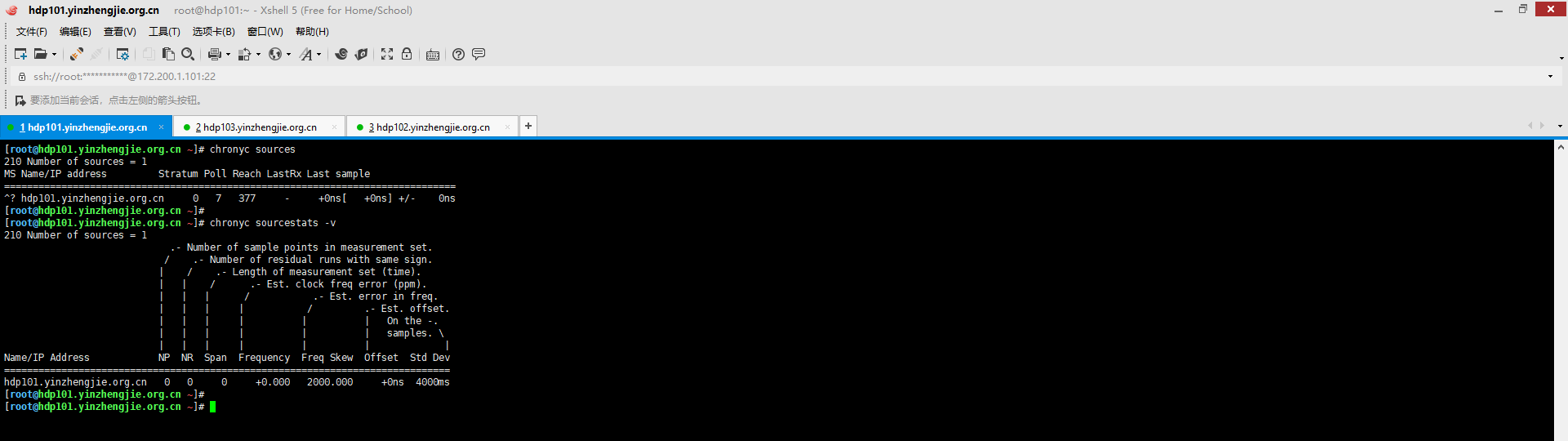
10>.chronyd服务端修改时间
[root@hdp101.yinzhengjie.org.cn ~]# date

Fri Jan  :: CST

[root@hdp101.yinzhengjie.org.cn ~]#

[root@hdp101.yinzhengjie.org.cn ~]# date -s "2020-01-31 15:45:00"

Fri Jan  :: CST

[root@hdp101.yinzhengjie.org.cn ~]#

[root@hdp101.yinzhengjie.org.cn ~]# hwclock -w

[root@hdp101.yinzhengjie.org.cn ~]#

[root@hdp101.yinzhengjie.org.cn ~]# date

Fri Jan  :: CST

[root@hdp101.yinzhengjie.org.cn ~]#

[root@hdp101.yinzhengjie.org.cn ~]# chronyc sources

 Number of sources =

MS Name/IP address         Stratum Poll Reach LastRx Last sample

===============================================================================

^? hdp101.yinzhengjie.org.cn                -     +0ns[   +0ns] +/-    0ns

[root@hdp101.yinzhengjie.org.cn ~]#

[root@hdp101.yinzhengjie.org.cn ~]# chronyc sourcestats -v

 Number of sources =

                             .- Number of sample points in measurement set.

                            /    .- Number of residual runs with same sign.

                           |    /    .- Length of measurement set (time).

                           |   |    /      .- Est. clock freq error (ppm).

                           |   |   |      /           .- Est. error in freq.

                           |   |   |     |           /         .- Est. offset.

                           |   |   |     |          |          |   On the -.

                           |   |   |     |          |          |   samples. \

                           |   |   |     |          |          |             |

Name/IP Address            NP  NR  Span  Frequency  Freq Skew  Offset  Std Dev

==============================================================================

hdp101.yinzhengjie.org.cn                +0.000   2000.000     +0ns  4000ms

[root@hdp101.yinzhengjie.org.cn ~]#

[root@hdp101.yinzhengjie.org.cn ~]#
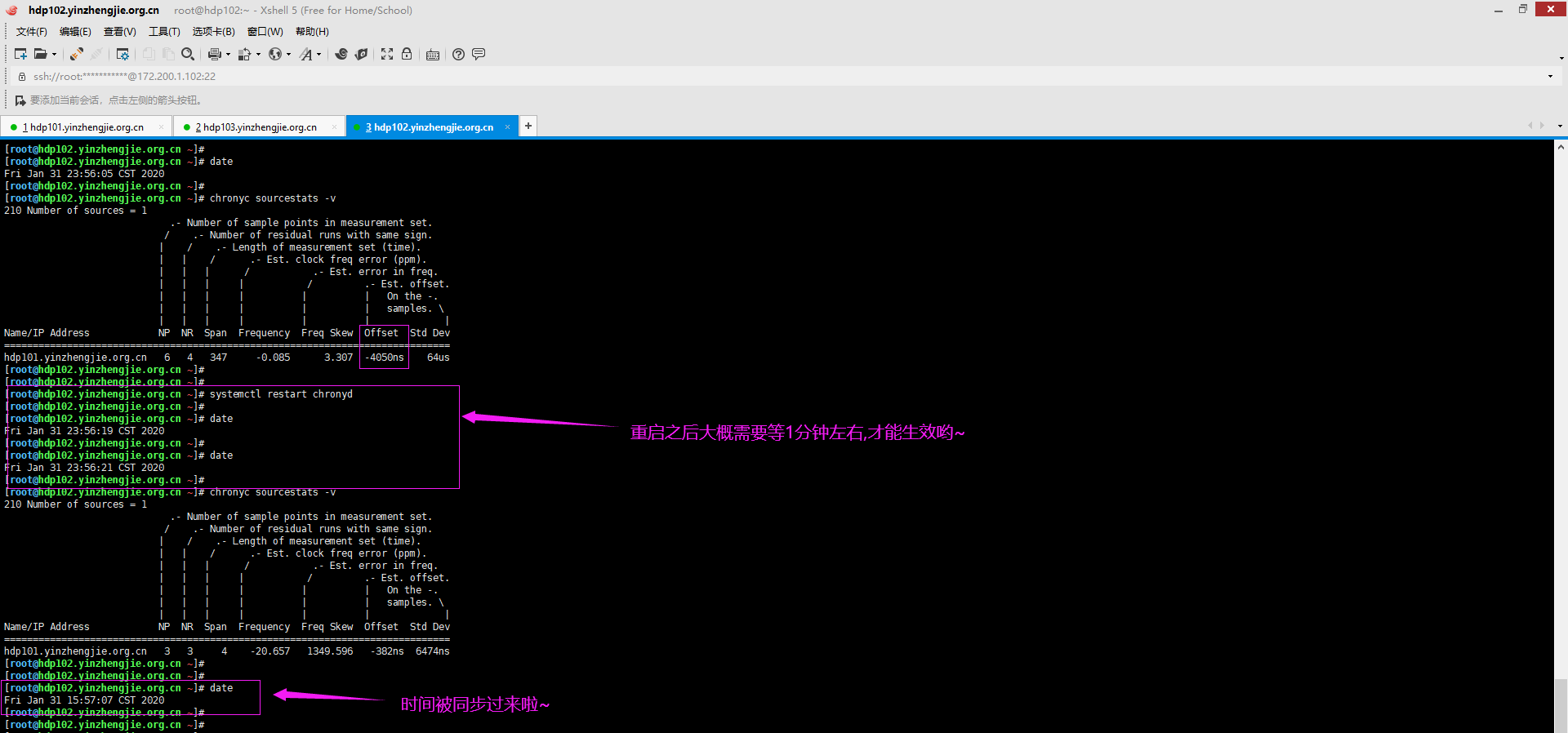
11>.chronyd客户端同步时间
[root@hdp102.yinzhengjie.org.cn ~]# date

Fri Jan  :: CST

[root@hdp102.yinzhengjie.org.cn ~]#

[root@hdp102.yinzhengjie.org.cn ~]# chronyc sourcestats -v

 Number of sources =

                             .- Number of sample points in measurement set.

                            /    .- Number of residual runs with same sign.

                           |    /    .- Length of measurement set (time).

                           |   |    /      .- Est. clock freq error (ppm).

                           |   |   |      /           .- Est. error in freq.

                           |   |   |     |           /         .- Est. offset.

                           |   |   |     |          |          |   On the -.

                           |   |   |     |          |          |   samples. \

                           |   |   |     |          |          |             |

Name/IP Address            NP  NR  Span  Frequency  Freq Skew  Offset  Std Dev

==============================================================================

hdp101.yinzhengjie.org.cn              -0.085      3.307  -4050ns    64us

[root@hdp102.yinzhengjie.org.cn ~]#

[root@hdp102.yinzhengjie.org.cn ~]#

[root@hdp102.yinzhengjie.org.cn ~]# systemctl restart chronyd

[root@hdp102.yinzhengjie.org.cn ~]#

[root@hdp102.yinzhengjie.org.cn ~]# chronyc sourcestats -v

 Number of sources =

                             .- Number of sample points in measurement set.

                            /    .- Number of residual runs with same sign.

                           |    /    .- Length of measurement set (time).

                           |   |    /      .- Est. clock freq error (ppm).

                           |   |   |      /           .- Est. error in freq.

                           |   |   |     |           /         .- Est. offset.

                           |   |   |     |          |          |   On the -.

                           |   |   |     |          |          |   samples. \

                           |   |   |     |          |          |             |

Name/IP Address            NP  NR  Span  Frequency  Freq Skew  Offset  Std Dev

==============================================================================

hdp101.yinzhengjie.org.cn               -20.657   1349.596   -382ns  6474ns

[root@hdp102.yinzhengjie.org.cn ~]#

[root@hdp102.yinzhengjie.org.cn ~]#

[root@hdp102.yinzhengjie.org.cn ~]# date

Fri Jan  :: CST

[root@hdp102.yinzhengjie.org.cn ~]#
三.部署Ambari集群
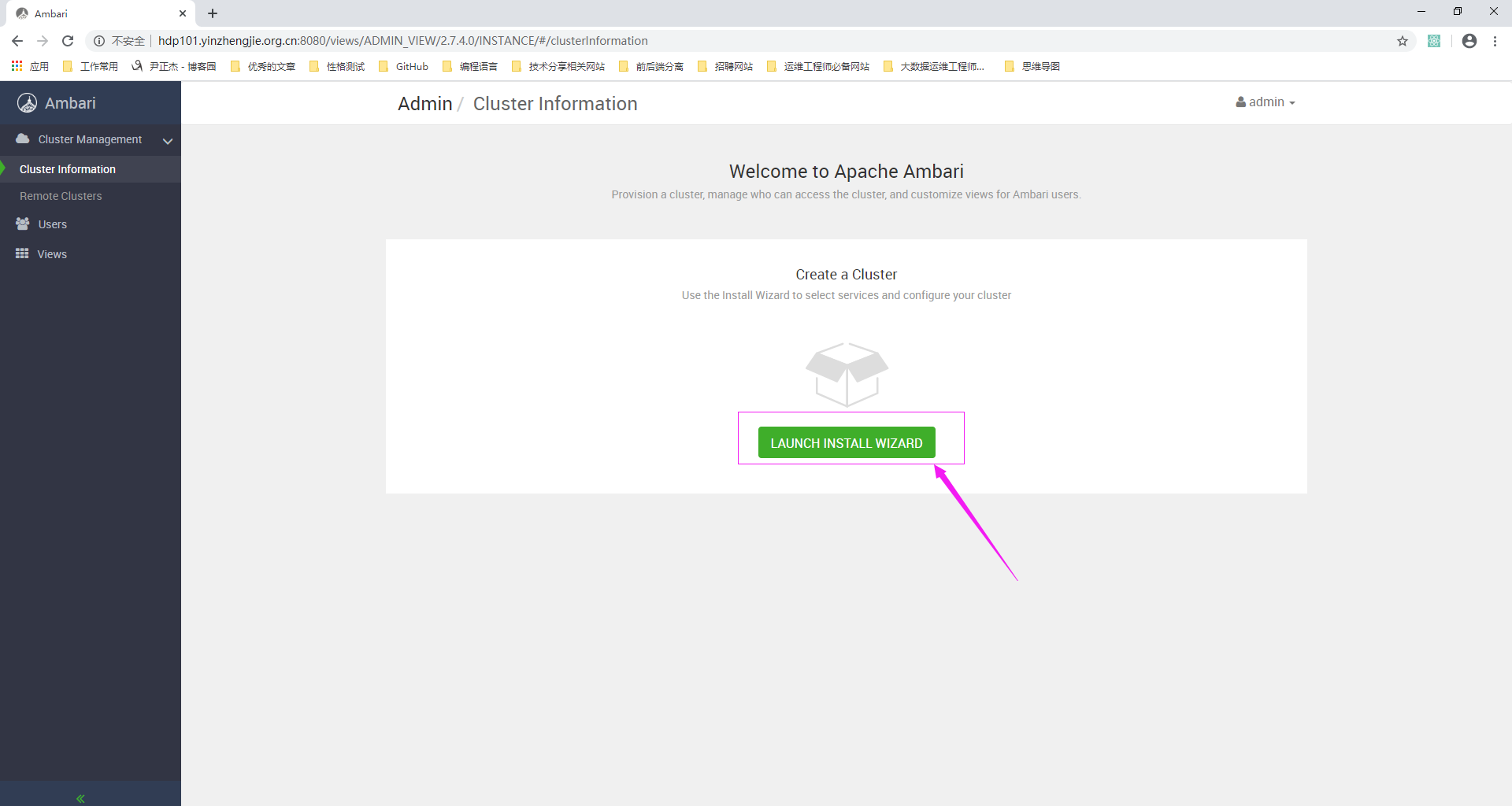
1>.浏览器访问"http://hdp101.yinzhengjie.org.cn:8080/",使用默认的用户名(admin)和密码(admin)登录成功后启动安装向导(如下图所示,点击"LAUNCH INSTALL WIZARD")
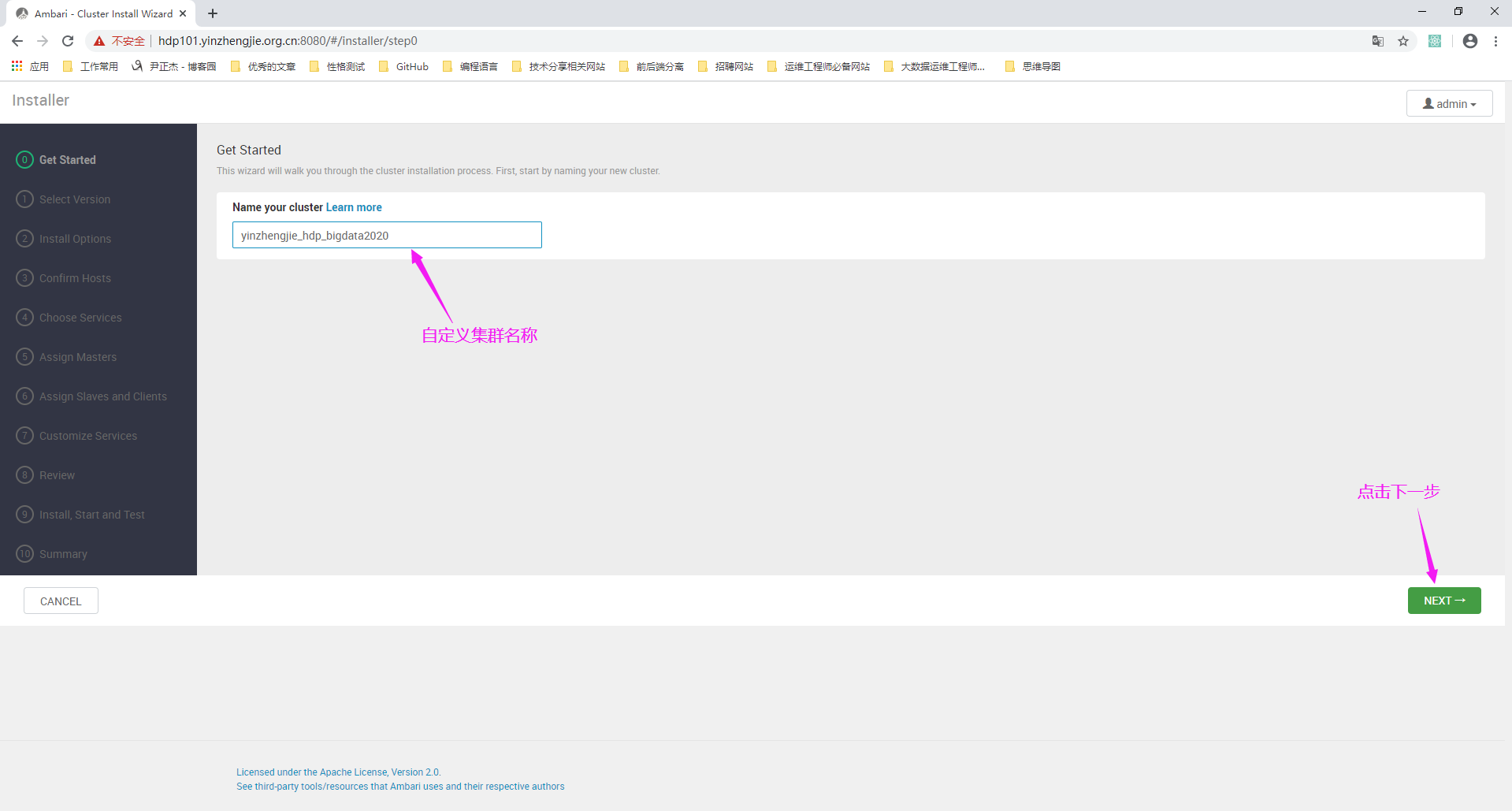
2>.自定义集群名称,并点击下一步
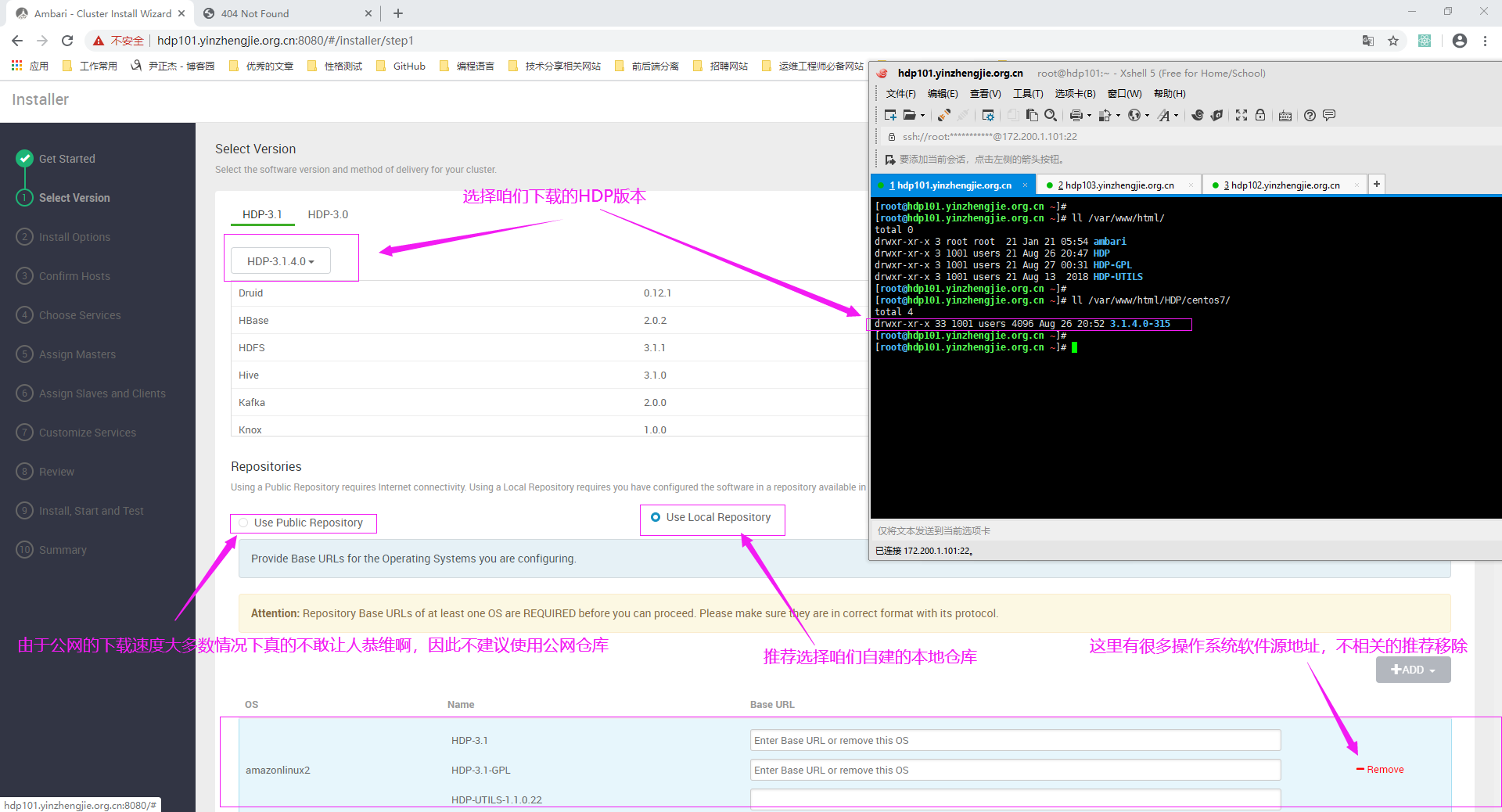
3>.选择HDP版本,并选择本地软件源仓库
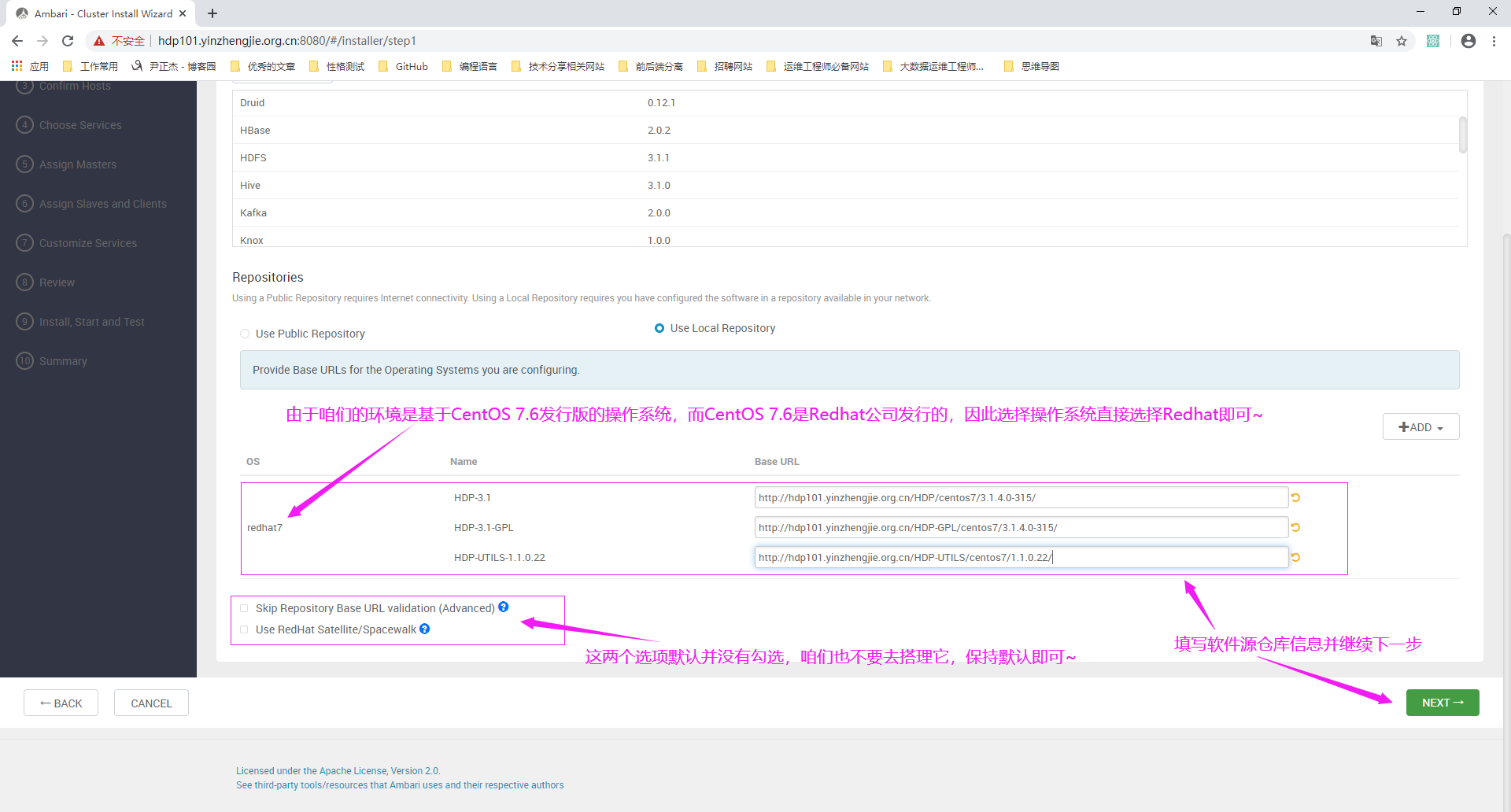
4>.删除不相关操作系统的仓库信息,只保留部署Ambari的操作系统的仓库信息
5>.注册主机
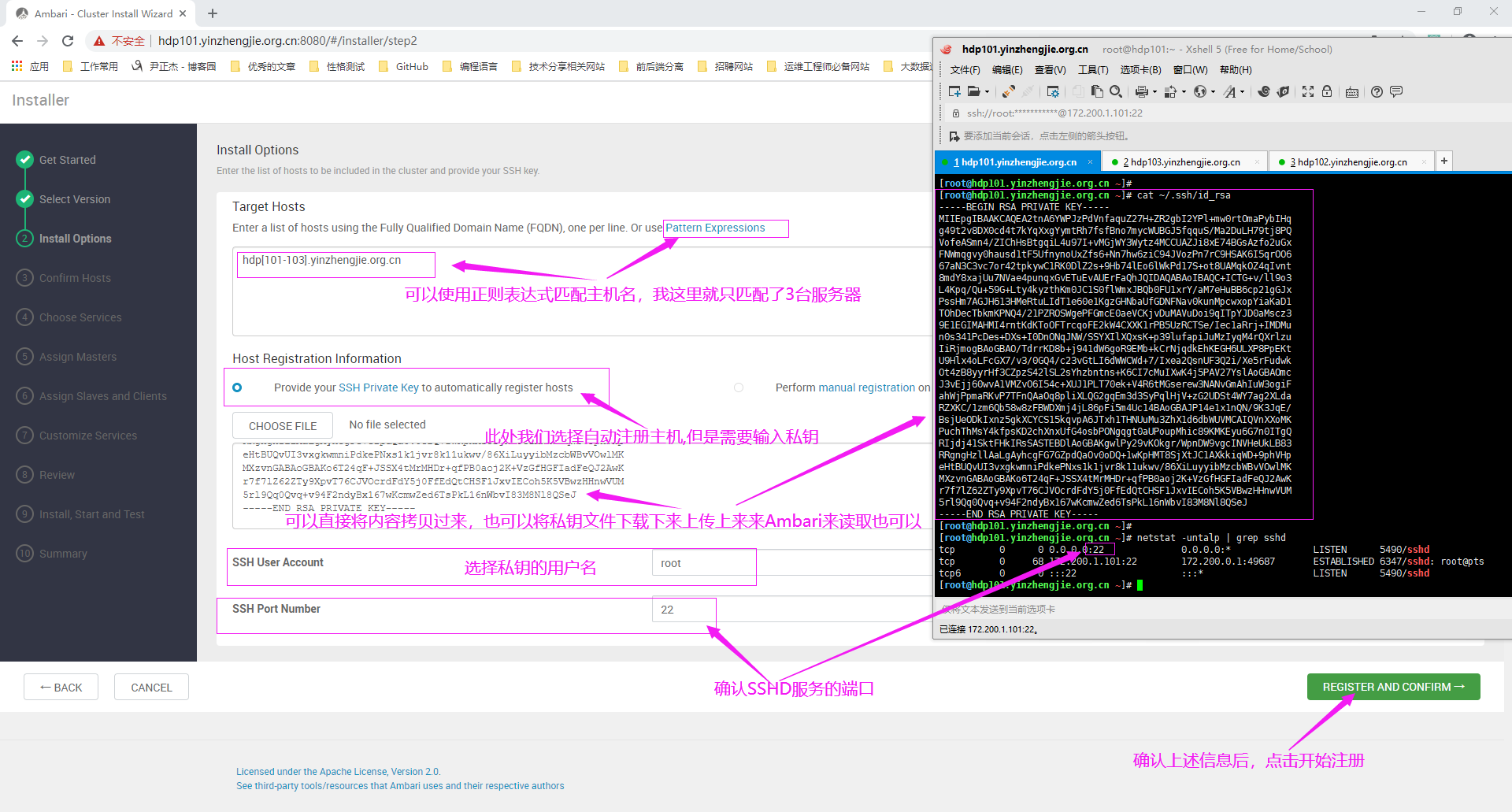
6>.确认匹配的主机名称
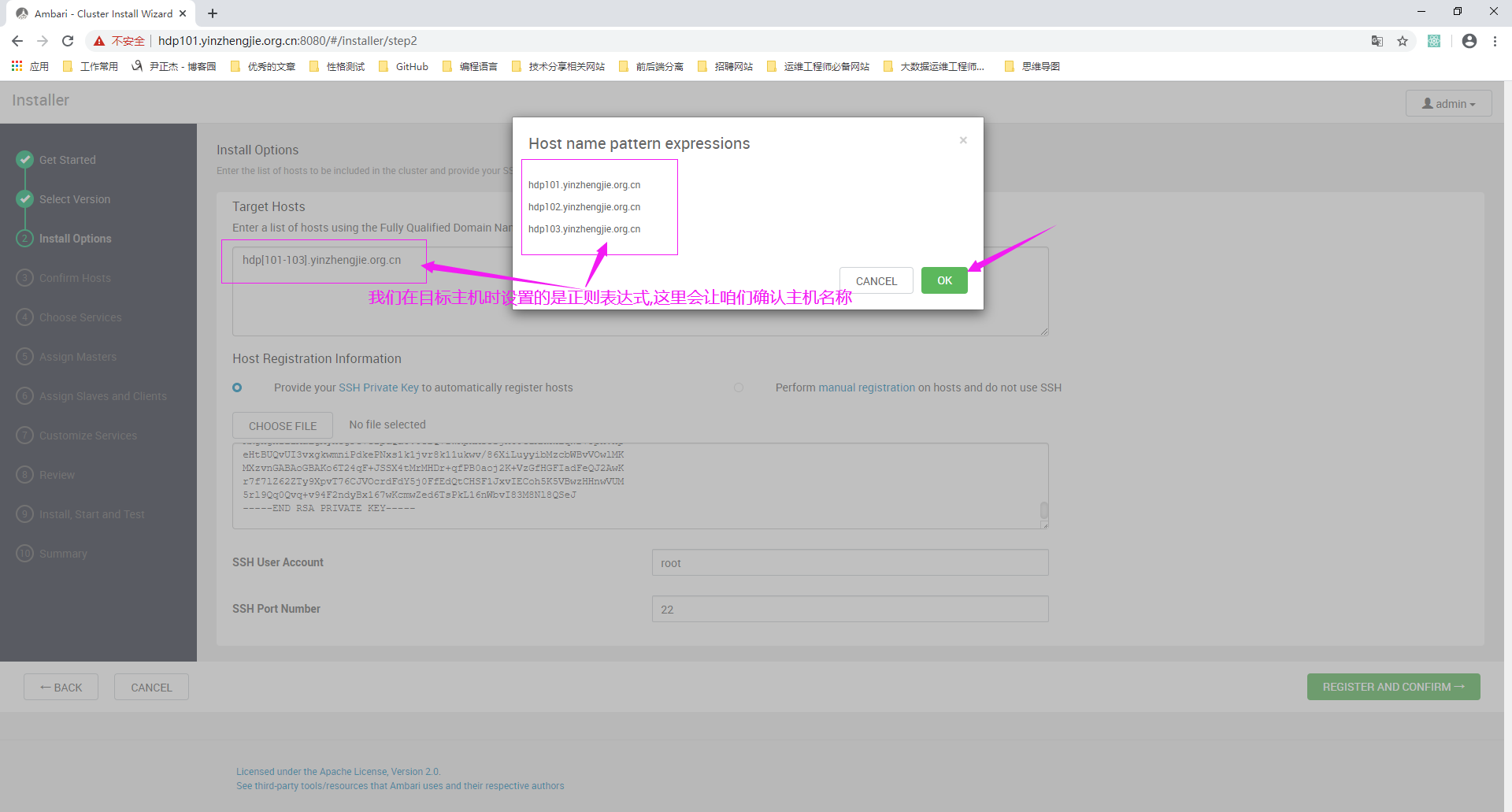
7>.等待自动注册

8>.等待集群自检
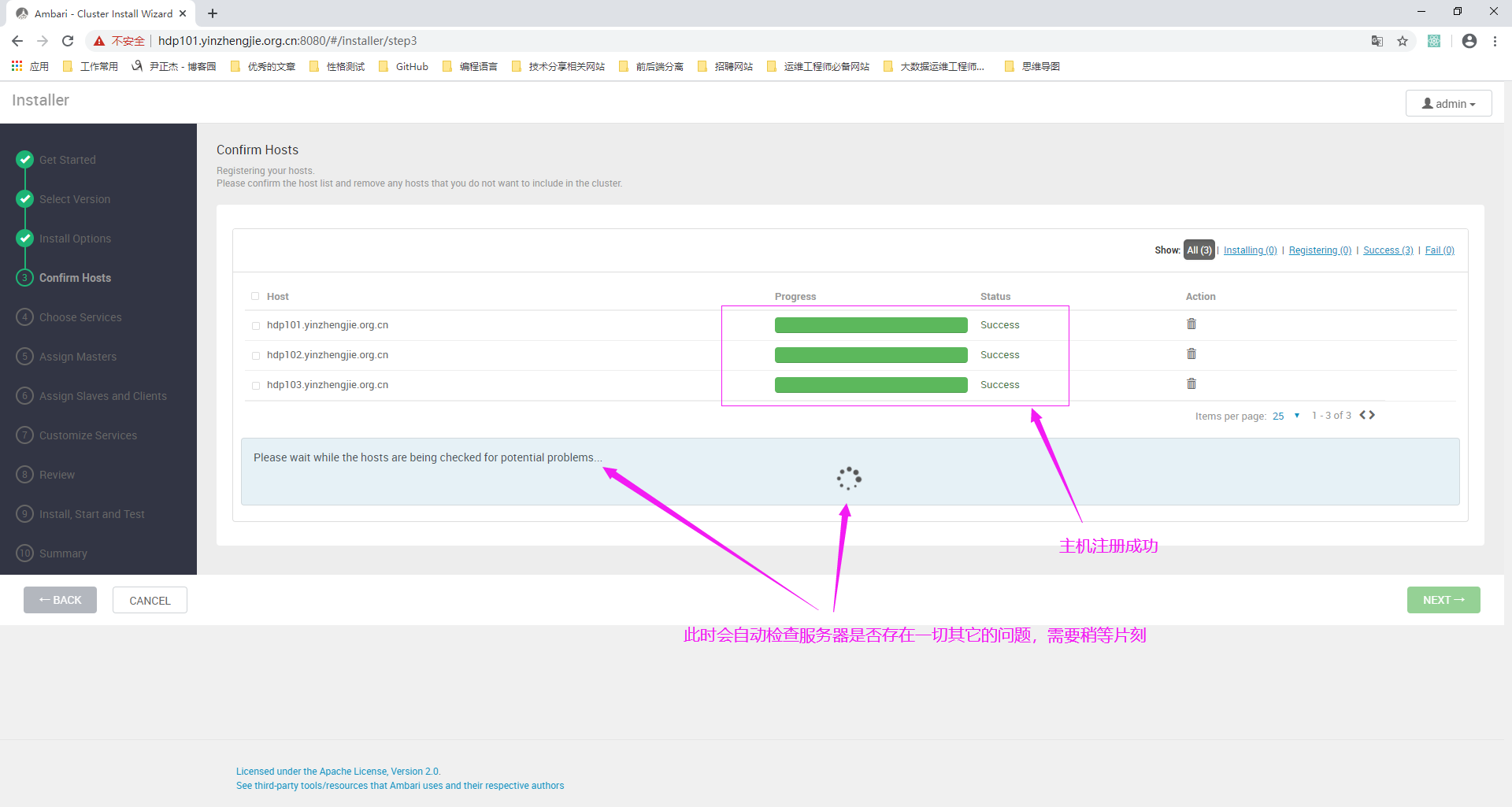
9>.集群自检完成
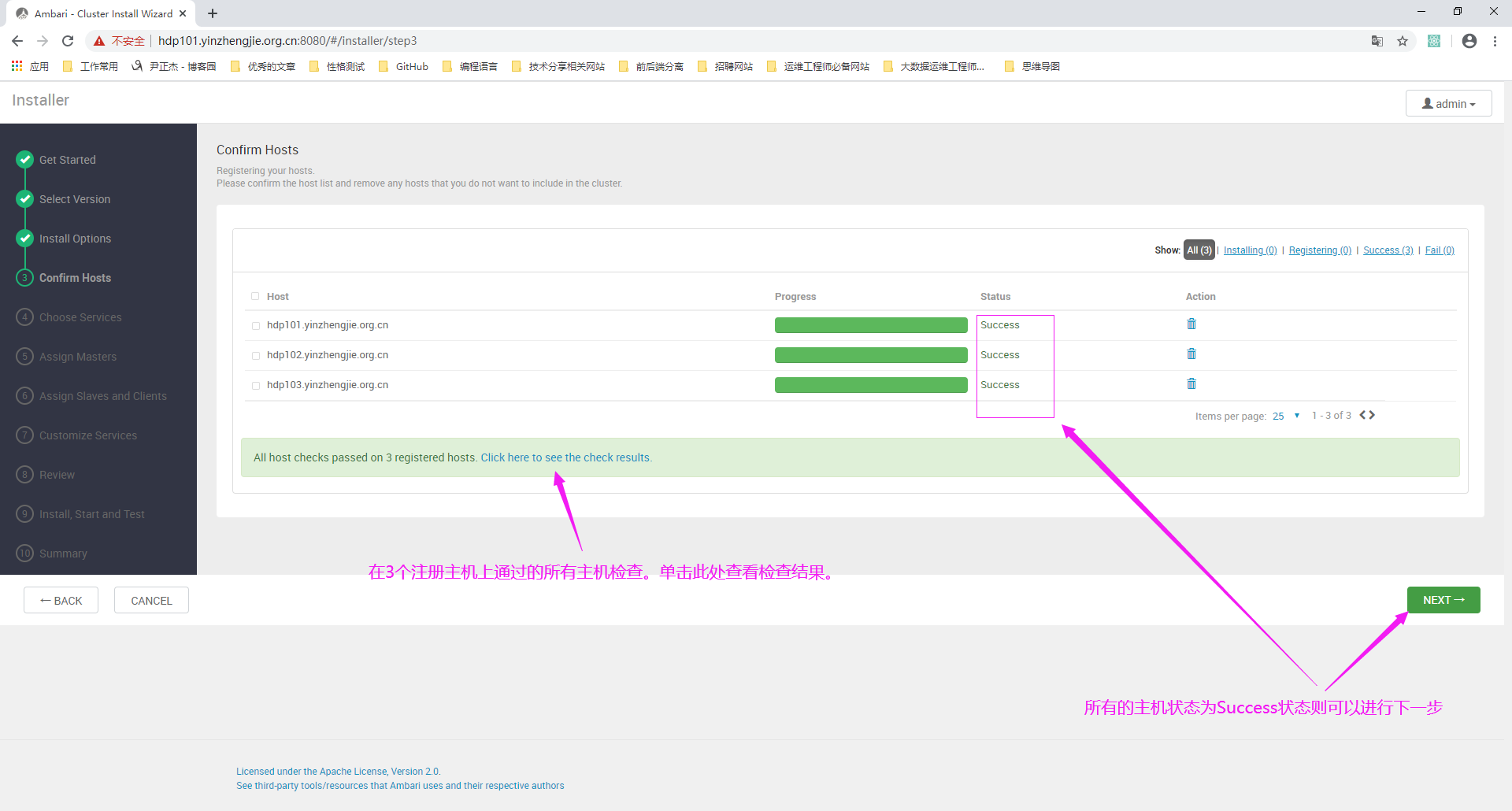
如果此步骤和上图一样直接跳过下面的阅读,如果你安装其它节点存在问题,如下图所示,别慌,查看日志解决问题才是正道。
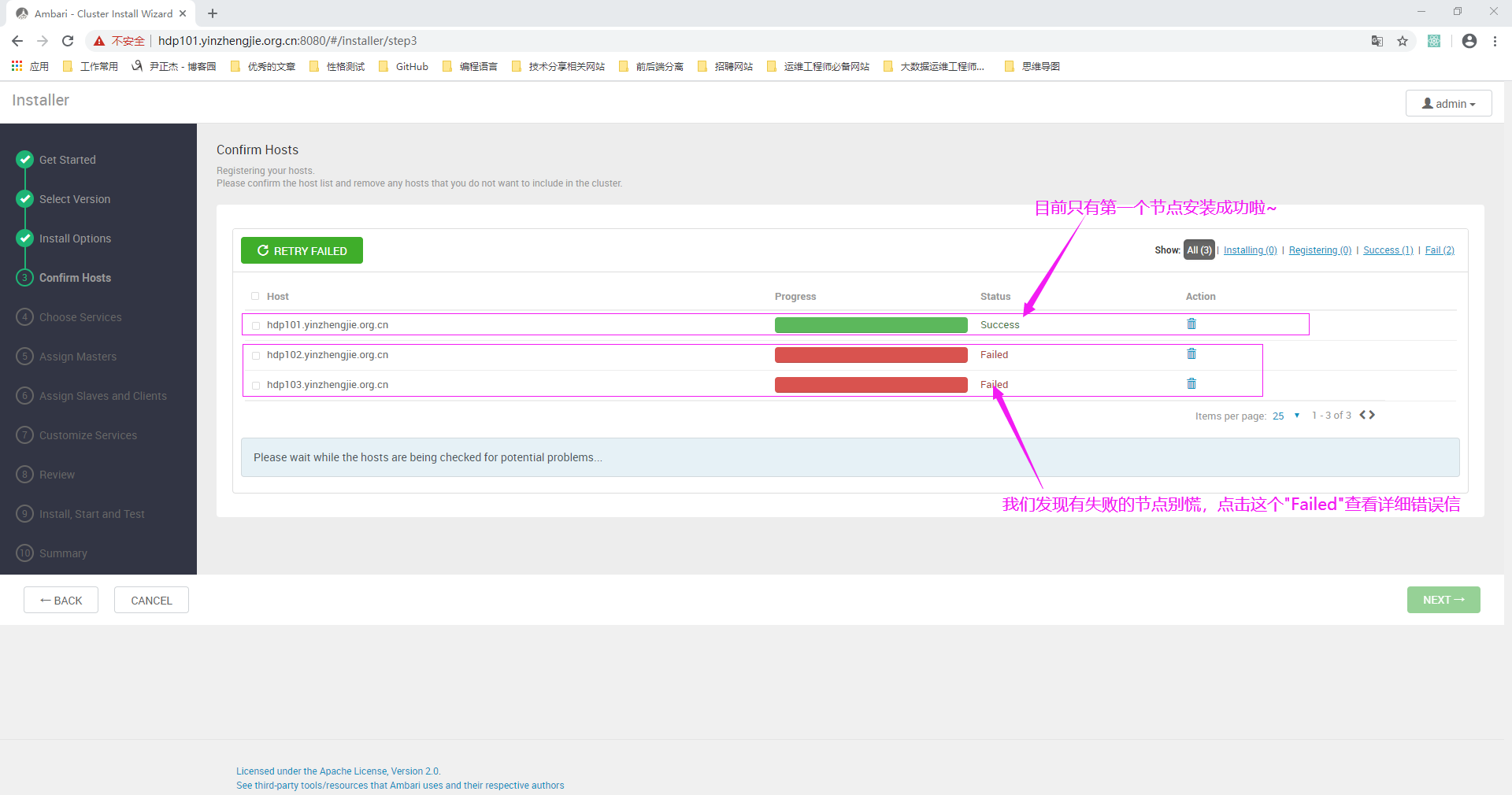
查看报错信息,如下图所示。
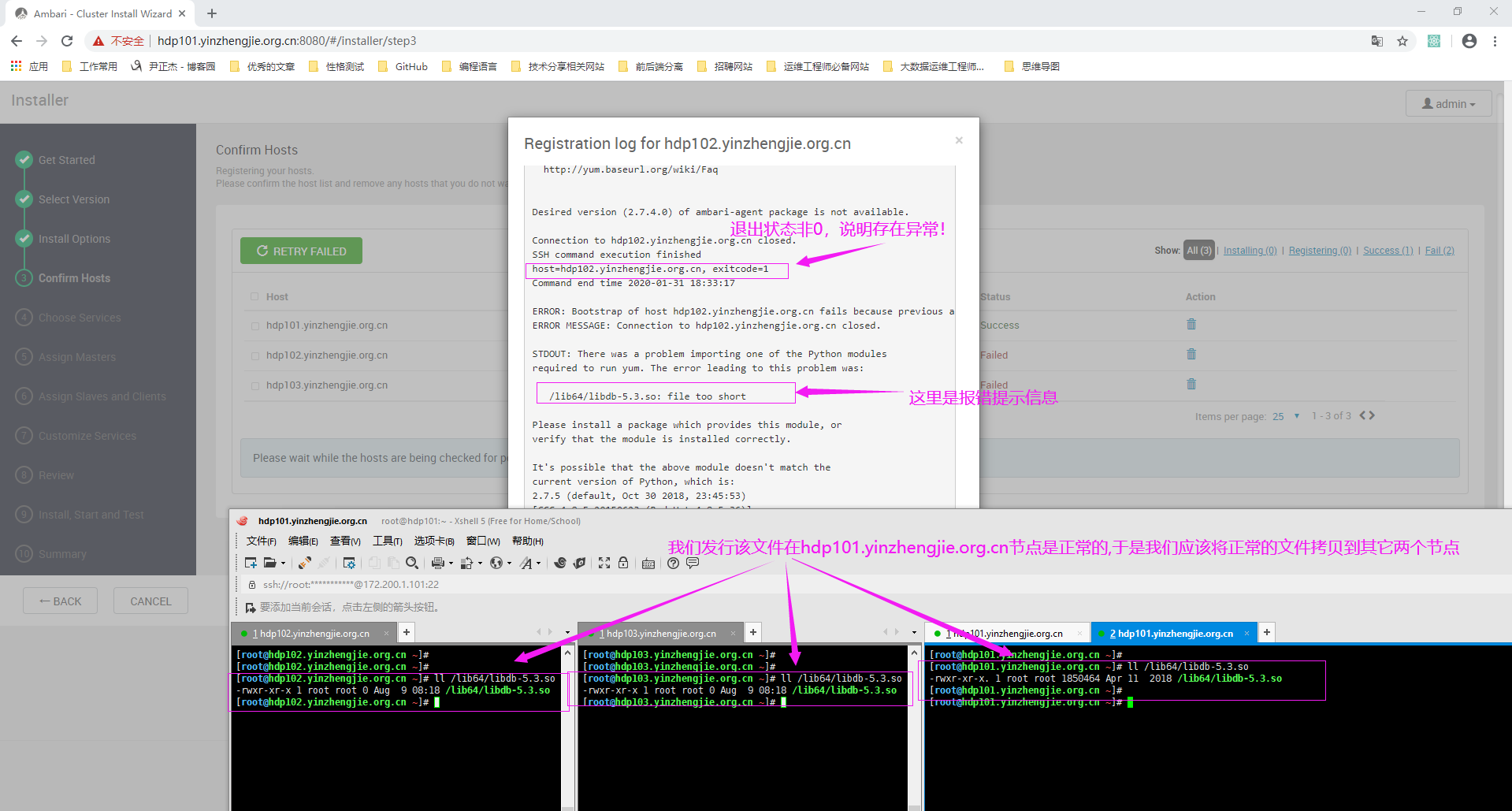
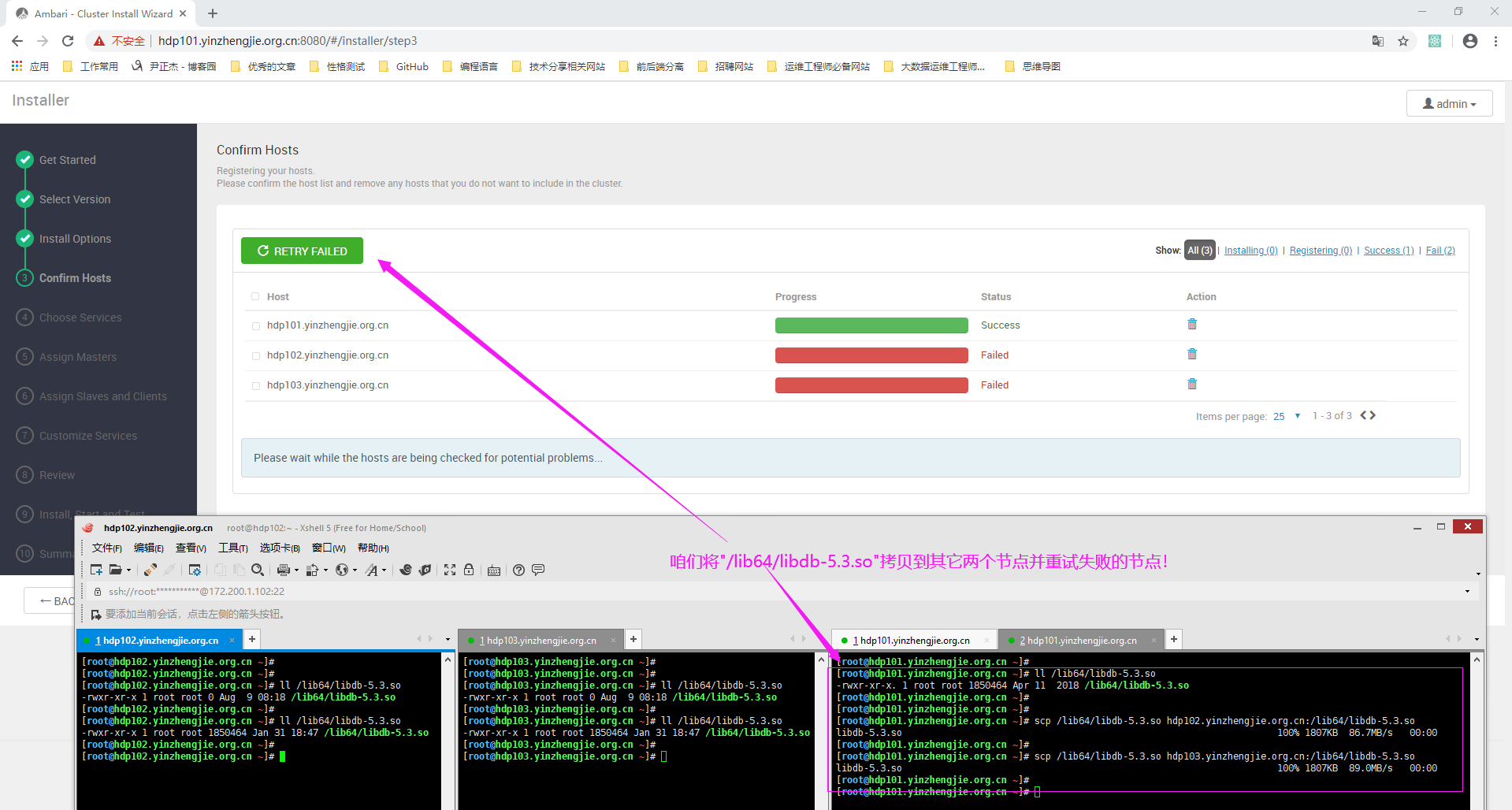
根据报错信息将hdp101.yinzhengjie.org.cn与hdp[102-103].yinzhengjie.org.cn不同的文件同步后,之前两个失败的节点最终状态变为"Success"状态。
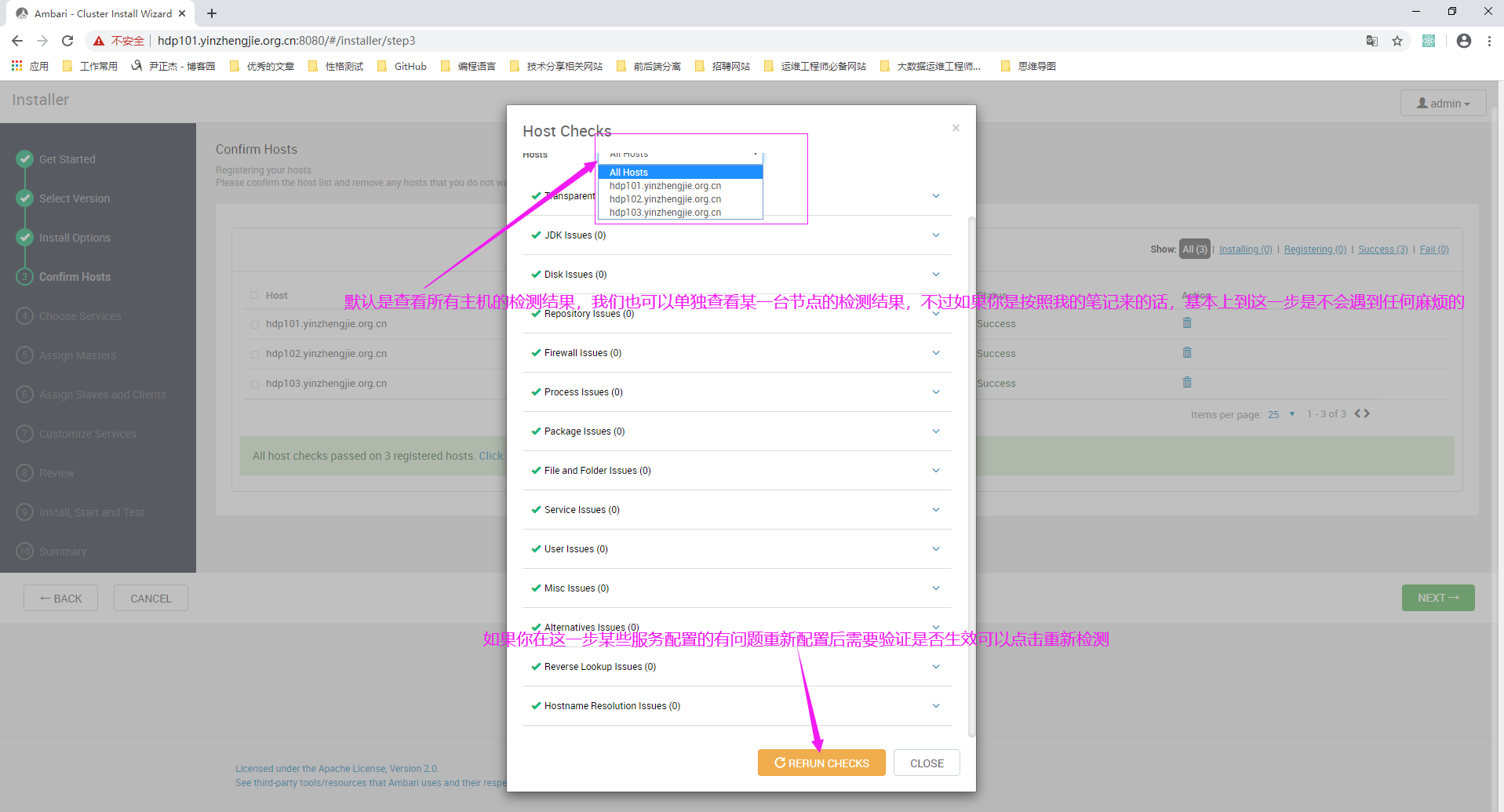
10>.查看集群自建结果(此步骤可省略,直接进行下一步)
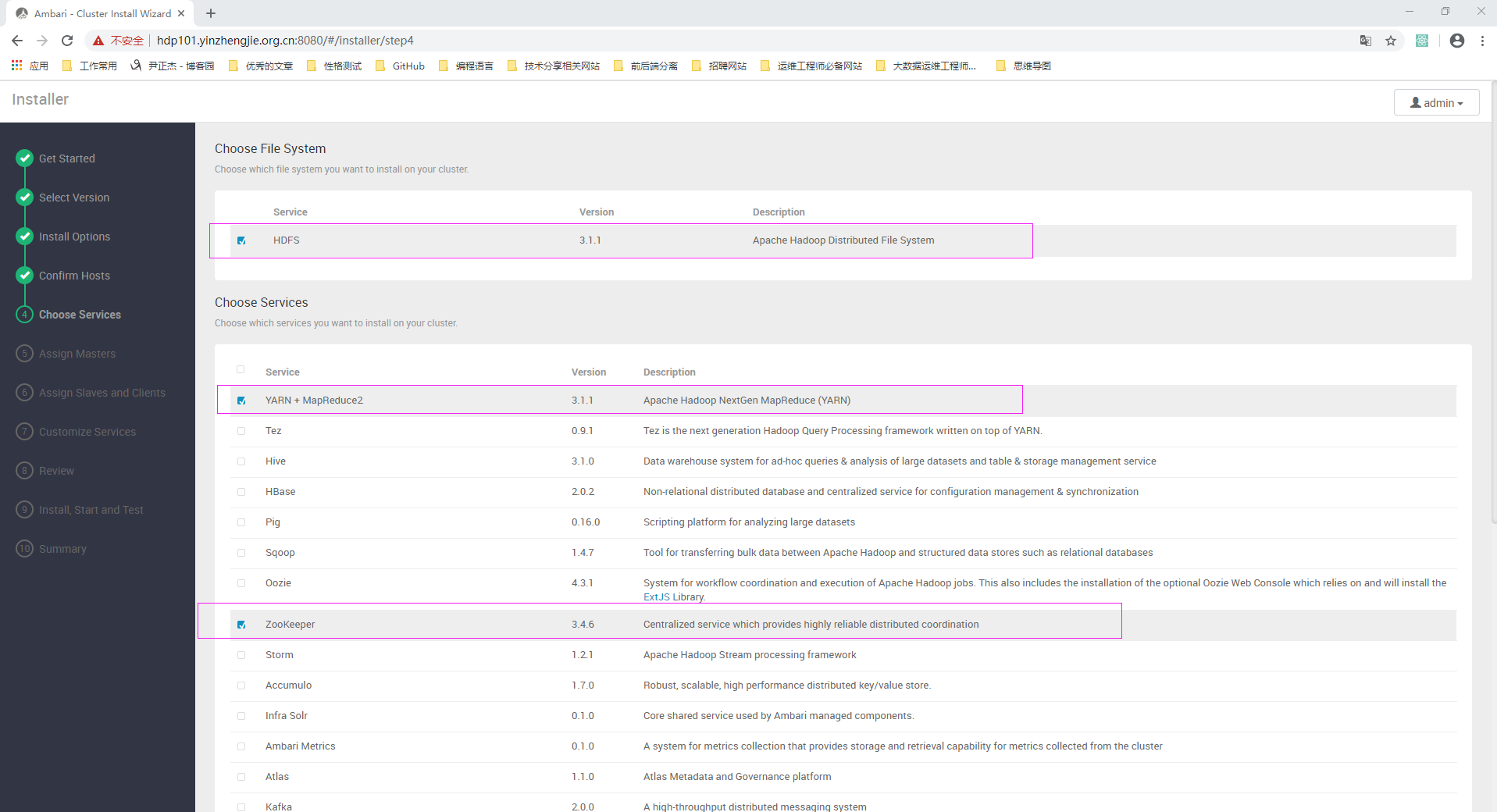
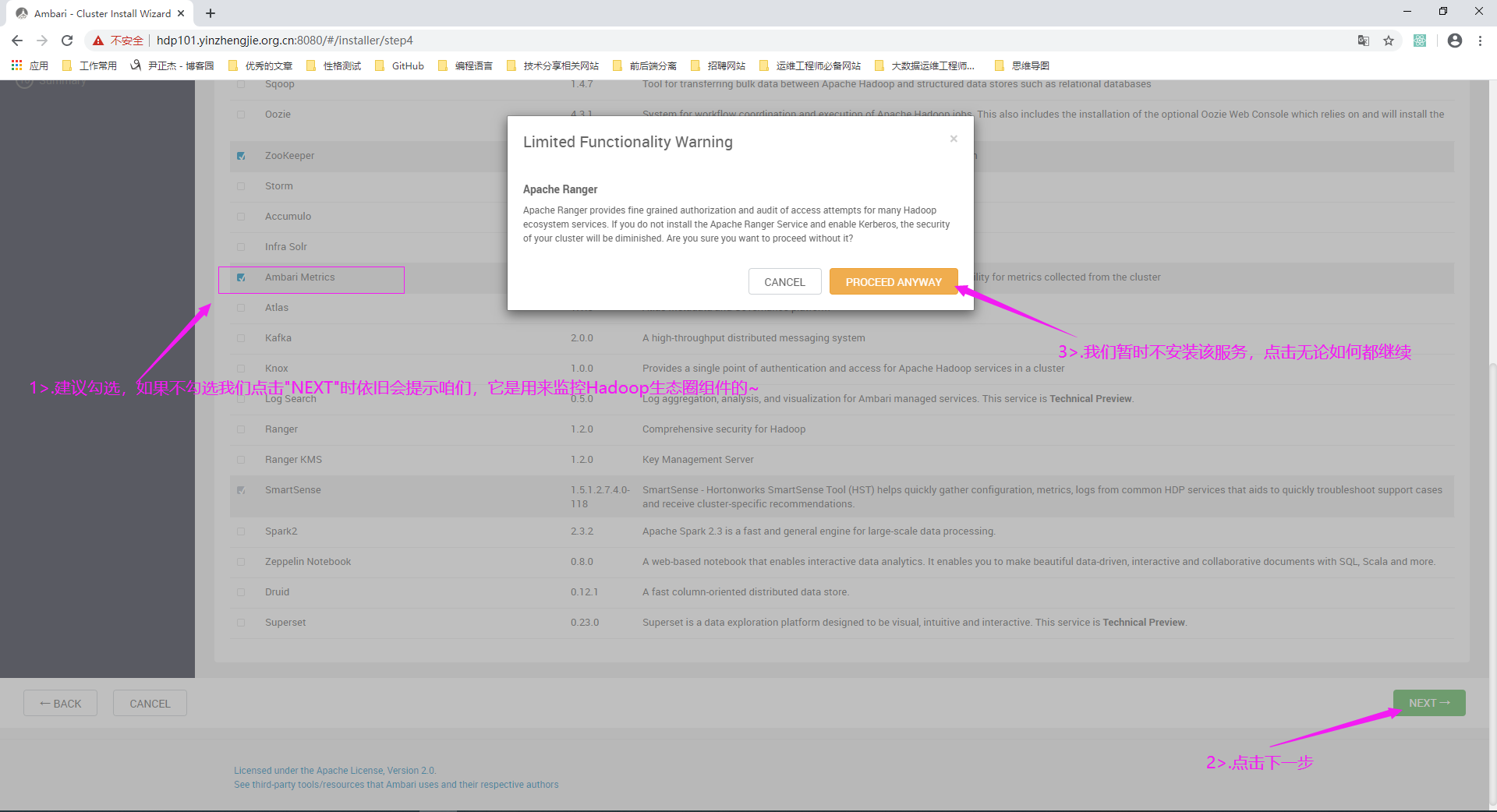
11>.自定义需要安装的服务(服务勾选少了也没多大关系,后面可以手动添加服务)
12>.勾选Ambari Metircs(会自动安装监控已经勾选服务的状态)服务并点击"NEXT",如果弹出如下图所示的提示,点击"PROCEED ANYWAY"
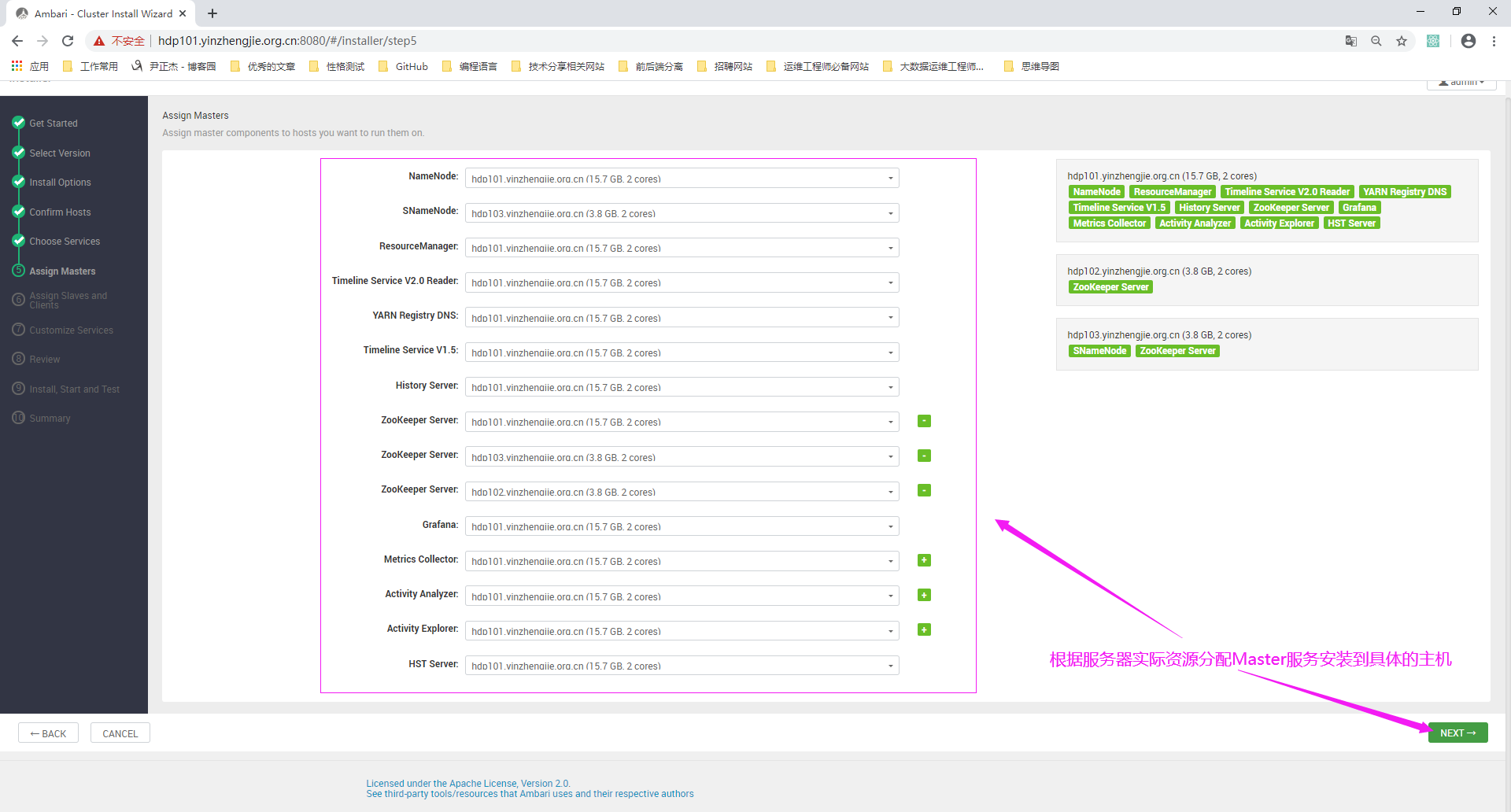
13>.根据服务器实际资源分配Master服务角色安装到具体的主机
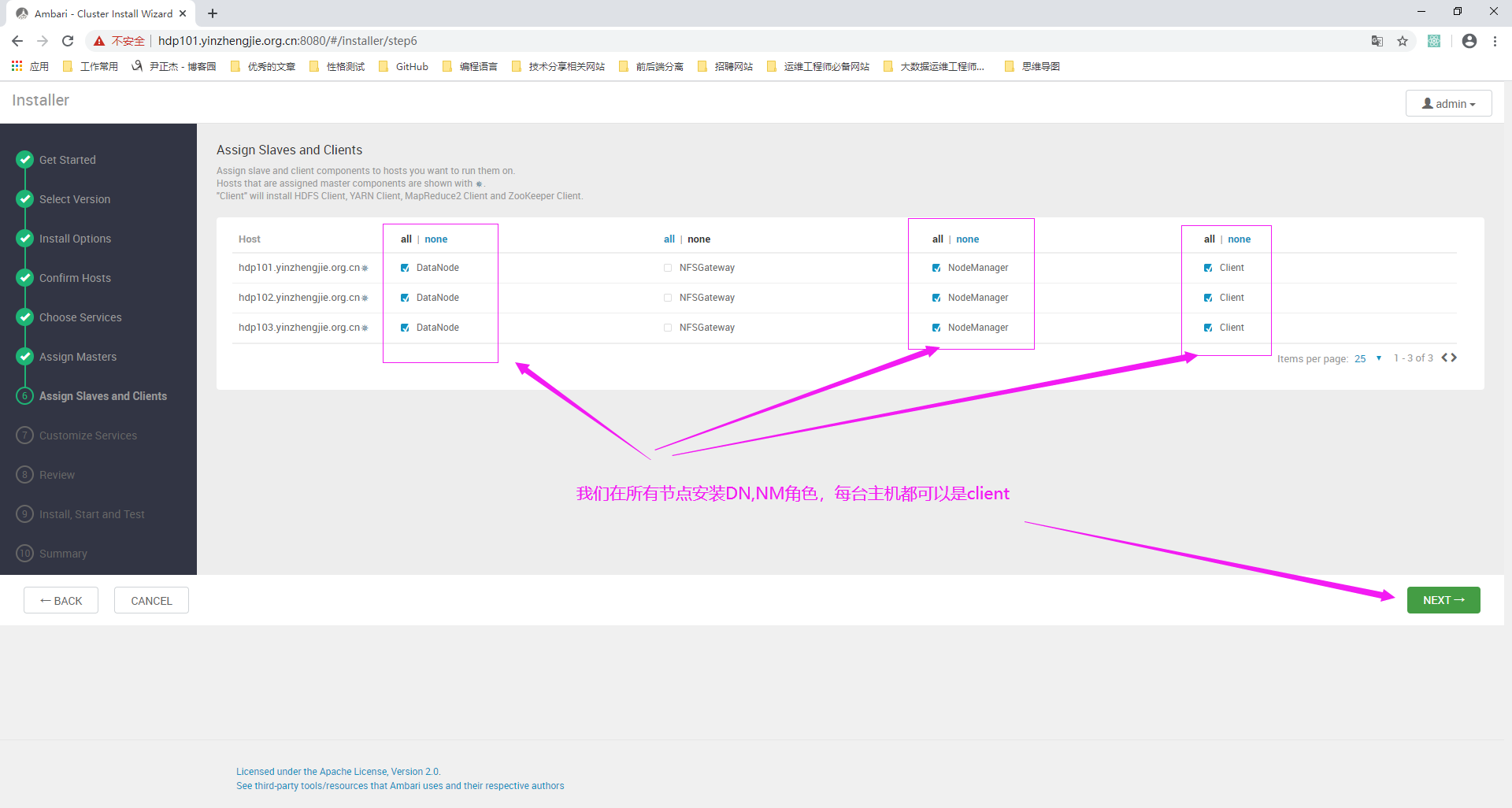
14>.除了NFSGateway角色(如有需要后续可以自行安装)不勾选,其它的slave服务都勾选
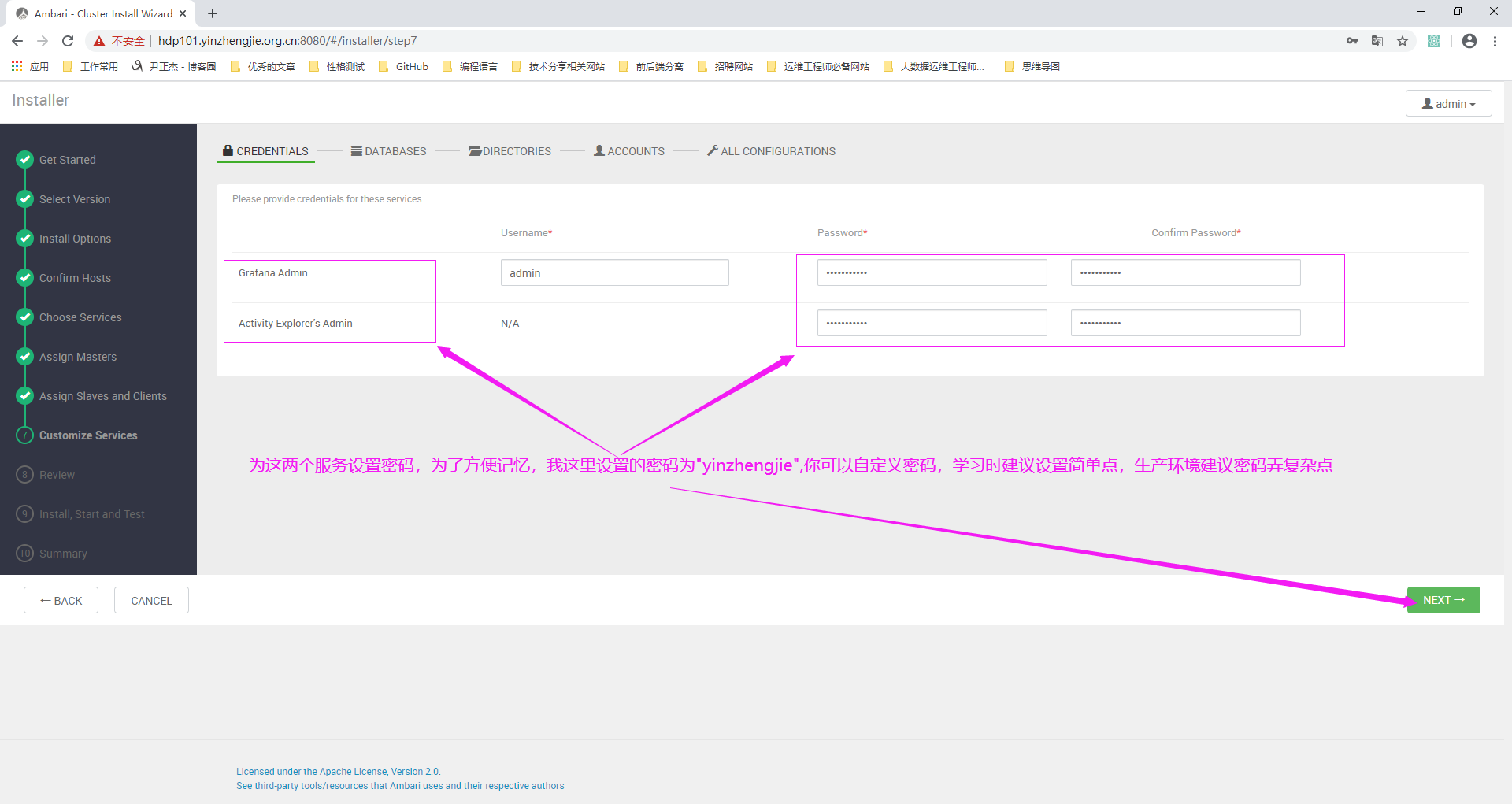
15>.为Grafana Admin和Activity Explorer's Admin服务设置密码
16>.自定义各个服务对应数据的存储路径(由于我们使用的是root用户安装,因此尽管指定的目录不存在,Ambari会通过root用户自动创建的哟~)
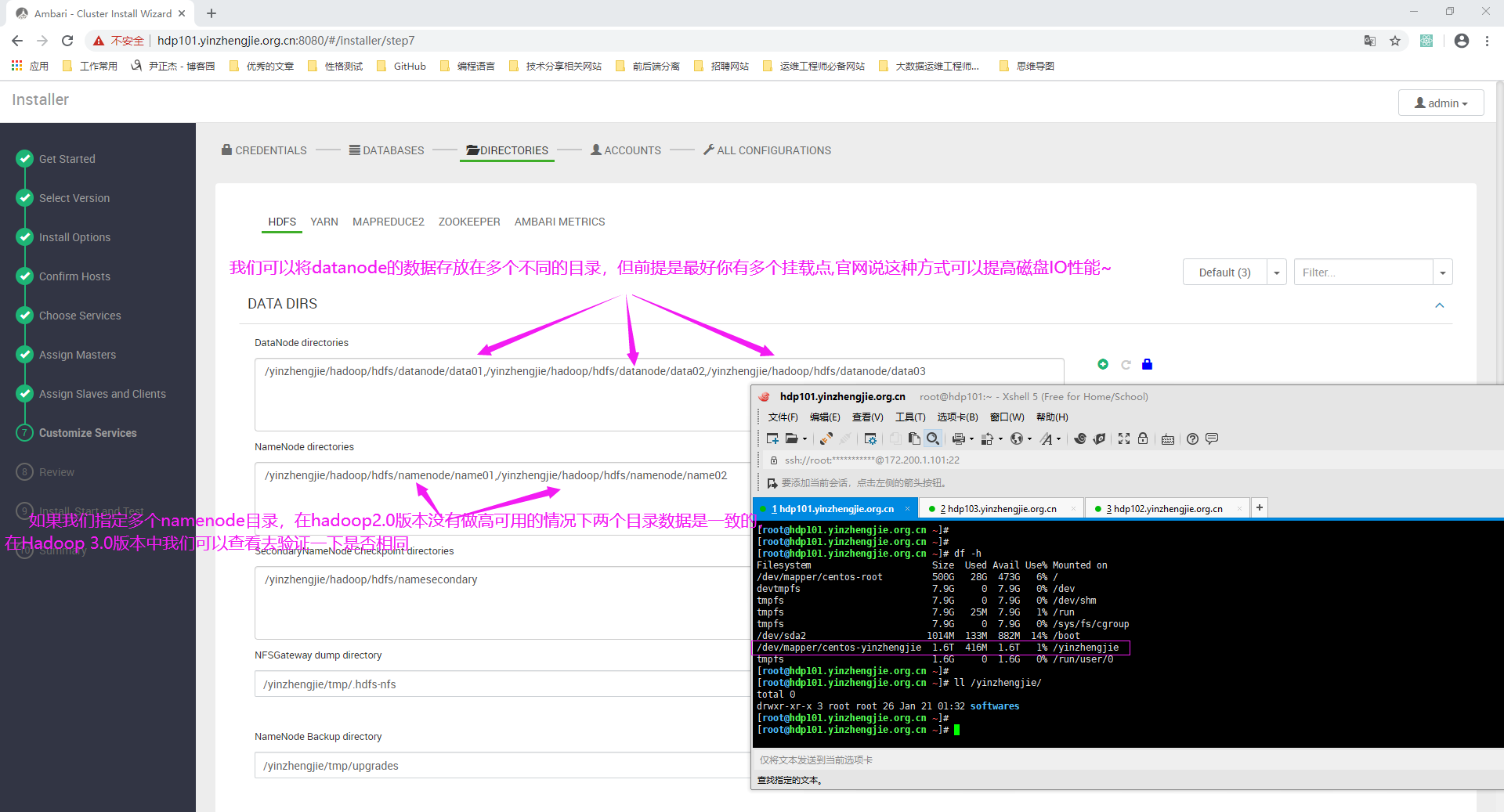
17>.确认各个服务在操作系统中以哪个用户身份运行(保持默认即可,直接下一步)
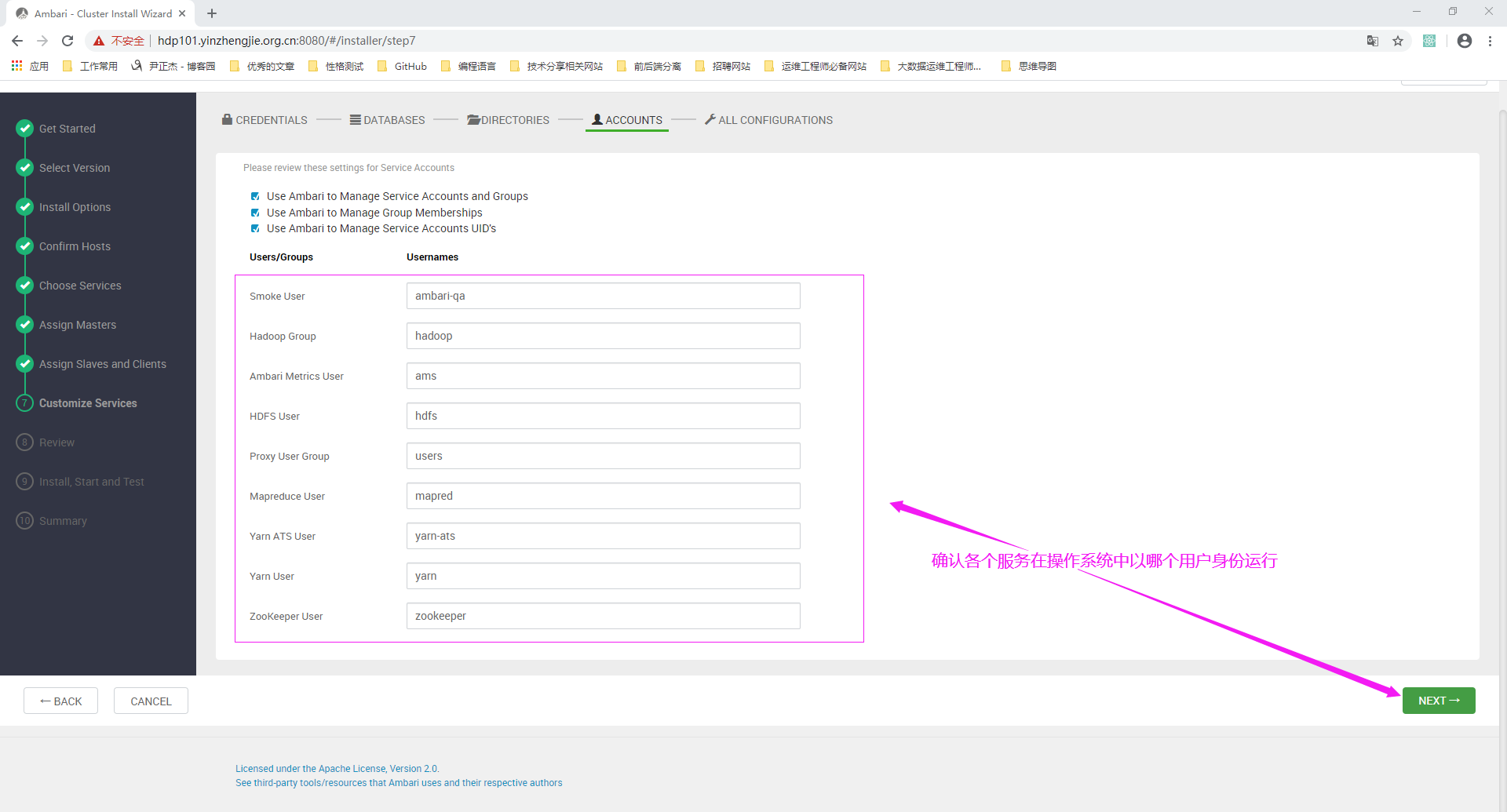
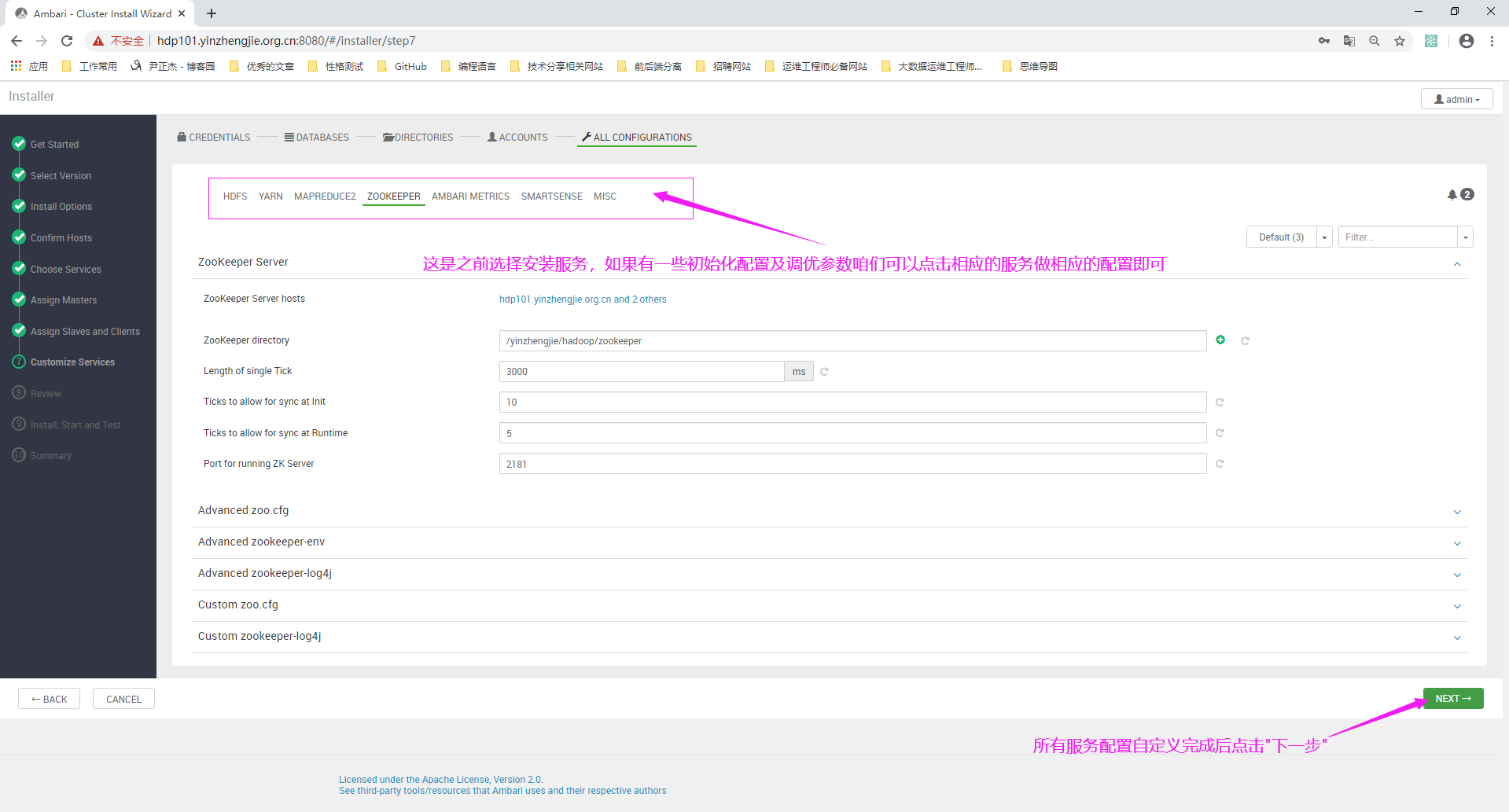
18>.自定义安装服务的配置并点击下一步
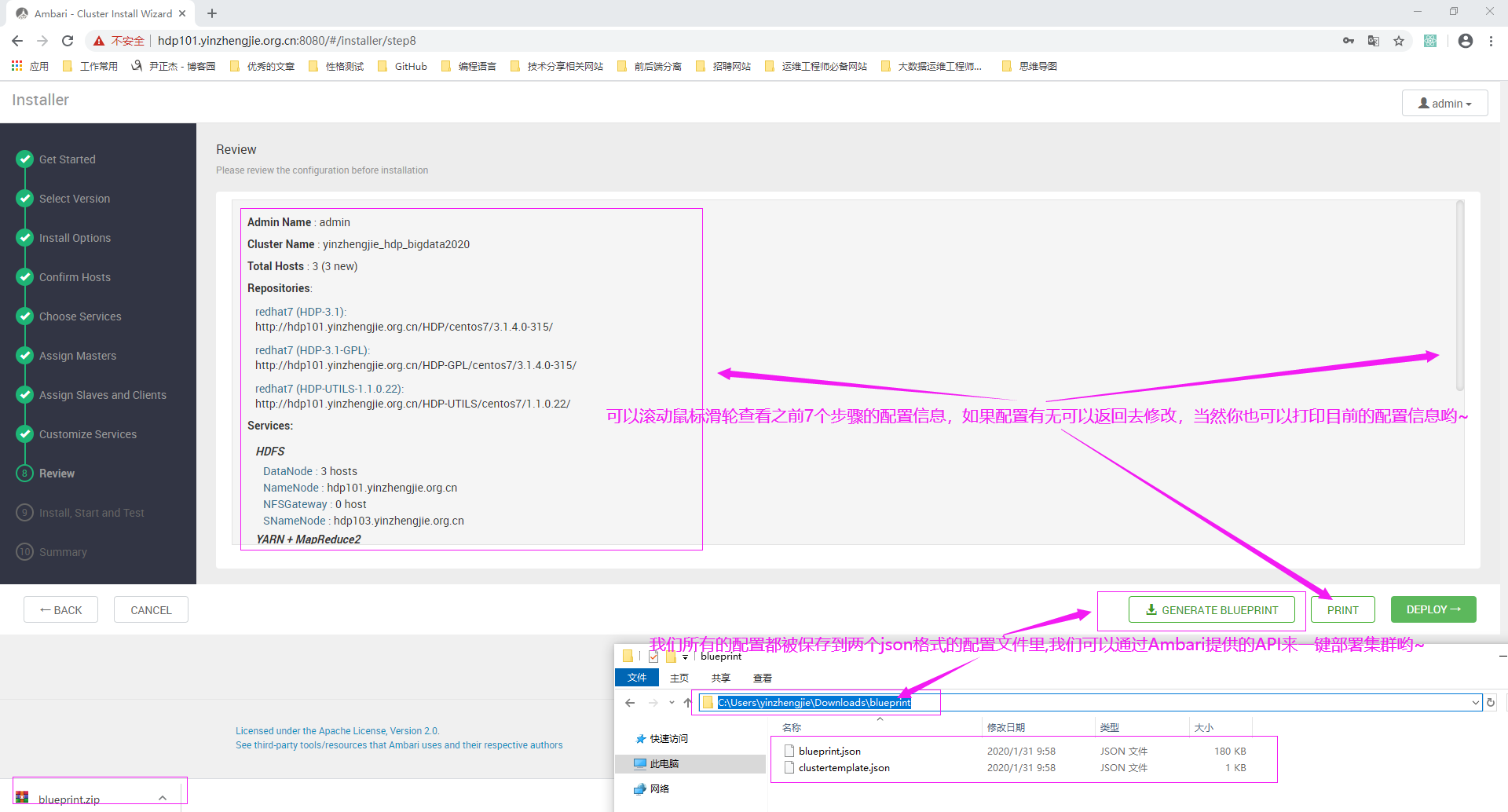
19>.在Review步骤无需做任何配置,而是对之前几个步骤的配置有一个大概的信息概览,如果确认配置五五后点击"DEPLOY"就正式部署啦
20>.点击"DEPLOY"会开始初始化任务
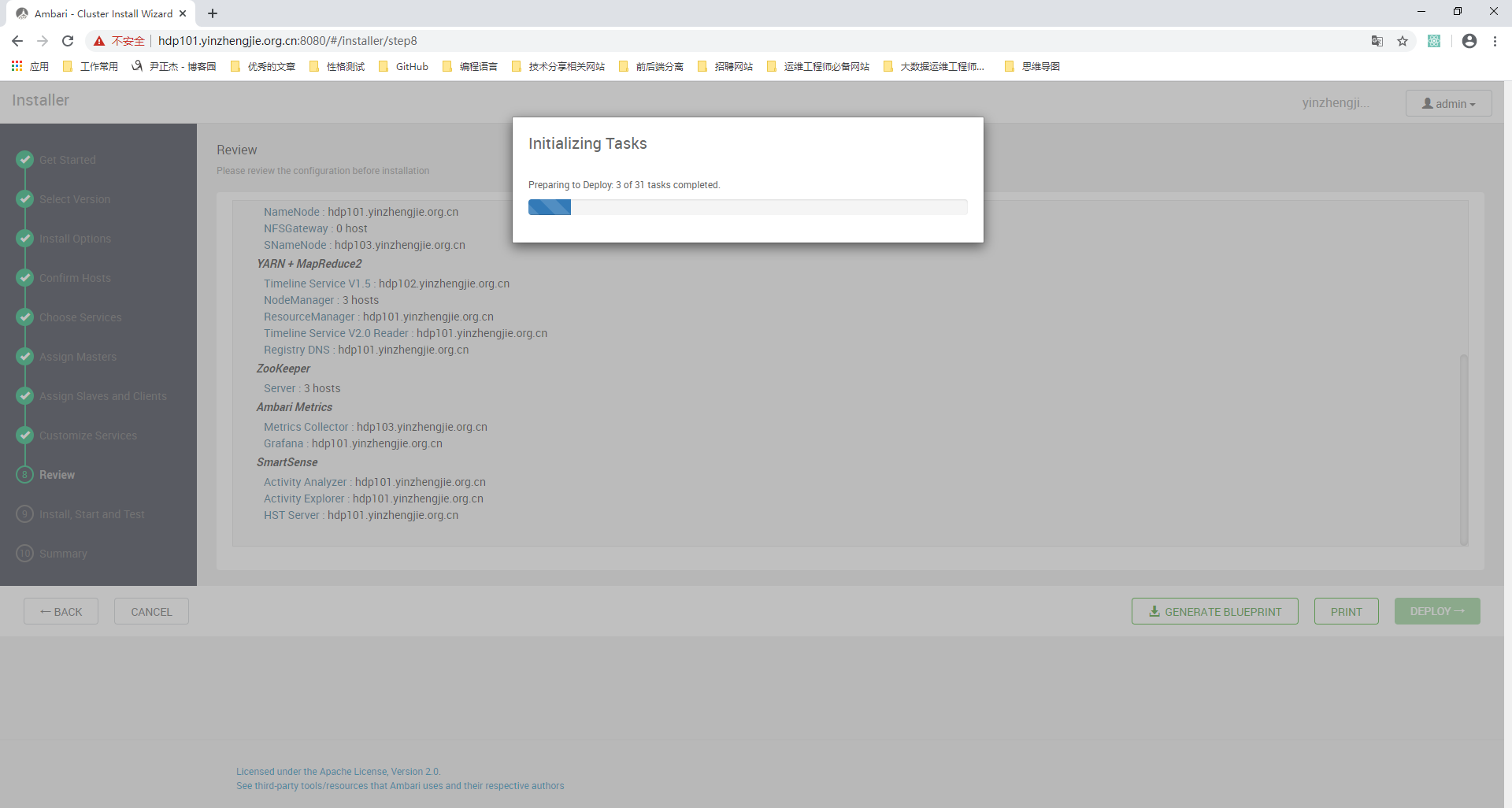
21>.初始化完就开始部署了
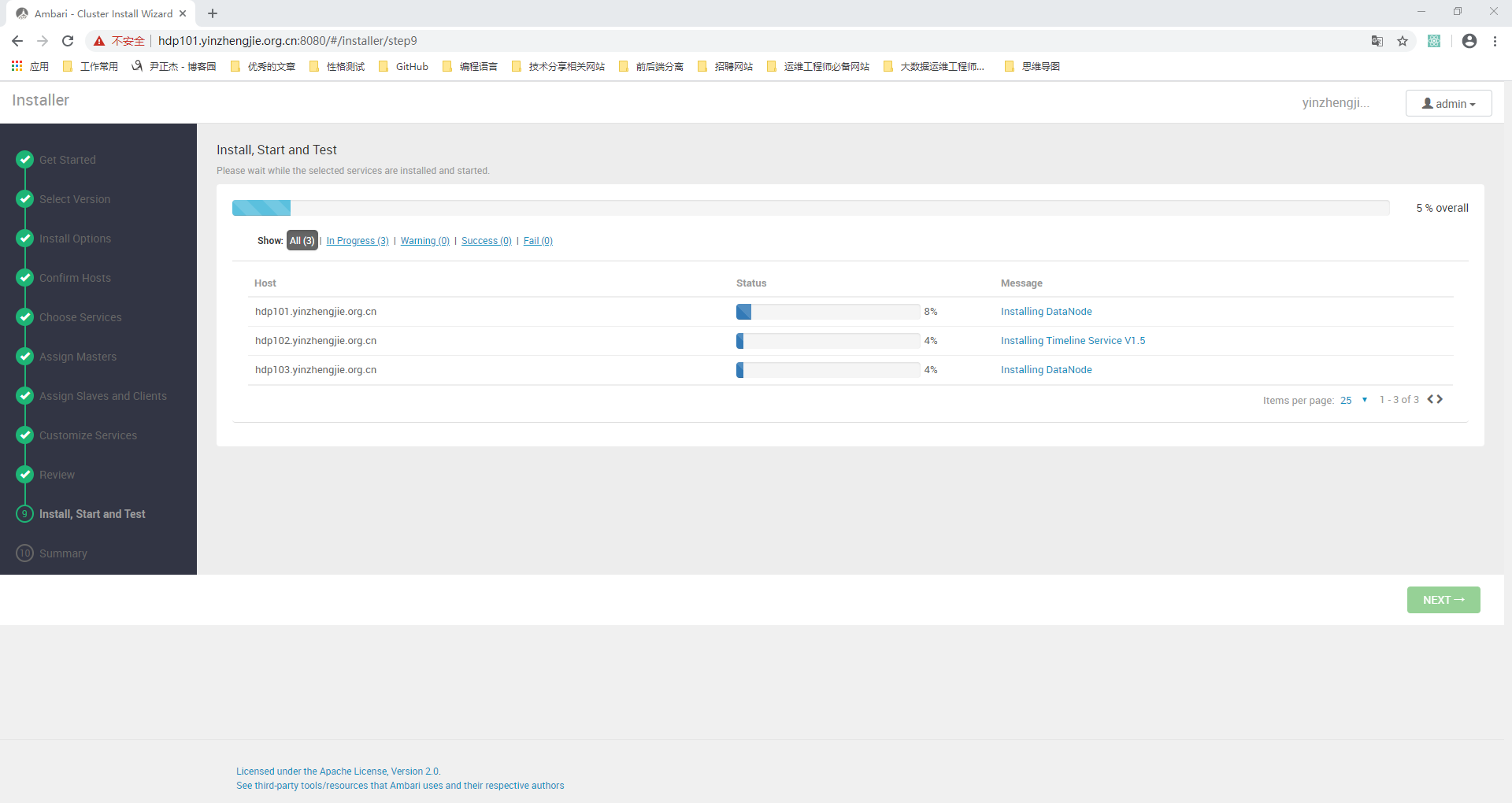
22>.等待服务自动安装,启动和测试

23>.服务安装成功
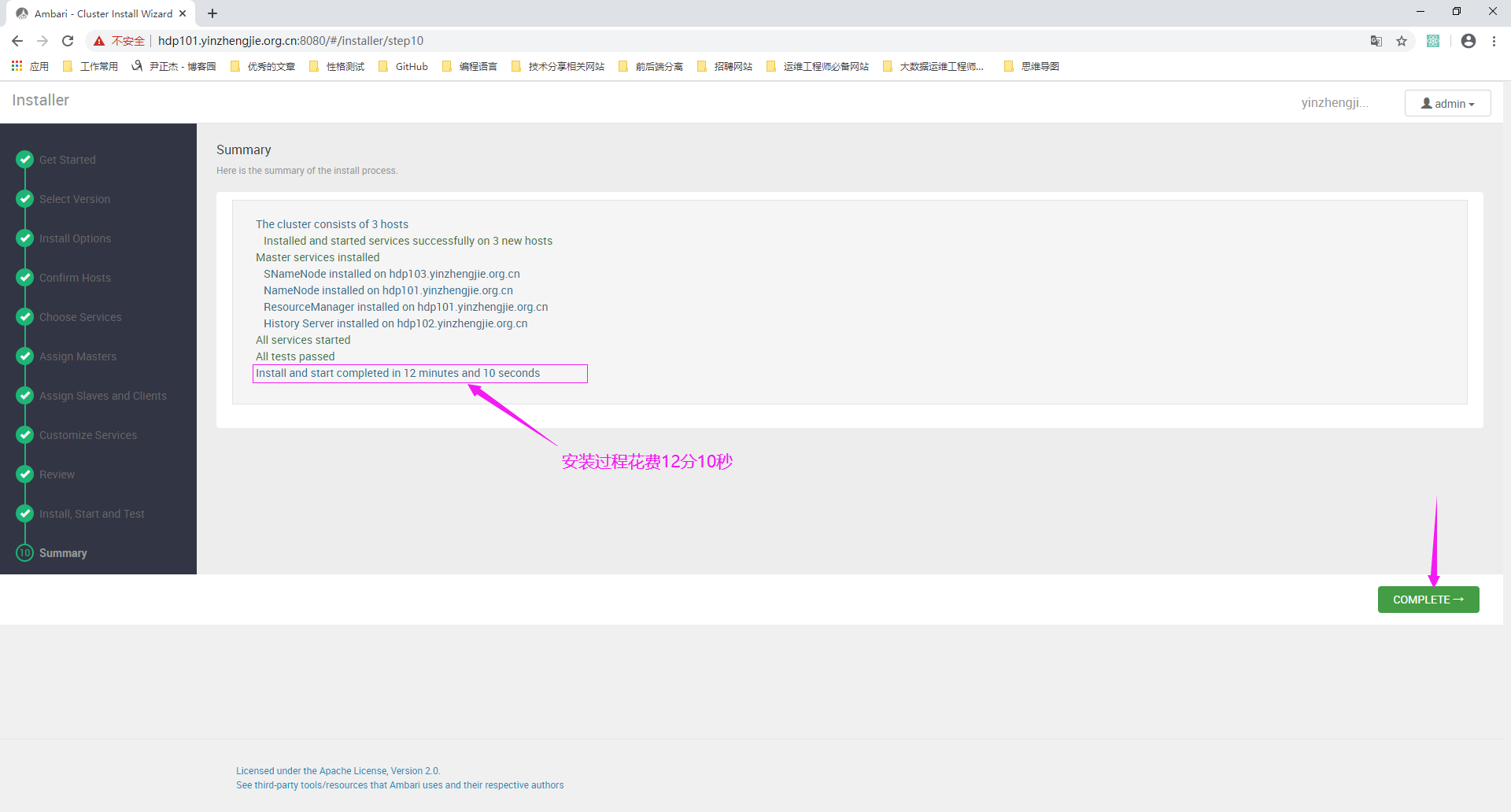
24>.安装完成后点击上图的“COMPLETE”会自动进入到"Dashboard"的监控页面

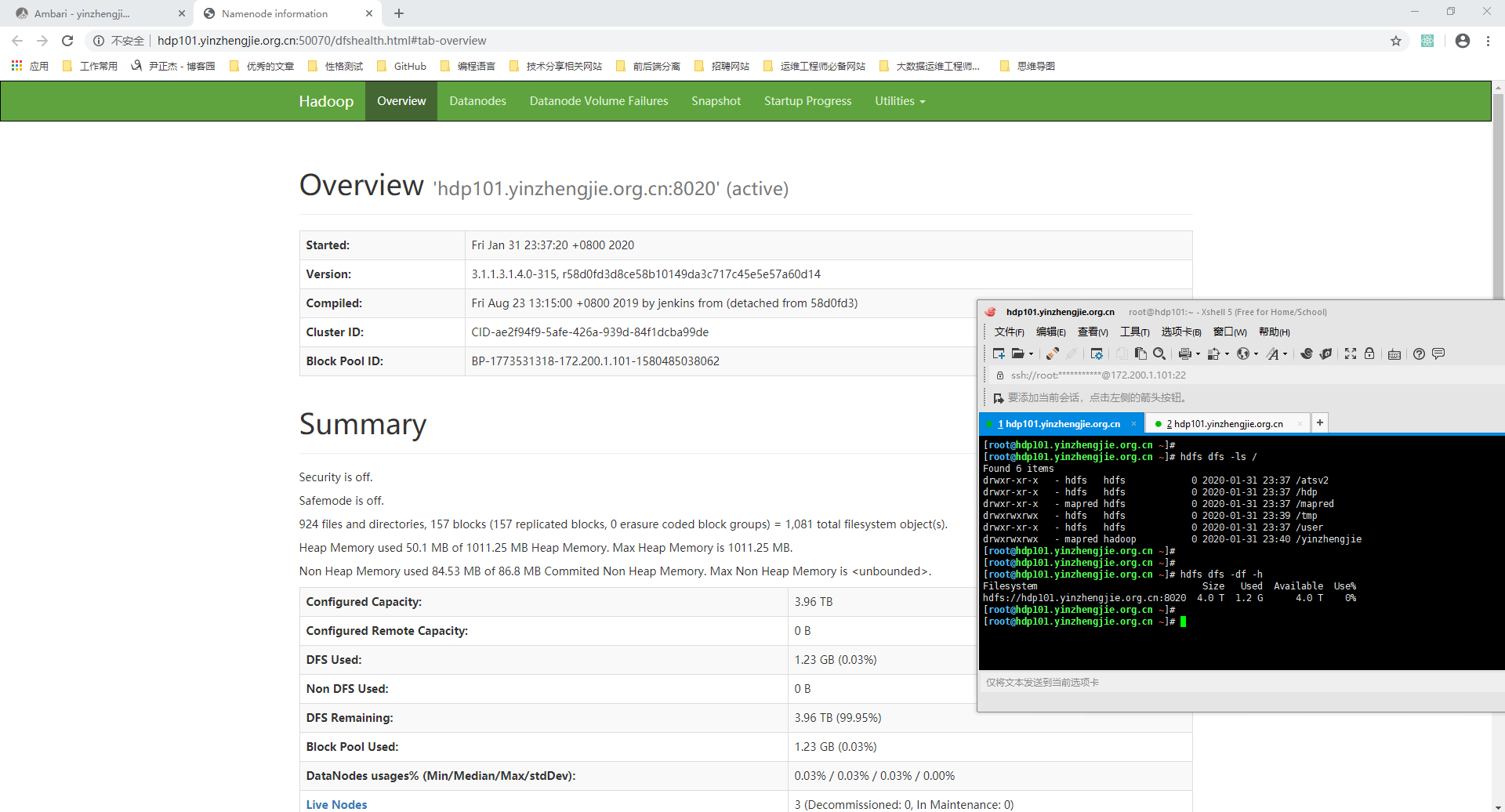
25>.手动测试HDFS服务是否安装成功
[root@hdp101.yinzhengjie.org.cn ~]# hdfs dfs -ls /

Found  items

drwxr-xr-x   - hdfs   hdfs             -- : /atsv2

drwxr-xr-x   - hdfs   hdfs             -- : /hdp

drwxr-xr-x   - mapred hdfs             -- : /mapred

drwxrwxrwx   - hdfs   hdfs             -- : /tmp

drwxr-xr-x   - hdfs   hdfs             -- : /user

drwxrwxrwx   - mapred hadoop           -- : /yinzhengjie

[root@hdp101.yinzhengjie.org.cn ~]#

[root@hdp101.yinzhengjie.org.cn ~]#

[root@hdp101.yinzhengjie.org.cn ~]# hdfs dfs -df -h

Filesystem                              Size   Used  Available  Use%

hdfs://hdp101.yinzhengjie.org.cn:8020  4.0 T  1.2 G      4.0 T    0%

[root@hdp101.yinzhengjie.org.cn ~]#

[root@hdp101.yinzhengjie.org.cn ~]#
基于Ambari Server部署HDP集群实战案例的更多相关文章
- 基于Ambari的WebUI实现集群扩容案例
基于Ambari的WebUI实现集群扩容案例 作者:尹正杰 版权声明:原创作品,谢绝转载!否则将追究法律责任. 一.将HDP的服务托管给Ambari服务 1>.点击“Service Auto S ...
- 庐山真面目之十微服务架构 Net Core 基于 Docker 容器部署 Nginx 集群
庐山真面目之十微服务架构 Net Core 基于 Docker 容器部署 Nginx 集群 一.简介 前面的两篇文章,我们已经介绍了Net Core项目基于Docker容器部署在Linux服 ...
- KVM部署LVS集群故障案例一则
一.故障现象 KVM部署LVS(Linux Virtual Server)集群后,能够单独以HTTP方式访问RS(Real Server)的实际IP,但无法通过VIP(Virtual IP)访问. 二 ...
- 使用虚拟机CentOS7部署CEPH集群
第1章 CEPH部署 1.1 简单介绍 Ceph的部署模式下主要包含以下几个类型的节点 Ø CephOSDs: A Ceph OSD 进程主要用来存储数据,处理数据的replication,恢复 ...
- 基于TLS证书手动部署kubernetes集群(下)
一.master节点组件部署 承接上篇文章--基于TLS证书手动部署kubernetes集群(上),我们已经部署好了etcd集群.flannel网络以及每个节点的docker,接下来部署master节 ...
- AMBARI部署HADOOP集群(4)
通过 Ambari 部署 hadoop 集群 1. 打开 http://192.168.242.181:8080 登陆的用户名/密码是 : admin/admin 2. 点击 “LAUNCH INS ...
- ambari部署Hadoop集群(2)
准备本地 repository 1. 下载下面的包 wget http://public-repo-1.hortonworks.com/ambari/centos7/2.x/updates/2.7.3 ...
- (转)基于TLS证书手动部署kubernetes集群(下)
转:https://www.cnblogs.com/wdliu/p/9152347.html 一.master节点组件部署 承接上篇文章--基于TLS证书手动部署kubernetes集群(上),我们已 ...
- Centos8 部署 ElasticSearch 集群并搭建 ELK,基于Logstash同步MySQL数据到ElasticSearch
Centos8安装Docker 1.更新一下yum [root@VM-24-9-centos ~]# yum -y update 2.安装containerd.io # centos8默认使用podm ...
随机推荐
- WebView使用详解(二)——WebViewClient与常用事件监听
登录|注册 关闭 启舰 当乌龟有了梦想…… 目录视图 摘要视图 订阅 异步赠书:Kotlin领衔10本好书 免费直播:AI时代,机器学习如何入门? 程序员8 ...
- .net设置浏览器缓存和跨域的几种方法
.自定义过滤器属性 public class NoCacheAttribute : FilterAttribute, IActionFilter { public void OnActionExecu ...
- windows10安装.netframework3.5
先挂载,看看挂载到哪个盘了,假设是I盘 然后按住shift 点鼠标右键,打开powershell,运行下面命令: dism.exe /online /enable-feature /featurena ...
- mysql#自定义序列
原文 mysql主键不用自增数字的时候,可以参考如下方式,我抄来的. -- 创建公共的序列表 DROP TABLE IF EXISTS t_common_sequence; CREATE TABLE ...
- Python基础_ONLINE习题集_03 数据类型
3.1 将元组(1,2,3) 和集合{"four",5,6}合成一个列表 tuple,set,list = (1,2,3),{"four",5,6},[] fo ...
- HTML<a>标签作为锚链接
1. 什么是锚链接? <a></a>标签主要作为超链接和锚链接使用.超链接主要指不同html页面之间的跳转,而锚链接指的是同一页面之间的跳转. 锚链接的两种效果: 在当前页面中 ...
- 连接数据库 - (mysql-thinkphp) (2)
1.现在conf里面写好选择的数据库 选择好了以后 2.在index里面输入 查询mysql数据库里面的表tables_priv的所有数据 public function index() { $res ...
- docker中使用mongodb
连接mongodb容器,下拉alpine应用测试连接
- 前端构建工具gulp超详细配置, 使用教程(图文)
流程 1. 输入命令(可以使用git bash或者命令控制台cmd) npm install -g gulp 安装全局gulp命令 2. 创建一个项目文件夹, 当前项目文件夹下输入命令npm init ...
- Day6 - K - 陌上花开 HYSBZ - 3262
有n朵花,每朵花有三个属性:花形(s).颜色(c).气味(m),用三个整数表示. 现在要对每朵花评级,一朵花的级别是它拥有的美丽能超过的花的数量. 定义一朵花A比另一朵花B要美丽,当且仅Sa>= ...