
matlab 调用C程序进行simulink仿真
文章目录
simulink仿真
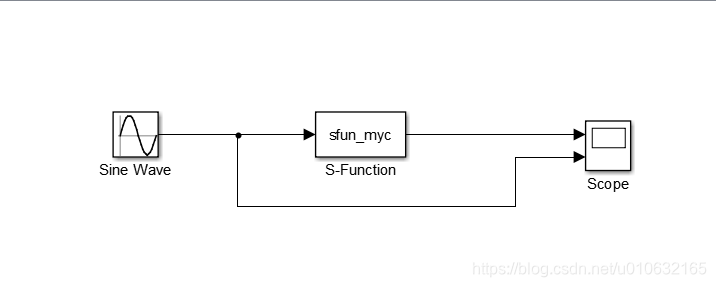
simulink仿真中需要使用S-Function模块,可以实现调用C程序进行仿真,下面先建立一个简单的仿真;
具体如下图所示;
创建C程序
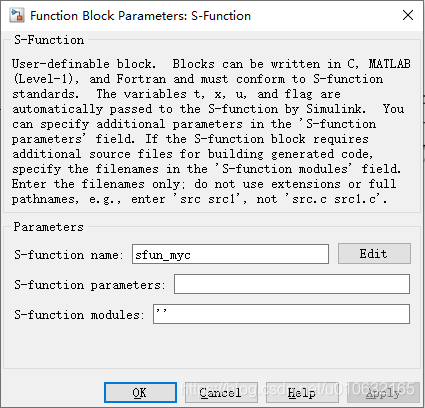
需要在S-Function模块的S-Function name一栏填写需要调用C程序文件名,注意不需要带文件名后缀;
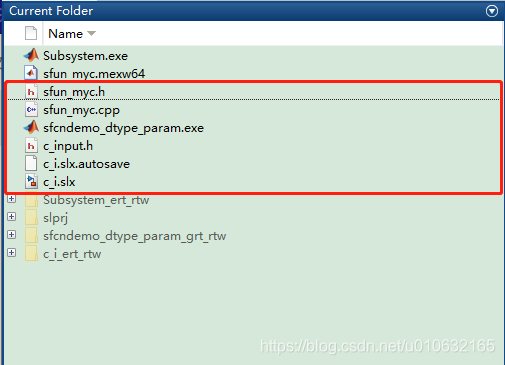
之后,新建文件sfun_myc.cpp和sfun_myc.h,放置在simulink仿真的同一级目录下,如下图所示;
sfun_myc.h如下;
/* Copyright 2003-2004 The MathWorks, Inc. */

#ifndef _SFUN_MYC_CPP_

#define _SFUN_MYC_CPP_

// Define a generic template that can accumulate

// values of any numeric data type

template <class DataType> class GenericAdder {

private:

    DataType Peak;

public:

    GenericAdder() {

        Peak = 0;

    }

    DataType AddTo(DataType Val) {

        Peak += Val;

        return Peak;

    }

    DataType GetPeak() const {

    	return Peak;

    }

    void SetPeak(DataType v) {

    	Peak = v;

    }

};

// Specialize the generic adder to a 'double'

// data type adder

class DoubleAdder : public GenericAdder<double> {};

#endif
sfun_myc.cpp如下;
/* Copyright 2003-2004 The MathWorks, Inc. */

// *******************************************************************

// **** To build this mex function use: mex sfun_cppcount_cpp.cpp ****

// *******************************************************************

#include "sfun_myc.h"

#define S_FUNCTION_LEVEL 2

#define S_FUNCTION_NAME  sfun_myc

// Need to include simstruc.h for the definition of the SimStruct and

// its associated macro definitions.

#include "simstruc.h"

#define IS_PARAM_DOUBLE(pVal) (mxIsNumeric(pVal) && !mxIsLogical(pVal) &&\

!mxIsEmpty(pVal) && !mxIsSparse(pVal) && !mxIsComplex(pVal) && mxIsDouble(pVal))

// Function: mdlInitializeSizes ===============================================

// Abstract:

//    The sizes information is used by Simulink to determine the S-function

//    block's characteristics (number of inputs, outputs, states, etc.).

static void mdlInitializeSizes(SimStruct *S)

{

    // No expected parameters

    ssSetNumSFcnParams(S, 0);

    // Parameter mismatch will be reported by Simulink

    if (ssGetNumSFcnParams(S) != ssGetSFcnParamsCount(S)) {

        return;

    }

    // Specify I/O

    if (!ssSetNumInputPorts(S, 1)) return;

    ssSetInputPortWidth(S, 0, DYNAMICALLY_SIZED);

    ssSetInputPortDirectFeedThrough(S, 0, 1);

    if (!ssSetNumOutputPorts(S,1)) return;

    ssSetOutputPortWidth(S, 0, DYNAMICALLY_SIZED);

    ssSetNumSampleTimes(S, 1);

    // Reserve place for C++ object

    ssSetNumPWork(S, 1);

    ssSetSimStateCompliance(S, USE_CUSTOM_SIM_STATE);

    ssSetOptions(S,

                 SS_OPTION_WORKS_WITH_CODE_REUSE |

                 SS_OPTION_EXCEPTION_FREE_CODE);

}

// Function: mdlInitializeSampleTimes =========================================

// Abstract:

//   This function is used to specify the sample time(s) for your

//   S-function. You must register the same number of sample times as

//   specified in ssSetNumSampleTimes.

static void mdlInitializeSampleTimes(SimStruct *S)

{

    ssSetSampleTime(S, 0, INHERITED_SAMPLE_TIME);

    ssSetOffsetTime(S, 0, 0.0);

    ssSetModelReferenceSampleTimeDefaultInheritance(S);

}

// Function: mdlStart =======================================================

// Abstract:

//   This function is called once at start of model execution. If you

//   have states that should be initialized once, this is the place

//   to do it.

#define MDL_START

static void mdlStart(SimStruct *S)

{

    // Store new C++ object in the pointers vector

    DoubleAdder *da  = new DoubleAdder();

    ssGetPWork(S)[0] = da;

}

// Function: mdlOutputs =======================================================

// Abstract:

//   In this function, you compute the outputs of your S-function

//   block.

static void mdlOutputs(SimStruct *S, int_T tid)

{

    // Retrieve C++ object from the pointers vector

    DoubleAdder *da = static_cast<DoubleAdder *>(ssGetPWork(S)[0]);

    // Get data addresses of I/O

    InputRealPtrsType  u = ssGetInputPortRealSignalPtrs(S,0);

               real_T *y = ssGetOutputPortRealSignal(S, 0);

    // Call AddTo method and return peak value

    // y[0] = da->AddTo(*u[0]);

    y[0] = *u[0] + 100;

}

/* Define to indicate that this S-Function has the mdlG[S]etSimState mothods */

#define MDL_SIM_STATE

/* Function: mdlGetSimState =====================================================

 * Abstract:

 *

 */

static mxArray* mdlGetSimState(SimStruct* S)

{

    // Retrieve C++ object from the pointers vector

    DoubleAdder *da = static_cast<DoubleAdder*>(ssGetPWork(S)[0]);

    return mxCreateDoubleScalar(da->GetPeak());

}

/* Function: mdlGetSimState =====================================================

 * Abstract:

 *

 */

static void mdlSetSimState(SimStruct* S, const mxArray* ma)

{

    // Retrieve C++ object from the pointers vector

    DoubleAdder *da = static_cast<DoubleAdder*>(ssGetPWork(S)[0]);

    da->SetPeak(mxGetPr(ma)[0]);

}

// Function: mdlTerminate =====================================================

// Abstract:

//   In this function, you should perform any actions that are necessary

//   at the termination of a simulation.  For example, if memory was

//   allocated in mdlStart, this is the place to free it.

static void mdlTerminate(SimStruct *S)

{

    // Retrieve and destroy C++ object

    DoubleAdder *da = static_cast<DoubleAdder *>(ssGetPWork(S)[0]);

    delete da;

}

// Required S-function trailer

#ifdef  MATLAB_MEX_FILE    /* Is this file being compiled as a MEX-file? */

#include "simulink.c"      /* MEX-file interface mechanism */

#else

#include "cg_sfun.h"       /* Code generation registration function */

#endif
最终在static void mdlOutputs(SimStruct *S, int_T tid)函数中对输入的数据进行处理即可;
static void mdlOutputs(SimStruct *S, int_T tid)

{

    // Retrieve C++ object from the pointers vector

    DoubleAdder *da = static_cast<DoubleAdder *>(ssGetPWork(S)[0]);

    // Get data addresses of I/O

    InputRealPtrsType  u = ssGetInputPortRealSignalPtrs(S,0);	//	输入

               real_T *y = ssGetOutputPortRealSignal(S, 0);		//	输出

    // Call AddTo method and return peak value

    // y[0] = da->AddTo(*u[0]);

    y[0] = *u[0] + 100;	//增加100的偏移量

}
编译C程序
查看当前路径下是否已经存在C文件,sfun_myc.h,sfun_myc.cpp;

使用mex指令编译sfun_myc.cpp;

运行结果
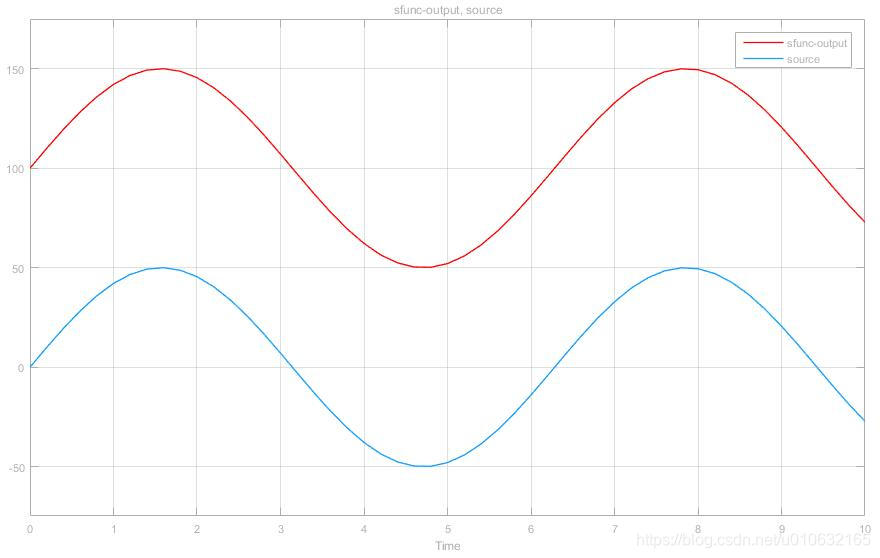
最终的运行结果,经过S-Function模块处理的波形比原来的波形偏移了100了,期望结果符合程序的逻辑,具体如下图所示;
链接:百度云下载
提取码:jnmg
matlab 调用C程序进行simulink仿真的更多相关文章
- MATLAB调用C程序、调试和LDPC译码
MATLAB是一个很好用的工具.利用MATLAB脚本进行科学计算也特别方便快捷.但是代码存在较多循环时,MATLAB运行速度极慢.如果不想放弃MATLAB中大量方便使用的库,又希望代码能迅速快捷的运行 ...
- Matlab调用C程序
Matlab调用C程序 复制来自https://blog.csdn.net/u010839382/article/details/42463237 Matlab是矩阵语言,如果运算可以用矩阵实现, ...
- Matlab调用C程序 分类: Matlab c/c++ 2015-01-06 19:18 464人阅读 评论(0) 收藏
Matlab是矩阵语言,如果运算可以用矩阵实现,其运算速度非常快.但若运算中涉及到大量循环,Matlab的速度令人难以忍受的.当必须使用for循环且找不到对应的矩阵运算来等效时,可以将耗时长的函数用C ...
- MATLAB设计模糊控制器并用simulink仿真
一.设计模糊控制器1.1 创建项目文件夹在此路径如图 1.2 打开MATLAB打开MATLAB R2012a切换当前目录为上一步路径,如图 1.3 设计模糊控制器打开模糊控制器设计对话框 根据模糊控制 ...
- matlab调用c程序(转载)
通过把耗时长的函数用c语言实现,并编译成mex函数可以加快执行速度. Matlab本身是不带c语言的编译器的,所以要求你的机器上已经安装有VC,BC或Watcom C中的一种. 如果你在安装Matla ...
- 【Matlab】简单的滑模控制程序及Simulink仿真
文章: [控制理论]滑模控制最强解析 滑模控制程序及Simulink仿真 这篇文章仿真和输出U的推到有些问题,博主根据此篇文章进行修改进行对sin(t)曲线的追踪(使用滑模控制) 使用滑模控制对sin ...
- Simulink仿真入门到精通(十) S函数
10.1 S函数概述 S函数也称为Simulink中的系统函数,是用来描述模块的Simulink宏函数,支持M.C等多种语言.当Simulink默认的模块不能满足用户的需求时,用户可以通过S函数自己打 ...
- 基于MATLAB的单级倒立摆仿真
有关代码及word文档请关注公众号“浮光倾云”,后台回复A010.02即可获取 一.单级倒立摆概述 倒立摆是处于倒置不稳定状态,人为控制使其处于动态平衡的一种摆,是一类典型的快速.多变量.非线性.强耦 ...
- Simulink仿真入门到精通(五) Simulink模型的仿真
5.1 模型的配置仿真 由各种模块所构建的可视化逻辑连接,只是模型的外在表现,模型仿真的核心驱动器是被称作解算器(Solver)的组件,相当于Simulink仿真过程的心脏,驱动着模型仿真,它在每一个 ...
随机推荐
- JUC强大的辅助类讲解--->>>CountDownLatchDemo (减少计数)
原理: CountDownLatch主要有两个方法,当一个或多个线程调用await方法时,这些线程会阻塞.其它线程调用countDown方法会将计数器减1(调用countDown方法的线程不会阻塞), ...
- python这门语言为什么要起这个名字
我只是一只可爱的小虫 前言 文的文字及图片来源于网络,仅供学习.交流使用,不具有任何商业用途,版权归原作者所有,如有问题请及时联系我们以作处理. 作者:Liz喵 PS:如有需要Python学习资料的小 ...
- Linux命令:chown
说明: 将指定文件的拥有者改为指定的用户或组. 语法: chown [-cfhvR] [--help] [--version] user[:group] file... 参数: user : 新的文件 ...
- 初识phar反序列化&&复现bytectf_2019_easycms&&RSS思路
概要 来自Secarma的安全研究员Sam Thomas发现了一种新的漏洞利用方式,可以在不使用php函数unserialize()的前提下,引起严重的php对象注入漏洞.这个新的攻击方式被他公开在了 ...
- eclipse 集成git工具
1.eclipse git插件下载 打开Eclipse,然后点击Help>Install New Software>Add name:git location:http://downloa ...
- python数据分析工具——Pandas、StatsModels、Scikit-Learn
Pandas Pandas是 Python下最强大的数据分析和探索工具.它包含高级的数据结构和精巧的工具,使得在 Python中处理数据非常快速和简单. Pandas构建在 Numpy之上,它使得以 ...
- 关于如何在Linux上使用Nugix反向代理部署net core3.1项目
本文意在教大家如何在Linux上部署net core web项目,本人通过实践已经成功可以通过外网访问我部署在阿里云服务器上的站点. 一:需要用到的东西如下: 1:一个基于net core框架下的we ...
- sqli lab less-5-6
less-5 基于报错的注入 基于报错可以爆出当前数据库名等等 id=2' and extractvalue(1, concat(0x7c,(select user())));-- # ?id=2' ...
- jstat命令查看JVM 的GC状态
转载于 https://www.cnblogs.com/alter888/p/10407952.html jstat命令可以查看堆内存各部分的使用量,以及加载类的数量.命令的格式如下: jstat ...
- NPM 私有仓库的搭建
NPM 私有仓库的搭建 为什么搭建私有仓库 balabala,当然是有需求的时候嘛 搭建流程 介绍和安装verdaccio 备注: 程序启动后,配置文件为/home/work/.config/verd ...