
matlab 调用C程序进行simulink仿真
文章目录
simulink仿真
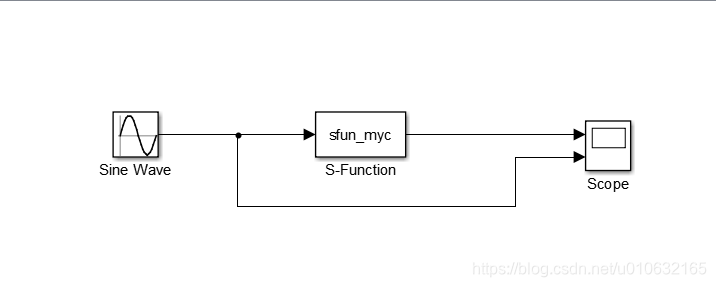
simulink仿真中需要使用S-Function模块,可以实现调用C程序进行仿真,下面先建立一个简单的仿真;
具体如下图所示;
创建C程序
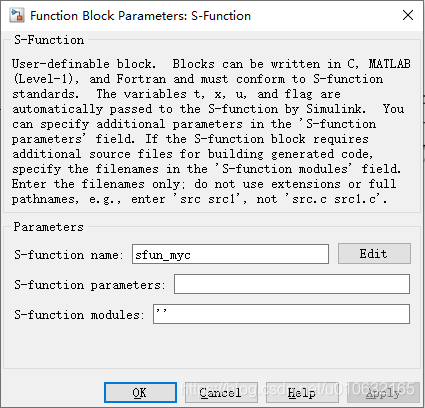
需要在S-Function模块的S-Function name一栏填写需要调用C程序文件名,注意不需要带文件名后缀;
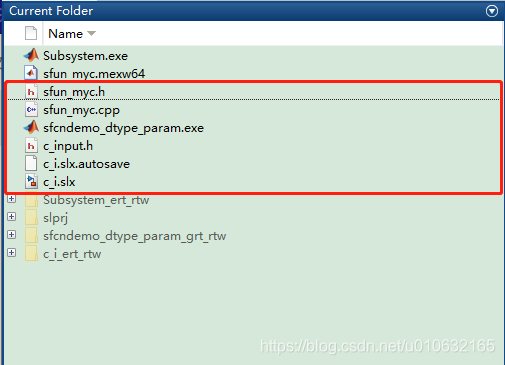
之后,新建文件sfun_myc.cpp和sfun_myc.h,放置在simulink仿真的同一级目录下,如下图所示;
sfun_myc.h如下;
/* Copyright 2003-2004 The MathWorks, Inc. */

#ifndef _SFUN_MYC_CPP_

#define _SFUN_MYC_CPP_

// Define a generic template that can accumulate

// values of any numeric data type

template <class DataType> class GenericAdder {

private:

    DataType Peak;

public:

    GenericAdder() {

        Peak = 0;

    }

    DataType AddTo(DataType Val) {

        Peak += Val;

        return Peak;

    }

    DataType GetPeak() const {

    	return Peak;

    }

    void SetPeak(DataType v) {

    	Peak = v;

    }

};

// Specialize the generic adder to a 'double'

// data type adder

class DoubleAdder : public GenericAdder<double> {};

#endif
sfun_myc.cpp如下;
/* Copyright 2003-2004 The MathWorks, Inc. */

// *******************************************************************

// **** To build this mex function use: mex sfun_cppcount_cpp.cpp ****

// *******************************************************************

#include "sfun_myc.h"

#define S_FUNCTION_LEVEL 2

#define S_FUNCTION_NAME  sfun_myc

// Need to include simstruc.h for the definition of the SimStruct and

// its associated macro definitions.

#include "simstruc.h"

#define IS_PARAM_DOUBLE(pVal) (mxIsNumeric(pVal) && !mxIsLogical(pVal) &&\

!mxIsEmpty(pVal) && !mxIsSparse(pVal) && !mxIsComplex(pVal) && mxIsDouble(pVal))

// Function: mdlInitializeSizes ===============================================

// Abstract:

//    The sizes information is used by Simulink to determine the S-function

//    block's characteristics (number of inputs, outputs, states, etc.).

static void mdlInitializeSizes(SimStruct *S)

{

    // No expected parameters

    ssSetNumSFcnParams(S, 0);

    // Parameter mismatch will be reported by Simulink

    if (ssGetNumSFcnParams(S) != ssGetSFcnParamsCount(S)) {

        return;

    }

    // Specify I/O

    if (!ssSetNumInputPorts(S, 1)) return;

    ssSetInputPortWidth(S, 0, DYNAMICALLY_SIZED);

    ssSetInputPortDirectFeedThrough(S, 0, 1);

    if (!ssSetNumOutputPorts(S,1)) return;

    ssSetOutputPortWidth(S, 0, DYNAMICALLY_SIZED);

    ssSetNumSampleTimes(S, 1);

    // Reserve place for C++ object

    ssSetNumPWork(S, 1);

    ssSetSimStateCompliance(S, USE_CUSTOM_SIM_STATE);

    ssSetOptions(S,

                 SS_OPTION_WORKS_WITH_CODE_REUSE |

                 SS_OPTION_EXCEPTION_FREE_CODE);

}

// Function: mdlInitializeSampleTimes =========================================

// Abstract:

//   This function is used to specify the sample time(s) for your

//   S-function. You must register the same number of sample times as

//   specified in ssSetNumSampleTimes.

static void mdlInitializeSampleTimes(SimStruct *S)

{

    ssSetSampleTime(S, 0, INHERITED_SAMPLE_TIME);

    ssSetOffsetTime(S, 0, 0.0);

    ssSetModelReferenceSampleTimeDefaultInheritance(S);

}

// Function: mdlStart =======================================================

// Abstract:

//   This function is called once at start of model execution. If you

//   have states that should be initialized once, this is the place

//   to do it.

#define MDL_START

static void mdlStart(SimStruct *S)

{

    // Store new C++ object in the pointers vector

    DoubleAdder *da  = new DoubleAdder();

    ssGetPWork(S)[0] = da;

}

// Function: mdlOutputs =======================================================

// Abstract:

//   In this function, you compute the outputs of your S-function

//   block.

static void mdlOutputs(SimStruct *S, int_T tid)

{

    // Retrieve C++ object from the pointers vector

    DoubleAdder *da = static_cast<DoubleAdder *>(ssGetPWork(S)[0]);

    // Get data addresses of I/O

    InputRealPtrsType  u = ssGetInputPortRealSignalPtrs(S,0);

               real_T *y = ssGetOutputPortRealSignal(S, 0);

    // Call AddTo method and return peak value

    // y[0] = da->AddTo(*u[0]);

    y[0] = *u[0] + 100;

}

/* Define to indicate that this S-Function has the mdlG[S]etSimState mothods */

#define MDL_SIM_STATE

/* Function: mdlGetSimState =====================================================

 * Abstract:

 *

 */

static mxArray* mdlGetSimState(SimStruct* S)

{

    // Retrieve C++ object from the pointers vector

    DoubleAdder *da = static_cast<DoubleAdder*>(ssGetPWork(S)[0]);

    return mxCreateDoubleScalar(da->GetPeak());

}

/* Function: mdlGetSimState =====================================================

 * Abstract:

 *

 */

static void mdlSetSimState(SimStruct* S, const mxArray* ma)

{

    // Retrieve C++ object from the pointers vector

    DoubleAdder *da = static_cast<DoubleAdder*>(ssGetPWork(S)[0]);

    da->SetPeak(mxGetPr(ma)[0]);

}

// Function: mdlTerminate =====================================================

// Abstract:

//   In this function, you should perform any actions that are necessary

//   at the termination of a simulation.  For example, if memory was

//   allocated in mdlStart, this is the place to free it.

static void mdlTerminate(SimStruct *S)

{

    // Retrieve and destroy C++ object

    DoubleAdder *da = static_cast<DoubleAdder *>(ssGetPWork(S)[0]);

    delete da;

}

// Required S-function trailer

#ifdef  MATLAB_MEX_FILE    /* Is this file being compiled as a MEX-file? */

#include "simulink.c"      /* MEX-file interface mechanism */

#else

#include "cg_sfun.h"       /* Code generation registration function */

#endif
最终在static void mdlOutputs(SimStruct *S, int_T tid)函数中对输入的数据进行处理即可;
static void mdlOutputs(SimStruct *S, int_T tid)

{

    // Retrieve C++ object from the pointers vector

    DoubleAdder *da = static_cast<DoubleAdder *>(ssGetPWork(S)[0]);

    // Get data addresses of I/O

    InputRealPtrsType  u = ssGetInputPortRealSignalPtrs(S,0);	//	输入

               real_T *y = ssGetOutputPortRealSignal(S, 0);		//	输出

    // Call AddTo method and return peak value

    // y[0] = da->AddTo(*u[0]);

    y[0] = *u[0] + 100;	//增加100的偏移量

}
编译C程序
查看当前路径下是否已经存在C文件,sfun_myc.h,sfun_myc.cpp;

使用mex指令编译sfun_myc.cpp;

运行结果
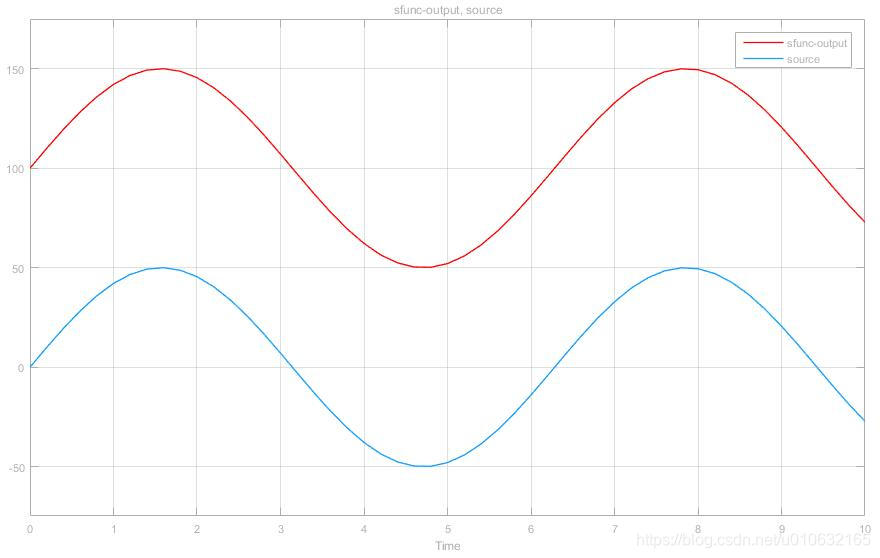
最终的运行结果,经过S-Function模块处理的波形比原来的波形偏移了100了,期望结果符合程序的逻辑,具体如下图所示;
链接:百度云下载
提取码:jnmg
matlab 调用C程序进行simulink仿真的更多相关文章
- MATLAB调用C程序、调试和LDPC译码
MATLAB是一个很好用的工具.利用MATLAB脚本进行科学计算也特别方便快捷.但是代码存在较多循环时,MATLAB运行速度极慢.如果不想放弃MATLAB中大量方便使用的库,又希望代码能迅速快捷的运行 ...
- Matlab调用C程序
Matlab调用C程序 复制来自https://blog.csdn.net/u010839382/article/details/42463237 Matlab是矩阵语言,如果运算可以用矩阵实现, ...
- Matlab调用C程序 分类: Matlab c/c++ 2015-01-06 19:18 464人阅读 评论(0) 收藏
Matlab是矩阵语言,如果运算可以用矩阵实现,其运算速度非常快.但若运算中涉及到大量循环,Matlab的速度令人难以忍受的.当必须使用for循环且找不到对应的矩阵运算来等效时,可以将耗时长的函数用C ...
- MATLAB设计模糊控制器并用simulink仿真
一.设计模糊控制器1.1 创建项目文件夹在此路径如图 1.2 打开MATLAB打开MATLAB R2012a切换当前目录为上一步路径,如图 1.3 设计模糊控制器打开模糊控制器设计对话框 根据模糊控制 ...
- matlab调用c程序(转载)
通过把耗时长的函数用c语言实现,并编译成mex函数可以加快执行速度. Matlab本身是不带c语言的编译器的,所以要求你的机器上已经安装有VC,BC或Watcom C中的一种. 如果你在安装Matla ...
- 【Matlab】简单的滑模控制程序及Simulink仿真
文章: [控制理论]滑模控制最强解析 滑模控制程序及Simulink仿真 这篇文章仿真和输出U的推到有些问题,博主根据此篇文章进行修改进行对sin(t)曲线的追踪(使用滑模控制) 使用滑模控制对sin ...
- Simulink仿真入门到精通(十) S函数
10.1 S函数概述 S函数也称为Simulink中的系统函数,是用来描述模块的Simulink宏函数,支持M.C等多种语言.当Simulink默认的模块不能满足用户的需求时,用户可以通过S函数自己打 ...
- 基于MATLAB的单级倒立摆仿真
有关代码及word文档请关注公众号“浮光倾云”,后台回复A010.02即可获取 一.单级倒立摆概述 倒立摆是处于倒置不稳定状态,人为控制使其处于动态平衡的一种摆,是一类典型的快速.多变量.非线性.强耦 ...
- Simulink仿真入门到精通(五) Simulink模型的仿真
5.1 模型的配置仿真 由各种模块所构建的可视化逻辑连接,只是模型的外在表现,模型仿真的核心驱动器是被称作解算器(Solver)的组件,相当于Simulink仿真过程的心脏,驱动着模型仿真,它在每一个 ...
随机推荐
- JAVA—SQL注入
之前看到的一道java面试题,Statement与PreparedStatement的区别,什么是SQL注入,如何防止SQL注入 前面部分比较好回答 1.PreparedStatement支持动态设置 ...
- Ubuntu16.04 安装eclipse
首先确保自己的Ubuntu已经安装了jdk并且配置好了环境变量 然后在官网下载相应的eclipse安装包: https://www.eclipse.org/downloads/packages/ 下载 ...
- Java面试系列第3篇-HashMap相关面试题
HashMap是非线程安全的,如果想要用线程安全的map,可使用同步的HashTable或通过Collections.synchronizeMap(hashMap)让HashMap变的同步,或者使用并 ...
- php://input和parse_str()使用
php://input可以读取没有处理过的POST数据,总结起来就是, 在用$_POST获取不到由APP或者一些接口的回调数据时,就用php://input试试 实例 index.php <fo ...
- Discuz的文件目录解析
最近在学习discuz,对这个不了解的 可以参考 http://www.cnblogs.com/hgj123/p/4641845.html
- Task Scheduler Error Message: 80041318
Using the error lookup tool that comes with VC++ (errlook.exe, or "Error Lookup" on the To ...
- Gym 101194D Ice Cream Tower
被一道数位DP折磨得欲仙欲死之后,再做这道题真是如同吃了ice cream一样舒畅啊 #include<bits/stdc++.h> using namespace std; #defin ...
- Struts2漏洞利用
Struts漏洞合集 Struts-S2-013漏洞利用 受影响版本 Struts 2.0.0 - Struts 2.3.14.1 漏洞利用 任意命令执行POC: ${(#_memberAccess[ ...
- Vue Cli 3 报错:router is not defined
报错内容: 报错原因: 代码全部放在了路由配置的main.js文件里,router没有定义,使用的时候报undefined 解决方法: 把router.beforeEach放在main.js里面
- Shiro踩坑记(一):关于shiro-spring-boot-web-starter自动注解无法注入authorizer的问题
一)问题描述: 我在一个Spring的项目中使用shiro搭建权限控制框架.主要通过shiro-spring-boot-web-starter包快速集成Shiro.但是项目无法启动,报没有author ...