
【09】openlayers 图片图层
效果:
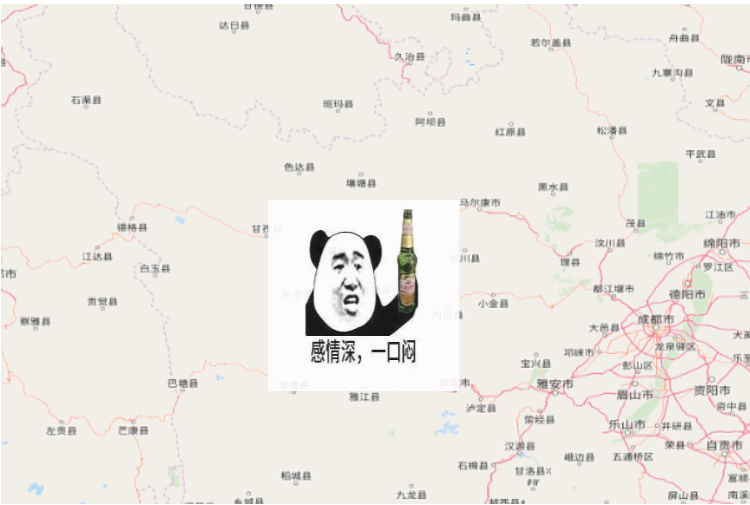
创建地图:
var map = new ol.Map({

    //设置显示地图的视图

    view: new ol.View({

        projection:'EPSG:4326',//投影方式

        center: [108, 34],//定义初始显示位置

        zoom: 3 ,//定义地图显示层级

    }),

    //创建地图图层

    layers: [

        //创建一个使用Open Street Map地图源的瓦片图层

        new ol.layer.Tile({

            source: new ol.source.OSM()

        })

    ],

    //让id为map的div作为地图的容器

    target: 'map',

    //控件初始默认不显示

    controls:ol.control.defaults({

        attribution: false,

        zoom: false

    }).extend([])

});
创建图片图层:
//静态图片资源

let source = new ol.source.ImageStatic({

    url: 'lib/time.jpg',//图片网址

    projection: 'EPSG:4326',//投影

    imageExtent: [100,30,102,32]//图像坐标[minLon,minLat,maxLon,maxLat]

})

//wms资源

let wmsSource = new ol.source.ImageWMS({

    url: "https://ahocevar.com/geoserver/wms",

    params: { LAYERS: "ne:ne" },

    serverType: "geoserver",

    crossOrigin: "anonymous"

});

let imageLayer = new ol.layer.Image({

    source: source,//该层的来源

    zIndex:1,//图层渲染的Z索引,默认按加载顺序叠加

    extent:[100,30,102,32],//图层渲染范围,可选值,默认渲染全部

    visible:true,//是否显示,默认为true

    opacity:1,//透明度,默认为1

})

map.addLayer(imageLayer)
图片图层关于map的方法:
//添加图片图层

map.addLayer(imageLayer)

//删除图片图层

map.removeLayer(imageLayer)
图片图层自身方法:
//获取-设置,渲染范围

imageLayer.getExtent()

imageLayer.setExtent([100,30,104,40])

//获取-设置,最大级别

imageLayer.getMaxZoom()

imageLayer.setMaxZoom(18)

//获取-设置,最小级别

imageLayer.getMinZoom()

imageLayer.setMinZoom(2)

//获取-设置,透明度

imageLayer.getOpacity()

imageLayer.setOpacity(0.9)

//获取-设置,图层源

imageLayer.getSource()

imageLayer.setSource(source)

//获取-设置,是否可见

imageLayer.getVisible()

imageLayer.setVisible(true)

//获取-设置,图层的Z-index

imageLayer.getZIndex()

imageLayer.setZIndex(2)

//绑定事件-取消事件 type事件类型,listener函数体

imageLayer.on(type,listener)

imageLayer.un(type,listener)
【09】openlayers 图片图层的更多相关文章
- CALayer 知识:创建带阴影效果的圆角图片图层和创建自定义绘画内容图层
效果如下: KMLayerDelegate.h #import <UIKit/UIKit.h> @interface KMLayerDelegate : NSObject @end KML ...
- arcgis api 4.x for js 自定义叠加图片图层实现地图叠加图片展示(附源码下载)
前言 关于本篇功能实现用到的 api 涉及类看不懂的,请参照 esri 官网的 arcgis api 4.x for js:esri 官网 api,里面详细的介绍 arcgis api 4.x 各个类 ...
- openlayers筛选图层
很多时候需要筛选图层,例如选择交互(ol.interaction.Select). 图片来自官方:https://openlayers.org/en/v4.6.5/apidoc/ol.interact ...
- openlayers自定义图层控制的实现
好久没写博文了,今天出来冒个泡. 最近一直在考虑一件事情,那就是openlayers中自定义wms的图层控制.用过openlayers的人都知道,在openlayers中有自带的图层控制的控件,调用方 ...
- 【07】openlayers 矢量图层
创建地图: //创建地图 var map = new ol.Map({ //设置显示地图的视图 view: new ol.View({ center: [0, 0],//义地图显示中心于经度0度,纬度 ...
- Openlayers 3 图层探查功能
<body> <div id="map"></div> <script> var map=new ol.Map({ target:& ...
- openlayers 各种图层,持续更新
/*高德地图*/ var vectorLayerLine = new ol.layer.Tile({ source: new ol.source.XYZ({ urls: [ "http:// ...
- 【05】openlayers 网格图层
效果: 创建地图: //创建地图 var map = new ol.Map({ //设置显示地图的视图 view: new ol.View({ projection: 'EPSG:4326', //投 ...
- 【06】openlayers 切片图层
创建地图: //OSM图层 let source = new ol.source.OSM() //切片图层tilelayer let layers = new ol.layer.Tile({ sour ...
随机推荐
- UFT检查点
一.标准检查点 选择需要插入检查点的语句,点击右键,选择Insert Standard Checkpoint.... 二.图像检查点(Insert Standard Checkpoint....) 在 ...
- Python迭代器和关键字 global ,nonlocal
1.关键字 global : 可以修改全局变量 可以在局部作用域声明一个全局变量,剪切 : 此时局部作用域没有该变量,全局作用域中有 name = 1 def func(): global name ...
- 图形学创世纪——写在SIGGRAPH 40年的边上
40年的边上" title="图形学创世纪--写在SIGGRAPH 40年的边上"> 前言: SIGGRAPH是由ACM SIGGRAPH(美国计算机协会计算机图形 ...
- perf4j+logback配置 非spring 可使用注解
最近项目打算使用perf4j进行性能监控,由于项目没有使用spring,而又不想对代码入侵过高,打算使用注解的方式进行接入.perf4j采用AspectJ库实现AOP. 具体接入方法如下: logba ...
- Caused by: com.alibaba.fastjson.JSONException: syntax error, expect {, actual [, pos 0, fastjson-version 1.2
环境: vue.js 问题: 当添加评论时 重新查询数据刷新数据控制台异常Caused by: com.alibaba.fastjson.JSONException: syntax error, ex ...
- 吴裕雄--天生自然 R语言开发学习:方差分析
#-------------------------------------------------------------------# # R in Action (2nd ed): Chapte ...
- MyBatis like (模糊查询)
select * from user where user_name like concat('%',#{userName},'%'); select * from user where user_n ...
- iOS中如何实现准确的倒计时程序 · 九十里
iOS中倒计时程序,考虑线程暂停场景. iOS App进入后台时,GCD线程也会跟着暂停.当程序进入前台后,GCD线程恢复.因而倒计时程序需要考虑这一点,通过加入时间的比对来实现. + (void)c ...
- 8.2.2 使用Java8增强的Iterator遍历集合元素
8.2.2 使用Java 8增强的Iterator遍历集合元素 Iterator接口方法 程序示例 Iterator仅用于遍历集合 Iterator必须依附于Collection对象 修改迭代变量的值 ...
- CentOS7使用firewalld管理防火墙与端口
firewalld的基本使用 启动: systemctl start firewalld 关闭: systemctl stop firewalld 查看状态: systemctl status fir ...