
吴裕雄--天生自然 R语言开发学习:方差分析
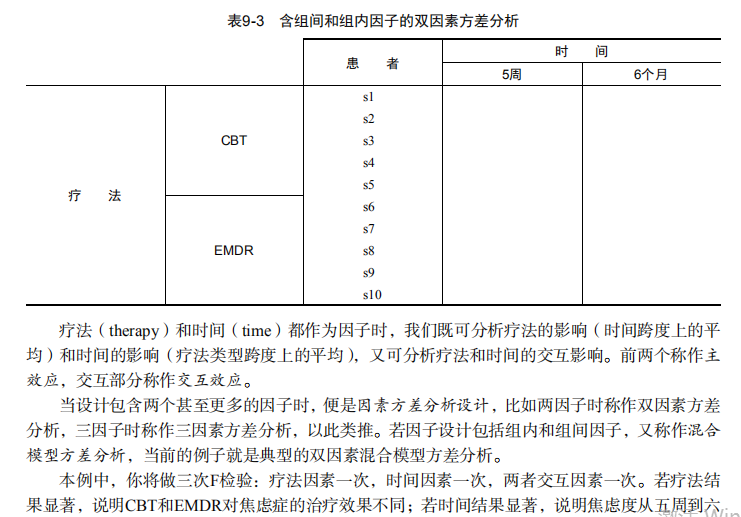
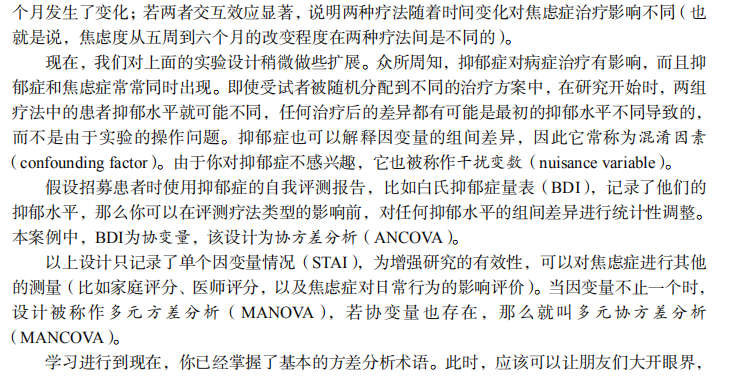
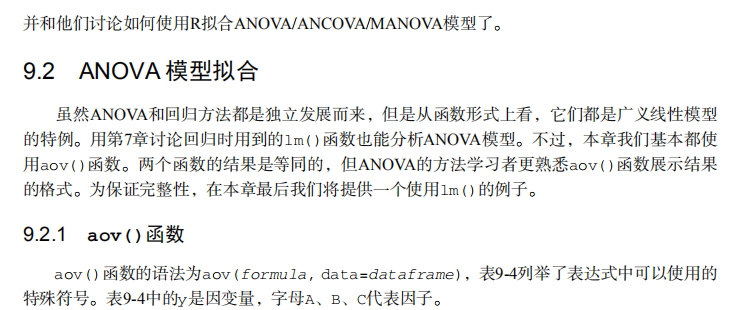
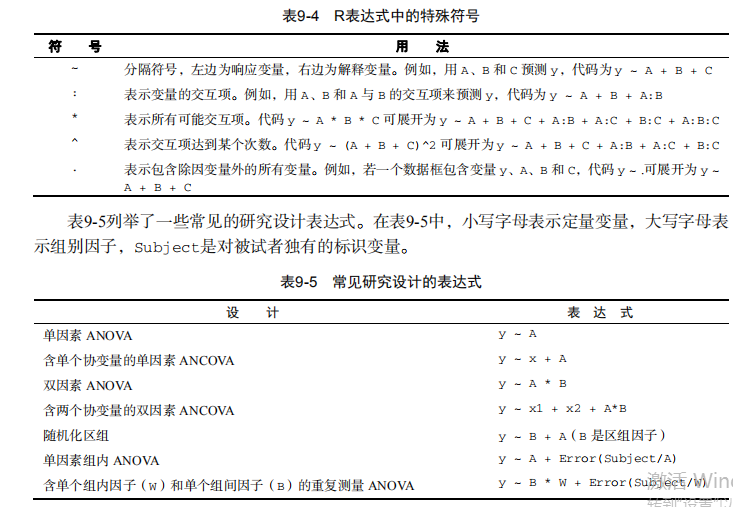
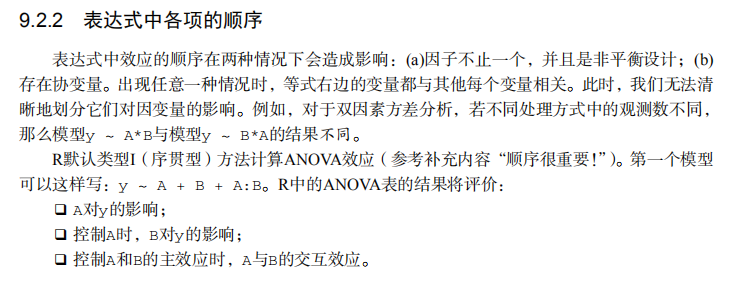
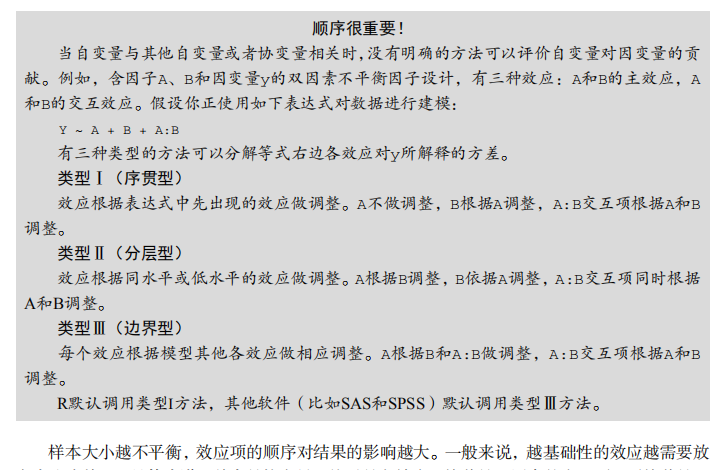
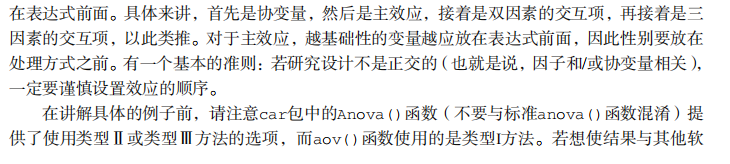
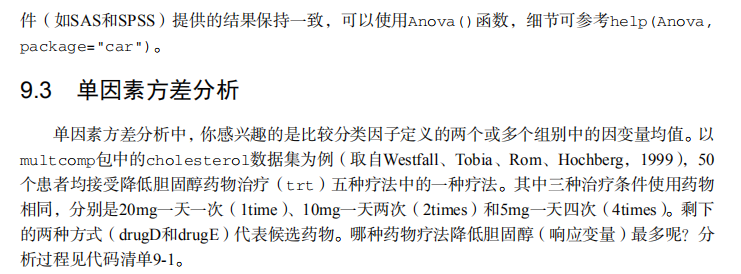




#-------------------------------------------------------------------#

# R in Action (2nd ed): Chapter 9                                   #

# Analysis of variance                                              #

# requires packages multcomp, gplots, car, HH, effects,             #

#                   rrcov, mvoutlier to be installed                #

# install.packages(c("multcomp", "gplots", "car", "HH", "effects",  #

#                    "rrcov", "mvoutlier"))                         #

#-------------------------------------------------------------------#

par(ask=TRUE)

opar <- par(no.readonly=TRUE) # save original parameters

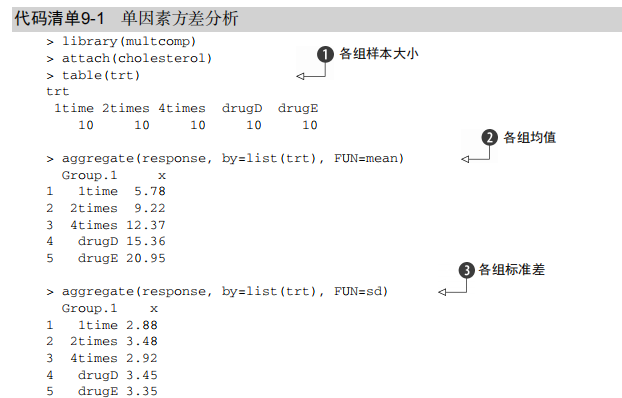
# Listing 9.1 - One-way ANOVA

library(multcomp)

attach(cholesterol)

table(trt)

aggregate(response, by=list(trt), FUN=mean)

aggregate(response, by=list(trt), FUN=sd)

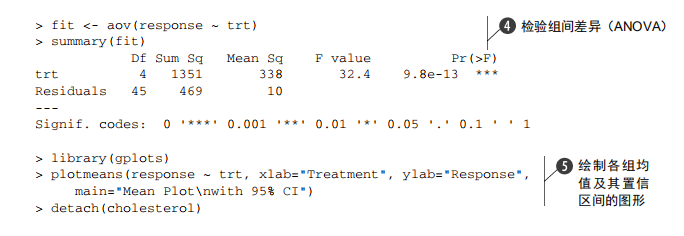
fit <- aov(response ~ trt)

summary(fit)

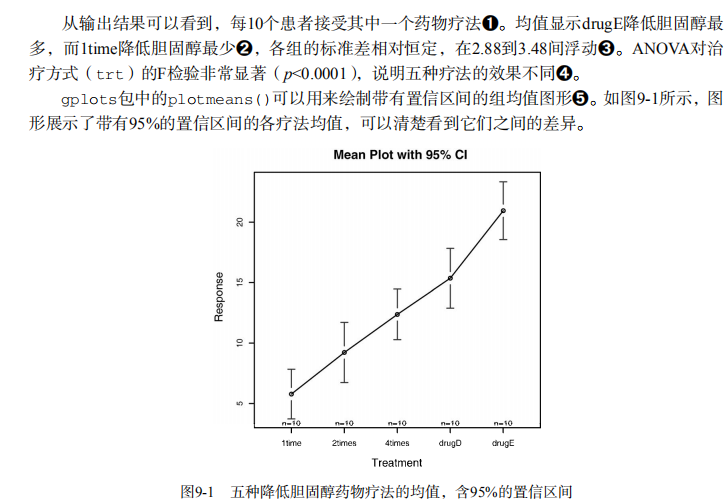
library(gplots)

plotmeans(response ~ trt, xlab="Treatment", ylab="Response",

          main="Mean Plot\nwith 95% CI")

detach(cholesterol)

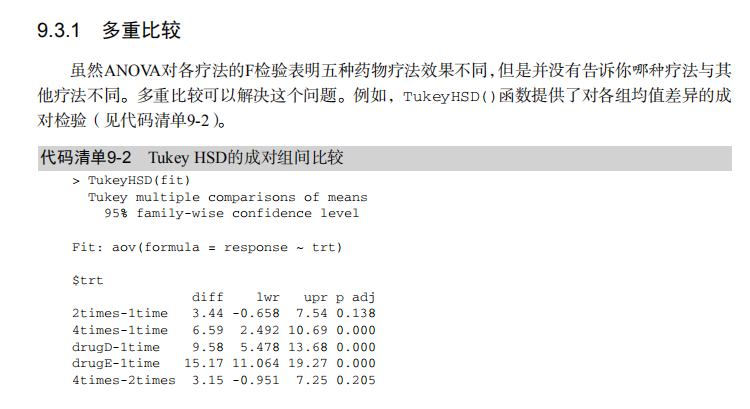
# Listing 9.2 - Tukey HSD pairwise group comparisons

TukeyHSD(fit)

par(las=2)

par(mar=c(5,8,4,2))

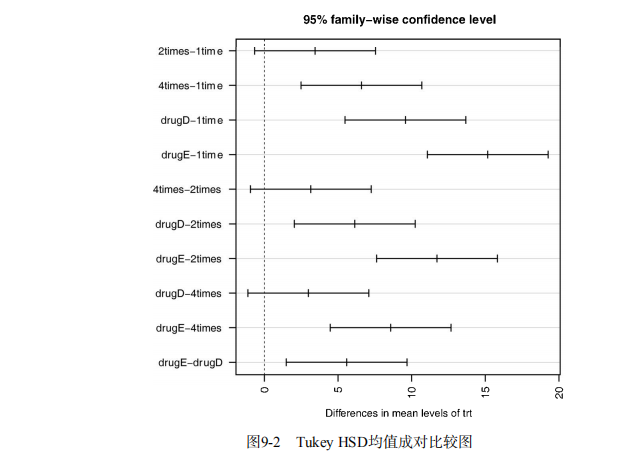
plot(TukeyHSD(fit))

par(opar)

# Multiple comparisons the multcomp package

library(multcomp)

par(mar=c(5,4,6,2))

tuk <- glht(fit, linfct=mcp(trt="Tukey"))

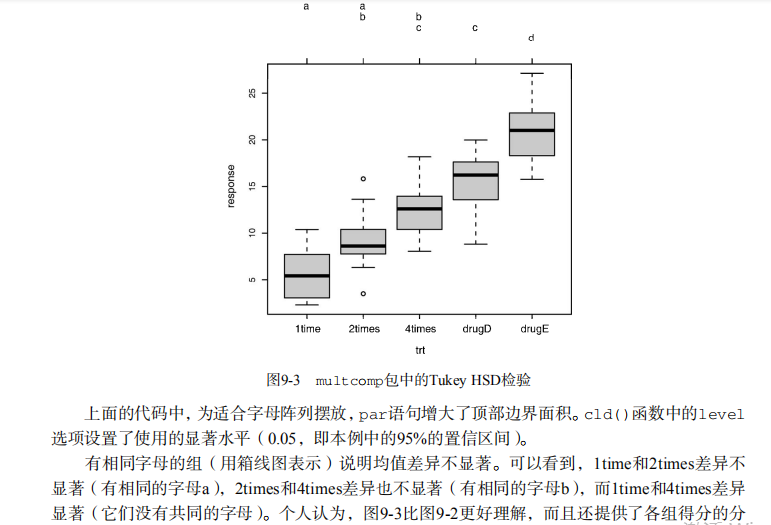
plot(cld(tuk, level=.05),col="lightgrey")

par(opar)

# Assessing normality

library(car)

qqPlot(lm(response ~ trt, data=cholesterol),

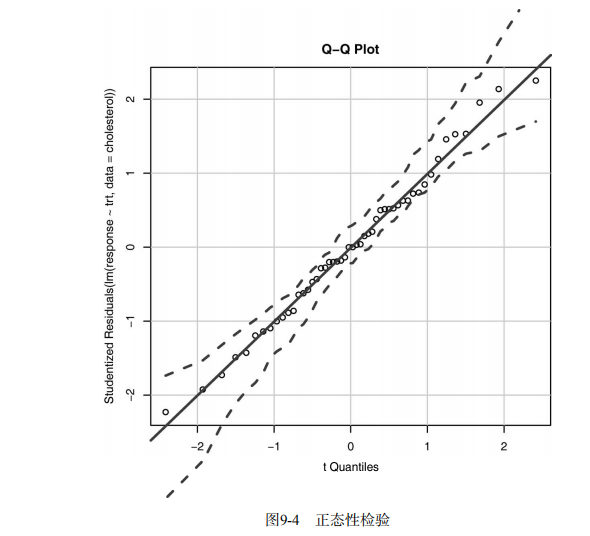
       simulate=TRUE, main="Q-Q Plot", labels=FALSE)

# Assessing homogeneity of variances

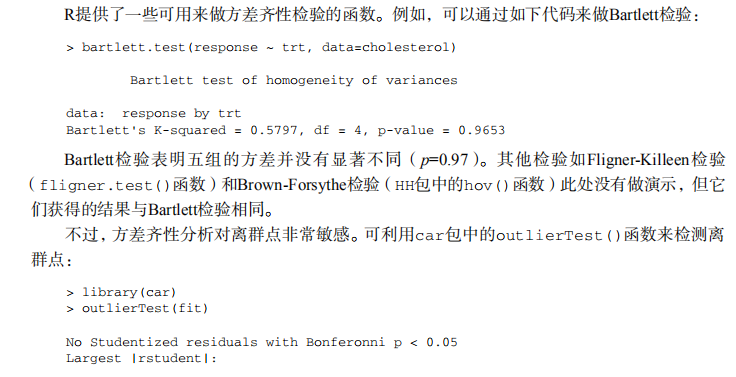
bartlett.test(response ~ trt, data=cholesterol)

# Assessing outliers

library(car)

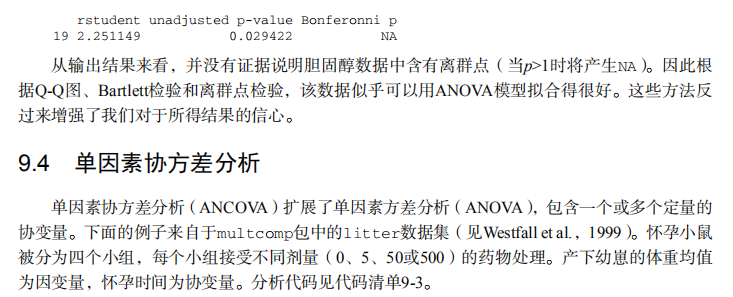
outlierTest(fit)

# Listing 9.3 - One-way ANCOVA

data(litter, package="multcomp")

attach(litter)

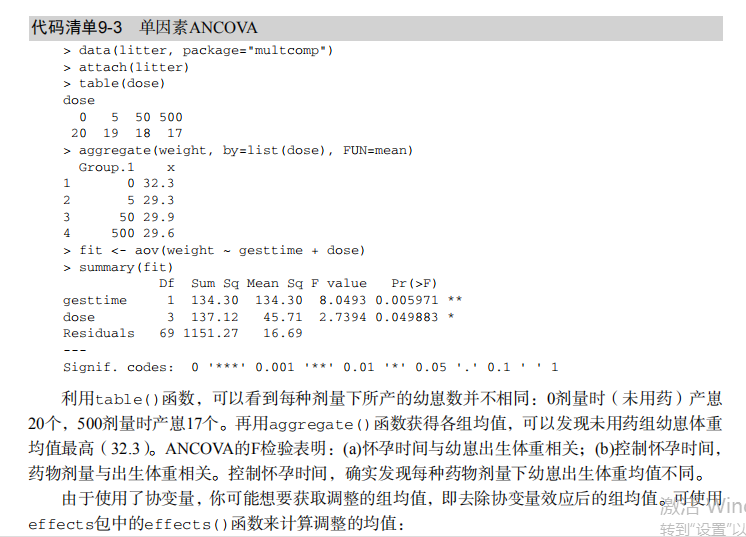
table(dose)

aggregate(weight, by=list(dose), FUN=mean)

fit <- aov(weight ~ gesttime + dose)

summary(fit)

# Obtaining adjusted means

library(effects)

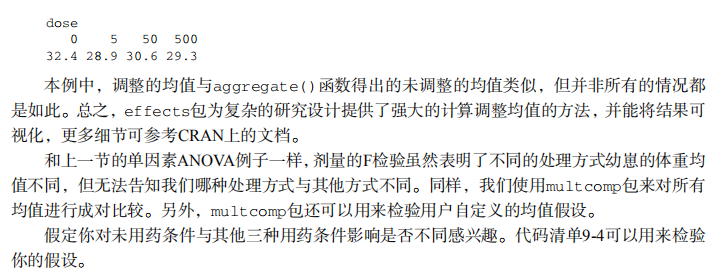
effect("dose", fit)

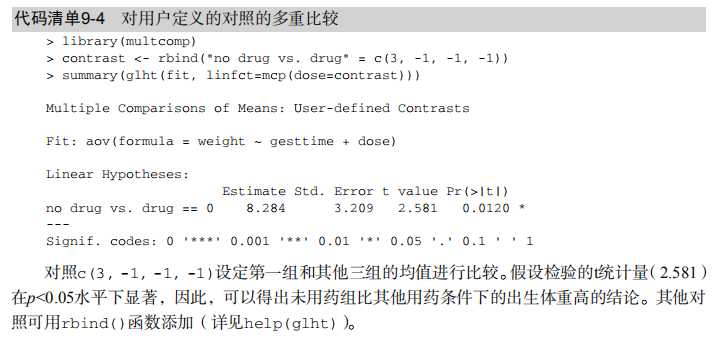
#  Listing 9.4 - Multiple comparisons using user supplied contrasts

library(multcomp)

contrast <- rbind("no drug vs. drug" = c(3, -1, -1, -1))

summary(glht(fit, linfct=mcp(dose=contrast)))

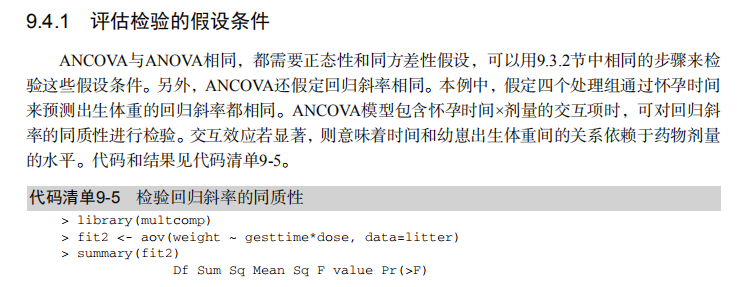
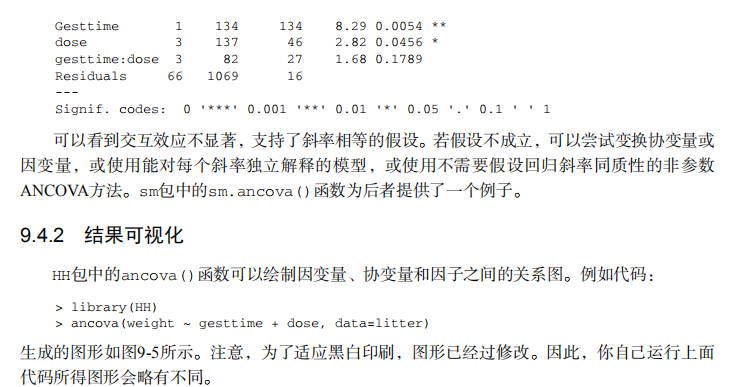
# Listing 9.5 - Testing for homegeneity of regression slopes

library(multcomp)

fit2 <- aov(weight ~ gesttime*dose, data=litter)

summary(fit2)

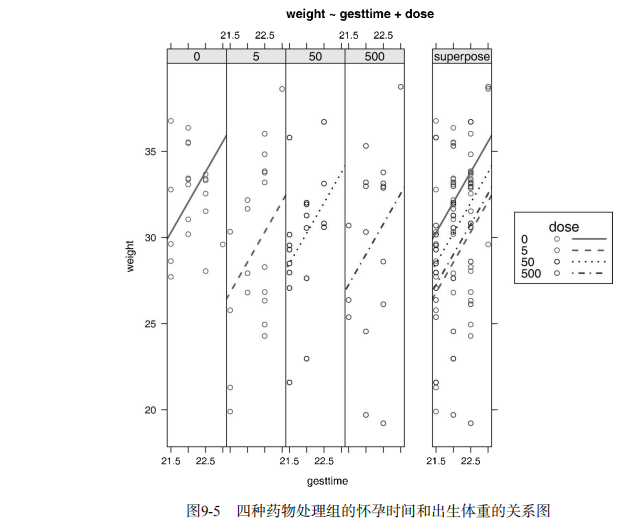
# Visualizing a one-way ANCOVA

library(HH)

ancova(weight ~ gesttime + dose, data=litter)

# Listing 9.6 - Two way ANOVA

attach(ToothGrowth)

table(supp,dose)

aggregate(len, by=list(supp,dose), FUN=mean)

aggregate(len, by=list(supp,dose), FUN=sd)

dose <- factor(dose)

fit <- aov(len ~ supp*dose)

summary(fit)

# plotting interactions

interaction.plot(dose, supp, len, type="b",

                 col=c("red","blue"), pch=c(16, 18),

                 main = "Interaction between Dose and Supplement Type")

library(gplots)

plotmeans(len ~ interaction(supp, dose, sep=" "),

          connect=list(c(1, 3, 5),c(2, 4, 6)),

          col=c("red","darkgreen"),

          main = "Interaction Plot with 95% CIs",

          xlab="Treatment and Dose Combination")

library(HH)

interaction2wt(len~supp*dose)

#  Listing 9.7 - Repeated measures ANOVA with one between and within groups factor

CO2$conc <- factor(CO2$conc)

w1b1 <- subset(CO2, Treatment=='chilled')

fit <- aov(uptake ~ (conc*Type) + Error(Plant/(conc)), w1b1)

summary(fit)

par(las=2)

par(mar=c(10,4,4,2))

with(w1b1,

     interaction.plot(conc,Type,uptake,

                      type="b", col=c("red","blue"), pch=c(16,18),

                      main="Interaction Plot for Plant Type and Concentration"))

boxplot(uptake ~ Type*conc, data=w1b1, col=(c("gold","green")),

        main="Chilled Quebec and Mississippi Plants",

        ylab="Carbon dioxide uptake rate (umol/m^2 sec)")

par(opar)

# Listing 9.8 - One-way MANOVA

library(MASS)

attach(UScereal)

shelf <- factor(shelf)

y <- cbind(calories, fat, sugars)

aggregate(y, by=list(shelf), FUN=mean)

cov(y)

fit <- manova(y ~ shelf)

summary(fit)

summary.aov(fit)

#  Listing 9.9 - Assessing multivariate normality

center <- colMeans(y)

n <- nrow(y)

p <- ncol(y)

cov <- cov(y)

d <- mahalanobis(y,center,cov)

coord <- qqplot(qchisq(ppoints(n),df=p),

                d, main="QQ Plot Assessing Multivariate Normality",

                ylab="Mahalanobis D2")

abline(a=0,b=1)

identify(coord$x, coord$y, labels=row.names(UScereal))

# multivariate outliers

library(mvoutlier)

outliers <- aq.plot(y)

outliers

# Listing 9.10 - Robust one-way MANOVA

library(rrcov)

Wilks.test(y,shelf, method="mcd")  # this can take a while

# Listing 9.11 - A regression approach to the Anova problem

fit.lm <- lm(response ~ trt, data=cholesterol)

summary(fit.lm)

contrasts(cholesterol$trt)
吴裕雄--天生自然 R语言开发学习:方差分析的更多相关文章
- 吴裕雄--天生自然 R语言开发学习:R语言的安装与配置
下载R语言和开发工具RStudio安装包 先安装R
- 吴裕雄--天生自然 R语言开发学习:数据集和数据结构
数据集的概念 数据集通常是由数据构成的一个矩形数组,行表示观测,列表示变量.表2-1提供了一个假想的病例数据集. 不同的行业对于数据集的行和列叫法不同.统计学家称它们为观测(observation)和 ...
- 吴裕雄--天生自然 R语言开发学习:导入数据
2.3.6 导入 SPSS 数据 IBM SPSS数据集可以通过foreign包中的函数read.spss()导入到R中,也可以使用Hmisc 包中的spss.get()函数.函数spss.get() ...
- 吴裕雄--天生自然 R语言开发学习:使用键盘、带分隔符的文本文件输入数据
R可从键盘.文本文件.Microsoft Excel和Access.流行的统计软件.特殊格 式的文件.多种关系型数据库管理系统.专业数据库.网站和在线服务中导入数据. 使用键盘了.有两种常见的方式:用 ...
- 吴裕雄--天生自然 R语言开发学习:R语言的简单介绍和使用
假设我们正在研究生理发育问 题,并收集了10名婴儿在出生后一年内的月龄和体重数据(见表1-).我们感兴趣的是体重的分 布及体重和月龄的关系. 可以使用函数c()以向量的形式输入月龄和体重数据,此函 数 ...
- 吴裕雄--天生自然 R语言开发学习:基础知识
1.基础数据结构 1.1 向量 # 创建向量a a <- c(1,2,3) print(a) 1.2 矩阵 #创建矩阵 mymat <- matrix(c(1:10), nrow=2, n ...
- 吴裕雄--天生自然 R语言开发学习:图形初阶(续二)
# ----------------------------------------------------# # R in Action (2nd ed): Chapter 3 # # Gettin ...
- 吴裕雄--天生自然 R语言开发学习:图形初阶(续一)
# ----------------------------------------------------# # R in Action (2nd ed): Chapter 3 # # Gettin ...
- 吴裕雄--天生自然 R语言开发学习:图形初阶
# ----------------------------------------------------# # R in Action (2nd ed): Chapter 3 # # Gettin ...
- 吴裕雄--天生自然 R语言开发学习:基本图形(续二)
#---------------------------------------------------------------# # R in Action (2nd ed): Chapter 6 ...
随机推荐
- 17.3.12---socket
1----如果要用python做一个服务器和客户端的通信程序,那么就一定得选择标准库中的scoket套接字模块,它支持多种网络协议:TCP/IP ,ICMP/IP, UDP ...
- java IO流的概念与分类
DataInputStream && ObjectInputStream 示例 https://blog.csdn.net/hoho_12/article/details/520543 ...
- 初识API网关,API-gateway
1.API-gateway(含义) 所有API的调用统一接入API网关层,由网关层负责接入和输出. API Gateway是一个服务器,也可以说是进入系统的唯一节点.这跟面向对象设计模式中的Facad ...
- 7.docker file 语法
详细文档 : https://docs.docker.com/engine/reference/builder/ 1. FROM 尽量使用官方的 image 作为 base image FROM ...
- 如何把word文档导入到数据库中——java POI
本文方法借鉴于https://www.cnblogs.com/ljysy/p/10574197.html 在经过朋友的指导下,在处理文档的方式上有所不同. 我的数据库使用的是SQL server,这篇 ...
- OVERVIEW:gcc,g++,cmake,make
首先介绍一下GCC:GNU Compiler Collection(GNU 编译器集合),在为Linux开发应用程序时,绝大多数情况下使用的都是C语言,因此几乎每一位Linux程序员面临的首要问题都是 ...
- Java的各类型数据在内存中分配情况详解
1. 有这样一种说法,如今争锋于IT战场的两大势力,MS一族偏重于底层实现,Java一族偏重于系统架构.说法根据无从考证,但从两大势力各自的社区力量和图书市场已有佳作不难看出,此说法不虚,但 ...
- 爬虫笔记(十一)——认识cookie
什么是cookie? 在爬虫的使用中,如果涉及登录等操作时,经常会使用到cookie.简单的来说,我们访问每一个互联网页面,都是通过HTTP协议进行的,而HTTP协议是一个无状态协议,所谓的无状态协议 ...
- 菜鸟cmake使用
cmake是用过把源码生成visual studio 工程的工具,也就是生成.sln文件.他会把相应的库依赖都自动添加上. cmake有个CMakeLists.txt (具体语法这里先不介绍) 我都是 ...
- 898A. Rounding#数的舍入
题目出处:http://codeforces.com/problemset/problem/898/A 题目大意:找一个数最近的整十的数 #include<iostream> using ...