
A trip through the Graphics Pipeline 2011_03
At this point, we’ve sent draw calls down from our app all the way through various driver layers and the command processor; now, finally we’re actually going to do some graphics processing on it! In this part, I’ll look at the vertex pipeline. But before we start…
Have some Alphabet Soup!
We’re now in the 3D pipeline proper, which in turn consists of several stages, each of which does one particular job. I’m gonna give names to all the stages I’ll talk about – mostly sticking with the “official” D3D10/11 names for consistency – plus the corresponding acronyms. We’ll see all of these eventually on our grand tour, but it’ll take a while (and several more parts) until we see most of them – seriously, I made a small outline of the ground I want to cover, and this series will keep me busy for at least 2 weeks! Anyway, here goes, together with a one-sentence summary of what each stage does.
- IA — Input Assembler. Reads index and vertex data.
- VS — Vertex shader. Gets input vertex data, writes out processed vertex data for the next stage.
- PA — Primitive Assembly. Reads the vertices that make up a primitive and passes them on.
- HS — Hull shader; accepts patch primitives, writes transformed (or not) patch control points, inputs for the domain shader, plus some extra data that drives tessellation.
- TS — Tessellator stage. Creates vertices and connectivity for tessellated lines or triangles.
- DS — Domain shader; takes shaded control points, extra data from HS and tessellated positions from TS and turns them into vertices again.
- GS — Geometry shader; inputs primitives, optionally with adjacency information, then outputs different primitives. Also the primary hub for…
- SO — Stream-out. Writes GS output (i.e. transformed primitives) to a buffer in memory.
- RS — Rasterizer. Rasterizes primitives.
- PS — Pixel shader. Gets interpolated vertex data, outputs pixel colors. Can also write to UAVs (unordered access views).
- OM — Output merger. Gets shaded pixels from PS, does alpha blending and writes them back to the backbuffer.
- CS — Compute shader. In its own pipeline all by itself. Only input is constant buffers+thread ID; can write to buffers and UAVs.
And now that that’s out of the way, here’s a list of the various data paths I’ll be talking about, in order: (I’ll leave out the IA, PA, RS and OM stages in here, since for our purposes they don’t actually do anything to the data, they just rearrange/reorder it – i.e. they’re essentially glue)
- VS→PS: Ye Olde Programmable Pipeline. In D3D9, this was all you got. Still the most important path for regular rendering by far. I’ll go through this from beginning to end then double back to the fancier paths once I’m done.
- VS→GS→PS: Geometry Shading (new with D3D10).
- VS→HS→TS→DS→PS, VS→HS→TS→DS→GS→PS: Tessellation (new in D3D11).
- VS→SO, VS→GS→SO, VS→HS→TS→DS→GS→SO: Stream-out (with and without tessellation).
- CS: Compute. New in D3D11.
And now that you know what’s coming up, let’s get started on vertex shaders!
Input Assembler stage
The very first thing that happens here is loading indices from the index buffer – if it’s an indexed batch. If not, just pretend it was an identity index buffer (0 1 2 3 4 …) and use that as index instead. If there is an index buffer, its contents are read from memory at this point – not directly though, the IA usually has a data cache to exploit locality of index/vertex buffer access.
Vertex Caching and Shading
Note: The contents of this section are, in part, guesswork. They’re based on public comments made by people “in the know” about current GPUs, but that only gives me the “what”, not the “why”, so there’s some extrapolation here. Also, I’m simply guessing some of the details here. That said, I’m not talking completely out of my ass here – I’m confident that what I’m describing here is both reasonable and works (in the general sense), I just can’t guarantee that it’s actually that way in real HW or that I didn’t miss any tricky details. :)
Anyway. For a long time (up to and including the shader model 3.0 generation of GPUs), vertex and pixel shaders were implemented with different units that had different performance trade-offs, and vertex caches were a fairly simple affair: usually just a FIFO for a small number (think one or two dozen) of vertices, with enough space for a worst-case number of output attributes, using the vertex index as a tag. As said, fairly straightforward stuff.
Okay, so here’s the deal: instead of the vertex shader units of old that shaded more or less one vertex at a time, you now have a huge beast of a unified shader unit that’s designed for maximum throughput, not latency, and hence wants large batches of work (How large? Right now, the magic number seems to be between 16 and 64 vertices shaded in one batch).
This whole FIFO thing really doesn’t adapt well to this environment, so, well, just throw it out. Back to the drawing board. What do we actually want to do? Get a decently-sized batch of vertices to shade, and not shade vertices (much) more often than necessary.
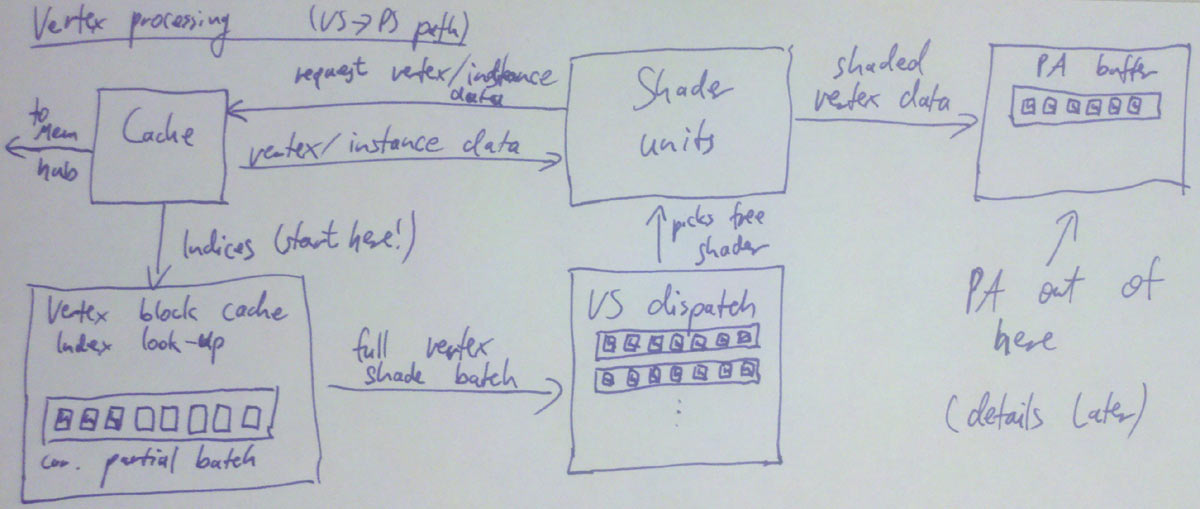
So, well, keep it simple: Reserve enough buffer space for 32 vertices (=1 batch), and similarly cache tag space for 32 entries. Start with an empty “cache”, i.e. all entries invalid. For every primitive in the index buffer, do a lookup on all the indices; if it’s a hit in the cache, fine. If it’s a miss, allocate a slot in the current batch and add the new index to the cache tag array. Once we don’t have enough space left to add a new primitive anymore, dispatch the whole batch for vertex shading, save the cache tag array (i.e. the 32 indices of the vertices we just shaded), and start setting up the next batch, again from an empty cache – ensuring that the batches are completely independent.
Each batch will keep a shader unit busy for some while (probably at least a few hundred cycles!). But that’s no problem, because we got plenty of them – just pick a different unit to execute each batch! Presto parallelism. We’ll eventually get the results back. At which point we can use the saved cache tags and the original index buffer data to assemble primitives to be sent down the pipeline (this is what “primitive assembly” does, which I’ll cover in the later part).
By the way, when I say “get the results back”, what does that mean? Where do they end up? There’s two major choices: 1. specialized buffers or 2. some general cache/scratchpad memory. It used to be 1), with a fixed organization designed around vertex data (with space for 16 float4 vectors of attributes per vertex and so on), but lately GPUs seem to be moving towards 2), i.e. “just memory”. It’s more flexible, and has the distinct advantage that you can use this memory for other shader stages, whereas things like specialized vertex caches are fairly useless for the pixel shading or compute pipeline, to give just one example.
Update: And here’s a picture of the vertex shading dataflow as described so far.
Shader Unit internals
Short versions: It’s pretty much what you’d expect from looking at disassembled HLSL compiler output (fxc /dumpbin is your friend!). Guess what, it’s just processors that are really good at running that kind of code, and the way that kind of thing is done in hardware is building something that eats something fairly close to shader bytecode, in spirit anyway. And unlike the stuff that I’ve been talking about so far, it’s fairly well documented too – if you’re interested, just check out conference presentations from AMD and NVidia or read the documentation for the CUDA/Stream SDKs.
Anyway, here’s the executive summary: fast ALU mostly built around a FMAC (Floating Multiply-ACcumulate) unit, some HW support for (at least) reciprocal, reciprocal square root, log2, exp2, sin, cos, optimized for high throughput and high density not low latency, running a high number of threads to cover said latency, fairly small number of registers per thread (since you’re running so many of them!), very good at executing straight-line code, bad at branches (especially if they’re not coherent).
What’s interesting to note though is the differences between the various shader stages. The short version is that really are rather few of them; for example, all the arithmetic and logic instructions are exactly the same across all stages. Some constructs (like derivative instructions and interpolated attributes in pixel shaders) only exist in some stages; but mostly, the differences are just what kind (and format) of data are passed in and out.
There’s one special bit related to shaders though that’s a big enough subject to deserve a part on its own. That bit is texture sampling (and texture units). Which, it turns out, will be our topic next time! See you then.
Closing remarks
Again, I repeat my disclaimer from the “Vertex Caching and Shading” section: Part of that is conjecture on my part, so take it with a grain of salt. Or maybe a pound. I don’t know.
I’m also not going into any detail on how scratch/cache memory is managed; the buffer sizes depend (primarily) on the size of batches you process and the number of vertex output attributes you expect. Buffer sizing and management is reallyimportant for performance, but I can’t meaningfully explain it here, nor do I want to; while interesting, this stuff is very specific to whatever hardware you’re talking about, and not really very insightful.
A trip through the Graphics Pipeline 2011_03的更多相关文章
- A trip through the Graphics Pipeline 2011_13 Compute Shaders, UAV, atomic, structured buffer
Welcome back to what’s going to be the last “official” part of this series – I’ll do more GPU-relate ...
- A trip through the Graphics Pipeline 2011_12 Tessellation
Welcome back! This time, we’ll look into what is perhaps the “poster boy” feature introduced with th ...
- A trip through the Graphics Pipeline 2011_10_Geometry Shaders
Welcome back. Last time, we dove into bottom end of the pixel pipeline. This time, we’ll switch ...
- A trip through the Graphics Pipeline 2011_08_Pixel processing – “fork phase”
In this part, I’ll be dealing with the first half of pixel processing: dispatch and actual pixel sha ...
- A trip through the Graphics Pipeline 2011_07_Z/Stencil processing, 3 different ways
In this installment, I’ll be talking about the (early) Z pipeline and how it interacts with rasteriz ...
- A trip through the Graphics Pipeline 2011_05
After the last post about texture samplers, we’re now back in the 3D frontend. We’re done with verte ...
- A trip through the Graphics Pipeline 2011_04
Welcome back. Last part was about vertex shaders, with some coverage of GPU shader units in general. ...
- A trip through the Graphics Pipeline 2011_02
Welcome back. Last part was about vertex shaders, with some coverage of GPU shader units in general. ...
- A trip through the Graphics Pipeline 2011_01
It’s been awhile since I posted something here, and I figured I might use this spot to explain some ...
随机推荐
- 堆的判断(codevs 2879)
2879 堆的判断 时间限制: 1 s 空间限制: 32000 KB 题目等级 : 黄金 Gold 题解 查看运行结果 题目描述 Description 堆是一种常用的数据结构.二叉堆 ...
- hadoop配置文件加载顺序(转)
原文 http://www.cnblogs.com/wolfblogs/p/4147485.html 用了一段时间的hadoop,现在回来看看源码发现别有一番味道,温故而知新,还真是这样的 在使用h ...
- Solr常用查询语法笔记
1.常用查询 q - 查询字符串,这个是必须的.如果查询所有*:* ,根据指定字段查询(Name:张三 AND Address:北京) fq - (filter query)过虑查询,作用:在q查询符 ...
- Java Hour 32 Weather ( 5 ) struts2 – Action class
有句名言,叫做10000小时成为某一个领域的专家.姑且不辩论这句话是否正确,让我们到达10000小时的时候再回头来看吧. Hour 32 Struts2 Action 1 将action 映射到 ac ...
- hdu 1515 dfs
一道不错的搜索题 题意:告诉你两个字符串a和b,要求对a进行栈的操作而产生b串,输出操作的顺序,如果有多组输出就按字典序输出. Sample Input madam adamm bahama baha ...
- NHibernate初探(1)
1 NHibernate是ORM的一种. 是一种为了解决面向对象与关系数据库存在的互不匹配的现象的技术.ORM是通过使用描述对象和数据库之间映射的元数据,将程序中的对象自动持久化到关系数据库中.本质上 ...
- UVA 1328 - Period KMP
题目链接:http://acm.hust.edu.cn/vjudge/problem/viewProblem.action?id=36131 题意:给出一个长度为n的字符串,要求找到一些i,满足说从1 ...
- SqlServer 函数 大全
sql server使用convert来取得datetime日期数据 sql server使用convert来取得datetime日期数据,以下实例包含各种日期格式的转换 语句及查询结果: Selec ...
- cf 333b
G - Chips Time Limit:1000MS Memory Limit:262144KB 64bit IO Format:%I64d & %I64u Submit S ...
- Linphone iOS客户端编译时打开G729支持
Assuming you were able to compile the SDK and the linphone XCode project, here is what you need to d ...