原文地址:https://examples.javacodegeeks.com/enterprise-java/spring/tomcat-vs-jetty-vs-undertow-comparison-of-spring-boot-embedded-servlet-containers/
With the rise in popularity of micro services we have seen a similar rise in popularity of applications with embedded servlet containers. Spring boot is a Java based framework that supports application services. It runs as a standalone jar with an embedded servlet container or as a WAR file inside a container.
In this example, we will focus on the standalone jar with embedded servlet containers. The framework supports three different types of embedded servlet containers: Tomcat (default), Jetty and Undertow. We will compare the three and look at differences in properties, settings, performance and memory. Keep in mind that this example is analyzing the default configuration. There are many ways to optimize the performance or memory usage including to customize the auto configuration and component scanning.
We used Eclipse Neon, Java 8, Maven 3.3.9, Spring 1.4.3, Tomcat 8.5.6, Jetty 9.3.14 and Undertow 1.3.24.
1. Setup Spring Boot Application
We will use Maven to setup a new project in Eclipse with the appropriate dependencies. We will use the starter parent for this example but the dependencies in a production application will likely be altered to streamline, optimize or customize.
1.1 Setup Spring Boot Dependencies
The default embedded servlet container is Tomcat. This version of Spring Web 1.4.3 brings in Tomcat version 8.5.6.
pom.xml
02 |
<groupId>org.springframework.boot</groupId> |
03 |
<artifactId>spring-boot-starter-parent</artifactId> |
04 |
<version>1.4.3.RELEASE</version> |
10 |
<groupId>org.springframework.boot</groupId> |
11 |
<artifactId>spring-boot-starter-web</artifactId> |
1.2 Setup Spring Boot Main Application and Controllers
To setup the Spring Boot application you include the @SpringBootApplication annotation in your Main class. The @SpringBootApplication annotation brings in @SpringBootConfiguration, @EnableAutoConfiguration and @ComponentScanannotations.
Application.java
2 |
@ConfigurationProperties |
3 |
public class Application { |
4 |
public static void main(String[] args) { |
5 |
SpringApplication.run(Application.class, args); |
You may choose to eliminate this annotation and add the @SpringBootConfiguration alone or to another class that allows you to customize the configuration. The @ComponentScan will scan your application for items like the @Controller you will need to setup a RESTful service. The following controller will return a simple “Hello World” string from a HTTP GET request. We have also included in the bundled example another endpoint mapping that returns a complex object type.
SampleController.java
02 |
public class SampleController { |
05 |
private ResourceLoader resourceLoader; |
09 |
public String home() { |
10 |
return "Hello World!"; |
1.3 Key Configuration Parameters
The default properties for all the embedded servlet containers are the same. Some of the most important properties to consider are the properties for configuring startup information like ports and application name, TSL, access logs, compression and many more.
For example, to configure SSL add the following to key value pairs to the application.properties.
application.properties
2 |
server.ssl.key-store=classpath:keystore.jks |
3 |
server.ssl.key-store-password=secret |
4 |
server.ssl.key-password=another-secret |
1.4 How to Find Additional Parameters
To explore the parameters for Spring boot applications you can add the Spring actuator dependency and the @ConfigurationProperties annotation to your Main class. You then visit the /configprops endpoint on your application to get a list of the available properties.
Application.java
2 |
@ConfigurationProperties |
3 |
public class Application { |
pom.xml
2 |
<groupId>org.springframework.boot</groupId> |
3 |
<artifactId>spring-boot-starter-actuator</artifactId> |
1.5 Change version of Embedded Servlet Containers
The embedded servlet container versions are defined in the following parent dependency from the pom. You can change the version of the embedded servlet container by explicitly including the dependency and identifying a new version in the pom. We will show you how in the examples below.
pom.xml
2 |
<groupId>org.springframework.boot</groupId> |
3 |
<artifactId>spring-boot-dependencies</artifactId> |
4 |
<version>1.3.7.RELEASE</version> |
2. Tomcat
As Tomcat is the default embedded servlet container there is nothing you need to do to the default implementation to use Tomcat. You can change the version of Tomcat you are using or change properties in the pom.xml or application.properties files.
2.2 Change Version of Tomcat
pom.xml
01 |
<properties><tomcat.version>8.5.6</tomcat.version></properties> |
04 |
<groupId>org.apache.tomcat.embed</groupId> |
05 |
<artifactId>tomcat-embed-core</artifactId> |
06 |
<version>${tomcat.version}</version> |
09 |
<groupId>org.apache.tomcat.embed</groupId> |
10 |
<artifactId>tomcat-embed-el</artifactId> |
11 |
<version>${tomcat.version}</version> |
14 |
<groupId>org.apache.tomcat.embed</groupId> |
15 |
<artifactId>tomcat-embed-websocket</artifactId> |
16 |
<version>${tomcat.version}</version> |
3. Jetty
To change the embedded servlet container to Jetty you need to edit the pom file to remove the Tomcat dependency and add Jetty.
3.1 Change to Jetty (version 9.3.14)
pom.xml
02 |
<groupId>org.springframework.boot</groupId> |
03 |
<artifactId>spring-boot-starter-web</artifactId> |
06 |
<groupId>org.springframework.boot</groupId> |
07 |
<artifactId>spring-boot-starter-tomcat</artifactId> |
12 |
<groupId>org.springframework.boot</groupId> |
13 |
<artifactId>spring-boot-starter-jetty</artifactId> |
4. Undertow
To change the embedded servlet container to Undertow you need to edit the pom file to remove the Tomcat dependency and add Undertow.
4.1 Change to Undertow (version 1.3.24 final)
Notice the undertow version included in the spring boot starter is incorrect, referring to 1.3.25. You’ll need to change it to 1.3.24.Final for this to work at the time of this article.
pom.xml
02 |
<groupId>org.springframework.boot</groupId> |
03 |
<artifactId>spring-boot-starter-web</artifactId> |
06 |
<groupId>org.springframework.boot</groupId> |
07 |
<artifactId>spring-boot-starter-tomcat</artifactId> |
12 |
<groupId>org.springframework.boot</groupId> |
13 |
<artifactId>spring-boot-starter-undertow</artifactId> |
16 |
<groupId>io.undertow</groupId> |
17 |
<artifactId>undertow-core</artifactId> |
18 |
<version>1.3.24.Final</version> |
21 |
<groupId>io.undertow</groupId> |
22 |
<artifactId>undertow-servlet</artifactId> |
23 |
<version>1.3.24.Final</version> |
5. Performance and Load
In this example, we will analyze both the peformance of HTTP requests and the memory footprint at startup of all three embedded servlet containers. We used JMeter to measure performance by simulating load and JVisualVM to look at the memory footprint.
5.1 Measure Performance
In this example, we will analyze both the peformance of simple RESTFul GET requests that return a string and more complex GET requests that return complex JSON objects. JMeter is the tool used to measure the performance of the the three different types of containers. The key to setting up this test was establishing thread groups with the appropriate load, a counter to dynamically update the input to the API and report viewers to display or aggregate the results. For the simple string examples, we used a thread group with 1000 threads that would loop 3 times through the sequence. It also used a ramp up time of 10 seconds. For the complex object examples, we used the same parameters but did not loop.
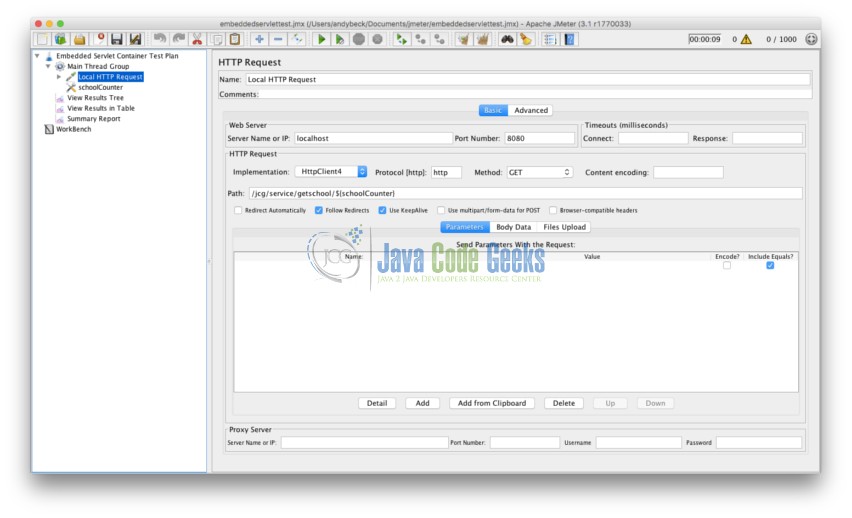
JMeter Tomcat Thread Group
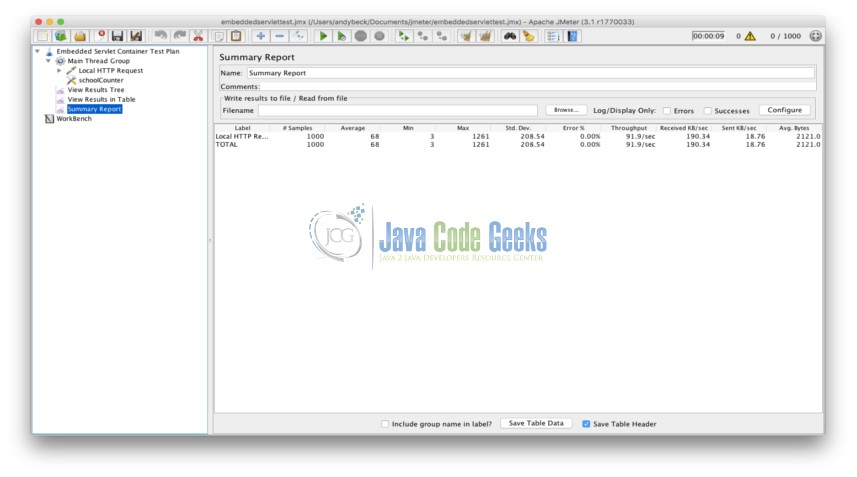
JMeter Tomcat Summary Report
5.1.1 Tomcat
5.1.1.1 Simple String
| Label |
# Samples |
Average |
Min |
Max |
Std. Dev. |
Error % |
Throughput |
Received KB/sec |
Sent KB/sec |
Avg. Bytes |
| Startup |
3000 |
7 |
1 |
549 |
35.78374361 |
0 |
293.8583603 |
55.95935572 |
55.67238466 |
195 |
| Others |
3000 |
1 |
0 |
45 |
1.359661682 |
0 |
287.8802418 |
54.82094449 |
54.53981144 |
195 |
| Others |
3000 |
1 |
0 |
24 |
1.155032275 |
0 |
292.1129503 |
55.62697785 |
55.3417113 |
195 |
5.1.1.2 Complex Object with Dynamic Data
| Label |
# Samples |
Average |
Min |
Max |
Std. Dev. |
Error % |
Throughput |
Received KB/sec |
Sent KB/sec |
Avg. Bytes |
| Startup |
1000 |
114 |
3 |
1601 |
322.8671905 |
0 |
97.68486861 |
202.3335999 |
19.93763432 |
2121 |
| Others |
1000 |
3 |
2 |
17 |
1.328216473 |
0 |
97.88566954 |
202.7495167 |
19.9786181 |
2121 |
| Others |
1000 |
2 |
1 |
16 |
1.110529603 |
0 |
98.52216749 |
204.0678879 |
20.10852833 |
2121 |
| Others |
1000 |
2 |
1 |
21 |
1.344498419 |
0 |
98.53187506 |
204.0879951 |
20.11050966 |
2121 |
5.1.2 Jetty
5.1.2.1 Simple Object
| Label |
# Samples |
Average |
Min |
Max |
Std. Dev. |
Error % |
Throughput |
Received KB/sec |
Sent KB/sec |
Avg. Bytes |
| Startup |
3000 |
7 |
0 |
561 |
40.13705065 |
0 |
291.5168594 |
56.0828333 |
55.22878 |
197 |
| Others |
3000 |
1 |
0 |
21 |
1.058925031 |
0 |
293.5995302 |
56.48350338 |
55.6233485 |
197 |
| Others |
3000 |
1 |
0 |
21 |
0.926034317 |
0 |
294.3485086 |
56.62759395 |
55.7652448 |
197 |
5.1.2.2 Complex Object with Dynamic Data
| Label |
# Samples |
Average |
Min |
Max |
Std. Dev. |
Error % |
Throughput |
Received KB/sec |
Sent KB/sec |
Avg. Bytes |
| Startup |
1000 |
110 |
3 |
1397 |
278.7961107 |
0 |
98.13542689 |
203.3626717 |
19.93375859 |
2122 |
| Others |
1000 |
3 |
2 |
20 |
1.500210319 |
0 |
98.48335631 |
204.0836739 |
20.00443175 |
2122 |
| Others |
1000 |
3 |
2 |
45 |
2.729377218 |
0 |
98.29942003 |
203.7025091 |
19.96706969 |
2122 |
5.1.3 Undertow
5.1.3.1 Simple Object
| Label |
# Samples |
Average |
Min |
Max |
Std. Dev. |
Error % |
Throughput |
Received KB/sec |
Sent KB/sec |
Avg. Bytes |
| Startup |
3000 |
6 |
0 |
451 |
31.6188702 |
0 |
295.6830278 |
63.81440346 |
56.01807363 |
221 |
| Others |
3000 |
1 |
0 |
22 |
1.255447862 |
0 |
292.7400468 |
63.17924839 |
55.46051669 |
221 |
| Others |
3000 |
1 |
0 |
18 |
1.559477975 |
0 |
294.3773918 |
63.53262069 |
55.77071681 |
221 |
5.1.3.2 Complex Object with Dynamic Data
| Label |
# Samples |
Average |
Min |
Max |
Std. Dev. |
Error % |
Throughput |
Received KB/sec |
Sent KB/sec |
Avg. Bytes |
| Startup |
1000 |
70 |
3 |
1114 |
197.1333241 |
0 |
97.059109 |
203.3969361 |
19.62044201 |
2145.893 |
| Startup |
1000 |
42 |
3 |
852 |
132.6443576 |
0 |
98.02960494 |
205.6324135 |
20.00799554 |
2148 |
| Others |
1000 |
3 |
2 |
19 |
1.293570253 |
0 |
98.55129595 |
206.6305004 |
20.01823199 |
2147 |
| Others |
1000 |
2 |
2 |
27 |
1.659250132 |
0 |
98.74592673 |
207.0385788 |
20.05776637 |
2147 |
| Others |
1000 |
2 |
1 |
17 |
1.260904041 |
0 |
98.28975821 |
206.0821395 |
19.96510714 |
2147 |
5.2 Measure Memory
To measure the memory of each embedded servlet container we looked at the memory usage on startup. JVisualVM is a tool provided with the Java Development Kit for visualizing the memory and footprint of java applications. We used this tool to show the initial startup impact of each of the three embedded servlet containers. The heap size and thread counts are key in analyzing this initial footprint. The ten threads that are common to all three containers include: JMX server connection timeout, RMI Scheduler, RMI TCP Connection (2), RMI TCP Accept, Attach Listener, DestroyJavaVM, Signal Dispatcher, Finalizer and Reference Handler.
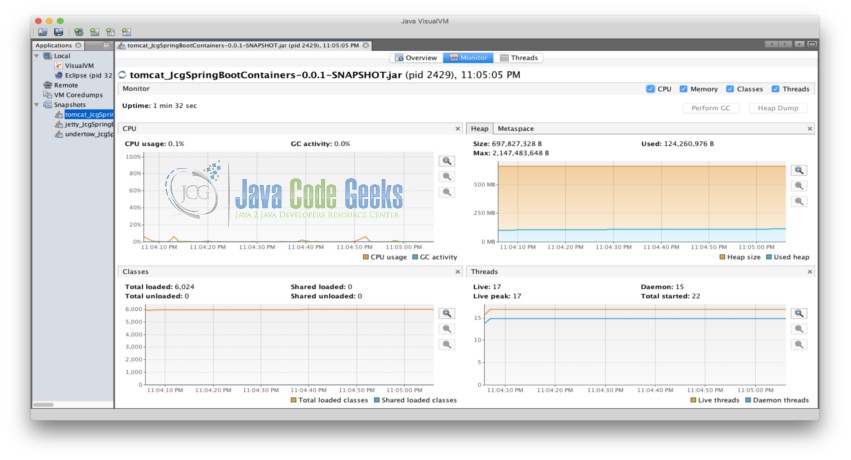
JVisualVM Report
5.2.2 Tomcat
Heap Size: 697,827,328 B
Used: 124,260,976 B
Max: 2,147,483,648 B
Threads: 17 Live, 22 Started
5.2.3 Jetty
Heap Size: 628,621,312 B
Used: 311,476,776 B
Max: 2,147,483,648 B
Threads: 19 Live, 22 Started
5.2.4 Undertow
Heap Size: 630,718,464 B
Used: 114,599,536 B
Max: 2,147,483,648 B
Threads: 17 Live, 20 Started
6. Compare
6.1 Performance
While all three of the embedded servlet containers had similar performance under the parameters used in this example, Undertow seems to have the best performance with Tomcat and Jetty close behind. The memory footprint of Jetty on startup was the largest using 311 MB. Tomcat and Undertow had similarly low initial footprints around 120 MB with Undertow coming in the lowest at 114 MB. The key difference in the response headers is that Undertow includes HTTP Persistent connections by default. This header will be used in clients that support persistent connections to optimize performance by reusing connection details.
6.1.1 Tomcat Response Headers
1 |
Content-Type →application/json;charset=UTF-8 |
2 |
Date →Mon, 09 Jan 2017 02:23:26 GMT |
3 |
Transfer-Encoding →chunked |
4 |
X-Application-Context →JcgSpringBootContainers:# Application index. |
6.1.2 Jetty Response Headers
1 |
Content-Type →application/json;charset=UTF-8 |
2 |
Date →Mon, 09 Jan 2017 02:29:21 GMT |
3 |
Transfer-Encoding →chunked |
4 |
X-Application-Context →JcgSpringBootContainers:# Application index. |
6.1.3 Undertow Response Headers
2 |
Content-Type →application/json;charset=UTF-8 |
3 |
Date →Mon, 09 Jan 2017 02:20:25 GMT |
4 |
Transfer-Encoding →chunked |
5 |
X-Application-Context →JcgSpringBootContainers:# Application index. |
7. Conclusion
The numbers indicate that Undertow is the best in performance and memory usage. It is encouraging to see that Undertow is embracing the latest capabilities and defaulting to persistent connections. The numbers do not indicate a dramatic difference in performance based on the load used in this example but I would imagine that they would scale and that if performance is the most important factor Undertow is the right match for your application. It is also reasonable to think that an organization may favor an embedded servlet container because of familiarity with it’s capabilities. Many times the defaults settings will have to change because of application requirements that include performance, memory usage and functionality.
8. Download the Source Code
Here we compared three types of embedded servlet containers you can include in a Spring Boot Application.
- Tomcat vs Jetty vs Undertow性能对比
Tomcat,Jetty和Undertow是目前比较主流的3款Servlet容器,而且Spring Boot框架还提供了对它们的集成支持(默认使用的是Tomcat),网络上有许多文章都在介绍Under ...
- 动态线程池(DynamicTp)之动态调整Tomcat、Jetty、Undertow线程池参数篇
大家好,这篇文章我们来介绍下动态线程池框架(DynamicTp)的adapter模块,上篇文章也大概介绍过了,该模块主要是用来适配一些第三方组件的线程池管理,让第三方组件内置的线程池也能享受到动态参数 ...
- spring boot整合servlet、filter、Listener等组件方式
创建一个maven项目,然后此项目继承一个父项目:org.springframework.boot 1.创建一个maven项目: 2.点击next后配置父项目及版本号 3.点击finish后就可查看p ...
- Spring Boot 集成servlet,发布为可直接运行的war包,方便后续打包为docker镜像。
背景:Spring Boot 集成servlet,发布为可直接运行的war包,方便后续打包为docker镜像. 原文地址 https://github.com/weibaohui/springboot ...
- Spring Boot 注册 Servlet 的三种方法,真是太有用了!
本文栈长教你如何在 Spring Boot 注册 Servlet.Filter.Listener. 你所需具备的基础 什么是 Spring Boot? Spring Boot 核心配置文件详解 Spr ...
- Spring Boot整合Servlet,Filter,Listener,访问静态资源
目录 Spring Boot整合Servlet(两种方式) 第一种方式(通过注解扫描方式完成Servlet组件的注册): 第二种方式(通过方法完成Servlet组件的注册) Springboot整合F ...
- spring boot配置Servlet容器
Spring boot 默认使用Tomcat作为嵌入式Servlet容器,只需要引入spring-boot-start-web依赖,默认采用的Tomcat作为容器 01 定制和修改Servlet容器 ...
- spring boot(18)-servlet、filter、listener
servlet.filter.listener的用法就不讲了,只讲如何在spring boot中配置它们.有两种方式,一种是从servlet3开始提供的注解方式,另一种是spring的注入方式 ser ...
- Spring Boot (19) servlet、filter、listener
servlet.filter.listener,在spring boot中配置方式有两种:一种是以servlet3开始提供的注解方式,另一种是spring的注入方式. servlet注解方式 serv ...
随机推荐
- 怎么用命令行运行jar文件
假设你配置好了jre环境,你如今有一个打包好的jar文件,你能够这样子開始运行 java -classpath example.jar mainClass -classpath告诉虚拟机在哪里找类的字 ...
- web服务启动spring自己主动运行ApplicationListener的使用方法
我们知道.一般来说一个项目启动时须要载入或者运行一些特殊的任务来初始化系统.通常的做法就是用servlet去初始化.可是servlet在使用spring bean时不能直接注入,还须要在web.xml ...
- windowsclient崩溃分析和调试
本文介绍windows上崩溃分析的一些手段,顺便提多进程调试.死锁等. 1.崩溃分析过程 1.1 确认错误码 不管是用windbg还是用vs.首先应该注意的是错误码,而90%以上的崩溃都是非法訪问. ...
- bzoj1830: [AHOI2008]Y型项链(LCP+贪心)
1830: [AHOI2008]Y型项链 题目:传送门 简要题意: 给出三个字符串,可以对任意字符串进行操作,每次操作都可以再其中一个字符串的末尾删除或添加一个字符,求最小操作数使得所有的字符串相同 ...
- python+caffe训练自己的图片数据流程
1. 准备自己的图片数据 选用部分的Caltech数据库作为训练和测试样本.Caltech是加州理工学院的图像数据库,包含Caltech101和Caltech256两个数据集.该数据集是由Fei-Fe ...
- javascript系列-class9.DOM(上)
欢迎加入前端交流群交流知识获取视频资料:749539640 1.文档对象模型DOM(document Object Model) 所谓DOM就是以家族的形式描述HTML 节点 ...
- Ubuntu14.04下Mongodb官网卸载部署步骤(图文详解)(博主推荐)
不多说,直接上干货! 前期博客 Ubuntu14.04下Mongodb官网安装部署步骤(图文详解)(博主推荐) https://docs.mongodb.com/manual/tutorial/ins ...
- python 3.x 学习笔记12 (反射 and 异常)
1.反射通过字符串映射或修改程序运行时的状态.属性.方法 getattr(obj,name_str): 根据字符串name_str去获取obj对象里的对应的方法的内存地址 hasttr(obj,na ...
- 如何给table的指定td进行css样式改变
td:nth-child(){background-color:#; color:#fff;}/*把第3个td的背景设为黑色*/ :nth-child()不止可以给table指定样式 p标签页是可以的 ...
- Oracle12C查询自建用户(非系统自带)
select username from dba_users where INHERITED='NO';
