
css 水平垂直居中的方法总结
在项目中经常会遇到设置元素水平垂直居中的需求。而且具体的场景也不同,所以将个人总结的方法做个汇总,希望对浏览者有用。
以下所举的例子都以一个html为准,这里规定好一些公用样式。
body {

    background-color: #efefef;

}

main {

    background-color: #fff;

    padding: 10px;

    margin:10px 0px;

}

main div {

    background-color: #aaf;

}
水平居中
1 相对块级父元素,可将子级设置成行内或者行内块元素,父元素设置text-align属性
举例如下:
.parent1 {

    text-align:center;

}

.child1 {

    display:inline|inline-block;

}
2 若父子都为块级元素,则给子元素宽度值之后,将margin:auto
<main class="parent2">

    <div class="child2">我是孩子2,我要水平居中</div>

</main>

.child2 {

    width:60%;

    margin:auto;

}
3 如果是多个子元素水平居中,则有两种方法
3.1 将子级设置成行内或者行内块元素,父元素设置text-align属性
3.2 将父元素设置display:flex
<main class="parent4">

    <div class="child4">我是孩子4,我要水平居中</div>

    <div class="child4">我是孩子4,我要水平居中</div>

    <div class="child4">我是孩子4,我要水平居中</div>

</main>

.parent4 {

    display: flex;

    justify-content: center;

}

  .child4 {

    margin:10px;

}
垂直居中
1 除了设置固定的padding值使其看起来垂直居中之外,还可用line-height
将line-height和height的值设置为相同值,
<main class="parent5">

    <div class="child5">我是孩子5,我要垂直居中</div>

</main>

.child5 {

    height:50px;

    line-height: 50px;

}
2 如果是多行的,可以像table那样,按照table cell 模式显示,配合vertical-align
<main class="parent6">

    <div class="child6">我是孩子6,我要垂直居中</div>

    <div class="child6">我是孩子6,我要垂直居中</div>

    <div class="child6">我是孩子6,我要垂直居中</div>

</main>

.parent6 {

    display: table;

}

.child6 {

    display: table-cell;

    border:2px solid #000;

    vertical-align: middle;

}
3 通过绝对定位
<main class="parent7">

    <div class="child7">我是孩子7,我要垂直居中</div>

</main>

/*如果知道子元素宽高*/

.parent7 {

    position: relative;

    height: 100px;

}

.child7 {

    position: absolute;

    top:50%;

    height:60px;

    margin-top:-30px;

}

/*如果不知道子元素宽高*/

.parent7 {

    position: relative;

    height: 100px;

}

.child7 {

    position: absolute;

    top:50%;

    transform: translateY(-50%);

}
4 使用flex
<main class="parent8">

    <div class="child8">我是孩子8,我要垂直居中</div>

</main>

.parent8 {

    height: 200px;

    display: flex;

    flex-direction: column;

    justify-content: center;

}
水平和垂直都居中
1 使用绝对定位
<main class="parent9">

    <div class="child9">我是孩子9,我要水平垂直居中</div>

</main>

 /*如果不知道子元素宽高*/

.parent9 {

    position: relative;

    height: 150px;

}

.child9 {

    position: absolute;

    top:50%;

    left:50%;

    transform: translate(-50%,-50%);

}

/*如果知道子元素宽高*/

.parent9 {

    position: relative;

    height: 150px;

}

.child9 {

    position: absolute;

    top:50%;

    left:50%;

    height:60px;

    width:100px;

    margin-left:-50px;

    margin-top:-30px;

}
2 使用flex
.parent10 {

    height: 200px;

    display: flex;

    flex-direction: column;

    justify-content: center;

}

.child10 {

    margin: auto;

}
3 除此之外,还可以将上述的水平和垂直分别居中的方法,尝试着搭配。当然,应该还有其它方法,待发现。
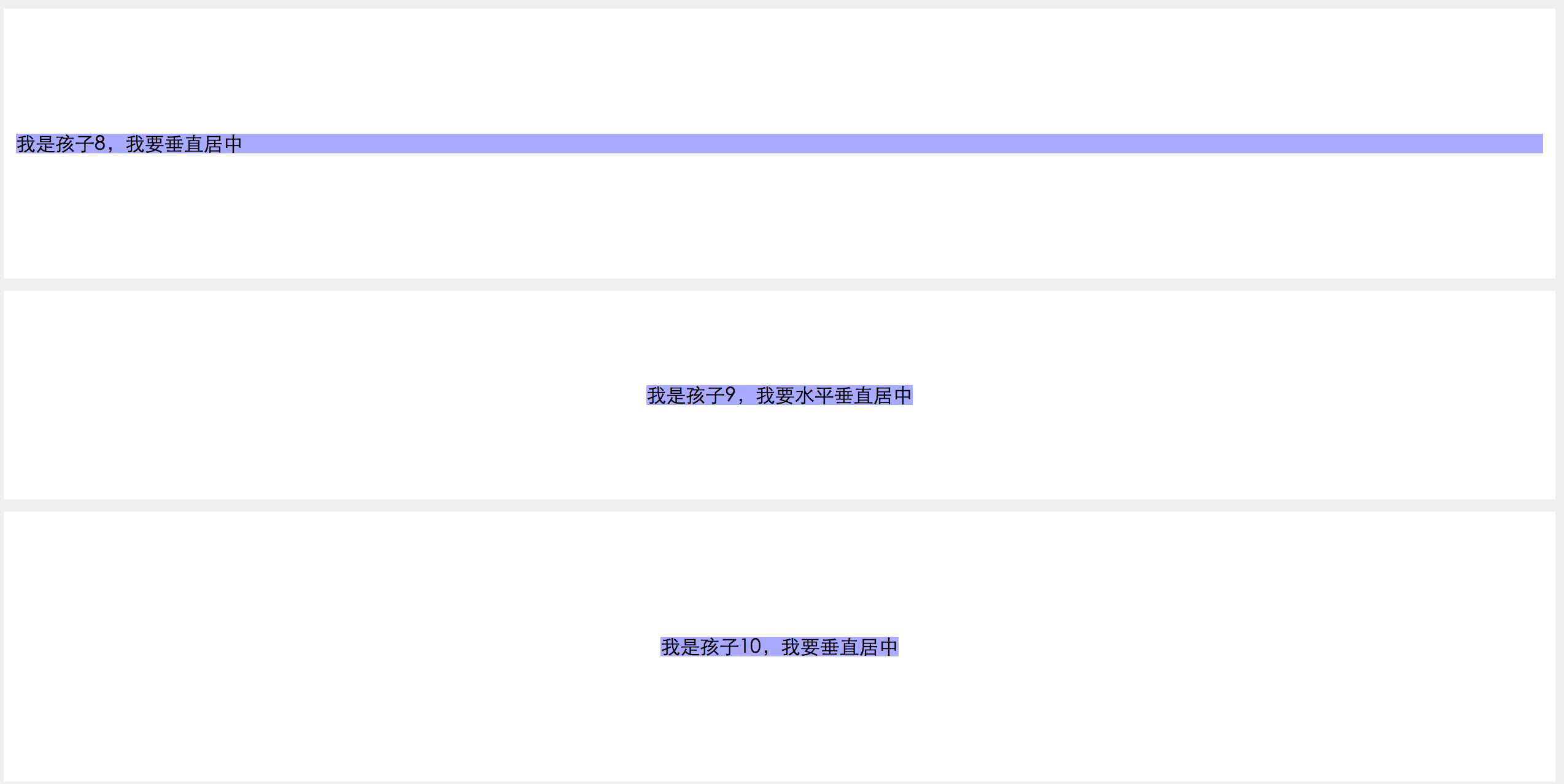
上述结果输出截图

css 水平垂直居中的方法总结的更多相关文章
- CSS水平垂直居中的方法
原文链接:http://caibaojian.com/370.html 水平垂直居中,特别是使用在列表的时候经常会用到的,以前有需求的时候我也做过类似的代码,是使用display:table-cell ...
- 介绍一种css水平垂直居中的方法(非常好用!)
这次介绍一下一个水平垂直居中的css方法,这个方法可以说是百试百灵,废话不多说,直接附上代码: html,body{ width:100%; height:100%; } 你需要居中的元素{ posi ...
- css水平垂直居中的方法与 vertical-align 的用法
前言:这是笔者学习之后自己的理解与整理.如果有错误或者疑问的地方,请大家指正,我会持续更新! 1. 已知元素宽度 方法一:已知宽高,可以用position定位 + margin负值的方法 : 绝对定位 ...
- CSS水平垂直居中常见方法总结
1.元素水平居中 当然最好使的是: margin: 0 auto; 居中不好使的原因: 1.元素没有设置宽度,没有宽度怎么居中嘛! 2.设置了宽度依然不好使,你设置的是行内元素吧,行内元素和块元素的区 ...
- CSS水平垂直居中常见方法总结2
1.文本水平居中line-height,text-align:center(文字)元素水平居中 margin:0 auo 方案1:position 元素已知宽度 父元素设置为:position: re ...
- [css]水平垂直居中的方法
1.top:cale(50% - 2rem); left:cale(50% - 2rem);
- 53.CSS---CSS水平垂直居中常见方法总结
CSS水平垂直居中常见方法总结 1.元素水平居中 当然最好使的是: margin: 0 auto; 居中不好使的原因: 1.元素没有设置宽度,没有宽度怎么居中嘛! 2.设置了宽度依然不好使,你设置的是 ...
- CSS水平垂直居中总结
行内元素水平居中 把行内元素包裹在块级父元素中,且父元素中的css设置text-align:center; <!DOCTYPE html> <html> <head> ...
- CSS水平垂直居中的几种方法2
直接进入主题! 一.脱离文档流元素的居中 方法一:margin:auto法 CSS代码: div{ width: 400px; height: 400px; position: relative; b ...
随机推荐
- File Upload with Jersey
package com.toic.rest; import java.io.File; import java.io.FileOutputStream; import java.io.IOExcept ...
- restcontroller和controller区别
http://www.cnblogs.com/softidea/p/5884772.html#undefined http://blog.csdn.net/blueheart20/article/de ...
- [Javascript AST] 4. Continue: Report ESLint error
const disallowedMethods = ["log", "info", "warn", "error", & ...
- 2. ZooKeeper的ZAB协议。
转自:https://blog.csdn.net/en_joker/article/details/78662880 ZooKeeper并没有完全采用Paxos算法,而是使用了一种称为ZooKeepe ...
- Mybatis like查询的写法--转载
原文地址:http://lavasoft.blog.51cto.com/62575/1386870 Mybatis like查询官方文档没有明确的例子可循,网上搜索了很多,都不正确. Mybatis ...
- CView::OnPreparePrinting
http://technet.microsoft.com/zh-cn/subscriptions/a59dff1e(v=vs.71).aspx CView::OnPreparePrinting Cal ...
- 【Codeforces Round #450 (Div. 2) A】Find Extra One
[链接] 我是链接,点我呀:) [题意] 在这里输入题意 [题解] 模拟. 看看Y左边或右边的点个数是否<=1 [代码] #include <bits/stdc++.h> using ...
- PatentTips - Use of multiple virtual machine monitors to handle privileged events
BACKGROUND OF THE INVENTION A conventional virtual-machine monitor (VMM) typically runs on a compute ...
- Jedis源码分析
http://blog.csdn.net/luyee2010/article/details/17580381
- 洛谷—— P1062 数列
https://www.luogu.org/problem/show?pid=1062#sub 题目描述 给定一个正整数k(3≤k≤15),把所有k的方幂及所有有限个互不相等的k的方幂之和构成一个递增 ...