
MVC.Net5:添加Tinymce的图片上传功能
Tinymce是目前几个主流的Web文本编辑器之一,不过它的图片上传功能是要收费的,而其它几个免费的上传图片的插件支持的都是PHP。那么就只能自己动手写一个了(源代码下载)。
准备工作如下:
1. 创建一个MVC.Net的项目(废话)
2. 添加jQuery类库。我使用的是jQuery 1.11.1版本。可以通过NuGet直接加入到项目中。
Install-Package jQuery -Version 1.11.1
3. 添加jQuery UI类库。下载地址如下:http://jqueryui.com/download/ 此处我们只用到它的Dialog Widget。
4. 添加Tinymce类库。我使用的是Tinymce 3.5.8版本。可以通过NuGet直接加入到项目中。
Install-Package TinyMCE -Version 3.5.8
5. 添加Tinymce的中文语言包,下载地址:http://www.tinymce.com/i18n3x/index.php?ctrl=lang&act=download&pr_id=1
6. 准备一个上传图片的ICON,这里我直接copy了cnblogs的。:D
准备工作结束,这时的项目结构如下: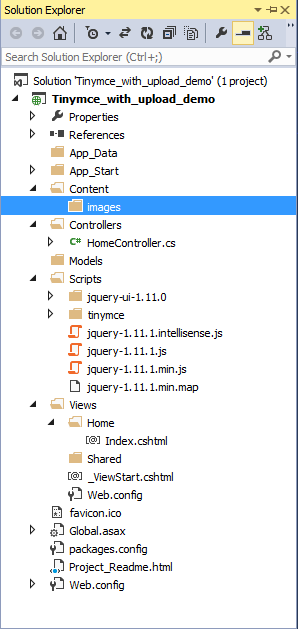
接下来开始代码部分:
1. 创建html文件
<!DOCTYPE HTML PUBLIC "-//W3C//DTD XHTML 1.0 Transitional//EN" "http://www.w3.org/TR/xhtml1/DTD/xhtml1-transitional.dtd">

<html xmlns="http://www.w3.org/1999/xhtml">

<head>

    <meta charset="utf-8" />

    <title>Tinymce with upload feature's demo</title>

</head>

<body>

    <div>

        <label>Tinymce with upload feature's demo</label>

        <br />

        <textarea name="content" id="content" cols="50" rows="20"></textarea>

    </div>

</body>

</html>
2. 引入需要的js和css文件。
    <link type="text/css" href="/Scripts/jquery-ui-1.11.0/jquery-ui.min.css" rel="stylesheet" />

    <script type="text/javascript" src="/Scripts/jquery-1.11.1.min.js"></script>

    <script type="text/javascript" src="/Scripts/tinymce/tiny_mce.js"></script>

    <script type="text/javascript" src="/Scripts/jquery-ui-1.11.0/jquery-ui.min.js"></script>
3. 将Tinymce初始化
    <script type="text/javascript">

        tinyMCE.init({

            language: "cn",

            mode: "textareas",

            theme: "advanced",

            plugins: "emotions,spellchecker,advhr,insertdatetime,preview",

            // Theme options - button# indicated the row# only

            theme_advanced_buttons1: "newdocument,|,bold,italic,underline,|,justifyleft,justifycenter,justifyright,fontselect,fontsizeselect,formatselect",

            theme_advanced_buttons2: "cut,copy,paste,|,bullist,numlist,|,outdent,indent,|,undo,redo,|,link,unlink,anchor,image,|,code,preview,|,forecolor,backcolor",

            theme_advanced_buttons3: "insertdate,inserttime,|,spellchecker,advhr,,removeformat,|,sub,sup,|,charmap,emotions",

            theme_advanced_toolbar_location: "top",

            theme_advanced_toolbar_align: "left",

            theme_advanced_statusbar_location: "bottom",

            theme_advanced_resizing: true

        });

    </script>
4. 这时textarea控件应该已经变成Tinymce编辑器了。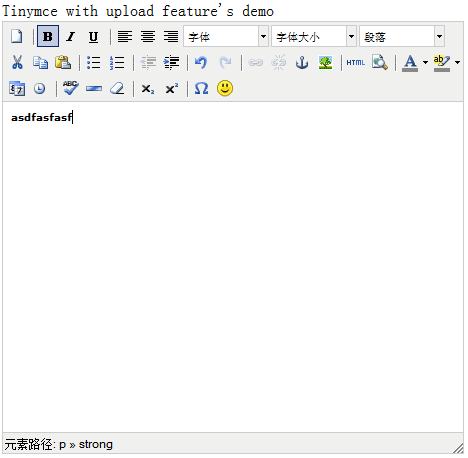
5. 现在开始创建上传图片的插件。先在Tinymce的plugins目录中创建如下目录和文件。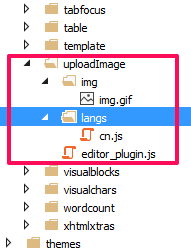
1) Img.gif就是上传图片的ICON
2) Editor_plugin.js的代码如下(注:此处代码copy自cnblogs,做了少量修改):
(function () {

    tinymce.PluginManager.requireLangPack('uploadImage');

    tinymce.create('tinymce.plugins.uploadImagePlugin', {

        /**

        * Initializes the plugin, this will be executed after the plugin has been created.

        * This call is done before the editor instance has finished it's initialization so use the onInit event

        * of the editor instance to intercept that event.

        *

        * @param {tinymce.Editor} ed Editor instance that the plugin is initialized in.

        * @param {string} url Absolute URL to where the plugin is located.

        */

        init: function (ed, url) {

            // Register the command so that it can be invoked by using tinyMCE.activeEditor.execCommand('mceExample');

            ed.addCommand('mceuploadImage', function () {

                imageUploadWindow();

            });

            // Register example button

            ed.addButton('uploadImage', {

                title: '上传图片',

                cmd: 'mceuploadImage',

                image: url + '/img/img.gif'

            });

            // Add a node change handler, selects the button in the UI when a image is selected

            ed.onNodeChange.add(function (ed, cm, n) {

                cm.setActive('uploadImage', n.nodeName == 'img');

            });

        },

        /**

        * Creates control instances based in the incomming name. This method is normally not

        * needed since the addButton method of the tinymce.Editor class is a more easy way of adding buttons

        * but you sometimes need to create more complex controls like listboxes, split buttons etc then this

        * method can be used to create those.

        *

        * @param {String} n Name of the control to create.

        * @param {tinymce.ControlManager} cm Control manager to use inorder to create new control.

        * @return {tinymce.ui.Control} New control instance or null if no control was created.

        */

        createControl: function (n, cm) {

            return null;

        },

        /**

        * Returns information about the plugin as a name/value array.

        * The current keys are longname, author, authorurl, infourl and version.

        *

        * @return {Object} Name/value array containing information about the plugin.

        */

        getInfo: function () {

            return {

                longname: 'uploadImage plugin',

                author: 'cnblogs',

                authorurl: 'http://www.cnblogs.com',

                infourl: 'http://www.cnblogs.com',

                version: "1.0"

            };

        }

    });

    // Register plugin

    tinymce.PluginManager.add('uploadImage', tinymce.plugins.uploadImagePlugin);

})();
3) cn.js的代码:
tinyMCE.addI18n('zh.uploadImage_cn', {

    desc: '上传图片'

});
6. 接着回到刚才的HTML页面,添加如下JS代码:
        var imageUploadWindow = function () {

            $("#dialog-confirm").dialog({

                resizable: false,

                width: 350,

                height: 200,

                modal: true,

                buttons: {

                    "确定": function () {

                        $(this).dialog("close");

                        var formObj = $('#updateForm');

                        var formURL = formObj.attr("action");

                        if (window.FormData !== undefined)  // for HTML5 browsers

                        {

                            var formData = new FormData();

                            jQuery.each($('input[name^="Photo"]')[0].files, function (i, file) {

                                formData.append('photo', file);

                            });

                            //formData.append('photo',);

                            $.ajax({

                                url: formURL,

                                type: 'POST',

                                data: formData,

                                async: false,

                                mimeType: "multipart/form-data",

                                contentType: false,

                                cache: false,

                                processData: false,

                                success: function (data, textStatus, jqXHR) {

                                    var ed = tinyMCE.get('content');

                                    var newNode = ed.dom.createHTML('img', { src: '/Content/images/' + data });  // create img node

                                    if (tinymce.isIE) {

                                        tinyMCE.activeEditor.selection.moveToBookmark(actualCaretPositionBookmark);

                                        ed.execCommand('mceInsertContent', false, newNode);

                                    } else {

                                        ed.execCommand('mceInsertContent', false, newNode);

                                    }

                                },

                                error: function (jqXHR, textStatus, errorThrown) {

                                }

                            });

                        }

                        else  //for olden browsers

                        {

                            //generate a random id

                            var iframeId = 'unique' + (new Date().getTime());

                            //create an empty iframe

                            var iframe = $('<iframe src="javascript:false;" name="' + iframeId + '" />');

                            //hide it

                            iframe.hide();

                            //set form target to iframe

                            formObj.attr('target', iframeId);

                            //Add iframe to body

                            iframe.appendTo('body');

                            iframe.load(function (e) {

                                var doc = getDoc(iframe[0]);

                                var docRoot = doc.body ? doc.body : doc.documentElement;

                                var data = docRoot.innerHTML;

                                //data is returned from server.

                            });

                        }

                    },

                    "取消": function () {

                        $(this).dialog("close");

                    }

                }

            });

        };

    function getDoc(frame) {

        var doc = null;

        // IE8 cascading access check

        try {

            if (frame.contentWindow) {

                doc = frame.contentWindow.document;

            }

        } catch (err) {

        }

        if (doc) { // successful getting content

            return doc;

        }

        try { // simply checking may throw in ie8 under ssl or mismatched protocol

            doc = frame.contentDocument ? frame.contentDocument : frame.document;

        } catch (err) {

            // last attempt

            doc = frame.document;

        }

        return doc;

    }
7. 修改Tinymce的初始化代码,加入uploadImage插件。
        tinyMCE.init({

            language: "cn",

            mode: "textareas",

            theme: "advanced",

            plugins: "emotions,spellchecker,advhr,insertdatetime,preview,uploadImage",

            // Theme options - button# indicated the row# only

            theme_advanced_buttons1: "newdocument,|,bold,italic,underline,|,justifyleft,justifycenter,justifyright,fontselect,fontsizeselect,formatselect",

            theme_advanced_buttons2: "cut,copy,paste,|,bullist,numlist,|,outdent,indent,|,undo,redo,|,link,unlink,anchor,image,uploadImage,|,code,preview,|,forecolor,backcolor",

            theme_advanced_buttons3: "insertdate,inserttime,|,spellchecker,advhr,,removeformat,|,sub,sup,|,charmap,emotions",

            theme_advanced_toolbar_location: "top",

            theme_advanced_toolbar_align: "left",

            theme_advanced_statusbar_location: "bottom",

            theme_advanced_resizing: true,

            setup: function (ed) {

                ed.onKeyUp.add(function (ed, e) {

                    actualCaretPositionBookmark = tinyMCE.activeEditor.selection.getBookmark();

                });

                ed.onClick.add(function (ed, e) {

                    actualCaretPositionBookmark = tinyMCE.activeEditor.selection.getBookmark();

                });

            }

        });
8. 添加上传图片的弹出窗口
        <div id="dialog-confirm" title="上传图片" style="display:none;">

            <form action="/File/Upload" method="post" role="form" enctype="multipart/form-data" name="updateForm" id="updateForm">

                <input type="file" name="Photo" accept="image/*">

            </form>

        </div>
9. 创建FileController.cs,代码如下:
        public ActionResult Upload()

        {

            return View();

        }

        [HttpPost]

        public ActionResult Upload(HttpPostedFileBase photo)

        {

            if (photo != null)

            {

                var path = Server.MapPath("/Content/images");

                var fileName = "p" + DateTime.Now.Ticks.ToString() +".jpg";

                photo.SaveAs(Path.Combine(path, fileName));

                ViewBag.FileName = fileName;

                return View();

            }

            else

            {

                ViewBag.FileName = "";

                return View();

            }

        }
10. 最后创建Upload.cshtml文件,内容就是一行代码:
@ViewBag.fileName
11. OK,效果如下:
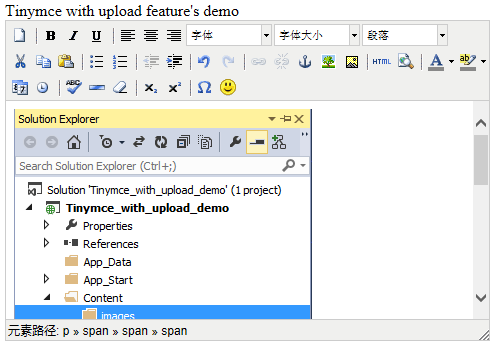
其实整个代码还有需要改善的地方,比如实现文件上传时的等待效果。这里就不展开了。
MVC.Net5:添加Tinymce的图片上传功能的更多相关文章
- Spring+SpringMVC+MyBatis+easyUI整合优化篇(七)图片上传功能
日常啰嗦 前一篇文章<Spring+SpringMVC+MyBatis+easyUI整合优化篇(六)easyUI与富文本编辑器UEditor整合>讲了富文本编辑器UEditor的整合与使用 ...
- vue 图片上传功能
这次做了vue页面的图片上传功能,不带裁剪功能的! 首先是html代码,在input框上添加change事件,如下: <ul class="clearfix"> ...
- 前端丨如何使用 tcb-js-sdk 实现图片上传功能
前言 tcb-js-sdk 让开发者可以在网页端使用 JavaScript 代码服务访问云开发的服务,以轻松构建自己的公众号页面或者独立的网站等 Web 服务.本文将以实现图片上传功能为例,介绍 tc ...
- thinkphp达到UploadFile.class.php图片上传功能
片上传在站点里是非经常常使用的功能.ThinkPHP里也有自带的图片上传类(UploadFile.class.php) 和图片模型类(Image.class.php).方便于我们去实现图片上传功能,以 ...
- PHP语言学习之php做图片上传功能
本文主要向大家介绍了PHP语言学习之php做图片上传功能,通过具体的内容向大家展示,希望对大家学习php语言有所帮助. 今天来做一个图片上传功能的插件,首先做一个html文件:text.php < ...
- [Ting's笔记Day8]活用套件carrierwave gem:(3)Deploy图片上传功能到Heroku网站
前情提要: 身为Ruby新手村民,创造稳定且持续的学习步调很重要,我用的方法就是一周在IT邦写三篇笔记,希望藉由把笔记和遇到的bug记录下来的过程,能帮助到未来想用Ruby on Rails架站的新手 ...
- H5 利用vue实现图片上传功能。
H5的上传图片如何实现呢? 以下是我用vue实现的图片上传功能,仅供参考. <!DOCTYPE html> <html> <head> <meta chars ...
- 给DEDECMS广告管理中增加图片上传功能
dedecms的广告管理功能稍微有点次,本文就是在dedecms广告管理原有的基础上增加广告图片上传功能. 安装方法,对应自己的dedecms版本下载对应的编码然后解压把里面的文件放在后台目录覆盖即可 ...
- django中tinymce添加图片上传功能
主要参考以下: https://pixabay.com/en/blog/posts/direct-image-uploads-in-tinymce-4-42/ http://blog.csdn.net ...
随机推荐
- Python细节(一)深浅拷贝
深浅拷贝 只要涉及拷贝,就会涉及创建新对象 浅拷贝,会创建一个新的容器,列表中的元素和原列表的元素用的是同一个内存空间 第一种方法:从头切到尾,完整的复制一份 lst = [1,2,3,4] lst1 ...
- sql case when 用法
sql语言中有没有类似C语言中的switch case的语句?? 没有,用case when 来代替就行了. 例如,下面的语句显示中文年月 select ...
- form表单中图片也可以当作提交按钮
点击图片按钮时,不光提交其他输入框信息,还把鼠标点击图片上的x,y坐标也传输过去了
- Xml的读取
using System; using System.Collections.Generic; using System.Linq; using System.Web; namespace WebAp ...
- Android 使用MySQL直接访问数据库
在实际项目中,一般很少直接访问MySQL数据库,一般情况下会通过http请求将数据传送到服务端,然后在服务端连接mysql数据库. 在android 中,会通过使用Jdbc 连接MySQL 服务器 p ...
- 如何修改wampserver中mysql中字符编码的解决方案
因为我用的一般都是utf8,所以有必要改一下: 打开mysql控制台,输入密码登录之后,执行命令: show variables like ‘%char%’; 注意引号的中英文格式以及最后面的分号不要 ...
- R 连接数据库长数字被科学计数法解决方法
数据库中的订单编号
- html5——动画案例(时钟)
1.秒钟转360度需要60s分60步 2.分针转360度需要3600s分60步 3.秒钟转360度需要43200s分60步 <!DOCTYPE html> <html lang=&q ...
- JS——scroll
scrollWidth:父div宽度小于子div宽度,父div scrollWidth宽度为子div的宽度,大于则为本身的宽度width+padding scrollHeight:父div高度小于子d ...
- 4星|《超级技术:改变未来社会和商业的技术趋势》:AI对人友好吗
超级技术:改变未来社会和商业的技术趋势 多位专家或经济学人编辑关于未来的预测,梅琳达·盖茨写了其中一章.在同类书中属于水平比较高的,专家只写自己熟悉的领域,分析与预测有理有据而不仅仅是畅想性质. 以下 ...