
Android 4.0 Launcher2源码分析——主布局文件(转)
本文来自http://blog.csdn.net/chenshaoyang0011
Android系统的一大特色是它拥有的桌面通知系统,不同于IOS的桌面管理,Android有一个桌面系统用于管理和展示APP以及桌面Widget等。
Android提供一个默认的桌面应用,当然我们也可以使用第三方的桌面应用。Android的Launcher的源码在 \packages\apps\Launcher2。
Launcher2的主布局文件包括res\layout-land\launcher.xml
, res\layout-port\launcher.xml , res\layout-sw600dp\launcher.xml ,分别适配横屏,竖屏和7寸平板。内容大同小异,这里就以res\layout-port\launcher.xml的为例。
首先让我们看看launcher.xml中的结构:
- <com.android.launcher2.DragLayer
- xmlns:android="http://schemas.android.com/apk/res/android"
- xmlns:launcher="http://schemas.android.com/apk/res/com.android.launcher"
- android:id="@+id/drag_layer"
- ...
- >
- <!-- Keep these behind the workspace so that they are not visible when
- we go into AllApps -->
- <include
- android:id="@+id/dock_divider"
- layout="@layout/workspace_divider"
- ...
- />
- <!-- 分页指示器 -->
- <include
- android:id="@+id/paged_view_indicator"
- layout="@layout/scroll_indicator"
- ...
- />
- <!-- The workspace contains 5 screens of cells -->
- <com.android.launcher2.Workspace
- android:id="@+id/workspace"
- ...
- >
- <!-- 五个分屏,默认显示cell3 -->
- <include android:id="@+id/cell1" layout="@layout/workspace_screen" />
- <include android:id="@+id/cell2" layout="@layout/workspace_screen" />
- <include android:id="@+id/cell3" layout="@layout/workspace_screen" />
- <include android:id="@+id/cell4" layout="@layout/workspace_screen" />
- <include android:id="@+id/cell5" layout="@layout/workspace_screen" />
- </com.android.launcher2.Workspace>
- <!-- 搜索框/删除框 -->
- <include
- android:id="@+id/qsb_bar"
- layout="@layout/qsb_bar" />
- <!-- 显示具体全部应用的界面,包括APPS、WIGHETS的tab标签,以及显示ALL APP的页面和现实APP WIGHETS的页面 -->
- <include layout="@layout/apps_customize_pane"
- android:id="@+id/apps_customize_pane"
- ..
- />
- <!-- WorkSpace最下面的五个快捷位置 -->
- <include layout="@layout/hotseat"
- android:id="@+id/hotseat"
- ..
- />
- <!-- 刚启动的时候显示的指导页 -->
- <include layout="@layout/workspace_cling"
- android:id="@+id/workspace_cling"
- ...
- />
- <!-- 是第一次进入全部应用之后显示的指导页 -->
- <include layout="@layout/folder_cling"
- android:id="@+id/folder_cling"
- ...
- />
- </com.android.launcher2.DragLayer>
接着我们来一一认识每一个View控件。
1、最外层的DragLayer,是一个继承自FramLayout的View控件,显示的就是整个桌面根容器。桌面的所有控件都是位于DragLayer中。
2、id/dock_divider,使用了布局workspace_divider,其实就是一个ImageView。是Workspace与Hotseat之间的分割线。

3、id/paged_view_indicator,使用了布局scroll_indicator,显示效果是在id/dock_divider上显示一条淡蓝色的横线,来指示当分屏所处的位置
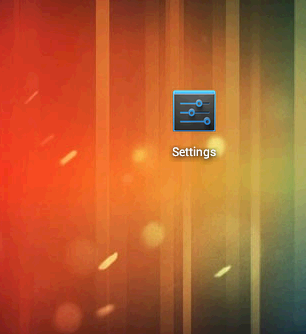
4、id/workspace ,工作空间拥有五个workspace_screen,即有五个分屏,每个分屏都可以放置shortcut和AppWidget,效果如下:
5、id/cell1..cell5 ,分别代表五个分屏
6、id/qsb_bar 搜索框/删除框,根据需要进行切换


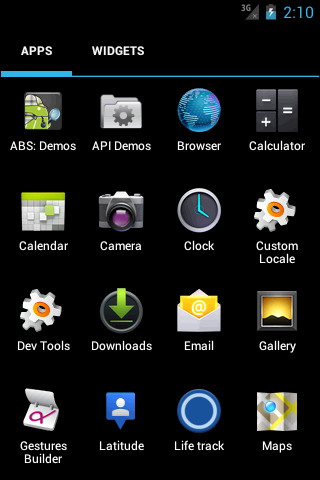
7、id/apps_customize_pane,效果如下
8、id/hotseat 即主屏幕下方的五个快捷位置

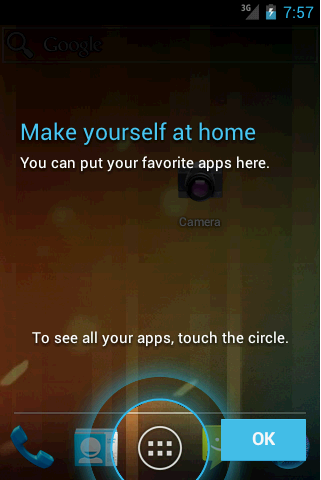
9、id/workspace_cling当第一次运行Launcher2时,会显示的用于指导的动画,以后不再显示
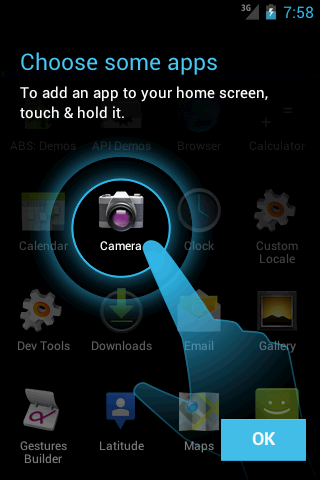
10、id/folder_cling,第一次使用Folder时,展示给用户的指导画面。
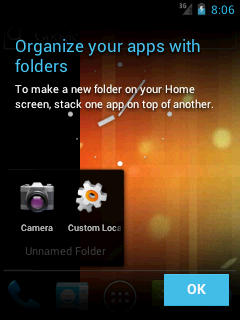
这样,我们已经可以使每个UI界面及组件都对号入座,这会使接下来分析的时候更加清晰。
Android 4.0 Launcher2源码分析——主布局文件(转)的更多相关文章
- 【Android】Android 4.0 Launcher2源码分析——启动过程分析
Android的应用程序的入口定义在AndroidManifest.xml文件中可以找出:[html] <manifest xmlns:android="http://schemas. ...
- 【转】Android 4.0 Launcher2源码分析——启动过程分析
Android的应用程序的入口定义在AndroidManifest.xml文件中可以找出:[html] <manifest xmlns:android="http://schemas. ...
- Android事件分发机制源码分析
Android事件分发机制源码分析 Android事件分发机制源码分析 Part1事件来源以及传递顺序 Activity分发事件源码 PhoneWindow分发事件源码 小结 Part2ViewGro ...
- jQuery 2.0.3 源码分析Sizzle引擎解析原理
jQuery 2.0.3 源码分析Sizzle引擎 - 解析原理 声明:本文为原创文章,如需转载,请注明来源并保留原文链接Aaron,谢谢! 先来回答博友的提问: 如何解析 div > p + ...
- 【转】Ubuntu 14.04.3上配置并成功编译Android 6.0 r1源码
http://www.linuxidc.com/Linux/2016-01/127292.htm 终于成功把Android 6.0 r1源码的源码编译.先上图,这是在Ubuntu中运行的Android ...
- Yii2.0源码分析之——控制器文件分析(Controller.php)创建动作、执行动作
在Yii中,当请求一个Url的时候,首先在application中获取request信息,然后由request通过urlManager解析出route,再在Module中根据route来创建contr ...
- Spark2.1.0之源码分析——事件总线
阅读提示:阅读本文前,最好先阅读<Spark2.1.0之源码分析——事件总线>.<Spark2.1.0事件总线分析——ListenerBus的继承体系>及<Spark2. ...
- Android 自定义View及其在布局文件中的使用示例(三):结合Android 4.4.2_r1源码分析onMeasure过程
转载请注明出处 http://www.cnblogs.com/crashmaker/p/3549365.html From crash_coder linguowu linguowu0622@gami ...
- android高级---->AsyncTask的源码分析
在Android中实现异步任务机制有两种方式,Handler和AsyncTask,它在子线程更新UI的例子可以参见我的博客(android基础---->子线程更新UI).今天我们通过一个小的案例 ...
随机推荐
- PAT 1057. Stack
Stack is one of the most fundamental data structures, which is based on the principle of Last In Fir ...
- 一个电商项目的Web服务化改造6:单元测试4步走,构造数据、执行操作、断言、回滚
最近一直在做一个电商项目,需要把原有单系统架构的项目,改造成基于服务的架构,SOA. 有点挑战,做完了,会有很大进步. 单元测试,在很早之前的文章已经介绍过. 可以在这里看到相关的 ...
- Scrapy——5 下载中间件常用函数、scrapy怎么对接selenium、常用的Setting内置设置有哪些
Scrapy——5 下载中间件常用的函数 Scrapy怎样对接selenium 常用的setting内置设置 对接selenium实战 (Downloader Middleware)下载中间件常用函数 ...
- 【codeforces 757D】Felicity's Big Secret Revealed
[题目链接]:http://codeforces.com/problemset/problem/757/D [题意] 给你一个01串; 让你分割这个01串; 要求2切..n+1切; 对于每一种切法 所 ...
- oracle数据库审计
Oracle使用大量不同的审计方法来监控使用何种权限,以及访问哪些对象.审计不会防止使用这些权限,但可以提供有用的信息,用于揭示权限的滥用和误用. 下表中总结了Oracle数据库中不同类型的审计. 审 ...
- 洛谷 P1120 小木棍 [数据加强版]
P1120 小木棍 [数据加强版] 题目描述 乔治有一些同样长的小木棍,他把这些木棍随意砍成几段,直到每段的长都不超过50. 现在,他想把小木棍拼接成原来的样子,但是却忘记了自己开始时有多少根木棍和它 ...
- data guard 的redo 传输
data guard 通过把redo从primary数据库传输到standby数据库并应用在standby数据库来实现自己的功能. redo 传输是有2种模式 1. 同步 sync 2. 异步 asy ...
- python network programming--connect()
首先我们看一段python client/server代码. server端: >>> import sys,socket >>> s = socket.socke ...
- Delphi春天将来临,Android遇到XE7我也是醉了,Hello World
回首往日,从Delphi 7走到如今.总感觉不愠不火.期间论坛倒掉无数,没倒掉的也半死不活,大批的程序猿转向C#,Java,PHP. Delphi的开发高效有目共睹,一直不忍放弃.Delphi以前一夜 ...
- UNIX环境编程学习——反思认识
学习情况: 有关UNIX系统环境编程的学习时间用来非常长的时间.可是感觉效果还是不是太好,在中间经过了期末考试.用来非常长的时间用来学习专业课.就将该过程的学习放到了一边上,放假以后又回家造成了 ...