
APScheduler定时执行外加supervisor管理后台运行
最近写的天气爬虫想要让它在后台每天定时执行,一开始用的celery,但不知道为什么明明设置cron在某个时间运行,但任务却不间断的运行。无奈转用apscheduler,但是不管怎么设置都不能使得当调用: python tasks.py 的时候都会阻塞在控制台。再次无奈转用supervisor。
首先是任务tasks.py:
#-*- coding: utf-8 -*-

#!/usr/bin/python

import datetime

from apscheduler.schedulers.blocking import BlockingScheduler

from scrapy.crawler import CrawlerProcess

from province_spider import ProvinceSpider

from billiard import Process

from scrapy.utils.log import configure_logging

configure_logging({'LOG_FORMAT': '%(levelname)s: %(message)s', 'LOG_FILE': 'schedule.log'})

def _crawl(path=None):

     crawl = CrawlerProcess({

         'USER_AGENT': 'Mozilla/4.0 (compatible; MSIE 7.0; Windows NT 5.1)'

     })

     crawl.crawl(ProvinceSpider)

     crawl.start()

     crawl.stop()

def run_crawl(path=None):

    p = Process(target=_crawl, args=['hahahahha'])

    p.start()

    #p.join()

scheduler = BlockingScheduler(daemon=True)

scheduler.add_job(run_crawl, "cron", hour=8, minute=30, timezone='Asia/Shanghai')

scheduler.add_job(run_crawl, "cron", hour=12, minute=30, timezone='Asia/Shanghai')

scheduler.add_job(run_crawl, "cron", hour=18, minute=30, timezone='Asia/Shanghai')

try:

    scheduler.start()

except (KeyboardInterrupt, SystemExit):

    scheduler.shutdown()
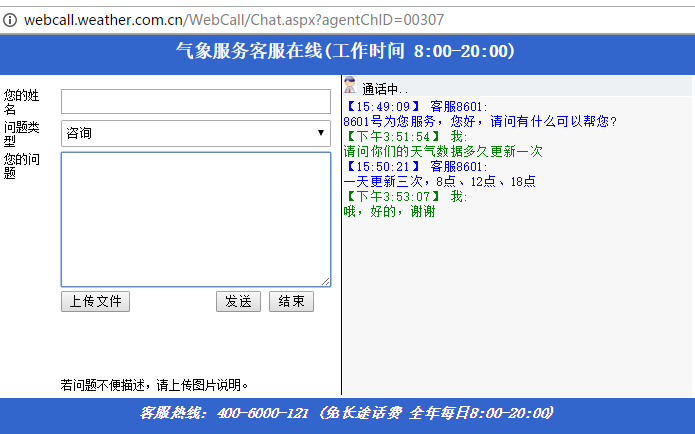
设置成8点半、12点半、18点半是因为天气数据是一天更新三次,分别在8点,12点,18点,有图为证:
直接执行:python tasks.py可以执行任务,但是会在控制台阻塞。这个时候要用supervisor。
ubuntu安装: apt-get install supervisor
开始:
1. 进行/etc/supervisor/conf.d 目录,新建weather_aps.conf文件,文件内容为:
[program:weather_aps]

command=python /var/my_git/WeatherCrawler/aps/tasks.py

autorstart=true

stdout_logfile=/var/my_git/WeatherCrawler/aps/log/weather_aps.log
2. 启动supervisor:
/etc/init.d/supervisor start
3. 启动成功后,查看weather_aps的状态:
supervisorctl status weather_aps
如果是running,则表示成功.
需要注意的是,如果在任务里面有日志输出到文件,而文件没有指定绝对路径的话,默认是在根目录生成,即在 ” / “ 目录下。
APScheduler定时执行外加supervisor管理后台运行的更多相关文章
- Supervisor 管理后台守护进程
Supervisor 管理后台守护进程 参考原文如下: http://codinn.com/people/brant/notes/110948/ 做了一些注释 +++++++++++引用开始+++++ ...
- Linux进程后台执行nohup(OpenTSDB后台运行方法)
1.问题描述 OpenTSDB执行./tsdb tsd启动之后,占有控制台执行并且Ctrl+C后就退出了,关闭控制台同样会退出. 2.解决方法(在/opt/module/opentsdb-2.3.1/ ...
- 使用supervisor管理进程
Supervisor (http://supervisord.org) 是一个用 Python 写的进程管理工具,可以很方便的用来启动.重启.关闭进程(不仅仅是 Python 进程).除了对单个进程的 ...
- supervisor管理进程 superlance对进程状态报警
supervisor介绍 首先,介绍一下supervisor.Supervisor(http://supervisord.org/)是用Python开发的一个client/server服务,是Linu ...
- supervisor管理进程工具配置
Supervisor(http://supervisord.org/)是用Python开发的一个client/server服务,是Linux/Unix系统下的一个进程管理工具,不支持Windows系统 ...
- 使用supervisor管理后台进程
在linux中supervisor是用来管理后台进程的,是一个用python写的进程管理工具,可以让宕机的进程重启.这里我们大概讲一下用他来管理uWSGI. 一.安装supervisor 1.pyth ...
- python脚本后台运行
问题描述: 环境: CentOS6.4 一个用python写的监控脚本test1.py,用while True方式一直运行,在ssh远程(使用putty终端)时通过以下命令启动脚本: python t ...
- linux 后台运行命令 nohup命令
转载:http://if.ustc.edu.cn/~ygwu/blog/archives/000538.html 2005年04月18日 简单而有用的nohup命令在UNIX/LINUX中,普通进程用 ...
- 让PHP程序永远在后台运行
PHP里有个函数很有用.这是在最近的开发中才逐渐用到的. int ignore_user_abort ( [bool setting] ) 这个函数的作用是指示服务器端在远程客户端关闭连接后是否继续执 ...
随机推荐
- beta阶段成果展示博客
跟着我们一一点一点揭开蒙娜丽莎的微笑 - 本次beta阶段之前,我们团队,对其他组在事后诸葛亮期间对我们的评价进行深刻的审视,特别是缺点方面,开了好几次的站立会议,专门讨论beta的主要方向和任务.最 ...
- selenium使用execl实现数据驱动测试
import java.io.FileInputStream;import java.io.IOException;import java.io.InputStream;import java.uti ...
- java中的==操作符和equals函数
基本规则 “==”操作符的使用需要分成两种情况 判值类型相等 这一点很好理解,两个值类型代表的数值相等,则“==”表达式返回true “==”可以用与不同值类型的比较,语言会自动进行类型转换 判引用类 ...
- Visual Studio Code运行Python文件出现 “Linter pylint is not installed ”提示解决办法
运行Python代码后出现 “Linter pylint is not installed ”提示 只需要添加一行代码就可以解决 { "python.pythonPath": &q ...
- Life Forms POJ - 3294(不小于k个字符串中的最长子串)
题意: 求不小于字符串一半长度个字符串中的最长字串 解析: 论文题例11 将n个字符串连起来,中间用不相同的且没有出现在字符串中的字符隔开, 求后缀数组, 然后二分答案变为判定性问题, 然后判断每组的 ...
- STL Queue 容器
STL Queue 容器 Queue简介 queue是队列容器,是一种“先进先出”的容器. queue是简单地装饰deque容器而成为另外的一种容器. # ...
- 「CodePlus 2017 12 月赛」火锅盛宴(模拟+树状数组)
1A,拿来练手的好题 用一个优先队列按煮熟时间从小到大排序,被煮熟了就弹出来. 用n个vector维护每种食物的煮熟时间,显然是有序的. 用树状数组维护每种煮熟食物的数量. 每次操作前把优先队列里煮熟 ...
- Linux日常维护命令
对于程序员来说,掌握一些基本的Linux命令是必不可少的,即使现在用不到,在不久的将来也应该会用到.由于Linux有很多命令,每个命令基本可以用一篇文章介绍,所以本文仅总结一些常用命令的常用用法,如有 ...
- Struts2的配置文件中, <package>的作用,<action><result>重名?
问:Struts2的配置文件中, <package>的作用是什么? 答:防止action重名啊,例如前台和后台,总会有很多地方起名重复的! 问:可是访问的时候,不也是访问action吗,能 ...
- 交互式shell脚本对话框----whiptail指令
当你在linux环境下setup软件的时候就会有相应的对话框让你输入.虽然我们已经习惯了这种交互的方法,但是如果有一种直观的界面来输入是不是会更加友好和方便呢,在shell脚本中你可以使用-whipt ...