
【代码笔记】iOS-iOS图片的原生(Graphics)
一,效果图。

二,工程图。
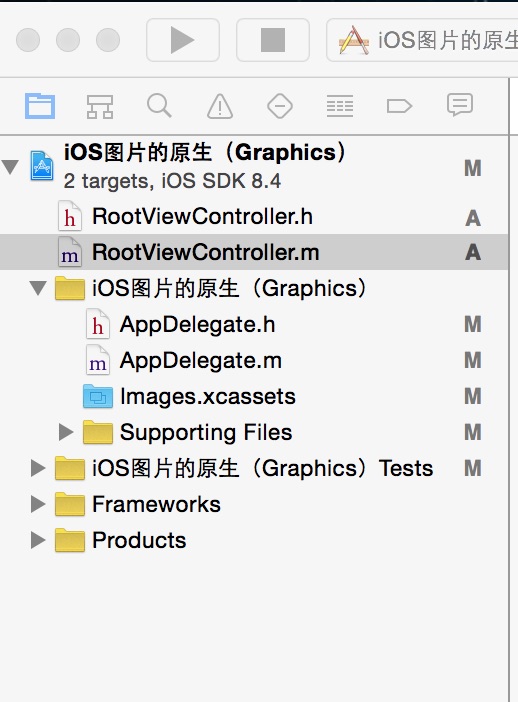
三,代码。
RootViewController.h
#import <UIKit/UIKit.h>

@interface RootViewController : UIViewController

@end
RootViewController.m

#import "RootViewController.h"

@interface RootViewController ()

@end

@implementation RootViewController

- (id)initWithNibName:(NSString *)nibNameOrNil bundle:(NSBundle *)nibBundleOrNil

{

    self = [super initWithNibName:nibNameOrNil bundle:nibBundleOrNil];

    if (self) {

        // Custom initialization

    }

    return self;

}

- (void)viewDidLoad

{

    [super viewDidLoad];

    // Do any additional setup after loading the view.

    //背景图

    [self addView];

}

#pragma -mark -functions

//背景图

-(void)addView

{

    UIImageView *imageView=[[UIImageView alloc]initWithFrame:CGRectMake(50, 100, 44, 44)];

    imageView.image=[self defaultImage];

    [self.view addSubview:imageView];

}

//图片原生

-(UIImage *)defaultImage {

    static UIImage *defaultImage = nil;

    static dispatch_once_t onceToken;

    dispatch_once(&onceToken, ^{

        UIGraphicsBeginImageContextWithOptions(CGSizeMake(20.f, 13.f), NO, 0.0f);

        [[UIColor blackColor] setFill];

        [[UIBezierPath bezierPathWithRect:CGRectMake(0, 0, 20, 1)] fill];

        [[UIBezierPath bezierPathWithRect:CGRectMake(0, 5, 20, 1)] fill];

        [[UIBezierPath bezierPathWithRect:CGRectMake(0, 10, 20, 1)] fill];

        [[UIColor whiteColor] setFill];

        [[UIBezierPath bezierPathWithRect:CGRectMake(0, 1, 20, 2)] fill];

        [[UIBezierPath bezierPathWithRect:CGRectMake(0, 6,  20, 2)] fill];

        [[UIBezierPath bezierPathWithRect:CGRectMake(0, 11, 20, 2)] fill];

        defaultImage = UIGraphicsGetImageFromCurrentImageContext();

        UIGraphicsEndImageContext();

    });

    return defaultImage;

}

- (void)didReceiveMemoryWarning

{

    [super didReceiveMemoryWarning];

    // Dispose of any resources that can be recreated.

}
【代码笔记】iOS-iOS图片的原生(Graphics)的更多相关文章
- 【代码笔记】iOS-使图片两边不拉伸,中间拉伸
代码: - (void)viewDidLoad { [super viewDidLoad]; // Do any additional setup after loading the view. // ...
- 【代码笔记】iOS-将图片处理成圆的
一,效果图. 二,工程图. 三,代码. ViewController.m - (void)viewDidLoad { [super viewDidLoad]; // Do any additional ...
- 【代码笔记】iOS-gif图片播放
一,效果图. 二,工程图. 三,代码. RootViewController.h #import <UIKit/UIKit.h> @interface RootViewController ...
- 谈谈 iOS 中图片的解压缩
原文 对于大多数 iOS 应用来说,图片往往是最占用手机内存的资源之一,同时也是不可或缺的组成部分.将一张图片从磁盘中加载出来,并最终显示到屏幕上,中间其实经过了一系列复杂的处理过程,其中就包括了对图 ...
- 【转】谈谈 iOS 中图片的解压缩
转自:http://blog.leichunfeng.com/blog/2017/02/20/talking-about-the-decompression-of-the-image-in-ios/ ...
- IOS中图片拉伸技巧与方法总结(转载)
以下内容转载自:http://my.oschina.net/u/2340880/blog/403996 IOS中图片拉伸技巧与方法总结 一.了解几个图像拉伸的函数和方法 1.直接拉伸法 简单暴力,却是 ...
- ios开发图片点击放大
图片点击放大,再次点击返回原视图.完美封装,一个类一句代码即可调用.IOS完美实现 创建了一个专门用于放大图片的类,以下为.h文件 #import <Foundation/Foundation. ...
- iOS多图片下载
iOS多图片下载.在cell里面下载图片.做了缓存优化. (app.icon是图片地址) // 先从内存缓存中取出图片 UIImage *image = self.images[app.icon]; ...
- iOS UIButton 图片文字上下垂直布局 解决方案
实现如图所示效果: 这是一个UIButton,需要改变image和title相对位置. 解决如下: //设置文字偏移:向下偏移图片高度+向左偏移图片宽度 (偏移量是根据[图片]大小来的,这点是关键)b ...
随机推荐
- Jmeter修改自身启动IP
先说一下问题,控制机访问压力机都是可以的,但是压力机访问控制机就不行了报:2019/04/13 16:05:49 ERROR - jmeter.samplers.RemoteTestListenerW ...
- spring中的监视器,过滤器,拦截器
1.监视器 (1)首先监视器是观察者模式的实现,在我之前的博客中有关于监视器模式的解释.监视器相当于观察者 (2)我们在springMvc中最常见的监视器 ContextLoaderlistener ...
- Java_使用日志
日志有什么用? 在实际开发中,不可能使用控制台输出所有数据,可以用日志把程序运行的过程记录下来,包括运行中出现的异常和BUG 当出现问题的时候,程序员可以去查看日志,从而能快速的找到问题所在. 一般来 ...
- yii2之ActiveForm表单使用
因目前项目并非前后端分离模式,且用到PHP的yii2框架(所有html代码,js较多内嵌在.php文件内多少采用同步提交[喷墨中...]),遂对于前端面上需要用到的yii2小组件一些整理(因是前端若涉 ...
- Python基础部分的疑惑解析——pycharm(4)
PyCharm部分设置: 1.安装后破解 2.创建的项目project实际上就是文件夹,可以在右键--show in explorer显示文件夹 3.右键-new--directory是建文件夹 ...
- 理解HashMap的原理
HashMap内部数据结构 HashMap内部采用数组和链表结合的方式来存取数据(见下图).这种方式有什么好处呢? 我们知道,数组操作对于检索是O(1)的,能够很快的根据数组的下标定位对 ...
- shell脚本批量部署ssh
日常运维工作中,需要给几十上百台服务器批量部署软件或者是重启服务器等操作, 这样大量重复性的工作一定很苦恼,本文给大家提供了最基本的批量操作的方法,虽然效率不高,对于初学者来说还是好理解.由于刚开始学 ...
- commons-pool2
转载请注明源出处:http://www.cnblogs.com/lighten/p/7375611.html 1.前言 本章介绍一下常用基础Jar包commons-pools2,最近使用到了thrif ...
- 国内maven仓库地址资源汇总
国内maven仓库地址:阿里云maven仓库,网易163maven仓库,以及其他maven仓库地址. 国内下载maven一般速度都很慢,下载需要很久时间.这里汇总了一些国内的镜像资源 附带pom文件中 ...
- yum命令速查
1 yum的基本原理 CentOS可在yum服务器上下载官方网站给出的rpm给出的表头列表数据,该数据除了记载每个rpm软件的相依性之外,也说明了rpm所放置的容器(repository)所在.通过分 ...