
TFS Express backup and restore
When we setup source control server, we should always make a backup and restore plan for it. This article is to describe how to backup and restore a TFS Express instance from one server to another server.
This blog is an English version, for Chinese version please check below URL:
http://www.cnblogs.com/aspnetx/p/4579233.html
Below is the key points for the backup and restore.
Steps:
- Backup database
- Install another TFS Express instance and finish config
- Restore backup database to new server.
- If needed, install ASP.NET MVC 4
- Change application instance ID
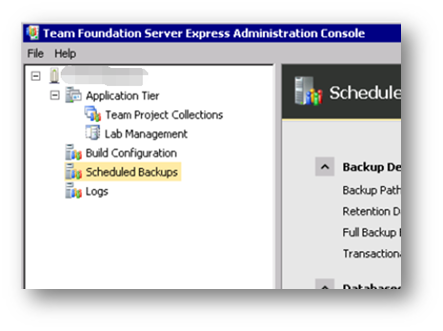
First, we should create a backup plan, open Team Foundation Server Express Administration Console, then click Scheduled Backups.
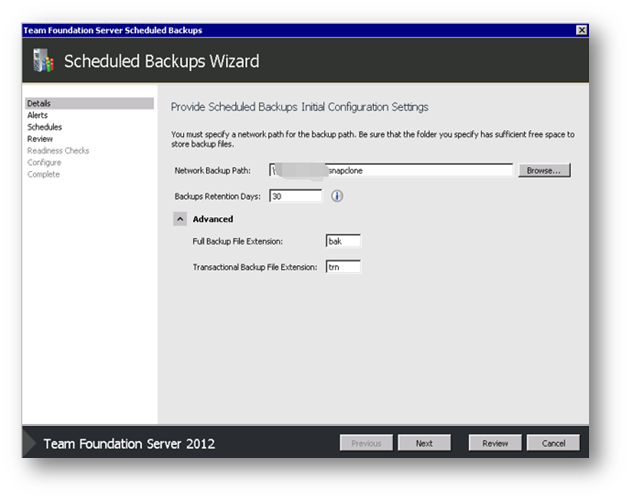
Create a backup plan, fill a network backup path, and please note the local path is not allowed, only share folder is accepted.
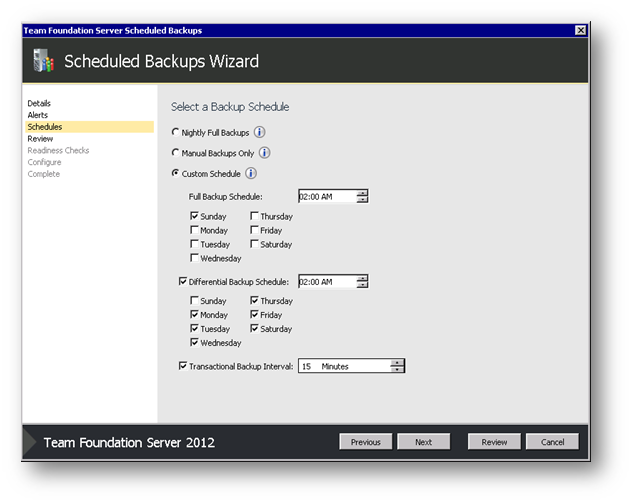
Then set the schedule for the backup plan, by default, always Sunday for a full backup and working day for differential backup, then apply transitional backup interval by minutes.
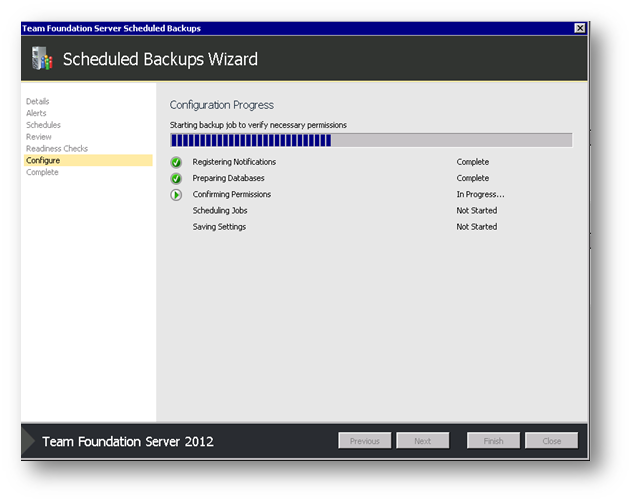
Then the wizard will applied the job setting.
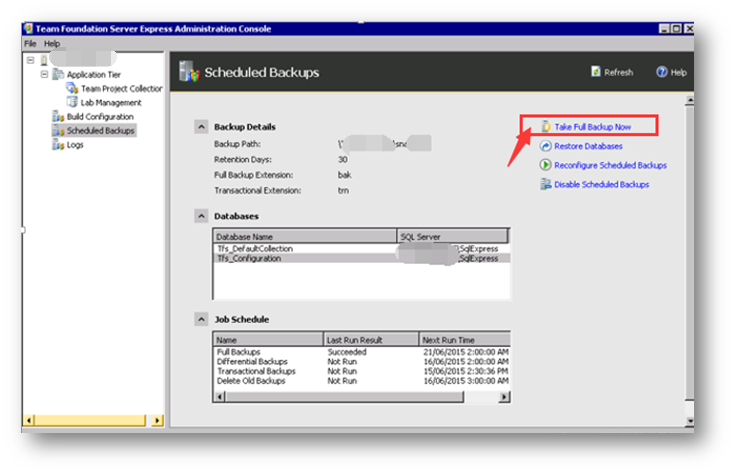
After the setting finish, it is suggested to run a full backup immediately, close the backup setup, click "Take Full Backup Now" to start a full backup, later the differential backup and transitional backup will be based on this.
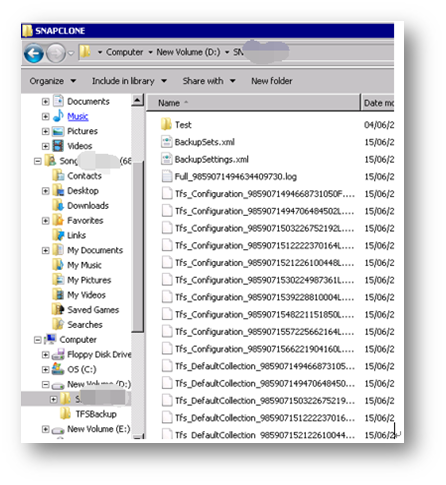
Go to the backup folder, you can see the backup files. Two databases which are supported TFS Express running will be backup by default, if you only have one collection, one is Tfs_Configuration, the other one is Tfs_DefaultCollection.
The backup is finished so far, below phase is how to restore the instance.
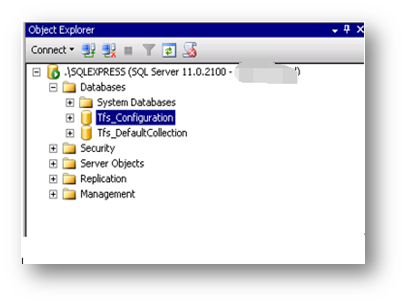
After install the TFS Express on another server, and finish the basic configuration, open the SQL Express using Management Studio, restore them one by one.
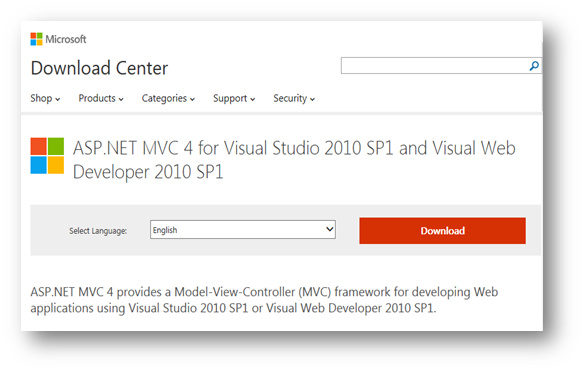
And what we should pay attention is the IIS, sometimes ASP.NET MVC will be lost(Browse TFS web page, error message reported: System.web.mvc is lost), when this happens, go to below asp.net official web site to download ASP.NET MVC 4, please note the version is 4, as-is latest version is already 5.
https://www.microsoft.com/en-us/download/details.aspx?id=30683
After the ASP.NET MVC 4 is installed, the last step is sync the application ID, the value is stored in web.config, copy the value from source server, and then replace it into the new server.
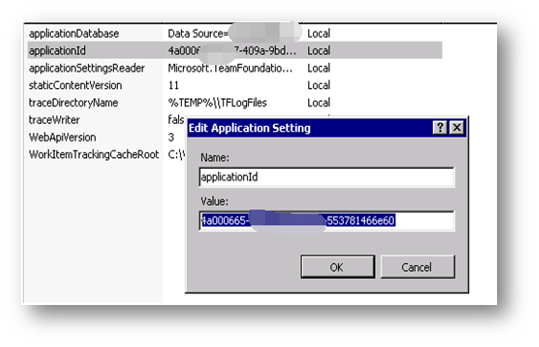
Then open the TFS web site, you will see the whole resource are migrated from the old server to new server, including source code, and task items.
TFS Express backup and restore的更多相关文章
- [BI项目记]-TFS Express备份和恢复
在项目中对TFS进行备份操作是日常重要的工作之一,此篇主要描述如何对TFS Express进行备份,并且在另外一台服务器上进行恢复. 以下是操作的几个关键点: 备份数据库,在TFS管理工具中就可以完成 ...
- 转:db2 backup 及 restore
db2 backup 及 restore 2011-06-21 18:12:20| 分类: AIX |举报 |字号 订阅 两个问题: db2=>list applications db ...
- 第一章、关于SQL Server数据库的备份和还原(sp_addumpdevice、backup、Restore)
在sql server数据库中,备份和还原都只能在服务器上进行,备份的数据文件在服务器上,还原的数据文件也只能在服务器上,当在非服务器的机器上启动sql server客户端的时候,也可以通过该客户端来 ...
- [转]Configure Network Drive Visible for SQL Server During Backup and Restore Using SSMS
本文转自:https://mytechmantra.com/LearnSQLServer/Configure-Network-Drive-Visible-for-SQL-Server-During-B ...
- 尝试 TFS Express 2012.3
之前一直使用SVN做版本管理,但是只能管理代码.之前的一份工作,只用了TFS来管理,可以将任务与代码集成管理,很是方便,只是安装太过于繁琐,现在的公司人少,不想费那么多事. 最关键的,就是安装TFS需 ...
- Backup and restore of FAST Search for SharePoint 2010
一个同事问我一个问题: 如果FAST Search for SharePoint 2010被full restore到了一个之前的时间点, 那么当FAST Search重新开始一个增量爬网的时候, 会 ...
- SQL Server Database Backup and Restore in C#
SQL Server Database Backup and Restore in C# Syed Noman Ali Shah, 7 Feb 201 ...
- csharp: SQL Server 2005 Database Backup and Restore using C#
1.第一种方式: using SQLDMO;//Microsoft SQLDMO Object Library 8.0 /// <summary> /// 数据库的备份 /// 涂聚文注: ...
- Experience on Namenode backup and restore --- checkpoint
Hadoop version: Hadoop 2.2.0.2.0.6.0-0009 Well, We can do this by building Secondary Namenode, Check ...
随机推荐
- [Tomcat] Tomcat的classloader
定义 同其他服务器应用一样,tomcat安装了各种classloader(classes that implement java.lang.ClassLoader) Bootstrap | Syste ...
- jq 根据值的正负变色
效果图这样: 意思就是根据最后的百分值变色,值为负变绿色,值为正变红色. 所以只要取到那个标签里的值了,就能根据正负的判断决定颜色. 我的html部分这样: /*不过他们都说我的dom结构不太合理,同 ...
- 虚函数的使用 以及虚函数与重载的关系, 空虚函数的作用,纯虚函数->抽象类,基类虚析构函数使释放对象更彻底
为了访问公有派生类的特定成员,可以通过讲基类指针显示转换为派生类指针. 也可以将基类的非静态成员函数定义为虚函数(在函数前加上virtual) #include<iostream> usi ...
- node.js下使用RSA加密事例(windows)
1.安装openss 直接下载window下的安装包 http://houjixin.blog.163.com/blog/static/3562841020144143494875/ 以我发博文现在的 ...
- Android中矢量动画
Android中矢量动画 Android中用<path> 标签来创建SVG,就好比控制着一支画笔,从一点到一点,动一条线. <path> 标签 支持一下属性 M = (Mx, ...
- zepto之tap事件点透问题分析及解决方案
点透现象出现的场景: 当A/B两个层上下z轴重叠,上层的A点击后消失或移开(这一点很重要),并且B元素本身有默认click事件(如a标签)或绑定了click事件.在这种情况下,点击A/B重叠的部分,就 ...
- (原创)微信支付SDK调用的核心代码与分析(基于Android)
先上代码,后面会分析 String url = "http://wxpay.weixin.qq.com/pub_v2/app/app_pay.php?plat=android"; ...
- BZOJ 2081: [Poi2010]Beads
Description 问把n截成每个长度后不同子串个数. Sol 调和极数+Hash. 首先这是一个式子 \(n\sum_{i=1}^n \frac {1}{i}\) . 这东西就是调和极数再乘上 ...
- vim的使用与配置
vim的简单使用 Content 三种模式 光标移动 查找与替换 删除.复制和粘贴 命令行 块选择 多文件编辑 多窗口显示 中文编码问题 语系转换和 三种模式 vim可以分为一般模式.编辑模式和命令行 ...
- Python复习之生成器 generator
生成器 generator def h(): print "hello" m = yield 5 print "m:", m d = yield 12 prin ...